How to remove ZoneAlarm install bug???

nondisposable

New member
Member
Local time
2:16 AM
Messages
28
I have tried to install ZoneAlarm firewall and never managed to. I ended up with a downloaded file without any extension, and Windows did not know what program to open it with.

So I set my choice on Comodo firewall, and installed it successfully.

However now "ZoneAlarm Free" appears in my list of Add / Remove Programs, and it says it occupies 60.0 MB. If I click on it to remove it, I get the error message
Code:
ZoneAlarm cannot be installed on a system already has COMODO Internet Security installed.
 
Your system doesn't meet the installation requirement.
(sic)

That message also appears at each restart.

There is no trace of ZoneAlarm or "Check Point" under Program Files, and it is nowhere to be found on the C drive. I have used 2 search programs and searched for file names and folder names.

I have used CCleaner to rename the ZoneAlarm entry in the list of Add / Remove Programs, but that hasn't changed the situation.

I COULD use CCleaner to delete that entry from the Add / Remove Programs list, but I am reluctant to do so, because there is obviously more than just the actual entry.

What would be your advice?
 

My Computer My Computer

Computer Manufacturer/Model Number
custom
OS
Windows 7 Home Premium 64 bit
CPU
3.40 gigahertz Intel Core i7-2600K
Motherboard
Gigabyte
Memory
2 TB
Monitor(s) Displays
Samsung SyncMaster 275T 27 inch
Hard Drives
2x 120GB AData SSDs
PSU
NotSure
Cooling
air

My Computer My Computer

Computer type
PC/Desktop
Computer Manufacturer/Model Number
LENOVO K450 @3.0GHZ
OS
64-bit Windows 8.1 Pro
CPU
Core(TM) i5 CPU 4330 Haswell @ 3.20GHz
Motherboard
LENOVO
Memory
12.00 GB
Graphics Card(s)
Intel(R) HD Graphics
Sound Card
Intel HD integtrated
Monitor(s) Displays
HP 25' ISP Monitor
Screen Resolution
1900/1020
Hard Drives
(1) ST1000DM003-1CH162 (2) Generic STORAGE DEVICE USB Device (3) Generic STORAGE DEVICE USB Device
Internet Speed
100mb down/10mb up

My Computer My Computer

Computer type
PC/Desktop
Computer Manufacturer/Model Number
Custom-built
OS
Windows 7 Professional SP1 32-bit
CPU
Intel Core 2 Duo E6600 2.4GHz
Motherboard
Asus PL5D2
Memory
4GB DDR2-667 (4x1GB in dual-channel config)
Graphics Card(s)
nVidia GeForce 9800 GT
Sound Card
Creative X-Fi XtremeMusic
Monitor(s) Displays
Acer P236H
Screen Resolution
1920x1200 (DVI)
Hard Drives
OCZ SSD Vertex Plus 60GB SATA (Firmware 3.55), 64MB cache
Hitachi HD321KJ SATA, 320GB, 7200rpm, 16MB cache
PSU
Antec TruePower 2.0
Case
Cooler Master Centurion
Cooling
Too many fans
Keyboard
Standard
Mouse
Microsoft wireless optical mouse
Internet Speed
AT&T U-verse (18mbit/sec)
Antivirus
Microsoft Security Essentials
Browser
Firefox
Other Info
Other devices:
Compaq CQ-60 laptop
Google Nexus 7 (2012) tablet
Nvidia SHIELD tablet (US/LTE)
Hardkernel ODROID-XU single-board computer (Samsung Exynos 5420)

My Computer My Computer

Computer type
PC/Desktop
Computer Manufacturer/Model Number
LENOVO K450 @3.0GHZ
OS
64-bit Windows 8.1 Pro
CPU
Core(TM) i5 CPU 4330 Haswell @ 3.20GHz
Motherboard
LENOVO
Memory
12.00 GB
Graphics Card(s)
Intel(R) HD Graphics
Sound Card
Intel HD integtrated
Monitor(s) Displays
HP 25' ISP Monitor
Screen Resolution
1900/1020
Hard Drives
(1) ST1000DM003-1CH162 (2) Generic STORAGE DEVICE USB Device (3) Generic STORAGE DEVICE USB Device
Internet Speed
100mb down/10mb up
Thanks. The uninstaller brings me one step closer: the error message no longer appears at each restart.

However ZoneAlarm is still listed under Add / Remove Programs. I also found a folder called Checkpoint (it's in one word; I was looking for "Check Point" before) under Program Files (it only has one file: intall.exe).

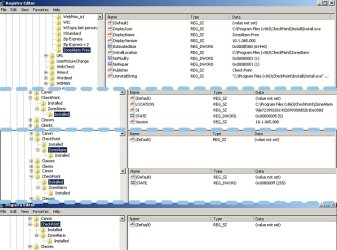
I also found ZoneAlarm in the registry editor under HKEY_LOCAL_MACHINE\SOFTWARE\Wow6432Node\CheckPoint and HKEY_LOCAL_MACHINE\SOFTWARE\Wow6432Node\Microsoft\Windows\CurrentVersion\Uninstall\ZoneAlarm Free . I attach screenshots (click to enlarge).

red1.jpg

I'd rather avoid a system restore, since too many other changes happened since, and a System Restore may be too time-consuming.

From what you see above, are there any manual removal methods?
 

My Computer My Computer

Computer Manufacturer/Model Number
custom
OS
Windows 7 Home Premium 64 bit
CPU
3.40 gigahertz Intel Core i7-2600K
Motherboard
Gigabyte
Memory
2 TB
Monitor(s) Displays
Samsung SyncMaster 275T 27 inch
Hard Drives
2x 120GB AData SSDs
PSU
NotSure
Cooling
air
At this point, you can simply use CCleaner to remove the ZoneAlarm uninstall entry and be done with it.
You may also delete the Checkpoint registry key and all its subkeys, and the Checkpoint folder under Program Files.
 

My Computer My Computer

Computer type
PC/Desktop
Computer Manufacturer/Model Number
Custom-built
OS
Windows 7 Professional SP1 32-bit
CPU
Intel Core 2 Duo E6600 2.4GHz
Motherboard
Asus PL5D2
Memory
4GB DDR2-667 (4x1GB in dual-channel config)
Graphics Card(s)
nVidia GeForce 9800 GT
Sound Card
Creative X-Fi XtremeMusic
Monitor(s) Displays
Acer P236H
Screen Resolution
1920x1200 (DVI)
Hard Drives
OCZ SSD Vertex Plus 60GB SATA (Firmware 3.55), 64MB cache
Hitachi HD321KJ SATA, 320GB, 7200rpm, 16MB cache
PSU
Antec TruePower 2.0
Case
Cooler Master Centurion
Cooling
Too many fans
Keyboard
Standard
Mouse
Microsoft wireless optical mouse
Internet Speed
AT&T U-verse (18mbit/sec)
Antivirus
Microsoft Security Essentials
Browser
Firefox
Other Info
Other devices:
Compaq CQ-60 laptop
Google Nexus 7 (2012) tablet
Nvidia SHIELD tablet (US/LTE)
Hardkernel ODROID-XU single-board computer (Samsung Exynos 5420)
Great; thanks! Done with no problems. :thumbsup:
 

My Computer My Computer

Computer Manufacturer/Model Number
custom
OS
Windows 7 Home Premium 64 bit
CPU
3.40 gigahertz Intel Core i7-2600K
Motherboard
Gigabyte
Memory
2 TB
Monitor(s) Displays
Samsung SyncMaster 275T 27 inch
Hard Drives
2x 120GB AData SSDs
PSU
NotSure
Cooling
air
Glad to hear :)
 

My Computer My Computer

Computer type
PC/Desktop
Computer Manufacturer/Model Number
Custom-built
OS
Windows 7 Professional SP1 32-bit
CPU
Intel Core 2 Duo E6600 2.4GHz
Motherboard
Asus PL5D2
Memory
4GB DDR2-667 (4x1GB in dual-channel config)
Graphics Card(s)
nVidia GeForce 9800 GT
Sound Card
Creative X-Fi XtremeMusic
Monitor(s) Displays
Acer P236H
Screen Resolution
1920x1200 (DVI)
Hard Drives
OCZ SSD Vertex Plus 60GB SATA (Firmware 3.55), 64MB cache
Hitachi HD321KJ SATA, 320GB, 7200rpm, 16MB cache
PSU
Antec TruePower 2.0
Case
Cooler Master Centurion
Cooling
Too many fans
Keyboard
Standard
Mouse
Microsoft wireless optical mouse
Internet Speed
AT&T U-verse (18mbit/sec)
Antivirus
Microsoft Security Essentials
Browser
Firefox
Other Info
Other devices:
Compaq CQ-60 laptop
Google Nexus 7 (2012) tablet
Nvidia SHIELD tablet (US/LTE)
Hardkernel ODROID-XU single-board computer (Samsung Exynos 5420)
Easy Fix

From START go to SEARCH
SEARCH Install.exe
Find Zone Alarm
DELETE
Done
 

My Computer My Computer

Computer type
PC/Desktop
OS
Florida
Back
Top