Solved Can't delete partitions on 2TB HDD

joenaz2003

New member
Member
Local time
3:24 PM
Messages
40
Location
NY
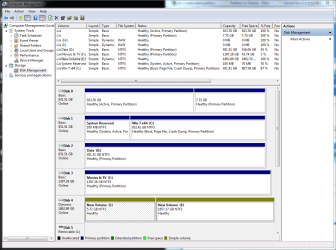
I'm running Win 7 Ultimate x64. I have a 2TB drive installed which I originally partitioned in half. It does not have any data on it. I'm trying to get it to be one drive again but it doesn't seem to want to be. Any ideas? It's Disk 4 I'm trying to get back to one disk.

Thanks
 

Attachments

  • Disk Manager.PNG
    Disk Manager.PNG
    45.7 KB · Views: 78

My Computer My Computer

Computer type
PC/Desktop
Computer Manufacturer/Model Number
Self Built
OS
Windows 7 Ultimate x64 SP1
CPU
AMD FX 8350 4.0GHz
Motherboard
Asus Sabertooth 990FX/Gen3
Memory
16GB - (2) 8GB Corsair Dominator Platinum DDR3 1866mhz
Graphics Card(s)
XFX AMD Radeon HD 7970 Double D
Sound Card
On board AMD HD Audio Device
Monitor(s) Displays
Samsung 23" LCD,AOC 20" LCD,G60"LG LCDTV,Epson PowerLite720c
Screen Resolution
1920 x 1080
Hard Drives
(1) OCZ Vertex 3 240MB SSD (Win 7 Ultimate x64)
(1) WD 2TB SATA 3G (Data)
(1) Seagate Baracuda 3TB SATA 6G (TV)
(1) Seagate Baracuda 3TB SATA 6G (Movies)
(2) Seagate Baracuda 3TB SATA 6G (Filez)
(1) Seagate Baracuda 1TB SATA 6G (Music/Books)
(1
PSU
OCZ 700W ModXSream-Pro
Case
Aerocool Strike-X ST
Cooling
Cooler Master Hyper 212 Plus (Dual 120mm Fans)
Keyboard
Logitech MX 3200
Mouse
Logitech M570 Trackman Wheel
Internet Speed
Ping: 8ms Download Speed:55.05Mb/s Up Speed:8.14Mb/s
Antivirus
avast!
Browser
Chrome
I'm running Win 7 Ultimate x64. I have a 2TB drive installed which I originally partitioned in half. It does not have any data on it. I'm trying to get it to be one drive again but it doesn't seem to want to be. Any ideas? It's Disk 4 I'm trying to get back to one disk.

Thanks

Hardly in half. One partition is 1857 and one 9 gigs. One partition is basic and one dynamic.

What are you using to try and delete the partitions?
 

My Computer My Computer

Computer Manufacturer/Model Number
HP Pavillion dv-7 1005 Tx
OS
Win 8 Release candidate 8400
CPU
[email protected]
Memory
4 gigs
Graphics Card(s)
Nvidia 9600M
Sound Card
HD built-in
Monitor(s) Displays
17" Wxga
Screen Resolution
1440x900
Cooling
none
Internet Speed
45Mb down 5Mb up
It was originally in half. I originally split it up to do a recovery and I used Ubuntu to split it into 2 ntfs partitions. I then tried to delete the volumes and this is what I ended up with. I was using the windows disk manager.
 

My Computer My Computer

Computer type
PC/Desktop
Computer Manufacturer/Model Number
Self Built
OS
Windows 7 Ultimate x64 SP1
CPU
AMD FX 8350 4.0GHz
Motherboard
Asus Sabertooth 990FX/Gen3
Memory
16GB - (2) 8GB Corsair Dominator Platinum DDR3 1866mhz
Graphics Card(s)
XFX AMD Radeon HD 7970 Double D
Sound Card
On board AMD HD Audio Device
Monitor(s) Displays
Samsung 23" LCD,AOC 20" LCD,G60"LG LCDTV,Epson PowerLite720c
Screen Resolution
1920 x 1080
Hard Drives
(1) OCZ Vertex 3 240MB SSD (Win 7 Ultimate x64)
(1) WD 2TB SATA 3G (Data)
(1) Seagate Baracuda 3TB SATA 6G (TV)
(1) Seagate Baracuda 3TB SATA 6G (Movies)
(2) Seagate Baracuda 3TB SATA 6G (Filez)
(1) Seagate Baracuda 1TB SATA 6G (Music/Books)
(1
PSU
OCZ 700W ModXSream-Pro
Case
Aerocool Strike-X ST
Cooling
Cooler Master Hyper 212 Plus (Dual 120mm Fans)
Keyboard
Logitech MX 3200
Mouse
Logitech M570 Trackman Wheel
Internet Speed
Ping: 8ms Download Speed:55.05Mb/s Up Speed:8.14Mb/s
Antivirus
avast!
Browser
Chrome
It was originally in half. I originally split it up to do a recovery and I used Ubuntu to split it into 2 ntfs partitions. I then tried to delete the volumes and this is what I ended up with. I was using the windows disk manager.

Ok do you want to make the whole HD a basic volume? There is a much better (and free trial) app to do that. Parigon disk suite.
 

My Computer My Computer

Computer Manufacturer/Model Number
HP Pavillion dv-7 1005 Tx
OS
Win 8 Release candidate 8400
CPU
[email protected]
Memory
4 gigs
Graphics Card(s)
Nvidia 9600M
Sound Card
HD built-in
Monitor(s) Displays
17" Wxga
Screen Resolution
1440x900
Cooling
none
Internet Speed
45Mb down 5Mb up
That is exactly what I want to do
Would that be Paragon Partition Manager Free Edition?
 

My Computer My Computer

Computer type
PC/Desktop
Computer Manufacturer/Model Number
Self Built
OS
Windows 7 Ultimate x64 SP1
CPU
AMD FX 8350 4.0GHz
Motherboard
Asus Sabertooth 990FX/Gen3
Memory
16GB - (2) 8GB Corsair Dominator Platinum DDR3 1866mhz
Graphics Card(s)
XFX AMD Radeon HD 7970 Double D
Sound Card
On board AMD HD Audio Device
Monitor(s) Displays
Samsung 23" LCD,AOC 20" LCD,G60"LG LCDTV,Epson PowerLite720c
Screen Resolution
1920 x 1080
Hard Drives
(1) OCZ Vertex 3 240MB SSD (Win 7 Ultimate x64)
(1) WD 2TB SATA 3G (Data)
(1) Seagate Baracuda 3TB SATA 6G (TV)
(1) Seagate Baracuda 3TB SATA 6G (Movies)
(2) Seagate Baracuda 3TB SATA 6G (Filez)
(1) Seagate Baracuda 1TB SATA 6G (Music/Books)
(1
PSU
OCZ 700W ModXSream-Pro
Case
Aerocool Strike-X ST
Cooling
Cooler Master Hyper 212 Plus (Dual 120mm Fans)
Keyboard
Logitech MX 3200
Mouse
Logitech M570 Trackman Wheel
Internet Speed
Ping: 8ms Download Speed:55.05Mb/s Up Speed:8.14Mb/s
Antivirus
avast!
Browser
Chrome
You could easily do this in diskpart from an elevated cmd prompt.....

diskpart
list disk
sel disk <#> (where "<#>" is the # of the disk to be modified, found via the output of the "list disk" command)
clean
convert basic
detail disk

This would "clean" the partition information from the disk, convert the disk back to basic, and then output detailed information about that disk afterwards.
 

My Computer My Computer

Computer type
PC/Desktop
Computer Manufacturer/Model Number
Custom
OS
Windows 10 Pro x64
CPU
Intel Core i7 4790K @ 4.5GHz
Motherboard
Asus Maximus Hero VII
Memory
32GB DDR3
Graphics Card(s)
Nvidia GeForce GTX970
Sound Card
Realtek HD Audio
Screen Resolution
1920x1200
Hard Drives
1x Samsung 250GB SSD
4x WD RE 2TB (RAIDZ)
PSU
Corsair AX760i
Case
Fractal Design Define R4
Cooling
Noctua NH-D15
You could easily do this in diskpart from an elevated cmd prompt.....

diskpart
list disk
sel disk <#> (where "<#>" is the # of the disk to be modified, found via the output of the "list disk" command)
clean
convert basic
detail disk

This would "clean" the partition information from the disk, convert the disk back to basic, and then output detailed information about that disk afterwards.

Awesome. That worked like a charm. Thank you for the help.
 

My Computer My Computer

Computer type
PC/Desktop
Computer Manufacturer/Model Number
Self Built
OS
Windows 7 Ultimate x64 SP1
CPU
AMD FX 8350 4.0GHz
Motherboard
Asus Sabertooth 990FX/Gen3
Memory
16GB - (2) 8GB Corsair Dominator Platinum DDR3 1866mhz
Graphics Card(s)
XFX AMD Radeon HD 7970 Double D
Sound Card
On board AMD HD Audio Device
Monitor(s) Displays
Samsung 23" LCD,AOC 20" LCD,G60"LG LCDTV,Epson PowerLite720c
Screen Resolution
1920 x 1080
Hard Drives
(1) OCZ Vertex 3 240MB SSD (Win 7 Ultimate x64)
(1) WD 2TB SATA 3G (Data)
(1) Seagate Baracuda 3TB SATA 6G (TV)
(1) Seagate Baracuda 3TB SATA 6G (Movies)
(2) Seagate Baracuda 3TB SATA 6G (Filez)
(1) Seagate Baracuda 1TB SATA 6G (Music/Books)
(1
PSU
OCZ 700W ModXSream-Pro
Case
Aerocool Strike-X ST
Cooling
Cooler Master Hyper 212 Plus (Dual 120mm Fans)
Keyboard
Logitech MX 3200
Mouse
Logitech M570 Trackman Wheel
Internet Speed
Ping: 8ms Download Speed:55.05Mb/s Up Speed:8.14Mb/s
Antivirus
avast!
Browser
Chrome
Good to hear :).
 

My Computer My Computer

Computer type
PC/Desktop
Computer Manufacturer/Model Number
Custom
OS
Windows 10 Pro x64
CPU
Intel Core i7 4790K @ 4.5GHz
Motherboard
Asus Maximus Hero VII
Memory
32GB DDR3
Graphics Card(s)
Nvidia GeForce GTX970
Sound Card
Realtek HD Audio
Screen Resolution
1920x1200
Hard Drives
1x Samsung 250GB SSD
4x WD RE 2TB (RAIDZ)
PSU
Corsair AX760i
Case
Fractal Design Define R4
Cooling
Noctua NH-D15
Back
Top