IE 9 crashes when opening tabs while playing a flash video

registerme

New member
Local time
2:15 PM
Messages
25
When I play a flash video (youtube, streams by twitch.tv etc) and open new tabs, chance is that IE9 crashes saying "A Problem with this webpage has caused internet explorer to close and reopen the tab". This doesn't happen everytime, but more often then not.

I think I was able to narrow down the issue:
-I belive this only happens when the new tab(s) contains an embedded FLV.
-Disabling the "Shockwave Flash Object"-Addon made this error doesn't occur it seems, but also (and/or due to) disables said embedded flv.

I'm on win 7 64 bit and using IE9 32 bit. Latest adobe flash player is installed. A fresh, clean install of win 7 didn't solved the problem.
 

My Computer My Computer

OS
Windows 7 HP x64
CPU
Intel Quard Core i5-2500K CPU @ 3.30GHz
Motherboard
MSI P67A-GD65(MS-7681); BIOS Ver. 04.06.04 (V1.8)
Memory
2x 4,00GB DD3 (1600 MHz)
Graphics Card(s)
NVIDIA GeForce GTX 560 Ti
Sound Card
Creative X-Fi Audio Processor (WDM)
Screen Resolution
1920x1080
Hard Drives
SAMSUNG HD103SJ ATA Device
Internet Speed
25 Mbit/s
Last edited:

My Computer My Computer

Computer type
PC/Desktop
Computer Manufacturer/Model Number
Custom Asus Build
OS
Microsoft Windows 8.1 Pro 64-bit
CPU
Intel(R) Core(TM) i3-4130 CPU @ 3.40GHz
Motherboard
B85M-E
Memory
8.00 GB
Graphics Card(s)
None
Sound Card
Realtek High Definition Audio
Monitor(s) Displays
Asus 23.6" Monitor
Screen Resolution
1920 x 1080 x 32 bits (4294967296 colors) @ 60 Hz
Hard Drives
INTEL SSDSC2BW180A4
Samsung SSD 840 PRO Series
PSU
Seasonic S12II-380Bronze
Case
Lian Li
Cooling
Fan, Passive
Keyboard
Logitech K120
Mouse
Microsoft Touch Mouse
Internet Speed
4ms Ping, 19.0 Mbps Download, 19.0 Mbps Upload
Antivirus
Eset Endpoint
Browser
Internet Explorer, Chrome

My Computer My Computer

Computer type
PC/Desktop
OS
Windows 8.1 ; Windows 7 x86 (Dec2008-Jan2013)
Other Info
"The scale icon at the top right of a post or tutorial is how you can give rep to the member."
I alway keep my software and drivers up to date. As stated I also have the latest adobe flash version installed.
I also reinstalled windows fresh and clean some while ago (after the the error started to occur tho). I guess it has something to do with a buggy version of a new Shockwave Flash Object-version a bit ago. I dunno if there is a work around for my problem or if it's a known topic, to say the least - it's frustrating.
 

My Computer My Computer

OS
Windows 7 HP x64
CPU
Intel Quard Core i5-2500K CPU @ 3.30GHz
Motherboard
MSI P67A-GD65(MS-7681); BIOS Ver. 04.06.04 (V1.8)
Memory
2x 4,00GB DD3 (1600 MHz)
Graphics Card(s)
NVIDIA GeForce GTX 560 Ti
Sound Card
Creative X-Fi Audio Processor (WDM)
Screen Resolution
1920x1080
Hard Drives
SAMSUNG HD103SJ ATA Device
Internet Speed
25 Mbit/s

My Computer My Computer

OS
Windows 7 HP x64
CPU
Intel Quard Core i5-2500K CPU @ 3.30GHz
Motherboard
MSI P67A-GD65(MS-7681); BIOS Ver. 04.06.04 (V1.8)
Memory
2x 4,00GB DD3 (1600 MHz)
Graphics Card(s)
NVIDIA GeForce GTX 560 Ti
Sound Card
Creative X-Fi Audio Processor (WDM)
Screen Resolution
1920x1080
Hard Drives
SAMSUNG HD103SJ ATA Device
Internet Speed
25 Mbit/s
Registerme,

Did you look on adobe's website for a previous flash version (If they have it)? If you find one and install it, let us know if that solved your problems.

Also, this problem was for sure caused by adobe, not something else? What I'm getting at is - this is more of a recent development to rule out an operating system problem or such? You might try resetting IE anyway, just to see if it helps (it couldn't hurt, right?).
 

My Computer My Computer

Computer type
PC/Desktop
Computer Manufacturer/Model Number
Custom Asus Build
OS
Microsoft Windows 8.1 Pro 64-bit
CPU
Intel(R) Core(TM) i3-4130 CPU @ 3.40GHz
Motherboard
B85M-E
Memory
8.00 GB
Graphics Card(s)
None
Sound Card
Realtek High Definition Audio
Monitor(s) Displays
Asus 23.6" Monitor
Screen Resolution
1920 x 1080 x 32 bits (4294967296 colors) @ 60 Hz
Hard Drives
INTEL SSDSC2BW180A4
Samsung SSD 840 PRO Series
PSU
Seasonic S12II-380Bronze
Case
Lian Li
Cooling
Fan, Passive
Keyboard
Logitech K120
Mouse
Microsoft Touch Mouse
Internet Speed
4ms Ping, 19.0 Mbps Download, 19.0 Mbps Upload
Antivirus
Eset Endpoint
Browser
Internet Explorer, Chrome
Registerme,

Did you look on adobe's website for a previous flash version (If they have it)? If you find one and install it, let us know if that solved your problems.

Also, this problem was for sure caused by adobe, not something else? What I'm getting at is - this is more of a recent development to rule out an operating system problem or such? You might try resetting IE anyway, just to see if it helps (it couldn't hurt, right?).
I have this problem for a few month now, I doubt reverting back to such an old version will be a good solution on the long run. Tho, disabling the addon seemed to solve it, but it only occurs on IE 9, not on Firefox. so there must be a problem with one of them or some sort of incompatibility between the too. I can clearly rule out anything else, since I reinstalled windows and the like and it didn't solve the problem.

What I'm curious about is if I can replace the flash object addon with anything similar that let's me see embedded files.
 

My Computer My Computer

OS
Windows 7 HP x64
CPU
Intel Quard Core i5-2500K CPU @ 3.30GHz
Motherboard
MSI P67A-GD65(MS-7681); BIOS Ver. 04.06.04 (V1.8)
Memory
2x 4,00GB DD3 (1600 MHz)
Graphics Card(s)
NVIDIA GeForce GTX 560 Ti
Sound Card
Creative X-Fi Audio Processor (WDM)
Screen Resolution
1920x1080
Hard Drives
SAMSUNG HD103SJ ATA Device
Internet Speed
25 Mbit/s
registerme,

I am not sure, most websites link you to use Adobe. Microsoft has Silverlight but rarely do people use it, and apple has quicktime, but again it is more rare. Adobe is the main standard. But it is strange that it should only be messing up your system and not mine, something tells me it isn't flash player's fault; maybe it is the browser's. I would try resetting IE as I metioned earlier, and perhaps you could list the other addons you have running with adobe in IE?

You aren't running any betas are you?
 

My Computer My Computer

Computer type
PC/Desktop
Computer Manufacturer/Model Number
Custom Asus Build
OS
Microsoft Windows 8.1 Pro 64-bit
CPU
Intel(R) Core(TM) i3-4130 CPU @ 3.40GHz
Motherboard
B85M-E
Memory
8.00 GB
Graphics Card(s)
None
Sound Card
Realtek High Definition Audio
Monitor(s) Displays
Asus 23.6" Monitor
Screen Resolution
1920 x 1080 x 32 bits (4294967296 colors) @ 60 Hz
Hard Drives
INTEL SSDSC2BW180A4
Samsung SSD 840 PRO Series
PSU
Seasonic S12II-380Bronze
Case
Lian Li
Cooling
Fan, Passive
Keyboard
Logitech K120
Mouse
Microsoft Touch Mouse
Internet Speed
4ms Ping, 19.0 Mbps Download, 19.0 Mbps Upload
Antivirus
Eset Endpoint
Browser
Internet Explorer, Chrome
If you install the latest version of Adobe Flash Player to a 64-bit machine it installs the 32-bit version to IE9 x86 and the 64-bit version to IE9 x64.

Try this version of Flash Player and use IE9 64-bit instead of IE9 32-bit.

Flash Player | 64-bit operating systems
 

My Computer My Computer

Computer Manufacturer/Model Number
HP Pavilion Elite 495UK
OS
Windows 7 Ultimate SP1 64-Bit
CPU
Intel Core i7 870 @ 2.93GHz
Motherboard
MSI 2A9C (CPU1)
Memory
8Gb Dual-Channel DDR3 @ 664MHz
Graphics Card(s)
nVidia GeForce GTX 460 1024MB dedicated RAM
Sound Card
Realtek HD Audio
Monitor(s) Displays
HP2310i
Screen Resolution
1920 x 1080
Hard Drives
1x1954GB Hitachi HDS22020ALA 330 (RAID), 1x1954GB Hitachi External for backup and storage
PSU
460W
Case
HP Elite
Cooling
Air cooled
Keyboard
Logitech K750 solar-powered keyboard
Mouse
Logitech Wireless M180 mouse
Internet Speed
2Mb
Other Info
Pure Avanti Flow Internet Radio with iPod Dock, 64Gb iPod, HP USB Speakers, Sony MDR-V500 Headphones, Sony Vaio F-Series Laptop
If you install the latest version of Adobe Flash Player to a 64-bit machine it installs the 32-bit version to IE9 x86 and the 64-bit version to IE9 x64.

Try this version of Flash Player and use IE9 64-bit instead of IE9 32-bit.

Flash Player | 64-bit operating systems

I tried 64 IE9 aswell and there was a huge problem that made me go back to 32 bit, but to be honest I can't remember why exactly, was a while back. I might give it a shot to see what it was.

registerme,

I am not sure, most websites link you to use Adobe. Microsoft has Silverlight but rarely do people use it, and apple has quicktime, but again it is more rare. Adobe is the main standard. But it is strange that it should only be messing up your system and not mine, something tells me it isn't flash player's fault; maybe it is the browser's. I would try resetting IE as I metioned earlier, and perhaps you could list the other addons you have running with adobe in IE?

You aren't running any betas are you?
not in particular.

the only enabled others: Microsoft Silverlight and IDM intergration (Internet download manager)
 

My Computer My Computer

OS
Windows 7 HP x64
CPU
Intel Quard Core i5-2500K CPU @ 3.30GHz
Motherboard
MSI P67A-GD65(MS-7681); BIOS Ver. 04.06.04 (V1.8)
Memory
2x 4,00GB DD3 (1600 MHz)
Graphics Card(s)
NVIDIA GeForce GTX 560 Ti
Sound Card
Creative X-Fi Audio Processor (WDM)
Screen Resolution
1920x1080
Hard Drives
SAMSUNG HD103SJ ATA Device
Internet Speed
25 Mbit/s
when you disable them is there any difference when using flash for watching videos?
 

My Computer My Computer

Computer type
PC/Desktop
Computer Manufacturer/Model Number
Custom Asus Build
OS
Microsoft Windows 8.1 Pro 64-bit
CPU
Intel(R) Core(TM) i3-4130 CPU @ 3.40GHz
Motherboard
B85M-E
Memory
8.00 GB
Graphics Card(s)
None
Sound Card
Realtek High Definition Audio
Monitor(s) Displays
Asus 23.6" Monitor
Screen Resolution
1920 x 1080 x 32 bits (4294967296 colors) @ 60 Hz
Hard Drives
INTEL SSDSC2BW180A4
Samsung SSD 840 PRO Series
PSU
Seasonic S12II-380Bronze
Case
Lian Li
Cooling
Fan, Passive
Keyboard
Logitech K120
Mouse
Microsoft Touch Mouse
Internet Speed
4ms Ping, 19.0 Mbps Download, 19.0 Mbps Upload
Antivirus
Eset Endpoint
Browser
Internet Explorer, Chrome
when you disable them is there any difference when using flash for watching videos?
I streamed a random video from twitch.tv and opened my favorite folder 3 times in a row (8 links *3). it still crashed when I disabled IDM and it still crashed when I disabled Silverlight, but didn't crashed when I disabled shockwave, thus proving my initial theroy: shockwave (in combination with IE9) is the source problem.
I'd leave it disabled, since I can watch any video just fine, but I can't see embedded files at all =/
 

My Computer My Computer

OS
Windows 7 HP x64
CPU
Intel Quard Core i5-2500K CPU @ 3.30GHz
Motherboard
MSI P67A-GD65(MS-7681); BIOS Ver. 04.06.04 (V1.8)
Memory
2x 4,00GB DD3 (1600 MHz)
Graphics Card(s)
NVIDIA GeForce GTX 560 Ti
Sound Card
Creative X-Fi Audio Processor (WDM)
Screen Resolution
1920x1080
Hard Drives
SAMSUNG HD103SJ ATA Device
Internet Speed
25 Mbit/s
Very weird, as I have all of that and no problems. Why don't you uninstall all shockwave and flash players, and then reinstall them new from adobe? (Can't remember if you tried that yet)
 

My Computer My Computer

Computer type
PC/Desktop
Computer Manufacturer/Model Number
Custom Asus Build
OS
Microsoft Windows 8.1 Pro 64-bit
CPU
Intel(R) Core(TM) i3-4130 CPU @ 3.40GHz
Motherboard
B85M-E
Memory
8.00 GB
Graphics Card(s)
None
Sound Card
Realtek High Definition Audio
Monitor(s) Displays
Asus 23.6" Monitor
Screen Resolution
1920 x 1080 x 32 bits (4294967296 colors) @ 60 Hz
Hard Drives
INTEL SSDSC2BW180A4
Samsung SSD 840 PRO Series
PSU
Seasonic S12II-380Bronze
Case
Lian Li
Cooling
Fan, Passive
Keyboard
Logitech K120
Mouse
Microsoft Touch Mouse
Internet Speed
4ms Ping, 19.0 Mbps Download, 19.0 Mbps Upload
Antivirus
Eset Endpoint
Browser
Internet Explorer, Chrome
Very weird, as I have all of that and no problems. Why don't you uninstall all shockwave and flash players, and then reinstall them new from adobe? (Can't remember if you tried that yet)
since I reinstalled my whole system that was certainly the case ;)
but just did it again... error still occurs =/
 

My Computer My Computer

OS
Windows 7 HP x64
CPU
Intel Quard Core i5-2500K CPU @ 3.30GHz
Motherboard
MSI P67A-GD65(MS-7681); BIOS Ver. 04.06.04 (V1.8)
Memory
2x 4,00GB DD3 (1600 MHz)
Graphics Card(s)
NVIDIA GeForce GTX 560 Ti
Sound Card
Creative X-Fi Audio Processor (WDM)
Screen Resolution
1920x1080
Hard Drives
SAMSUNG HD103SJ ATA Device
Internet Speed
25 Mbit/s
Did you do a clean install?

If you have an upgraded Install, did you follow this tutorial?

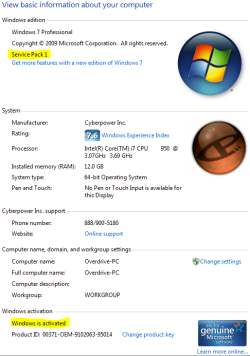
Did the install go smoothly? Did you activate windows? Did you download windows updates? Do you have SP1 installed? Here is an example:
Capture.PNG
 

My Computer My Computer

Computer type
PC/Desktop
Computer Manufacturer/Model Number
Custom Asus Build
OS
Microsoft Windows 8.1 Pro 64-bit
CPU
Intel(R) Core(TM) i3-4130 CPU @ 3.40GHz
Motherboard
B85M-E
Memory
8.00 GB
Graphics Card(s)
None
Sound Card
Realtek High Definition Audio
Monitor(s) Displays
Asus 23.6" Monitor
Screen Resolution
1920 x 1080 x 32 bits (4294967296 colors) @ 60 Hz
Hard Drives
INTEL SSDSC2BW180A4
Samsung SSD 840 PRO Series
PSU
Seasonic S12II-380Bronze
Case
Lian Li
Cooling
Fan, Passive
Keyboard
Logitech K120
Mouse
Microsoft Touch Mouse
Internet Speed
4ms Ping, 19.0 Mbps Download, 19.0 Mbps Upload
Antivirus
Eset Endpoint
Browser
Internet Explorer, Chrome
I'm not new to PCs (the opposite in fact; part of my education), so while I appreciate your detailed concern, it's not neccassary (less time consuming for you this way). I did everything a 'normal user' can do that doesn't require specific help to solve the problem, hence my approach in this forum.
I've a genuinely activated win 7 x64 HP version and formated my whole HDD twice, so it won't get any cleaner.
I've every update installed to date (including SP1 of course). I also used adobe's own uninstaller to remove Flash Player entirely upon installing it again.

I will uninstall AFP again, and get an older version on my system to test it and verify whether it's a problem with a past update. (Version (9/20/2010) Flash Player 10.1.85.3 and 9.0.283.0 (126 MB)). Gonna post the results tomorrow.


edit: I also updated my hardware spec (even tho it's prolly unrelated to my problem, but just in case)
 
Last edited:

My Computer My Computer

OS
Windows 7 HP x64
CPU
Intel Quard Core i5-2500K CPU @ 3.30GHz
Motherboard
MSI P67A-GD65(MS-7681); BIOS Ver. 04.06.04 (V1.8)
Memory
2x 4,00GB DD3 (1600 MHz)
Graphics Card(s)
NVIDIA GeForce GTX 560 Ti
Sound Card
Creative X-Fi Audio Processor (WDM)
Screen Resolution
1920x1080
Hard Drives
SAMSUNG HD103SJ ATA Device
Internet Speed
25 Mbit/s
I'm not new to PCs (the opposite in fact; part of my education)
Sometimes there is just no way to tell without you telling me first. I am in the process of helping like 5 other people and they all are newer to the pc realm. Also, forgive me if I revert back to a detailed explaination, because of all the different people that come through here, sometimes it is just easier to start with the basics.

So the newer one you have installed (Before removing it and trying the older version) is this one: http://get.adobe.com/flashplayer/?

Please also completely uninstall and remove your graphics driver, and install the newest released one (try this with newest adobe flash with it also).

After this, can you try to replicate the issue but have task manager open to the processes tab and keep an eye on the CPU usage and the Iexplore processes; report back how it goes. If it doesn't, can you post a pic of your addons?
 

My Computer My Computer

Computer type
PC/Desktop
Computer Manufacturer/Model Number
Custom Asus Build
OS
Microsoft Windows 8.1 Pro 64-bit
CPU
Intel(R) Core(TM) i3-4130 CPU @ 3.40GHz
Motherboard
B85M-E
Memory
8.00 GB
Graphics Card(s)
None
Sound Card
Realtek High Definition Audio
Monitor(s) Displays
Asus 23.6" Monitor
Screen Resolution
1920 x 1080 x 32 bits (4294967296 colors) @ 60 Hz
Hard Drives
INTEL SSDSC2BW180A4
Samsung SSD 840 PRO Series
PSU
Seasonic S12II-380Bronze
Case
Lian Li
Cooling
Fan, Passive
Keyboard
Logitech K120
Mouse
Microsoft Touch Mouse
Internet Speed
4ms Ping, 19.0 Mbps Download, 19.0 Mbps Upload
Antivirus
Eset Endpoint
Browser
Internet Explorer, Chrome
I'm not new to PCs (the opposite in fact; part of my education)
Sometimes there is just no way to tell without you telling me first. I am in the process of helping like 5 other people and they all are newer to the pc realm. Also, forgive me if I revert back to a detailed explaination, because of all the different people that come through here, sometimes it is just easier to start with the basics.

So the newer one you have installed (Before removing it and trying the older version) is this one: http://get.adobe.com/flashplayer/?

Please also completely uninstall and remove your graphics driver, and install the newest released one (try this with newest adobe flash with it also).

After this, can you try to replicate the issue but have task manager open to the processes tab and keep an eye on the CPU usage and the Iexplore processes; report back how it goes. If it doesn't, can you post a pic of your addons?
I don't mind it, I just thought it'll be less a hassle to you.

the most recent yes. -clean installed

I ALWAYS clean install my graphic drivers, and update it at least twice a month (if an update is available).

IE has a normal CPU consumption and when the error happens it drops to 0. the curious thing is that it opens a new process for every tab that has been restored with a usage of 0.

here ya go:
23w5qb7.jpg
 

My Computer My Computer

OS
Windows 7 HP x64
CPU
Intel Quard Core i5-2500K CPU @ 3.30GHz
Motherboard
MSI P67A-GD65(MS-7681); BIOS Ver. 04.06.04 (V1.8)
Memory
2x 4,00GB DD3 (1600 MHz)
Graphics Card(s)
NVIDIA GeForce GTX 560 Ti
Sound Card
Creative X-Fi Audio Processor (WDM)
Screen Resolution
1920x1080
Hard Drives
SAMSUNG HD103SJ ATA Device
Internet Speed
25 Mbit/s
Hey registerme, some more questions for ya. This is a strange problem that has me in a spin

IE has a normal CPU consumption and when the error happens it drops to 0. the curious thing is that it opens a new process for every tab that has been restored with a usage of 0.
I'm sorry, I'm not following you with this bit here. task manager says IE has 0% cpu usage when you have multiple tabs open (video playing and a new tab with embedded FLV that causes the crash).

What do you mean tab being restored? After it restores from the crash? Do you have IE set to open every tab in its own process? Did you change any advanced internet options, and have you tried the internet reset I suggested before?

Have you made any customizations to windows downloaded off the internet?

Have you also tried disabling (temporarily) all add-ons except for the shockwave flash (Which should be the most recent flash available)?
 

My Computer My Computer

Computer type
PC/Desktop
Computer Manufacturer/Model Number
Custom Asus Build
OS
Microsoft Windows 8.1 Pro 64-bit
CPU
Intel(R) Core(TM) i3-4130 CPU @ 3.40GHz
Motherboard
B85M-E
Memory
8.00 GB
Graphics Card(s)
None
Sound Card
Realtek High Definition Audio
Monitor(s) Displays
Asus 23.6" Monitor
Screen Resolution
1920 x 1080 x 32 bits (4294967296 colors) @ 60 Hz
Hard Drives
INTEL SSDSC2BW180A4
Samsung SSD 840 PRO Series
PSU
Seasonic S12II-380Bronze
Case
Lian Li
Cooling
Fan, Passive
Keyboard
Logitech K120
Mouse
Microsoft Touch Mouse
Internet Speed
4ms Ping, 19.0 Mbps Download, 19.0 Mbps Upload
Antivirus
Eset Endpoint
Browser
Internet Explorer, Chrome
Hey registerme, some more questions for ya. This is a strange problem that has me in a spin

IE has a normal CPU consumption and when the error happens it drops to 0. the curious thing is that it opens a new process for every tab that has been restored with a usage of 0.
I'm sorry, I'm not following you with this bit here. task manager says IE has 0% cpu usage when you have multiple tabs open (video playing and a new tab with embedded FLV that causes the crash).

What do you mean tab being restored? After it restores from the crash? Do you have IE set to open every tab in its own process? Did you change any advanced internet options, and have you tried the internet reset I suggested before?

Have you made any customizations to windows downloaded off the internet?

Have you also tried disabling (temporarily) all add-ons except for the shockwave flash (Which should be the most recent flash available)?
When I start IE it creates two processes (which is normal) with 0-1% CPU usage.
Afterwards I load any random stream from twitch.tv - IE goes to 0-5%.
When I load my 8 tabs it peaks to ~40 at max for a split second before everything is loaded and steadies at 0-5% again. However, when the crash occurs I have 3 IE processes (two normals +1 for error message all with 0% consumption), after I click the error away, IE restores my tabs and this is the result:
3178xf7.jpg

FYI: I had 10 tabs open at the moment it crashed.

I didn't change any advanced internet options (other then download location, search provider, some basic tab config, history stuff [on a side note: I have "check for new versions of the stored page: Everytime I visit the page"] and I increased the max connections to 8/4 respectively).

since I reinstalled my whole system and the error still occurs I doubt it'll do anything if I simply reset it (again).

I don't get "Have you made any customizations to windows downloaded off the internet?". can you please elaborate?

yep, that I surely did.
 

My Computer My Computer

OS
Windows 7 HP x64
CPU
Intel Quard Core i5-2500K CPU @ 3.30GHz
Motherboard
MSI P67A-GD65(MS-7681); BIOS Ver. 04.06.04 (V1.8)
Memory
2x 4,00GB DD3 (1600 MHz)
Graphics Card(s)
NVIDIA GeForce GTX 560 Ti
Sound Card
Creative X-Fi Audio Processor (WDM)
Screen Resolution
1920x1080
Hard Drives
SAMSUNG HD103SJ ATA Device
Internet Speed
25 Mbit/s
Back
Top