New laptop, changing partition disks?

There are no Recovery Disks. She used Samsung Recovery Solution to save the image to external, but it won't run now because it depends on a small OEM (and possibly EISA) partition to use F4 to run it from boot which she deleted during Clean Reinstall.

Samsung has been no help and is bullying her for doing a Clean Reinstall which she unfortunately admitted to them in an email. Seems you have to return the laptop to have the software reinstalled at cost.

Edit - But Nicole is saying that she likely will want to keep her clean reinstall so only wants access to a Samsung Download for Recovery Solution which will not run without the partition, since that software also has a menu to select needed OEM Software after a clean reinstall.
 
Last edited:
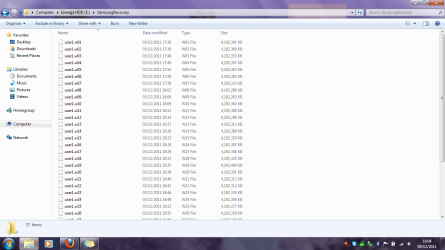
Here is the screenshot of the Samsung Recovery Image files that I saved to my external before doing the clean install

samsungrecov.png
 

My Computer My Computer

Computer Manufacturer/Model Number
Samsung RF511-S02UK
OS
Microsoft Windows 7 Home Premium 64-bit 7601 Multiprocessor Free Service Pack 1
CPU
Intel Core i5 2410M CPU @ 2.30GHz
Motherboard
SAMSUNG ELECTRONICS CO., LTD. RF511/RF411/RF711
Memory
6GB
Graphics Card(s)
(1) Intel(R) HD Graphics Family (2) NVIDIA GeForce GT 540M
Sound Card
(1) Realtek High Definition Audio (2) Bluetooth Hands-free
Screen Resolution
1366x768
Hard Drives
640GB
Other Info
15.6"

My Computer My Computer

OS
ME/XP/Vista/Win7
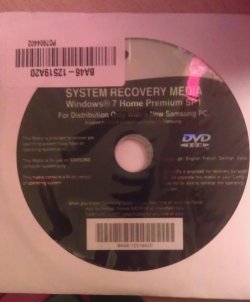
Samsung sent the disk that I used to do the clean install named "System Recovery Media"

The other disk I created was the OEM Disk.

Then I also did a backup to my external using the Samsung Recovery 5 which is shown on the screen shot in my last post.
 

My Computer My Computer

Computer Manufacturer/Model Number
Samsung RF511-S02UK
OS
Microsoft Windows 7 Home Premium 64-bit 7601 Multiprocessor Free Service Pack 1
CPU
Intel Core i5 2410M CPU @ 2.30GHz
Motherboard
SAMSUNG ELECTRONICS CO., LTD. RF511/RF411/RF711
Memory
6GB
Graphics Card(s)
(1) Intel(R) HD Graphics Family (2) NVIDIA GeForce GT 540M
Sound Card
(1) Realtek High Definition Audio (2) Bluetooth Hands-free
Screen Resolution
1366x768
Hard Drives
640GB
Other Info
15.6"
The other disk I created was the OEM Disk.
I thought the only disk you made is the Win7 Repair CD.

So they send you a clean copy Win7 Reinstallation DVD but if you do a clean reinstall Samsung says they will not help you.

I would call them and ask for their help getting the features working that are not working correctly. Tell them you used the very disk they included to clean reinstall.

You might mention your Support thread on this in the top Win7 forums is now a top Samsung google search result, and that we are all waiting to hear why they will not support it now.

Be very pleasant no matter what nonsense you get, ask for a Supervisor if needed, and let us know what they say.
 
How many disks did Samsung send?

Did you read the Samsung Install Guide?
 
Last edited:

My Computer My Computer

OS
ME/XP/Vista/Win7
One disk that Samsung sent, here's the picture of it.

samsungrecdisk.jpg


I will indeed be contacting Samsung about all these problems.
 

My Computer My Computer

Computer Manufacturer/Model Number
Samsung RF511-S02UK
OS
Microsoft Windows 7 Home Premium 64-bit 7601 Multiprocessor Free Service Pack 1
CPU
Intel Core i5 2410M CPU @ 2.30GHz
Motherboard
SAMSUNG ELECTRONICS CO., LTD. RF511/RF411/RF711
Memory
6GB
Graphics Card(s)
(1) Intel(R) HD Graphics Family (2) NVIDIA GeForce GT 540M
Sound Card
(1) Realtek High Definition Audio (2) Bluetooth Hands-free
Screen Resolution
1366x768
Hard Drives
640GB
Other Info
15.6"
Ok I'm getting a little confused I think I named what I did incorrectly. Here's what I did in more detail.

Samsung sent the disk named "System Recovery Media" which is the image above. That's the disk I used to do the clean install.

But before doing the clean install, the disk I created was from using this tutorial http://www.sevenforums.com/tutorials/663-backup-complete-computer-create-image-backup.html

Then also before the clean install, I did a backup to my external using the Samsung Recovery 5 which the saved files from that are shown on the screen shot in my earlier post.
 

My Computer My Computer

Computer Manufacturer/Model Number
Samsung RF511-S02UK
OS
Microsoft Windows 7 Home Premium 64-bit 7601 Multiprocessor Free Service Pack 1
CPU
Intel Core i5 2410M CPU @ 2.30GHz
Motherboard
SAMSUNG ELECTRONICS CO., LTD. RF511/RF411/RF711
Memory
6GB
Graphics Card(s)
(1) Intel(R) HD Graphics Family (2) NVIDIA GeForce GT 540M
Sound Card
(1) Realtek High Definition Audio (2) Bluetooth Hands-free
Screen Resolution
1366x768
Hard Drives
640GB
Other Info
15.6"
Here is the screenshot of the Samsung Recovery Image files that I saved to my external before doing the clean install

View attachment 187512

Did you need to make a Samsung Recovery Startup CD?

Then also before the clean install, I did a backup to my external using the Samsung Recovery 5 which the saved files from that are shown on the screen shot in my earlier post.


Do you have Samsung Recovery 5 installed or a Samsung Recovery Startup CD to start the recovery?
 

My Computer My Computer

OS
ME/XP/Vista/Win7
I contacted them about my intial problems, they replied:

"Samsung, like most large computer manufacturers these days, do not provide "pre made" recovery disks.
We create a partition on the hard drive for all the recovery file as well as all the reinstallations of loaded
software. At the time of fist you we highly recommend that all customers make recovery disks for this very
reason. If you have created the recovery disks, there is option on the recovery called system software. This
section of the recovery process allows customers to reinstall any software that originally shipped with the
product.
If you have not deleted the recovery partition your hard drive you should be able to run the Samsung
Recovery console and reinstall the needed software. On the boot of the computer tap the f4 key, this will bring
you to the Samsung recovery console. Within the console you will be given 3 choices: restore, backup, and
system software. Simply choose system software and follow the wizard to choose and reinstall your missing
software."


Now after the clean install, I have tried to re download Samsung Recovery, however I get the Error "there is no samsung recovery area on your hardisk"

At that point is when I contacted Samsung again about this and they gave me this response:

"reinstalling the preshipped sofware will not make any changes to your hard drive other than adding in the
desired application. The full recovery disks that would contain the operating system, all
driver, all Samsung proprietary application, and all third party application. I do not know what disk came with
your computer. We have hundreds of models over the years that have shipped with a massisve variety of,
well for lack of a better expression, this and that. "


I wanted the Samsung Recovery back on my system as I am having issues with the touchpad and sound drivers, not to have all the other software back.

"I realise that you did not want all the applications reinstalled back onto your system. However you will find when you go through the system software wizard using the recommended recovery disks that you have created, there is is an interface at the end of the wizard with tick boxes that allow you to reinstall the applications you desire. "

Then another response from them after I explained again that I could not get the Samsung Recovery software back on my system.

"I am sorry to hear that you are having problems installing Samsung Recovery Solution.

You are having problems installing this software because the hidden partition which this software requires has been removed from you laptop. Looking over your previous emails I see the issue is that you wish to get the software which came on your laptop back. Unfortunately this cannot be done through Recovery Solution as the hidden partition has been removed.

If you wish to get this software back you will need to purchase it from the relevant companies. This is due to the fact that this software can only be supplied within the origional install of the laptop, If they are removed then you will need to purchase a new full licence from each of the individual companies.

I am sorry that we could not be of more help in this matter but as this partitiion has been removed there is nothing I can do for you."

The point is that once these problems with the drivers are corrected I am fine with keeping this clean install. The only reason why I wanted to be able to run the Samsung Recovery is because they said once I run that, at the end of the wizard I can pick and choose what software to recover rather than having ALL of the original software back, it was just a easier solution. But indeed if these issues can be fixed without the Samsung recovery then it's fine but I would like to have that partition back to gain access to the software.

 

My Computer My Computer

Computer Manufacturer/Model Number
Samsung RF511-S02UK
OS
Microsoft Windows 7 Home Premium 64-bit 7601 Multiprocessor Free Service Pack 1
CPU
Intel Core i5 2410M CPU @ 2.30GHz
Motherboard
SAMSUNG ELECTRONICS CO., LTD. RF511/RF411/RF711
Memory
6GB
Graphics Card(s)
(1) Intel(R) HD Graphics Family (2) NVIDIA GeForce GT 540M
Sound Card
(1) Realtek High Definition Audio (2) Bluetooth Hands-free
Screen Resolution
1366x768
Hard Drives
640GB
Other Info
15.6"
Well, as I understand Samsung's reply, you're not going to get it back.

Basically, what they are saying is "You deleted the hidden recovery partition - tough, we can't help."

I don't want to sound too harsh, but if Samsung won't help, I just don't see how anyone else can pluck this recovery partition out of thin air.

I think your best bet is a clean install followed by Windows updating, and then check in device manager to see if you are missing any drivers.
 

My Computer My Computer

Computer Manufacturer/Model Number
HP Pavilion Elite 495UK
OS
Windows 7 Ultimate SP1 64-Bit
CPU
Intel Core i7 870 @ 2.93GHz
Motherboard
MSI 2A9C (CPU1)
Memory
8Gb Dual-Channel DDR3 @ 664MHz
Graphics Card(s)
nVidia GeForce GTX 460 1024MB dedicated RAM
Sound Card
Realtek HD Audio
Monitor(s) Displays
HP2310i
Screen Resolution
1920 x 1080
Hard Drives
1x1954GB Hitachi HDS22020ALA 330 (RAID), 1x1954GB Hitachi External for backup and storage
PSU
460W
Case
HP Elite
Cooling
Air cooled
Keyboard
Logitech K750 solar-powered keyboard
Mouse
Logitech Wireless M180 mouse
Internet Speed
2Mb
Other Info
Pure Avanti Flow Internet Radio with iPod Dock, 64Gb iPod, HP USB Speakers, Sony MDR-V500 Headphones, Sony Vaio F-Series Laptop
Here is the screenshot of the Samsung Recovery Image files that I saved to my external before doing the clean install

View attachment 187512

Did you need to make a Samsung Recovery Startup CD?

Then also before the clean install, I did a backup to my external using the Samsung Recovery 5 which the saved files from that are shown on the screen shot in my earlier post.


Do you have Samsung Recovery 5 installed or a Samsung Recovery Startup CD to start the recovery?

But before doing the clean install, the disk I created was from using this tutorial Backup Complete Computer - Create an Image Backup

Did you make the Windows 7 startup CD?

Awaiting Reply.
 

My Computer My Computer

OS
ME/XP/Vista/Win7
Here is more information about the deleted Samsung Recovery partition which enables reimaging with the image she stored on external: What's in your Recovery Partition?

There is apparently no boot disk possibility, only running Recovery from within the factory preinstalled OS or using F4 at boot which is hotlinked to the small OEM/EISA partition she deleted. I'm not even sure that if we could mount Recovery image to run it that she would get that partition back, and she needs it to run a software from Samsung called Samsung Recovery Solution which they told her has a menu of more needed software like the full SRS Premium sound package that isn't included with Realtek driver from website.

She has the WIn7 repair CD, as we used it two nights ago to reimage her clean reinstall when it corrupted from attempted fixes to get the Samsung crapware to work right. She had lost the most important piece Easy Display which makes buttons function, but got it back with image.
 
Nicole wants to keep the clean reinstall but needs help now finding the SRS Premium Sound device add-on to the Realtek driver which is all they post on Samsung's Downloads page. Her sound is missing dimension.

She also needs to get the touchpad software to support scrolling without having to click on the obnoxious Elan touchpad Run box which pops up at boot. We have tried installing this in every way possible including the Synaptics software which is in a sub-folder of Elan's which then shows both drivers. Hopefully someone recognizes this issue.

The problem is that Samsung OEM software loses important features when it is installed from their website after clean reinstall, like none I've seen before.
 
At post 22, Samsung install is OK, NO need for a reinstall.
Why reinstall?
 

My Computer My Computer

OS
ME/XP/Vista/Win7
She is an unusually capable OP who specifically asked for a Clean Reinstall.

They provided her with a Win7 Reinstallation DVD which would cause anyone to believe it is supported and possible.

The needed OEM software was all on the Samsung Downloads page, but we could not know it loses features at reinstall.

Nor could we know they don't make Recovery Disks and the factory image she backed up wouldn't run without a tiny OEM partition, as it's unheard of except for these models apparently.

I'm defending her because she is getting needed sleep after two overnights at this on TeamViewer. She can respond herself later.

Does anyone have any help with the two outstanding issues in my last post? She gets enough bullying from Samsung.
 

My Computer My Computer

OS
ME/XP/Vista/Win7
Back
Top