

[FONT=Arial, Helvetica, sans-serif]Ok here goes, after I managed to connect to the internet and do the windows updates and drivers everything seems ok. There's just one driver I can't seem to find on the net which is the realteck ethernet controller driver [/FONT]
[FONT=Arial, Helvetica, sans-serif]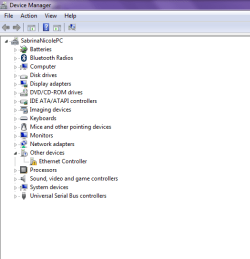 [/FONT]
[FONT=Arial, Helvetica, sans-serif]Turns out I needed some of that easy software so that I can use the functions of the laptop for the display and so on. Here's how my programs list is looking, a lot healthier![/FONT]
[FONT=Arial, Helvetica, sans-serif]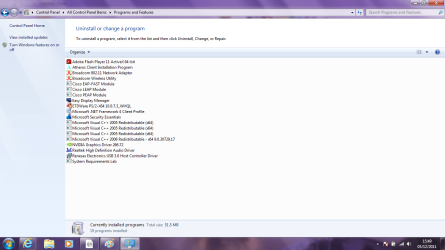 [/FONT]
[FONT=Arial, Helvetica, sans-serif]I have also done another backup to my external using the windows backup and restore, including the system image.[/FONT]
[FONT=Arial, Helvetica, sans-serif]I haven't transferred anything to my user folders yet as I'm planning on having that on D, so I'm assuming I still do that this way? [/FONT]
[FONT=Arial, Helvetica, sans-serif]"To link User folders to D follow this method: User Folders - Change Default Location[/FONT]
[FONT=Arial, Helvetica, sans-serif]Or do them all at once by moving your named User account: User Profile - Change Default Location"[/FONT]
[FONT=Arial, Helvetica, sans-serif]I have used the disk management to do the partitions but I can only shrink C to 300gb now.[/FONT]
[FONT=Arial, Helvetica, sans-serif]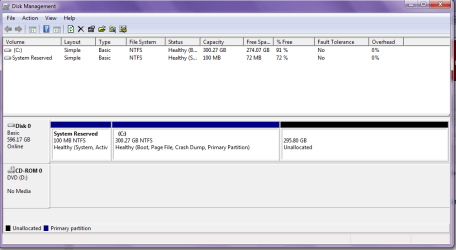 [/FONT]
[FONT=Arial, Helvetica, sans-serif]So I have already installed the Partition Wizard bootable CD to a CD[/FONT]
[FONT=Arial, Helvetica, sans-serif]
[/FONT][FONT=Arial, Helvetica, sans-serif]Turns out I needed some of that easy software so that I can use the functions of the laptop for the display and so on. Here's how my programs list is looking, a lot healthier![/FONT]
[FONT=Arial, Helvetica, sans-serif]
[/FONT][FONT=Arial, Helvetica, sans-serif]I have also done another backup to my external using the windows backup and restore, including the system image.[/FONT]
[FONT=Arial, Helvetica, sans-serif]I haven't transferred anything to my user folders yet as I'm planning on having that on D, so I'm assuming I still do that this way? [/FONT]
[FONT=Arial, Helvetica, sans-serif]"To link User folders to D follow this method: User Folders - Change Default Location[/FONT]
[FONT=Arial, Helvetica, sans-serif]Or do them all at once by moving your named User account: User Profile - Change Default Location"[/FONT]
[FONT=Arial, Helvetica, sans-serif]I have used the disk management to do the partitions but I can only shrink C to 300gb now.[/FONT]
[FONT=Arial, Helvetica, sans-serif]
[/FONT][FONT=Arial, Helvetica, sans-serif]So I have already installed the Partition Wizard bootable CD to a CD[/FONT]
My Computer
- Computer Manufacturer/Model Number
- Samsung RF511-S02UK
- OS
- Microsoft Windows 7 Home Premium 64-bit 7601 Multiprocessor Free Service Pack 1
- CPU
- Intel Core i5 2410M CPU @ 2.30GHz
- Motherboard
- SAMSUNG ELECTRONICS CO., LTD. RF511/RF411/RF711
- Memory
- 6GB
- Graphics Card(s)
- (1) Intel(R) HD Graphics Family (2) NVIDIA GeForce GT 540M
- Sound Card
- (1) Realtek High Definition Audio (2) Bluetooth Hands-free
- Screen Resolution
- 1366x768
- Hard Drives
- 640GB
- Other Info
- 15.6"


 ) Can I just confirm that in the future I can resize these drives even if they both have files in them? I'm happy with the space I've allocated for them as of now, but I wanted to double check, again.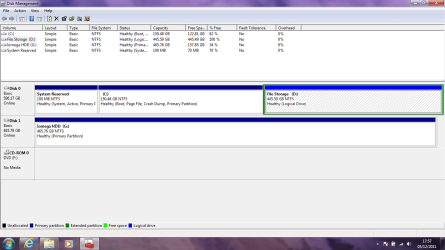


 . Managed to accidently convert to a dynamic drive during the resize which appeared to block my changeing the drive letters(which had "Drifted". Had to use Ghost to copy the drive to another spare drive and back again which returned the drive to basic and cured my problems
 . Have downloaded the utils you suggested and promise to use them in the future. Many thanks for your quick reply and accurate diagnosis.


