Built-in Administrator Account - Change Name

How to Rename the Built-in Elevated "Administrator" Account in Windows 7 and Windows 8

   Information
This will show you how to rename the built-in "Administrator" account name to any name you would like instead to be displayed on the Welcome screen, log on screen, Start menu, and C:\Users\Administrator folder in Windows 7and Windows 8.

You could have better security by not using the same default name of Administrator as everyone else does.

   Note
The built-in elevated "Administrator" account is not enabled by default in Windows 7. Instead you use a default normal administrator account that was created during installation. This normal administrator account is not the same as the built-in Administrator account.

   Tip
When you change a name of a user account, the original name is still tied to that account even though the new name is displayed in the Start menu and at log on. So you will not be able to use both names to rename another account with without deleting the other account that already has the name.


EXAMPLE: Built-in Elevated "Administrator" Account at Log on
NOTE: Top screenshot is the default name, and bottom screenshot is renamed.

Log-on-1.jpg
.
Log-on-2.jpg


OPTION ONE

Manually in Registry Editor and User Accounts


NOTE: This option will allow you to also rename the C:\Users\Administrator folder if the built-in Administrator account has already been previously enabled. This option will also rename the built-in Administrator account's name displayed on the log on screen and Start Menu.
1. For how, see: http://www.sevenforums.com/tutorials/147545-user-profile-folder-change-user-account-folder-name.html


OPTION TWO

Through Local Security Policy


NOTE: This option will allow you to also rename the C:\Users\Administrator folder if the built-in Administrator account has not already been previously enabled. This option will also rename the built-in Administrator account's name displayed on the log on screen and Start Menu.
1. Open the Local Security Policy editor.

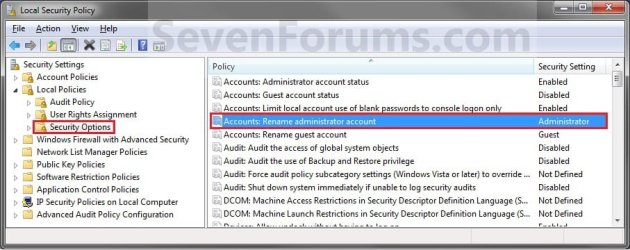
2. In the left pane, expand Local Policies, and click on Security Options. (See screenshot below)
Secpol-1.jpg
3. In the right pane, right click on Accounts: Rename administrator account and click on Properties. (See screenshot above)

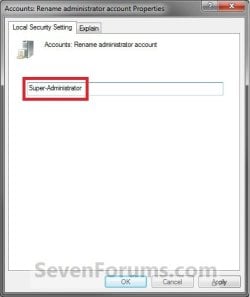
4. Type in a name you want instead that has not ever been used by any other user account on the computer, and click on OK. (See screenshot below)
Secpol-2.jpg
5. Close the Local Security Policy window. (See screenshot below step 2)

6. You can now enable the built-in Administrator account, and log off or switch users to see it's log on icon with the new name in the log on screen. (See screeenshot below)
Log-on-2.jpg


OPTION THREE

Through Local Users and Groups


NOTE: This option will allow you to also rename the C:\Users\Administrator folder if the built-in Administrator account has not already been previously enabled. This option will also rename the built-in Administrator account's name displayed on the log on screen and Start Menu.
1. Open the Local Users and Groups manager.

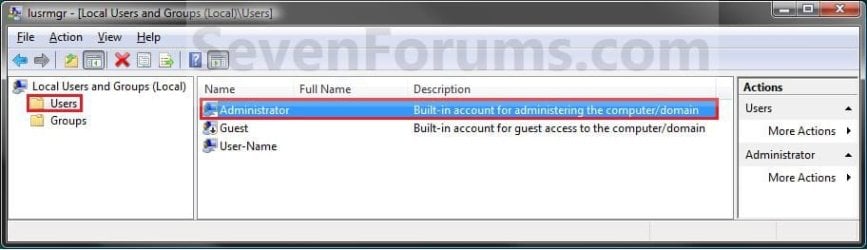
2. In the left pane click on Users. (See screenshot below)
Admin-9.jpg
3. In the right pane, right click on Administrator and click on Properties. (See screenshot above)

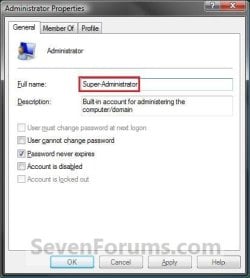
4. In the General tab and to the right of Full name, type in a name you want instead that has not been used by any other user on the computer and click on OK. (See screenshot below)
Admin-10.jpg
5. Close Local Users and Groups window. (See screenshot below step 2)

6. You can now enable the built-in Administrator account, and can now log off or switch users to see built-in Administrator account's log on icon with the new name in the log on screen. (See screeenshot below)
Log-on-2.jpg


OPTION FOUR

Through User Accounts


NOTE: This option will only rename the built-in Administrator account's name displayed on the Welcome, log on screen, and Start Menu, and not for the C:\Users\Administrator folder. If you wanted to rename the folder, then you will need to use one of the other options above instead.
1. If you have not already, you will need to enable the built-in Administrator account.

2. Open the Control Panel (icons view), and click on the User Accounts icon.

3. Click on the Manage another account link. (See screenshots below)
NOTE: The top screenshot is while logged in to the built-in Administrator account. The bottom screenshot is while logged in to a default administrator account.
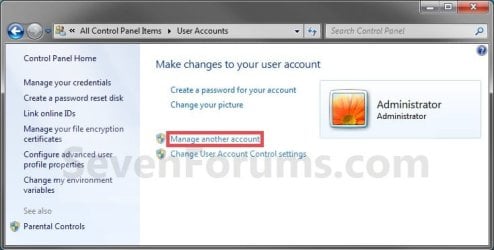
Built_in-1.jpg

Default-1.jpg
4. If prompted by UAC, then click on Yes.

5. Click on the listed built-in Administrator account. (See screenshot below)
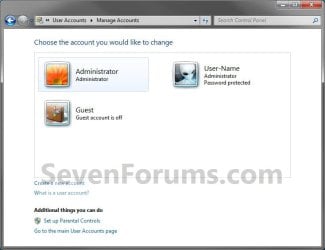
Built-in-2.jpg
6. Click on the Change the account name link. (See screenshot below)
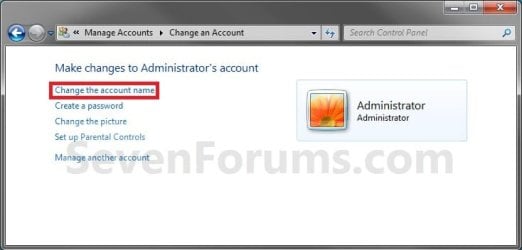
Built-in-3.jpg
7. Type in a name you want instead that has not been used by any other user on the computer, and click on the Change Name. (See screenshot below)
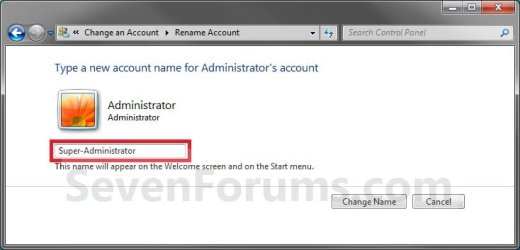
Built-in-4.jpg
8. The built-in Administrator account is now renamed. Close the User Account window. (See screenshot below)
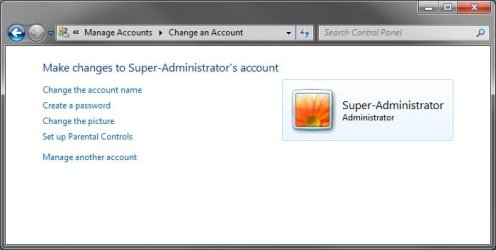
Built-in-5.jpg
9. You can now log off or switch users to see built-in Administrator account's log on icon with the new name in the log on screen. (See screeenshot below)
Log-on-2.jpg
That's it,
Shawn


Last edited:
I was coming to the same conclusions. I'll be really upset if System Error 1359 turns out to mean something that's easily fixed, but this is a relatively new installation that won't be too hard to reinstall. I should be able to get to it some time this week.

Thanks.
 

My Computer My Computer

At a glance

Windows 7 Home Premium 64bitIntel Core i716GB
Computer type
Laptop
Computer Manufacturer/Model Number
Dell Latitude E6440
OS
Windows 7 Home Premium 64bit
CPU
Intel Core i7
Memory
16GB
Hard Drives
Samsung SSD
You're welcome MFA. Please let us know how it went.
 

My Computer My Computer

At a glance

64-bit Windows 11 Pro for WorkstationsIntel i7-8700K OC'd to 5 GHz64 GB (4x16GB) G.SKILL TridentZ RGB DDR4 3600...ASUS ROG-STRIX-GTX1080TI-O11G-GAMING
Computer type
PC/Desktop
Computer Manufacturer/Model Number
Self built custom
OS
64-bit Windows 11 Pro for Workstations
CPU
Intel i7-8700K OC'd to 5 GHz
Motherboard
ASUS ROG Maximus XI Formula Z390
Memory
64 GB (4x16GB) G.SKILL TridentZ RGB DDR4 3600 MHz
Graphics Card(s)
ASUS ROG-STRIX-GTX1080TI-O11G-GAMING
Sound Card
Integrated
Monitor(s) Displays
2 x Samsung Odyssey G7 27"
Screen Resolution
2560x1440
Hard Drives
1TB Samsung 990 PRO M.2,
4TB Samsung 990 PRO PRO M.2,
TerraMaster F8 SSD Plus NAS
PSU
Seasonic Prime Titanium 850W
Case
Thermaltake Core P3
Cooling
Corsair Hydro H115i
Keyboard
Logitech wireless K800
Mouse
Logitech MX Master 4
Internet Speed
2 Gb/s Download and 100 Mb/s Upload
Antivirus
Malwarebyte Anti-Malware Premium
Browser
Google Chrome
Other Info
Logitech Z625 speaker system,
Logitech BRIO 4K Pro webcam,
HP Color LaserJet Pro MFP M477fdn,
APC SMART-UPS RT 1000 XL - SURT1000XLI,
Galaxy S23 Plus phone
I first tried reinstalling via the recover facility. It copied data (to somewhere), requested the install DVD, then barfed with a "The unattend answer file contains an invalid product key" message. I bailed at that point and did a simple boot-from-the-DVD reinstall, which appears to be progessing nicely. So far I have been unable to locate the data supposedly saved by the recover process, but I've got my own copy -- I think -- and should be fully restored in a couple of hours.

Update: Actually took about 4 hours all told. A lot of files I thought I had saved on an external drive turned out not to be there, plus several other oddities make me glad that I did a clean reinstall. We'll be tweaking things like Office parameters forever, but we're back in business. Somewhat disappointed that whatever caused all this got by MSE. Oh, btw, the Administrator account is behaving itself, although the amount of stuff that even the Administrator can't see or do in Win 7 is frustrating.
 
Last edited:

My Computer My Computer

At a glance

Windows 7 Home Premium 64bitIntel Core i716GB
Computer type
Laptop
Computer Manufacturer/Model Number
Dell Latitude E6440
OS
Windows 7 Home Premium 64bit
CPU
Intel Core i7
Memory
16GB
Hard Drives
Samsung SSD
That's great news MFA. :)
 

My Computer My Computer

At a glance

64-bit Windows 11 Pro for WorkstationsIntel i7-8700K OC'd to 5 GHz64 GB (4x16GB) G.SKILL TridentZ RGB DDR4 3600...ASUS ROG-STRIX-GTX1080TI-O11G-GAMING
Computer type
PC/Desktop
Computer Manufacturer/Model Number
Self built custom
OS
64-bit Windows 11 Pro for Workstations
CPU
Intel i7-8700K OC'd to 5 GHz
Motherboard
ASUS ROG Maximus XI Formula Z390
Memory
64 GB (4x16GB) G.SKILL TridentZ RGB DDR4 3600 MHz
Graphics Card(s)
ASUS ROG-STRIX-GTX1080TI-O11G-GAMING
Sound Card
Integrated
Monitor(s) Displays
2 x Samsung Odyssey G7 27"
Screen Resolution
2560x1440
Hard Drives
1TB Samsung 990 PRO M.2,
4TB Samsung 990 PRO PRO M.2,
TerraMaster F8 SSD Plus NAS
PSU
Seasonic Prime Titanium 850W
Case
Thermaltake Core P3
Cooling
Corsair Hydro H115i
Keyboard
Logitech wireless K800
Mouse
Logitech MX Master 4
Internet Speed
2 Gb/s Download and 100 Mb/s Upload
Antivirus
Malwarebyte Anti-Malware Premium
Browser
Google Chrome
Other Info
Logitech Z625 speaker system,
Logitech BRIO 4K Pro webcam,
HP Color LaserJet Pro MFP M477fdn,
APC SMART-UPS RT 1000 XL - SURT1000XLI,
Galaxy S23 Plus phone
Renaming an Enabled Built-In Admin Account

Hello everyone,

I am having an issue with renaming my built-in admin account through secpol. I have already had it enabled and placed a password on it. However, due to my needs, I require the name to be changed as well. This tutorial listed options for the admin account that wasn't enabled already.

When I try changing the name with my created Admin account, it seems to dissapear from the Users list in Control Panel. I would prefer not to reinstall windows, but if the process to change this is long, I will do that. I'm looking for all of my options prior to reinstalling.

Thanks for any help!
 

My Computer My Computer

At a glance

Windows 7 Professional
OS
Windows 7 Professional
Hello Udochen, and welcome to Seven Forums.

You could use OPTION ONE to rename the built-in Administrator account when it has already been enabled previously. :)

Hope this helps,
Shawn
 

My Computer My Computer

At a glance

64-bit Windows 11 Pro for WorkstationsIntel i7-8700K OC'd to 5 GHz64 GB (4x16GB) G.SKILL TridentZ RGB DDR4 3600...ASUS ROG-STRIX-GTX1080TI-O11G-GAMING
Computer type
PC/Desktop
Computer Manufacturer/Model Number
Self built custom
OS
64-bit Windows 11 Pro for Workstations
CPU
Intel i7-8700K OC'd to 5 GHz
Motherboard
ASUS ROG Maximus XI Formula Z390
Memory
64 GB (4x16GB) G.SKILL TridentZ RGB DDR4 3600 MHz
Graphics Card(s)
ASUS ROG-STRIX-GTX1080TI-O11G-GAMING
Sound Card
Integrated
Monitor(s) Displays
2 x Samsung Odyssey G7 27"
Screen Resolution
2560x1440
Hard Drives
1TB Samsung 990 PRO M.2,
4TB Samsung 990 PRO PRO M.2,
TerraMaster F8 SSD Plus NAS
PSU
Seasonic Prime Titanium 850W
Case
Thermaltake Core P3
Cooling
Corsair Hydro H115i
Keyboard
Logitech wireless K800
Mouse
Logitech MX Master 4
Internet Speed
2 Gb/s Download and 100 Mb/s Upload
Antivirus
Malwarebyte Anti-Malware Premium
Browser
Google Chrome
Other Info
Logitech Z625 speaker system,
Logitech BRIO 4K Pro webcam,
HP Color LaserJet Pro MFP M477fdn,
APC SMART-UPS RT 1000 XL - SURT1000XLI,
Galaxy S23 Plus phone
Second Administrator account?

Just wandering if another user that has administrative accounts can change this "hidden administrator account". I ask this because I have purchased laptops for my teenagers for christmas and I want to make them administrators. However, I want to have an administrator account on their computer also; realizing that their account could disable my administrator account.

Basically, I don't want to have to get bothered everytime they want an administrator to allow them to do something. Yet, I want to be able to update and check up on them when needed.

Any help or advice would be appreciated.

Thanks
 

My Computer My Computer

At a glance

Windows 7
OS
Windows 7
Hello TJDAN, and welcome to Seven Forums.

Yes, another administrator account will be able to since it will have full access of the computer, and could also make any change to any account.

Only a standard or guest account will not be able to.

Hope this helps,
Shawn
 

My Computer My Computer

At a glance

64-bit Windows 11 Pro for WorkstationsIntel i7-8700K OC'd to 5 GHz64 GB (4x16GB) G.SKILL TridentZ RGB DDR4 3600...ASUS ROG-STRIX-GTX1080TI-O11G-GAMING
Computer type
PC/Desktop
Computer Manufacturer/Model Number
Self built custom
OS
64-bit Windows 11 Pro for Workstations
CPU
Intel i7-8700K OC'd to 5 GHz
Motherboard
ASUS ROG Maximus XI Formula Z390
Memory
64 GB (4x16GB) G.SKILL TridentZ RGB DDR4 3600 MHz
Graphics Card(s)
ASUS ROG-STRIX-GTX1080TI-O11G-GAMING
Sound Card
Integrated
Monitor(s) Displays
2 x Samsung Odyssey G7 27"
Screen Resolution
2560x1440
Hard Drives
1TB Samsung 990 PRO M.2,
4TB Samsung 990 PRO PRO M.2,
TerraMaster F8 SSD Plus NAS
PSU
Seasonic Prime Titanium 850W
Case
Thermaltake Core P3
Cooling
Corsair Hydro H115i
Keyboard
Logitech wireless K800
Mouse
Logitech MX Master 4
Internet Speed
2 Gb/s Download and 100 Mb/s Upload
Antivirus
Malwarebyte Anti-Malware Premium
Browser
Google Chrome
Other Info
Logitech Z625 speaker system,
Logitech BRIO 4K Pro webcam,
HP Color LaserJet Pro MFP M477fdn,
APC SMART-UPS RT 1000 XL - SURT1000XLI,
Galaxy S23 Plus phone
Re: Second Administrator Account

Shawn, thanks for the reply... I kinda figured that. Is there another option; maybe somewhere in the securities where I could give the neccessary rights, yet secure my administrator account?

Thanks
 

My Computer My Computer

At a glance

Windows 7
OS
Windows 7
Brink i have a question here that is :( why does windows tell us that we are the admin when there is a built in admin :( why do we have to create an account again :( ?
 

My Computer My Computer

At a glance

Windows 10 Home 64BitIntel Core i5 10400 @ 2.90GHz8.00GB Single-Channel Unknown @ 1329MHz (16-2...
Computer type
PC/Desktop
Computer Manufacturer/Model Number
Self assembled
OS
Windows 10 Home 64Bit
CPU
Intel Core i5 10400 @ 2.90GHz
Motherboard
Intel Corporation DG41WV (PROCESSOR)
Memory
8.00GB Single-Channel Unknown @ 1329MHz (16-20-20-38)
Sound Card
Realtek High Definition Audio
Monitor(s) Displays
DELL E170S
Screen Resolution
1280x1024 pixels
Hard Drives
931GB TOSHIBA DT01ACA100 (SATA)
238GB TEAM TM8PS7256G (SATA SSD)
Case
Nothing Fancy
Cooling
Fans
Keyboard
A4 Tech Co LTD
Mouse
A4 Tech Co Ltd/Logitech
Internet Speed
25 Mbps
Shawn, thanks for the reply... I kinda figured that. Is there another option; maybe somewhere in the securities where I could give the neccessary rights, yet secure my administrator account?

Thanks

If they have an administrator account, it wouldn't do any good since they are able to change any setting you make as well. :(
 

My Computer My Computer

At a glance

64-bit Windows 11 Pro for WorkstationsIntel i7-8700K OC'd to 5 GHz64 GB (4x16GB) G.SKILL TridentZ RGB DDR4 3600...ASUS ROG-STRIX-GTX1080TI-O11G-GAMING
Computer type
PC/Desktop
Computer Manufacturer/Model Number
Self built custom
OS
64-bit Windows 11 Pro for Workstations
CPU
Intel i7-8700K OC'd to 5 GHz
Motherboard
ASUS ROG Maximus XI Formula Z390
Memory
64 GB (4x16GB) G.SKILL TridentZ RGB DDR4 3600 MHz
Graphics Card(s)
ASUS ROG-STRIX-GTX1080TI-O11G-GAMING
Sound Card
Integrated
Monitor(s) Displays
2 x Samsung Odyssey G7 27"
Screen Resolution
2560x1440
Hard Drives
1TB Samsung 990 PRO M.2,
4TB Samsung 990 PRO PRO M.2,
TerraMaster F8 SSD Plus NAS
PSU
Seasonic Prime Titanium 850W
Case
Thermaltake Core P3
Cooling
Corsair Hydro H115i
Keyboard
Logitech wireless K800
Mouse
Logitech MX Master 4
Internet Speed
2 Gb/s Download and 100 Mb/s Upload
Antivirus
Malwarebyte Anti-Malware Premium
Browser
Google Chrome
Other Info
Logitech Z625 speaker system,
Logitech BRIO 4K Pro webcam,
HP Color LaserJet Pro MFP M477fdn,
APC SMART-UPS RT 1000 XL - SURT1000XLI,
Galaxy S23 Plus phone
Shawn, thanks for the reply... I kinda figured that. Is there another option; maybe somewhere in the securities where I could give the neccessary rights, yet secure my administrator account?

Thanks

If they have an administrator account, it wouldn't do any good since they are able to change any setting you make as well. :(


If you give them ADMIN accounts it will be just like yours

If you are worried about sites they might go to or need to be monitored you can always look in the history and with your ADMIN block access and let them know why it was blocked

Atleast giving them a set of rules before using the device would be recommended too since you are worried about things being done when your not there

Also some virus programs have detailed web blocking features ,I would look into this it wil save you time trouble and hair loss :D
 

My Computer My Computer

At a glance

Windows 10 Home Premium 64bit sp1Intel I7-6700K @ 4.6 Ghz 1.344 volts everyday OC32GB G-Skill TridentZ 3200mhz 16-18-18-38 DDR4Sli Gigabyte Windforce GTX 980 G1
Computer type
PC/Desktop
Computer Manufacturer/Model Number
CoreI7-6700K MrFingerIII Special Builds
OS
Windows 10 Home Premium 64bit sp1
CPU
Intel I7-6700K @ 4.6 Ghz 1.344 volts everyday OC
Motherboard
Asrock Fatality K6 Z170 Socket 1151
Memory
32GB G-Skill TridentZ 3200mhz 16-18-18-38 DDR4
Graphics Card(s)
Sli Gigabyte Windforce GTX 980 G1
Sound Card
AC97 Creative Rage Tactic 3D Headphones Bluetooth
Monitor(s) Displays
27" Asus ROG Swift PG278Q G-Sync 48" Vizio Smart HD TV
Screen Resolution
2560x1440p 27"- 48" Currently Gaming at 2560x1440p Res 2K
Hard Drives
250GB Samsung Evo840SSD Seagate baracuda 500 GB WD Mybook 500Gb 1TB Seagate Barracuda
PSU
HX1050w Corsair Silver 80plus certified crosfire/sli
Case
Enthod Pro Full Tower
Cooling
Corsair H110i GT 280 mm High Performance WaterBlock
Keyboard
Logitech wireless keyboard
Mouse
Logitech wireless mouse
Internet Speed
Cox Cable 100+ mb
Antivirus
WebRoot Spysweeper with Antivirus
Browser
IE-10, Chrome, Opera
Other Info
My Other Rig is a AMD FX8320E @4.6Ghz 16GB Ballistic Sport Ram
Mobo Asrock Fatality 990FX 120GB OCZ SSD 1TB Seagate Barracuda Corsair H75 Cooling PSU Corsair CX750
GPU GTX Gigabyte 970G1
Brink i have a question here that is :( why does windows tell us that we are the admin when there is a built in admin :( why do we have to create an account again :( ?

Hello Koolkat,

Basically, the built-in Adminstrator account is like the one in XP and has full unrestricted access of the computer. The default administrator user account that you create in User Accounts or during the installation of Windows 7 is like the built-in Administrator account except that it will be prompted by UAC by default when anything ran in that account affect other users or the system. This is done to have better security since whatever runs on the computer will have the same access rights as the user account that you are currently logged on.

That's why it's not recommended to always use the built-in Administrator account as an everyday account. If malware was to run while logged in the built-in Administrator account, it would have the same unrestricted access of the computer. At least with a default administratror user account, you might have a change to click on NO in a UAC prompt to prevent the malware from doing serious damage.


From: http://www.sevenforums.com/tutorials/507-built-administrator-account-enable-disable.html

The defaultadministrator account that is created during the installation of Windows 7, or setup already for you on a OEM (ex: Dell) computer, will have complete access to the computer and can make any desired changes. To help make the computer more secure, this administrator account may be asked with a UAC prompt to provide their password or confirmation before allowed to make changes that affect the system, other users, or when running anything elevated (Run as Administrator) since running elevated will allow it to have access to the entire computer.

The built-in Administrator account is an account that has full unrestricted access and permission on the computer, and will not be prompted by UAC. It is not recommended to leave the built-in Administrator account always enabled, or use it all the time for just everyday purposes.

Hope this helps. :)
 

My Computer My Computer

At a glance

64-bit Windows 11 Pro for WorkstationsIntel i7-8700K OC'd to 5 GHz64 GB (4x16GB) G.SKILL TridentZ RGB DDR4 3600...ASUS ROG-STRIX-GTX1080TI-O11G-GAMING
Computer type
PC/Desktop
Computer Manufacturer/Model Number
Self built custom
OS
64-bit Windows 11 Pro for Workstations
CPU
Intel i7-8700K OC'd to 5 GHz
Motherboard
ASUS ROG Maximus XI Formula Z390
Memory
64 GB (4x16GB) G.SKILL TridentZ RGB DDR4 3600 MHz
Graphics Card(s)
ASUS ROG-STRIX-GTX1080TI-O11G-GAMING
Sound Card
Integrated
Monitor(s) Displays
2 x Samsung Odyssey G7 27"
Screen Resolution
2560x1440
Hard Drives
1TB Samsung 990 PRO M.2,
4TB Samsung 990 PRO PRO M.2,
TerraMaster F8 SSD Plus NAS
PSU
Seasonic Prime Titanium 850W
Case
Thermaltake Core P3
Cooling
Corsair Hydro H115i
Keyboard
Logitech wireless K800
Mouse
Logitech MX Master 4
Internet Speed
2 Gb/s Download and 100 Mb/s Upload
Antivirus
Malwarebyte Anti-Malware Premium
Browser
Google Chrome
Other Info
Logitech Z625 speaker system,
Logitech BRIO 4K Pro webcam,
HP Color LaserJet Pro MFP M477fdn,
APC SMART-UPS RT 1000 XL - SURT1000XLI,
Galaxy S23 Plus phone

My Computer My Computer

At a glance

Windows 10 Home 64BitIntel Core i5 10400 @ 2.90GHz8.00GB Single-Channel Unknown @ 1329MHz (16-2...
Computer type
PC/Desktop
Computer Manufacturer/Model Number
Self assembled
OS
Windows 10 Home 64Bit
CPU
Intel Core i5 10400 @ 2.90GHz
Motherboard
Intel Corporation DG41WV (PROCESSOR)
Memory
8.00GB Single-Channel Unknown @ 1329MHz (16-20-20-38)
Sound Card
Realtek High Definition Audio
Monitor(s) Displays
DELL E170S
Screen Resolution
1280x1024 pixels
Hard Drives
931GB TOSHIBA DT01ACA100 (SATA)
238GB TEAM TM8PS7256G (SATA SSD)
Case
Nothing Fancy
Cooling
Fans
Keyboard
A4 Tech Co LTD
Mouse
A4 Tech Co Ltd/Logitech
Internet Speed
25 Mbps
You're welcome Koolkat. :)
 

My Computer My Computer

At a glance

64-bit Windows 11 Pro for WorkstationsIntel i7-8700K OC'd to 5 GHz64 GB (4x16GB) G.SKILL TridentZ RGB DDR4 3600...ASUS ROG-STRIX-GTX1080TI-O11G-GAMING
Computer type
PC/Desktop
Computer Manufacturer/Model Number
Self built custom
OS
64-bit Windows 11 Pro for Workstations
CPU
Intel i7-8700K OC'd to 5 GHz
Motherboard
ASUS ROG Maximus XI Formula Z390
Memory
64 GB (4x16GB) G.SKILL TridentZ RGB DDR4 3600 MHz
Graphics Card(s)
ASUS ROG-STRIX-GTX1080TI-O11G-GAMING
Sound Card
Integrated
Monitor(s) Displays
2 x Samsung Odyssey G7 27"
Screen Resolution
2560x1440
Hard Drives
1TB Samsung 990 PRO M.2,
4TB Samsung 990 PRO PRO M.2,
TerraMaster F8 SSD Plus NAS
PSU
Seasonic Prime Titanium 850W
Case
Thermaltake Core P3
Cooling
Corsair Hydro H115i
Keyboard
Logitech wireless K800
Mouse
Logitech MX Master 4
Internet Speed
2 Gb/s Download and 100 Mb/s Upload
Antivirus
Malwarebyte Anti-Malware Premium
Browser
Google Chrome
Other Info
Logitech Z625 speaker system,
Logitech BRIO 4K Pro webcam,
HP Color LaserJet Pro MFP M477fdn,
APC SMART-UPS RT 1000 XL - SURT1000XLI,
Galaxy S23 Plus phone
Hello!

I am using an Acer Aspire M3970 with Windows 7... For some reason, I am trying to change the existing User Account Name from, shall we say KRYONET, to bPr. However, the name KRYONET is greyed out, i.e. I can't change it using the methods I've read on this thread.

Is this because this is the original Administrators account? Is it changeable?

Many Thanks (I see this thread was started some years ago!) :)
 

My Computer My Computer

At a glance

Windows 7 Ultimate 64 bitNVIDIA GeForce GTX 460
Computer Manufacturer/Model Number
Acer Aspire M3970
OS
Windows 7 Ultimate 64 bit
Graphics Card(s)
NVIDIA GeForce GTX 460
Sound Card
ESI MAYA 44 PCIe
Hello Waterpistol,

This tutorial is only for the built-in "Administrator" account, and not for a normal user account (administrator or standard user).

For what you are wanting, one of the tutorials below should work for you instead. If you also wanted to change the C:\Users\(user-name) folder's name as well, then use the second tutorial. :)

User Account Name - Vista Forums

http://www.sevenforums.com/tutorials/147545-user-profile-folder-change-user-account-folder-name.html

Hope this helps,
Shawn
 

My Computer My Computer

At a glance

64-bit Windows 11 Pro for WorkstationsIntel i7-8700K OC'd to 5 GHz64 GB (4x16GB) G.SKILL TridentZ RGB DDR4 3600...ASUS ROG-STRIX-GTX1080TI-O11G-GAMING
Computer type
PC/Desktop
Computer Manufacturer/Model Number
Self built custom
OS
64-bit Windows 11 Pro for Workstations
CPU
Intel i7-8700K OC'd to 5 GHz
Motherboard
ASUS ROG Maximus XI Formula Z390
Memory
64 GB (4x16GB) G.SKILL TridentZ RGB DDR4 3600 MHz
Graphics Card(s)
ASUS ROG-STRIX-GTX1080TI-O11G-GAMING
Sound Card
Integrated
Monitor(s) Displays
2 x Samsung Odyssey G7 27"
Screen Resolution
2560x1440
Hard Drives
1TB Samsung 990 PRO M.2,
4TB Samsung 990 PRO PRO M.2,
TerraMaster F8 SSD Plus NAS
PSU
Seasonic Prime Titanium 850W
Case
Thermaltake Core P3
Cooling
Corsair Hydro H115i
Keyboard
Logitech wireless K800
Mouse
Logitech MX Master 4
Internet Speed
2 Gb/s Download and 100 Mb/s Upload
Antivirus
Malwarebyte Anti-Malware Premium
Browser
Google Chrome
Other Info
Logitech Z625 speaker system,
Logitech BRIO 4K Pro webcam,
HP Color LaserJet Pro MFP M477fdn,
APC SMART-UPS RT 1000 XL - SURT1000XLI,
Galaxy S23 Plus phone
Hi,
I can assume adding a password to the default admin account after enabling it will make it act like Linux and you'd have to enter a password on the uac popups on the normal admin account ?

I've read entering safe mode will show the disabled default user account and anyone can use it unless it has a password ?
 

My Computer My Computer

At a glance

Win-7-Pro64bit 7-H-Prem-64biti7-5930K 2nd i9-9940x both water blocked VRM'...Trident-z 3200C14 2nd Trident-z 3600C16EVGA 1080ti ftw3 2nd Titan Xp both water blocked
Computer type
PC/Desktop
Computer Manufacturer/Model Number
Custom assembled by me :}
OS
Win-7-Pro64bit 7-H-Prem-64bit
CPU
i7-5930K 2nd i9-9940x both water blocked VRM's too
Motherboard
ASUS SABERTOOTH X99 2nd ASUS x299 Apex
Memory
Trident-z 3200C14 2nd Trident-z 3600C16
Graphics Card(s)
EVGA 1080ti ftw3 2nd Titan Xp both water blocked
Sound Card
Built-in Realtek
Monitor(s) Displays
1-AOC G2460PG 24"G-Sync 144Hz/ 2nd 1-ASUS VG248QE 24" 144Hz
Screen Resolution
1920 x 1080 144Hz
Hard Drives
2-Samsung M.2 Evo & Evo Plus
2-Samsung 850 EVO 500GB SSD's/ 3-2.5 W.D. Black 1tb-&3-1tb/3-3.5 WD Black 1tb hdd's
PSU
EVGA SuperNOVA 1000-P2 2nd 1200-P2
Case
2-Corsair Obsidian Series 450D Black ATX Mid Tower
Cooling
Custom water loops
Keyboard
Logitech G710+/ 2nd Logitech G910
Mouse
2-RedDragon M901 Perdition 16400 dpi Gaming mouse = wired
Internet Speed
Comcast Ping 19ms 89.31mbps download speed 6.12mbps upload
Antivirus
Malwarebytes Pro/ Superantispyware Pro
Browser
FireFox & Pale moon
Other Info
2nd ASUS X299 Apex/Intel i9-9940x with Custom water loop/7H-Prem-x64/Corsair 450D case/Ram Trident-z 3600C16 4x8gb / Samsung970Evo plus 500gb SSD/Dual ssd EZ swap evo/PSU EVGA SuperNova 1200w-P2 80+Platinum/GPU Titan Xp /8-ML-140 on push-pull on 2-280GTX rads
Hey Mike, :)

Nar, an administrator can just click on "Yes" in a UAC prompt. Only standard users will have to enter the password of an administrator to approve.

Creating a password for the built-in Administrator will help prevent anyone that doesn't know the password from signing in to the account.
 

My Computer My Computer

At a glance

64-bit Windows 11 Pro for WorkstationsIntel i7-8700K OC'd to 5 GHz64 GB (4x16GB) G.SKILL TridentZ RGB DDR4 3600...ASUS ROG-STRIX-GTX1080TI-O11G-GAMING
Computer type
PC/Desktop
Computer Manufacturer/Model Number
Self built custom
OS
64-bit Windows 11 Pro for Workstations
CPU
Intel i7-8700K OC'd to 5 GHz
Motherboard
ASUS ROG Maximus XI Formula Z390
Memory
64 GB (4x16GB) G.SKILL TridentZ RGB DDR4 3600 MHz
Graphics Card(s)
ASUS ROG-STRIX-GTX1080TI-O11G-GAMING
Sound Card
Integrated
Monitor(s) Displays
2 x Samsung Odyssey G7 27"
Screen Resolution
2560x1440
Hard Drives
1TB Samsung 990 PRO M.2,
4TB Samsung 990 PRO PRO M.2,
TerraMaster F8 SSD Plus NAS
PSU
Seasonic Prime Titanium 850W
Case
Thermaltake Core P3
Cooling
Corsair Hydro H115i
Keyboard
Logitech wireless K800
Mouse
Logitech MX Master 4
Internet Speed
2 Gb/s Download and 100 Mb/s Upload
Antivirus
Malwarebyte Anti-Malware Premium
Browser
Google Chrome
Other Info
Logitech Z625 speaker system,
Logitech BRIO 4K Pro webcam,
HP Color LaserJet Pro MFP M477fdn,
APC SMART-UPS RT 1000 XL - SURT1000XLI,
Galaxy S23 Plus phone
Hi,
Thanks but I've read there is no password on the built in admin account although disabled ?
Is there really a way to enable the built in account via safe mode... ?
 

My Computer My Computer

At a glance

Win-7-Pro64bit 7-H-Prem-64biti7-5930K 2nd i9-9940x both water blocked VRM'...Trident-z 3200C14 2nd Trident-z 3600C16EVGA 1080ti ftw3 2nd Titan Xp both water blocked
Computer type
PC/Desktop
Computer Manufacturer/Model Number
Custom assembled by me :}
OS
Win-7-Pro64bit 7-H-Prem-64bit
CPU
i7-5930K 2nd i9-9940x both water blocked VRM's too
Motherboard
ASUS SABERTOOTH X99 2nd ASUS x299 Apex
Memory
Trident-z 3200C14 2nd Trident-z 3600C16
Graphics Card(s)
EVGA 1080ti ftw3 2nd Titan Xp both water blocked
Sound Card
Built-in Realtek
Monitor(s) Displays
1-AOC G2460PG 24"G-Sync 144Hz/ 2nd 1-ASUS VG248QE 24" 144Hz
Screen Resolution
1920 x 1080 144Hz
Hard Drives
2-Samsung M.2 Evo & Evo Plus
2-Samsung 850 EVO 500GB SSD's/ 3-2.5 W.D. Black 1tb-&3-1tb/3-3.5 WD Black 1tb hdd's
PSU
EVGA SuperNOVA 1000-P2 2nd 1200-P2
Case
2-Corsair Obsidian Series 450D Black ATX Mid Tower
Cooling
Custom water loops
Keyboard
Logitech G710+/ 2nd Logitech G910
Mouse
2-RedDragon M901 Perdition 16400 dpi Gaming mouse = wired
Internet Speed
Comcast Ping 19ms 89.31mbps download speed 6.12mbps upload
Antivirus
Malwarebytes Pro/ Superantispyware Pro
Browser
FireFox & Pale moon
Other Info
2nd ASUS X299 Apex/Intel i9-9940x with Custom water loop/7H-Prem-x64/Corsair 450D case/Ram Trident-z 3600C16 4x8gb / Samsung970Evo plus 500gb SSD/Dual ssd EZ swap evo/PSU EVGA SuperNova 1200w-P2 80+Platinum/GPU Titan Xp /8-ML-140 on push-pull on 2-280GTX rads
Back
Top