Windows Live Mail Freezes With Contacts.

NateZ

New member
Local time
8:20 PM
Messages
5
Location
Israel
I am running Windows 7 Ultimate x64. I use all of the windows live applications except for "family safety" (which is currently not installed).
All of the applications run fine except for Live Mail which freezes when I am signed in and click on contacts.
No problems sending, receiving or writing emails. No problems adding contacts to an email (even if I am signed in to Live).
It simply freezes when I am signed in and click on the contacts option of the application. Or if I am in contacts and then sign in to Windows Live.

I have done a repair of all windows Live products. I also followed another troubleshooting tutorial and changed the "contacts" folder name in order to allow Live Mail to re-synchronize contacts when I signed in again. Neither of these worked.

I would prefer not to have to re-install the application altogether if it can be avoided.

Any help is much appreciated!
 

My Computer My Computer

At a glance

Windows 7 Ultimate x64Core2 Quad Q6602x2GB DDR2NVIDIA GeForce GT 430
OS
Windows 7 Ultimate x64
CPU
Core2 Quad Q660
Motherboard
ASUS P5KPL-CM
Memory
2x2GB DDR2
Graphics Card(s)
NVIDIA GeForce GT 430
Monitor(s) Displays
Samsung SyncMaster 2053bw & Acer AL1917
Hard Drives
a bunch
Hi NateZ, Welcome to Seven Forums.
You say you can sign in to WLM. Sign in to your account directly, thats where your contacts should be stored.
 

My Computer My Computer

At a glance

Win7 H.Prem. 32bit+SP1
Computer Manufacturer/Model Number
Look in my Signature.
OS
Win7 H.Prem. 32bit+SP1
Hi NateZ, Welcome to Seven Forums.
You say you can sign in to WLM. Sign in to your account directly, thats where your contacts should be stored.

I'm not sure I understand. What does signing in directly mean? I do sign in to windows live mail, and then it freezes if I try to use the contacts section. It works fine when I am NOT signed in.
 

My Computer My Computer

At a glance

Windows 7 Ultimate x64Core2 Quad Q6602x2GB DDR2NVIDIA GeForce GT 430
OS
Windows 7 Ultimate x64
CPU
Core2 Quad Q660
Motherboard
ASUS P5KPL-CM
Memory
2x2GB DDR2
Graphics Card(s)
NVIDIA GeForce GT 430
Monitor(s) Displays
Samsung SyncMaster 2053bw & Acer AL1917
Hard Drives
a bunch
NateZ;1658079[/QUOTE said:
I'm not sure I understand. What does signing in directly mean? I do sign in to windows live mail, and then it freezes if I try to use the contacts section. It works fine when I am NOT signed in.
Sign in directly from here. Sign In
 

My Computer My Computer

At a glance

Win7 H.Prem. 32bit+SP1
Computer Manufacturer/Model Number
Look in my Signature.
OS
Win7 H.Prem. 32bit+SP1
How does this solve my problem of Windows Live Mail client freezing when I use the contacts section?
 

My Computer My Computer

At a glance

Windows 7 Ultimate x64Core2 Quad Q6602x2GB DDR2NVIDIA GeForce GT 430
OS
Windows 7 Ultimate x64
CPU
Core2 Quad Q660
Motherboard
ASUS P5KPL-CM
Memory
2x2GB DDR2
Graphics Card(s)
NVIDIA GeForce GT 430
Monitor(s) Displays
Samsung SyncMaster 2053bw & Acer AL1917
Hard Drives
a bunch
When I send an email, I click in the 'To' Box, type first 2 or 3 letters the select from options given.
 

My Computer My Computer

At a glance

Win7 H.Prem. 32bit+SP1
Computer Manufacturer/Model Number
Look in my Signature.
OS
Win7 H.Prem. 32bit+SP1
...What does signing in directly mean? I do sign in to windows live mail, and then it freezes if I try to use the contacts section. It works fine when I am NOT signed in.
Not sure I can help with the freeze issue. But you should be aware of the significant affect "Signing In" has on your contact list. Windows Live Mail actually has two completely different contact lists: your "signed-in" contact list and your "not signed-in" contact list. You can only see one at a time depending on your signed in status. If you are signed in, your contacts list should match the list you see in your web browser when you go to the page "contacts.live.com". By the way, the "Contacts" list in Windows Explorer under your username actually has nothing to do with WLM, so renaming it should have no effect.
 

My Computer My Computer

At a glance

Windows 8 Pro w/MC 32-bitIntel Atom 1.86 GHz2 GBIntel GMA 500
Computer type
PC/Desktop
Computer Manufacturer/Model Number
OQO 2+
OS
Windows 8 Pro w/MC 32-bit
CPU
Intel Atom 1.86 GHz
Motherboard
OQO 2+
Memory
2 GB
Graphics Card(s)
Intel GMA 500
Sound Card
IDT
Monitor(s) Displays
LCD
Screen Resolution
800 x 480 (portable) 1280 x 1024 (docked)
Hard Drives
64 GB SSD
PSU
9 Ah Battery (portable) or OQO Brick (docked)
Case
Shirt Pocket Sized
Cooling
Tiny Fan
Keyboard
Slide out (portable) DiNovo Edge (docked)
Mouse
Eraser head (portable) Logitech Bluetooth (docked)
Internet Speed
WWAN or 802.11G (portable) T1 (docked)
Browser
IE 10
Other Info
DVD-RW OQO Docking Station
I have a similar problem. I have converted to Windows 7 and imported messages, settings and contacts from OE 6. Large numbers of messages have not cone across, but my contacts list is intact. However, when I click on New Message and try to add one or more contacts no contacts appear. Where have they gone? :confused:
 

My Computer My Computer

At a glance

Windows Home Premium x 64AMD Bulldozer FX-4130 3.8GHz Quad Core CPU8GB DDR3(PC3-10700) 667MHz (DDR3 1333)Intel Series 4 Express Chipset
Computer Manufacturer/Model Number
Self built
OS
Windows Home Premium x 64
CPU
AMD Bulldozer FX-4130 3.8GHz Quad Core CPU
Motherboard
Gigabyte 78LMT-USB3
Memory
8GB DDR3(PC3-10700) 667MHz (DDR3 1333)
Graphics Card(s)
Intel Series 4 Express Chipset
Sound Card
Realtek High Definition
Monitor(s) Displays
AOCA 725
Hard Drives
ST3250310AS [Hard drive] (250.06 GB)
KINGSTON SVP100S296G [Hard drive] (96.03 GB)
PSU
?
Case
?
Cooling
?

My Computer My Computer

At a glance

Windows 8 Pro w/MC 32-bitIntel Atom 1.86 GHz2 GBIntel GMA 500
Computer type
PC/Desktop
Computer Manufacturer/Model Number
OQO 2+
OS
Windows 8 Pro w/MC 32-bit
CPU
Intel Atom 1.86 GHz
Motherboard
OQO 2+
Memory
2 GB
Graphics Card(s)
Intel GMA 500
Sound Card
IDT
Monitor(s) Displays
LCD
Screen Resolution
800 x 480 (portable) 1280 x 1024 (docked)
Hard Drives
64 GB SSD
PSU
9 Ah Battery (portable) or OQO Brick (docked)
Case
Shirt Pocket Sized
Cooling
Tiny Fan
Keyboard
Slide out (portable) DiNovo Edge (docked)
Mouse
Eraser head (portable) Logitech Bluetooth (docked)
Internet Speed
WWAN or 802.11G (portable) T1 (docked)
Browser
IE 10
Other Info
DVD-RW OQO Docking Station
I have a similar problem. I have converted to Windows 7 and imported messages, settings and contacts from OE 6. Large numbers of messages have not cone across, but my contacts list is intact. However, when I click on New Message and try to add one or more contacts no contacts appear. Where have they gone? :confused:
Which of the 3 contact lists are you looking at: http://www.sevenforums.com/browsers-mail/197452-windows-live-mail-freezes-contacts.html#post1660477 ?

There appears to be only one Contact list.

The good news is that, for no apparent reason, I am now able to add contacts to new messages. :D
 

My Computer My Computer

At a glance

Windows Home Premium x 64AMD Bulldozer FX-4130 3.8GHz Quad Core CPU8GB DDR3(PC3-10700) 667MHz (DDR3 1333)Intel Series 4 Express Chipset
Computer Manufacturer/Model Number
Self built
OS
Windows Home Premium x 64
CPU
AMD Bulldozer FX-4130 3.8GHz Quad Core CPU
Motherboard
Gigabyte 78LMT-USB3
Memory
8GB DDR3(PC3-10700) 667MHz (DDR3 1333)
Graphics Card(s)
Intel Series 4 Express Chipset
Sound Card
Realtek High Definition
Monitor(s) Displays
AOCA 725
Hard Drives
ST3250310AS [Hard drive] (250.06 GB)
KINGSTON SVP100S296G [Hard drive] (96.03 GB)
PSU
?
Case
?
Cooling
?
...There appears to be only one Contact list...
The three lists are explained in my above post: "signed-in", "not-signed-in", and the one in Windows Explorer under your username which is not used by WLM.
 

My Computer My Computer

At a glance

Windows 8 Pro w/MC 32-bitIntel Atom 1.86 GHz2 GBIntel GMA 500
Computer type
PC/Desktop
Computer Manufacturer/Model Number
OQO 2+
OS
Windows 8 Pro w/MC 32-bit
CPU
Intel Atom 1.86 GHz
Motherboard
OQO 2+
Memory
2 GB
Graphics Card(s)
Intel GMA 500
Sound Card
IDT
Monitor(s) Displays
LCD
Screen Resolution
800 x 480 (portable) 1280 x 1024 (docked)
Hard Drives
64 GB SSD
PSU
9 Ah Battery (portable) or OQO Brick (docked)
Case
Shirt Pocket Sized
Cooling
Tiny Fan
Keyboard
Slide out (portable) DiNovo Edge (docked)
Mouse
Eraser head (portable) Logitech Bluetooth (docked)
Internet Speed
WWAN or 802.11G (portable) T1 (docked)
Browser
IE 10
Other Info
DVD-RW OQO Docking Station
Very interesting. I was not given an option to sign in, as used to be the case with OE 6.
 

My Computer My Computer

At a glance

Windows Home Premium x 64AMD Bulldozer FX-4130 3.8GHz Quad Core CPU8GB DDR3(PC3-10700) 667MHz (DDR3 1333)Intel Series 4 Express Chipset
Computer Manufacturer/Model Number
Self built
OS
Windows Home Premium x 64
CPU
AMD Bulldozer FX-4130 3.8GHz Quad Core CPU
Motherboard
Gigabyte 78LMT-USB3
Memory
8GB DDR3(PC3-10700) 667MHz (DDR3 1333)
Graphics Card(s)
Intel Series 4 Express Chipset
Sound Card
Realtek High Definition
Monitor(s) Displays
AOCA 725
Hard Drives
ST3250310AS [Hard drive] (250.06 GB)
KINGSTON SVP100S296G [Hard drive] (96.03 GB)
PSU
?
Case
?
Cooling
?
Very interesting. I was not given an option to sign in, as used to be the case with OE 6.
OE never had a "sign-in" since it did not have the "Windows Live" features. However, they both have a "login" to each of your email accounts so that you can access your email service providers. "Sign-in" refers to using your "LiveID" to use the "contacts.live.com" website for duplicating your contact list on-line and for the Photo-email feature where emailed photos are viewed and saved on Microsoft servers (SkyDrive). To enable sign-in you must go to the Connections tab under options.
 

My Computer My Computer

At a glance

Windows 8 Pro w/MC 32-bitIntel Atom 1.86 GHz2 GBIntel GMA 500
Computer type
PC/Desktop
Computer Manufacturer/Model Number
OQO 2+
OS
Windows 8 Pro w/MC 32-bit
CPU
Intel Atom 1.86 GHz
Motherboard
OQO 2+
Memory
2 GB
Graphics Card(s)
Intel GMA 500
Sound Card
IDT
Monitor(s) Displays
LCD
Screen Resolution
800 x 480 (portable) 1280 x 1024 (docked)
Hard Drives
64 GB SSD
PSU
9 Ah Battery (portable) or OQO Brick (docked)
Case
Shirt Pocket Sized
Cooling
Tiny Fan
Keyboard
Slide out (portable) DiNovo Edge (docked)
Mouse
Eraser head (portable) Logitech Bluetooth (docked)
Internet Speed
WWAN or 802.11G (portable) T1 (docked)
Browser
IE 10
Other Info
DVD-RW OQO Docking Station
Very interesting. I was not given an option to sign in, as used to be the case with OE 6.
OE never had a "sign-in" since it did not have the "Windows Live" features. However, they both have a "login" to each of your email accounts so that you can access your email service providers. "Sign-in" refers to using your "LiveID" to use the "contacts.live.com" website for duplicating your contact list on-line and for the Photo-email feature where emailed photos are viewed and saved on Microsoft servers (SkyDrive). To enable sign-in you must go to the Connections tab under options.

I see. I have no wish to use Windows Messenger and Spaces, which presumably explains why I only have one list of contacts. It does seem strange that there is no log in to Live Mail, as this reduces its security.
 

My Computer My Computer

At a glance

Windows Home Premium x 64AMD Bulldozer FX-4130 3.8GHz Quad Core CPU8GB DDR3(PC3-10700) 667MHz (DDR3 1333)Intel Series 4 Express Chipset
Computer Manufacturer/Model Number
Self built
OS
Windows Home Premium x 64
CPU
AMD Bulldozer FX-4130 3.8GHz Quad Core CPU
Motherboard
Gigabyte 78LMT-USB3
Memory
8GB DDR3(PC3-10700) 667MHz (DDR3 1333)
Graphics Card(s)
Intel Series 4 Express Chipset
Sound Card
Realtek High Definition
Monitor(s) Displays
AOCA 725
Hard Drives
ST3250310AS [Hard drive] (250.06 GB)
KINGSTON SVP100S296G [Hard drive] (96.03 GB)
PSU
?
Case
?
Cooling
?
...I have no wish to use Windows Messenger and Spaces, which presumably explains why I only have one list of contacts. It does seem strange that there is no log in to Live Mail, as this reduces its security.
Go to WLM options/connections/"connecting to Windows Live Services" and push the "sign-in..." button. I don't use Messenger and Spaces either, but if you have WLM then you also have a LiveID and access to PhotoEmail and the Contacts web synchronization feature. You will only see one contact list at a time depending on whether or not you are signed-in.
 

My Computer My Computer

At a glance

Windows 8 Pro w/MC 32-bitIntel Atom 1.86 GHz2 GBIntel GMA 500
Computer type
PC/Desktop
Computer Manufacturer/Model Number
OQO 2+
OS
Windows 8 Pro w/MC 32-bit
CPU
Intel Atom 1.86 GHz
Motherboard
OQO 2+
Memory
2 GB
Graphics Card(s)
Intel GMA 500
Sound Card
IDT
Monitor(s) Displays
LCD
Screen Resolution
800 x 480 (portable) 1280 x 1024 (docked)
Hard Drives
64 GB SSD
PSU
9 Ah Battery (portable) or OQO Brick (docked)
Case
Shirt Pocket Sized
Cooling
Tiny Fan
Keyboard
Slide out (portable) DiNovo Edge (docked)
Mouse
Eraser head (portable) Logitech Bluetooth (docked)
Internet Speed
WWAN or 802.11G (portable) T1 (docked)
Browser
IE 10
Other Info
DVD-RW OQO Docking Station
I accept that OE did not have a "sign in", but it did have the facility to set up a password to access your account, thus making it more difficult for anyone else to access it. I cannot find any similar facility on Windows Live Mail which means that if I leave my computer unattended anyone can read my emails simply by clicking on the Live Mail icon. Not very satisfactory!
 

My Computer My Computer

At a glance

Windows Home Premium x 64AMD Bulldozer FX-4130 3.8GHz Quad Core CPU8GB DDR3(PC3-10700) 667MHz (DDR3 1333)Intel Series 4 Express Chipset
Computer Manufacturer/Model Number
Self built
OS
Windows Home Premium x 64
CPU
AMD Bulldozer FX-4130 3.8GHz Quad Core CPU
Motherboard
Gigabyte 78LMT-USB3
Memory
8GB DDR3(PC3-10700) 667MHz (DDR3 1333)
Graphics Card(s)
Intel Series 4 Express Chipset
Sound Card
Realtek High Definition
Monitor(s) Displays
AOCA 725
Hard Drives
ST3250310AS [Hard drive] (250.06 GB)
KINGSTON SVP100S296G [Hard drive] (96.03 GB)
PSU
?
Case
?
Cooling
?
I accept that OE did not have a "sign in", but it did have the facility to set up a password to access your account, thus making it more difficult for anyone else to access it. I cannot find any similar facility on Windows Live Mail which means that if I leave my computer unattended anyone can read my emails simply by clicking on the Live Mail icon. Not very satisfactory!
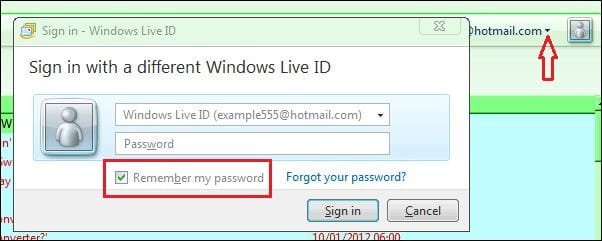
Wrong! see my image.

RR.JPG
 

My Computer My Computer

At a glance

Win7 H.Prem. 32bit+SP1
Computer Manufacturer/Model Number
Look in my Signature.
OS
Win7 H.Prem. 32bit+SP1
I have no recollection of using a Windows Live ID to sign in to Windows Live Mail and I am not able to find the page in your image in order to uncheck the "remember password" box. I do not use Windows Live, apart from Windows Live Mail.
 

My Computer My Computer

At a glance

Windows Home Premium x 64AMD Bulldozer FX-4130 3.8GHz Quad Core CPU8GB DDR3(PC3-10700) 667MHz (DDR3 1333)Intel Series 4 Express Chipset
Computer Manufacturer/Model Number
Self built
OS
Windows Home Premium x 64
CPU
AMD Bulldozer FX-4130 3.8GHz Quad Core CPU
Motherboard
Gigabyte 78LMT-USB3
Memory
8GB DDR3(PC3-10700) 667MHz (DDR3 1333)
Graphics Card(s)
Intel Series 4 Express Chipset
Sound Card
Realtek High Definition
Monitor(s) Displays
AOCA 725
Hard Drives
ST3250310AS [Hard drive] (250.06 GB)
KINGSTON SVP100S296G [Hard drive] (96.03 GB)
PSU
?
Case
?
Cooling
?
My image was taken using WLM
 

My Computer My Computer

At a glance

Win7 H.Prem. 32bit+SP1
Computer Manufacturer/Model Number
Look in my Signature.
OS
Win7 H.Prem. 32bit+SP1
I have no recollection of using a Windows Live ID to sign in to Windows Live Mail and I am not able to find the page in your image in order to uncheck the "remember password" box. I do not use Windows Live, apart from Windows Live Mail.
The image shown was the window that shows up if you don't already have your password remembered and you attempt to sign in. In order to stop signing in automatically you need to go to Options/Connection Tab and push the "stop signing in" button. Keep in mind that if you stop signing in your contact list will switch to the "not signed in" list, which may be empty if you have been signing in. So you will have to import your list from an export you make of your contacts prior to selecting "stop signing in". There are two disadvantages to not signing in with respect to contacts: first, you need to backup your contacts manually since they will no longer be synchronized with the "contacts.live.com" website; second, the export copy is unable to save the way your contacts are grouped into categories, so when you use the backup you will have all the contacts but not grouped into categories, so you will have to re-group them. Another less important disadvantage is loosing Photo Email which comes in handy for sending large numbers of photos that collectively may exceed your allowed email file size.
 

My Computer My Computer

At a glance

Windows 8 Pro w/MC 32-bitIntel Atom 1.86 GHz2 GBIntel GMA 500
Computer type
PC/Desktop
Computer Manufacturer/Model Number
OQO 2+
OS
Windows 8 Pro w/MC 32-bit
CPU
Intel Atom 1.86 GHz
Motherboard
OQO 2+
Memory
2 GB
Graphics Card(s)
Intel GMA 500
Sound Card
IDT
Monitor(s) Displays
LCD
Screen Resolution
800 x 480 (portable) 1280 x 1024 (docked)
Hard Drives
64 GB SSD
PSU
9 Ah Battery (portable) or OQO Brick (docked)
Case
Shirt Pocket Sized
Cooling
Tiny Fan
Keyboard
Slide out (portable) DiNovo Edge (docked)
Mouse
Eraser head (portable) Logitech Bluetooth (docked)
Internet Speed
WWAN or 802.11G (portable) T1 (docked)
Browser
IE 10
Other Info
DVD-RW OQO Docking Station
Back
Top