Can't create restore points or backup files

mag45

New member
Local time
10:55 AM
Messages
1
I have a Gateway NV78 running windows 7 home premium 64 bit OS. I can't create restore points or do image backups on this computer. Plenty of room on C: drive and on the external drive I’m backing up to for image backups. When I try to create a restore point, I get the error 'The restore point could not be created for the following reason The specified object was not found (0x80042308). It runs for about two minutes before this message. I see under the event log the following errors:
volsnap 14 - shadow copies of volume C: were aborted because of an IO failure on volume C
Ntfs 57 - The system failed to flush data to the transaction log. Corruption may occur.
atapi 11 - The driver detected a controller error on \Device\Ide\IdePort0
I have always had problems with this computer concerning backups and restore points.
I have taken the following steps:
1. Did a fresh intall of the entire system from the Gateway factory installed partition. Tried to back up - no go.
2. Disabled all firewalls and antivirus software
3. run chkdsk \R - disk is clean.
4. Ran SFC \scannow - file system is clean.
5. Got into services and made sure that VSS and SPP were set to run automatically. Stopped both and restarted. Still no go.
5. Checked vssadmin - All writers are OK before attempting to set restore point. Microsoft is the only provider. After attemping to create restore point, the following writers have timed out: task scheduler writer, system writer, WMI writer, COM+ REGDB writer, MS Service writer, Registry writer, Shadow Copy Optimization Writer.
6. I checked the registry, and the SystemSetupInProgress and UpgradeInProgress flags are both 0.
7. Got into msconfig.exe and did selective backup with 3rd party services disabled, and no startup files being run. Still no go.
8. Tried to backup using Macrium software - same errors.
9. Made sure that there are no old restore points on drive.
Can’t think of what else to do at this point. The system tried to create a restore point over night, and I saw that that failed also. (Guess because no restore points had been created for 7 days). However, Microsoft updates seem to go OK, and it says that restore points are being created during the update, but if I check to see if there are old restore points, none exist.
Can't think of what else to do, and would greatly appreciate any help.
 

My Computer

Computer Manufacturer/Model Number
Gateway NV78
OS
Windows 7 home premium 64 bit
CPU
Intel Core 2 Duo T6660 2.2 GHz
Motherboard
Gateway
Memory
4 GB DIMM2
Graphics Card(s)
Mobil Intel(R) 4 Series Express Chipset Famiily
Sound Card
Intel Realtech High Definition Audio HDMI
Hard Drives
Toshiba MK5055GSX ATA Device
Hello mag45, welcome to Seven Forums!


I'm not much help with your issue right now I'm afraid, so I'm just going to put this out there for you to consider; I would suggest a complete wipe of the Hard Disk Drive but that will over-write all data on the HDD for good.

After you have copied out or made back-ups of the data you need to save to external media; if you can find an exact Windows version that the PC shipped with you can do a clean install using the activation key on the COA sticker attached to the PC though it may require a robo-call to MS to sort the OEM batch-key.

How to Activate Windows 7 by Phone

If you can't find an exact same version, you could use the info in this tutorial to create an "all versions" installer of any version Windows installer, to install using the same method I posted above.

Windows 7 Universal Installation Disc - Create

After you have made backups of everything you care to save, the best method is to do a complete wipe (secure erase) of the entire Hard Disk Drive first, it over-writes everything, all the old Windows code including all the old drivers/programs, giving you the best possible space to install Windows to.

SSD / HDD : Optimize for Windows Reinstallation

You may also care to have a look at this tutorial at the link below, especially Method Two, just in case you find a solution the issue.

System Restore Point : Create at System Startup
 

My Computer

Computer Manufacturer/Model Number
* BFK Customs *
OS
W 7 64-bit Ultimate
CPU
Intel Q9550 Yorkfield
Motherboard
ASUS P5Q Pro
Memory
8GB Dominator 8500C5D
Graphics Card(s)
ATI : XFX 5870
Sound Card
Realtek HD Audio 7-1
Monitor(s) Displays
1x 47" LCD HDMI & 3x 26" LCD HDMI
Screen Resolution
1920x1080P & 1920x1200
Hard Drives
1x 80GB Intel X25-M G2 SSD : 1x 500GB & 1x 640GB WD Caviar Black(s)
PSU
Corsair 620HX
Case
Cooler Master RC-690
Cooling
Tuniq Tower 120, 2x 140mm and 3x 120mm case fans
Keyboard
Microsoft 500
Mouse
Razer Diamondback 3G
Internet Speed
14 Mb/s
Other Info
1x Koutech 3Gb/s SATA HDD Hot Swap Rack
Cannot create backup or system restore point.

Mag 45 - did you ever find a solution? I have the same exact problem. I've had this Dell laptop for 2 years and from day 1, there has never been a system restore point or backup of this system anywhere, anytime. I guess I'm about as computer savvy as I care to be, probably a higher level than the vast majority, but I just got tired of trying. I have more important things to do and have no desire to become a computer techie!
 

My Computer

Computer type
Laptop
Computer Manufacturer/Model Number
Dell
OS
Windows 7 Home Premium
Mag 45 - did you ever find a solution? I have the same exact problem. I've had this Dell laptop for 2 years and from day 1, there has never been a system restore point or backup of this system anywhere, anytime. I guess I'm about as computer savvy as I care to be, probably a higher level than the vast majority, but I just got tired of trying. I have more important things to do and have no desire to become a computer techie!
Doing nothing is not a good strategy. If I were you, I would use imaging. Free Macrium or free Paragon are good options. Then at least you can bail yourself out the day disaster strikes - and I have not yet seen a system where it did not strike one day or another.
 

My Computer

Computer Manufacturer/Model Number
HP, Dell, Gateway, Toshiba - 4 laptops and 2 desktops
OS
Vista, Windows7, Mint Mate, Zorin, Windows 8
CPU
from 1.6GHz Duo to i7
Monitor(s) Displays
2x HP w2207
Hard Drives
5x HDD, 7x SSD, 12x Externals
Keyboard
with trackball - no mices
Mouse
Trackball mice
Internet Speed
DSL 6000
Mag 45 - did you ever find a solution? I have the same exact problem. I've had this Dell laptop for 2 years and from day 1, there has never been a system restore point or backup of this system anywhere, anytime. I guess I'm about as computer savvy as I care to be, probably a higher level than the vast majority, but I just got tired of trying. I have more important things to do and have no desire to become a computer techie!
Doing nothing is not a good strategy. If I were you, I would use imaging. Free Macrium or free Paragon are good options. Then at least you can bail yourself out the day disaster strikes - and I have not yet seen a system where it did not strike one day or another.

I know you're right and disaster has struck in the past. I have pulled my photos and documents onto an external hard drive but perhaps the imaging programs you mentioned would be a good option. Will they work regardless of the current inability to create images?
 

My Computer

Computer type
Laptop
Computer Manufacturer/Model Number
Dell
OS
Windows 7 Home Premium
Sure they will work. They do not rely on the Windows imaging.

One other thing you could try:

Open an elevated commend prompt and run this command

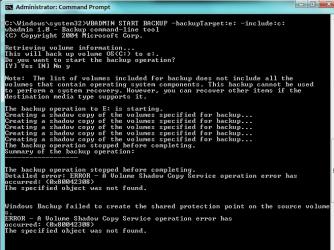
WBADMIN START BACKUP -backupTarget:f: -include:e:

where 'f ' is the disk to which you want to image and 'e' is the partition you image. This command uses some of the same routines as the restore points. Have a look whether that works.

Once you have this image (the VHD), you can mount (attach) it with Disk Management.
 

My Computer

Computer Manufacturer/Model Number
HP, Dell, Gateway, Toshiba - 4 laptops and 2 desktops
OS
Vista, Windows7, Mint Mate, Zorin, Windows 8
CPU
from 1.6GHz Duo to i7
Monitor(s) Displays
2x HP w2207
Hard Drives
5x HDD, 7x SSD, 12x Externals
Keyboard
with trackball - no mices
Mouse
Trackball mice
Internet Speed
DSL 6000

My Computer

Computer type
PC/Desktop
Computer Manufacturer/Model Number
Custom
OS
Windows 7
CPU
AMD Phenom II X2 (dual-core)
Motherboard
GA-MA785GM-US2H
Memory
4G
Graphics Card(s)
integrated ATI HD 4200
Sound Card
integrated
Monitor(s) Displays
Samsung 24"
Screen Resolution
1920x1080
Hard Drives
1 SSD - Samsung 840 - 500 GB - OS and DATA partitions
1 SSD - Intel 320 - 120 GB (used for backups) - Misc/BACKUP
1 SATA HD - WD, 500 GB - BACKUP
PSU
Ultra X4 500W
Case
Ultra X-blaster
Keyboard
Microsoft Digital Media Pro
Mouse
Logitech WIRED!
Internet Speed
15 Mbps FIOS
Didn't work

Sure they will work. They do not rely on the Windows imaging.

One other thing you could try:

Open an elevated commend prompt and run this command

WBADMIN START BACKUP -backupTarget:f: -include:e:

where 'f ' is the disk to which you want to image and 'e' is the partition you image. This command uses some of the same routines as the restore points. Have a look whether that works.

Once you have this image (the VHD), you can mount (attach) it with Disk Management.


Here's what i got:
(I'll try the 3rd party imaging suggestions you made) -- thanks for your help
 

Attachments

  • screenshot.PNG
    screenshot.PNG
    14 KB · Views: 123

My Computer

Computer type
Laptop
Computer Manufacturer/Model Number
Dell
OS
Windows 7 Home Premium
But this is interesting anyhow. It shows that your shadow copy service is corrupted - finding that out was the purpose of the exercise. I think you can repair that only with a startup/repair.
 

My Computer

Computer Manufacturer/Model Number
HP, Dell, Gateway, Toshiba - 4 laptops and 2 desktops
OS
Vista, Windows7, Mint Mate, Zorin, Windows 8
CPU
from 1.6GHz Duo to i7
Monitor(s) Displays
2x HP w2207
Hard Drives
5x HDD, 7x SSD, 12x Externals
Keyboard
with trackball - no mices
Mouse
Trackball mice
Internet Speed
DSL 6000
Back
Top