
Solved System Restore Error, Unable to Create Restore Points

martindm

New member
Local time
1:47 PM
Messages
2
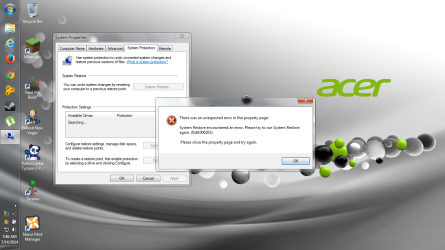
Hello everyone, not sure why but I get an error every time I open the System Restore. I rarely have to use a restore point as I regularly maintain my computer and check for viruses and malware, but I would like to have the option just in case. When I open System Properties, and click the System Protection tab, I get this error and am unable to create a Restore Point. Attached is a screenshot and a DxDiag.txt. Any insight to this problem would be helpful, perhaps I have some windows feature disabled that I might need enabled, I am not sure. I recently did a complete reformat of my hard drive and a fresh install of Windows, maybe two months ago, and somewhere along the line I must have removed/disabled something I need for System Restore. Even third party maintenance software is unable to create restore points, such as TuneUp Utilities 2014, AVG Internet Security 2014, and UVK. I'm sure the fix for this is simple, I am just unaware of it. Thanks in advance.
 

Attachments
  • sysrestoreerror.png
    sysrestoreerror.png
    225.5 KB · Views: 8
  • DxDiag.txt
    DxDiag.txt
    36.8 KB · Views: 5

My Computer

Computer type
Laptop
Computer Manufacturer/Model Number
Acer Aspire 5750z
OS
Windows 7 Home Premium 64-bit
CPU
Intel Pentium CPU B940 @ 2.00GHz (2 CPUs), ~2.0GHz
Memory
4096MB RAM
Graphics Card(s)
Intel(R) HD Graphics Family (Integrated GPU)
Hard Drives
WDC WD5000BPVT-22A1YT0
Antivirus
AVG Internet Security 2014
Browser
Mozilla Firefox 30.0 (x86 en-US)

My Computer

Computer type
PC/Desktop
Computer Manufacturer/Model Number
Pandora (computer name)
OS
Windows 7 x64 / Windows Server 2008 / Linux (Redhat & Deb distros) / OS X / More
CPU
AMD FX 8150 Eight-Core Processor 4.23 Ghz OC
Motherboard
ASUS SaberTooth 990FX
Memory
G.SKILL Ripjaws X Series 32GB (4 x 8GB) DDR3 SDRAM 1333
Graphics Card(s)
2X Radeon HD 4870 CrossFire X
Sound Card
Onboard and loving it
Monitor(s) Displays
2x HP w2480 Wide LCD
Screen Resolution
1920x1200 each
Hard Drives
RAID (6x0 Seagate Barracuda 7200 rpm 32 MB cache 500Gb SATA)
PSU
Antec 850 Watt
Case
Antec 900
Cooling
Lots of fans
Keyboard
Logitech
Mouse
Rat 9
Internet Speed
40 Mbps Down 5 Mbps Up
Antivirus
AVG
Browser
Chrome, Firefox, IE
Other Info
My main desktop
Yeah you are right, it was turbo mode on TuneUp Utilities. It was disabling things like System Restore and Automatic Updates. I just turned off turbo mode and created a restore point.
 

My Computer

Computer type
Laptop
Computer Manufacturer/Model Number
Acer Aspire 5750z
OS
Windows 7 Home Premium 64-bit
CPU
Intel Pentium CPU B940 @ 2.00GHz (2 CPUs), ~2.0GHz
Memory
4096MB RAM
Graphics Card(s)
Intel(R) HD Graphics Family (Integrated GPU)
Hard Drives
WDC WD5000BPVT-22A1YT0
Antivirus
AVG Internet Security 2014
Browser
Mozilla Firefox 30.0 (x86 en-US)
Well that's good! I'm glad that helped :) Be sure to mark this thread as solved if that solved your problem :)
 

My Computer

Computer type
PC/Desktop
Computer Manufacturer/Model Number
Pandora (computer name)
OS
Windows 7 x64 / Windows Server 2008 / Linux (Redhat & Deb distros) / OS X / More
CPU
AMD FX 8150 Eight-Core Processor 4.23 Ghz OC
Motherboard
ASUS SaberTooth 990FX
Memory
G.SKILL Ripjaws X Series 32GB (4 x 8GB) DDR3 SDRAM 1333
Graphics Card(s)
2X Radeon HD 4870 CrossFire X
Sound Card
Onboard and loving it
Monitor(s) Displays
2x HP w2480 Wide LCD
Screen Resolution
1920x1200 each
Hard Drives
RAID (6x0 Seagate Barracuda 7200 rpm 32 MB cache 500Gb SATA)
PSU
Antec 850 Watt
Case
Antec 900
Cooling
Lots of fans
Keyboard
Logitech
Mouse
Rat 9
Internet Speed
40 Mbps Down 5 Mbps Up
Antivirus
AVG
Browser
Chrome, Firefox, IE
Other Info
My main desktop
Back
Top