Solved Device manager showing Standard VGA graphics adapter after restore

Bpruhs

New member
Local time
1:29 PM
Messages
7
I have been searching the internet for hours trying to find a solution to this problem to no avail :(.

Computer: Dell precision workstation t3500, Intel Xeon W3503 @ 2.4ghz, 6gb ram, GTX 560 ti (not working now, worked before restore)

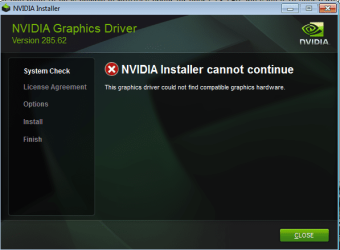
I just restored my PC through Dell's backup and recovery manager. When finished, I tried to install drivers for my GTX 560 that I downloaded off of the Nvidia website. I receive the error: "The graphics driver could not find compatible graphics hardware."
I go to check the Device Manager and in the Display adapters I see "Standard VGA graphics adapter", not my Nvidia card. I'm assuming that is the reason my card does not appear and I can't install drivers?

These are the steps I have already taken:
First I tried uninstalling the Standard VGA graphics adapter but I found that it re-installs itself whenever I restart. Next, I tried to uninstall in safe mode but it STILL re-installs it self while in safe mode. I have tried Driver Sweeper to the same effect. After reading several threads online where users experience similar problems, I went to Dell to find the drivers they supplied for the computer I bought and Dell doesn't offer drivers for the card I have because I upgraded since buying the prebuilt from Dell. I found Dell drivers for a 560 ti however I still receive the same "The graphics driver could not find compatible graphics hardware" error.

These are the hardware id's for the Standard VGA graphics adapter:
PCI\VEN_10DE&DEV_1087&SUBSYS_20683842&REV_A1
PCI\VEN_10DE&DEV_1087&SUBSYS_20683842
PCI\VEN_10DE&DEV_1087&CC_030000
PCI\VEN_10DE&DEV_1087&CC_0300


Why is Device Manager showing me "Standard VGA graphics adapter", Why isn't it recognizing my card when it previously did before being restored?, and most importantly how do I get it to recognize my card so I can install the drivers?

Thanks
 

My Computer My Computer

At a glance

Windows 7
OS
Windows 7
Welcome to Windows Seven Forums.

I shouldn't worry too much about Windows installing drivers for the VGA adapter.

What you need to do is download NVIDIA's driver for your GTX 560 and save it to your hard drive.

Next, right-click the downloaded driver's .exe file and choose Run as Administrator.

You'll be offered a quick install and a custom install so choose the custom option.

The installer will uninstall the VGA adapter driver and clean install the GTX 560 driver.

When it's done reboot your computer and you should be good to go,
 

My Computer My Computer

At a glance

Windows 7 Ultimate SP1 64-BitIntel Core i7 870 @ 2.93GHz8Gb Dual-Channel DDR3 @ 664MHznVidia GeForce GTX 460 1024MB dedicated RAM
Computer Manufacturer/Model Number
HP Pavilion Elite 495UK
OS
Windows 7 Ultimate SP1 64-Bit
CPU
Intel Core i7 870 @ 2.93GHz
Motherboard
MSI 2A9C (CPU1)
Memory
8Gb Dual-Channel DDR3 @ 664MHz
Graphics Card(s)
nVidia GeForce GTX 460 1024MB dedicated RAM
Sound Card
Realtek HD Audio
Monitor(s) Displays
HP2310i
Screen Resolution
1920 x 1080
Hard Drives
1x1954GB Hitachi HDS22020ALA 330 (RAID), 1x1954GB Hitachi External for backup and storage
PSU
460W
Case
HP Elite
Cooling
Air cooled
Keyboard
Logitech K750 solar-powered keyboard
Mouse
Logitech Wireless M180 mouse
Internet Speed
2Mb
Other Info
Pure Avanti Flow Internet Radio with iPod Dock, 64Gb iPod, HP USB Speakers, Sony MDR-V500 Headphones, Sony Vaio F-Series Laptop
Thanks for the response.

I just tried doing that however I get this error: "The graphics driver could not find compatible graphics hardware" before I am even given the install option.


I attached a picture of what I see.
 

Attachments

  • sfa.png
    sfa.png
    34.5 KB · Views: 132

My Computer My Computer

At a glance

Windows 7
OS
Windows 7

My Computer My Computer

At a glance

Windows 7 Ultimate SP1 64-BitIntel Core i7 870 @ 2.93GHz8Gb Dual-Channel DDR3 @ 664MHznVidia GeForce GTX 460 1024MB dedicated RAM
Computer Manufacturer/Model Number
HP Pavilion Elite 495UK
OS
Windows 7 Ultimate SP1 64-Bit
CPU
Intel Core i7 870 @ 2.93GHz
Motherboard
MSI 2A9C (CPU1)
Memory
8Gb Dual-Channel DDR3 @ 664MHz
Graphics Card(s)
nVidia GeForce GTX 460 1024MB dedicated RAM
Sound Card
Realtek HD Audio
Monitor(s) Displays
HP2310i
Screen Resolution
1920 x 1080
Hard Drives
1x1954GB Hitachi HDS22020ALA 330 (RAID), 1x1954GB Hitachi External for backup and storage
PSU
460W
Case
HP Elite
Cooling
Air cooled
Keyboard
Logitech K750 solar-powered keyboard
Mouse
Logitech Wireless M180 mouse
Internet Speed
2Mb
Other Info
Pure Avanti Flow Internet Radio with iPod Dock, 64Gb iPod, HP USB Speakers, Sony MDR-V500 Headphones, Sony Vaio F-Series Laptop
Posting this on my phone, attempting a fresh restore then trying the method on that thread.

Will update.
 

My Computer My Computer

At a glance

Windows 7
OS
Windows 7
unfortunately that solution didn't work =(
 

My Computer My Computer

At a glance

Windows 7
OS
Windows 7
Do you have Windows 7 32-bit or Windows 7 64-bit?

Obviously you'll need a 32-bit driver for the former and a 64-bit driver for the latter.

Have you tried NVIDIA's Auto Driver Detection utility?

http://www.geforce.com/Drivers
 

My Computer My Computer

At a glance

Windows 7 Ultimate SP1 64-BitIntel Core i7 870 @ 2.93GHz8Gb Dual-Channel DDR3 @ 664MHznVidia GeForce GTX 460 1024MB dedicated RAM
Computer Manufacturer/Model Number
HP Pavilion Elite 495UK
OS
Windows 7 Ultimate SP1 64-Bit
CPU
Intel Core i7 870 @ 2.93GHz
Motherboard
MSI 2A9C (CPU1)
Memory
8Gb Dual-Channel DDR3 @ 664MHz
Graphics Card(s)
nVidia GeForce GTX 460 1024MB dedicated RAM
Sound Card
Realtek HD Audio
Monitor(s) Displays
HP2310i
Screen Resolution
1920 x 1080
Hard Drives
1x1954GB Hitachi HDS22020ALA 330 (RAID), 1x1954GB Hitachi External for backup and storage
PSU
460W
Case
HP Elite
Cooling
Air cooled
Keyboard
Logitech K750 solar-powered keyboard
Mouse
Logitech Wireless M180 mouse
Internet Speed
2Mb
Other Info
Pure Avanti Flow Internet Radio with iPod Dock, 64Gb iPod, HP USB Speakers, Sony MDR-V500 Headphones, Sony Vaio F-Series Laptop
Windows 7 64-bit.
I have tried the detection utility but I receive this message: "Unfortunately we were unable to detect your GPU. Please try again using the manual search"
 

My Computer My Computer

At a glance

Windows 7
OS
Windows 7
Are you absolutely sure you have the GTX 560 installed in your computer, because right now I'm out of ideas.
 

My Computer My Computer

At a glance

Windows 7 Ultimate SP1 64-BitIntel Core i7 870 @ 2.93GHz8Gb Dual-Channel DDR3 @ 664MHznVidia GeForce GTX 460 1024MB dedicated RAM
Computer Manufacturer/Model Number
HP Pavilion Elite 495UK
OS
Windows 7 Ultimate SP1 64-Bit
CPU
Intel Core i7 870 @ 2.93GHz
Motherboard
MSI 2A9C (CPU1)
Memory
8Gb Dual-Channel DDR3 @ 664MHz
Graphics Card(s)
nVidia GeForce GTX 460 1024MB dedicated RAM
Sound Card
Realtek HD Audio
Monitor(s) Displays
HP2310i
Screen Resolution
1920 x 1080
Hard Drives
1x1954GB Hitachi HDS22020ALA 330 (RAID), 1x1954GB Hitachi External for backup and storage
PSU
460W
Case
HP Elite
Cooling
Air cooled
Keyboard
Logitech K750 solar-powered keyboard
Mouse
Logitech Wireless M180 mouse
Internet Speed
2Mb
Other Info
Pure Avanti Flow Internet Radio with iPod Dock, 64Gb iPod, HP USB Speakers, Sony MDR-V500 Headphones, Sony Vaio F-Series Laptop
I'm sure =/
I was using it before I restored
 

My Computer My Computer

At a glance

Windows 7
OS
Windows 7
Solved by editing the .inf files in the Dell driver instead of the nvidia driver.

Thanks.
 

My Computer My Computer

At a glance

Windows 7
OS
Windows 7
Great stuff.

Thanks for the update.
 

My Computer My Computer

At a glance

Windows 7 Ultimate SP1 64-BitIntel Core i7 870 @ 2.93GHz8Gb Dual-Channel DDR3 @ 664MHznVidia GeForce GTX 460 1024MB dedicated RAM
Computer Manufacturer/Model Number
HP Pavilion Elite 495UK
OS
Windows 7 Ultimate SP1 64-Bit
CPU
Intel Core i7 870 @ 2.93GHz
Motherboard
MSI 2A9C (CPU1)
Memory
8Gb Dual-Channel DDR3 @ 664MHz
Graphics Card(s)
nVidia GeForce GTX 460 1024MB dedicated RAM
Sound Card
Realtek HD Audio
Monitor(s) Displays
HP2310i
Screen Resolution
1920 x 1080
Hard Drives
1x1954GB Hitachi HDS22020ALA 330 (RAID), 1x1954GB Hitachi External for backup and storage
PSU
460W
Case
HP Elite
Cooling
Air cooled
Keyboard
Logitech K750 solar-powered keyboard
Mouse
Logitech Wireless M180 mouse
Internet Speed
2Mb
Other Info
Pure Avanti Flow Internet Radio with iPod Dock, 64Gb iPod, HP USB Speakers, Sony MDR-V500 Headphones, Sony Vaio F-Series Laptop
What is the answer?

Sorry to post in a solved thread, but I have the same problem.

The difference is that I have an Acer Aspire 8930G. My GFx card went south for some reason almost 2 years ago. I just bought a new one, and installed it and upgraded my laptop from vista to win7 ultimate x64.
But I'm stuck on standard VGA graphics card, and this is day 5 on trying to solve this.

Bpruhs wrote that it was solved by editing the .inf files in the Dell driver instead of the nvidia driver.

How? What did he/she do?

Please help!
 

My Computer My Computer

At a glance

Windows 7 Ultimate x64
OS
Windows 7 Ultimate x64
I have a similar issue. Multi boot GB X58-UD5,f13. Nvidia 1gb 8400GS, 12gb ram, several drives, conservative bios setup.
3x-Win7, 1x-Win8, Linux booters via EasyBCD. The win7 install on SSD blew up with some kind of glitch, source never identified. Eventually got it to get past BSOD on boot with some external cleaning. Only worked with "unsigned driver" boot option. Many system files appeared to be munged, sfc no use - hash errors making it look like the hash tables were gone too.
So I then managed a repair install-in-place (usb boot worked but not recognized from this running OS so more fun there), retaining data and some installed software.
Got only VGA video, Nvidia installers failed with the 'no hardware found' errors and a failure due to inablilty to remove a font for reinstall (found in the NV install logs). Used Revo uninstaller to clean up. Still no go. Then saw in a thread a suggestion to trash the display and VGA and let them reinstall.
VGA and video came back, but no display devices show in devmgr. Now the same NVIDIA errors not finding the NVIDIA card, running only in generic VGA mode. Before you 'AHA!' this one, the other OS installs boot and run perfectly with current display drivers. The faulty Win7 passes the relevant checks otherwise and the drive tests good. The rest of the hardware seems stable and power is in spec. One small clue is that the faulty OS _sometimes_ takes a long time in POST for a reboot. Power cycling cures this.
It seems that the next step is another 'upgrade' repair install and maybe an image save and full wipe install....bios refresh, battery, image to another drive. Yes, there are needed programs on the drive that would take a long time to get going again.

Ideas?
 
Last edited:

My Computer My Computer

At a glance

win7 64b
OS
win7 64b
I have been searching the internet for hours trying to find a solution to this problem to no avail :(.

Computer: Dell precision workstation t3500, Intel Xeon W3503 @ 2.4ghz, 6gb ram, GTX 560 ti (not working now, worked before restore)

I just restored my PC through Dell's backup and recovery manager. When finished, I tried to install drivers for my GTX 560 that I downloaded off of the Nvidia website. I receive the error: "The graphics driver could not find compatible graphics hardware."
I go to check the Device Manager and in the Display adapters I see "Standard VGA graphics adapter", not my Nvidia card. I'm assuming that is the reason my card does not appear and I can't install drivers?

These are the steps I have already taken:
First I tried uninstalling the Standard VGA graphics adapter but I found that it re-installs itself whenever I restart. Next, I tried to uninstall in safe mode but it STILL re-installs it self while in safe mode. I have tried Driver Sweeper to the same effect. After reading several threads online where users experience similar problems, I went to Dell to find the drivers they supplied for the computer I bought and Dell doesn't offer drivers for the card I have because I upgraded since buying the prebuilt from Dell. I found Dell drivers for a 560 ti however I still receive the same "The graphics driver could not find compatible graphics hardware" error.

These are the hardware id's for the Standard VGA graphics adapter:
PCI\VEN_10DE&DEV_1087&SUBSYS_20683842&REV_A1
PCI\VEN_10DE&DEV_1087&SUBSYS_20683842
PCI\VEN_10DE&DEV_1087&CC_030000
PCI\VEN_10DE&DEV_1087&CC_0300


Why is Device Manager showing me "Standard VGA graphics adapter", Why isn't it recognizing my card when it previously did before being restored?, and most importantly how do I get it to recognize my card so I can install the drivers?

Thanks

I hassled for months, trying to get a solution to a similar problem. Nothing I did fixed it, and no help could be found. Until I discovered this NVIDIA GeForce Automatic Driver Updater
Drivers | GeForce

Ran the program, it said it had failed, but when rebooted Everything looked Great. FIXED.
Hope it works for you, or someone else.
 

My Computer My Computer

At a glance

Windows 7 Home Premium 64bit3.30 gigahertz Intel Core i3-2120
Computer type
PC/Desktop
Computer Manufacturer/Model Number
Dell
OS
Windows 7 Home Premium 64bit
CPU
3.30 gigahertz Intel Core i3-2120
Motherboard
Alienware 06G6JW A00
Back
Top