Active directory

ajishb03

New member
Member
Local time
2:31 PM
Messages
32
I am very new to active directory. Hence I need to make my basics strong. Hence if any one could answer this for me please.
If I run a company, say 'a financial', If I have 10 users. I have also installed windows server 2008 in one of my computers and
given windows vista to the client computers. How will I make the client computers connect to my server? If I install DHCP server
will it give private IP or APIPA(169.X.X.X). With APIPA could I communicate? Also I dont have ISP becuase I am not hosting a webste.
Is it possible to have active directory in this environment? Or to have active directory I should always be conected to the internet?
 

My Computer

OS
windows 7 Home premium 64 bit
Welcome to SF.

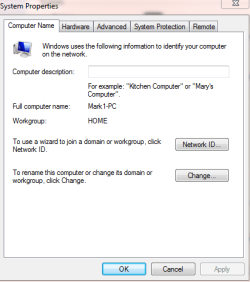
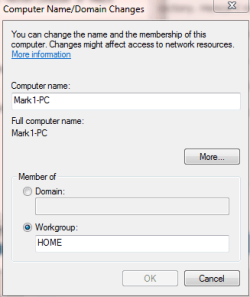
On the client, right click on computer. Left click on properties. Under computer name, domain, and workgroup settings -> select "change settings".

I typically select "Change" to specify the domain. You might want to use the wizard.
 

Attachments

  • Capture.PNG
    Capture.PNG
    9.9 KB · Views: 17
  • Capture2.PNG
    Capture2.PNG
    7.9 KB · Views: 12

My Computer

Computer Manufacturer/Model Number
Dell and Custom
OS
Systems 1 and 2: Windows 7 Enterprise x64, Win 8 Developer
CPU
System 1: i7 [email protected], System 2: AMD FX-4100 Zambezi 3.6G
Motherboard
System 1:Dell 06NWYK System 2: ASUS M5A97 AM3+
Memory
System 1: 8GB System 2: 8GB
Graphics Card(s)
System 1: ATI FirePro V4800 System 2: Radeon HD 6850
Sound Card
System 1: onboard System 2: onboard
Monitor(s) Displays
System1: Viewsonic HDMI 24"
Screen Resolution
System 1: 1920x1080 System 2: 1920x1080
Hard Drives
System 1: Mirrored .5B drives System 2: Seagate Barracuda ST1000DM003 1TB 7200 RPM 64MB Cache SATA 6.0Gb/s
Case
System 1: Dell System 2: Cooler Master
Internet Speed
10 MBPS
Hi ajishb03,

If you are up for a big challenge, you may configure your Windows 2008 Server as a Domain Controller, AD will be created automatically. It is always a good practice to configure DHCP and don't forget the DNS from the Server, then you may create/add all 10 Users in AD Users & Computers - see Lemur's Post on how to join a computer in your Domain Controller.

If you decide not to configure DHCP in your Server, you may enable DHCP from your Router (it will create conflict if your have both enabled). Make sure that all your 10 PC's have DHCP or Auto IP Enabled, they will have to receive the IP Addresses from your Router or Server. You will get the IPIPA Addressing if the IP is not configured properly from your network.

If this is the first time that you are setting up a Domain Network, you will need to do a lot of reading and training. A few others will go through some professional In-Person training, I was one of those. :D

A good Tutorial here on how to configure a Windows 2008 Server as your first DC.

You don't have to have a Domain Network, Workgroup will also do.

Hope this helps.
 
Last edited:

My Computer

Computer Manufacturer/Model Number
Lenovo Desktop/Samsung Laptop
OS
Win7 & Win8 64bit
CPU
Intel i5
Internet Speed
Charter-20 Mbps
Antivirus
Avast
Browser
FF, IE9 and Chrome
You don't have to be on the Internet for Active Directory. If you setup a DHCP server, you can have the server hand out IP's on any range you like, APIPA is just what is used when a DHCP server cannot be found. If the machines all got APIPA addresses, they could talk to one another as they are technically on the same subnet.

I question why you would ever put Vista on the workstations though. Windows 7 is a much better choice, and often times easier on less capable hardware.
 

My Computer

Computer Manufacturer/Model Number
Self-Built in July 2009
OS
Windows 7 Ultimate x64
CPU
Intel Q9550 2.83Ghz OC'd to 3.40Ghz
Motherboard
Gigabyte GA-EP45-UD3R rev. 1.1, F12 BIOS
Memory
8GB G.Skill PI DDR2-800, 4-4-4-12 timings
Graphics Card(s)
EVGA 1280MB Nvidia GeForce GTX570
Sound Card
Realtek ALC899A 8 channel onboard audio
Monitor(s) Displays
23" Acer x233H
Screen Resolution
1920x1080
Hard Drives
Intel X25-M 80GB Gen 2 SSD
Western Digital 1TB Caviar Black, 32MB cache. WD1001FALS
PSU
Corsair 620HX modular
Case
Antec P182
Cooling
stock
Keyboard
ABS M1 Mechanical
Mouse
Logitech G9 Laser Mouse
Internet Speed
15/2 cable modem
Other Info
Windows and Linux enthusiast. Logitech G35 Headset.
One thing of note: I see that at least your listed system is home premium.

Remember that not all versions of vista will be able to join a domain. (in vista home premium and basic can not join)
 

My Computer

OS
Windows 7 32 bit & Windows 7 64 bit
CPU
Core i5
Motherboard
eVGA
Memory
4GB 1333
Graphics Card(s)
eVGA 460 GT OC
Welcome to SF.

On the client, right click on computer. Left click on properties. Under computer name, domain, and workgroup settings -> select "change settings".

I typically select "Change" to specify the domain. You might want to use the wizard.

Thanks
 

My Computer

OS
windows 7 Home premium 64 bit
You don't have to be on the Internet for Active Directory. If you setup a DHCP server, you can have the server hand out IP's on any range you like, APIPA is just what is used when a DHCP server cannot be found. If the machines all got APIPA addresses, they could talk to one another as they are technically on the same subnet.

I question why you would ever put Vista on the workstations though. Windows 7 is a much better choice, and often times easier on less capable hardware.

Thank you for your reply too. Ok if internet is not required for active directory to work, then that means DNS server works for intranet as well??? Because I learned active directory cannot work without DNS server and I thought DNS server works only for internet. If DNS works for intranet (locally) then why we use www.x.com for domain.. could www be used locally for an intranet???
 

My Computer

OS
windows 7 Home premium 64 bit
One thing of note: I see that at least your listed system is home premium.

Remember that not all versions of vista will be able to join a domain. (in vista home premium and basic can not join)

sure mate
 

My Computer

OS
windows 7 Home premium 64 bit
Hi ajishb03,

If you are up for a big challenge, you may configure your Windows 2008 Server as a Domain Controller, AD will be created automatically. It is always a good practice to configure DHCP and don't forget the DNS from the Server, then you may create/add all 10 Users in AD Users & Computers - see Lemur's Post on how to join a computer in your Domain Controller.

If you decide not to configure DHCP in your Server, you may enable DHCP from your Router (it will create conflict if your have both enabled). Make sure that all your 10 PC's have DHCP or Auto IP Enabled, they will have to receive the IP Addresses from your Router or Server. You will get the IPIPA Addressing if the IP is not configured properly from your network.

If this is the first time that you are setting up a Domain Network, you will need to do a lot of reading and training. A few others will go through some professional In-Person training, I was one of those. :D

A good Tutorial here on how to configure a Windows 2008 Server as your first DC.

You don't have to have a Domain Network, Workgroup will also do.

Hope this helps.

Thank you so much... so do you mean we could set an active directory on a work group as well. ??
 

My Computer

OS
windows 7 Home premium 64 bit
Welcome to SF.

On the client, right click on computer. Left click on properties. Under computer name, domain, and workgroup settings -> select "change settings".

I typically select "Change" to specify the domain. You might want to use the wizard.

you guys make learning easier...please contribute more....
 

My Computer

OS
windows 7 Home premium 64 bit
Thank you for your reply too. Ok if internet is not required for active directory to work, then that means DNS server works for intranet as well??? Because I learned active directory cannot work without DNS server and I thought DNS server works only for internet. If DNS works for intranet (locally) then why we use www.x.com for domain.. could www be used locally for an intranet???
Woah, hold on there ;).

So, what you had heard is partially correct - Active Directory (any server version, any domain or forest level) absolutely requires DNS to work. Everything in active directory itself relies on DNS in some way, shape, or form, and without it AD doesn't work, computers can't authenticate, join the domain, etc. So, yes, DNS is required for Active Directory to work, and that is why you really want to install the DNS server role on your server before you install and enable the Active Directory role (the AD installation wizard will configure DNS properly for you after asking you a few questions about your domain).

However, having a DNS domain does not have anything to do with the internet - in fact, almost every AD domain out there in existence doesn't have any integration with internet-facing DNS servers short of forwarding or discovery. Also, using a root-level DNS domain for an internal domain structure, unless you are using it specifically for that purpose, is neither recommended nor a good/best practice. For example, if you owned the domain "mydomain.com", and you wanted to use that for Active Directory, that would break things like www.mydomain.com, unless you added an A record into DNS manually (or actually had a host called www in your domain - also not a good idea, in either case ;)).

What you should be doing, is using the name of a new subdomain of "mydomain.com", perhaps called "ad.mydomain.com", when you set up your AD infrastructure. That will create an Active Directory Forest root called "ad.mydomain.com", and the netbios domain name (unless you changed it) would be "AD". You could then easily create child domains in this forest later (for example, "sales.ad.mydomain.com" or "marketing.ad.mydomain.com") as necessary. Again, NONE of this has anything to do with the public "mydomain.com" other than you are now using it as part of your DNS naming structure for AD.

Hopefully that makes some sense - if it doesn't, I strongly suggest doing a little more reading/research into AD itself, as these are pretty basic questions about the foundations of Active Directory.
How DNS Support for Active Directory Works: Active Directory

 

My Computer

Computer type
PC/Desktop
Computer Manufacturer/Model Number
Custom
OS
Windows 10 Pro x64
CPU
Intel Core i7 4790K @ 4.5GHz
Motherboard
Asus Maximus Hero VII
Memory
32GB DDR3
Graphics Card(s)
Nvidia GeForce GTX970
Sound Card
Realtek HD Audio
Screen Resolution
1920x1200
Hard Drives
1x Samsung 250GB SSD
4x WD RE 2TB (RAIDZ)
PSU
Corsair AX760i
Case
Fractal Design Define R4
Cooling
Noctua NH-D15
Hi ajishb03,

If you are up for a big challenge, you may configure your Windows 2008 Server as a Domain Controller, AD will be created automatically. It is always a good practice to configure DHCP and don't forget the DNS from the Server, then you may create/add all 10 Users in AD Users & Computers - see Lemur's Post on how to join a computer in your Domain Controller.

If you decide not to configure DHCP in your Server, you may enable DHCP from your Router (it will create conflict if your have both enabled). Make sure that all your 10 PC's have DHCP or Auto IP Enabled, they will have to receive the IP Addresses from your Router or Server. You will get the IPIPA Addressing if the IP is not configured properly from your network.

If this is the first time that you are setting up a Domain Network, you will need to do a lot of reading and training. A few others will go through some professional In-Person training, I was one of those. :D

A good Tutorial here on how to configure a Windows 2008 Server as your first DC.

You don't have to have a Domain Network, Workgroup will also do.

Hope this helps.

Thank you so much... so do you mean we could set an active directory on a work group as well. ??

With a workgroup, all administration would be done at the local pc. Not appropriate for AD. The domain provides a single point of administration (e.g., login script, policies, accts, etc). Stay with the domain for active directory.
 

My Computer

Computer Manufacturer/Model Number
Dell and Custom
OS
Systems 1 and 2: Windows 7 Enterprise x64, Win 8 Developer
CPU
System 1: i7 [email protected], System 2: AMD FX-4100 Zambezi 3.6G
Motherboard
System 1:Dell 06NWYK System 2: ASUS M5A97 AM3+
Memory
System 1: 8GB System 2: 8GB
Graphics Card(s)
System 1: ATI FirePro V4800 System 2: Radeon HD 6850
Sound Card
System 1: onboard System 2: onboard
Monitor(s) Displays
System1: Viewsonic HDMI 24"
Screen Resolution
System 1: 1920x1080 System 2: 1920x1080
Hard Drives
System 1: Mirrored .5B drives System 2: Seagate Barracuda ST1000DM003 1TB 7200 RPM 64MB Cache SATA 6.0Gb/s
Case
System 1: Dell System 2: Cooler Master
Internet Speed
10 MBPS
Thank you for your reply too. Ok if internet is not required for active directory to work, then that means DNS server works for intranet as well??? Because I learned active directory cannot work without DNS server and I thought DNS server works only for internet. If DNS works for intranet (locally) then why we use www.x.com for domain.. could www be used locally for an intranet???

It is true that Active Directory relies on DNS to work. And when you install a server and run dcpromo, it will allow you to install a DNS server as well. Even on a network without internet access, you will have an internal DNS namespace. For example, EXAMPLE.LOCAL. Therefore, if you named your server Pablo, you would have a host called pablo.example.local. And you might have a workstation named tiger and a workstation named lion, thus you would have tiger.example.local and lion.example.local. All DNS is is a way to resolve hostnames on a network, it doesn't matter whether that network is a small private network, a larger corporate network, or on the Internet.
 

My Computer

Computer Manufacturer/Model Number
Self-Built in July 2009
OS
Windows 7 Ultimate x64
CPU
Intel Q9550 2.83Ghz OC'd to 3.40Ghz
Motherboard
Gigabyte GA-EP45-UD3R rev. 1.1, F12 BIOS
Memory
8GB G.Skill PI DDR2-800, 4-4-4-12 timings
Graphics Card(s)
EVGA 1280MB Nvidia GeForce GTX570
Sound Card
Realtek ALC899A 8 channel onboard audio
Monitor(s) Displays
23" Acer x233H
Screen Resolution
1920x1080
Hard Drives
Intel X25-M 80GB Gen 2 SSD
Western Digital 1TB Caviar Black, 32MB cache. WD1001FALS
PSU
Corsair 620HX modular
Case
Antec P182
Cooling
stock
Keyboard
ABS M1 Mechanical
Mouse
Logitech G9 Laser Mouse
Internet Speed
15/2 cable modem
Other Info
Windows and Linux enthusiast. Logitech G35 Headset.
Thank you for your reply too. Ok if internet is not required for active directory to work, then that means DNS server works for intranet as well??? Because I learned active directory cannot work without DNS server and I thought DNS server works only for internet. If DNS works for intranet (locally) then why we use www.x.com for domain.. could www be used locally for an intranet???

It is true that Active Directory relies on DNS to work. And when you install a server and run dcpromo, it will allow you to install a DNS server as well. Even on a network without internet access, you will have an internal DNS namespace. For example, EXAMPLE.LOCAL. Therefore, if you named your server Pablo, you would have a host called pablo.example.local. And you might have a workstation named tiger and a workstation named lion, thus you would have tiger.example.local and lion.example.local. All DNS is is a way to resolve hostnames on a network, it doesn't matter whether that network is a small private network, a larger corporate network, or on the Internet.

fabulous......cleared..thanks...
 

My Computer

OS
windows 7 Home premium 64 bit
Hi ajishb03,

If you are up for a big challenge, you may configure your Windows 2008 Server as a Domain Controller, AD will be created automatically. It is always a good practice to configure DHCP and don't forget the DNS from the Server, then you may create/add all 10 Users in AD Users & Computers - see Lemur's Post on how to join a computer in your Domain Controller.

If you decide not to configure DHCP in your Server, you may enable DHCP from your Router (it will create conflict if your have both enabled). Make sure that all your 10 PC's have DHCP or Auto IP Enabled, they will have to receive the IP Addresses from your Router or Server. You will get the IPIPA Addressing if the IP is not configured properly from your network.

If this is the first time that you are setting up a Domain Network, you will need to do a lot of reading and training. A few others will go through some professional In-Person training, I was one of those. :D

A good Tutorial here on how to configure a Windows 2008 Server as your first DC.

You don't have to have a Domain Network, Workgroup will also do.

Hope this helps.

Thank you so much... so do you mean we could set an active directory on a work group as well. ??

With a workgroup, all administration would be done at the local pc. Not appropriate for AD. The domain provides a single point of administration (e.g., login script, policies, accts, etc). Stay with the domain for active directory.

thank you
 

My Computer

OS
windows 7 Home premium 64 bit
Thank you for your reply too. Ok if internet is not required for active directory to work, then that means DNS server works for intranet as well??? Because I learned active directory cannot work without DNS server and I thought DNS server works only for internet. If DNS works for intranet (locally) then why we use www.x.com for domain.. could www be used locally for an intranet???
Woah, hold on there ;).

So, what you had heard is partially correct - Active Directory (any server version, any domain or forest level) absolutely requires DNS to work. Everything in active directory itself relies on DNS in some way, shape, or form, and without it AD doesn't work, computers can't authenticate, join the domain, etc. So, yes, DNS is required for Active Directory to work, and that is why you really want to install the DNS server role on your server before you install and enable the Active Directory role (the AD installation wizard will configure DNS properly for you after asking you a few questions about your domain).

However, having a DNS domain does not have anything to do with the internet - in fact, almost every AD domain out there in existence doesn't have any integration with internet-facing DNS servers short of forwarding or discovery. Also, using a root-level DNS domain for an internal domain structure, unless you are using it specifically for that purpose, is neither recommended nor a good/best practice. For example, if you owned the domain "mydomain.com", and you wanted to use that for Active Directory, that would break things like www.mydomain.com, unless you added an A record into DNS manually (or actually had a host called www in your domain - also not a good idea, in either case ;)).

What you should be doing, is using the name of a new subdomain of "mydomain.com", perhaps called "ad.mydomain.com", when you set up your AD infrastructure. That will create an Active Directory Forest root called "ad.mydomain.com", and the netbios domain name (unless you changed it) would be "AD". You could then easily create child domains in this forest later (for example, "sales.ad.mydomain.com" or "marketing.ad.mydomain.com") as necessary. Again, NONE of this has anything to do with the public "mydomain.com" other than you are now using it as part of your DNS naming structure for AD.

Hopefully that makes some sense - if it doesn't, I strongly suggest doing a little more reading/research into AD itself, as these are pretty basic questions about the foundations of Active Directory.
How DNS Support for Active Directory Works: Active Directory

yup i am researching thanks...
 

My Computer

OS
windows 7 Home premium 64 bit
Good luck :)
 

My Computer

Computer type
PC/Desktop
Computer Manufacturer/Model Number
Custom
OS
Windows 10 Pro x64
CPU
Intel Core i7 4790K @ 4.5GHz
Motherboard
Asus Maximus Hero VII
Memory
32GB DDR3
Graphics Card(s)
Nvidia GeForce GTX970
Sound Card
Realtek HD Audio
Screen Resolution
1920x1200
Hard Drives
1x Samsung 250GB SSD
4x WD RE 2TB (RAIDZ)
PSU
Corsair AX760i
Case
Fractal Design Define R4
Cooling
Noctua NH-D15
why some domains have 2 domain controllers ? Is this for load balancing?
 

My Computer

OS
windows 7 Home premium 64 bit
Redundancy. If the primary DC fails, the other takes over. They both have copies of the AD.
 

My Computer

Computer Manufacturer/Model Number
Dell and Custom
OS
Systems 1 and 2: Windows 7 Enterprise x64, Win 8 Developer
CPU
System 1: i7 [email protected], System 2: AMD FX-4100 Zambezi 3.6G
Motherboard
System 1:Dell 06NWYK System 2: ASUS M5A97 AM3+
Memory
System 1: 8GB System 2: 8GB
Graphics Card(s)
System 1: ATI FirePro V4800 System 2: Radeon HD 6850
Sound Card
System 1: onboard System 2: onboard
Monitor(s) Displays
System1: Viewsonic HDMI 24"
Screen Resolution
System 1: 1920x1080 System 2: 1920x1080
Hard Drives
System 1: Mirrored .5B drives System 2: Seagate Barracuda ST1000DM003 1TB 7200 RPM 64MB Cache SATA 6.0Gb/s
Case
System 1: Dell System 2: Cooler Master
Internet Speed
10 MBPS
I actually wanted to work out how active directory work in corporate world as I dont have any experience in working with active directory.
DNS has all the records for the domain which is distributed in different zones like primary and secondary. Now in the domain we have users. Now my question is what sort of records or resources are the user updating in the DNS for eg. the concept of dynamic update and non dynamic update. And why the updates should sometimes be secure?

If the user logins to the given credentials to him or her and if he uses internet to browse how this could be related to the DNS dynamic update??
 

My Computer

OS
windows 7 Home premium 64 bit
Back
Top