Solved More reliable software for hardware sensors?

writhziden

Closed by request.
Local time
1:50 AM
Messages
11,269
Location
Colorado
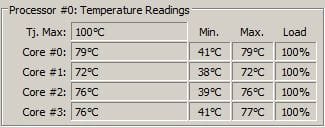
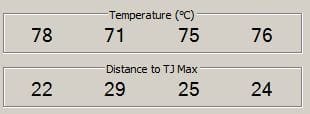
I have tried out a number of different temperature monitors during my time helping within the crashing and debugging forums. I am now wondering if these monitors are accurate because they claim my desktop CPU is getting up to 76 C. Q9550 shows that the max is 71.4 C (or 76.4 C if one adds the 5 C), so I would be very surprised if my cores were actually getting to 76 C on a regular basis for the past two years without a catastrophic failure resulting. See the images attached for HWINFO, RealTemp, SpeedFan, and Core Temp in that order. I am wondering if the TJMax might be offset from 76 to 100 and that is causing the erroneous readings from my sensors.

HWINFO.JPG

RealTemp.JPG

SpeedFan.JPG

Core Temp.JPG

Is there a better program for monitoring system temperatures than HWINFO, RealTemp, SpeedFan, and Core Temp?
 

My Computer My Computer

Computer Manufacturer/Model Number
HP Pavilion e9110t
OS
Windows 7 Home Premium 64 Bit
CPU
Intel(R) Core(TM)2 Quad CPU Q9550 @ 2.83GHz
Motherboard
Pegatron IPIEL-LA3
Memory
6.00 GB Hundai HMT125U6BFR8C-H9
Graphics Card(s)
ATI Radeon HD 4850
Sound Card
Realtek High Definition Audio/ATI High Definition Audio
Monitor(s) Displays
Acer AL2216W
Screen Resolution
1680x1050
Hard Drives
Hitachi HDP725050GLA360 ATA Device 500 GB
PSU
Unknown/installed by HP
Case
HP generic case
Cooling
Intel Stock Cooling
Keyboard
HP Keyboard
Mouse
HP Mouse
Internet Speed
Download: 19.15 Mbps Upload: 1.67 Mbps
Other Info
Network Adapter Realtek RTL8168D/8111D Family PCI-E Gigabit Ethernet NIC (NDIS 6.20)
Network Adapter 802.11n Wireless PCI Express Card LAN Adapter
I don't put a lot of faith in any of them.

Do any of them do anything other than try to read a number from the BIOS?

I've never made a study of them, but I don't really understand why they vary so much.

I use HWInfo, but don't take its readings too seriously.

I have a setting in my BIOS to set off an audio alarm if temps rise above a certain point that I can choose. As long as I don't hear that, I don't agonize over it.

What is the TJ Max on your processor? I wouldn't be surprised if you could operate for years in the 70s.
 

My Computer My Computer

Computer type
PC/Desktop
Computer Manufacturer/Model Number
Ignatz Special; 4 speed manual gearbox; factory air conditioning; one of one
OS
Windows 7 Home Premium SP1, 64-bit
CPU
Intel Skylake i5-6600K, not overclocked
Motherboard
AsRock Z170M Extreme 4, micro ATX
Memory
8 GB HyperX DDR4-2666 (2 x 4 GB)
Graphics Card(s)
none; graphics are integrated on CPU
Sound Card
onboard: Realtek ALC1150; external: USB Behringer UF0-202
Monitor(s) Displays
Dell S2340M 23 inch IPS
Screen Resolution
1600 x 900
Hard Drives
System: Crucial MX100 series SSD, 128 GB;
Data: Samsung Spinpoint 103SJ, 1 TB;
Backup: WD Caviar Green WD30EZRX-00D8PB0, 3 TB
PSU
Rosewill SilentNight 500 watt fanless, semi-modular
Case
Antec Solo II
Cooling
Noctua NH-U12S; Noctua F12 intake, Noctua S12A exhaust
Keyboard
Microsoft 200 6JH-00001 USB
Mouse
Dell or Microsoft optical wired; USB
Antivirus
Microsoft Security Essentials and Malwarebytes Premium
Browser
Pale Moon
Other Info
All fans PWM; speeds at idle: CPU circa 500 rpm; intake circa 600 rpm; exhaust circa 600 rpm; CPU temps 27 idle and 47 C load in a warm room (27 C/81 F) when running Intel Extreme Tuning Utility stress test.
I don't put a lot of faith in any of them.

Do any of them do anything other than try to read a number from the BIOS?

I've never made a study of them, but I don't really understand why they vary so much.

I use HWInfo, but don't take its readings too seriously.

I have a setting in my BIOS to set off an audio alarm if temps rise above a certain point that I can choose. As long as I don't hear that, I don't agonize over it.

What is the TJ Max on your processor? I wouldn't be surprised if you could operate for years in the 70s.

TCase is 71.4 C, so TJ Max should be 76.4 C; All four sensor programs show my temperatures about the same +/- 2 C. The reason they vary so much in the images is I was using prime95 to show how hot they get, so the temperatures rose a bit during the time it took for me to take an image of each. I am thinking that TJ Max for the programs being set at 100 C is misleading. If I adjust it in RealTemp to 76 C instead, for instance, my temperatures look a lot more reasonable. With it adjusted, I get temperatures of 30 C at idle and a max of 56 C during stress.
 

My Computer My Computer

Computer Manufacturer/Model Number
HP Pavilion e9110t
OS
Windows 7 Home Premium 64 Bit
CPU
Intel(R) Core(TM)2 Quad CPU Q9550 @ 2.83GHz
Motherboard
Pegatron IPIEL-LA3
Memory
6.00 GB Hundai HMT125U6BFR8C-H9
Graphics Card(s)
ATI Radeon HD 4850
Sound Card
Realtek High Definition Audio/ATI High Definition Audio
Monitor(s) Displays
Acer AL2216W
Screen Resolution
1680x1050
Hard Drives
Hitachi HDP725050GLA360 ATA Device 500 GB
PSU
Unknown/installed by HP
Case
HP generic case
Cooling
Intel Stock Cooling
Keyboard
HP Keyboard
Mouse
HP Mouse
Internet Speed
Download: 19.15 Mbps Upload: 1.67 Mbps
Other Info
Network Adapter Realtek RTL8168D/8111D Family PCI-E Gigabit Ethernet NIC (NDIS 6.20)
Network Adapter 802.11n Wireless PCI Express Card LAN Adapter
The most reliable? Restart now enter bios,check in there system and cpu temperatures.

Post here the cpu and system temperatures.

Then,

Check with Core Temp.

Check with Speccy - Standard.

Upload here snip\screenshots.
 

My Computer My Computer

Computer Manufacturer/Model Number
Custom Built by me.
OS
Windows 7 Ultimate 64bit SP1
CPU
Intel Core 2 Quad Q6600
Motherboard
Gigabyte GA-X38-DS4
Memory
2X2GB DDR2 PC6400 800MHZ DUAL CHANNEL
Graphics Card(s)
XFX RADEON HD 6850 1GB GDDR5
Sound Card
2/4/5.1/7.1-channel Realtek High Definition
Monitor(s) Displays
Samsung LE40A656F1 1080p 100Hz LCD HD TV 50,000:1
Screen Resolution
1366x768 in Desktop,1920x1080p in gaming and video
Hard Drives
C:\WD VelociRaptor 150 GB,10,000 RPM
E:\WESTERN DIGITAL WD15EADS 1.5TB CAVIAR GREEN SATA2 F:\WESTERN DIGITAL WD15EADS 1.5TB CAVIAR GREEN SATA2
PSU
THERMALTAKE W0229 TOUGHPOWER XT 750W
Case
A-Case Twin Engine BB
Cooling
3 x thermaltake smart case fan II + 1 arctic cooling fan
Keyboard
Wireless Logitech LX710
Mouse
Logitech Wireless Gaming Mouse G700
Internet Speed
ADSL 12000 plus
Other Info
Mouse Logitech G700,with 13 buttons who needs keyboard in RPG?

D:\Sony high speed sata Dvd Rewriter
Logitech Cordless Rumblepad 2
The most reliable? Restart now enter bios,check in there system and cpu temperatures.

Post here the cpu and system temperatures.

Then,

Check with Core Temp.

Check with Speccy - Standard.

Upload here snip\screenshots.

My BIOS does not show my temperatures. HP hides that information (annoyingly). That was the first thing I checked when I realized the sensor programs were giving such high readings.

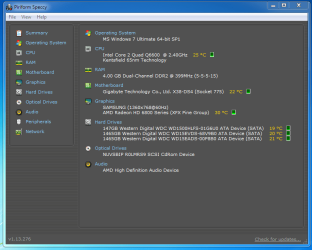
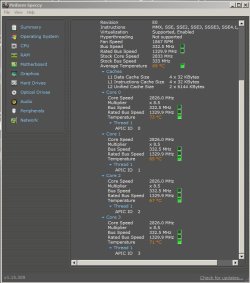
Here are the images:
Core Temp.JPG
Speccy.JPG
 
Last edited:

My Computer My Computer

Computer Manufacturer/Model Number
HP Pavilion e9110t
OS
Windows 7 Home Premium 64 Bit
CPU
Intel(R) Core(TM)2 Quad CPU Q9550 @ 2.83GHz
Motherboard
Pegatron IPIEL-LA3
Memory
6.00 GB Hundai HMT125U6BFR8C-H9
Graphics Card(s)
ATI Radeon HD 4850
Sound Card
Realtek High Definition Audio/ATI High Definition Audio
Monitor(s) Displays
Acer AL2216W
Screen Resolution
1680x1050
Hard Drives
Hitachi HDP725050GLA360 ATA Device 500 GB
PSU
Unknown/installed by HP
Case
HP generic case
Cooling
Intel Stock Cooling
Keyboard
HP Keyboard
Mouse
HP Mouse
Internet Speed
Download: 19.15 Mbps Upload: 1.67 Mbps
Other Info
Network Adapter Realtek RTL8168D/8111D Family PCI-E Gigabit Ethernet NIC (NDIS 6.20)
Network Adapter 802.11n Wireless PCI Express Card LAN Adapter
Core temp never have done mistake for me.

Coretemp always agree with my bios and my laser temp scanner.
 

My Computer My Computer

Computer Manufacturer/Model Number
Custom Built by me.
OS
Windows 7 Ultimate 64bit SP1
CPU
Intel Core 2 Quad Q6600
Motherboard
Gigabyte GA-X38-DS4
Memory
2X2GB DDR2 PC6400 800MHZ DUAL CHANNEL
Graphics Card(s)
XFX RADEON HD 6850 1GB GDDR5
Sound Card
2/4/5.1/7.1-channel Realtek High Definition
Monitor(s) Displays
Samsung LE40A656F1 1080p 100Hz LCD HD TV 50,000:1
Screen Resolution
1366x768 in Desktop,1920x1080p in gaming and video
Hard Drives
C:\WD VelociRaptor 150 GB,10,000 RPM
E:\WESTERN DIGITAL WD15EADS 1.5TB CAVIAR GREEN SATA2 F:\WESTERN DIGITAL WD15EADS 1.5TB CAVIAR GREEN SATA2
PSU
THERMALTAKE W0229 TOUGHPOWER XT 750W
Case
A-Case Twin Engine BB
Cooling
3 x thermaltake smart case fan II + 1 arctic cooling fan
Keyboard
Wireless Logitech LX710
Mouse
Logitech Wireless Gaming Mouse G700
Internet Speed
ADSL 12000 plus
Other Info
Mouse Logitech G700,with 13 buttons who needs keyboard in RPG?

D:\Sony high speed sata Dvd Rewriter
Logitech Cordless Rumblepad 2
I thought TJ Max was closer to 100 on that processor. Just wondering why you added 5 degrees to TCase of 71.4 to get TJ Max?

Have you seen this:

The Truth about Temperatures and Voltages

which says, among other things:

TJ Max is an inherently unreliable and inaccurate method of measuring idle/low temperatures. Due to the way it was designed, the readings are so inaccurate under 50C that Intel says they can only be read as a number temperature below 50C. As the temperature approaches TJ Max, the precision increases and at TJ Max the temperature is considered to be 100% accurate. Because of this error at low temperatures, sub-ambient temperature/very high readings are sometimes given for idle temperatures. With the TJ Max method, your idle temperatures have no accuracy and therefore should be ignored. Under load, the temperatures become much more accurate and should be very carefully monitored.

The argument then says that you should calibrate your TJ Max by measuring the ambient temperature in the room, setting your CPU at stock with stock voltages, but then lower your multiplier to the lowest possible (usually 6 for Core 2 CPUs). Then adjust the TJ Max until your idle temp readings are about 7C higher than ambient. The problem with this argument is that Intel has implied that the Distance to TJ Max values are not linear, and therefore you would have accurate idle temps (not important) and very inaccurate load temps (very important).
 

My Computer My Computer

Computer type
PC/Desktop
Computer Manufacturer/Model Number
Ignatz Special; 4 speed manual gearbox; factory air conditioning; one of one
OS
Windows 7 Home Premium SP1, 64-bit
CPU
Intel Skylake i5-6600K, not overclocked
Motherboard
AsRock Z170M Extreme 4, micro ATX
Memory
8 GB HyperX DDR4-2666 (2 x 4 GB)
Graphics Card(s)
none; graphics are integrated on CPU
Sound Card
onboard: Realtek ALC1150; external: USB Behringer UF0-202
Monitor(s) Displays
Dell S2340M 23 inch IPS
Screen Resolution
1600 x 900
Hard Drives
System: Crucial MX100 series SSD, 128 GB;
Data: Samsung Spinpoint 103SJ, 1 TB;
Backup: WD Caviar Green WD30EZRX-00D8PB0, 3 TB
PSU
Rosewill SilentNight 500 watt fanless, semi-modular
Case
Antec Solo II
Cooling
Noctua NH-U12S; Noctua F12 intake, Noctua S12A exhaust
Keyboard
Microsoft 200 6JH-00001 USB
Mouse
Dell or Microsoft optical wired; USB
Antivirus
Microsoft Security Essentials and Malwarebytes Premium
Browser
Pale Moon
Other Info
All fans PWM; speeds at idle: CPU circa 500 rpm; intake circa 600 rpm; exhaust circa 600 rpm; CPU temps 27 idle and 47 C load in a warm room (27 C/81 F) when running Intel Extreme Tuning Utility stress test.
I prefer to keep it simple,

Are you overclocking anything?
 

My Computer My Computer

Computer Manufacturer/Model Number
Custom Built by me.
OS
Windows 7 Ultimate 64bit SP1
CPU
Intel Core 2 Quad Q6600
Motherboard
Gigabyte GA-X38-DS4
Memory
2X2GB DDR2 PC6400 800MHZ DUAL CHANNEL
Graphics Card(s)
XFX RADEON HD 6850 1GB GDDR5
Sound Card
2/4/5.1/7.1-channel Realtek High Definition
Monitor(s) Displays
Samsung LE40A656F1 1080p 100Hz LCD HD TV 50,000:1
Screen Resolution
1366x768 in Desktop,1920x1080p in gaming and video
Hard Drives
C:\WD VelociRaptor 150 GB,10,000 RPM
E:\WESTERN DIGITAL WD15EADS 1.5TB CAVIAR GREEN SATA2 F:\WESTERN DIGITAL WD15EADS 1.5TB CAVIAR GREEN SATA2
PSU
THERMALTAKE W0229 TOUGHPOWER XT 750W
Case
A-Case Twin Engine BB
Cooling
3 x thermaltake smart case fan II + 1 arctic cooling fan
Keyboard
Wireless Logitech LX710
Mouse
Logitech Wireless Gaming Mouse G700
Internet Speed
ADSL 12000 plus
Other Info
Mouse Logitech G700,with 13 buttons who needs keyboard in RPG?

D:\Sony high speed sata Dvd Rewriter
Logitech Cordless Rumblepad 2
I thought TJ Max was closer to 100 on that processor. Just wondering why you added 5 degrees to TCase of 71.4 to get TJ Max?

Have you seen this:

The Truth about Temperatures and Voltages

which says, among other things:

TJ Max is an inherently unreliable and inaccurate method of measuring idle/low temperatures. Due to the way it was designed, the readings are so inaccurate under 50C that Intel says they can only be read as a number temperature below 50C. As the temperature approaches TJ Max, the precision increases and at TJ Max the temperature is considered to be 100% accurate. Because of this error at low temperatures, sub-ambient temperature/very high readings are sometimes given for idle temperatures. With the TJ Max method, your idle temperatures have no accuracy and therefore should be ignored. Under load, the temperatures become much more accurate and should be very carefully monitored.

The argument then says that you should calibrate your TJ Max by measuring the ambient temperature in the room, setting your CPU at stock with stock voltages, but then lower your multiplier to the lowest possible (usually 6 for Core 2 CPUs). Then adjust the TJ Max until your idle temp readings are about 7C higher than ambient. The problem with this argument is that Intel has implied that the Distance to TJ Max values are not linear, and therefore you would have accurate idle temps (not important) and very inaccurate load temps (very important).

I think I misunderstood what TJ Max is. I thought it was the maximum temperature of the processor. It appears to not be the Tcase from what I am reading. The Q series seems to have a max Tjunction of 90-100 C depending on the processor, so maybe 100 C is correct. The max processor temp I have seen calculated using the case temp + 5 C, but that may be a conservative value.


I prefer to keep it simple,

Are you overclocking anything?

Nope, I do not like overclocking. Why limit my electronics' life when I do not have any money to buy new components? ;)

And if you wonder about dust, the system is dust free as of a week ago. I thoroughly clean the dust out every few weeks.
 

My Computer My Computer

Computer Manufacturer/Model Number
HP Pavilion e9110t
OS
Windows 7 Home Premium 64 Bit
CPU
Intel(R) Core(TM)2 Quad CPU Q9550 @ 2.83GHz
Motherboard
Pegatron IPIEL-LA3
Memory
6.00 GB Hundai HMT125U6BFR8C-H9
Graphics Card(s)
ATI Radeon HD 4850
Sound Card
Realtek High Definition Audio/ATI High Definition Audio
Monitor(s) Displays
Acer AL2216W
Screen Resolution
1680x1050
Hard Drives
Hitachi HDP725050GLA360 ATA Device 500 GB
PSU
Unknown/installed by HP
Case
HP generic case
Cooling
Intel Stock Cooling
Keyboard
HP Keyboard
Mouse
HP Mouse
Internet Speed
Download: 19.15 Mbps Upload: 1.67 Mbps
Other Info
Network Adapter Realtek RTL8168D/8111D Family PCI-E Gigabit Ethernet NIC (NDIS 6.20)
Network Adapter 802.11n Wireless PCI Express Card LAN Adapter
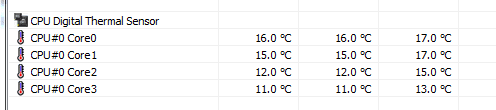
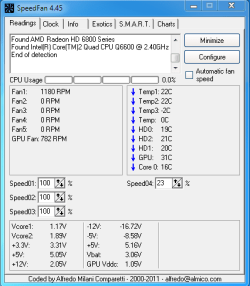
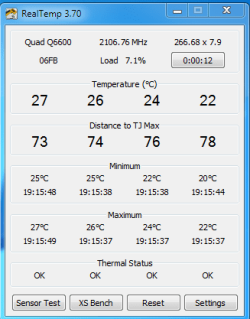
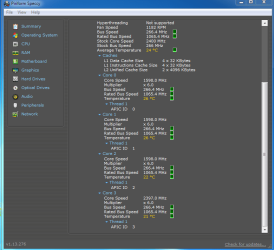
My temps,Q6600 2.40,compare,do you see anything different\strange?
 

Attachments

  • panaisc.PNG
    panaisc.PNG
    28.6 KB · Views: 6
  • panais.PNG
    panais.PNG
    29.2 KB · Views: 12
  • panaisb.PNG
    panaisb.PNG
    11.8 KB · Views: 7
  • HWiNFO.PNG
    HWiNFO.PNG
    2.1 KB · Views: 7
  • SpeedFan.PNG
    SpeedFan.PNG
    9.8 KB · Views: 7
  • RealTemp.PNG
    RealTemp.PNG
    9.6 KB · Views: 6

My Computer My Computer

Computer Manufacturer/Model Number
Custom Built by me.
OS
Windows 7 Ultimate 64bit SP1
CPU
Intel Core 2 Quad Q6600
Motherboard
Gigabyte GA-X38-DS4
Memory
2X2GB DDR2 PC6400 800MHZ DUAL CHANNEL
Graphics Card(s)
XFX RADEON HD 6850 1GB GDDR5
Sound Card
2/4/5.1/7.1-channel Realtek High Definition
Monitor(s) Displays
Samsung LE40A656F1 1080p 100Hz LCD HD TV 50,000:1
Screen Resolution
1366x768 in Desktop,1920x1080p in gaming and video
Hard Drives
C:\WD VelociRaptor 150 GB,10,000 RPM
E:\WESTERN DIGITAL WD15EADS 1.5TB CAVIAR GREEN SATA2 F:\WESTERN DIGITAL WD15EADS 1.5TB CAVIAR GREEN SATA2
PSU
THERMALTAKE W0229 TOUGHPOWER XT 750W
Case
A-Case Twin Engine BB
Cooling
3 x thermaltake smart case fan II + 1 arctic cooling fan
Keyboard
Wireless Logitech LX710
Mouse
Logitech Wireless Gaming Mouse G700
Internet Speed
ADSL 12000 plus
Other Info
Mouse Logitech G700,with 13 buttons who needs keyboard in RPG?

D:\Sony high speed sata Dvd Rewriter
Logitech Cordless Rumblepad 2

My Computer My Computer

Computer Manufacturer/Model Number
HP Pavilion e9110t
OS
Windows 7 Home Premium 64 Bit
CPU
Intel(R) Core(TM)2 Quad CPU Q9550 @ 2.83GHz
Motherboard
Pegatron IPIEL-LA3
Memory
6.00 GB Hundai HMT125U6BFR8C-H9
Graphics Card(s)
ATI Radeon HD 4850
Sound Card
Realtek High Definition Audio/ATI High Definition Audio
Monitor(s) Displays
Acer AL2216W
Screen Resolution
1680x1050
Hard Drives
Hitachi HDP725050GLA360 ATA Device 500 GB
PSU
Unknown/installed by HP
Case
HP generic case
Cooling
Intel Stock Cooling
Keyboard
HP Keyboard
Mouse
HP Mouse
Internet Speed
Download: 19.15 Mbps Upload: 1.67 Mbps
Other Info
Network Adapter Realtek RTL8168D/8111D Family PCI-E Gigabit Ethernet NIC (NDIS 6.20)
Network Adapter 802.11n Wireless PCI Express Card LAN Adapter

My Computer My Computer

Computer Manufacturer/Model Number
Custom Built by me.
OS
Windows 7 Ultimate 64bit SP1
CPU
Intel Core 2 Quad Q6600
Motherboard
Gigabyte GA-X38-DS4
Memory
2X2GB DDR2 PC6400 800MHZ DUAL CHANNEL
Graphics Card(s)
XFX RADEON HD 6850 1GB GDDR5
Sound Card
2/4/5.1/7.1-channel Realtek High Definition
Monitor(s) Displays
Samsung LE40A656F1 1080p 100Hz LCD HD TV 50,000:1
Screen Resolution
1366x768 in Desktop,1920x1080p in gaming and video
Hard Drives
C:\WD VelociRaptor 150 GB,10,000 RPM
E:\WESTERN DIGITAL WD15EADS 1.5TB CAVIAR GREEN SATA2 F:\WESTERN DIGITAL WD15EADS 1.5TB CAVIAR GREEN SATA2
PSU
THERMALTAKE W0229 TOUGHPOWER XT 750W
Case
A-Case Twin Engine BB
Cooling
3 x thermaltake smart case fan II + 1 arctic cooling fan
Keyboard
Wireless Logitech LX710
Mouse
Logitech Wireless Gaming Mouse G700
Internet Speed
ADSL 12000 plus
Other Info
Mouse Logitech G700,with 13 buttons who needs keyboard in RPG?

D:\Sony high speed sata Dvd Rewriter
Logitech Cordless Rumblepad 2
My temps,Q6600 2.40,compare,do you see anything different\strange?


Are those HWInfo temps, ranging from 11 to 17, below ambient and likely bogus?
 

My Computer My Computer

Computer type
PC/Desktop
Computer Manufacturer/Model Number
Ignatz Special; 4 speed manual gearbox; factory air conditioning; one of one
OS
Windows 7 Home Premium SP1, 64-bit
CPU
Intel Skylake i5-6600K, not overclocked
Motherboard
AsRock Z170M Extreme 4, micro ATX
Memory
8 GB HyperX DDR4-2666 (2 x 4 GB)
Graphics Card(s)
none; graphics are integrated on CPU
Sound Card
onboard: Realtek ALC1150; external: USB Behringer UF0-202
Monitor(s) Displays
Dell S2340M 23 inch IPS
Screen Resolution
1600 x 900
Hard Drives
System: Crucial MX100 series SSD, 128 GB;
Data: Samsung Spinpoint 103SJ, 1 TB;
Backup: WD Caviar Green WD30EZRX-00D8PB0, 3 TB
PSU
Rosewill SilentNight 500 watt fanless, semi-modular
Case
Antec Solo II
Cooling
Noctua NH-U12S; Noctua F12 intake, Noctua S12A exhaust
Keyboard
Microsoft 200 6JH-00001 USB
Mouse
Dell or Microsoft optical wired; USB
Antivirus
Microsoft Security Essentials and Malwarebytes Premium
Browser
Pale Moon
Other Info
All fans PWM; speeds at idle: CPU circa 500 rpm; intake circa 600 rpm; exhaust circa 600 rpm; CPU temps 27 idle and 47 C load in a warm room (27 C/81 F) when running Intel Extreme Tuning Utility stress test.

My Computer My Computer

Computer Manufacturer/Model Number
HP Pavilion e9110t
OS
Windows 7 Home Premium 64 Bit
CPU
Intel(R) Core(TM)2 Quad CPU Q9550 @ 2.83GHz
Motherboard
Pegatron IPIEL-LA3
Memory
6.00 GB Hundai HMT125U6BFR8C-H9
Graphics Card(s)
ATI Radeon HD 4850
Sound Card
Realtek High Definition Audio/ATI High Definition Audio
Monitor(s) Displays
Acer AL2216W
Screen Resolution
1680x1050
Hard Drives
Hitachi HDP725050GLA360 ATA Device 500 GB
PSU
Unknown/installed by HP
Case
HP generic case
Cooling
Intel Stock Cooling
Keyboard
HP Keyboard
Mouse
HP Mouse
Internet Speed
Download: 19.15 Mbps Upload: 1.67 Mbps
Other Info
Network Adapter Realtek RTL8168D/8111D Family PCI-E Gigabit Ethernet NIC (NDIS 6.20)
Network Adapter 802.11n Wireless PCI Express Card LAN Adapter
My temps,Q6600 2.40,compare,do you see anything different\strange?


Are those HWInfo temps, ranging from 11 to 17, below ambient and likely bogus?

I dont trust HWInfo.

My system is always cold for a specific reason.

Even if i over-overclock i get low temperatures in all softwares.

But especially i trust my bios and my laser thermometer.;)

My system is stand alone open wide case in out 10C cold room and i added 3 powerful fans.

No wires in the case all the wires are outside in back side of the computer.

If you touch my computer now its freezing!

I control the pc in my room which is connected with hdmi-hdni,wireless keyboard mouse etc

I made a small break in the wall and i tranfer 10 usb cables here.

So,no computer,no noise,no nothing,just a big screen 1 little keyboard and a mouse.

Coretmp though for me was always right.
 

My Computer My Computer

Computer Manufacturer/Model Number
Custom Built by me.
OS
Windows 7 Ultimate 64bit SP1
CPU
Intel Core 2 Quad Q6600
Motherboard
Gigabyte GA-X38-DS4
Memory
2X2GB DDR2 PC6400 800MHZ DUAL CHANNEL
Graphics Card(s)
XFX RADEON HD 6850 1GB GDDR5
Sound Card
2/4/5.1/7.1-channel Realtek High Definition
Monitor(s) Displays
Samsung LE40A656F1 1080p 100Hz LCD HD TV 50,000:1
Screen Resolution
1366x768 in Desktop,1920x1080p in gaming and video
Hard Drives
C:\WD VelociRaptor 150 GB,10,000 RPM
E:\WESTERN DIGITAL WD15EADS 1.5TB CAVIAR GREEN SATA2 F:\WESTERN DIGITAL WD15EADS 1.5TB CAVIAR GREEN SATA2
PSU
THERMALTAKE W0229 TOUGHPOWER XT 750W
Case
A-Case Twin Engine BB
Cooling
3 x thermaltake smart case fan II + 1 arctic cooling fan
Keyboard
Wireless Logitech LX710
Mouse
Logitech Wireless Gaming Mouse G700
Internet Speed
ADSL 12000 plus
Other Info
Mouse Logitech G700,with 13 buttons who needs keyboard in RPG?

D:\Sony high speed sata Dvd Rewriter
Logitech Cordless Rumblepad 2
My system is stand alone open wide in out 10C cold room and i added 3 powerful fans.

If you touch my computer now its freezing!

Ah, the cool room might be part of why you have lower temperatures than I do. Hope you wear a jacket; 10 C is too cold for me. I also am unable to change my fan speeds for my CPU (why vendors feel the need to prevent us users from doing such things is beyond me). I can change my GPU fan speed, but that is hardly beneficial to the overall system. I am sure if I really looked into it, I could find a way to adjust my fan speeds. The system runs really well, so I guess I won't muck around with it.
 

My Computer My Computer

Computer Manufacturer/Model Number
HP Pavilion e9110t
OS
Windows 7 Home Premium 64 Bit
CPU
Intel(R) Core(TM)2 Quad CPU Q9550 @ 2.83GHz
Motherboard
Pegatron IPIEL-LA3
Memory
6.00 GB Hundai HMT125U6BFR8C-H9
Graphics Card(s)
ATI Radeon HD 4850
Sound Card
Realtek High Definition Audio/ATI High Definition Audio
Monitor(s) Displays
Acer AL2216W
Screen Resolution
1680x1050
Hard Drives
Hitachi HDP725050GLA360 ATA Device 500 GB
PSU
Unknown/installed by HP
Case
HP generic case
Cooling
Intel Stock Cooling
Keyboard
HP Keyboard
Mouse
HP Mouse
Internet Speed
Download: 19.15 Mbps Upload: 1.67 Mbps
Other Info
Network Adapter Realtek RTL8168D/8111D Family PCI-E Gigabit Ethernet NIC (NDIS 6.20)
Network Adapter 802.11n Wireless PCI Express Card LAN Adapter
My system is stand alone open wide in out 10C cold room and i added 3 powerful fans.

If you touch my computer now its freezing!

Ah, the cool room might be part of why you have lower temperatures than I do. Hope you wear a jacket; 10 C is too cold for me. I also am unable to change my fan speeds for my CPU (why vendors feel the need to prevent us users from doing such things is beyond me). I can change my GPU fan speed, but that is hardly beneficial to the overall system. I am sure if I really looked into it, I could find a way to adjust my fan speeds. The system runs really well, so I guess I won't muck around with it.

Read again my last post. ;)
 

My Computer My Computer

Computer Manufacturer/Model Number
Custom Built by me.
OS
Windows 7 Ultimate 64bit SP1
CPU
Intel Core 2 Quad Q6600
Motherboard
Gigabyte GA-X38-DS4
Memory
2X2GB DDR2 PC6400 800MHZ DUAL CHANNEL
Graphics Card(s)
XFX RADEON HD 6850 1GB GDDR5
Sound Card
2/4/5.1/7.1-channel Realtek High Definition
Monitor(s) Displays
Samsung LE40A656F1 1080p 100Hz LCD HD TV 50,000:1
Screen Resolution
1366x768 in Desktop,1920x1080p in gaming and video
Hard Drives
C:\WD VelociRaptor 150 GB,10,000 RPM
E:\WESTERN DIGITAL WD15EADS 1.5TB CAVIAR GREEN SATA2 F:\WESTERN DIGITAL WD15EADS 1.5TB CAVIAR GREEN SATA2
PSU
THERMALTAKE W0229 TOUGHPOWER XT 750W
Case
A-Case Twin Engine BB
Cooling
3 x thermaltake smart case fan II + 1 arctic cooling fan
Keyboard
Wireless Logitech LX710
Mouse
Logitech Wireless Gaming Mouse G700
Internet Speed
ADSL 12000 plus
Other Info
Mouse Logitech G700,with 13 buttons who needs keyboard in RPG?

D:\Sony high speed sata Dvd Rewriter
Logitech Cordless Rumblepad 2
Ah, I see. You have two rooms; one for the user and one for the computer. Nice system. Probably better for your electric/heating bill, too.

I did a little research, and it seems HP computers are basically impossible to tweak fan settings on. Good thing I am happy with how the system is running and do not feel the need to. The only part of it that bothers me is I bought the machine, so I feel I should have more control over how it functions. Ah well...

I'm going to mark this thread solved since my original question was answered. Looks like most of the sensor software works as it should and I was just misunderstanding what TCase and TJunction were. If I see any erroneous temperature values in the course of crashes and debugging, I will recommend one of the other pieces of software. RealTemp and Core Temp seem to be the most reliable for core temperatures IMO. I think HWINFO is useful for getting hardware specs and also GPU temperatures.
 

My Computer My Computer

Computer Manufacturer/Model Number
HP Pavilion e9110t
OS
Windows 7 Home Premium 64 Bit
CPU
Intel(R) Core(TM)2 Quad CPU Q9550 @ 2.83GHz
Motherboard
Pegatron IPIEL-LA3
Memory
6.00 GB Hundai HMT125U6BFR8C-H9
Graphics Card(s)
ATI Radeon HD 4850
Sound Card
Realtek High Definition Audio/ATI High Definition Audio
Monitor(s) Displays
Acer AL2216W
Screen Resolution
1680x1050
Hard Drives
Hitachi HDP725050GLA360 ATA Device 500 GB
PSU
Unknown/installed by HP
Case
HP generic case
Cooling
Intel Stock Cooling
Keyboard
HP Keyboard
Mouse
HP Mouse
Internet Speed
Download: 19.15 Mbps Upload: 1.67 Mbps
Other Info
Network Adapter Realtek RTL8168D/8111D Family PCI-E Gigabit Ethernet NIC (NDIS 6.20)
Network Adapter 802.11n Wireless PCI Express Card LAN Adapter
This link is a long read but interesting information.

I did some researched on the info posted and found it to be accurate.

core2duo and core2quad temperature guide

Intel provides complete specifications for Tcase (CPU temperature), but only partial specifications for Tjunction (Core temperature), which has caused much confusion and debate in the overclocking community concerning test methods, temperature monitoring utilities and accuracy. The monitoring utilities provided by motherboard manufacturers monitor CPU temperature, while some popular freeware utilities monitor Core temperatures. The most accurate Core temperature monitoring utility available is Real Temp 2.7 - Real Temp - CPU temperature monitoring - which has several unique and innovative features, and is recommended for users interested in monitoring Core temperatures only.
TjunctionMax (TJ Max) = the point at which thermal shutdown occurs, to prevent your CPU from melting.
TCase is 71.4 C, so TJ Max should be 76.4 C
Intel recommended max TCase is 71.4°C add 5°C so your Intel recommended TJ (CPU core) acceptable limit is 76.4°C.


Depending on your BIOS settings, the temps seem fairly high.
Are you using the EIST settings?
When was the last time you re-applied the CPU thermal paste?
Even if recently you should pull off the CPU cooler and check it, then re-apply thermal paste.
 
Last edited:

My Computer My Computer

Computer type
PC/Desktop
Computer Manufacturer/Model Number
76~2.0
OS
Windows 7 Ult x64 - SP1/ Windows 8 Pro x64
CPU
Intel Core i5-3570K 4.6GHz
Motherboard
Gigabyte GA-Z77X UD3H, f18
Memory
8GB (2X4GB) DDR3 1600 Corsair Vengeance CL8 1.5v
Graphics Card(s)
Sapphire HD 7770 Vapor-X OC 1GB DDR5
Sound Card
Onboard VIA VT2021
Monitor(s) Displays
22" LCD Dell
Screen Resolution
1680x1050
Hard Drives
Samsung 840Pro 128GB SSD,
Seagate Barracuda 500GB SATA2 7200rpm 32MB cache, Seagate Barracuda 1TB SATA2 7200rpm 32MB cache,
PSU
Corsair HX650W
Case
Cooler Master Storm Scout
Cooling
Corsair H80 2x12cm Noctua NF P12 , 2x14cm case fans
Keyboard
Logitech Wave
Mouse
CM Sentinel
Internet Speed
Dismal
Antivirus
Avast
Browser
Opera Next
Other Info
Haswell laptop: HP Envy 17t-j, i7-4700MQ, GeForce 740M 2GB DDR3, 17.3" Full HD 1920x1080, 16GB RAM, Samsung 840 Pro 128GB, 1TB Hitachi 7200 HDD,
Desktop: eSATA ports,
External eSATA Seagate 500GB SATA2 7200rpm,
External WD USB 500GB
Depending on your BIOS settings, the temps seem fairly high.
Are you using the EIST settings?
When was the last time you re-applied the CPU thermal paste?
Even if recently you should pull off the CPU cooler and check it, then re-apply thermal paste.

I cannot make any changes to the BIOS settings for thermal monitoring/control or voltage control. It does not appear EIST is enabled. I could apply thermal paste, but I do not feel there is need to do so because the fans are not running at a high RPM when the CPU gets into the high 70s, so it appears the HP BIOS thermal control settings have a higher setting than 76-79 C, and the CPU is not in danger. I know that if the CPU gets above ~85 C, the fans kick in at a higher RPM because it sounds like a vacuum cleaner started up in my machine.

I think HP designed the system to run a little hotter so the fans are not running so loud as to annoy the customer. The system has been like this since I bought it, and I have never had any indication of overheating occurring other than when dust accumulated causing the fans to run fast more often. I have never had the system shut down to prevent damage due to heat issues.

After reading through the link, I am wondering if maybe the temperatures I am getting need to be offset to be more accurate. I will have to spend some time determining the calibration method used in the link and see if that helps.
 
Last edited:

My Computer My Computer

Computer Manufacturer/Model Number
HP Pavilion e9110t
OS
Windows 7 Home Premium 64 Bit
CPU
Intel(R) Core(TM)2 Quad CPU Q9550 @ 2.83GHz
Motherboard
Pegatron IPIEL-LA3
Memory
6.00 GB Hundai HMT125U6BFR8C-H9
Graphics Card(s)
ATI Radeon HD 4850
Sound Card
Realtek High Definition Audio/ATI High Definition Audio
Monitor(s) Displays
Acer AL2216W
Screen Resolution
1680x1050
Hard Drives
Hitachi HDP725050GLA360 ATA Device 500 GB
PSU
Unknown/installed by HP
Case
HP generic case
Cooling
Intel Stock Cooling
Keyboard
HP Keyboard
Mouse
HP Mouse
Internet Speed
Download: 19.15 Mbps Upload: 1.67 Mbps
Other Info
Network Adapter Realtek RTL8168D/8111D Family PCI-E Gigabit Ethernet NIC (NDIS 6.20)
Network Adapter 802.11n Wireless PCI Express Card LAN Adapter
Back
Top