Solved New sound card, can't setup 5.1

MadSupra354

Supra
Pro User
Local time
2:44 PM
Messages
792
Location
On my chair, in my room
I bought and installed an Asus Xonar DX, and installed the latest software. I have a Roccat Kave Solid 5.1 headset. I've always set the amount of channels to 2 in the Xonar control panel, and it seems to be fine. When I configure 5.1 through Windows, it sets it to 6 channels and doesn't sound right in-game. Is there something I've not done right? :(
 

My Computer My Computer

Computer type
PC/Desktop
OS
10 Home x64
CPU
Intel Core i5 4670K
Motherboard
Gigabyte GA-Z87-D3HP
Memory
Corsair XMS3 8GB DDr3 1600MHz
Graphics Card(s)
Sapphire NITRO Radeon R9 Fury
Sound Card
Asus Xonar DX
Monitor(s) Displays
Acer H236HLbmjd
Screen Resolution
1920x1080
Hard Drives
Force GS 128GB - Seagate 320GB - WD Caviar Black 1TB - WD Caviar Blue 500GB
PSU
EVGA SuperNOVA 650 P2
Case
Silverstone Raven 3 RV03B-W
Keyboard
Topre Realforce 104UG-HiPro
Mouse
Mionix Naos 7000
Internet Speed
76/4 On a good day
Antivirus
SmartScreen
Browser
Internet Explorer 11
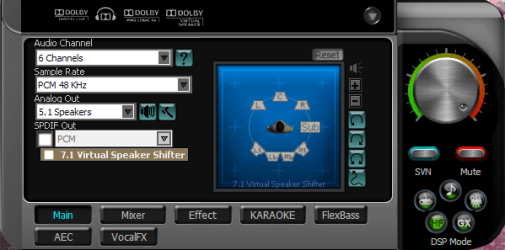
If it's asus, stay away from the config in windows control panel. Reset to default and leave it so. Use the DX audio center instead. Don't think it's smth wrong with either one, but it will cause conflicts. The DX audio center handles the same settings at both win and driver level. Plus the DX Audio Center gives you the same options and more. After you reset the control panel config, go to the DX audio center and set audio channel 6 and analog out 5.1. Should do it if the headset connects how i think. (never owned one, does it have 3 jacks to connect to the sound card? if not, select sound channel 6 and analog out 2.1 or 2 speakers).
 
Last edited:

My Computer My Computer

Computer Manufacturer/Model Number
Self-made
OS
Windows 7 Ultimate x64
CPU
AMD Athlon II X3
Motherboard
ASRock 890FX Deluxe5
Memory
A-DATA XPG Gaming Series V2.0 2x2GB
Graphics Card(s)
AMD ATI RADEON HD 5570 OC to 750Mhz
Sound Card
Asus XONAR DS 7.1
Monitor(s) Displays
PHILIPS Brilliance C-line
Screen Resolution
1680x1050 16:10
Hard Drives
Samsung Spinpoint F3 SATAII 1TB
If it's asus, stay away from the config in windows control panel. Reset to default and leave it so. Use the DX audio center instead. It gives you the same options and more. After you reset the control panel config, go to the DX audio center and set audio channel 6 and analog out 5.1. Should do it if the headset connects how i think. (never owned one, does it have 3 jacks to connect to the sound card?).
Yes, 4 jacks in total if you include the microphone. I don't know if it's just me or maybe the game settings but I've tried 6 channels in Battlefield 3 and Skyrim and it doesn't sound right. Sounds kind of fuzzy. Could sample rates too high effect sound?
 

My Computer My Computer

Computer type
PC/Desktop
OS
10 Home x64
CPU
Intel Core i5 4670K
Motherboard
Gigabyte GA-Z87-D3HP
Memory
Corsair XMS3 8GB DDr3 1600MHz
Graphics Card(s)
Sapphire NITRO Radeon R9 Fury
Sound Card
Asus Xonar DX
Monitor(s) Displays
Acer H236HLbmjd
Screen Resolution
1920x1080
Hard Drives
Force GS 128GB - Seagate 320GB - WD Caviar Black 1TB - WD Caviar Blue 500GB
PSU
EVGA SuperNOVA 650 P2
Case
Silverstone Raven 3 RV03B-W
Keyboard
Topre Realforce 104UG-HiPro
Mouse
Mionix Naos 7000
Internet Speed
76/4 On a good day
Antivirus
SmartScreen
Browser
Internet Explorer 11
It might. Some games don't run at all if sample rate is higher than 44Khz. Also in the Xonar DX center, enable HI. It's a button in the right hand lower corner. It disables andy possible dsp effects and let's the sound flow untouched. Also, try to make sure GX (next to HI button) is disabled. Battlefield and Skyrim are new titles, adapted to seven's and vista's sound handicap, they don't need EAX or D3D emulation. And, in the mixer tab of the Xonar DX, click 'Reset' to reset the volume. The individual channel controller, if pushed over it's default limit will actually go over the otherwise default volume limit, and cause such issues. Use only the big round volume button on the right side of the mixer. Ingame settings, try alternating between surround option and 5.1. See if that helps. Also, if the game does have OpenAL as output setting, try selecting that. Some games, use OpenAL to support 5.1 output. On speakers it will sound right without but i dunno about headphones.
 

My Computer My Computer

Computer Manufacturer/Model Number
Self-made
OS
Windows 7 Ultimate x64
CPU
AMD Athlon II X3
Motherboard
ASRock 890FX Deluxe5
Memory
A-DATA XPG Gaming Series V2.0 2x2GB
Graphics Card(s)
AMD ATI RADEON HD 5570 OC to 750Mhz
Sound Card
Asus XONAR DS 7.1
Monitor(s) Displays
PHILIPS Brilliance C-line
Screen Resolution
1680x1050 16:10
Hard Drives
Samsung Spinpoint F3 SATAII 1TB

My Computer My Computer

Computer type
PC/Desktop
OS
10 Home x64
CPU
Intel Core i5 4670K
Motherboard
Gigabyte GA-Z87-D3HP
Memory
Corsair XMS3 8GB DDr3 1600MHz
Graphics Card(s)
Sapphire NITRO Radeon R9 Fury
Sound Card
Asus Xonar DX
Monitor(s) Displays
Acer H236HLbmjd
Screen Resolution
1920x1080
Hard Drives
Force GS 128GB - Seagate 320GB - WD Caviar Black 1TB - WD Caviar Blue 500GB
PSU
EVGA SuperNOVA 650 P2
Case
Silverstone Raven 3 RV03B-W
Keyboard
Topre Realforce 104UG-HiPro
Mouse
Mionix Naos 7000
Internet Speed
76/4 On a good day
Antivirus
SmartScreen
Browser
Internet Explorer 11
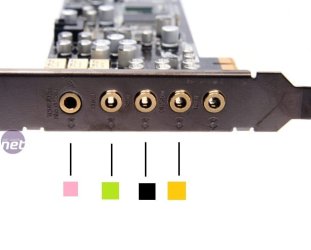
I just came from Battlefield 3, tried Hi-Fi, changing effects & changing sample rate, it still doesn't sound right. Started messing around with ports/connections, isn't easy without colour coding. Is this right?
xonardx4-7.jpg
 

My Computer My Computer

Computer type
PC/Desktop
OS
10 Home x64
CPU
Intel Core i5 4670K
Motherboard
Gigabyte GA-Z87-D3HP
Memory
Corsair XMS3 8GB DDr3 1600MHz
Graphics Card(s)
Sapphire NITRO Radeon R9 Fury
Sound Card
Asus Xonar DX
Monitor(s) Displays
Acer H236HLbmjd
Screen Resolution
1920x1080
Hard Drives
Force GS 128GB - Seagate 320GB - WD Caviar Black 1TB - WD Caviar Blue 500GB
PSU
EVGA SuperNOVA 650 P2
Case
Silverstone Raven 3 RV03B-W
Keyboard
Topre Realforce 104UG-HiPro
Mouse
Mionix Naos 7000
Internet Speed
76/4 On a good day
Antivirus
SmartScreen
Browser
Internet Explorer 11
yes, the HF is what i ment. Sorry for that. Well to me it seems ok from that coding you posted however there is a better way.
Once the panel shows yopu those speakers like that, click on each one. Should play a test sound thropugh the selected speaker. If they are correctly connected, each speaker will sound accurately when you click it.
 

My Computer My Computer

Computer Manufacturer/Model Number
Self-made
OS
Windows 7 Ultimate x64
CPU
AMD Athlon II X3
Motherboard
ASRock 890FX Deluxe5
Memory
A-DATA XPG Gaming Series V2.0 2x2GB
Graphics Card(s)
AMD ATI RADEON HD 5570 OC to 750Mhz
Sound Card
Asus XONAR DS 7.1
Monitor(s) Displays
PHILIPS Brilliance C-line
Screen Resolution
1680x1050 16:10
Hard Drives
Samsung Spinpoint F3 SATAII 1TB
Yes, I know about the speaker testing. It sounds right in that, but in pretty much any game I hear buzzing. I played Killing Floor yesterday and that sounded fine in the '3D Audio' setting.
 

My Computer My Computer

Computer type
PC/Desktop
OS
10 Home x64
CPU
Intel Core i5 4670K
Motherboard
Gigabyte GA-Z87-D3HP
Memory
Corsair XMS3 8GB DDr3 1600MHz
Graphics Card(s)
Sapphire NITRO Radeon R9 Fury
Sound Card
Asus Xonar DX
Monitor(s) Displays
Acer H236HLbmjd
Screen Resolution
1920x1080
Hard Drives
Force GS 128GB - Seagate 320GB - WD Caviar Black 1TB - WD Caviar Blue 500GB
PSU
EVGA SuperNOVA 650 P2
Case
Silverstone Raven 3 RV03B-W
Keyboard
Topre Realforce 104UG-HiPro
Mouse
Mionix Naos 7000
Internet Speed
76/4 On a good day
Antivirus
SmartScreen
Browser
Internet Explorer 11
that is pretty weird. Consider perhaps asking advice from the manufacturer, or describe this to the retailer u bought from. May be smth wrong with the card. Or it could just be the game settings it's self. Try using 3D audio(which will expand to your 5.1 setting) and experiment with different settings for the GX button(on or of). Only other thing that comes to mind would be bad driver install. When i exaust all possible options i just reinstall the win system. Always did the trick, unless the hardware piece was actually broken. 'Course, it's up to you if you're willing to go through that or try a safe mode boot... Srry i couldn't do more. Btw, do 5.1 movies sound ok? Play a 5.1 film and play with the mixer. Mute different channels and see what happens with the rest and if they sound clear.
 

My Computer My Computer

Computer Manufacturer/Model Number
Self-made
OS
Windows 7 Ultimate x64
CPU
AMD Athlon II X3
Motherboard
ASRock 890FX Deluxe5
Memory
A-DATA XPG Gaming Series V2.0 2x2GB
Graphics Card(s)
AMD ATI RADEON HD 5570 OC to 750Mhz
Sound Card
Asus XONAR DS 7.1
Monitor(s) Displays
PHILIPS Brilliance C-line
Screen Resolution
1680x1050 16:10
Hard Drives
Samsung Spinpoint F3 SATAII 1TB
Only other thing that comes to mind would be bad driver install.
Tried reinstalling the driver. I didn't use the CD, and I clicked the first setup from the .rar so this time I opened the 'WIN7' folder and installed the setup in there, but didn't solve it.
do 5.1 movies sound ok? Play a 5.1 film and play with the mixer. Mute different channels and see what happens with the rest and if they sound clear.
I don't know any surround sound films I could watch to test it out, I have a lot of Blu-Ray discs but I don't have a Blu-Ray player. On my 'Tip 'n' Control' (Sound controller that can change from 5.1 to stereo, adjust certain channels like rear, front ect.) I found it's the rear surround that's causing the buzzing. If I mute it, the buzzing disappears. I think what it means by 'rear' is the channels at the back. What they really mean is side.
*EDIT* It's only when sound is emited from the rear speakers that is makes the weird noise.
 

My Computer My Computer

Computer type
PC/Desktop
OS
10 Home x64
CPU
Intel Core i5 4670K
Motherboard
Gigabyte GA-Z87-D3HP
Memory
Corsair XMS3 8GB DDr3 1600MHz
Graphics Card(s)
Sapphire NITRO Radeon R9 Fury
Sound Card
Asus Xonar DX
Monitor(s) Displays
Acer H236HLbmjd
Screen Resolution
1920x1080
Hard Drives
Force GS 128GB - Seagate 320GB - WD Caviar Black 1TB - WD Caviar Blue 500GB
PSU
EVGA SuperNOVA 650 P2
Case
Silverstone Raven 3 RV03B-W
Keyboard
Topre Realforce 104UG-HiPro
Mouse
Mionix Naos 7000
Internet Speed
76/4 On a good day
Antivirus
SmartScreen
Browser
Internet Explorer 11
Most dvd-s come with 5.1 sound. Also do blu-ray. But don't you have a BD-rom on your comp? Also, a method a bit unorthodox, go to thepiratebay.org. Get a hd rip there. It will have 5.1. Use vlc to play that.
 

My Computer My Computer

Computer Manufacturer/Model Number
Self-made
OS
Windows 7 Ultimate x64
CPU
AMD Athlon II X3
Motherboard
ASRock 890FX Deluxe5
Memory
A-DATA XPG Gaming Series V2.0 2x2GB
Graphics Card(s)
AMD ATI RADEON HD 5570 OC to 750Mhz
Sound Card
Asus XONAR DS 7.1
Monitor(s) Displays
PHILIPS Brilliance C-line
Screen Resolution
1680x1050 16:10
Hard Drives
Samsung Spinpoint F3 SATAII 1TB
OK, got a HD DVD and listened in 5.1 and I still get the weird noise. It's like it's coming out of two channels instead of one. Like, if someone was talking to the right of me and I turned right a little bit, it would go into the front as well. Is that supposed to happen? Because it's annoying, and it lags as well. It happens all the time in Skyrim when wind swished past you and when your armour clings together when you sprint.
 

My Computer My Computer

Computer type
PC/Desktop
OS
10 Home x64
CPU
Intel Core i5 4670K
Motherboard
Gigabyte GA-Z87-D3HP
Memory
Corsair XMS3 8GB DDr3 1600MHz
Graphics Card(s)
Sapphire NITRO Radeon R9 Fury
Sound Card
Asus Xonar DX
Monitor(s) Displays
Acer H236HLbmjd
Screen Resolution
1920x1080
Hard Drives
Force GS 128GB - Seagate 320GB - WD Caviar Black 1TB - WD Caviar Blue 500GB
PSU
EVGA SuperNOVA 650 P2
Case
Silverstone Raven 3 RV03B-W
Keyboard
Topre Realforce 104UG-HiPro
Mouse
Mionix Naos 7000
Internet Speed
76/4 On a good day
Antivirus
SmartScreen
Browser
Internet Explorer 11
i'm not sure and also not an expert, but i think that is called channel crosstalk. When signal from one channel leaks into another. The XONAR DS i have sounds ok in 5.1 setup with 5.1 speakers. Each channels plays it's precise thing. I'm not sure if it can be considered a malfunctioning unit really. I'm out of ideas on this. But as i mentioned previously in a post, to see if maybe it's the win install, or the card there is one way to test. Downloads | XBMC Go get the live usb version, boot it up from the usb stick, and play a dvd with it. And configure it first to make sure it is set to 5.1. If that sound's ok then everything should be fine with the card. Don't worry, no install needed. It's a Media Center bootable basically.
 
Last edited:

My Computer My Computer

Computer Manufacturer/Model Number
Self-made
OS
Windows 7 Ultimate x64
CPU
AMD Athlon II X3
Motherboard
ASRock 890FX Deluxe5
Memory
A-DATA XPG Gaming Series V2.0 2x2GB
Graphics Card(s)
AMD ATI RADEON HD 5570 OC to 750Mhz
Sound Card
Asus XONAR DS 7.1
Monitor(s) Displays
PHILIPS Brilliance C-line
Screen Resolution
1680x1050 16:10
Hard Drives
Samsung Spinpoint F3 SATAII 1TB
Ahh, I can't do that. I don't own a USB thumb drive. I used to, but I lost it ages ago. I didn't build my computer with this sound card though.
I posted a thread on Asus forums and all I got was 23 views in 17 hours, so I'm going to send Online Technical Service an email and see what they say. Thanks for your help though, you're the only person who has been replying. Thanks :)
 

My Computer My Computer

Computer type
PC/Desktop
OS
10 Home x64
CPU
Intel Core i5 4670K
Motherboard
Gigabyte GA-Z87-D3HP
Memory
Corsair XMS3 8GB DDr3 1600MHz
Graphics Card(s)
Sapphire NITRO Radeon R9 Fury
Sound Card
Asus Xonar DX
Monitor(s) Displays
Acer H236HLbmjd
Screen Resolution
1920x1080
Hard Drives
Force GS 128GB - Seagate 320GB - WD Caviar Black 1TB - WD Caviar Blue 500GB
PSU
EVGA SuperNOVA 650 P2
Case
Silverstone Raven 3 RV03B-W
Keyboard
Topre Realforce 104UG-HiPro
Mouse
Mionix Naos 7000
Internet Speed
76/4 On a good day
Antivirus
SmartScreen
Browser
Internet Explorer 11
I'm sorry i couldn't help more. If anything comes to mind though i'll post back. Good luck mate.
 

My Computer My Computer

Computer Manufacturer/Model Number
Self-made
OS
Windows 7 Ultimate x64
CPU
AMD Athlon II X3
Motherboard
ASRock 890FX Deluxe5
Memory
A-DATA XPG Gaming Series V2.0 2x2GB
Graphics Card(s)
AMD ATI RADEON HD 5570 OC to 750Mhz
Sound Card
Asus XONAR DS 7.1
Monitor(s) Displays
PHILIPS Brilliance C-line
Screen Resolution
1680x1050 16:10
Hard Drives
Samsung Spinpoint F3 SATAII 1TB
Don't know if you're still subscribed to this thread, but I'll tell you what's happened.
I RMA'd the Xonar DX and after a while, CCL (Retailer) sent us an email but they didn't give us a clear answer. I bought it off my dads ebay account and according to him, they said it was indeed faulty and they sent me the money I payed for it. Seems odd, but they weren't selling the sound card anymore, so I suppose they ran out of stock.
Last week, I ordered the Xonar DX from Scan (One of the most widely known UK retailers) and I was getting the same thing. Turns out it was the driver, and the problem I was getting was 5.1 Stereo Upmix. I downloaded the UNi Xonar driver and now I'm getting good performance and low DPC latency. :)
 

My Computer My Computer

Computer type
PC/Desktop
OS
10 Home x64
CPU
Intel Core i5 4670K
Motherboard
Gigabyte GA-Z87-D3HP
Memory
Corsair XMS3 8GB DDr3 1600MHz
Graphics Card(s)
Sapphire NITRO Radeon R9 Fury
Sound Card
Asus Xonar DX
Monitor(s) Displays
Acer H236HLbmjd
Screen Resolution
1920x1080
Hard Drives
Force GS 128GB - Seagate 320GB - WD Caviar Black 1TB - WD Caviar Blue 500GB
PSU
EVGA SuperNOVA 650 P2
Case
Silverstone Raven 3 RV03B-W
Keyboard
Topre Realforce 104UG-HiPro
Mouse
Mionix Naos 7000
Internet Speed
76/4 On a good day
Antivirus
SmartScreen
Browser
Internet Explorer 11
Back
Top