How to stop autoscrolling within a folder?

zerofallz

New member
Local time
6:20 PM
Messages
1
First off I have Windows 7 home edition and have my folders are in "list" display. When the folder displays the first 2 columns and I select a file from the right most column the folder automatically shifts to the right. The main reason I'm annoyed is because it gets frustrating when I'm trying to drag and drop an item and the folder scrolls away from the folder I want to drop the file into. Does anyone know how to disable this feature? It wasn't like this when I had XP pro. Thanks
 

My Computer My Computer

At a glance

Windows 7
OS
Windows 7
I was looking for a way to fix that ANNNNNNOOOOOYING feature... or bug... when I found your thread.
Just to add some clarification (wich might explain why this received no ear yet)
we're using standart Folder, wich mean we have TURNED OFF original Win7 explorer... wich personnally, I never could use. What I'm used to do, instead of using the "new" explorer (that explorer was added in WinXp, I know... but I never used it)
I place 2 windows side by side and I drop file from right windows into the left windows.

Now, in explorer, there is so many panel (file type, size, modifed date, etc) that when you DROP your file, the right pannel autoscroll to the right. so now you cannot see the file name on the left. and you have to reset the view each time before dropping another file.

The only workaround for now would be to remove the most title pannel you can have to prevent that autoscrolling.

but... unless you have a very width screen, removing SOME pannel might not be enough...

anyone can help us have a registry key to DISABLE COMPLETELY that stupid behavior ?
and I MEAN STUPID because I CANNOT SEE any reason WHY on earth we would like to auto scroll that windows on file drop. if I wanted that windows scroll to be positionned differently, I would have placed it the way I wanted BEFORE to drop the file.
 

My Computer My Computer

At a glance

Win7 x64
OS
Win7 x64
Hi Zero and VbNet.

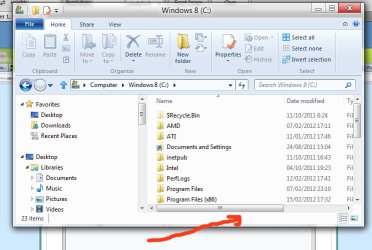
Try this method.
See the picture, if you want to drag and drop just drag it to this area (red arrow, under the slider), and see what happen.
Copy.jpg
Hope it helps
 

My Computers My Computers

  • At a glance

    Windows 11 PrereleaseCORE i5 1040016GBGTX 750Ti
    Computer type
    PC/Desktop
    Computer Manufacturer/Model Number
    MSI
    OS
    Windows 11 Prerelease
    CPU
    CORE i5 10400
    Motherboard
    MSI H510M Pro
    Memory
    16GB
    Graphics Card(s)
    GTX 750Ti
    Sound Card
    Realtek HD Integrated
    Monitor(s) Displays
    Samsung Curved 24"; Samsung TV 50"
    Screen Resolution
    1920 x 1080
    Hard Drives
    Vi-Gen NVMe 256GB
    WD 3 TB
    Seagate 2 TB
    Seagate 4TB
    PSU
    Power Striker
    Case
    VBR
    Cooling
    Conventional
    Keyboard
    Logitech Wireless
    Mouse
    Logitech Wireless
    Internet Speed
    2MBPs
  • At a glance

    BigSurCore i58 GB
    Computer type
    Laptop
    System Manufacturer/Model Number
    Apple MacBook
    OS
    BigSur
    CPU
    Core i5
    Memory
    8 GB
    Monitor(s) Displays
    13 "
    Screen Resolution
    1366 x 768
    Hard Drives
    SSD 256 GB
Kevin: your trick is functional, but do you realize the amount of detour with the mouse we have to do in order to avoid the affected area ? as soon as the mouse enter the upper left side, it Autoscroll. Meaning for your trick to work, we have to drag completely from top screen to bottom, then go to left and drop it in the designated area.

I personnally really apreciate your input, but implementation require as much time as to simply reset the view each time.

we need to find another solution for long time avoiding of crazyness... ;)
 

My Computer My Computer

At a glance

Win7 x64
OS
Win7 x64
Well, that is all I do for years. But you know, you can even go to upper section of the open explorer aside of the lower section.

Just wait some time, I'm sure other friends here could come up with better solution.

Kevin
 

My Computers My Computers

  • At a glance

    Windows 11 PrereleaseCORE i5 1040016GBGTX 750Ti
    Computer type
    PC/Desktop
    Computer Manufacturer/Model Number
    MSI
    OS
    Windows 11 Prerelease
    CPU
    CORE i5 10400
    Motherboard
    MSI H510M Pro
    Memory
    16GB
    Graphics Card(s)
    GTX 750Ti
    Sound Card
    Realtek HD Integrated
    Monitor(s) Displays
    Samsung Curved 24"; Samsung TV 50"
    Screen Resolution
    1920 x 1080
    Hard Drives
    Vi-Gen NVMe 256GB
    WD 3 TB
    Seagate 2 TB
    Seagate 4TB
    PSU
    Power Striker
    Case
    VBR
    Cooling
    Conventional
    Keyboard
    Logitech Wireless
    Mouse
    Logitech Wireless
    Internet Speed
    2MBPs
  • At a glance

    BigSurCore i58 GB
    Computer type
    Laptop
    System Manufacturer/Model Number
    Apple MacBook
    OS
    BigSur
    CPU
    Core i5
    Memory
    8 GB
    Monitor(s) Displays
    13 "
    Screen Resolution
    1366 x 768
    Hard Drives
    SSD 256 GB
I hope so, this have been frustrating for month.... I'm new to Win7, I'm an experienced computer tech who recently migrated 300 computer from Xp to Win7, and we searched for possible solution... nada... zip...

And this is not the "most" annoying "feature" of Win7 but most of the others can be bypassed with registry manual entry.
 

My Computer My Computer

At a glance

Win7 x64
OS
Win7 x64
Just make the window bigger or scroll across first and it won't need to scroll...
 

My Computer My Computer

At a glance

Windows 7 Ultimate x64Intel Core i5-2500 3.3GHz8GB DDR3 1333MHzOn-board
Computer Manufacturer/Model Number
CreepinJesus Mk. IV
OS
Windows 7 Ultimate x64
CPU
Intel Core i5-2500 3.3GHz
Motherboard
Asus P8H67-M PRO
Memory
8GB DDR3 1333MHz
Graphics Card(s)
On-board
Sound Card
On-board
Monitor(s) Displays
Samsung SyncMaster BX2250 22.5" LED-backlit LCD
Screen Resolution
1920 * 1080
Hard Drives
OCZ Agility 3 120GB, SATA-III
PSU
Thermaltake Toughpower Grand TPG-650M
Case
Lian-Li PC-A04
Cooling
Standard fans. They blow.
Keyboard
Logitech K360
Mouse
Generic Logitech from the bargain-bin by the checkout
Internet Speed
Over 9000! ...Mbps.
Other Info
Chocolate digestives are my favourite biscuit.
can't do that CJ, windows are split 50/50 on screen.... (left and right side)

it is our method of work for last 10 years... it's an habbit hard to change.
 

My Computer My Computer

At a glance

Win7 x64
OS
Win7 x64
Well, I find change is certainly painful to go.
I have few back up and working folders. I made shortcuts on the desktop. And, just drag any important files or folders to it without opening more explorer window. Sure if it on the same drive, but don't want it to be moved (as by default), use right click drag instead, and choose copy.
 

My Computers My Computers

  • At a glance

    Windows 11 PrereleaseCORE i5 1040016GBGTX 750Ti
    Computer type
    PC/Desktop
    Computer Manufacturer/Model Number
    MSI
    OS
    Windows 11 Prerelease
    CPU
    CORE i5 10400
    Motherboard
    MSI H510M Pro
    Memory
    16GB
    Graphics Card(s)
    GTX 750Ti
    Sound Card
    Realtek HD Integrated
    Monitor(s) Displays
    Samsung Curved 24"; Samsung TV 50"
    Screen Resolution
    1920 x 1080
    Hard Drives
    Vi-Gen NVMe 256GB
    WD 3 TB
    Seagate 2 TB
    Seagate 4TB
    PSU
    Power Striker
    Case
    VBR
    Cooling
    Conventional
    Keyboard
    Logitech Wireless
    Mouse
    Logitech Wireless
    Internet Speed
    2MBPs
  • At a glance

    BigSurCore i58 GB
    Computer type
    Laptop
    System Manufacturer/Model Number
    Apple MacBook
    OS
    BigSur
    CPU
    Core i5
    Memory
    8 GB
    Monitor(s) Displays
    13 "
    Screen Resolution
    1366 x 768
    Hard Drives
    SSD 256 GB
I know, I use right click all the time... it still doesn't fix the issue... the windows is scrolling!
 

My Computer My Computer

At a glance

Win7 x64
OS
Win7 x64

My Computer My Computer

At a glance

W7 Ultimate SP1, LM19.2 MATE, W10 Home 1703, ...AMD Phenom II x6 1100T, 3.3 GHz12GB DDR3 1333 G-Skill (4GB x 2), G-Skill (2G...NVIDIA GeForce GTX 660
Computer type
PC/Desktop
Computer Manufacturer/Model Number
n/a
OS
W7 Ultimate SP1, LM19.2 MATE, W10 Home 1703, W10 Pro 1703 VM, #All 64 bit
CPU
AMD Phenom II x6 1100T, 3.3 GHz
Motherboard
ASUS M4A88T-M/USB3 (AM3)
Memory
12GB DDR3 1333 G-Skill (4GB x 2), G-Skill (2GB x 2)
Graphics Card(s)
NVIDIA GeForce GTX 660
Sound Card
Realtek?
Monitor(s) Displays
Samsung S23B350
Screen Resolution
1920x1080
Hard Drives
WD Green 2TB (SATA), WD Green 3TB (SATA), WD Blue 4TB (SATA), WD Blue 6TB (SATA)
PSU
Cooler Master
Case
Antec GX300 Tower
Cooling
3x Antec TRICOOL 120mm Fans
Mouse
Wired Optical
Internet Speed
DSL
Antivirus
Avast
Browser
Pale Moon (64 bit)
Other Info
2018-12-27 Upgraded HDDs
2015-12-10 Upgraded case, graphics card, storage
2015-08-15 Upgraded motherboard & RAM
2015-07-15 Upgraded LM17.1 to LM17.2
Classic Shell seem a very nice program (Open source too) and I see that thousand of people gave nice review on it...
maybe Ms should "rethink" they "feature" and accept it to call it a "bug" of design...

thanks for the link
 

My Computer My Computer

At a glance

Win7 x64
OS
Win7 x64
No problems

Classic Shell seem a very nice program (Open source too) and I see that thousand of people gave nice review on it...
maybe Ms should "rethink" they "feature" and accept it to call it a "bug" of design...

thanks for the link

I couldn't find the one I was thinking of, because I was in Windows 8, so it wasn't in my FF history.
I may have actually been using Ubuntu, when I read about it.

I don't use "List" view, so I wasn't even aware of that bug.
The "Navigation" pane scroll bug annoys the H*** out of me though.
 

My Computer My Computer

At a glance

W7 Ultimate SP1, LM19.2 MATE, W10 Home 1703, ...AMD Phenom II x6 1100T, 3.3 GHz12GB DDR3 1333 G-Skill (4GB x 2), G-Skill (2G...NVIDIA GeForce GTX 660
Computer type
PC/Desktop
Computer Manufacturer/Model Number
n/a
OS
W7 Ultimate SP1, LM19.2 MATE, W10 Home 1703, W10 Pro 1703 VM, #All 64 bit
CPU
AMD Phenom II x6 1100T, 3.3 GHz
Motherboard
ASUS M4A88T-M/USB3 (AM3)
Memory
12GB DDR3 1333 G-Skill (4GB x 2), G-Skill (2GB x 2)
Graphics Card(s)
NVIDIA GeForce GTX 660
Sound Card
Realtek?
Monitor(s) Displays
Samsung S23B350
Screen Resolution
1920x1080
Hard Drives
WD Green 2TB (SATA), WD Green 3TB (SATA), WD Blue 4TB (SATA), WD Blue 6TB (SATA)
PSU
Cooler Master
Case
Antec GX300 Tower
Cooling
3x Antec TRICOOL 120mm Fans
Mouse
Wired Optical
Internet Speed
DSL
Antivirus
Avast
Browser
Pale Moon (64 bit)
Other Info
2018-12-27 Upgraded HDDs
2015-12-10 Upgraded case, graphics card, storage
2015-08-15 Upgraded motherboard & RAM
2015-07-15 Upgraded LM17.1 to LM17.2
Classic Shell seem a very nice program (Open source too) and I see that thousand of people gave nice review on it...
maybe Ms should "rethink" they "feature" and accept it to call it a "bug" of design...

thanks for the link

I couldn't find the one I was thinking of, because I was in Windows 8, so it wasn't in my FF history.
I may have actually been using Ubuntu, when I read about it.

I don't use "List" view, so I wasn't even aware of that bug.
The "Navigation" pane scroll bug annoys the H*** out of me though.
It's not really a bug though... it scrolls across so you can read the full title of what you've just clicked on.
 

My Computer My Computer

At a glance

Windows 7 Ultimate x64Intel Core i5-2500 3.3GHz8GB DDR3 1333MHzOn-board
Computer Manufacturer/Model Number
CreepinJesus Mk. IV
OS
Windows 7 Ultimate x64
CPU
Intel Core i5-2500 3.3GHz
Motherboard
Asus P8H67-M PRO
Memory
8GB DDR3 1333MHz
Graphics Card(s)
On-board
Sound Card
On-board
Monitor(s) Displays
Samsung SyncMaster BX2250 22.5" LED-backlit LCD
Screen Resolution
1920 * 1080
Hard Drives
OCZ Agility 3 120GB, SATA-III
PSU
Thermaltake Toughpower Grand TPG-650M
Case
Lian-Li PC-A04
Cooling
Standard fans. They blow.
Keyboard
Logitech K360
Mouse
Generic Logitech from the bargain-bin by the checkout
Internet Speed
Over 9000! ...Mbps.
Other Info
Chocolate digestives are my favourite biscuit.
Details view for me

It's not really a bug though... it scrolls across so you can read the full title of what you've just clicked on.

That's why I use "Details" view on most folders.
I can set the column sizes to suit myself.

I have my picture folders set to "Large Icons" view, but I have set some details, so that I can group/sort using them.
 

My Computer My Computer

At a glance

W7 Ultimate SP1, LM19.2 MATE, W10 Home 1703, ...AMD Phenom II x6 1100T, 3.3 GHz12GB DDR3 1333 G-Skill (4GB x 2), G-Skill (2G...NVIDIA GeForce GTX 660
Computer type
PC/Desktop
Computer Manufacturer/Model Number
n/a
OS
W7 Ultimate SP1, LM19.2 MATE, W10 Home 1703, W10 Pro 1703 VM, #All 64 bit
CPU
AMD Phenom II x6 1100T, 3.3 GHz
Motherboard
ASUS M4A88T-M/USB3 (AM3)
Memory
12GB DDR3 1333 G-Skill (4GB x 2), G-Skill (2GB x 2)
Graphics Card(s)
NVIDIA GeForce GTX 660
Sound Card
Realtek?
Monitor(s) Displays
Samsung S23B350
Screen Resolution
1920x1080
Hard Drives
WD Green 2TB (SATA), WD Green 3TB (SATA), WD Blue 4TB (SATA), WD Blue 6TB (SATA)
PSU
Cooler Master
Case
Antec GX300 Tower
Cooling
3x Antec TRICOOL 120mm Fans
Mouse
Wired Optical
Internet Speed
DSL
Antivirus
Avast
Browser
Pale Moon (64 bit)
Other Info
2018-12-27 Upgraded HDDs
2015-12-10 Upgraded case, graphics card, storage
2015-08-15 Upgraded motherboard & RAM
2015-07-15 Upgraded LM17.1 to LM17.2
Back
Top