Solved How to turn off applilcation global hotkey ?

lovelyHanibal

New member
Local time
5:26 PM
Messages
3
Location
Europe
Hello.

Some application (most probably one from ivona.com) have register global hotkey Ctrl+Alt+T.
So I can not start quick search in Total Commander from leter T.
I turn off ivona application but hotkey still lead to unexsisting shortcut to exe file.
I was searching in google for turning off hotkeys in windows, but all what I find is how to turn off build in windows hot keys and applications to register new global hotkeys.

Is there a way to find witch task have registred hotkey ?
Is there some place in registry where global hotkeys are defined ?
 

My Computer My Computer

At a glance

Windows 7 x64, Linux Debian x64i72GBnVidia 8600 GTX
OS
Windows 7 x64, Linux Debian x64
CPU
i7
Motherboard
msi
Memory
2GB
Graphics Card(s)
nVidia 8600 GTX
Monitor(s) Displays
2
Screen Resolution
3200x1024
Keyboard
Logitech
Internet Speed
3MB / s
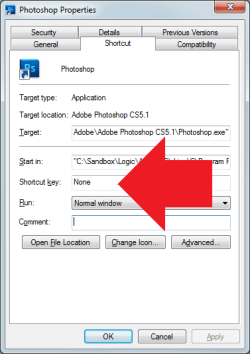
Try the shortcut properties of the software in question.
 

My Computer My Computer

At a glance

Windows 10 Pro (x64)Intel Core i7-3930K (3.2GHz - 4.5GHz)4x Samsung 4GB PC3-12800 DDR3 (16GB 1600MHz)Nvidia Geforce GTX 690
Computer type
PC/Desktop
Computer Manufacturer/Model Number
Alienware Aurora ALX R4
OS
Windows 10 Pro (x64)
CPU
Intel Core i7-3930K (3.2GHz - 4.5GHz)
Motherboard
Alienware Aurora-R4 x79
Memory
4x Samsung 4GB PC3-12800 DDR3 (16GB 1600MHz)
Graphics Card(s)
Nvidia Geforce GTX 690
Sound Card
SteelSeries Siberia Elite
Monitor(s) Displays
Dell UltraSharp U3011
Screen Resolution
2560x1600
Hard Drives
Samsung 850 Pro 256 GB, Seagate 1TB Desktop Hybrid HDD, 2x Western Digital 4TB Green HDD
PSU
875W Some Dell PSU <.<
Case
Alienware Aurora ALX
Cooling
Custom Liquid Cooling (EK CPU & GPU blocks) dual EK 480RAD
Keyboard
Logitech G710+ Mechanical
Mouse
Logitech G700s
Internet Speed
Verizon Fios (50 mbps average)
Other Info
Server: Intel NUC D54250WYK: i5-4250U, 16GB, 256 GB mSATA, Windows Server 2012 R2
That shortcut is not in that menu.
And I'm not sure is it that software or other.
 

My Computer My Computer

At a glance

Windows 7 x64, Linux Debian x64i72GBnVidia 8600 GTX
OS
Windows 7 x64, Linux Debian x64
CPU
i7
Motherboard
msi
Memory
2GB
Graphics Card(s)
nVidia 8600 GTX
Monitor(s) Displays
2
Screen Resolution
3200x1024
Keyboard
Logitech
Internet Speed
3MB / s
I was referring to the shortcut properties that Windows uses...You know all those icons in the start menu are shortcuts...see below.
 

Attachments

  • Untitled.png
    Untitled.png
    11.4 KB · Views: 9

My Computer My Computer

At a glance

Windows 10 Pro (x64)Intel Core i7-3930K (3.2GHz - 4.5GHz)4x Samsung 4GB PC3-12800 DDR3 (16GB 1600MHz)Nvidia Geforce GTX 690
Computer type
PC/Desktop
Computer Manufacturer/Model Number
Alienware Aurora ALX R4
OS
Windows 10 Pro (x64)
CPU
Intel Core i7-3930K (3.2GHz - 4.5GHz)
Motherboard
Alienware Aurora-R4 x79
Memory
4x Samsung 4GB PC3-12800 DDR3 (16GB 1600MHz)
Graphics Card(s)
Nvidia Geforce GTX 690
Sound Card
SteelSeries Siberia Elite
Monitor(s) Displays
Dell UltraSharp U3011
Screen Resolution
2560x1600
Hard Drives
Samsung 850 Pro 256 GB, Seagate 1TB Desktop Hybrid HDD, 2x Western Digital 4TB Green HDD
PSU
875W Some Dell PSU <.<
Case
Alienware Aurora ALX
Cooling
Custom Liquid Cooling (EK CPU & GPU blocks) dual EK 480RAD
Keyboard
Logitech G710+ Mechanical
Mouse
Logitech G700s
Internet Speed
Verizon Fios (50 mbps average)
Other Info
Server: Intel NUC D54250WYK: i5-4250U, 16GB, 256 GB mSATA, Windows Server 2012 R2
That solve the problem.
I found the right shortcut in menu start and just delete it. :)
Thank you very much for help.
 

My Computer My Computer

At a glance

Windows 7 x64, Linux Debian x64i72GBnVidia 8600 GTX
OS
Windows 7 x64, Linux Debian x64
CPU
i7
Motherboard
msi
Memory
2GB
Graphics Card(s)
nVidia 8600 GTX
Monitor(s) Displays
2
Screen Resolution
3200x1024
Keyboard
Logitech
Internet Speed
3MB / s
That solve the problem.
I found the right shortcut in menu start and just delete it. :)
Thank you very much for help.
I have a few of these as well. I tend to open the properties (as shown in logicearth's post), click in the field highlighted in that screenshot and press backspace to delete the OS shortcut key. Then I use the general tab of that same proerties window to make the shortcut a read-only file. This usually prevents updates to the program in question from being able to redefine that shortcut key.
 

My Computer My Computer

At a glance

W7 Pro SP1 64biti78GBIntel HD Graphics
Computer type
Laptop
Computer Manufacturer/Model Number
Employer provided Dell Latitude
OS
W7 Pro SP1 64bit
CPU
i7
Memory
8GB
Graphics Card(s)
Intel HD Graphics
Hard Drives
crappy SSD
Antivirus
Employer mandated Symantec Endpoint Protection
Browser
Pale Moon 64bit, IE11 64bit & Chrome 64bit
Back
Top