Windows Defender - Turn On or Off

How to Turn Windows Defender On or Off in Windows 7

   Information
This will show you how to turn Windows Defender On or Off in Windows 7. When Windows Defender is on, you will be alerted when spyware and other potentially unwanted software tries to install itself or run on your computer. By default, Windows Defender is turned on in Windows 7.

   Note
If you installed Microsoft Security Essentials (MSE), then it will disable Window Defender by default, and MSE will be used by instead. You will not be able to turn on Windows Defender as long as you have MSE installed.

The release of the Microsoft Safety Scanner has resulted in confusion about the available anti-malware tools provided by Microsoft and questions about when they should be used.

Read more at: Understanding Microsoft Anti-Malware Software ~ Security Garden

   Warning
It's important to run antispyware software whenever you're using your computer. Spyware and other potentially unwanted software can try to install itself on your computer any time you connect to the Internet. It can also infect your computer when you install some programs using a CD, DVD, or other removable media. Spyware or potentially unwanted software can also be programmed to run at unexpected times, not just when it's installed.


OPTION ONE

Turn Off Windows Defender


1. Open the Control Panel (icons view), and click on the Windows Defender icon.

2. Click on Tools on the toolbar at the top. (see screenshot below)
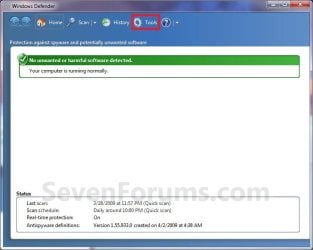
Step1.jpg
3. Under Settings, click on Options. (see screenshot below)
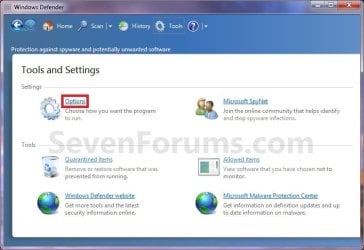
Step2.jpg
4. In the left pane, click on Administrator. (see screenshot below)
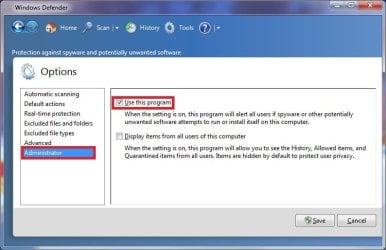
Step3.jpg
5. Uncheck the Use this program box. (see screenshot below step 4)

7. Click on the Save button. (see screenshot below step 4)

8. If prompted by UAC, then click on Yes.

9. Click on the Close button. (see screenshot below)
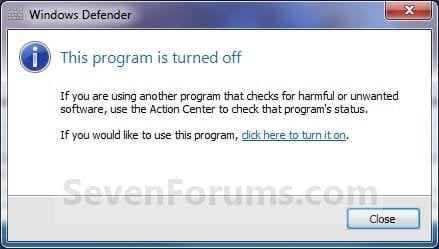
Off.jpg
   Note
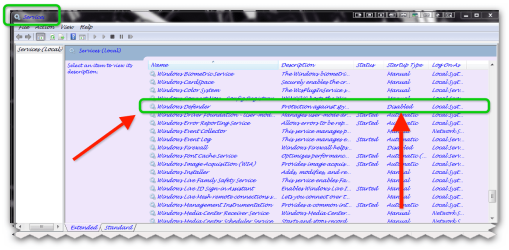
If you continue to get a Windows Defender pop-up after turning it off, then you can disable the "Windows Defender" service to stop it.


OPTION TWO

Turn On Windows Defender


1. Double check to make sure that the "Windows Defender" service is enabled and set to Automatic (Delayed Start).

2. Open the Control Panel (icons view), and click on the Windows Defender icon.

3. Click on the click here to turn it on link. (see screenshot below)
NOTE: This will take a moment to finish.
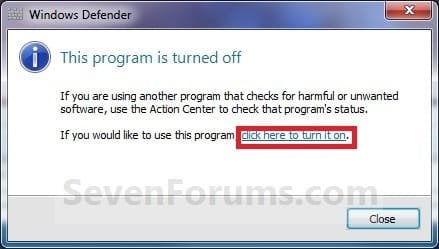
On.jpg
4. When finished, close the Windows Defender window. (see screenshot below step 2 in OPTION ONE)
NOTE: To help prevent spyware and other potentially unwanted software from running on your computer, it is recommended that you also turn on Windows Defender real-time protection and select all real-time protection options.
That's it,
Shawn


Last edited:

Attachments

  • brys snap ?13 ?March ?2011 12h34m34s.png
    brys snap ?13 ?March ?2011 12h34m34s.png
    52.2 KB · Views: 3,813

My Computer

Computer Manufacturer/Model Number
packard bell IXTREME M5722
OS
Operating System : Windows 7 Home Premium Edition 6.01.7600 SP1 (x64)
CPU
Processor : Intel Core 2 Quad Q8300 @ 2500 MHz
Motherboard
Mainboard : Packard Bell (Acer EG43M )
Memory
Physical Memory :8GB Corsair4x 2GB 800MHz C5 DDR2
Graphics Card(s)
Video Card : XFX 6700 AMD
Monitor(s) Displays
Maestro 234DL - BenQ V2220 - BenQ VW2420H
Screen Resolution
Current Display :1920x1080p pixels at 60 Hz in HD LED
Hard Drives
Hard Disks : WDC (1000 GB)
Drive C: (Hard Disk) : 428 GB available on 491 GB
Drive D: (Hard Disk) : 426 GB available on 492 GB
SAMSUNG spinpoint HD103SJ 1000.2 GB
(X 2) KINGSTON SSD NOW V 30GB
PSU
XFX ProSeries 550W PSU
Case
PACKARD BELL IXTREME
Cooling
System Blower Current: 150mA Air Flow16CFM ;Akasa 90mm rear
Keyboard
Gigabyte Aivia K8100
Mouse
TRUST-Wireless Laser Mouse - Carbon edition MI-7770C
Internet Speed
TP-LINK > TL-WN951N / AV500 Gigabit Powerline Adapters
Browser
chrome dev
Other Info
EXTRA COOLING>(FAN CONTROLLER) PC Bay Cooler 3 x 40mm fans; Akasa AK-HD-BL Blue hard drive cooler 2 x 40 mm fan 4500 rpm 29.7 dBA
Bios> American Megatrends Inc.
Version : P01-A1
Date : 08/31/2009
Windows Registry Editor Version 5.00

[HKEY_LOCAL_MACHINE\SYSTEM\ControlSet001\services\WinDefend]
"Start"=dword:00000004

[HKEY_LOCAL_MACHINE\SYSTEM\CurrentControlSet\services\WinDefend]
"Start"=dword:00000004
 

My Computer

OS
windows7 ultimate x32
CPU
DualCore Intel Core 2 Duo E8400, 3000 MHz (9 x 333)
Motherboard
ASRock 4Core1333-GLAN (3 PCI,1 PCI-E x16,4 DDR2 DIMM...)
Memory
4Gb (1x4 DDR2-800 DDR2 SDRAM)
Graphics Card(s)
NVIDIA GeForce 9600 GT (512 mb)
Sound Card
onboard
Monitor(s) Displays
lg flatron w2242t
Screen Resolution
1680 x 1050
Hard Drives
WDC WD5000AAJS-00YFA0 ATA Device
PSU
-
Case
-
Cooling
-
Other Info
d-link dir100
Hello Nalbe,

Thank you, but it would be this instead.

[HKEY_LOCAL_MACHINE\SOFTWARE\Microsoft\Windows Defender]

ON
"DisableAntiSpyware"=dword:00000000

OFF
"DisableAntiSpyware"=dword:00000001
 
Last edited:

My Computer

Computer type
PC/Desktop
Computer Manufacturer/Model Number
Self built custom
OS
64-bit Windows 11 Pro for Workstations
CPU
Intel i7-8700K OC'd to 5 GHz
Motherboard
ASUS ROG Maximus XI Formula Z390
Memory
64 GB (4x16GB) G.SKILL TridentZ RGB DDR4 3600 MHz
Graphics Card(s)
ASUS ROG-STRIX-GTX1080TI-O11G-GAMING
Sound Card
Integrated
Monitor(s) Displays
2 x Samsung Odyssey G7 27"
Screen Resolution
2560x1440
Hard Drives
1TB Samsung 990 PRO M.2,
4TB Samsung 990 PRO PRO M.2,
TerraMaster F8 SSD Plus NAS
PSU
Seasonic Prime Titanium 850W
Case
Thermaltake Core P3
Cooling
Corsair Hydro H115i
Keyboard
Logitech wireless K800
Mouse
Logitech MX Master 4
Internet Speed
2 Gb/s Download and 100 Mb/s Upload
Antivirus
Malwarebyte Anti-Malware Premium
Browser
Google Chrome
Other Info
Logitech Z625 speaker system,
Logitech BRIO 4K Pro webcam,
HP Color LaserJet Pro MFP M477fdn,
APC SMART-UPS RT 1000 XL - SURT1000XLI,
Galaxy S23 Plus phone
Brink, will this prevent the covert updates to Defender known as "critical updates"? I had set defender up as you showed with the exception of "Uncheck the Use this program box". Don't know how I missed it but I did. Over the past 4 weeks, Defender update KB915597 has messed up my machine 8 times resulting in me doing complete clean installs, which I am getting really good at. I am not real happy with MS Updates. In addition to the Defender update, NetFramework KB958488 also screwed up my machine twice. Just finished a complete redo last night only to find the Defender update had covertly installed around noon yesterday. Waiting to see the issues began. Got to be some way to totally stop the updates as I am totally paranoid.
Ron Burnes
 

My Computer

Computer type
PC/Desktop
Computer Manufacturer/Model Number
Computer by ME
OS
Windows 7 Pro 64 bit & Windows Pro 64 bit
CPU
Intel i7-2600k 3.06 GHz
Motherboard
Gigabyte H67A-UD3H-B3
Memory
16 GB GSkill F3-10666CL7Q
Graphics Card(s)
EVGA GeForce GT 1030
Sound Card
onboard for now
Monitor(s) Displays
Dual AOC 2770VH1
Screen Resolution
1920x1080
Hard Drives
3 - Samsung 850 Pro Series 256 GB SSD
2 - Samsung 840 Pro Series 128 GB SSD
2 - Muskin Chronos Deluxe 120 GB SSD
PSU
Antec EarthWatts EA750
Case
Antec Sonata Elite
Cooling
120 mm Antec System Fan & 120 Antec rear exhaust fan
Keyboard
Keys U See
Mouse
Logitech Trackball T-BC21
Internet Speed
18 mbps down / 4 mbps up
Antivirus
MSE
Browser
Firefox
Other Info
Icy Dock 4 bay x 2.5 ssd to 5.25 exterior hot swap
4-LaCie Rugged USB3 Thunderbolt Series 120GB SSD
2-Mushkin Enhanced Ventura Pro 32GB USB 3.0 Flash Drive
3-Sandisk Extreme Pro 128gb Flash Drive
Netgear Nighthawk X6 AC 3200 R8000 - WZR-1 D1800H
US Robotics USr5610C modem
Hello Ron,

Personally, I would ditch Windows Defender by installing MSE (Microsoft Security Essentials). It's a lot better IMO. Either way, the updates for Windows Defender or MSE are definition updates that need to be installed to help keep your system protected from the latest malware and virus threats.
 

My Computer

Computer type
PC/Desktop
Computer Manufacturer/Model Number
Self built custom
OS
64-bit Windows 11 Pro for Workstations
CPU
Intel i7-8700K OC'd to 5 GHz
Motherboard
ASUS ROG Maximus XI Formula Z390
Memory
64 GB (4x16GB) G.SKILL TridentZ RGB DDR4 3600 MHz
Graphics Card(s)
ASUS ROG-STRIX-GTX1080TI-O11G-GAMING
Sound Card
Integrated
Monitor(s) Displays
2 x Samsung Odyssey G7 27"
Screen Resolution
2560x1440
Hard Drives
1TB Samsung 990 PRO M.2,
4TB Samsung 990 PRO PRO M.2,
TerraMaster F8 SSD Plus NAS
PSU
Seasonic Prime Titanium 850W
Case
Thermaltake Core P3
Cooling
Corsair Hydro H115i
Keyboard
Logitech wireless K800
Mouse
Logitech MX Master 4
Internet Speed
2 Gb/s Download and 100 Mb/s Upload
Antivirus
Malwarebyte Anti-Malware Premium
Browser
Google Chrome
Other Info
Logitech Z625 speaker system,
Logitech BRIO 4K Pro webcam,
HP Color LaserJet Pro MFP M477fdn,
APC SMART-UPS RT 1000 XL - SURT1000XLI,
Galaxy S23 Plus phone
Hello Ron,

Personally, I would ditch Windows Defender by installing MSE (Microsoft Security Essentials). It's a lot better IMO. Either way, the updates for Windows Defender or MSE are definition updates that need to be installed to help keep your system protected from the latest malware and virus threats.

Get rid of defender. Ire mse instead it our much better
 

My Computer

OS
win 7
I have been running Avast for a couple years. Is MSE better?
Ron Burnes
 

My Computer

Computer type
PC/Desktop
Computer Manufacturer/Model Number
Computer by ME
OS
Windows 7 Pro 64 bit & Windows Pro 64 bit
CPU
Intel i7-2600k 3.06 GHz
Motherboard
Gigabyte H67A-UD3H-B3
Memory
16 GB GSkill F3-10666CL7Q
Graphics Card(s)
EVGA GeForce GT 1030
Sound Card
onboard for now
Monitor(s) Displays
Dual AOC 2770VH1
Screen Resolution
1920x1080
Hard Drives
3 - Samsung 850 Pro Series 256 GB SSD
2 - Samsung 840 Pro Series 128 GB SSD
2 - Muskin Chronos Deluxe 120 GB SSD
PSU
Antec EarthWatts EA750
Case
Antec Sonata Elite
Cooling
120 mm Antec System Fan & 120 Antec rear exhaust fan
Keyboard
Keys U See
Mouse
Logitech Trackball T-BC21
Internet Speed
18 mbps down / 4 mbps up
Antivirus
MSE
Browser
Firefox
Other Info
Icy Dock 4 bay x 2.5 ssd to 5.25 exterior hot swap
4-LaCie Rugged USB3 Thunderbolt Series 120GB SSD
2-Mushkin Enhanced Ventura Pro 32GB USB 3.0 Flash Drive
3-Sandisk Extreme Pro 128gb Flash Drive
Netgear Nighthawk X6 AC 3200 R8000 - WZR-1 D1800H
US Robotics USr5610C modem
They're about the same, but I like MSE better.
 

My Computer

Computer type
PC/Desktop
Computer Manufacturer/Model Number
Self built custom
OS
64-bit Windows 11 Pro for Workstations
CPU
Intel i7-8700K OC'd to 5 GHz
Motherboard
ASUS ROG Maximus XI Formula Z390
Memory
64 GB (4x16GB) G.SKILL TridentZ RGB DDR4 3600 MHz
Graphics Card(s)
ASUS ROG-STRIX-GTX1080TI-O11G-GAMING
Sound Card
Integrated
Monitor(s) Displays
2 x Samsung Odyssey G7 27"
Screen Resolution
2560x1440
Hard Drives
1TB Samsung 990 PRO M.2,
4TB Samsung 990 PRO PRO M.2,
TerraMaster F8 SSD Plus NAS
PSU
Seasonic Prime Titanium 850W
Case
Thermaltake Core P3
Cooling
Corsair Hydro H115i
Keyboard
Logitech wireless K800
Mouse
Logitech MX Master 4
Internet Speed
2 Gb/s Download and 100 Mb/s Upload
Antivirus
Malwarebyte Anti-Malware Premium
Browser
Google Chrome
Other Info
Logitech Z625 speaker system,
Logitech BRIO 4K Pro webcam,
HP Color LaserJet Pro MFP M477fdn,
APC SMART-UPS RT 1000 XL - SURT1000XLI,
Galaxy S23 Plus phone
Have you heard of the MSE beta which has auto-updating and silent threat removal?
 

My Computer

Computer type
PC/Desktop
Computer Manufacturer/Model Number
Self built custom
OS
64-bit Windows 11 Pro for Workstations
CPU
Intel i7-8700K OC'd to 5 GHz
Motherboard
ASUS ROG Maximus XI Formula Z390
Memory
64 GB (4x16GB) G.SKILL TridentZ RGB DDR4 3600 MHz
Graphics Card(s)
ASUS ROG-STRIX-GTX1080TI-O11G-GAMING
Sound Card
Integrated
Monitor(s) Displays
2 x Samsung Odyssey G7 27"
Screen Resolution
2560x1440
Hard Drives
1TB Samsung 990 PRO M.2,
4TB Samsung 990 PRO PRO M.2,
TerraMaster F8 SSD Plus NAS
PSU
Seasonic Prime Titanium 850W
Case
Thermaltake Core P3
Cooling
Corsair Hydro H115i
Keyboard
Logitech wireless K800
Mouse
Logitech MX Master 4
Internet Speed
2 Gb/s Download and 100 Mb/s Upload
Antivirus
Malwarebyte Anti-Malware Premium
Browser
Google Chrome
Other Info
Logitech Z625 speaker system,
Logitech BRIO 4K Pro webcam,
HP Color LaserJet Pro MFP M477fdn,
APC SMART-UPS RT 1000 XL - SURT1000XLI,
Galaxy S23 Plus phone
Thanks Brink, got it downloaded and will give it a try.
Ron Burnes
 

My Computer

Computer type
PC/Desktop
Computer Manufacturer/Model Number
Computer by ME
OS
Windows 7 Pro 64 bit & Windows Pro 64 bit
CPU
Intel i7-2600k 3.06 GHz
Motherboard
Gigabyte H67A-UD3H-B3
Memory
16 GB GSkill F3-10666CL7Q
Graphics Card(s)
EVGA GeForce GT 1030
Sound Card
onboard for now
Monitor(s) Displays
Dual AOC 2770VH1
Screen Resolution
1920x1080
Hard Drives
3 - Samsung 850 Pro Series 256 GB SSD
2 - Samsung 840 Pro Series 128 GB SSD
2 - Muskin Chronos Deluxe 120 GB SSD
PSU
Antec EarthWatts EA750
Case
Antec Sonata Elite
Cooling
120 mm Antec System Fan & 120 Antec rear exhaust fan
Keyboard
Keys U See
Mouse
Logitech Trackball T-BC21
Internet Speed
18 mbps down / 4 mbps up
Antivirus
MSE
Browser
Firefox
Other Info
Icy Dock 4 bay x 2.5 ssd to 5.25 exterior hot swap
4-LaCie Rugged USB3 Thunderbolt Series 120GB SSD
2-Mushkin Enhanced Ventura Pro 32GB USB 3.0 Flash Drive
3-Sandisk Extreme Pro 128gb Flash Drive
Netgear Nighthawk X6 AC 3200 R8000 - WZR-1 D1800H
US Robotics USr5610C modem
You're welcome Ron. :)
 

My Computer

Computer type
PC/Desktop
Computer Manufacturer/Model Number
Self built custom
OS
64-bit Windows 11 Pro for Workstations
CPU
Intel i7-8700K OC'd to 5 GHz
Motherboard
ASUS ROG Maximus XI Formula Z390
Memory
64 GB (4x16GB) G.SKILL TridentZ RGB DDR4 3600 MHz
Graphics Card(s)
ASUS ROG-STRIX-GTX1080TI-O11G-GAMING
Sound Card
Integrated
Monitor(s) Displays
2 x Samsung Odyssey G7 27"
Screen Resolution
2560x1440
Hard Drives
1TB Samsung 990 PRO M.2,
4TB Samsung 990 PRO PRO M.2,
TerraMaster F8 SSD Plus NAS
PSU
Seasonic Prime Titanium 850W
Case
Thermaltake Core P3
Cooling
Corsair Hydro H115i
Keyboard
Logitech wireless K800
Mouse
Logitech MX Master 4
Internet Speed
2 Gb/s Download and 100 Mb/s Upload
Antivirus
Malwarebyte Anti-Malware Premium
Browser
Google Chrome
Other Info
Logitech Z625 speaker system,
Logitech BRIO 4K Pro webcam,
HP Color LaserJet Pro MFP M477fdn,
APC SMART-UPS RT 1000 XL - SURT1000XLI,
Galaxy S23 Plus phone
stop defender popup

These methods certainly disable the defender service, but you will probably still see a popup at boot saying the service is disabled. This is caused by another startup item. In vista, it was obvious - windows defender, but in w7, it is obfuscated under MS(R) Win(R) Operating System. Look in the command column to find the culprit - defender\msascui.exe.
 

My Computer

OS
w7 home premium 32 bit
Thanks, I'll keep this in mind but a week now and no issues with Defender - fingers crossed!'
Ron Burnes
 

My Computer

Computer type
PC/Desktop
Computer Manufacturer/Model Number
Computer by ME
OS
Windows 7 Pro 64 bit & Windows Pro 64 bit
CPU
Intel i7-2600k 3.06 GHz
Motherboard
Gigabyte H67A-UD3H-B3
Memory
16 GB GSkill F3-10666CL7Q
Graphics Card(s)
EVGA GeForce GT 1030
Sound Card
onboard for now
Monitor(s) Displays
Dual AOC 2770VH1
Screen Resolution
1920x1080
Hard Drives
3 - Samsung 850 Pro Series 256 GB SSD
2 - Samsung 840 Pro Series 128 GB SSD
2 - Muskin Chronos Deluxe 120 GB SSD
PSU
Antec EarthWatts EA750
Case
Antec Sonata Elite
Cooling
120 mm Antec System Fan & 120 Antec rear exhaust fan
Keyboard
Keys U See
Mouse
Logitech Trackball T-BC21
Internet Speed
18 mbps down / 4 mbps up
Antivirus
MSE
Browser
Firefox
Other Info
Icy Dock 4 bay x 2.5 ssd to 5.25 exterior hot swap
4-LaCie Rugged USB3 Thunderbolt Series 120GB SSD
2-Mushkin Enhanced Ventura Pro 32GB USB 3.0 Flash Drive
3-Sandisk Extreme Pro 128gb Flash Drive
Netgear Nighthawk X6 AC 3200 R8000 - WZR-1 D1800H
US Robotics USr5610C modem
Thanks Brink, it has worked out as you said. Defender is no longer an issue and MSE appears to be pretty good.

Ron Burnes
 

My Computer

Computer type
PC/Desktop
Computer Manufacturer/Model Number
Computer by ME
OS
Windows 7 Pro 64 bit & Windows Pro 64 bit
CPU
Intel i7-2600k 3.06 GHz
Motherboard
Gigabyte H67A-UD3H-B3
Memory
16 GB GSkill F3-10666CL7Q
Graphics Card(s)
EVGA GeForce GT 1030
Sound Card
onboard for now
Monitor(s) Displays
Dual AOC 2770VH1
Screen Resolution
1920x1080
Hard Drives
3 - Samsung 850 Pro Series 256 GB SSD
2 - Samsung 840 Pro Series 128 GB SSD
2 - Muskin Chronos Deluxe 120 GB SSD
PSU
Antec EarthWatts EA750
Case
Antec Sonata Elite
Cooling
120 mm Antec System Fan & 120 Antec rear exhaust fan
Keyboard
Keys U See
Mouse
Logitech Trackball T-BC21
Internet Speed
18 mbps down / 4 mbps up
Antivirus
MSE
Browser
Firefox
Other Info
Icy Dock 4 bay x 2.5 ssd to 5.25 exterior hot swap
4-LaCie Rugged USB3 Thunderbolt Series 120GB SSD
2-Mushkin Enhanced Ventura Pro 32GB USB 3.0 Flash Drive
3-Sandisk Extreme Pro 128gb Flash Drive
Netgear Nighthawk X6 AC 3200 R8000 - WZR-1 D1800H
US Robotics USr5610C modem
That's great new Ron. Thank you for posting back with an update. :)
 

My Computer

Computer type
PC/Desktop
Computer Manufacturer/Model Number
Self built custom
OS
64-bit Windows 11 Pro for Workstations
CPU
Intel i7-8700K OC'd to 5 GHz
Motherboard
ASUS ROG Maximus XI Formula Z390
Memory
64 GB (4x16GB) G.SKILL TridentZ RGB DDR4 3600 MHz
Graphics Card(s)
ASUS ROG-STRIX-GTX1080TI-O11G-GAMING
Sound Card
Integrated
Monitor(s) Displays
2 x Samsung Odyssey G7 27"
Screen Resolution
2560x1440
Hard Drives
1TB Samsung 990 PRO M.2,
4TB Samsung 990 PRO PRO M.2,
TerraMaster F8 SSD Plus NAS
PSU
Seasonic Prime Titanium 850W
Case
Thermaltake Core P3
Cooling
Corsair Hydro H115i
Keyboard
Logitech wireless K800
Mouse
Logitech MX Master 4
Internet Speed
2 Gb/s Download and 100 Mb/s Upload
Antivirus
Malwarebyte Anti-Malware Premium
Browser
Google Chrome
Other Info
Logitech Z625 speaker system,
Logitech BRIO 4K Pro webcam,
HP Color LaserJet Pro MFP M477fdn,
APC SMART-UPS RT 1000 XL - SURT1000XLI,
Galaxy S23 Plus phone
Hello Nalbe,

Thank you, but it would be this instead.

[HKEY_LOCAL_MACHINE\SOFTWARE\Microsoft\Windows Defender]

ON
"DisableAntiSpyware"=dword:00000000

OFF
"DisableAntiSpyware"=dword:00000001
You have to set registry permissions for "HKEY_LOCAL_MACHINE\SOFTWARE\Microsoft\Windows Defender" on Windows Vista and 7. Otherwise, you get registry import error:

Code:
[Window Title]
Registry Editor

[Content]
Cannot import .\Disable Windows Defender.reg: Not all data was successfully written to the registry.  Some keys are open by the system or other processes.

[OK]

You must follow these steps:

  1. Right click on key > Permissions...> Advanced > Owner.
  2. Under "Change owner to:", select "Administrators" > Enable "Replace owner on subcontainers and objects" > OK.
  3. Under "Group or user names:", select "Administrators" > Under "Allow", enable "Full Control" > OK.

Otherwise, setting permissions will show this error:
Code:
---------------------------
Windows Security
---------------------------
Unable to save permission changes on Windows Defender.

Access is denied.

---------------------------
OK   
---------------------------
 

My Computer

OS
*
Hello Ron,

Personally, I would ditch Windows Defender by installing MSE (Microsoft Security Essentials). It's a lot better IMO. Either way, the updates for Windows Defender or MSE are definition updates that need to be installed to help keep your system protected from the latest malware and virus threats.

I was wondering about Windows Defender. Usually in XP, WD has an unistaller, but in Windows 7, it does not. I have MSE as my main security software right now, how do I if possible, remove Windows Defender off from my computer?
 

My Computer

Computer type
PC/Desktop
Computer Manufacturer/Model Number
Dell Dimension 5150
OS
Windows 7 Professional x86
CPU
Intel 2.66GHz Dual Core
Motherboard
Intel
Memory
PC2-5300 4GB
Graphics Card(s)
1GB PCI-Ex
Sound Card
Sound Blaster X-Fi Extreme Audio
Monitor(s) Displays
emachines LCD 18.5"
Hard Drives
Western Digital Caviar Green 500GB
PSU
500watts
Cooling
heatsink for CPU
Keyboard
MadCatz
Mouse
espow Optical
Internet Speed
16Mbps
Antivirus
Norton 360
Browser
Comodo Dragon (Chrome)
Back
Top