trying to make hirens boot cd into a bootable usb

kimoxxx

New member
Local time
9:41 PM
Messages
2
basically the title explanes what im trying to do but here's why im trying to accomplish this. i have recently purchasd a dell inspiron mini 10 mod #pp19s it comes without a cd/dvd drive since its one of those half size laptops. now i recieved it with out the previous owners password to the logon window. i figured at the time it wouldnt be a problem because ive used hirens before. problem is no cd/dvd drive. is it possible to make a bootable usb version of the cd and how please.
 

My Computer My Computer

OS
windows 7 32 bit
basically the title explanes what im trying to do but here's why im trying to accomplish this. i have recently purchasd a dell inspiron mini 10 mod #pp19s it comes without a cd/dvd drive since its one of those half size laptops. now i recieved it with out the previous owners password to the logon window. i figured at the time it wouldnt be a problem because ive used hirens before. problem is no cd/dvd drive. is it possible to make a bootable usb version of the cd and how please.

Well, it's quite easy. You can follow this tutorial, readily available at Hiren's site.

Hiren's BootCD From USB Flash Drive (Pen Drive) » www.hiren.info

Also, take note that you can as easily format it in NTFS. And you can use the in built tool of Windows to format it.

So the really important steps to follow after formatting is Step 3 onwards.

Let me know if you need any more help. :D
 

My Computer My Computer

Computer type
PC/Desktop
Computer Manufacturer/Model Number
Custom Build
OS
Windows 7 Ultimate x64 Service Pack 1
CPU
AMD Athlon II x4 Propus 2.9 GHz
Motherboard
ASRock N68C-GS FX
Memory
2 x 4GB Corsair XMS 3 DDR3 -1600 CL9
Graphics Card(s)
AMD Radeon HD 5850 1GB GDDR5
Sound Card
On-board 6-Channel HD Audio
Monitor(s) Displays
18' LG Flatron E1942TC-BN on DVI, 18' Chimei 95ND on HDMI
Screen Resolution
1366 x 768 x 2
Hard Drives
1 x 500 GB Seagate
1 x 1 TB Western Digital Caviar Green
1 x 1 TB Hitachi Touro Mobile USB 3
PSU
Seasonic S12II 520W
Case
Generic with Cable Management
Cooling
Deep Cool Gammaxx 200
Keyboard
Dragonwar Desert Eagle
Mouse
Logitech B85
Internet Speed
5Mb/s DL, 0.9Mb/s UL
Antivirus
ESET Nod32
Browser
Google Chrome 64 Bit
Other Info
LG G4 H818P - Rooted with Xposed Framework

My Computer My Computer

OS
Windows 7 Home Premium 32 bit
thanks!

Thank you both for your time to try and help me! Ill work on your sugestions tonight! Ill post tomorrow how it works out! Thanks again!
 

My Computer My Computer

OS
windows 7 32 bit
Following oero27's way is the easiest, but if Hiren's is a ISO file then you'll need to mount it in a virtual CD drive or extract it with WinRAR, 7Zip etc... to be able to copy the files to the USB under Step 4.
 

My Computer My Computer

Computer Manufacturer/Model Number
Self built
OS
Windows 7 Ultimate x64
CPU
Intel Pentium Dual Core E5200 2.5GHz (3.77GHz OC)
Motherboard
Asus P5Q-E
Memory
Corsair 4GB DDR2 (4x1GB CM2X1024-6400C4)
Graphics Card(s)
Palit GeForce GTS 250 (1024MB)
Sound Card
On Board (ADI AD2000B 8ch HD)
Monitor(s) Displays
Samsung 32in LCD TV
Screen Resolution
1360x768
Hard Drives
2 x 1TB Samsung 103SJ (Raid0)
2 x External 500GB Samsung 502IJ (NexStar 3 HD Enclosures)
PSU
550W Antec Neo HE 550
Case
Antec P180
Cooling
Xigmatex Red Scorpion CPU Cooler. 3x120mm Fans
Keyboard
Logitech MX5000 Laser (Combo)
Mouse
Logitech MX5000 Laser (Combo)
Internet Speed
ADSL2+ (avg 10 Mbps Down, 0.80 Mbps up)
Other Info
Gigabyte GN-WP01GS 54g Wireless Lan Card
Thank you both for your time to try and help me! Ill work on your sugestions tonight! Ill post tomorrow how it works out! Thanks again!

Let us know how it goes mate :)

Following oero27's way is the easiest, but if Hiren's is a ISO file then you'll need to mount it in a virtual CD drive or extract it with WinRAR, 7Zip etc... to be able to copy the files to the USB under Step 4.


Yes, it's an ISO file. I prefer it be extracted using 7-Zip. But I also personally use Freeware MagicISO Virtual CD/DVD-ROM(MagicDisc) Overview for mounting. It's pretty lightweight and does its job perfectly.
 

My Computer My Computer

Computer type
PC/Desktop
Computer Manufacturer/Model Number
Custom Build
OS
Windows 7 Ultimate x64 Service Pack 1
CPU
AMD Athlon II x4 Propus 2.9 GHz
Motherboard
ASRock N68C-GS FX
Memory
2 x 4GB Corsair XMS 3 DDR3 -1600 CL9
Graphics Card(s)
AMD Radeon HD 5850 1GB GDDR5
Sound Card
On-board 6-Channel HD Audio
Monitor(s) Displays
18' LG Flatron E1942TC-BN on DVI, 18' Chimei 95ND on HDMI
Screen Resolution
1366 x 768 x 2
Hard Drives
1 x 500 GB Seagate
1 x 1 TB Western Digital Caviar Green
1 x 1 TB Hitachi Touro Mobile USB 3
PSU
Seasonic S12II 520W
Case
Generic with Cable Management
Cooling
Deep Cool Gammaxx 200
Keyboard
Dragonwar Desert Eagle
Mouse
Logitech B85
Internet Speed
5Mb/s DL, 0.9Mb/s UL
Antivirus
ESET Nod32
Browser
Google Chrome 64 Bit
Other Info
LG G4 H818P - Rooted with Xposed Framework
Why all this fuss?

1.Download Hiren's Boot CD Hiren*.zip Download Hiren (500MB)

2.Download Universal USB Installer Universal USB Installer – Easy as 1 2 3 | USB Pen Drive Linux It is just a 988KB .exe file. No installation is required. Run it.

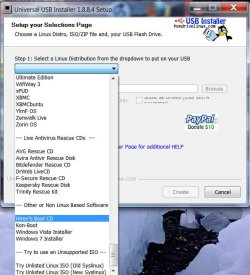
Step 1. Select Hiren's Boot CD in the drop down box.

HBCDStep1.jpg

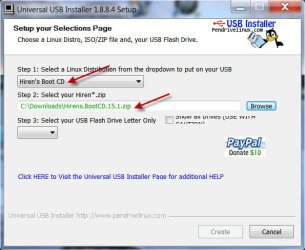
Step 2. Browse to locate Hiren*.zip

step2.jpg

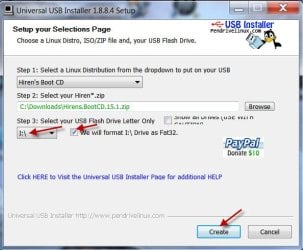
Step 3. Select your pendrive and check format to FAT32 and click on Create.

step3.jpg

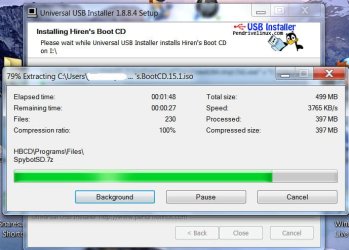
In Progress:

In Progress.jpg

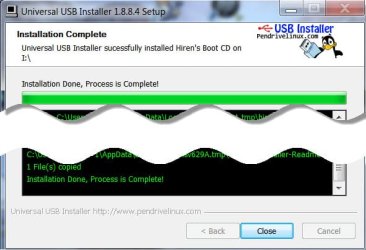
Completed:

completed.jpg

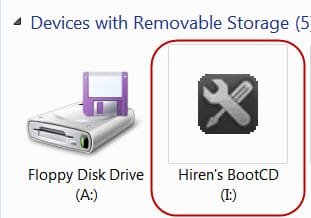
Within minutes your bootable Hiren Pendrive is ready.

Ready.jpg

A one-stop solution.
 

My Computer My Computer

OS
Windows 7 Home Premium 32 bit
Tried the Universal Installer method but after booting from the USB, I kept getting the message "Option 'maps' requires a sector". This was with Hiren's 15.2. I tried Universal Installer 1.9.1.5 and 1.8.8.4. I tried fast and slow FAT32 formatting. I tried two USB sticks. I tried booting a Dell desktop and a Lenovo laptop.

So I went back to the "official" approach referred to in oreo27's post:

Hiren's BootCD From USB Flash Drive (Pen Drive) » www.hiren.info

I just used Windows to do the FAT32 format, then started from step 3. That uses grub4dos, which sounds ominous, but it's actually very easy following the instructions at Hiren's site.
 

My Computer My Computer

OS
Win7 Pro 64-bit
Tried the Universal Installer method but after booting from the USB, I kept getting the message "Option 'maps' requires a sector". This was with Hiren's 15.2. I tried Universal Installer 1.9.1.5 and 1.8.8.4. I tried fast and slow FAT32 formatting. I tried two USB sticks. I tried booting a Dell desktop and a Lenovo laptop.

So I went back to the "official" approach referred to in oreo27's post:

Hiren's BootCD From USB Flash Drive (Pen Drive) » www.hiren.info

I just used Windows to do the FAT32 format, then started from step 3. That uses grub4dos, which sounds ominous, but it's actually very easy following the instructions at Hiren's site.

Glad to know that this worked.

Although nowadays, I'm using YUMI - Multiboot USB Creator (Windows) | USB Pen Drive Linux.

This way, I also have the Windows XP Installer available on the thumb drive. It does prove helpful in some repair install cases that I come across.
 

My Computer My Computer

Computer type
PC/Desktop
Computer Manufacturer/Model Number
Custom Build
OS
Windows 7 Ultimate x64 Service Pack 1
CPU
AMD Athlon II x4 Propus 2.9 GHz
Motherboard
ASRock N68C-GS FX
Memory
2 x 4GB Corsair XMS 3 DDR3 -1600 CL9
Graphics Card(s)
AMD Radeon HD 5850 1GB GDDR5
Sound Card
On-board 6-Channel HD Audio
Monitor(s) Displays
18' LG Flatron E1942TC-BN on DVI, 18' Chimei 95ND on HDMI
Screen Resolution
1366 x 768 x 2
Hard Drives
1 x 500 GB Seagate
1 x 1 TB Western Digital Caviar Green
1 x 1 TB Hitachi Touro Mobile USB 3
PSU
Seasonic S12II 520W
Case
Generic with Cable Management
Cooling
Deep Cool Gammaxx 200
Keyboard
Dragonwar Desert Eagle
Mouse
Logitech B85
Internet Speed
5Mb/s DL, 0.9Mb/s UL
Antivirus
ESET Nod32
Browser
Google Chrome 64 Bit
Other Info
LG G4 H818P - Rooted with Xposed Framework
Interesting, hadn't heard of YUMI.

One reason I wanted to put Hiren on a USB stick is so I could add extra files to the stick and access them from the Mini XP environment. Tested today with adding Western Digital Data Lifeguard Diagnostics installer. Once Mini XP was up, I just installed that (to the RAMdrive) and voila, I was testing the disk with the native tool. Did a similar thing awhile back with an SSD flash program.
 

My Computer My Computer

OS
Win7 Pro 64-bit
Interesting, hadn't heard of YUMI.

One reason I wanted to put Hiren on a USB stick is so I could add extra files to the stick and access them from the Mini XP environment. Tested today with adding Western Digital Data Lifeguard Diagnostics installer. Once Mini XP was up, I just installed that (to the RAMdrive) and voila, I was testing the disk with the native tool. Did a similar thing awhile back with an SSD flash program.

Yup. PE environments have a hit or miss kind of approach on apps. Some apps work nicely while some don't even install successfully. Needless to say, Hiren's BootCD nowadays removed all paid apps making it an invaluable resource in my day to day needs.

On a side note, I couldn't find a reliable source to the supposedly newly released 15.2 version.
 

My Computer My Computer

Computer type
PC/Desktop
Computer Manufacturer/Model Number
Custom Build
OS
Windows 7 Ultimate x64 Service Pack 1
CPU
AMD Athlon II x4 Propus 2.9 GHz
Motherboard
ASRock N68C-GS FX
Memory
2 x 4GB Corsair XMS 3 DDR3 -1600 CL9
Graphics Card(s)
AMD Radeon HD 5850 1GB GDDR5
Sound Card
On-board 6-Channel HD Audio
Monitor(s) Displays
18' LG Flatron E1942TC-BN on DVI, 18' Chimei 95ND on HDMI
Screen Resolution
1366 x 768 x 2
Hard Drives
1 x 500 GB Seagate
1 x 1 TB Western Digital Caviar Green
1 x 1 TB Hitachi Touro Mobile USB 3
PSU
Seasonic S12II 520W
Case
Generic with Cable Management
Cooling
Deep Cool Gammaxx 200
Keyboard
Dragonwar Desert Eagle
Mouse
Logitech B85
Internet Speed
5Mb/s DL, 0.9Mb/s UL
Antivirus
ESET Nod32
Browser
Google Chrome 64 Bit
Other Info
LG G4 H818P - Rooted with Xposed Framework
I downloaded 15.2 yesterday from www.hirensbootcd.org/download. Is that a reliable source?

It sure is. It took them a long while to mirror it there. I was reading about a week ago and several days of checking yielded nothing new.

Thanks for the update. I'll download but I'll keep it as a backup. I've had some issues in the past wherein the drivers(sata) were not working that well in updates.
 

My Computer My Computer

Computer type
PC/Desktop
Computer Manufacturer/Model Number
Custom Build
OS
Windows 7 Ultimate x64 Service Pack 1
CPU
AMD Athlon II x4 Propus 2.9 GHz
Motherboard
ASRock N68C-GS FX
Memory
2 x 4GB Corsair XMS 3 DDR3 -1600 CL9
Graphics Card(s)
AMD Radeon HD 5850 1GB GDDR5
Sound Card
On-board 6-Channel HD Audio
Monitor(s) Displays
18' LG Flatron E1942TC-BN on DVI, 18' Chimei 95ND on HDMI
Screen Resolution
1366 x 768 x 2
Hard Drives
1 x 500 GB Seagate
1 x 1 TB Western Digital Caviar Green
1 x 1 TB Hitachi Touro Mobile USB 3
PSU
Seasonic S12II 520W
Case
Generic with Cable Management
Cooling
Deep Cool Gammaxx 200
Keyboard
Dragonwar Desert Eagle
Mouse
Logitech B85
Internet Speed
5Mb/s DL, 0.9Mb/s UL
Antivirus
ESET Nod32
Browser
Google Chrome 64 Bit
Other Info
LG G4 H818P - Rooted with Xposed Framework
Back
Top