My first SSD how to clone to HDD partitions

mick1

New member
Local time
1:00 PM
Messages
16
Hello to all
I have just Bought a new OCZ AGILITY 3 SATA III 120gb, And a new 500gHDD to use as for partitions and my back up with the ssd. I would Like to know is it Possible to partition the 500gb into ( 50gb - 50gb - 50gb - 150gb ) clone my SSD to the 150gb partition and run my APPs on one of the other partitions ??? the other thing is where should i put the system Reserved 100mb ?? windows install like to put them on a separate partition on the HDD !! i was thinking it is better to put system reserved + windows all on the SSD so its all there but im not sure ? How would u set this up if u were in my Place to get best performance ?? Thanks for ur help
MOBO Asus m5A78L LE , SATA 3,
 

My Computer My Computer

At a glance

Windows 7 64bit
OS
Windows 7 64bit
200 + reviews but no one answer HMM ?? it cant be that hard
 

My Computer My Computer

At a glance

Windows 7 64bit
OS
Windows 7 64bit

My Computer My Computer

At a glance

Windows 7 Professional SP1 64-bitIntel Core 2 Duo Processor E8300 @ 2.83GHz4.00 GB Dual-Channel DDR2 @ 332MHz (5-5-5-15)Intel(R) G33/G31 Express Chipset Family
Computer type
PC/Desktop
Computer Manufacturer/Model Number
Dell Inspiron 530
OS
Windows 7 Professional SP1 64-bit
CPU
Intel Core 2 Duo Processor E8300 @ 2.83GHz
Motherboard
Dell Inc. 0RY007 (Socket 775)
Memory
4.00 GB Dual-Channel DDR2 @ 332MHz (5-5-5-15)
Graphics Card(s)
Intel(R) G33/G31 Express Chipset Family
Sound Card
Integrated 7.1 Channel Audio
Monitor(s) Displays
Acer G245HQL 23.6" LED(1920x1080@60Hz)
Screen Resolution
1920 x 1080
Hard Drives
Disk 0 HITACHI 1TB OS Installed - Disk 1 HITACHI 1TB For Backups
Keyboard
Dell USB Keyboard
Mouse
Dell Optical USB Mouse
Internet Speed
DSL 10 meg
Antivirus
Symantec(SEP)
Browser
Pale Moon
This is what I do to get rid of the 100MB partition.

Hack to Remove 100 MB System Reserved Partition When Installing Windows 7 - Use method 3 - Trick to Remove 100.00 MB System Reserved Partition During Setup

I wouldn't partition the 500GB drive so many times. I'd just leave it as one big drive and use folder shortcuts instead. A new partition does not mean a new disk meaning the drive will be susceptible to disk thrashing if you're moving (cut/copy paste) more than 1 transfer to the drive.
 

My Computer My Computer

At a glance

Windows 7 Ultimate x64 SP1Core i7 2600k (4.6GHz)16GB G.SKILL Ares 1600MHzMSI R6970 Lightning
Computer type
PC/Desktop
Computer Manufacturer/Model Number
Less is more
OS
Windows 7 Ultimate x64 SP1
CPU
Core i7 2600k (4.6GHz)
Motherboard
ASUS P8Z68 Deluxe (3603)
Memory
16GB G.SKILL Ares 1600MHz
Graphics Card(s)
MSI R6970 Lightning
Sound Card
Asus Xonar Essence ST (UNi drivers 1.41)
Monitor(s) Displays
Samsung P2570, CrossOver 27Q LED-P
Screen Resolution
1920*1080, 2560*1440
Hard Drives
256GB OCZ Vector, 2x Hitachi 4TB (7K4000), Hitachi 3TB (7K3000 & 5K3000)
PSU
Seasonic X750
Case
Lian-Li PC-P80N
Cooling
NZXT HAVIK 140 (2x GELID Wing12PL Push/Pull)
Keyboard
CM Storm Trigger (Brown Switch)
Mouse
Logitech G400
Internet Speed
55Mbps/10Mbps
Other Info
Speakers - Klipsch ProMedia 2.1
Headphones - Sennheiser HD595
Router - ASUS RT-N66U
Webcam - Logitech C910
I follow the instructions to use DISKPART and never actually create the 100 MB partition in the first place. On that system, I wouldn't over-partition anything. Have the SSD as one partiton for the OS/apps, and then use the 500 GB as a single partition for your user data. I'm not sure why people think this way, but what good is the SSD if you install your apps on another drive? Apps and OS on C....user data, like pics, docs, etc on D.

If you are concerned about backups of the system volume, use something like Macrium Reflect to create system images and store them on D.
 

My Computer My Computer

At a glance

Windows 7 Ultimate x64 SP1Intel Core i7-260012 GB Patriot Extreme DDR3-1333Nvidia GTX 470
OS
Windows 7 Ultimate x64 SP1
CPU
Intel Core i7-2600
Motherboard
Gigabyte GA-P67A-UD3P-B3
Memory
12 GB Patriot Extreme DDR3-1333
Graphics Card(s)
Nvidia GTX 470
Monitor(s) Displays
Dell UltraSharp 2209WA
Hard Drives
OCZ Agility3 240 GB, WD5001AALS, WD7501AALS
PSU
OCZ ModStream 700W
Case
CoolerMaster HAF 912 Advanced
Cooling
CoolerMaster Hyper 212 Plus
I follow the instructions to use DISKPART and never actually create the 100 MB partition in the first place. On that system, I wouldn't over-partition anything. Have the SSD as one partiton for the OS/apps, and then use the 500 GB as a single partition for your user data. I'm not sure why people think this way, but what good is the SSD if you install your apps on another drive? Apps and OS on C....user data, like pics, docs, etc on D.

If you are concerned about backups of the system volume, use something like Macrium Reflect to create system images and store them on D.

Thanks Great advice i only have 120gb on SSD i think this is more then enough to fallow ur Instructions ! but i do i move Pictures and document to D ?? when they r in C already right ?? and if i copy and past then i have them on C and D Right ?? Can u Please explain a little more about how to move user data to D so i can save space on C ??

Thanks Much will be waiting
 

My Computer My Computer

At a glance

Windows 7 64bit
OS
Windows 7 64bit
The first step is to not store the data on C in the first place. I don't know anyone who still uses the "My" folders that a user profile defaults to. On my systems, I create folders on D for Documents, Photos, Music, etc, and then I point my libraries to them.
 

My Computer My Computer

At a glance

Windows 7 Ultimate x64 SP1Intel Core i7-260012 GB Patriot Extreme DDR3-1333Nvidia GTX 470
OS
Windows 7 Ultimate x64 SP1
CPU
Intel Core i7-2600
Motherboard
Gigabyte GA-P67A-UD3P-B3
Memory
12 GB Patriot Extreme DDR3-1333
Graphics Card(s)
Nvidia GTX 470
Monitor(s) Displays
Dell UltraSharp 2209WA
Hard Drives
OCZ Agility3 240 GB, WD5001AALS, WD7501AALS
PSU
OCZ ModStream 700W
Case
CoolerMaster HAF 912 Advanced
Cooling
CoolerMaster Hyper 212 Plus
The OP's question lead me to do some thinking. Since I've always been using method 3, is it better to use method 2 diskpart instead? Does method 2 or 3 results differ in any way?
 

My Computer My Computer

At a glance

Windows 7 Ultimate x64 SP1Core i7 2600k (4.6GHz)16GB G.SKILL Ares 1600MHzMSI R6970 Lightning
Computer type
PC/Desktop
Computer Manufacturer/Model Number
Less is more
OS
Windows 7 Ultimate x64 SP1
CPU
Core i7 2600k (4.6GHz)
Motherboard
ASUS P8Z68 Deluxe (3603)
Memory
16GB G.SKILL Ares 1600MHz
Graphics Card(s)
MSI R6970 Lightning
Sound Card
Asus Xonar Essence ST (UNi drivers 1.41)
Monitor(s) Displays
Samsung P2570, CrossOver 27Q LED-P
Screen Resolution
1920*1080, 2560*1440
Hard Drives
256GB OCZ Vector, 2x Hitachi 4TB (7K4000), Hitachi 3TB (7K3000 & 5K3000)
PSU
Seasonic X750
Case
Lian-Li PC-P80N
Cooling
NZXT HAVIK 140 (2x GELID Wing12PL Push/Pull)
Keyboard
CM Storm Trigger (Brown Switch)
Mouse
Logitech G400
Internet Speed
55Mbps/10Mbps
Other Info
Speakers - Klipsch ProMedia 2.1
Headphones - Sennheiser HD595
Router - ASUS RT-N66U
Webcam - Logitech C910
I use Method 2 because it is done before installation, and it's a very quick process that takes less than a minute.
 

My Computer My Computer

At a glance

Windows 7 Ultimate x64 SP1Intel Core i7-260012 GB Patriot Extreme DDR3-1333Nvidia GTX 470
OS
Windows 7 Ultimate x64 SP1
CPU
Intel Core i7-2600
Motherboard
Gigabyte GA-P67A-UD3P-B3
Memory
12 GB Patriot Extreme DDR3-1333
Graphics Card(s)
Nvidia GTX 470
Monitor(s) Displays
Dell UltraSharp 2209WA
Hard Drives
OCZ Agility3 240 GB, WD5001AALS, WD7501AALS
PSU
OCZ ModStream 700W
Case
CoolerMaster HAF 912 Advanced
Cooling
CoolerMaster Hyper 212 Plus
I've always used diskpart also. It's quick and easy and done at the time of install.
 

My Computers My Computers

  • At a glance

    Windows 11 ProRyzen 9 5900X32GB G Skill DDR4-3600EVGA RTX 3080 FTW 3 Ultra
    Computer type
    PC/Desktop
    Computer Manufacturer/Model Number
    ALWAYS UNDER CONSTRUCTION
    OS
    Windows 11 Pro
    CPU
    Ryzen 9 5900X
    Motherboard
    Asus X570 Crosshair Viii Hero
    Memory
    32GB G Skill DDR4-3600
    Graphics Card(s)
    EVGA RTX 3080 FTW 3 Ultra
    Sound Card
    On Board/Sennheiser PC37X Headset
    Monitor(s) Displays
    3 X Asus 27"
    Screen Resolution
    2560x1440
    Hard Drives
    2 X 1 TB NVME drives
    PSU
    EVGA 850
    Case
    Phanteks Eclipse P400A
    Cooling
    EVGA 280 AIO
    Keyboard
    Logitech G510s/ Logitech G13
    Mouse
    Logitech G502
    Internet Speed
    24/1
    Antivirus
    ESET/MBAM Pro/SAS Pro
    Browser
    Chrome/ Firefox/ Edge
  • At a glance

    Windows 11 ProIntel Ultra 9 288V32 GB LPDDR5X 8533
    Computer type
    Laptop
    System Manufacturer/Model Number
    Dell 16 Plus
    OS
    Windows 11 Pro
    CPU
    Intel Ultra 9 288V
    Memory
    32 GB LPDDR5X 8533
    Monitor(s) Displays
    16" Mini-LED HDR600 Touch 90 Hz
    Screen Resolution
    2560X1600
    Hard Drives
    1 TB NVME
The OP's question lead me to do some thinking. Since I've always been using method 3, is it better to use method 2 diskpart instead? Does method 2 or 3 results differ in any way?

Ok Thanks i took a Quick look at ur ((Hack to Remove 100 MB System Reserved Partition When Installing Windows 7 )) TUT very Nice info i did not know i can do all of this thanks much,, I am Rocky so my Question is what is so useful about deleting this 100mb ??? thanks ,, The other thing is i clones my SSD to my HDD and every thing boots up smooth but know i Lost all my Drive letter on my HDD hhhhh
 

My Computer My Computer

At a glance

Windows 7 64bit
OS
Windows 7 64bit
I've always used diskpart also. It's quick and easy and done at the time of install.

Method 3 is quick and easy and done at time of install too. :eek:

Ok Thanks i took a Quick look at ur ((Hack to Remove 100 MB System Reserved Partition When Installing Windows 7 )) TUT very Nice info i did not know i can do all of this thanks much,, I am Rocky so my Question is what is so useful about deleting this 100mb ??? thanks ,, The other thing is i clones my SSD to my HDD and every thing boots up smooth but know i Lost all my Drive letter on my HDD hhhhh

That's the main reason I do it (aesthetic), to remove a drive letter when cloning/imaging my SSD.
 

My Computer My Computer

At a glance

Windows 7 Ultimate x64 SP1Core i7 2600k (4.6GHz)16GB G.SKILL Ares 1600MHzMSI R6970 Lightning
Computer type
PC/Desktop
Computer Manufacturer/Model Number
Less is more
OS
Windows 7 Ultimate x64 SP1
CPU
Core i7 2600k (4.6GHz)
Motherboard
ASUS P8Z68 Deluxe (3603)
Memory
16GB G.SKILL Ares 1600MHz
Graphics Card(s)
MSI R6970 Lightning
Sound Card
Asus Xonar Essence ST (UNi drivers 1.41)
Monitor(s) Displays
Samsung P2570, CrossOver 27Q LED-P
Screen Resolution
1920*1080, 2560*1440
Hard Drives
256GB OCZ Vector, 2x Hitachi 4TB (7K4000), Hitachi 3TB (7K3000 & 5K3000)
PSU
Seasonic X750
Case
Lian-Li PC-P80N
Cooling
NZXT HAVIK 140 (2x GELID Wing12PL Push/Pull)
Keyboard
CM Storm Trigger (Brown Switch)
Mouse
Logitech G400
Internet Speed
55Mbps/10Mbps
Other Info
Speakers - Klipsch ProMedia 2.1
Headphones - Sennheiser HD595
Router - ASUS RT-N66U
Webcam - Logitech C910
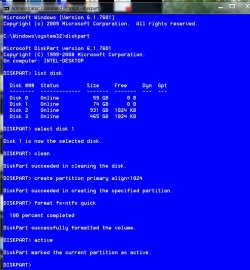
The guide does not show him aligning the SSD. Whether diskpart will auto align, I don't know, but the installer will. But, why do diskpart if you are going to format with the installer. Quite simply, there needs to be no 'Hack' to remove the 100MB partition. If you align and format the SSD and then install to an already aligned partition, it will not create the 100MB partition. With the caveat that I never run 'Clean All' command on my SSDs, this is a good guide that gives the option to have or not have the 100MB partition. You will notice there is no hack. If you do this to an SSD during installation exit diskpart, then simply install, there will be no 100MB partition. Also, if it is a new SSD, you can omit the 'clean' command, and begin at the create partition primary. You will also be better off to disconnect all hard drives except the SSD and make sure your sata controller in in AHCI mode before starting. This was just an example to show someone how to do it on a reinstall.

clean-align-format SSD.JPG
 

My Computers My Computers

  • At a glance

    Windows 11 ProRyzen 9 5900X32GB G Skill DDR4-3600EVGA RTX 3080 FTW 3 Ultra
    Computer type
    PC/Desktop
    Computer Manufacturer/Model Number
    ALWAYS UNDER CONSTRUCTION
    OS
    Windows 11 Pro
    CPU
    Ryzen 9 5900X
    Motherboard
    Asus X570 Crosshair Viii Hero
    Memory
    32GB G Skill DDR4-3600
    Graphics Card(s)
    EVGA RTX 3080 FTW 3 Ultra
    Sound Card
    On Board/Sennheiser PC37X Headset
    Monitor(s) Displays
    3 X Asus 27"
    Screen Resolution
    2560x1440
    Hard Drives
    2 X 1 TB NVME drives
    PSU
    EVGA 850
    Case
    Phanteks Eclipse P400A
    Cooling
    EVGA 280 AIO
    Keyboard
    Logitech G510s/ Logitech G13
    Mouse
    Logitech G502
    Internet Speed
    24/1
    Antivirus
    ESET/MBAM Pro/SAS Pro
    Browser
    Chrome/ Firefox/ Edge
  • At a glance

    Windows 11 ProIntel Ultra 9 288V32 GB LPDDR5X 8533
    Computer type
    Laptop
    System Manufacturer/Model Number
    Dell 16 Plus
    OS
    Windows 11 Pro
    CPU
    Intel Ultra 9 288V
    Memory
    32 GB LPDDR5X 8533
    Monitor(s) Displays
    16" Mini-LED HDR600 Touch 90 Hz
    Screen Resolution
    2560X1600
    Hard Drives
    1 TB NVME
Method 3 is quick and easy and done at time of install too. :eek:
That's the other reason I use DISKPART. Everything I've read says that the drive will be properly aligned each time with DISKPART, but not always with the GUI installer.
 

My Computer My Computer

At a glance

Windows 7 Ultimate x64 SP1Intel Core i7-260012 GB Patriot Extreme DDR3-1333Nvidia GTX 470
OS
Windows 7 Ultimate x64 SP1
CPU
Intel Core i7-2600
Motherboard
Gigabyte GA-P67A-UD3P-B3
Memory
12 GB Patriot Extreme DDR3-1333
Graphics Card(s)
Nvidia GTX 470
Monitor(s) Displays
Dell UltraSharp 2209WA
Hard Drives
OCZ Agility3 240 GB, WD5001AALS, WD7501AALS
PSU
OCZ ModStream 700W
Case
CoolerMaster HAF 912 Advanced
Cooling
CoolerMaster Hyper 212 Plus
essenbe the Guide u provide here is amazing thank u, but it looks like this is only when i want to do a fresh install right ??? coz now every thing is up and running, the other thing is i try to avoid re installing Windows as much as i can coz lately i have been re installing Windows over and over coz i keep switching from raid to ahci and so,, now i am set on AHCI ,, so to avoid all the hassle and down time from re installing windows i did some google search and found this Unattended Installation Software for Windows Unattended Installation Software for Windows
this software says it will install windows and all other programs from scratch and u dont have to do anything ,,, so DO U KNOW anything about this software or anything similar ?? that can keep me away from the running around finding every thing back again ???

Last question :p what do u guys prefer Cloning or Imaging ???

u guys r the best thanks
 

My Computer My Computer

At a glance

Windows 7 64bit
OS
Windows 7 64bit
Cloning and imaging are 2 different tools used for 2 different purposes. They aren't "competitors". Which you should use depends on your intentions.

What are your intentions?

Any why don't you install Windows once instead of so often that you are asking about unattended installations?

What are your intentions?

I've re-read the thread and don't fully understand your complaints or what you are trying to accomplish.

There's no particular point in agonizing over the 100 MB System Reserved partition either. Some use it and some don't. It hardly matters in the larger scheme of things.
 

My Computer My Computer

At a glance

Windows 7 Home Premium SP1, 64-bitIntel Skylake i5-6600K, not overclocked8 GB HyperX DDR4-2666 (2 x 4 GB)none; graphics are integrated on CPU
Computer type
PC/Desktop
Computer Manufacturer/Model Number
Ignatz Special; 4 speed manual gearbox; factory air conditioning; one of one
OS
Windows 7 Home Premium SP1, 64-bit
CPU
Intel Skylake i5-6600K, not overclocked
Motherboard
AsRock Z170M Extreme 4, micro ATX
Memory
8 GB HyperX DDR4-2666 (2 x 4 GB)
Graphics Card(s)
none; graphics are integrated on CPU
Sound Card
onboard: Realtek ALC1150; external: USB Behringer UF0-202
Monitor(s) Displays
Dell S2340M 23 inch IPS
Screen Resolution
1600 x 900
Hard Drives
System: Crucial MX100 series SSD, 128 GB;
Data: Samsung Spinpoint 103SJ, 1 TB;
Backup: WD Caviar Green WD30EZRX-00D8PB0, 3 TB
PSU
Rosewill SilentNight 500 watt fanless, semi-modular
Case
Antec Solo II
Cooling
Noctua NH-U12S; Noctua F12 intake, Noctua S12A exhaust
Keyboard
Microsoft 200 6JH-00001 USB
Mouse
Dell or Microsoft optical wired; USB
Antivirus
Microsoft Security Essentials and Malwarebytes Premium
Browser
Pale Moon
Other Info
All fans PWM; speeds at idle: CPU circa 500 rpm; intake circa 600 rpm; exhaust circa 600 rpm; CPU temps 27 idle and 47 C load in a warm room (27 C/81 F) when running Intel Extreme Tuning Utility stress test.
An SSD has to be in proper alignment. I have had issues with imaging, unless the image came from an aligned SSD. Others do not have such problems. There is a good tutorial here about transfering the OS by WHS which I can't get to right now. My prefered method is Paragon Migrate ($19.95) it will transfer the OS align it and has worked without fail for me on numerous occasions.
 

My Computers My Computers

  • At a glance

    Windows 11 ProRyzen 9 5900X32GB G Skill DDR4-3600EVGA RTX 3080 FTW 3 Ultra
    Computer type
    PC/Desktop
    Computer Manufacturer/Model Number
    ALWAYS UNDER CONSTRUCTION
    OS
    Windows 11 Pro
    CPU
    Ryzen 9 5900X
    Motherboard
    Asus X570 Crosshair Viii Hero
    Memory
    32GB G Skill DDR4-3600
    Graphics Card(s)
    EVGA RTX 3080 FTW 3 Ultra
    Sound Card
    On Board/Sennheiser PC37X Headset
    Monitor(s) Displays
    3 X Asus 27"
    Screen Resolution
    2560x1440
    Hard Drives
    2 X 1 TB NVME drives
    PSU
    EVGA 850
    Case
    Phanteks Eclipse P400A
    Cooling
    EVGA 280 AIO
    Keyboard
    Logitech G510s/ Logitech G13
    Mouse
    Logitech G502
    Internet Speed
    24/1
    Antivirus
    ESET/MBAM Pro/SAS Pro
    Browser
    Chrome/ Firefox/ Edge
  • At a glance

    Windows 11 ProIntel Ultra 9 288V32 GB LPDDR5X 8533
    Computer type
    Laptop
    System Manufacturer/Model Number
    Dell 16 Plus
    OS
    Windows 11 Pro
    CPU
    Intel Ultra 9 288V
    Memory
    32 GB LPDDR5X 8533
    Monitor(s) Displays
    16" Mini-LED HDR600 Touch 90 Hz
    Screen Resolution
    2560X1600
    Hard Drives
    1 TB NVME
Cloning and imaging are 2 different tools used for 2 different purposes. They aren't "competitors". Which you should use depends on your intentions.

What are your intentions?

Any why don't you install Windows once instead of so often that you are asking about unattended installations?

What are your intentions?

I've re-read the thread and don't fully understand your complaints or what you are trying to accomplish.

There's no particular point in agonizing over the 100 MB System Reserved partition either. Some use it and some don't. It hardly matters in the larger scheme of things.

Ok good Enough so i will show u by Picture what has happened and what i would like to do ,, take a look at this ImageShack® - Online Photo and Video Hosting

So Disk 0 is my SSD --- Disk 1 is my 500gbHDD ---Disk 2 is not important just an old HDD 80gb for some programs ... So when i cloned my SSD as u see i lost my Letters On my HDD the major Question is if i clone again it looks like Acronis will take out my A partition But i am not sure so this is what i want to know !! should i stop cloning and do imaging or i am ok with cloning and it wont take my partition A ?? or what will u do if u have this set up like me ??? all i want is to Avoid is losing Data and re installing windows every 2 day Hop i was clear and hop one of u guys can help thanks much
 

My Computer My Computer

At a glance

Windows 7 64bit
OS
Windows 7 64bit
Method 3 is quick and easy and done at time of install too. :eek:
That's the other reason I use DISKPART. Everything I've read says that the drive will be properly aligned each time with DISKPART, but not always with the GUI installer.

I guess both methods work just as well. As long as it's formatted under Windows 7 it will be properly aligned.
 

Attachments

  • aligned.PNG
    aligned.PNG
    14 KB · Views: 7

My Computer My Computer

At a glance

Windows 7 Ultimate x64 SP1Core i7 2600k (4.6GHz)16GB G.SKILL Ares 1600MHzMSI R6970 Lightning
Computer type
PC/Desktop
Computer Manufacturer/Model Number
Less is more
OS
Windows 7 Ultimate x64 SP1
CPU
Core i7 2600k (4.6GHz)
Motherboard
ASUS P8Z68 Deluxe (3603)
Memory
16GB G.SKILL Ares 1600MHz
Graphics Card(s)
MSI R6970 Lightning
Sound Card
Asus Xonar Essence ST (UNi drivers 1.41)
Monitor(s) Displays
Samsung P2570, CrossOver 27Q LED-P
Screen Resolution
1920*1080, 2560*1440
Hard Drives
256GB OCZ Vector, 2x Hitachi 4TB (7K4000), Hitachi 3TB (7K3000 & 5K3000)
PSU
Seasonic X750
Case
Lian-Li PC-P80N
Cooling
NZXT HAVIK 140 (2x GELID Wing12PL Push/Pull)
Keyboard
CM Storm Trigger (Brown Switch)
Mouse
Logitech G400
Internet Speed
55Mbps/10Mbps
Other Info
Speakers - Klipsch ProMedia 2.1
Headphones - Sennheiser HD595
Router - ASUS RT-N66U
Webcam - Logitech C910
I guess both methods work just as well. As long as it's formatted under Windows 7 it will be properly aligned.
That's the point. From what I've read on here and elsewhere, it isn't always aligned properly using the GUI installer, as opposed to diskpart. Considering this, and how quick and easy it is to use diskpart, I don't take any chances. I'd rather spend a few seconds early on knowing it is done right.
 

My Computer My Computer

At a glance

Windows 7 Ultimate x64 SP1Intel Core i7-260012 GB Patriot Extreme DDR3-1333Nvidia GTX 470
OS
Windows 7 Ultimate x64 SP1
CPU
Intel Core i7-2600
Motherboard
Gigabyte GA-P67A-UD3P-B3
Memory
12 GB Patriot Extreme DDR3-1333
Graphics Card(s)
Nvidia GTX 470
Monitor(s) Displays
Dell UltraSharp 2209WA
Hard Drives
OCZ Agility3 240 GB, WD5001AALS, WD7501AALS
PSU
OCZ ModStream 700W
Case
CoolerMaster HAF 912 Advanced
Cooling
CoolerMaster Hyper 212 Plus
Back
Top