
Solved Volume control on keyboard stopped working.

inouno

Banned
Local time
4:41 AM
Messages
132
Hi Guys.

On my HP keyboard are 3 silver buttons which control the volume. up, down and mute.
When you press on one of them, a scroll bar thing appears, and you can see what you are doing.

Now, all of a sudden, the bar does not appear.
The volume control still works when pressing them, but where has the scroll thing gone ?
 

My Computer My Computer

At a glance

MS Windows 7 Home Premium 64-bit SP1
OS
MS Windows 7 Home Premium 64-bit SP1
Happened to me before. Did you uninstall "HP SmartMenu"? Check whether it's in your installed programs' list. If it's not go to HP Support & Drivers | United States

Look up your laptop model number by typing into CMD:

wmic /namespace:\\root\wmi path MS_SystemInformation

Download SmartMenu, reboot, and it should be fixed.
 

My Computer My Computer

At a glance

Windows 7 ultimate x32
OS
Windows 7 ultimate x32
Motherboard
Intel dp35dp
Sound Card
IDT 92xx
Happened to me before. Did you uninstall "HP SmartMenu"? Check whether it's in your installed programs' list. If it's not go to HP Support & Drivers | United States

Look up your laptop model number by typing into CMD:

wmic /namespace:\\root\wmi path MS_SystemInformation

Download SmartMenu, reboot, and it should be fixed.

no , it's not a laptop. it is a desktop.
i went to the link and nothing happened when i opened it.
i checked installed programs list and it came up nothing.
i am a bit cross. i might have to look at this tomorrow.
 

My Computer My Computer

At a glance

MS Windows 7 Home Premium 64-bit SP1
OS
MS Windows 7 Home Premium 64-bit SP1
Happened to me before. Did you uninstall "HP SmartMenu"? Check whether it's in your installed programs' list. If it's not go to HP Support & Drivers | United States

Look up your laptop model number by typing into CMD:

wmic /namespace:\\root\wmi path MS_SystemInformation

Download SmartMenu, reboot, and it should be fixed.

Dear nonyabus,

You were right. I did uninstall it, along with all the HP Support assistant.
I have since reinstalled it all.
And have found that I have to have running on Startup ,
HKLM:Run SmartMenu C:\Program Files\Hewlett-Packard\HP MediaSmart\SmartMenu.exe/background

My Mood was uncool and it cost me two days of experimentation, to find out (that)
You were right all along !
 

My Computer My Computer

At a glance

MS Windows 7 Home Premium 64-bit SP1
OS
MS Windows 7 Home Premium 64-bit SP1

My Computer My Computer

At a glance

Win 7 Home Premium x64Intel Core i3-540 3.07 GHz4 GB (2 X 2) Dual-Channel PC-10600 DDR3 @ 665...Integrated Intel H57
Computer Manufacturer/Model Number
HP p6608f
OS
Win 7 Home Premium x64
CPU
Intel Core i3-540 3.07 GHz
Motherboard
MS-7613 (Iona-GL8E)
Memory
4 GB (2 X 2) Dual-Channel PC-10600 DDR3 @ 665MHz (9-9-9-24)
Graphics Card(s)
Integrated Intel H57
Sound Card
Integrated Realtek ALC888S Audio
Monitor(s) Displays
17" SDM-HS73 (a vestige from my old computer)
Screen Resolution
1280 X 1024
Hard Drives
750GB SATA 7200 RPM
PSU
250W
Keyboard
HP USB keyboard
Mouse
HP USB optical mouse
Internet Speed
15Mbps/1Mbps


Hi bru,

Yeah, funny reply.
Riddle me this but.
Did you get your keyboard volume control working again, using the same method ?

(also, I have found out, that HP add an extra thing on keyboard, that forces you to use their update, otherwise parts of your keyboard will stop working. Not too cool, I reckon.)

...and it was more like troublemaking than trouble shooting..
:)
 

My Computer My Computer

At a glance

MS Windows 7 Home Premium 64-bit SP1
OS
MS Windows 7 Home Premium 64-bit SP1
Riddle me this but.
Did you get your keyboard volume control working again, using the same method ?

(also, I have found out, that HP add an extra thing on keyboard, that forces you to use their update, otherwise parts of your keyboard will stop working. Not too cool, I reckon.)

...and it was more like troublemaking than trouble shooting..
:)
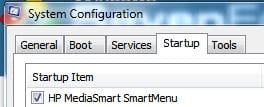
Trying to streamline my Startup programs I disabled HP MediaSmart. That's what took away the on screen volume display (and who knows what else). Once I reenabled it, it was back.
 

Attachments

  • hps.JPG
    hps.JPG
    13.9 KB · Views: 2,753

My Computer My Computer

At a glance

Win 7 Home Premium x64Intel Core i3-540 3.07 GHz4 GB (2 X 2) Dual-Channel PC-10600 DDR3 @ 665...Integrated Intel H57
Computer Manufacturer/Model Number
HP p6608f
OS
Win 7 Home Premium x64
CPU
Intel Core i3-540 3.07 GHz
Motherboard
MS-7613 (Iona-GL8E)
Memory
4 GB (2 X 2) Dual-Channel PC-10600 DDR3 @ 665MHz (9-9-9-24)
Graphics Card(s)
Integrated Intel H57
Sound Card
Integrated Realtek ALC888S Audio
Monitor(s) Displays
17" SDM-HS73 (a vestige from my old computer)
Screen Resolution
1280 X 1024
Hard Drives
750GB SATA 7200 RPM
PSU
250W
Keyboard
HP USB keyboard
Mouse
HP USB optical mouse
Internet Speed
15Mbps/1Mbps
Riddle me this but.
Did you get your keyboard volume control working again, using the same method ?

(also, I have found out, that HP add an extra thing on keyboard, that forces you to use their update, otherwise parts of your keyboard will stop working. Not too cool, I reckon.)

...and it was more like troublemaking than trouble shooting..
:)
Trying to streamline my Startup programs I disabled HP MediaSmart. That's what took away the on screen volume display (and who knows what else). Once I reenabled it, it was back.

Cool.

..and thanks for that little picture showing System Configuration thing, as I could never find out where my Startup programs were located, and I always had to use the Ccleaner option.
:)
 

My Computer My Computer

At a glance

MS Windows 7 Home Premium 64-bit SP1
OS
MS Windows 7 Home Premium 64-bit SP1
Back
Top