Solved motherboard revival? suitable for Win 7?

Hi Gemini,

Nope, slower sped won't affect the crashing, unless that speed is incompatible with timings set in the BIOS. Dave will be able to tell from the CPUZ info that you post.

I agree with Dwarf : since you have a good 'borrowed' RAM, test Windows 7 on this laptop by installing it - you do not need to validate it for 30 days since you are effectively trialling it, so do don't place a check mark in "automatically validate online" option during installation.

Regards,
Golden
 
Last edited:

My Computer My Computer

At a glance

Windows 10 Pro x64 ; Xubuntu x64Intel i7 860 @ 2.80 GHz O/C'ed to 4.0GHz16GB Corsair Vengance DDR3 @ 661 MHz Dual Cha...EVGA NVidia GTX 560 1024MB
Computer type
PC/Desktop
Computer Manufacturer/Model Number
Golden Mk. I.4
OS
Windows 10 Pro x64 ; Xubuntu x64
CPU
Intel i7 860 @ 2.80 GHz O/C'ed to 4.0GHz
Motherboard
Gigabyte P55A-UD3R Rev.1. Award BIOS F13
Memory
16GB Corsair Vengance DDR3 @ 661 MHz Dual Channel (9-9-9-24)
Graphics Card(s)
EVGA NVidia GTX 560 1024MB
Sound Card
Realtek Integrated
Monitor(s) Displays
Dual Samsung SyncMaster 2494HS
Screen Resolution
1920*1080 and 1920*1080
Hard Drives
1*Samsung 840 EVO 120GB SSD;
1*OCZ Vertex 2 60GB SSD;
2*Samsung F3 SpinPoint 1TB in RAID0;
1*Samsung F1 SpinPoint 1TB;
2*Western Digital 1TB External USB 3.0
1*Western Digital 500GB External USB 3.0
1*Seagate 500GB External USB 2.0
PSU
Thermaltake ToughPower QFan 750W
Case
Thermaltake Element S VK60001W2Z
Cooling
Corsair H60 Water Cooling, 2*230mm and 2*80mm case fans
Keyboard
Logitech G110
Mouse
Logitech MX518
I think Golden meant
don't place a check mark in "automatically validate online" option during installation.
Shouldn't cause a crash, the info from CPUZ will help analyze that.

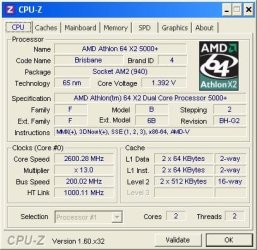
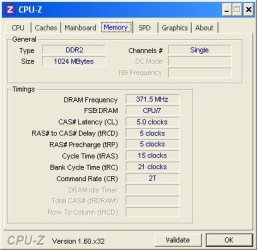
The Memory tab is what the current RAM settings are.
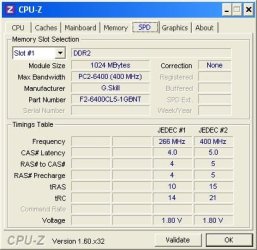
The SPD tab is the manufacturer tested settings, and are their recommended setting choices.

Let us know if you can get the CPUZ tabs with the 'Bad' RAM installed.
 

My Computer My Computer

At a glance

Windows 7 Ult x64 - SP1/ Windows 8 Pro x64Intel Core i5-3570K 4.6GHz8GB (2X4GB) DDR3 1600 Corsair Vengeance CL8 1.5vSapphire HD 7770 Vapor-X OC 1GB DDR5
Computer type
PC/Desktop
Computer Manufacturer/Model Number
76~2.0
OS
Windows 7 Ult x64 - SP1/ Windows 8 Pro x64
CPU
Intel Core i5-3570K 4.6GHz
Motherboard
Gigabyte GA-Z77X UD3H, f18
Memory
8GB (2X4GB) DDR3 1600 Corsair Vengeance CL8 1.5v
Graphics Card(s)
Sapphire HD 7770 Vapor-X OC 1GB DDR5
Sound Card
Onboard VIA VT2021
Monitor(s) Displays
22" LCD Dell
Screen Resolution
1680x1050
Hard Drives
Samsung 840Pro 128GB SSD,
Seagate Barracuda 500GB SATA2 7200rpm 32MB cache, Seagate Barracuda 1TB SATA2 7200rpm 32MB cache,
PSU
Corsair HX650W
Case
Cooler Master Storm Scout
Cooling
Corsair H80 2x12cm Noctua NF P12 , 2x14cm case fans
Keyboard
Logitech Wave
Mouse
CM Sentinel
Internet Speed
Dismal
Antivirus
Avast
Browser
Opera Next
Other Info
Haswell laptop: HP Envy 17t-j, i7-4700MQ, GeForce 740M 2GB DDR3, 17.3" Full HD 1920x1080, 16GB RAM, Samsung 840 Pro 128GB, 1TB Hitachi 7200 HDD,
Desktop: eSATA ports,
External eSATA Seagate 500GB SATA2 7200rpm,
External WD USB 500GB
Thanks Dave - thats correct " do NOT place a check in "automatically validate online"
 

My Computer My Computer

At a glance

Windows 10 Pro x64 ; Xubuntu x64Intel i7 860 @ 2.80 GHz O/C'ed to 4.0GHz16GB Corsair Vengance DDR3 @ 661 MHz Dual Cha...EVGA NVidia GTX 560 1024MB
Computer type
PC/Desktop
Computer Manufacturer/Model Number
Golden Mk. I.4
OS
Windows 10 Pro x64 ; Xubuntu x64
CPU
Intel i7 860 @ 2.80 GHz O/C'ed to 4.0GHz
Motherboard
Gigabyte P55A-UD3R Rev.1. Award BIOS F13
Memory
16GB Corsair Vengance DDR3 @ 661 MHz Dual Channel (9-9-9-24)
Graphics Card(s)
EVGA NVidia GTX 560 1024MB
Sound Card
Realtek Integrated
Monitor(s) Displays
Dual Samsung SyncMaster 2494HS
Screen Resolution
1920*1080 and 1920*1080
Hard Drives
1*Samsung 840 EVO 120GB SSD;
1*OCZ Vertex 2 60GB SSD;
2*Samsung F3 SpinPoint 1TB in RAID0;
1*Samsung F1 SpinPoint 1TB;
2*Western Digital 1TB External USB 3.0
1*Western Digital 500GB External USB 3.0
1*Seagate 500GB External USB 2.0
PSU
Thermaltake ToughPower QFan 750W
Case
Thermaltake Element S VK60001W2Z
Cooling
Corsair H60 Water Cooling, 2*230mm and 2*80mm case fans
Keyboard
Logitech G110
Mouse
Logitech MX518
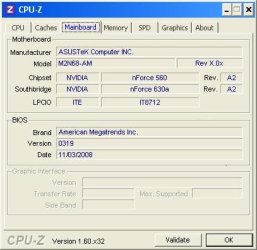
Managed to take a screen shot of all the details...
Interesting to note that I managed to get these details before it crashed again, this time with the following errors;
  1. generic host process for win32 services has encountered a problem and needs to close
  2. automatic updates has encountered a problem and needs to close
  3. pc frozen
I rebooted with the good RAM in order to transfer the files to USB.
 

Attachments

  • bad RAM sceen shot CPU.JPG
    bad RAM sceen shot CPU.JPG
    38.6 KB · Views: 6
  • bad RAM sceen shot mainboard.JPG
    bad RAM sceen shot mainboard.JPG
    26.5 KB · Views: 7
  • bad RAM sceen shot memory.JPG
    bad RAM sceen shot memory.JPG
    27.3 KB · Views: 7
  • bad RAM sceen shot SPD.JPG
    bad RAM sceen shot SPD.JPG
    30.2 KB · Views: 7

My Computer My Computer

At a glance

Windows 7 Home Premium
OS
Windows 7 Home Premium
Have you been checking your temperatures?
Use Core Temp, to check the CPU temps when at idle, under load and/or testing.
Let us know the minimum and maximum temps you get.

I can't run the core temp program on that machine, it wants to connect to the internet which is not available to that machine at the moment.


Go to your BIOS and tell us what the CPU, RAM and the CPU integrated memory controller voltages are.

I am guessing I need the bad RAM for this? I might have to do this step tomorrow as it is getting late now.

Thanks heaps for all your help!
 

My Computer My Computer

At a glance

Windows 7 Home Premium
OS
Windows 7 Home Premium
You're welcome.
No problem, let us know how it's going tomorrow.

You can download Core Temp on another computer and transfer it by USB memory stick.

You can check the BIOS voltages with the good RAM installed.
Let me know if you have any problems finding the voltages, I can look them up in your motherboard manual.

The RAM should run fine at those settings.
The SPD tab, manufacturers recommended settings, lists 400MHz and the Memory tab shows the actual settings at 371MHz. The frequency is turned down a little bit, this should make it run easily at the 5-5-5-15 timings. So that is ok for now.

We can make some adjustments after you get the BIOS voltage settings.
 

My Computer My Computer

At a glance

Windows 7 Ult x64 - SP1/ Windows 8 Pro x64Intel Core i5-3570K 4.6GHz8GB (2X4GB) DDR3 1600 Corsair Vengeance CL8 1.5vSapphire HD 7770 Vapor-X OC 1GB DDR5
Computer type
PC/Desktop
Computer Manufacturer/Model Number
76~2.0
OS
Windows 7 Ult x64 - SP1/ Windows 8 Pro x64
CPU
Intel Core i5-3570K 4.6GHz
Motherboard
Gigabyte GA-Z77X UD3H, f18
Memory
8GB (2X4GB) DDR3 1600 Corsair Vengeance CL8 1.5v
Graphics Card(s)
Sapphire HD 7770 Vapor-X OC 1GB DDR5
Sound Card
Onboard VIA VT2021
Monitor(s) Displays
22" LCD Dell
Screen Resolution
1680x1050
Hard Drives
Samsung 840Pro 128GB SSD,
Seagate Barracuda 500GB SATA2 7200rpm 32MB cache, Seagate Barracuda 1TB SATA2 7200rpm 32MB cache,
PSU
Corsair HX650W
Case
Cooler Master Storm Scout
Cooling
Corsair H80 2x12cm Noctua NF P12 , 2x14cm case fans
Keyboard
Logitech Wave
Mouse
CM Sentinel
Internet Speed
Dismal
Antivirus
Avast
Browser
Opera Next
Other Info
Haswell laptop: HP Envy 17t-j, i7-4700MQ, GeForce 740M 2GB DDR3, 17.3" Full HD 1920x1080, 16GB RAM, Samsung 840 Pro 128GB, 1TB Hitachi 7200 HDD,
Desktop: eSATA ports,
External eSATA Seagate 500GB SATA2 7200rpm,
External WD USB 500GB
Hi Dave,
I'm not sure what I am doing wrong, I tried going to the website twice for Core Temp but the only file I could find was an installer file which wants to connect to the internet.
Any ideas are welcome!
 

My Computer My Computer

At a glance

Windows 7 Home Premium
OS
Windows 7 Home Premium

My Computer My Computer

At a glance

Windows 7 Ultimate X64 SP1Intel i5-2550K, Differing ~4.4-4.8GHz No buil...16GB G.Skill Sniper 1866MHz @ 2133MHz 2x8GBASUS GTX650TIB-DC2OC-2GD5, (650TI Boost)
Computer type
PC/Desktop
Computer Manufacturer/Model Number
Home Built Desktop By DataTech
OS
Windows 7 Ultimate X64 SP1
CPU
Intel i5-2550K, Differing ~4.4-4.8GHz No built in GPU
Motherboard
ASUS P8Z68-V PRO/GEN3
Memory
16GB G.Skill Sniper 1866MHz @ 2133MHz 2x8GB
Graphics Card(s)
ASUS GTX650TIB-DC2OC-2GD5, (650TI Boost)
Sound Card
Onboard Realtek 5-1
Monitor(s) Displays
Samsung P2570HD
Screen Resolution
1920x1080
Hard Drives
Samsung 840 Pro 256GB SSD for OS, 500GB Seagate Constellation (Enterprise drive) for Data
PSU
Corsair HX650W
Case
Inwin Dragon Rider
Cooling
Hyper 212 EVO w/two Noctua fans, push-pull, @1300 RPM
Keyboard
E-Z Eyes, bright yellow keys with large characters
Mouse
steelseries SENSEI Laser Pro Gaming
Internet Speed
48-51Mbs Mbs down, 11 Mbs up Xfinity Cable
Antivirus
Norton Internet Security 2013
Browser
IE 10, Opera, Pale Moon if needed
Other Info
4 case fans, LG BluRay-RE, ASUS DVD-RW, Mr. Fusion power supply, 1.21 gigawatts.
Hi Britton,
Thanks for your post, I will look into that one shortly...!


Dave,
I think this is the information I needed to acccess?

CPU Ratio and Voltage:
  • Processor Frequency Multiplier [Auto]
    (Options are Auto or x8.0 1600Mhz through to x13.0 2600Mhz)
  • Processor Voltage [Standard]
    (Options are Power Saving Mode, Standard, +50mv, +100mv)
Memory Timing and Voltage:
  • Memory Clock Mode [Auto]
    (Options are Auto or Manual)
  • DRAM Timing Mode [Auto]
    (Options are Auto or DCT 0)
  • Memory Over Voltage [Auto]
    (Options are *Min = 1.85000V, Max = 2.24375V, Standard = 1.8500V, Increment = 0.00625V)
Chipset Voltage:
  • Chipset Voltage [Auto]
    (Options are Auto, +50mv, +100mv, +150mv)
 

My Computer My Computer

At a glance

Windows 7 Home Premium
OS
Windows 7 Home Premium
Hi Britton,
I tried open hardware monitor but it has an application error, The application failed to initialize properly (Oxc0000135). Click on OK to terminate the application.
I have tried recopying it to disk, and I will try it again after this post.

**Have just tried again with older version of open hardware monitor and has the same error.
 
Last edited:

My Computer My Computer

At a glance

Windows 7 Home Premium
OS
Windows 7 Home Premium
Did you extract all the file from the zip file into one older of its own? It has config settings that are needed for the app to run. Then Right click the .exe file and choose Run as Admin.
 

My Computer My Computer

At a glance

Windows 7 Ultimate X64 SP1Intel i5-2550K, Differing ~4.4-4.8GHz No buil...16GB G.Skill Sniper 1866MHz @ 2133MHz 2x8GBASUS GTX650TIB-DC2OC-2GD5, (650TI Boost)
Computer type
PC/Desktop
Computer Manufacturer/Model Number
Home Built Desktop By DataTech
OS
Windows 7 Ultimate X64 SP1
CPU
Intel i5-2550K, Differing ~4.4-4.8GHz No built in GPU
Motherboard
ASUS P8Z68-V PRO/GEN3
Memory
16GB G.Skill Sniper 1866MHz @ 2133MHz 2x8GB
Graphics Card(s)
ASUS GTX650TIB-DC2OC-2GD5, (650TI Boost)
Sound Card
Onboard Realtek 5-1
Monitor(s) Displays
Samsung P2570HD
Screen Resolution
1920x1080
Hard Drives
Samsung 840 Pro 256GB SSD for OS, 500GB Seagate Constellation (Enterprise drive) for Data
PSU
Corsair HX650W
Case
Inwin Dragon Rider
Cooling
Hyper 212 EVO w/two Noctua fans, push-pull, @1300 RPM
Keyboard
E-Z Eyes, bright yellow keys with large characters
Mouse
steelseries SENSEI Laser Pro Gaming
Internet Speed
48-51Mbs Mbs down, 11 Mbs up Xfinity Cable
Antivirus
Norton Internet Security 2013
Browser
IE 10, Opera, Pale Moon if needed
Other Info
4 case fans, LG BluRay-RE, ASUS DVD-RW, Mr. Fusion power supply, 1.21 gigawatts.
I tried redoing it several times and when I run as admin it still has the same error.. not sure what I'm doing wrong.
 

My Computer My Computer

At a glance

Windows 7 Home Premium
OS
Windows 7 Home Premium
Odd, will it run on your Win 7 machine?
 

My Computer My Computer

At a glance

Windows 7 Ultimate X64 SP1Intel i5-2550K, Differing ~4.4-4.8GHz No buil...16GB G.Skill Sniper 1866MHz @ 2133MHz 2x8GBASUS GTX650TIB-DC2OC-2GD5, (650TI Boost)
Computer type
PC/Desktop
Computer Manufacturer/Model Number
Home Built Desktop By DataTech
OS
Windows 7 Ultimate X64 SP1
CPU
Intel i5-2550K, Differing ~4.4-4.8GHz No built in GPU
Motherboard
ASUS P8Z68-V PRO/GEN3
Memory
16GB G.Skill Sniper 1866MHz @ 2133MHz 2x8GB
Graphics Card(s)
ASUS GTX650TIB-DC2OC-2GD5, (650TI Boost)
Sound Card
Onboard Realtek 5-1
Monitor(s) Displays
Samsung P2570HD
Screen Resolution
1920x1080
Hard Drives
Samsung 840 Pro 256GB SSD for OS, 500GB Seagate Constellation (Enterprise drive) for Data
PSU
Corsair HX650W
Case
Inwin Dragon Rider
Cooling
Hyper 212 EVO w/two Noctua fans, push-pull, @1300 RPM
Keyboard
E-Z Eyes, bright yellow keys with large characters
Mouse
steelseries SENSEI Laser Pro Gaming
Internet Speed
48-51Mbs Mbs down, 11 Mbs up Xfinity Cable
Antivirus
Norton Internet Security 2013
Browser
IE 10, Opera, Pale Moon if needed
Other Info
4 case fans, LG BluRay-RE, ASUS DVD-RW, Mr. Fusion power supply, 1.21 gigawatts.
I havent tried on this one... I figure, why mess with something that is working fine! I haven't ventured into the workings of this machine, it is only a few weeks old and came bundled ready to go. TBH I haven't done much work with computers since I was studying IT networking about 8 years ago or so.
 

My Computer My Computer

At a glance

Windows 7 Home Premium
OS
Windows 7 Home Premium
My curiosity got the better of me and so I ran it on this computer and it works fine on this one with Windows 7.. Is it an xp thing do you think?
 

My Computer My Computer

At a glance

Windows 7 Home Premium
OS
Windows 7 Home Premium
Hmm. it may be a compatibility issue. Try Speccy - System Information - Free Download I used it on XP before.

EDIT: The Hardware monitor says it is for XP and all x86 systems

The free Open Hardware Monitor software runs on 32-bit and 64-bit Microsoft Windows XP / Vista / 7 and any x86 based Linux operating systems without installation.
 
Last edited:

My Computer My Computer

At a glance

Windows 7 Ultimate X64 SP1Intel i5-2550K, Differing ~4.4-4.8GHz No buil...16GB G.Skill Sniper 1866MHz @ 2133MHz 2x8GBASUS GTX650TIB-DC2OC-2GD5, (650TI Boost)
Computer type
PC/Desktop
Computer Manufacturer/Model Number
Home Built Desktop By DataTech
OS
Windows 7 Ultimate X64 SP1
CPU
Intel i5-2550K, Differing ~4.4-4.8GHz No built in GPU
Motherboard
ASUS P8Z68-V PRO/GEN3
Memory
16GB G.Skill Sniper 1866MHz @ 2133MHz 2x8GB
Graphics Card(s)
ASUS GTX650TIB-DC2OC-2GD5, (650TI Boost)
Sound Card
Onboard Realtek 5-1
Monitor(s) Displays
Samsung P2570HD
Screen Resolution
1920x1080
Hard Drives
Samsung 840 Pro 256GB SSD for OS, 500GB Seagate Constellation (Enterprise drive) for Data
PSU
Corsair HX650W
Case
Inwin Dragon Rider
Cooling
Hyper 212 EVO w/two Noctua fans, push-pull, @1300 RPM
Keyboard
E-Z Eyes, bright yellow keys with large characters
Mouse
steelseries SENSEI Laser Pro Gaming
Internet Speed
48-51Mbs Mbs down, 11 Mbs up Xfinity Cable
Antivirus
Norton Internet Security 2013
Browser
IE 10, Opera, Pale Moon if needed
Other Info
4 case fans, LG BluRay-RE, ASUS DVD-RW, Mr. Fusion power supply, 1.21 gigawatts.
Is this your motherboard: Asus M2N68-AM
If it is you can download the manual from there.

Dave,
I think this is the information I needed to acccess?

CPU Ratio and Voltage:
  • Processor Frequency Multiplier [Auto]
    (Options are Auto or x8.0 1600Mhz through to x13.0 2600Mhz)
  • Processor Voltage [Standard]
    (Options are Power Saving Mode, Standard, +50mv, +100mv)
Memory Timing and Voltage:
  • Memory Clock Mode [Auto]
    (Options are Auto or Manual)
  • DRAM Timing Mode [Auto]
    (Options are Auto or DCT 0)
  • Memory Over Voltage [Auto]
    (Options are *Min = 1.85000V, Max = 2.24375V, Standard = 1.8500V, Increment = 0.00625V)
Chipset Voltage:
  • Chipset Voltage [Auto]
    (Options are Auto, +50mv, +100mv, +150mv)

These are the right place to adjust the DRAM and Chipset voltages. Page 2-8 in your motherboard manual.
Memory Over Voltage [Auto]
(Options are *Min = 1.85000V, Max = 2.24375V, Standard = 1.8500V, Increment = 0.00625V)
Set to 'Manual' and change the DRAM voltage to 1.950v.

Chipset Voltage [Auto]
(Options are Auto, +50mv, +100mv, +150mv)
Set to 'Manual' and change the Chipset voltage +100mv.

Post the voltage of the chipset, after the increase.

With the 'Bad' RAM installed, run memtest86+ again, for 7 full passes.
If you get any errors, stop the test and let us know the results.

Let us know if you have any questions.


Are you installing the hardware monitoring apps with the good or bad RAM installed?
You might need to try it with the good RAM installed.
We need to know the CPU temps, as this could be the cause of the problems.
 

My Computer My Computer

At a glance

Windows 7 Ult x64 - SP1/ Windows 8 Pro x64Intel Core i5-3570K 4.6GHz8GB (2X4GB) DDR3 1600 Corsair Vengeance CL8 1.5vSapphire HD 7770 Vapor-X OC 1GB DDR5
Computer type
PC/Desktop
Computer Manufacturer/Model Number
76~2.0
OS
Windows 7 Ult x64 - SP1/ Windows 8 Pro x64
CPU
Intel Core i5-3570K 4.6GHz
Motherboard
Gigabyte GA-Z77X UD3H, f18
Memory
8GB (2X4GB) DDR3 1600 Corsair Vengeance CL8 1.5v
Graphics Card(s)
Sapphire HD 7770 Vapor-X OC 1GB DDR5
Sound Card
Onboard VIA VT2021
Monitor(s) Displays
22" LCD Dell
Screen Resolution
1680x1050
Hard Drives
Samsung 840Pro 128GB SSD,
Seagate Barracuda 500GB SATA2 7200rpm 32MB cache, Seagate Barracuda 1TB SATA2 7200rpm 32MB cache,
PSU
Corsair HX650W
Case
Cooler Master Storm Scout
Cooling
Corsair H80 2x12cm Noctua NF P12 , 2x14cm case fans
Keyboard
Logitech Wave
Mouse
CM Sentinel
Internet Speed
Dismal
Antivirus
Avast
Browser
Opera Next
Other Info
Haswell laptop: HP Envy 17t-j, i7-4700MQ, GeForce 740M 2GB DDR3, 17.3" Full HD 1920x1080, 16GB RAM, Samsung 840 Pro 128GB, 1TB Hitachi 7200 HDD,
Desktop: eSATA ports,
External eSATA Seagate 500GB SATA2 7200rpm,
External WD USB 500GB
Yes, you can't get Core temp directly, it uses some flaky installer and will add toolbars and other crapware if you're not on your toes.
Not entirely true. It is possible to download CoreTemp directly. Instead of clicking on the main download (currently Core Temp 1.0 RC3), click on More downloads... instead. Here you can download a standalone 32-bit or 64-bit version, plus language packs. Click on the appropriate version, either 32 Bit or 64 Bit, to download it. Once downloaded, extract the contents of the zip file/folder. Core Temp may now be run directly from the extracted folder. It does not require installation.
 

My Computer My Computer

At a glance

Windows 8.1 Pro RTM x64Intel Core-i5-3570K 4-core @ 3.4GHz (Ivy Brid...4 x 4GB DDR3-1600 Corsair Vengeance CMZ8GX3M2...MSI GeForce GTX770 Gaming OC 2GB
Computer type
PC/Desktop
Computer Manufacturer/Model Number
Dwarf Dwf/11/2012 r09/2013
OS
Windows 8.1 Pro RTM x64
CPU
Intel Core-i5-3570K 4-core @ 3.4GHz (Ivy Bridge) (OC 4.4GHz)
Motherboard
ASRock Z77 Extreme4-M
Memory
4 x 4GB DDR3-1600 Corsair Vengeance CMZ8GX3M2A1600C9B (16GB)
Graphics Card(s)
MSI GeForce GTX770 Gaming OC 2GB
Sound Card
Realtek High Definition on board solution (ALC 898)
Monitor(s) Displays
ViewSonic VA1912w Widescreen (VGA)
Screen Resolution
1440x900
Hard Drives
OCZ Agility 3 SSD 120GB SATA III x2 (RAID 0)
Samsung HD501LJ 500GB SATA II x2
Hitachi HDS721010CLA332 1TB SATA II
Iomega 1.5TB Ext USB 2.0
WD 2.0TB Ext USB 3.0
PSU
XFX Pro Series 850W Semi-Modular
Case
Gigabyte IF233
Cooling
1 x 120mm Front Inlet 1 x 120mm Rear Exhaust
Keyboard
Microsoft Comfort Curve Keyboard 3000 (USB)
Mouse
Microsoft Comfort Mouse 3000 for Business (USB)
Internet Speed
NetGear DG834Gv3 ADSL Modem/Router (Ethernet) ~4.0 Mb/s (O2)
Antivirus
Avast! 8.0.1497
Browser
IE 11
Other Info
Optical Drive: HL-DT-ST BD-RE BH10LS30 SATA Bluray
Lexmark S305 Printer/Scanner/Copier (USB)
WEI Score: 8.1/8.1/8.5/8.5/8.25
Asus Eee PC 1011PX Netbook (Windows 7 x86 Starter)
Yes, you can't get Core temp directly, it uses some flaky installer and will add toolbars and other crapware if you're not on your toes.
Not entirely true. It is possible to download CoreTemp directly. Instead of clicking on the main download (currently Core Temp 1.0 RC3), click on More downloads... instead. Here you can download a standalone 32-bit or 64-bit version, plus language packs. Click on the appropriate version, either 32 Bit or 64 Bit, to download it. Once downloaded, extract the contents of the zip file/folder. Core Temp may now be run directly from the extracted folder. It does not require installation.
Thanks Guy! I saw no More Downloads on the page I linked to, just Download, but indeed that worked with no finessing around bumware.
 

My Computer My Computer

At a glance

Windows 7 Ultimate X64 SP1Intel i5-2550K, Differing ~4.4-4.8GHz No buil...16GB G.Skill Sniper 1866MHz @ 2133MHz 2x8GBASUS GTX650TIB-DC2OC-2GD5, (650TI Boost)
Computer type
PC/Desktop
Computer Manufacturer/Model Number
Home Built Desktop By DataTech
OS
Windows 7 Ultimate X64 SP1
CPU
Intel i5-2550K, Differing ~4.4-4.8GHz No built in GPU
Motherboard
ASUS P8Z68-V PRO/GEN3
Memory
16GB G.Skill Sniper 1866MHz @ 2133MHz 2x8GB
Graphics Card(s)
ASUS GTX650TIB-DC2OC-2GD5, (650TI Boost)
Sound Card
Onboard Realtek 5-1
Monitor(s) Displays
Samsung P2570HD
Screen Resolution
1920x1080
Hard Drives
Samsung 840 Pro 256GB SSD for OS, 500GB Seagate Constellation (Enterprise drive) for Data
PSU
Corsair HX650W
Case
Inwin Dragon Rider
Cooling
Hyper 212 EVO w/two Noctua fans, push-pull, @1300 RPM
Keyboard
E-Z Eyes, bright yellow keys with large characters
Mouse
steelseries SENSEI Laser Pro Gaming
Internet Speed
48-51Mbs Mbs down, 11 Mbs up Xfinity Cable
Antivirus
Norton Internet Security 2013
Browser
IE 10, Opera, Pale Moon if needed
Other Info
4 case fans, LG BluRay-RE, ASUS DVD-RW, Mr. Fusion power supply, 1.21 gigawatts.
Set to 'Manual' and change the DRAM voltage to 1.950v
Set to 'Manual' and change the Chipset voltage +100mv

Hi Dave, thanks for the post,
That is my motherboard yes.
I adjusted the setting in the BIOS as described above, but as soon as I booted with the bad RAM I got blue screen error flash up briefly followed by a restart.

EDIT - I've been trying the hardware monitoring apps with the good RAM

Dwarf,
Thanks for that, I did quickly view that section, I'll go back and look a little more carefully for it.
 
Last edited:

My Computer My Computer

At a glance

Windows 7 Home Premium
OS
Windows 7 Home Premium
Back
Top