
Solved motherboard revival? suitable for Win 7?

The screenshots of CPU-Z are your bad RAM right?
What does the BIOS say about the CPU temp?
OS installed... just getting CPUZ now.
Just a thought, I noticed that the borrowed 'good' RAM is slower? than the original 'bad' RAM... 371Mhz? vs 430Mhz? or something along those lines... does that make any sense and would that cause the crash?
Anyone like to suggest why the RAM is not running at 400Mhz. I would look at manually setting the clock speed myself.
 

My Computer My Computer

At a glance

Windows 7 Ultimate x64Intel Pentium Dual Core E5200 2.5GHz (3.77GHz...Corsair 4GB DDR2 (4x1GB CM2X1024-6400C4)Palit GeForce GTS 250 (1024MB)
Computer Manufacturer/Model Number
Self built
OS
Windows 7 Ultimate x64
CPU
Intel Pentium Dual Core E5200 2.5GHz (3.77GHz OC)
Motherboard
Asus P5Q-E
Memory
Corsair 4GB DDR2 (4x1GB CM2X1024-6400C4)
Graphics Card(s)
Palit GeForce GTS 250 (1024MB)
Sound Card
On Board (ADI AD2000B 8ch HD)
Monitor(s) Displays
Samsung 32in LCD TV
Screen Resolution
1360x768
Hard Drives
2 x 1TB Samsung 103SJ (Raid0)
2 x External 500GB Samsung 502IJ (NexStar 3 HD Enclosures)
PSU
550W Antec Neo HE 550
Case
Antec P180
Cooling
Xigmatex Red Scorpion CPU Cooler. 3x120mm Fans
Keyboard
Logitech MX5000 Laser (Combo)
Mouse
Logitech MX5000 Laser (Combo)
Internet Speed
ADSL2+ (avg 10 Mbps Down, 0.80 Mbps up)
Other Info
Gigabyte GN-WP01GS 54g Wireless Lan Card
Hi Duzzy,

Tried changing the setting in the BIOS for the DRAM and chipset as mentioned above, but this had a negative affect.

CPU = 44 degrees celsius at the moment, its only been on about 4 minutes idling in BIOS screen.

I'm going to see if I can find that other download for the cpu monitor
 

My Computer My Computer

At a glance

Windows 7 Home Premium
OS
Windows 7 Home Premium
Just defaulted the BIOS again, and booted with the good RAM and it states that the system has recovered from a serious error.

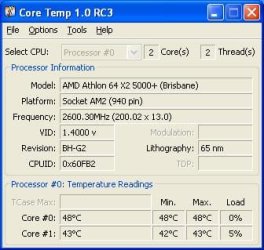
Got the Core Temp application running...
 

Attachments

  • coretemp good RAM.JPG
    coretemp good RAM.JPG
    23.4 KB · Views: 1

My Computer My Computer

At a glance

Windows 7 Home Premium
OS
Windows 7 Home Premium
I was actually referring to setting Memory Clock Mode to 400Mhz if the RAM is DDR2 800Mhz (PC2-6400) the same as in the CPU-Z screenshots and leaving the voltages on auto.

EDIT:
OS installed... just getting CPUZ now.
Just a thought, I noticed that the borrowed 'good' RAM is slower? than the original 'bad' RAM... 371Mhz? vs 430Mhz? or something along those lines... does that make any sense and would that cause the crash?
I don't know why know one has suggested this but if the bad RAM is running at 430Mhz and it is DDR2 800Mhz (PC2-6400) then yes this could be the reason for the errors. Most decent branded RAM could handle a 30Mhz overclock but there's always the chance that this particular stick can not, either it's going bad or the RAM timings need adjusting to handle it and/or voltage (which has been tried).

EDIT: Apologies to Golden and Dave they both did state the underclock should not cause problems and Golden did mention about timings (Post #21 and #22)

But in saying this if your CPU-Z screenshot is the bad RAM then it's underclocked and less likely to have a problem although I have had a problem with underclocking mine any more than 10Mhz.
 
Last edited:

My Computer My Computer

At a glance

Windows 7 Ultimate x64Intel Pentium Dual Core E5200 2.5GHz (3.77GHz...Corsair 4GB DDR2 (4x1GB CM2X1024-6400C4)Palit GeForce GTS 250 (1024MB)
Computer Manufacturer/Model Number
Self built
OS
Windows 7 Ultimate x64
CPU
Intel Pentium Dual Core E5200 2.5GHz (3.77GHz OC)
Motherboard
Asus P5Q-E
Memory
Corsair 4GB DDR2 (4x1GB CM2X1024-6400C4)
Graphics Card(s)
Palit GeForce GTS 250 (1024MB)
Sound Card
On Board (ADI AD2000B 8ch HD)
Monitor(s) Displays
Samsung 32in LCD TV
Screen Resolution
1360x768
Hard Drives
2 x 1TB Samsung 103SJ (Raid0)
2 x External 500GB Samsung 502IJ (NexStar 3 HD Enclosures)
PSU
550W Antec Neo HE 550
Case
Antec P180
Cooling
Xigmatex Red Scorpion CPU Cooler. 3x120mm Fans
Keyboard
Logitech MX5000 Laser (Combo)
Mouse
Logitech MX5000 Laser (Combo)
Internet Speed
ADSL2+ (avg 10 Mbps Down, 0.80 Mbps up)
Other Info
Gigabyte GN-WP01GS 54g Wireless Lan Card
I was actually referring to setting Memory Clock Mode to 400Mhz if the RAM is DDR2 800Mhz (PC2-6400) the same as in the CPU-Z screenshots and leaving the voltages on auto.

Duzzy thanks for clearing that up for me.
I gave it a crack but that didn't work either.. grr
 

My Computer My Computer

At a glance

Windows 7 Home Premium
OS
Windows 7 Home Premium
Well wait for the original helpers advice but I would say the RAM is a no go and needs to be replaced.

If others agree you could try the bad RAM in the PC that the good RAM came from but only boot Memtest don't let it boot Windows to avoid corruption. I say if others agree because there might be a minor risk involved and the likelyhood of a different outcome is minimal.
 

My Computer My Computer

At a glance

Windows 7 Ultimate x64Intel Pentium Dual Core E5200 2.5GHz (3.77GHz...Corsair 4GB DDR2 (4x1GB CM2X1024-6400C4)Palit GeForce GTS 250 (1024MB)
Computer Manufacturer/Model Number
Self built
OS
Windows 7 Ultimate x64
CPU
Intel Pentium Dual Core E5200 2.5GHz (3.77GHz OC)
Motherboard
Asus P5Q-E
Memory
Corsair 4GB DDR2 (4x1GB CM2X1024-6400C4)
Graphics Card(s)
Palit GeForce GTS 250 (1024MB)
Sound Card
On Board (ADI AD2000B 8ch HD)
Monitor(s) Displays
Samsung 32in LCD TV
Screen Resolution
1360x768
Hard Drives
2 x 1TB Samsung 103SJ (Raid0)
2 x External 500GB Samsung 502IJ (NexStar 3 HD Enclosures)
PSU
550W Antec Neo HE 550
Case
Antec P180
Cooling
Xigmatex Red Scorpion CPU Cooler. 3x120mm Fans
Keyboard
Logitech MX5000 Laser (Combo)
Mouse
Logitech MX5000 Laser (Combo)
Internet Speed
ADSL2+ (avg 10 Mbps Down, 0.80 Mbps up)
Other Info
Gigabyte GN-WP01GS 54g Wireless Lan Card
I was thinking the same thing that the RAM is caput. I can honestly say that this is the first time I have ever seen something like this happen to a 6 month old motherboard... It was 6 months old when it crashed and I put it in the cupboard and forgot about it for 2 years.

That sounds like a good idea to test the bad RAM in the other machine, I hadn't thought of doing that. But as you say, I'll wait and see what Dave says.

Yes, the CPU-Z screen shots were taken with the old RAM, this confused me as to how it managed to run long enough to do that, it wont even get to the desktop screen when I try to load it now. I knew what you meant though- overclocking meaning underclocking...
Tempermental machines...

Thanks for your help!
 

My Computer My Computer

At a glance

Windows 7 Home Premium
OS
Windows 7 Home Premium
No problem, hope you get it fix quick.
 

My Computer My Computer

At a glance

Windows 7 Ultimate x64Intel Pentium Dual Core E5200 2.5GHz (3.77GHz...Corsair 4GB DDR2 (4x1GB CM2X1024-6400C4)Palit GeForce GTS 250 (1024MB)
Computer Manufacturer/Model Number
Self built
OS
Windows 7 Ultimate x64
CPU
Intel Pentium Dual Core E5200 2.5GHz (3.77GHz OC)
Motherboard
Asus P5Q-E
Memory
Corsair 4GB DDR2 (4x1GB CM2X1024-6400C4)
Graphics Card(s)
Palit GeForce GTS 250 (1024MB)
Sound Card
On Board (ADI AD2000B 8ch HD)
Monitor(s) Displays
Samsung 32in LCD TV
Screen Resolution
1360x768
Hard Drives
2 x 1TB Samsung 103SJ (Raid0)
2 x External 500GB Samsung 502IJ (NexStar 3 HD Enclosures)
PSU
550W Antec Neo HE 550
Case
Antec P180
Cooling
Xigmatex Red Scorpion CPU Cooler. 3x120mm Fans
Keyboard
Logitech MX5000 Laser (Combo)
Mouse
Logitech MX5000 Laser (Combo)
Internet Speed
ADSL2+ (avg 10 Mbps Down, 0.80 Mbps up)
Other Info
Gigabyte GN-WP01GS 54g Wireless Lan Card
Dave has already given some DRAM settings to follow. Being on Auto is why the RAM is running at different speeds.
 

My Computer My Computer

At a glance

Windows 7 Ultimate X64 SP1Intel i5-2550K, Differing ~4.4-4.8GHz No buil...16GB G.Skill Sniper 1866MHz @ 2133MHz 2x8GBASUS GTX650TIB-DC2OC-2GD5, (650TI Boost)
Computer type
PC/Desktop
Computer Manufacturer/Model Number
Home Built Desktop By DataTech
OS
Windows 7 Ultimate X64 SP1
CPU
Intel i5-2550K, Differing ~4.4-4.8GHz No built in GPU
Motherboard
ASUS P8Z68-V PRO/GEN3
Memory
16GB G.Skill Sniper 1866MHz @ 2133MHz 2x8GB
Graphics Card(s)
ASUS GTX650TIB-DC2OC-2GD5, (650TI Boost)
Sound Card
Onboard Realtek 5-1
Monitor(s) Displays
Samsung P2570HD
Screen Resolution
1920x1080
Hard Drives
Samsung 840 Pro 256GB SSD for OS, 500GB Seagate Constellation (Enterprise drive) for Data
PSU
Corsair HX650W
Case
Inwin Dragon Rider
Cooling
Hyper 212 EVO w/two Noctua fans, push-pull, @1300 RPM
Keyboard
E-Z Eyes, bright yellow keys with large characters
Mouse
steelseries SENSEI Laser Pro Gaming
Internet Speed
48-51Mbs Mbs down, 11 Mbs up Xfinity Cable
Antivirus
Norton Internet Security 2013
Browser
IE 10, Opera, Pale Moon if needed
Other Info
4 case fans, LG BluRay-RE, ASUS DVD-RW, Mr. Fusion power supply, 1.21 gigawatts.
Dave has already given some DRAM settings to follow. Being on Auto is why the RAM is running at different speeds.
Correct me if I'm wrong but the only setting I saw Dave suggest were to do with voltages which shouldn't affect the speed.
 

My Computer My Computer

At a glance

Windows 7 Ultimate x64Intel Pentium Dual Core E5200 2.5GHz (3.77GHz...Corsair 4GB DDR2 (4x1GB CM2X1024-6400C4)Palit GeForce GTS 250 (1024MB)
Computer Manufacturer/Model Number
Self built
OS
Windows 7 Ultimate x64
CPU
Intel Pentium Dual Core E5200 2.5GHz (3.77GHz OC)
Motherboard
Asus P5Q-E
Memory
Corsair 4GB DDR2 (4x1GB CM2X1024-6400C4)
Graphics Card(s)
Palit GeForce GTS 250 (1024MB)
Sound Card
On Board (ADI AD2000B 8ch HD)
Monitor(s) Displays
Samsung 32in LCD TV
Screen Resolution
1360x768
Hard Drives
2 x 1TB Samsung 103SJ (Raid0)
2 x External 500GB Samsung 502IJ (NexStar 3 HD Enclosures)
PSU
550W Antec Neo HE 550
Case
Antec P180
Cooling
Xigmatex Red Scorpion CPU Cooler. 3x120mm Fans
Keyboard
Logitech MX5000 Laser (Combo)
Mouse
Logitech MX5000 Laser (Combo)
Internet Speed
ADSL2+ (avg 10 Mbps Down, 0.80 Mbps up)
Other Info
Gigabyte GN-WP01GS 54g Wireless Lan Card
Dave has already given some DRAM settings to follow. Being on Auto is why the RAM is running at different speeds.
Correct me if I'm wrong but the only setting I saw Dave suggest were to do with voltages which shouldn't affect the speed.
You're right but OP needs to get it stable then fuss with the speed, that's not causing the restarts.
 

My Computer My Computer

At a glance

Windows 7 Ultimate X64 SP1Intel i5-2550K, Differing ~4.4-4.8GHz No buil...16GB G.Skill Sniper 1866MHz @ 2133MHz 2x8GBASUS GTX650TIB-DC2OC-2GD5, (650TI Boost)
Computer type
PC/Desktop
Computer Manufacturer/Model Number
Home Built Desktop By DataTech
OS
Windows 7 Ultimate X64 SP1
CPU
Intel i5-2550K, Differing ~4.4-4.8GHz No built in GPU
Motherboard
ASUS P8Z68-V PRO/GEN3
Memory
16GB G.Skill Sniper 1866MHz @ 2133MHz 2x8GB
Graphics Card(s)
ASUS GTX650TIB-DC2OC-2GD5, (650TI Boost)
Sound Card
Onboard Realtek 5-1
Monitor(s) Displays
Samsung P2570HD
Screen Resolution
1920x1080
Hard Drives
Samsung 840 Pro 256GB SSD for OS, 500GB Seagate Constellation (Enterprise drive) for Data
PSU
Corsair HX650W
Case
Inwin Dragon Rider
Cooling
Hyper 212 EVO w/two Noctua fans, push-pull, @1300 RPM
Keyboard
E-Z Eyes, bright yellow keys with large characters
Mouse
steelseries SENSEI Laser Pro Gaming
Internet Speed
48-51Mbs Mbs down, 11 Mbs up Xfinity Cable
Antivirus
Norton Internet Security 2013
Browser
IE 10, Opera, Pale Moon if needed
Other Info
4 case fans, LG BluRay-RE, ASUS DVD-RW, Mr. Fusion power supply, 1.21 gigawatts.
Golden has given great advice. I'd add that sometimes new RAM can be finicky, so you might need to be patient. I went through three matched sets this past weekend for that 8GB for my desktop. Had random crashing, ran Memtest and had to go back to the store three times before they finally had a set that worked.

I'm wondering why this occured with Colonal Travis. Is it hit and miss when finding a suitable type of RAM?

Is this your motherboard: Asus M2N68-AM
If it is you can download the manual from there.

These are the right place to adjust the DRAM and Chipset voltages. Page 2-8 in your motherboard manual.
Memory Over Voltage [Auto]
(Options are *Min = 1.85000V, Max = 2.24375V, Standard = 1.8500V, Increment = 0.00625V)
Set to 'Manual' and change the DRAM voltage to 1.950v.

Chipset Voltage [Auto]
(Options are Auto, +50mv, +100mv, +150mv)
Set to 'Manual' and change the Chipset voltage +100mv.

Post the voltage of the chipset, after the increase.

With the 'Bad' RAM installed, run memtest86+ again, for 7 full passes.
If you get any errors, stop the test and let us know the results.

The manual I downloaded didn't go into much detail.
 

My Computer My Computer

At a glance

Windows 7 Home Premium
OS
Windows 7 Home Premium
All motherboard manuals are intentionally vague, I don't think it would be much trouble for them to at least give a little more info on the BIOS settings but, they don't.
You have to get the details from experience or research. Motherboard, RAM and OC'ing sites have good info on various settings adjustments. Just remember, not every post is good information.

As for the (bad) RAM settings, it is a common practice to lower frequencies and/or 'loosen' timings (higher numbers) when dealing with unstable RAM, also bumping the DRAM and NB (memory controller) voltage.
As to why the motherboard was running the RAM on 'auto' at 371MHz, either the manufacturer set it that way or the builder set it, both scenarios tell me the RAM is not 100% and had to be underclocked to run.
Since your RAM was slightly underclocked at 371MHz, recommended (SPD tab) frequency is 400MHz, and we bumped the voltage by a fair amount, which resulted in a shutdown and reboot, is indicating that the RAM is more than likely gone bad.

RAM is more finicky than other computer components, sometimes the RAM is just not stable even when new (or 6 months old), sometimes RAM is optimized for a set of specific motherboards and may or may not run on other motherboards.
AMD CPUs seem to have more issues, a larger percent of computers have Intel CPUs so most RAM manufacturers tend to setup RAM to run on Intel systems. Some of the RAM will run on AMD systems, but I have seen a lot of issues due to RAM that is not optimized to run on AMD boards.


We could play around with frequencies, timings and voltages but, I don't think the RAM is going to be salvageable.
If you want to put Win7 on this machine you will need at least 2GB RAM, I would get a kit of two matched RAM cards. You system will run better with two RAM cards, this will enable dual channel mode which is faster performance wise.
AMD has started selling their own brand of RAM due to this issue, when you look for RAM make sure it is made to run on an AMD system. Also make sure the shop you get it from has a good return policy, this is very important.
 

My Computer My Computer

At a glance

Windows 7 Ult x64 - SP1/ Windows 8 Pro x64Intel Core i5-3570K 4.6GHz8GB (2X4GB) DDR3 1600 Corsair Vengeance CL8 1.5vSapphire HD 7770 Vapor-X OC 1GB DDR5
Computer type
PC/Desktop
Computer Manufacturer/Model Number
76~2.0
OS
Windows 7 Ult x64 - SP1/ Windows 8 Pro x64
CPU
Intel Core i5-3570K 4.6GHz
Motherboard
Gigabyte GA-Z77X UD3H, f18
Memory
8GB (2X4GB) DDR3 1600 Corsair Vengeance CL8 1.5v
Graphics Card(s)
Sapphire HD 7770 Vapor-X OC 1GB DDR5
Sound Card
Onboard VIA VT2021
Monitor(s) Displays
22" LCD Dell
Screen Resolution
1680x1050
Hard Drives
Samsung 840Pro 128GB SSD,
Seagate Barracuda 500GB SATA2 7200rpm 32MB cache, Seagate Barracuda 1TB SATA2 7200rpm 32MB cache,
PSU
Corsair HX650W
Case
Cooler Master Storm Scout
Cooling
Corsair H80 2x12cm Noctua NF P12 , 2x14cm case fans
Keyboard
Logitech Wave
Mouse
CM Sentinel
Internet Speed
Dismal
Antivirus
Avast
Browser
Opera Next
Other Info
Haswell laptop: HP Envy 17t-j, i7-4700MQ, GeForce 740M 2GB DDR3, 17.3" Full HD 1920x1080, 16GB RAM, Samsung 840 Pro 128GB, 1TB Hitachi 7200 HDD,
Desktop: eSATA ports,
External eSATA Seagate 500GB SATA2 7200rpm,
External WD USB 500GB
As to why the motherboard was running the RAM on 'auto' at 371MHz, either the manufacturer set it that way or the builder set it, both scenarios tell me the RAM is not 100% and had to be underclocked to run.
Thanks Dave that is what I originally asked.

@gemini
If purchasing new RAM take note your board only supports a max of 4GB 2x2GB don't go overboard and purchase 2 4GB sticks.

2GB will be the bare minimum for x64 but it will run ok. I have a second PC running x64 on a AMD4600+ with 2GB. It's not super fast but it runs just don't expect to play the latest games.
 

My Computer My Computer

At a glance

Windows 7 Ultimate x64Intel Pentium Dual Core E5200 2.5GHz (3.77GHz...Corsair 4GB DDR2 (4x1GB CM2X1024-6400C4)Palit GeForce GTS 250 (1024MB)
Computer Manufacturer/Model Number
Self built
OS
Windows 7 Ultimate x64
CPU
Intel Pentium Dual Core E5200 2.5GHz (3.77GHz OC)
Motherboard
Asus P5Q-E
Memory
Corsair 4GB DDR2 (4x1GB CM2X1024-6400C4)
Graphics Card(s)
Palit GeForce GTS 250 (1024MB)
Sound Card
On Board (ADI AD2000B 8ch HD)
Monitor(s) Displays
Samsung 32in LCD TV
Screen Resolution
1360x768
Hard Drives
2 x 1TB Samsung 103SJ (Raid0)
2 x External 500GB Samsung 502IJ (NexStar 3 HD Enclosures)
PSU
550W Antec Neo HE 550
Case
Antec P180
Cooling
Xigmatex Red Scorpion CPU Cooler. 3x120mm Fans
Keyboard
Logitech MX5000 Laser (Combo)
Mouse
Logitech MX5000 Laser (Combo)
Internet Speed
ADSL2+ (avg 10 Mbps Down, 0.80 Mbps up)
Other Info
Gigabyte GN-WP01GS 54g Wireless Lan Card
You're welcome Duzzy.

Good advice on the RAM, need to stay within the motherboard limitations.
 

My Computer My Computer

At a glance

Windows 7 Ult x64 - SP1/ Windows 8 Pro x64Intel Core i5-3570K 4.6GHz8GB (2X4GB) DDR3 1600 Corsair Vengeance CL8 1.5vSapphire HD 7770 Vapor-X OC 1GB DDR5
Computer type
PC/Desktop
Computer Manufacturer/Model Number
76~2.0
OS
Windows 7 Ult x64 - SP1/ Windows 8 Pro x64
CPU
Intel Core i5-3570K 4.6GHz
Motherboard
Gigabyte GA-Z77X UD3H, f18
Memory
8GB (2X4GB) DDR3 1600 Corsair Vengeance CL8 1.5v
Graphics Card(s)
Sapphire HD 7770 Vapor-X OC 1GB DDR5
Sound Card
Onboard VIA VT2021
Monitor(s) Displays
22" LCD Dell
Screen Resolution
1680x1050
Hard Drives
Samsung 840Pro 128GB SSD,
Seagate Barracuda 500GB SATA2 7200rpm 32MB cache, Seagate Barracuda 1TB SATA2 7200rpm 32MB cache,
PSU
Corsair HX650W
Case
Cooler Master Storm Scout
Cooling
Corsair H80 2x12cm Noctua NF P12 , 2x14cm case fans
Keyboard
Logitech Wave
Mouse
CM Sentinel
Internet Speed
Dismal
Antivirus
Avast
Browser
Opera Next
Other Info
Haswell laptop: HP Envy 17t-j, i7-4700MQ, GeForce 740M 2GB DDR3, 17.3" Full HD 1920x1080, 16GB RAM, Samsung 840 Pro 128GB, 1TB Hitachi 7200 HDD,
Desktop: eSATA ports,
External eSATA Seagate 500GB SATA2 7200rpm,
External WD USB 500GB
Dave,

Thanks so much for your help. You have helped me understand a lot about my PC. I have used these sorts of test apps before, but I have been out of practice for so long that I had forgotten such applications exist. I think the statement under your name says it all, "endeaver to persevere".

I am not sure if I should look at getting new RAM for this problem PC, or upgrade the RAM in my other PC which is an Intel 1.8Ghz, slightly slower but it hasn't missed a beat in the 2.5 yrs. As you have pointed out, AMD are more likely to have these issues and this was also known during my study years. I don't know why I agreed to go with this board actually. This is where it gets even more confusing though because my old Intel (which was initially built to custom specs) was changed to AMD at upgrade, and old AMD was changed to Intel at upgrade.

Up until now I have been avoiding all this computer stuff. The two desktops I had rebuilt were basically just toys and I had a computer tech work out the specs, rather than me investigating and researching it, purely out of lazyness on my behalf. My laptop had seen me through the past 5 years. But I am now being asked to maybe think about building one from scratch that would be capable of gaming etc. I've never been much of a gamer, but my husband and children love them. I will have to think about it a little more I think. Maybe investigate threads about building a suitable stable PC/Network Server.

Anyhoo, I guess I can mark this thread as solved now with a conclusion of DEAD RAM...!!!
Its nice to know that new RAM can fix the problem :)

Again, thanks so much for everyone's input for this thread.
 

My Computer My Computer

At a glance

Windows 7 Home Premium
OS
Windows 7 Home Premium
Great stuff. Yes, Dave is a legend when it comes hardware - thats why I asked him to have a look here.

Adelaide doesn't have much in the way of PC shops (or not that I have seen anyway) - I got my gear at www.allneeds.com.au in the city on King William Road

Regards,
Golden
 

My Computer My Computer

At a glance

Windows 10 Pro x64 ; Xubuntu x64Intel i7 860 @ 2.80 GHz O/C'ed to 4.0GHz16GB Corsair Vengance DDR3 @ 661 MHz Dual Cha...EVGA NVidia GTX 560 1024MB
Computer type
PC/Desktop
Computer Manufacturer/Model Number
Golden Mk. I.4
OS
Windows 10 Pro x64 ; Xubuntu x64
CPU
Intel i7 860 @ 2.80 GHz O/C'ed to 4.0GHz
Motherboard
Gigabyte P55A-UD3R Rev.1. Award BIOS F13
Memory
16GB Corsair Vengance DDR3 @ 661 MHz Dual Channel (9-9-9-24)
Graphics Card(s)
EVGA NVidia GTX 560 1024MB
Sound Card
Realtek Integrated
Monitor(s) Displays
Dual Samsung SyncMaster 2494HS
Screen Resolution
1920*1080 and 1920*1080
Hard Drives
1*Samsung 840 EVO 120GB SSD;
1*OCZ Vertex 2 60GB SSD;
2*Samsung F3 SpinPoint 1TB in RAID0;
1*Samsung F1 SpinPoint 1TB;
2*Western Digital 1TB External USB 3.0
1*Western Digital 500GB External USB 3.0
1*Seagate 500GB External USB 2.0
PSU
Thermaltake ToughPower QFan 750W
Case
Thermaltake Element S VK60001W2Z
Cooling
Corsair H60 Water Cooling, 2*230mm and 2*80mm case fans
Keyboard
Logitech G110
Mouse
Logitech MX518
Great stuff. Yes, Dave is a legend when it comes hardware - thats why I asked him to have a look here.

Adelaide doesn't have much in the way of PC shops (or not that I have seen anyway) - I got my gear at www.allneeds.com.au in the city on King William Road

Regards,
Golden

Thanks for that Golden.. I will have a flick through their site tomorrow!
 

My Computer My Computer

At a glance

Windows 7 Home Premium
OS
Windows 7 Home Premium
You're welcome.

Since your problem PC runs fine with the RAM from your good PC, I would just get new RAM for the good PC and put the working RAM on the other one.

You can start a thread in Hardware & Devices, describe what you want the new build to do and your budget. There will be lots of help, there has been many threads like that and they have gotten good advice.

Good luck with your PC's, old and new.
Let us know how the new RAM is working.
 

My Computer My Computer

At a glance

Windows 7 Ult x64 - SP1/ Windows 8 Pro x64Intel Core i5-3570K 4.6GHz8GB (2X4GB) DDR3 1600 Corsair Vengeance CL8 1.5vSapphire HD 7770 Vapor-X OC 1GB DDR5
Computer type
PC/Desktop
Computer Manufacturer/Model Number
76~2.0
OS
Windows 7 Ult x64 - SP1/ Windows 8 Pro x64
CPU
Intel Core i5-3570K 4.6GHz
Motherboard
Gigabyte GA-Z77X UD3H, f18
Memory
8GB (2X4GB) DDR3 1600 Corsair Vengeance CL8 1.5v
Graphics Card(s)
Sapphire HD 7770 Vapor-X OC 1GB DDR5
Sound Card
Onboard VIA VT2021
Monitor(s) Displays
22" LCD Dell
Screen Resolution
1680x1050
Hard Drives
Samsung 840Pro 128GB SSD,
Seagate Barracuda 500GB SATA2 7200rpm 32MB cache, Seagate Barracuda 1TB SATA2 7200rpm 32MB cache,
PSU
Corsair HX650W
Case
Cooler Master Storm Scout
Cooling
Corsair H80 2x12cm Noctua NF P12 , 2x14cm case fans
Keyboard
Logitech Wave
Mouse
CM Sentinel
Internet Speed
Dismal
Antivirus
Avast
Browser
Opera Next
Other Info
Haswell laptop: HP Envy 17t-j, i7-4700MQ, GeForce 740M 2GB DDR3, 17.3" Full HD 1920x1080, 16GB RAM, Samsung 840 Pro 128GB, 1TB Hitachi 7200 HDD,
Desktop: eSATA ports,
External eSATA Seagate 500GB SATA2 7200rpm,
External WD USB 500GB
Back
Top