
Windows Media Player - Rebuild Corrupted Libraries

How to Rebuild Windows Media Player Corrupted Libraries

   Information
This tutorial will show you how to rebuild your Windows Media Player (WMP) libraries in order to remove corrupted files (for example, files deleted from the hard disk that linger in the WMP library) in just a few, easy steps. This tutorial can also be applied to other issues.
   Note

  • Using this tutorial will not delete any media files physically; instead, it will reset the WMP libraries to their default state, without changing your previously made settings.
  • Windows Libraries are not affected by this tutorial.


The N and KN editions of Windows 7 have all the features that normally come with each individual Windows 7 edition, except for Windows Media Player 12 and related programs, such as Windows Media Center or Windows DVD Maker.

The N editions of Windows 7 allow you to choose your own media player and software required to manage and play CDs, DVDs, and other digital media files. If you choose to use Windows Media Player 12, downloading it, along with related software, is free. Download Media Feature Pack for Windows 7 N with Service Pack 1 and Windows 7 KN with Service Pack 1 (KB968211) from Official Microsoft Download Center
   Tip
Please make sure Windows Media Player is closed during this process.


Here's how:

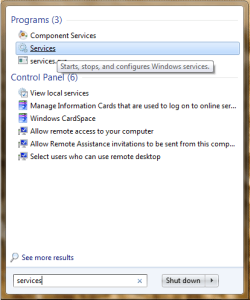
1. Click on the Start Orb and type "services" into the search, then select Services from the list of search results.
startmenusearch.png

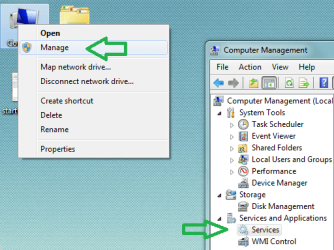
Alternatively, you can right-click the Computer icon, select Manage, then choose Services under "Services and Applications" in Computer Management.
computermanagement.png

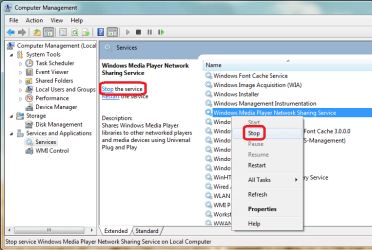
2. In the list of services, locate "Windows Media Player Network Sharing Service" and stop it via one of the highlighted options.
stopWMPNSS.png

   Tip
Please keep the Services window open, you will need it later.


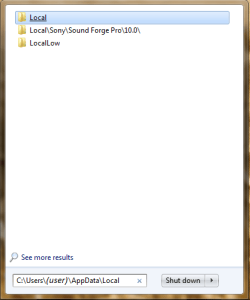
3. Click on the Start Orb and use the search again, this time type in C:\Users\(user)\AppData\Local and click the Local folder from the list of search results.
searchappdatalocal.png

4. Inside the "Local" folder, navigate to the "Microsoft", then "Media Player" folder. Delete all the files contained in this folder and close the Explorer window.
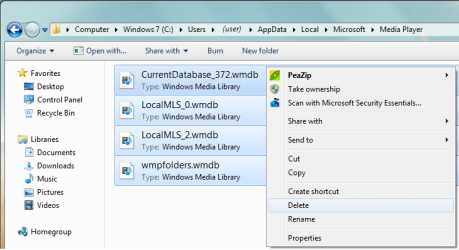
delfiles.png

5. Now go back to the Services window and start the Windows Media Player Network Sharing Service. Next time you start Windows Media Player, it will automatically rebuild all libraries using the information on folders that are included in the Windows Libraries.
 
Last edited by a moderator:

My Computer My Computer

At a glance

windos 7 Home PremiumIntel Core13-2330M4 GB DDR3Intel HD Graphics 3000
Computer Manufacturer/Model Number
Acer Aspire 5750-6667 P5WE0
OS
windos 7 Home Premium
CPU
Intel Core13-2330M
Motherboard
?
Memory
4 GB DDR3
Graphics Card(s)
Intel HD Graphics 3000
Sound Card
?
Monitor(s) Displays
15.6
Hard Drives
640 GB HDD
I would give it a shot, then post and let everyone know.
 

My Computer My Computer

At a glance

Windows 10 Pro X64Intel(R) Core(TM) i5-3570K CPU OC@ 4.5GHZ Turbo8.00 GB DDR3 1600MhzMSI Gaming X GTX 1070
Computer type
PC/Desktop
Computer Manufacturer/Model Number
Dude Build
OS
Windows 10 Pro X64
CPU
Intel(R) Core(TM) i5-3570K CPU OC@ 4.5GHZ Turbo
Motherboard
MSI Z77A-G45 Gaming
Memory
8.00 GB DDR3 1600Mhz
Graphics Card(s)
MSI Gaming X GTX 1070
Sound Card
Realtek High Definition
Monitor(s) Displays
Dell S23O9W, HP L1710
Screen Resolution
DELL-1920 x 1080 HP-1280 x1024
Hard Drives
Crucial m4 256 SSD, WD 7200RPM 500GB WD 1TB
PSU
Seasonic X650 GOLD
Case
Zalman Z12
Cooling
Antec Kuhler 920
Keyboard
Logitech
Mouse
MSI DS100 Interceptor
Internet Speed
50 down and 5 up
Antivirus
MSE
Browser
Chrome, IE 11
Other Info
Logitech X-620 Speakers
Before I try another repair, can anyone think of why I can't find the Microsoft page where the WMP library files are located????????

:confused:
 

My Computer My Computer

At a glance

windos 7 Home PremiumIntel Core13-2330M4 GB DDR3Intel HD Graphics 3000
Computer Manufacturer/Model Number
Acer Aspire 5750-6667 P5WE0
OS
windos 7 Home Premium
CPU
Intel Core13-2330M
Motherboard
?
Memory
4 GB DDR3
Graphics Card(s)
Intel HD Graphics 3000
Sound Card
?
Monitor(s) Displays
15.6
Hard Drives
640 GB HDD
Thanks for this information. I got to this part where I typed in "C:\Users\(user)\AppData\Local" but "Local" doesn't open to any option for Microsoft media???????? When I clicked on "Local", it opened to "temp" files???????? Not sure what I'm doing wrong? Thanks for any help you can provide at this point.

EFE

PS:
My problem is WMP has a corruption that won't erase the files completely, after I deleted all the music files so I could start over with a clean library, all my music icons still show in the library although none will play, the music is gone but not the icons and lists of songs?

New Acer laptop with Windows 7 and Intel processor.

You should replace (user) with the actual username in Windows. e.g.

C:\Users\oreo27\AppData\Local

Let me know if this works out for you :)

Thanks oreo27,

Tried that (my name in place of user) and it gave me a list again but not with "Microsoft" and WMP files that could be deleted? The only "Local" icon opens up to temp files. There are list of 3 Microsoft files, one is Microsoft Feed, Microsoft a 8be and Microsoft a 823, none of them give me WM files??????????? Confounded! ))) ;

Weird indeed.

Can you try hitting Windows Key + R and putting the same path there. Hit enter and it should open up the directory.

Once open, can you take a screenshot of it? Let me know.
 

My Computer My Computer

At a glance

Windows 7 Ultimate x64 Service Pack 1AMD Athlon II x4 Propus 2.9 GHz2 x 4GB Corsair XMS 3 DDR3 -1600 CL9AMD Radeon HD 5850 1GB GDDR5
Computer type
PC/Desktop
Computer Manufacturer/Model Number
Custom Build
OS
Windows 7 Ultimate x64 Service Pack 1
CPU
AMD Athlon II x4 Propus 2.9 GHz
Motherboard
ASRock N68C-GS FX
Memory
2 x 4GB Corsair XMS 3 DDR3 -1600 CL9
Graphics Card(s)
AMD Radeon HD 5850 1GB GDDR5
Sound Card
On-board 6-Channel HD Audio
Monitor(s) Displays
18' LG Flatron E1942TC-BN on DVI, 18' Chimei 95ND on HDMI
Screen Resolution
1366 x 768 x 2
Hard Drives
1 x 500 GB Seagate
1 x 1 TB Western Digital Caviar Green
1 x 1 TB Hitachi Touro Mobile USB 3
PSU
Seasonic S12II 520W
Case
Generic with Cable Management
Cooling
Deep Cool Gammaxx 200
Keyboard
Dragonwar Desert Eagle
Mouse
Logitech B85
Internet Speed
5Mb/s DL, 0.9Mb/s UL
Antivirus
ESET Nod32
Browser
Google Chrome 64 Bit
Other Info
LG G4 H818P - Rooted with Xposed Framework
Okay,
I found the problem, mt computer illiteracy is really bad! ((( ; I put my name in-between ( ) and should have just put my name?!? )))) ;

Now I opened the Media files and deleted all of them as per step 3, but one file wouldn't delete because it says WMP is running and I needed to shut it off first?? In step 2 I already stopped the player, so I don't understand what it wants me to shut off or how to shut it off anymore than I already have??? The file is "CurrentDatabase_372", maybe this file shouldn't be deleted? :(

The "CurrentDatabase_372" file has 12.444kb of data in it and I'm sure it probably consist of the corrupted files, so I need to delete it but it won't delete because it says the WMP must stop running first??? Anybody have any ideas how to stop WMP from running? I checked and the previous window has the player in "stop" mode??

EFE
 
Last edited by a moderator:

My Computer My Computer

At a glance

windos 7 Home PremiumIntel Core13-2330M4 GB DDR3Intel HD Graphics 3000
Computer Manufacturer/Model Number
Acer Aspire 5750-6667 P5WE0
OS
windos 7 Home Premium
CPU
Intel Core13-2330M
Motherboard
?
Memory
4 GB DDR3
Graphics Card(s)
Intel HD Graphics 3000
Sound Card
?
Monitor(s) Displays
15.6
Hard Drives
640 GB HDD
It appears that the corrupted file (mentioned above) is acting like it is running even though the WMP is not? I can't delete it as long as it appears to be running?? It's the only thing stopping this repair from finishing, any ideas???

EFE
 

My Computer My Computer

At a glance

windos 7 Home PremiumIntel Core13-2330M4 GB DDR3Intel HD Graphics 3000
Computer Manufacturer/Model Number
Acer Aspire 5750-6667 P5WE0
OS
windos 7 Home Premium
CPU
Intel Core13-2330M
Motherboard
?
Memory
4 GB DDR3
Graphics Card(s)
Intel HD Graphics 3000
Sound Card
?
Monitor(s) Displays
15.6
Hard Drives
640 GB HDD
FIXED! Thanks for the repair instructions and help from all!

:thumbsup:
 

My Computer My Computer

At a glance

windos 7 Home PremiumIntel Core13-2330M4 GB DDR3Intel HD Graphics 3000
Computer Manufacturer/Model Number
Acer Aspire 5750-6667 P5WE0
OS
windos 7 Home Premium
CPU
Intel Core13-2330M
Motherboard
?
Memory
4 GB DDR3
Graphics Card(s)
Intel HD Graphics 3000
Sound Card
?
Monitor(s) Displays
15.6
Hard Drives
640 GB HDD
FIXED! Thanks for the repair instructions and help from all!

:thumbsup:

Glad to hear you sorted it out. How were you able to delete the file? :)
 
Last edited:

My Computer My Computer

At a glance

Windows 7 Ultimate x64 Service Pack 1AMD Athlon II x4 Propus 2.9 GHz2 x 4GB Corsair XMS 3 DDR3 -1600 CL9AMD Radeon HD 5850 1GB GDDR5
Computer type
PC/Desktop
Computer Manufacturer/Model Number
Custom Build
OS
Windows 7 Ultimate x64 Service Pack 1
CPU
AMD Athlon II x4 Propus 2.9 GHz
Motherboard
ASRock N68C-GS FX
Memory
2 x 4GB Corsair XMS 3 DDR3 -1600 CL9
Graphics Card(s)
AMD Radeon HD 5850 1GB GDDR5
Sound Card
On-board 6-Channel HD Audio
Monitor(s) Displays
18' LG Flatron E1942TC-BN on DVI, 18' Chimei 95ND on HDMI
Screen Resolution
1366 x 768 x 2
Hard Drives
1 x 500 GB Seagate
1 x 1 TB Western Digital Caviar Green
1 x 1 TB Hitachi Touro Mobile USB 3
PSU
Seasonic S12II 520W
Case
Generic with Cable Management
Cooling
Deep Cool Gammaxx 200
Keyboard
Dragonwar Desert Eagle
Mouse
Logitech B85
Internet Speed
5Mb/s DL, 0.9Mb/s UL
Antivirus
ESET Nod32
Browser
Google Chrome 64 Bit
Other Info
LG G4 H818P - Rooted with Xposed Framework
I shut the computer off, started it up and went directly to that same file and it deleted. I use this computer strictly for playing all my music (over 400 CD's), I ended up deleting them all (mistake) and had to reinstall them but now I know that doesn't have to happen. It's only the WMP that get's corrupted and it can be repaired without deleting all the music since the music is actually in another folder and just brought into the WMP. I'm learning the hard way! :cry:

Thanks,
EFE
EFE TECHONLOGY Speakers
 

My Computer My Computer

At a glance

windos 7 Home PremiumIntel Core13-2330M4 GB DDR3Intel HD Graphics 3000
Computer Manufacturer/Model Number
Acer Aspire 5750-6667 P5WE0
OS
windos 7 Home Premium
CPU
Intel Core13-2330M
Motherboard
?
Memory
4 GB DDR3
Graphics Card(s)
Intel HD Graphics 3000
Sound Card
?
Monitor(s) Displays
15.6
Hard Drives
640 GB HDD
I shut the computer off, started it up and went directly to that same file and it deleted. I use this computer strictly for playing all my music (over 400 CD's), I ended up deleting them all (mistake) and had to reinstall them but now I know that doesn't have to happen. It's only the WMP that get's corrupted and it can be repaired without deleting all the music since the music is actually in another folder and just brought into the WMP. I'm learning the hard way! :cry:

Thanks,
EFE
EFE TECHONLOGY Speakers

It could have been that some service was still accessing said file. Good to hear you're all set now. :)
 

My Computer My Computer

At a glance

Windows 7 Ultimate x64 Service Pack 1AMD Athlon II x4 Propus 2.9 GHz2 x 4GB Corsair XMS 3 DDR3 -1600 CL9AMD Radeon HD 5850 1GB GDDR5
Computer type
PC/Desktop
Computer Manufacturer/Model Number
Custom Build
OS
Windows 7 Ultimate x64 Service Pack 1
CPU
AMD Athlon II x4 Propus 2.9 GHz
Motherboard
ASRock N68C-GS FX
Memory
2 x 4GB Corsair XMS 3 DDR3 -1600 CL9
Graphics Card(s)
AMD Radeon HD 5850 1GB GDDR5
Sound Card
On-board 6-Channel HD Audio
Monitor(s) Displays
18' LG Flatron E1942TC-BN on DVI, 18' Chimei 95ND on HDMI
Screen Resolution
1366 x 768 x 2
Hard Drives
1 x 500 GB Seagate
1 x 1 TB Western Digital Caviar Green
1 x 1 TB Hitachi Touro Mobile USB 3
PSU
Seasonic S12II 520W
Case
Generic with Cable Management
Cooling
Deep Cool Gammaxx 200
Keyboard
Dragonwar Desert Eagle
Mouse
Logitech B85
Internet Speed
5Mb/s DL, 0.9Mb/s UL
Antivirus
ESET Nod32
Browser
Google Chrome 64 Bit
Other Info
LG G4 H818P - Rooted with Xposed Framework
Simpler way: while WMP is not in use, type WMDB into the search bar, this will give you the database files. Delete them, open WMP, click F3 and media files will reboot.

BE AWARE this won't undo any tags - or undo any of the odd locations and library settings that WMP has already decided on (whether you like it or not). It will still continue to arrange the library how MSN wants it (not how you want it)
 

My Computer My Computer

At a glance

W7HP(Intel Core i7-2600 GHz8GB RAM, 2TB HDD?
Computer Manufacturer/Model Number
HP Pavilion p6-2190ea Desktop,
OS
W7HP
CPU
(Intel Core i7-2600 GHz
Motherboard
?
Memory
8GB RAM, 2TB HDD
Graphics Card(s)
?
Sound Card
?
Monitor(s) Displays
DEll
Hard Drives
??
PSU
?
Case
?
Cooling
?
I have been through this process several times. WMP rebuilds my picture libraries which I do not want but still does not rebuild my music libraries. The problem first occurred when I had to reinstall Windows 7 at the direction of a paid MS support call to fix random freezes. Can not longer access music through DLNA interface. Any suggestions?
 

My Computer My Computer

At a glance

Windows 7 64
OS
Windows 7 64
To be honest, after being jerked around by WMP for months I was advised to download Jaangle & MP3tag - which is one of the wisest moves I've made.

I couldn't get past the WMP continually rearranging my music, and scattering files and folders all over the place no matter what I did - and I really couldn't make any logical sense why it was doing it.

It seems to me that Microsoft are designing programs to be clever, and okay if you have a physics degree from NASA, but the rest of us find them more and more baffling and unusable and the sooner they wake up to this the better.

I'm not interested in the moronic hidden menus, hidden separators and everything else we have to play hide and seek to find (think crappy windows live mail that is not designed to work for the benefit of the user, but for some clever techie to keep himself in a job)

Sorry I'm unable to help friend
 

My Computer My Computer

At a glance

W7HP(Intel Core i7-2600 GHz8GB RAM, 2TB HDD?
Computer Manufacturer/Model Number
HP Pavilion p6-2190ea Desktop,
OS
W7HP
CPU
(Intel Core i7-2600 GHz
Motherboard
?
Memory
8GB RAM, 2TB HDD
Graphics Card(s)
?
Sound Card
?
Monitor(s) Displays
DEll
Hard Drives
??
PSU
?
Case
?
Cooling
?
The reason I need WMP is to access the music from my receiver through DLNA. Does Jaangle do this? No matter what thanks for the suggestion.
 

My Computer My Computer

At a glance

Windows 7 64
OS
Windows 7 64

My Computer My Computer

At a glance

Microsoft Windows 7 Home Premium 64-bit 7600IIx4 amd athelon 635 processor2x2gbati radeon HD 5450
Computer Manufacturer/Model Number
Hewlett packard/p6512uk
OS
Microsoft Windows 7 Home Premium 64-bit 7600
CPU
IIx4 amd athelon 635 processor
Motherboard
FOXCONN 2AA9
Memory
2x2gb
Graphics Card(s)
ati radeon HD 5450
Sound Card
(1) Realtek High Definition Audio (2) AMD High Definition
Monitor(s) Displays
samsung lcd tv 32"
Screen Resolution
1360x 768
Hard Drives
(1) WDC WD10 01FAES-60Z2A0 SATA Disk Device (2) Maxtor OneTouch USB Device (3) ST310003 33AS USB Device (4) WD My Book 1111 USB Device
PSU
?
Cooling
air!
Keyboard
wireless hp
Mouse
wireless Hp,optical
Internet Speed
1.10mb/s
Antivirus
MSE
Browser
Firefox
Can't answer the DLNA question as I use Jaangle simply to access music while working in the office.

It wouldn't be a system of choice in any other situation: home hi fi, mp3 player etc is the usual Japanese hardware.

Jaangle have a website and forum which may give you an answer. Good Luck
 

My Computer My Computer

At a glance

W7HP(Intel Core i7-2600 GHz8GB RAM, 2TB HDD?
Computer Manufacturer/Model Number
HP Pavilion p6-2190ea Desktop,
OS
W7HP
CPU
(Intel Core i7-2600 GHz
Motherboard
?
Memory
8GB RAM, 2TB HDD
Graphics Card(s)
?
Sound Card
?
Monitor(s) Displays
DEll
Hard Drives
??
PSU
?
Case
?
Cooling
?
I rebuilt the library and this time I did something wrong. After a restart WMC or WMP will not start. I mean, it gets hung up. I tried the fix in the control panel but it didn't work. Do I just uninstall Windows Live Essentials and re-install? Is that where those programs are?
 

My Computer My Computer

At a glance

Microsoft Windows 7 Home Premium 64-bit 7601 ...Intel(R) Core(TM) i5-2300 CPU @ 2.80GHz6 GBRadeon 6750 1gb
Computer Manufacturer/Model Number
HP Pavilion p6745f
OS
Microsoft Windows 7 Home Premium 64-bit 7601 Multiprocessor Free Service Pack 1
CPU
Intel(R) Core(TM) i5-2300 CPU @ 2.80GHz
Motherboard
PEGATRON CORPORATION 2AB6
Memory
6 GB
Graphics Card(s)
Radeon 6750 1gb
Sound Card
(1) IDT High Definition Audio CODEC (2) Intel(R) Display A
Monitor(s) Displays
Acer x193w
Hard Drives
(1) WDC WD15EARS-60MVWB0 (2) Generic- Compact Flash USB Device (3) Generic- MS/MS-Pro USB Device (4) Generic- SD/MMC USB Device (5) Generic- SM/xD-Picture USB Device (6) WD My Book 1110 USB Device
PSU
Internal 500W (100V-240V)
Case
Mid-size ATX
Cooling
unknown
Keyboard
HP usb multimedia keyboard
Mouse
HP usb compliant mouse
Internet Speed
256 kbps
Other Info
Ver: CHI_713.bin vCHI7.13
I wouldn't recommend uninstalling anything without expert advice. I've tried it and if the program loses a CAB file etc (whatever they are) you will never get the program back working - also, Microsoft make sure you cannot get the missing file from anywhere, so you end up stuck with a program that throws up error messages every time you open it.

I have a similar problem opening gifs - I am asked for the installation disc every time I click on one - but there is no disc - Win 7 is pre-installed. Hope this helps
 

My Computer My Computer

At a glance

W7HP(Intel Core i7-2600 GHz8GB RAM, 2TB HDD?
Computer Manufacturer/Model Number
HP Pavilion p6-2190ea Desktop,
OS
W7HP
CPU
(Intel Core i7-2600 GHz
Motherboard
?
Memory
8GB RAM, 2TB HDD
Graphics Card(s)
?
Sound Card
?
Monitor(s) Displays
DEll
Hard Drives
??
PSU
?
Case
?
Cooling
?
I found this worked for me: I

1 clicked start button, clicked Control panel
2 typed Troubleshooting into the search box
3 Clicked Programs
4 clicked WMP settings [Reset WMP to default settings]
5 Clicked reset to default settings.
 

My Computer My Computer

At a glance

Microsoft Windows 7 Home Premium 64-bit 7601 ...Intel(R) Core(TM) i5-2300 CPU @ 2.80GHz6 GBRadeon 6750 1gb
Computer Manufacturer/Model Number
HP Pavilion p6745f
OS
Microsoft Windows 7 Home Premium 64-bit 7601 Multiprocessor Free Service Pack 1
CPU
Intel(R) Core(TM) i5-2300 CPU @ 2.80GHz
Motherboard
PEGATRON CORPORATION 2AB6
Memory
6 GB
Graphics Card(s)
Radeon 6750 1gb
Sound Card
(1) IDT High Definition Audio CODEC (2) Intel(R) Display A
Monitor(s) Displays
Acer x193w
Hard Drives
(1) WDC WD15EARS-60MVWB0 (2) Generic- Compact Flash USB Device (3) Generic- MS/MS-Pro USB Device (4) Generic- SD/MMC USB Device (5) Generic- SM/xD-Picture USB Device (6) WD My Book 1110 USB Device
PSU
Internal 500W (100V-240V)
Case
Mid-size ATX
Cooling
unknown
Keyboard
HP usb multimedia keyboard
Mouse
HP usb compliant mouse
Internet Speed
256 kbps
Other Info
Ver: CHI_713.bin vCHI7.13
....but now I have the problem all over again. Oddly, when I went to local\microsoft\media, I found two Media Player folders... one had an .old extension. I made a restore point, deleted the .old one to see it that worked. Still nothing. I undid the restore but the .old folder did not come back. !! Need WMP and WMC to view picture files especially... it's the remote control that makes things easy... otherwise... VLC...
 

My Computer My Computer

At a glance

Microsoft Windows 7 Home Premium 64-bit 7601 ...Intel(R) Core(TM) i5-2300 CPU @ 2.80GHz6 GBRadeon 6750 1gb
Computer Manufacturer/Model Number
HP Pavilion p6745f
OS
Microsoft Windows 7 Home Premium 64-bit 7601 Multiprocessor Free Service Pack 1
CPU
Intel(R) Core(TM) i5-2300 CPU @ 2.80GHz
Motherboard
PEGATRON CORPORATION 2AB6
Memory
6 GB
Graphics Card(s)
Radeon 6750 1gb
Sound Card
(1) IDT High Definition Audio CODEC (2) Intel(R) Display A
Monitor(s) Displays
Acer x193w
Hard Drives
(1) WDC WD15EARS-60MVWB0 (2) Generic- Compact Flash USB Device (3) Generic- MS/MS-Pro USB Device (4) Generic- SD/MMC USB Device (5) Generic- SM/xD-Picture USB Device (6) WD My Book 1110 USB Device
PSU
Internal 500W (100V-240V)
Case
Mid-size ATX
Cooling
unknown
Keyboard
HP usb multimedia keyboard
Mouse
HP usb compliant mouse
Internet Speed
256 kbps
Other Info
Ver: CHI_713.bin vCHI7.13
Back
Top