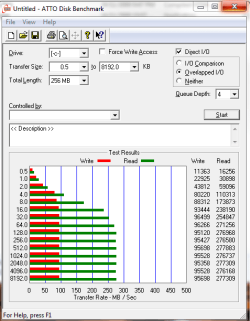
Show us your SSD performance 2

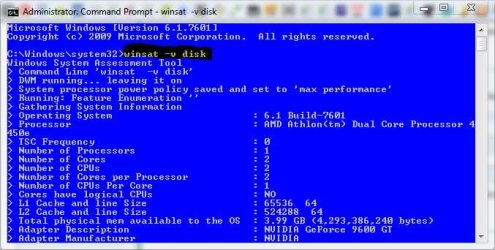
Sorry, another post real quick: it occurs to me that the best way to show off your SSD would be to use the built-in WinSat benchmark under Windows 7. It already accounts for the proper thread prioritization and gives you metrics that the other benchmark tools cannot.

When I go to run this, even as an Admin, it just pops up with a black CMD looking box and quickly shuts down...What am I doing wrong here?

You should be entering that in an elevated cmd prompt, not trying to elevate winsat.
 

Attachments

  • Capture.JPG
    Capture.JPG
    55.8 KB · Views: 53

My Computer My Computer

Computer type
PC/Desktop
Computer Manufacturer/Model Number
Self Built
OS
Win 10 Pro x64
CPU
Intel I5-2500K @3.3GHz
Motherboard
Asrock P67 Extreme4
Memory
16GB G.Skill Ripjaws X (4x4GB)
Graphics Card(s)
EVGA GeForce 750 Ti SC 2GB
Sound Card
ASUS Xonar DG 5.1 Channels 24-bit 96KHz PCI Interface Sound
Monitor(s) Displays
auria eq2367
Screen Resolution
1920 x 1080
Hard Drives
250GB Samsung 850 EVO SSD
1TB WD Blue
1TB Hitachi
PSU
SeaSonic X 650W 80 Plus Gold
Case
Corsair Obsidian 750D
Cooling
Corsair H60, Three 140mm case fans
Keyboard
Logitech Wireless Keyboard K520
Mouse
Logitech Wireless Mouse M310
Internet Speed
Wave Broadband ~ 100 dn 5 up
Antivirus
Windows Defender, Malwarebytes Premium
Browser
Edge, IE11, Chrome
Other Info
Laptop specs: HP g7-1365dx /
CPU: AMD A6-3420M APU with Radeon(tm) HD Graphics /
RAM: Crucial 8Gb (2x4Gb) /
SSD: Crucial M4-CT128M4SSD2 ATA Device/ FW 000F /
GFX: AMD Radeon HD 6520G /
OS: Windows 10 Pro x64
Numbers are fun..
When you use cache apps. anyone use them?

Disk Cache, Hybrid Disk Cache and RamDisk

&

FancyCache Overview

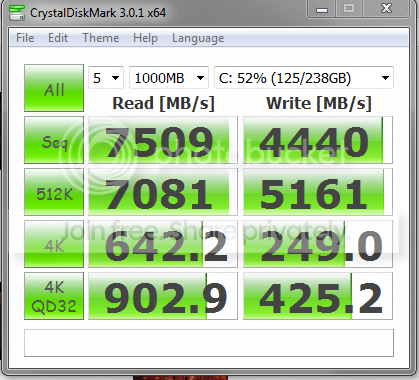
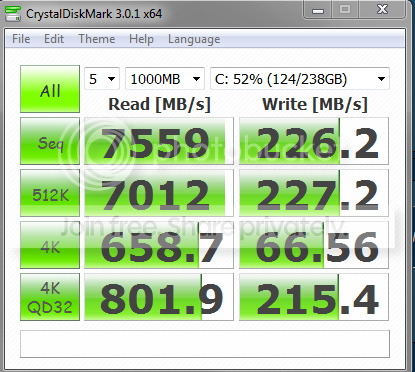
i know it ain't going to make your SSD that much better, but sure makes the numbers pretty :p


Crucal M4 256gb
write Enabled, and write Disabled
supercahe5.png


supercahce.png
 

My Computer My Computer

Computer Manufacturer/Model Number
Goonie Build 8 2010
OS
Windows 7 64bit Ultimate SP1, VMware Windows 7 64bit Ultimate SP1
CPU
Intel Core i7 920 @ 3.8 or 4.2 when i need it
Motherboard
Gigabyte GA-X58-UD5
Memory
Corsair XMS3 12GB DDR3 1600 1.5v
Graphics Card(s)
MSI GeForce GTX 560Ti OC Twin FrozR II
Sound Card
7.1 HD
Monitor(s) Displays
2x BenQ 24 LED 1080p + LG 50PK590 1080p
Screen Resolution
3840 x 1080p
Hard Drives
Intel X25-M 80GB OS/
Intel X25-M 160GB
Data Robotics Drobo V2 8TB
PSU
Corsair AX 750W ATX Modular
Case
Antec Fusion Remote Max
Cooling
Noctua NH D14
Keyboard
Logitech
Mouse
Logitech
Internet Speed
15Mbs Down 1.3Mbs Up
Other Info
Hauppauge HD PVR/
Pioneer 1017-k - 7.1 THX/
Xbox 360 250 Slim
SkyHD/LG 50PK590 TV
That looks interesting. I am going to try it on my Windows 8 to go which is on a USB3 stick.
 

My Computer My Computer

Computer Manufacturer/Model Number
HP, Dell, Gateway, Toshiba - 4 laptops and 2 desktops
OS
Vista, Windows7, Mint Mate, Zorin, Windows 8
CPU
from 1.6GHz Duo to i7
Monitor(s) Displays
2x HP w2207
Hard Drives
5x HDD, 7x SSD, 12x Externals
Keyboard
with trackball - no mices
Mouse
Trackball mice
Internet Speed
DSL 6000
I was looking at those apps a while ago, never did try them.

Do you notice any performance improvement?
 

My Computer My Computer

Computer type
PC/Desktop
Computer Manufacturer/Model Number
76~2.0
OS
Windows 7 Ult x64 - SP1/ Windows 8 Pro x64
CPU
Intel Core i5-3570K 4.6GHz
Motherboard
Gigabyte GA-Z77X UD3H, f18
Memory
8GB (2X4GB) DDR3 1600 Corsair Vengeance CL8 1.5v
Graphics Card(s)
Sapphire HD 7770 Vapor-X OC 1GB DDR5
Sound Card
Onboard VIA VT2021
Monitor(s) Displays
22" LCD Dell
Screen Resolution
1680x1050
Hard Drives
Samsung 840Pro 128GB SSD,
Seagate Barracuda 500GB SATA2 7200rpm 32MB cache, Seagate Barracuda 1TB SATA2 7200rpm 32MB cache,
PSU
Corsair HX650W
Case
Cooler Master Storm Scout
Cooling
Corsair H80 2x12cm Noctua NF P12 , 2x14cm case fans
Keyboard
Logitech Wave
Mouse
CM Sentinel
Internet Speed
Dismal
Antivirus
Avast
Browser
Opera Next
Other Info
Haswell laptop: HP Envy 17t-j, i7-4700MQ, GeForce 740M 2GB DDR3, 17.3" Full HD 1920x1080, 16GB RAM, Samsung 840 Pro 128GB, 1TB Hitachi 7200 HDD,
Desktop: eSATA ports,
External eSATA Seagate 500GB SATA2 7200rpm,
External WD USB 500GB
I was looking at those apps a while ago, never did try them.

Do you notice any performance improvement?

Dave, unfortunately it does not install in Windows 8. You get a message that the OS is unsupported - and that's the end of it. Would have loved to try it on my stick.
 

My Computer My Computer

Computer Manufacturer/Model Number
HP, Dell, Gateway, Toshiba - 4 laptops and 2 desktops
OS
Vista, Windows7, Mint Mate, Zorin, Windows 8
CPU
from 1.6GHz Duo to i7
Monitor(s) Displays
2x HP w2207
Hard Drives
5x HDD, 7x SSD, 12x Externals
Keyboard
with trackball - no mices
Mouse
Trackball mice
Internet Speed
DSL 6000
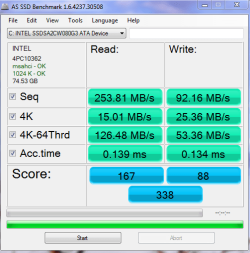
New Intel 320 80GB in my work PC

asssd.PNG atto.PNG
 

My Computer My Computer

Computer Manufacturer/Model Number
tw33k
OS
Windows 7 Ultimate (x64) SP1
CPU
Intel 3770k 4.6GHz
Motherboard
ASUS Maximus V Formula
Memory
8GB (2x 4GB) Crucial Ballistix
Graphics Card(s)
Sapphire 7950 (1060/1600)
Sound Card
On Board Realtek HD Audio
Monitor(s) Displays
27" Acer B273HU (via HDMI)
Screen Resolution
2048 x 1152
Hard Drives
Crucial M4 128GB
2TB WD Black
1TB Samsung F3 SATA
1TB WD Elite External
2TB WD USB 3.0
PSU
Corsair AX750 Gold
Case
Corsair Obsidian 800DW
Cooling
Corsair H100 (2x AP-121/2x UK-3000 push/pull)
Keyboard
Microsoft Wireless 5000
Mouse
Microsoft Wireless 5000
Internet Speed
5mb/s
Other Info
Logitech z-2300 2.1 speakers
Lamptron FC-5 v2
Sorry, another post real quick: it occurs to me that the best way to show off your SSD would be to use the built-in WinSat benchmark under Windows 7. It already accounts for the proper thread prioritization and gives you metrics that the other benchmark tools cannot.

When I go to run this, even as an Admin, it just pops up with a black CMD looking box and quickly shuts down...What am I doing wrong here?

You should be entering that in an elevated cmd prompt, not trying to elevate winsat.


Thanks! This worked...I don't know what I was doing wrong before....

Microsoft Windows [Version 6.1.7601]
Copyright (c) 2009 Microsoft Corporation. All rights reserved.

C:\Windows\system32>winsat -v disk
Windows System Assessment Tool
> Command Line 'winsat -v disk'
> DWM running... leaving it on
> System processor power policy saved and set to 'max performance'
> Running: Feature Enumeration ''
> Gathering System Information
> Operating System : 6.1 Build-7601
> Processor : Intel(R) Core(TM) i7 CPU 920
@ 2.67GHz
> TSC Frequency : 0
> Number of Processors : 1
> Number of Cores : 4
> Number of CPUs : 8
> Number of Cores per Processor : 4
> Number of CPUs Per Core : 2
> Cores have logical CPUs : YES
> L1 Cache and line Size : 32768 64
> L2 Cache and line Size : 262144 64
> Total physical mem available to the OS : 11.9 GB (12,875,550,720 bytes)
> Adapter Description : NVIDIA GeForce GTX 470
> Adapter Manufacturer : NVIDIA
> Adapter Driver Version : 8.17.12.9573
> Adapter Driver Date (yy/mm/dd) : 2012\2\9
> Has DX9 or better : Yes
> Has Pixel shader 2.0 or better : Yes
> Has LDDM Driver : Yes
> Dedicated (local) video memory : 1248.44MB
> System memory dedicated as video memory : 0MB
> System memory shared as video memory : 2815.84MB
> Primary Monitor Size : 1920 X 1080 (2073600 total pixels)
> WinSAT is Official : Yes
> Run Time 00:00:00.00
> Running: Storage Assessment '-seq -read -n 0'
Mode Flags = 0x%08x
Disk Number = 0
Iterations = 1
IO Count = 256
Sequential IO Size = 65536
Random IO Size = 16384
Run[1] Type[0x01080001] Zone[0] - 519.975073 MB/s
Run[1] Type[0x01080001] Zone[1] - 527.649715 MB/s
Run[1] Type[0x01080001] Zone[2] - 503.325934 MB/s
Run[1] Type[0x01080001] Zone[3] - 513.795490 MB/s
Run[1] Type[0x01080001] Zone[4] - 494.654794 MB/s
Run[1] Type[0x01080001] Zone[5] - 516.377409 MB/s
Run[1] Type[0x01080001] Zone[6] - 518.153907 MB/s
Run[1] Type[0x01080001] Zone[7] - 521.404754 MB/s
Run[1] Type[0x01080001] Zone[8] - 526.079467 MB/s
Run[1] Type[0x01080001] Zone[9] - 520.779928 MB/s
Run[1] Type[0x01080001] Zone[10] - 519.573578 MB/s
Run[1] Type[0x01080001] Zone[11] - 524.630668 MB/s
Run[1] Type[0x01080001] Zone[12] - 525.125933 MB/s
Run[1] Type[0x01080001] Zone[13] - 524.208780 MB/s
Run[1] Type[0x01080001] Zone[14] - 523.767843 MB/s
Run[1] Type[0x01080001] Zone[15] - 523.715243 MB/s
> Run Time 00:00:12.60
> Running: Storage Assessment '-ran -read -n 0'
Mode Flags = 0x%08x
Disk Number = 0
Iterations = 1
IO Count = 1000
Sequential IO Size = 65536
Random IO Size = 16384
Run[1] Type[0x01000002] Zone[0] - 300.316778 MB/s
> Run Time 00:00:00.81
> Running: Storage Assessment '-scen 2009 -drive C:'
Mode Flags = 0x%08x
Disk Number = 0
Iterations = 1
IO Count = 9000
Sequential IO Size = 65536
Random IO Size = 16384

Requesting a file of size 1073741824 located at physical offset 0x1bf590
0200.


Are these good numbers?

 

My Computer My Computer

Computer type
PC/Desktop
Computer Manufacturer/Model Number
ASUS-Self Built
OS
Windows 10 Anniversary, Linux & still Windows 7 Professional x64
CPU
Intel i7-920 2.67 GHz
Motherboard
ASUS-Rampage II Extreme Mobo
Memory
12 GB
Graphics Card(s)
EVGA Nvidia 970 GTX
Sound Card
Supreme FX X-fi-Audigy
Monitor(s) Displays
BenQ XL2730Z,Samsung SyncMaster PX2370 LED,Samsung 226BW LCD
Screen Resolution
2560 x 1440, LED-1920x1080, LCD-1680x1050
Hard Drives
4 internal :
1x TB SSD Samsung Evo
1x 1 TB
1x 3 TB
1x 4 TB
3 TB External
PSU
Coolermaster 750 watt PSU
Case
Thermaltake-Spedo case
Cooling
8 Cooling Fans on case and inside case
Keyboard
Logitech G-15 and G-13
Mouse
Logitech G-9 Optical and Logitech Mx-Revolutiom
Internet Speed
DSL

My Computer My Computer

Computer type
PC/Desktop
Computer Manufacturer/Model Number
Own build
OS
Windows 7x64 Home Premium SP1
CPU
Intel i7 2600k
Motherboard
ASUS P8Z68 Deluxe
Memory
G.Skill Ripjaws (DDR3-1600) 2x4GB
Graphics Card(s)
Nvidia GeForce GTS 450; Intel HD Graphics 3000(GT2+)
Monitor(s) Displays
Dell Ultrasharp IPS panel U2311H, Samsung SyncMaster P2350
Screen Resolution
1920x1080
Hard Drives
Samsung 850 Pro SSD 256GB, Samsung SSD 840 120GB, Seagates 1TB Barracuda ST31000528AS x2
PSU
Seasonic M12II 520W
Case
Lian Li Lancool PC-K60
Cooling
Case: 1x120mm, 3x140mm CPU: Hyper 212+
Keyboard
Logitech MK520 (wireless)
Mouse
Logitech MK520
Internet Speed
6-7 Mbps
Antivirus
Norton Security Premium, Malwarebytes on 2 (MSE on 3rd PC)
Browser
FireFox
Other Info
Audio: Logitech Z523 2.1
<snip>
Are these good numbers?
Actually, you can skip the -V argument and just run Winsat disk for a more 'optimal' output for the thread. It appears you're missing some data at the end to make the proper estimate. Here's my WD Raptor 150Gb at work:

Code:
C:\>winsat disk
Windows System Assessment Tool
> Running: Feature Enumeration ''
> Run Time 00:00:00.00
> Running: Storage Assessment '-seq -read -n 0'
> Run Time 00:00:05.99
> Running: Storage Assessment '-ran -read -n 0'
> Run Time 00:00:05.40
> Running: Storage Assessment '-scen 2009 -drive C:'
> Run Time 00:00:54.29
> Running: Storage Assessment '-seq -write -drive C:'
> Run Time 00:00:07.10
> Running: Storage Assessment '-flush -drive C: -seq'
> Run Time 00:00:03.84
> Running: Storage Assessment '-flush -drive C: -ran'
> Run Time 00:00:06.60
> Running: Storage Assessment '-hybrid -ran -read -n 0 -ransize 4096'
NV Cache not present.
> Run Time 00:00:00.33
> Running: Storage Assessment '-hybrid -ran -read -n 0 -ransize 16384'
NV Cache not present.
> Run Time 00:00:00.11
> Disk  Sequential 64.0 Read                   104.81 MB/s          6.6
> Disk  Random 16.0 Read                       3.23 MB/s          4.7
> Responsiveness: Average IO Rate              1.45 ms/IO          7.6
> Responsiveness: Grouped IOs                  8.20 units          7.5
> Responsiveness: Long IOs                     3.11 units          7.9
> Responsiveness: Overall                      25.50 units          7.6
> Responsiveness: PenaltyFactor                0.0
> Disk  Sequential 64.0 Write                  110.68 MB/s          6.7
> Average Read Time with Sequential Writes     4.972 ms          6.0
> Latency: 95th Percentile                     14.435 ms          5.1
> Latency: Maximum                             54.698 ms          7.8
> Average Read Time with Random Writes         6.636 ms          5.5
> Total Run Time 00:01:25.57

That way you can see access time for reads, writes, sequential speeds, blah-de-blah. WinSat also properly puts Windows into the "high performance" state and submits disk access requests at the highest available priority in the I/O stack. It gives a far more thorough and repeatable set of metrics than most of the other apps.
 

My Computer My Computer

OS
Windows 7 Professional 64 EFI
CPU
Core i7-3930k C2 @ 4.5Ghz (125 strap x 36)
Motherboard
Intel DX79Si 4.30FW
Memory
8 x 4Gb Mushkin Redline @ 8-9-8-24 1T 1666Mhz
Graphics Card(s)
Sapphire 7970 OC Edition @ 1200/1525
Monitor(s) Displays
Dell U2711
Screen Resolution
2560x1440
Hard Drives
6 x OCZ Agility 3 240Gb SATA3 RAID0 via
Highpoint 2720SGL PCIE 2.0 8x SAS card
PSU
Kingwin Lazer 1KW 80+Platinum
Case
ThermalTake Armor+
Cooling
Zalman CNPS9900 Max
Now that I'm at home, here's my 6-disk OCZ Agility 3 240Gb RAID0 array on the HighPoint 2720 controller...
Code:
C:\Windows\system32>winsat disk
Windows System Assessment Tool
> Running: Feature Enumeration ''
> Run Time 00:00:00.00
> Running: Storage Assessment '-seq -read -n 0'
> Run Time 00:00:02.82
> Running: Storage Assessment '-ran -read -n 0'
> Run Time 00:00:00.23
> Running: Storage Assessment '-scen 2009 -drive C:'
> Run Time 00:00:51.29
> Running: Storage Assessment '-seq -write -drive C:'
> Run Time 00:00:01.56
> Running: Storage Assessment '-flush -drive C: -seq'
> Run Time 00:00:00.53
> Running: Storage Assessment '-flush -drive C: -ran'
> Run Time 00:00:00.61
> Running: Storage Assessment '-hybrid -ran -read -n 0 -ransize 4096'
NV Cache not present.
> Run Time 00:00:00.00
> Running: Storage Assessment '-hybrid -ran -read -n 0 -ransize 16384'
NV Cache not present.
> Run Time 00:00:00.02
> Disk  Sequential 64.0 Read                   2304.91 MB/s          7.9
> Disk  Random 16.0 Read                       276.08 MB/s          7.9
> Responsiveness: Average IO Rate              0.24 ms/IO          7.9
> Responsiveness: Grouped IOs                  3.04 units          7.9
> Responsiveness: Long IOs                     0.46 units          7.9
> Responsiveness: Overall                      1.41 units          7.9
> Responsiveness: PenaltyFactor                0.0
> Disk  Sequential 64.0 Write                  2505.84 MB/s          7.9
> Average Read Time with Sequential Writes     0.223 ms          7.9
> Latency: 95th Percentile                     1.546 ms          7.9
> Latency: Maximum                             3.186 ms          7.9
> Average Read Time with Random Writes         0.368 ms          7.9
> Total Run Time 00:00:57.60

C:\Windows\system32>
 

My Computer My Computer

OS
Windows 7 Professional 64 EFI
CPU
Core i7-3930k C2 @ 4.5Ghz (125 strap x 36)
Motherboard
Intel DX79Si 4.30FW
Memory
8 x 4Gb Mushkin Redline @ 8-9-8-24 1T 1666Mhz
Graphics Card(s)
Sapphire 7970 OC Edition @ 1200/1525
Monitor(s) Displays
Dell U2711
Screen Resolution
2560x1440
Hard Drives
6 x OCZ Agility 3 240Gb SATA3 RAID0 via
Highpoint 2720SGL PCIE 2.0 8x SAS card
PSU
Kingwin Lazer 1KW 80+Platinum
Case
ThermalTake Armor+
Cooling
Zalman CNPS9900 Max
Well, that looks like a 7.9 to me :D :thumbsup:

A Guy
 

My Computer My Computer

Computer type
PC/Desktop
OS
Windows 10 Home x64
CPU
INTEL Core i5-750 Quad-Core 3.37GHz
Motherboard
ASUS P7P55D
Memory
HyperX Fury Black Series 8GB (2 x 4GB) 1866Mhz
Graphics Card(s)
EVGA GeForce GTX 750 Superclocked 1GB 128-Bit GDDR5
Monitor(s) Displays
LG 32MA68HY 32" IPS
Screen Resolution
1920 x 1080
Hard Drives
Samsung 840 Evo 120GB, SEAGATE 500GB Barracuda® 7200.12, SATA 3 Gb/s, 7200 RPM, 16MB cache
PSU
ANTEC TruePower New TP-550, 80 PLUS, 550W
Case
ANTEC Three Hundred Illusion
Cooling
COOLER MASTER Hyper 212 Plus, 4 x 120mm 1 x 140mm Noctua's
Internet Speed
85 + Mbps
Antivirus
Avast
Browser
Vivaldi
nice score, i'm still waiting for the prices to go down. I want a big ssd of around 250-300gbs but I don't want to pay the price they have right now. So i'm playing the waiting game to see the prices drop more :)
 

My Computer My Computer

Computer type
PC/Desktop
Computer Manufacturer/Model Number
custom build
OS
Windows 10 64bit
CPU
AMD Phenom II X4 925 (Deneb)(2.8GHz) OC 3.4GHz
Motherboard
M5A78L-MLX Plus
Memory
Corsair Vengeance DDR3 4GBX2 (8192MB)
Graphics Card(s)
XFX HD 6870 1GB (OC)- 940MHz core, mem 1150MHz
Monitor(s) Displays
Vizio 26' 1920x1080 / Acer 1336x768
Screen Resolution
1920x1080 60Hz /1336x768
Hard Drives
Kingston Digital 60GB SSDNow V300/500gb HDD Western Digital 7200rpm (/WD 160GB HDD 7200rpm
PSU
CORSAIR CX600 600w
Case
AZZA Orion 202 EVO
Cooling
cooler master hyper TX3 cpu cooler
Keyboard
Razer DeathStalker
Mouse
Logitech Optical Gaming Mouse G400
Antivirus
Defualt on win 10
Browser
Firefox
Other Info
cpu is overclocked in bios

My Computer My Computer

Computer Manufacturer/Model Number
tw33k
OS
Windows 7 Ultimate (x64) SP1
CPU
Intel 3770k 4.6GHz
Motherboard
ASUS Maximus V Formula
Memory
8GB (2x 4GB) Crucial Ballistix
Graphics Card(s)
Sapphire 7950 (1060/1600)
Sound Card
On Board Realtek HD Audio
Monitor(s) Displays
27" Acer B273HU (via HDMI)
Screen Resolution
2048 x 1152
Hard Drives
Crucial M4 128GB
2TB WD Black
1TB Samsung F3 SATA
1TB WD Elite External
2TB WD USB 3.0
PSU
Corsair AX750 Gold
Case
Corsair Obsidian 800DW
Cooling
Corsair H100 (2x AP-121/2x UK-3000 push/pull)
Keyboard
Microsoft Wireless 5000
Mouse
Microsoft Wireless 5000
Internet Speed
5mb/s
Other Info
Logitech z-2300 2.1 speakers
Lamptron FC-5 v2
nice score, i'm still waiting for the prices to go down. I want a big ssd of around 250-300gbs but I don't want to pay the price they have right now. So i'm playing the waiting game to see the prices drop more :)
If that is for a laptop, a bigger SSD may make sense. But for a desktop, 60GB or 80GB are really enough.
 

My Computer My Computer

Computer Manufacturer/Model Number
HP, Dell, Gateway, Toshiba - 4 laptops and 2 desktops
OS
Vista, Windows7, Mint Mate, Zorin, Windows 8
CPU
from 1.6GHz Duo to i7
Monitor(s) Displays
2x HP w2207
Hard Drives
5x HDD, 7x SSD, 12x Externals
Keyboard
with trackball - no mices
Mouse
Trackball mice
Internet Speed
DSL 6000
Ok, here are my new numbers using the WINSAT DISK command:

What's Good?
What's Bad?

Microsoft Windows [Version 6.1.7601]
Copyright (c) 2009 Microsoft Corporation. All rights reserved.

C:\Users\AL>Winsat disk
Windows System Assessment Tool
> Running: Feature Enumeration ''
> Run Time 00:00:00.00
> Running: Storage Assessment '-seq -read -n 0'
> Run Time 00:00:05.73
> Running: Storage Assessment '-ran -read -n 0'
> Run Time 00:00:00.36
> Running: Storage Assessment '-scen 2009 -drive C:'
> Run Time 00:00:51.92
> Running: Storage Assessment '-seq -write -drive C:'
> Run Time 00:00:03.46
> Running: Storage Assessment '-flush -drive C: -seq'
> Run Time 00:00:01.00
> Running: Storage Assessment '-flush -drive C: -ran'
> Run Time 00:00:00.95
> Running: Storage Assessment '-hybrid -ran -read -n 0 -ransize 4096'
NV Cache not present.
> Run Time 00:00:00.01
> Running: Storage Assessment '-hybrid -ran -read -n 0 -ransize 16384'
NV Cache not present.
> Run Time 00:00:00.00
> Disk Sequential 64.0 Read 527.58 MB/s 7.9
> Disk Random 16.0 Read 316.74 MB/s 7.9
> Responsiveness: Average IO Rate 0.39 ms/IO 7.9
> Responsiveness: Grouped IOs 6.53 units 7.7
> Responsiveness: Long IOs 0.97 units 7.9
> Responsiveness: Overall 6.34 units 7.9
> Responsiveness: PenaltyFactor 0.0
> Disk Sequential 64.0 Write 509.33 MB/s 7.9
> Average Read Time with Sequential Writes 0.567 ms 7.9
> Latency: 95th Percentile 2.026 ms 7.6
> Latency: Maximum 31.022 ms 7.9
> Average Read Time with Random Writes 0.552 ms 7.9
> Total Run Time 00:01:04.18

C:\Users\AL>
 

My Computer My Computer

Computer type
PC/Desktop
Computer Manufacturer/Model Number
ASUS-Self Built
OS
Windows 10 Anniversary, Linux & still Windows 7 Professional x64
CPU
Intel i7-920 2.67 GHz
Motherboard
ASUS-Rampage II Extreme Mobo
Memory
12 GB
Graphics Card(s)
EVGA Nvidia 970 GTX
Sound Card
Supreme FX X-fi-Audigy
Monitor(s) Displays
BenQ XL2730Z,Samsung SyncMaster PX2370 LED,Samsung 226BW LCD
Screen Resolution
2560 x 1440, LED-1920x1080, LCD-1680x1050
Hard Drives
4 internal :
1x TB SSD Samsung Evo
1x 1 TB
1x 3 TB
1x 4 TB
3 TB External
PSU
Coolermaster 750 watt PSU
Case
Thermaltake-Spedo case
Cooling
8 Cooling Fans on case and inside case
Keyboard
Logitech G-15 and G-13
Mouse
Logitech G-9 Optical and Logitech Mx-Revolutiom
Internet Speed
DSL
What SSD are you testing? The last four lines are latency figures for read and write; you are looking at around 1/2msec latency for both (on average), which seems a bit high for a single SSD. RAIDed SSD's will experience a tad more latency just for the overhead, so perhaps you've got two SATAII SSD's raided together? Also your maximum latency is WAY out for an SSD (even a RAID set), which makes me wonder if your drive might be due for a zero'ing.

Certainly they aren't bad numbers, but this tool provides a level of detail that allows you to do a different 'level' of analysis.
 
Last edited:

My Computer My Computer

OS
Windows 7 Professional 64 EFI
CPU
Core i7-3930k C2 @ 4.5Ghz (125 strap x 36)
Motherboard
Intel DX79Si 4.30FW
Memory
8 x 4Gb Mushkin Redline @ 8-9-8-24 1T 1666Mhz
Graphics Card(s)
Sapphire 7970 OC Edition @ 1200/1525
Monitor(s) Displays
Dell U2711
Screen Resolution
2560x1440
Hard Drives
6 x OCZ Agility 3 240Gb SATA3 RAID0 via
Highpoint 2720SGL PCIE 2.0 8x SAS card
PSU
Kingwin Lazer 1KW 80+Platinum
Case
ThermalTake Armor+
Cooling
Zalman CNPS9900 Max
What SSD are you testing? The last four lines are latency figures for read and write; you are looking at around 1/2msec latency for both (on average), which seems a bit high for a single SSD. RAIDed SSD's will experience a tad more latency just for the overhead, so perhaps you've got two SATAII SSD's raided together? Also your maximum latency is WAY out for an SSD (even a RAID set), which makes me wonder if your drive might be due for a zero'ing.

Certainly they aren't bad numbers, but this tool provides a level of detail that allows you to do a different 'level' of analysis.

Sorry, I have 2x120 GB SSD (Corsair-Force GT 3) in a RAID 0....They are only about 1 month old...if that..
 

My Computer My Computer

Computer type
PC/Desktop
Computer Manufacturer/Model Number
ASUS-Self Built
OS
Windows 10 Anniversary, Linux & still Windows 7 Professional x64
CPU
Intel i7-920 2.67 GHz
Motherboard
ASUS-Rampage II Extreme Mobo
Memory
12 GB
Graphics Card(s)
EVGA Nvidia 970 GTX
Sound Card
Supreme FX X-fi-Audigy
Monitor(s) Displays
BenQ XL2730Z,Samsung SyncMaster PX2370 LED,Samsung 226BW LCD
Screen Resolution
2560 x 1440, LED-1920x1080, LCD-1680x1050
Hard Drives
4 internal :
1x TB SSD Samsung Evo
1x 1 TB
1x 3 TB
1x 4 TB
3 TB External
PSU
Coolermaster 750 watt PSU
Case
Thermaltake-Spedo case
Cooling
8 Cooling Fans on case and inside case
Keyboard
Logitech G-15 and G-13
Mouse
Logitech G-9 Optical and Logitech Mx-Revolutiom
Internet Speed
DSL
Ah, cool. Yeah, the RAID answers the extra latency then, so overall those are very good numbers! I might have expected your "long IO's" to score a better (a lower number of "units" is better; units in this case is milliseconds per IO request) but it may be something specific to the Intel controller that I'm just unaware of.

I know most people really place no value in WEI (and rightfully so...) but the WINSAT tool provides a great level of detail for digging into performance data on your machine and its various subsystems. It's too bad Microsoft didn't evangelize it correctly :(
 

My Computer My Computer

OS
Windows 7 Professional 64 EFI
CPU
Core i7-3930k C2 @ 4.5Ghz (125 strap x 36)
Motherboard
Intel DX79Si 4.30FW
Memory
8 x 4Gb Mushkin Redline @ 8-9-8-24 1T 1666Mhz
Graphics Card(s)
Sapphire 7970 OC Edition @ 1200/1525
Monitor(s) Displays
Dell U2711
Screen Resolution
2560x1440
Hard Drives
6 x OCZ Agility 3 240Gb SATA3 RAID0 via
Highpoint 2720SGL PCIE 2.0 8x SAS card
PSU
Kingwin Lazer 1KW 80+Platinum
Case
ThermalTake Armor+
Cooling
Zalman CNPS9900 Max
A couple new SSDs.

Details on Intel SSD 330 Series, Est release date 13 Apr.
No info on the controller.
Size: 120GB
NAND: Intel 25nm MLC
Interface: SATA 6Gb/s
Form Factor: 2.5"
Read Speed: 500MB/s
Write Speed: 450MB/s
4K Random Read: 22.5K IOPS
4K Random Write: 33K IOPS
Street Price: $149


OCZ Vertex 4 Review
Current NAND: 25nm IMFT MLC
Controller: Indilinx Everest 2
Max Seq Read: 535 MB/s
Max Seq Write:475 MB/s
Max Random Read: 95K IOPS
Max Random Write: 85K IOPS
 

My Computer My Computer

Computer type
PC/Desktop
Computer Manufacturer/Model Number
76~2.0
OS
Windows 7 Ult x64 - SP1/ Windows 8 Pro x64
CPU
Intel Core i5-3570K 4.6GHz
Motherboard
Gigabyte GA-Z77X UD3H, f18
Memory
8GB (2X4GB) DDR3 1600 Corsair Vengeance CL8 1.5v
Graphics Card(s)
Sapphire HD 7770 Vapor-X OC 1GB DDR5
Sound Card
Onboard VIA VT2021
Monitor(s) Displays
22" LCD Dell
Screen Resolution
1680x1050
Hard Drives
Samsung 840Pro 128GB SSD,
Seagate Barracuda 500GB SATA2 7200rpm 32MB cache, Seagate Barracuda 1TB SATA2 7200rpm 32MB cache,
PSU
Corsair HX650W
Case
Cooler Master Storm Scout
Cooling
Corsair H80 2x12cm Noctua NF P12 , 2x14cm case fans
Keyboard
Logitech Wave
Mouse
CM Sentinel
Internet Speed
Dismal
Antivirus
Avast
Browser
Opera Next
Other Info
Haswell laptop: HP Envy 17t-j, i7-4700MQ, GeForce 740M 2GB DDR3, 17.3" Full HD 1920x1080, 16GB RAM, Samsung 840 Pro 128GB, 1TB Hitachi 7200 HDD,
Desktop: eSATA ports,
External eSATA Seagate 500GB SATA2 7200rpm,
External WD USB 500GB
Ah, cool. Yeah, the RAID answers the extra latency then, so overall those are very good numbers! I might have expected your "long IO's" to score a better (a lower number of "units" is better; units in this case is milliseconds per IO request) but it may be something specific to the Intel controller that I'm just unaware of.

I know most people really place no value in WEI (and rightfully so...) but the WINSAT tool provides a great level of detail for digging into performance data on your machine and its various subsystems. It's too bad Microsoft didn't evangelize it correctly :(

ROGER THAT!

Thanks for your input!
 

My Computer My Computer

Computer type
PC/Desktop
Computer Manufacturer/Model Number
ASUS-Self Built
OS
Windows 10 Anniversary, Linux & still Windows 7 Professional x64
CPU
Intel i7-920 2.67 GHz
Motherboard
ASUS-Rampage II Extreme Mobo
Memory
12 GB
Graphics Card(s)
EVGA Nvidia 970 GTX
Sound Card
Supreme FX X-fi-Audigy
Monitor(s) Displays
BenQ XL2730Z,Samsung SyncMaster PX2370 LED,Samsung 226BW LCD
Screen Resolution
2560 x 1440, LED-1920x1080, LCD-1680x1050
Hard Drives
4 internal :
1x TB SSD Samsung Evo
1x 1 TB
1x 3 TB
1x 4 TB
3 TB External
PSU
Coolermaster 750 watt PSU
Case
Thermaltake-Spedo case
Cooling
8 Cooling Fans on case and inside case
Keyboard
Logitech G-15 and G-13
Mouse
Logitech G-9 Optical and Logitech Mx-Revolutiom
Internet Speed
DSL
Back
Top