Dual monitor layout randomly reverting in Windows 7

Vartra

Banned
Local time
3:48 PM
Messages
3
I have been using dual monitors in windows 7 for at least a year or more. For a long time I had it set up with monitor two over monitor one, but now I have altered the physical layout to side by side and want the monitors to reflect this. I have changed it to being side by side in the appropriate windows settings location and in the NVIDIA control panel both, yet when I open a new program (whether it is a game, browser, or media player) it changes back to the old over/under set up. Is there some way I could lock it to the side by side?
 

My Computer My Computer

At a glance

Windows 7 Home Premium OA 64bit
OS
Windows 7 Home Premium OA 64bit
Welcome to Seven Forums!

I don't mean to sound like a smarty pants, but, did you click "apply" in the Nvidia Control Panel?
 

My Computer My Computer

At a glance

Windows 7 Home Premium x64Intel 2500k @4.5ghz 66deg max P95/IBT8 Gigs Patriot Viper 2 Extreme @1600EVGA GTX 580 3 GIG 35degrees idle
Computer Manufacturer/Model Number
Home Made
OS
Windows 7 Home Premium x64
CPU
Intel 2500k @4.5ghz 66deg max P95/IBT
Motherboard
Gigabyte Z68A-D3-B3
Memory
8 Gigs Patriot Viper 2 Extreme @1600
Graphics Card(s)
EVGA GTX 580 3 GIG 35degrees idle
Sound Card
Nvidia HD audio via HDMI to 7.1 Receiver
Monitor(s) Displays
32" Olevia hdtv
Screen Resolution
1080p
Hard Drives
64gig SSD(OS/Apps)
250gig (Files and Dox)
1tb (imaging and backup)
PSU
Corsair vx550w
Case
Thermaltake V3 black
Cooling
CM 212+(push n pull) 4 case fans
Keyboard
Logitech wireless Combo, G13
Mouse
G300
Internet Speed
40mps
Other Info
Two others up and running; C2D E5200/MSI G41M-P26/Corsair XMS3 8gb/GTS 250 1gb and C2D E8200/xFx 750sli/8gb Corsair Dominator/2x EVGA 550ti
Working on; i2600 Build...
HP DV6
@Work I use a Lenovo 5536B8U + Lenovo U300s
James7679, I dont mean to sound like a jerk, but did you read my post? If I did not click apply nothing would change and then nothing would be able to revert. Yes I clicked "apply" you smarty pants without the smarts.
 

My Computer My Computer

At a glance

Windows 7 Home Premium OA 64bit
OS
Windows 7 Home Premium OA 64bit
James7679, I dont mean to sound like a jerk, but did you read my post? If I did not click apply nothing would change and then nothing would be able to revert. Yes I clicked "apply" you smarty pants without the smarts.
Good luck at finding help with this.
 

My Computer My Computer

At a glance

Windows 7 Home Premium x64Intel 2500k @4.5ghz 66deg max P95/IBT8 Gigs Patriot Viper 2 Extreme @1600EVGA GTX 580 3 GIG 35degrees idle
Computer Manufacturer/Model Number
Home Made
OS
Windows 7 Home Premium x64
CPU
Intel 2500k @4.5ghz 66deg max P95/IBT
Motherboard
Gigabyte Z68A-D3-B3
Memory
8 Gigs Patriot Viper 2 Extreme @1600
Graphics Card(s)
EVGA GTX 580 3 GIG 35degrees idle
Sound Card
Nvidia HD audio via HDMI to 7.1 Receiver
Monitor(s) Displays
32" Olevia hdtv
Screen Resolution
1080p
Hard Drives
64gig SSD(OS/Apps)
250gig (Files and Dox)
1tb (imaging and backup)
PSU
Corsair vx550w
Case
Thermaltake V3 black
Cooling
CM 212+(push n pull) 4 case fans
Keyboard
Logitech wireless Combo, G13
Mouse
G300
Internet Speed
40mps
Other Info
Two others up and running; C2D E5200/MSI G41M-P26/Corsair XMS3 8gb/GTS 250 1gb and C2D E8200/xFx 750sli/8gb Corsair Dominator/2x EVGA 550ti
Working on; i2600 Build...
HP DV6
@Work I use a Lenovo 5536B8U + Lenovo U300s
In addition, FYI, we have everyone from, "what's a mouse?" to "How do I run a triple boot system?" here. So we have no way of knowing what your level of "expertise" is. The manner of your reply was unnecessary. There's always a starting point and there's always an ending. This is where I get off.

Thanks,

James
 

My Computer My Computer

At a glance

Windows 7 Home Premium x64Intel 2500k @4.5ghz 66deg max P95/IBT8 Gigs Patriot Viper 2 Extreme @1600EVGA GTX 580 3 GIG 35degrees idle
Computer Manufacturer/Model Number
Home Made
OS
Windows 7 Home Premium x64
CPU
Intel 2500k @4.5ghz 66deg max P95/IBT
Motherboard
Gigabyte Z68A-D3-B3
Memory
8 Gigs Patriot Viper 2 Extreme @1600
Graphics Card(s)
EVGA GTX 580 3 GIG 35degrees idle
Sound Card
Nvidia HD audio via HDMI to 7.1 Receiver
Monitor(s) Displays
32" Olevia hdtv
Screen Resolution
1080p
Hard Drives
64gig SSD(OS/Apps)
250gig (Files and Dox)
1tb (imaging and backup)
PSU
Corsair vx550w
Case
Thermaltake V3 black
Cooling
CM 212+(push n pull) 4 case fans
Keyboard
Logitech wireless Combo, G13
Mouse
G300
Internet Speed
40mps
Other Info
Two others up and running; C2D E5200/MSI G41M-P26/Corsair XMS3 8gb/GTS 250 1gb and C2D E8200/xFx 750sli/8gb Corsair Dominator/2x EVGA 550ti
Working on; i2600 Build...
HP DV6
@Work I use a Lenovo 5536B8U + Lenovo U300s
Act like a smarty pants, get responded to like one. This is a real irritating problem, and your answer to an intelligently phrased question, that anyone with common sense that reads it, is to ask what common sense says has already been done.
 

My Computer My Computer

At a glance

Windows 7 Home Premium OA 64bit
OS
Windows 7 Home Premium OA 64bit
Try Microsoft , they will charge you £50 ppm for the advice we give for free !!!!
 

My Computer My Computer

At a glance

win 7 ultimate32bit, Win8.1pro wmc 32bitamd phenom x4 9600corsair twinxs 2x2gb2x nvidia 1gb 8500gt
Computer type
PC/Desktop
Computer Manufacturer/Model Number
self build
OS
win 7 ultimate32bit, Win8.1pro wmc 32bit
CPU
amd phenom x4 9600
Motherboard
asus m2n32-sli deluxe
Memory
corsair twinxs 2x2gb
Graphics Card(s)
2x nvidia 1gb 8500gt
Sound Card
onboard
Monitor(s) Displays
23" PB Viseo 233d
Screen Resolution
1920x1080
Hard Drives
maxtor sata 500gb
maxtor sata 320gb
fujitsu sata200gb
PSU
oryxx tornado 750w
Case
thermaltake xaser lll
Cooling
artic freezer64 pro + 7 case fans

My Computer My Computer

At a glance

Win 7 Pro x64 / Win 10 ProIntel(R) Core(TM) i7-3630QM CPU @ 2.40GHz12 GB(1) Intel(R) HD Graphics 4000 (2) NVIDIA GeFo...
Computer type
Laptop
Computer Manufacturer/Model Number
Sager NP9170
OS
Win 7 Pro x64 / Win 10 Pro
CPU
Intel(R) Core(TM) i7-3630QM CPU @ 2.40GHz
Motherboard
CLEVO P170EM
Memory
12 GB
Graphics Card(s)
(1) Intel(R) HD Graphics 4000 (2) NVIDIA GeForce GTX 675M
Sound Card
(1) Realtek High Definition Audio (2) Intel(R) Display Aud
Monitor(s) Displays
17.3
Screen Resolution
1920x1080
Hard Drives
(1) Samsung 860 EVO 500GB(OS) (1) Samsung 860 EVO 500GB(Data)
Keyboard
Backlite
Antivirus
MSE, Malwarebytes Pro
Browser
Firefox
Other Info
DESKTOP: Custom-built.
OS: Win 10 Pro x64.
CASE: Rosewill R5.
CPU: Intel I5 4670K CPU @ 3.40GHz.
CPU COOLER: Cool Master Hyper 212 EVO.
MOTHERBOARD: Asus Z87-A.
MEMORY: Kingston HyperX 2x4 GB.
GPU: Nvidia Geforce 650 TI.
PSU: Corsair TX750.
DRIVES: (1) Samsung 840 120 GB SSD (2) Western Digital blue 500 GB 7200 RPM.
I have been using dual monitors in windows 7 for at least a year or more. For a long time I had it set up with monitor two over monitor one, but now I have altered the physical layout to side by side and want the monitors to reflect this. I have changed it to being side by side in the appropriate windows settings location and in the NVIDIA control panel both, yet when I open a new program (whether it is a game, browser, or media player) it changes back to the old over/under set up. Is there some way I could lock it to the side by side?
I'm curious... normally, new programs will open by default on monitor #1 in a multi-monitor environment (at least they always have for me, though I've always been an ATI video card user). So it would seem to me that if your monitor #1 used to be on the bottom (with monitor #2 formerly "above" monitor #1), and say now monitor #1 is on the left (with monitor #2 on the right), and the extended desktop is defined a horizontal spanning the two monitors arranged side-by-side, what exactly is the symptom you are describing when you say that when you open a new program "it changes back to the old over/under setup"?

What exactly are you seeing? Can you please describe it a bit more clearly? Is the window opening in a "phantom monitor 2 location ABOVE monitor 1"? Where maybe a "monitor #3" would have gone?? How do you know it's there, and how do you get it visible again on one of the two true monitors?

My suggestion would be to completely uninstall your current Nvidia software (drivers and control center and anything else) using Driver Sweeper. Then reboot, and you should now have two identical monitors providing simultaneous duplicated output, with Windows thinking you're in a 1-monitor desktop setup. Standard, stock, vanilla, generic Windows VGA driver running in 1-monitor mode, with the video card hardware handling the dual-simultaneous-output to the two connected monitors.

This should also hopefully delete whatever is left over in the Registry from your original top/bottom arrangement. You're once again back to out-of-the-box vanilla 1-monitor desktop.

Then reinstall the latest Nvidia drivers/software and once again use Nvidia's control panel to configure your desktop to be side-by-side extended with two monitors. This new driver install and desktop configuration should hopefully now make the left-right 2-monitor arrangement work.
 

My Computer My Computer

At a glance

Windows 7 Pro x64 (1), Win7 Pro X64 (2)i5-3350p 3.1Ghz/6MB-cache (1); E8400 3.0Ghz/6...8GB PC3-12800 DDR3 (1); 4GB PC3-10600 DDR3 (2)ATI HD7750 (1), (see TV cards); ATI R7 250 (2)
Computer type
PC/Desktop
Computer Manufacturer/Model Number
Home-built, two systems (1) and (2)
OS
Windows 7 Pro x64 (1), Win7 Pro X64 (2)
CPU
i5-3350p 3.1Ghz/6MB-cache (1); E8400 3.0Ghz/6MB-cache (2)
Motherboard
ASUS P8Z77-V Pro (1); ASUS P5Q3 (2)
Memory
8GB PC3-12800 DDR3 (1); 4GB PC3-10600 DDR3 (2)
Graphics Card(s)
ATI HD7750 (1), (see TV cards); ATI R7 250 (2)
Sound Card
Realtek ALC892 HD Audio (1); Realtek ALC1200 HD Audio (2)
Monitor(s) Displays
Eizo HD2441W LCD, Eizo S2433W (1); Eizo 24" S2433W (2)
Screen Resolution
1920x1200, 1920x1200 (1); 1920x1200 (2)
Hard Drives
(1) 1TB SATA-II (7200RPM), 2x2TB SATA-III (7200RPM), 250GB SATA-III (10000RPM) for OS; 2x2TB external USB 3.0

(2) 320GB SATA-II (7200RPM), 750GB SATA-II (7200RPM), 150GB SATA-II (10000RPM) for OS; 2TB external USB 3.0
PSU
Nesteq ECS-6001 600W (1); Nesteq ECS-5001 500W (2)
Case
Acousti-Case 360 (1) and (2)
Cooling
Noctua NH-U12P SE2 for CPU, 2x120mm case fans (1) and (2)
Keyboard
IBM PS/2 (1) and (2)
Mouse
Logitech MX Revolution wireless (1); Microsoft wired (2)
Internet Speed
100mbps down / 10mbps up
Antivirus
Microsoft Security Essentials; Malwarebyte Anti-Malware Pro
Browser
Firefox
Other Info
Ceton InfiniTV 4-tuner cablecard-enabled TV card as well as Hauppauge HVR-2250 OTA/ATSC 2-tuner TV card in (1), running under Win7 WMC
dsperber, Vartra won't be answering you they have moved on :zip:
 

My Computer My Computer

At a glance

Win 7 Pro x64 / Win 10 ProIntel(R) Core(TM) i7-3630QM CPU @ 2.40GHz12 GB(1) Intel(R) HD Graphics 4000 (2) NVIDIA GeFo...
Computer type
Laptop
Computer Manufacturer/Model Number
Sager NP9170
OS
Win 7 Pro x64 / Win 10 Pro
CPU
Intel(R) Core(TM) i7-3630QM CPU @ 2.40GHz
Motherboard
CLEVO P170EM
Memory
12 GB
Graphics Card(s)
(1) Intel(R) HD Graphics 4000 (2) NVIDIA GeForce GTX 675M
Sound Card
(1) Realtek High Definition Audio (2) Intel(R) Display Aud
Monitor(s) Displays
17.3
Screen Resolution
1920x1080
Hard Drives
(1) Samsung 860 EVO 500GB(OS) (1) Samsung 860 EVO 500GB(Data)
Keyboard
Backlite
Antivirus
MSE, Malwarebytes Pro
Browser
Firefox
Other Info
DESKTOP: Custom-built.
OS: Win 10 Pro x64.
CASE: Rosewill R5.
CPU: Intel I5 4670K CPU @ 3.40GHz.
CPU COOLER: Cool Master Hyper 212 EVO.
MOTHERBOARD: Asus Z87-A.
MEMORY: Kingston HyperX 2x4 GB.
GPU: Nvidia Geforce 650 TI.
PSU: Corsair TX750.
DRIVES: (1) Samsung 840 120 GB SSD (2) Western Digital blue 500 GB 7200 RPM.
...won't be answering you they have moved on :zip:
.
.
.
.
.
.
.
.
.
.
.
.
.
.
.
.
.
.
.
.

.
.

(Bells peal to signal end of moment of silence.) :devil:
 

My Computer My Computer

At a glance

Main - Windows 7 Pro SP1 64-Bit; 2nd - Window...Main - Core i7 2600K; 2nd - Core i7 920Main - 16GB Corsair Vengeance; 2nd - 12GB Cor...Main - XFX Radeon 6870 1GB; 2nd - XFX Radeon ...
Computer Manufacturer/Model Number
Self
OS
Main - Windows 7 Pro SP1 64-Bit; 2nd - Windows Server 2008 R2
CPU
Main - Core i7 2600K; 2nd - Core i7 920
Motherboard
Main - Asus P8Z68-V Pro/Gen3; 2nd - Gigabyte GA-EX58-UDR3
Memory
Main - 16GB Corsair Vengeance; 2nd - 12GB Corsair Vengeance
Graphics Card(s)
Main - XFX Radeon 6870 1GB; 2nd - XFX Radeon 4870 1GB
Sound Card
Both: Onboard Realtek Azalia
Monitor(s) Displays
Main - Hann 25" + I-INC 25" + Acer 23"; 2nd - Upgrading Soon
Screen Resolution
Main - 1920x1080 (All Three Monitors); 2nd - Upgrading Soon
Hard Drives
Main - (1) Crucial M4 128GB (Boot)
Main - (1) Seagate 2TB 64MB Cache (Data)
Main - (1) Seagate 2TB 64MB Cache (Data Backup)
2nd - (1) Intel X25-M SSD 80GB (Boot)
2nd - (3) Seagate 1TB 32MB Cache (Data Backup)
2nd - (1) Seagate 320GB (Because)
PSU
Main - OCZ 600W Modular; 2nd - OCZ 600W
Case
Main - Thermaltake Element G; 2nd - NZXT something or other
Cooling
Main - Corsair H80; 2nd - Prolimatech Megahalems
Keyboard
Main - Razer Reclusa; 2nd - Old MS Keyboard
Mouse
Main - Logitech MX Revolution; 2nd - Old MS Mouse
Internet Speed
20Mbps Time-Warner Cable
What a shame :sarc:
 

My Computer My Computer

At a glance

Windows 7 home premium x64AMD FX-4100 AM3+ 3.6GHz 12MB Black EditionCrsair vengeance 12Gb DDR3 1600MHz CL9Asus GTX 560 1GB
Computer Manufacturer/Model Number
DIY
OS
Windows 7 home premium x64
CPU
AMD FX-4100 AM3+ 3.6GHz 12MB Black Edition
Motherboard
Asus M5A97 Pro
Memory
Crsair vengeance 12Gb DDR3 1600MHz CL9
Graphics Card(s)
Asus GTX 560 1GB
Sound Card
Realtek onboard
Monitor(s) Displays
Hanns G 1680x1050 native
Hard Drives
OCZ 128Gb Petrol ssd
2x500 Gb Samsung
PSU
OCZ StealthXstream II 500W
Internet Speed
8Mb or better
Gosh, and I was about to say that programs will open on the last display on which they were closed. Ah, too bad. Perhaps the OP could have stuck around and helped someone else with his polished brilliance and keen wit.

I shall miss him....Not.
 

My Computer My Computer

At a glance

Windows 7 Pro-x64i7-2600 3.4GHz - 3.8GHz Turbo8Gb - 2x4GB, Muskin 991770 PC3-1333Integrated Intel HD 2000
Computer type
PC/Desktop
Computer Manufacturer/Model Number
Built 2/11/2011
OS
Windows 7 Pro-x64
CPU
i7-2600 3.4GHz - 3.8GHz Turbo
Motherboard
Intel DH67BL-B3
Memory
8Gb - 2x4GB, Muskin 991770 PC3-1333
Graphics Card(s)
Integrated Intel HD 2000
Sound Card
Integrated Intel 10.1 HD, RealTek ALC892
Monitor(s) Displays
Asus LCD VH222H, Haier HL24XSL2a
Screen Resolution
1920x1080, 1920x1080
Hard Drives
Crucial SSD C300-128Gb,
Western Digital WD5002AALX - 500Gb,
Western Digital WD7501AALS - 750Gb
PSU
Seasonic 650W 80+ Gold Modular
Case
Rosewill Defender
Cooling
Stock CPU, Four 120mm case fans, PCH fan added
Keyboard
Logitech EX100 Y-RBH94 Wireless
Mouse
Logitech EX100 M-RCE95 Wireless
Internet Speed
3.0/1.5 Mbs
Antivirus
Microsoft Security Essentials
Browser
Microsoft Internet Explorer 11
Other Info
Antec Veris Premier-Multimedia IR Station,
Cyber Accoustics-3602 Speakers,
AFT XM-5U Card Reader,
Hauppauge TV-HVR-2250,
Sony LX300 USB Turntable
 

My Computer My Computer

At a glance

Microsoft Windows 7 Home Premium 64-bit 7600IIx4 amd athelon 635 processor2x2gbati radeon HD 5450
Computer Manufacturer/Model Number
Hewlett packard/p6512uk
OS
Microsoft Windows 7 Home Premium 64-bit 7600
CPU
IIx4 amd athelon 635 processor
Motherboard
FOXCONN 2AA9
Memory
2x2gb
Graphics Card(s)
ati radeon HD 5450
Sound Card
(1) Realtek High Definition Audio (2) AMD High Definition
Monitor(s) Displays
samsung lcd tv 32"
Screen Resolution
1360x 768
Hard Drives
(1) WDC WD10 01FAES-60Z2A0 SATA Disk Device (2) Maxtor OneTouch USB Device (3) ST310003 33AS USB Device (4) WD My Book 1111 USB Device
PSU
?
Cooling
air!
Keyboard
wireless hp
Mouse
wireless Hp,optical
Internet Speed
1.10mb/s
Antivirus
MSE
Browser
Firefox
Gosh, and I was about to say that programs will open on the last display on which they were closed. Ah, too bad. Perhaps the OP could have stuck around and helped someone else with his polished brilliance and keen wit.

I shall miss him....Not.

Yeah if the displays were actually changing position it was probably due to some overly smart third party driver trying to restore a screen position to "catch" the program that was originally placed there when launched. Windows itself does not do this...

Heh, it is sort of a self amusement to give an answer to someone's question that will never see it because they were such a tool. :D
 

My Computer My Computer

At a glance

Windows 7 x64 Ultimatei7 96012 Gig Corsair DominatorNvidia 480
Computer Manufacturer/Model Number
Scratch built
OS
Windows 7 x64 Ultimate
CPU
i7 960
Motherboard
Asus P6X58D
Memory
12 Gig Corsair Dominator
Graphics Card(s)
Nvidia 480
Sound Card
Maudio Delta 44 + breakout box
Monitor(s) Displays
Dell UltraSharp U2410 24in and Samsung 21 dual monitors
Screen Resolution
1920x1200 and 1280x1024
Hard Drives
Primary: Intel X-25M G2 160G SSD
Secondary: Segate baracuda 1.0 TB
HDs in AHCI mode.
PSU
Corasair TX850
Case
Cooler Master HAF
Cooling
Corsair H50
Keyboard
Logitech G15 + N52 game pad
Mouse
Logitech MX518
Internet Speed
15kbs down 4.5kbps up
Other Info
WEI 7.6
CPU & RAM 7.6
Graphics 7.9
Hard disk 7.7
Gosh, and I was about to say that programs will open on the last display on which they were closed.
Almost always happens this way, if the program is written to standard Windows-conformant API. There certainly are exceptions, like non-standard or custom-built programs with custom-GUI that say always open on monitor 1 (say, in full-screen), even if you drag them over to monitor 2 and put them in "window mode" before closing them. They will simply always open on monitor 1 in full-screen when launched no matter where they were when last closed, because that's how the author wrote it.

Nevertheless, back to OP... I think OP's wording in his problem description may have confused me when I responded earlier:
yet when I open a new program (whether it is a game, browser, or media player) it changes back to the old over/under set up.
I think when he said "when I open a new program" I thought he was talking about a "newly, freshly installed brand new program run for the first time". And so I couldn't imagine how that first-time brand new open could ever be anywhere but on monitor 1.

But now that I see your comment, and look back on his words, I think his "open a new program" may really be describing "re-launch a new instance of a program that was closed previously". And now I see the applicability of your comment, since almost certainly a game, browser, or media player are ALL Windows-API conforming, and as you point out there's near 100% certainty that when re-launched they would once again re-open on exactly the same monitor and at the same place and with the same window size as when last closed.

This has happened to all of us who've had 2-monitor setups and gone to a 1-monitor setup, or maybe swapped 1 and 2 horizontally, or in his case gone from 2-over-1 to 1-to-the-left-of-2, etc. As you've pointed out, and as OP would have eventually learned from others if he'd only stuck it out here, it's that prior last-closed state for programs you may not have used for a while but previously were on the now "phantom monitor location" which actually no longer exists, which is almost certainly the explanation for his problem now that his two monitors have been physically rearranged with corresponding re-specification of monitor arrangement using the video driver Control Panel (or ATI's CCC, etc.).

And, the solution (for him) is easy... even if you have to go through it for each program as you first come to it again from its wrong opening on the "phantom monitor old location", as clearly explained by Brink in his "tutorial" for exactly this problem and its resolution:
Check this tutorial for the easy way to drag an off-screen window back onto your primary monitor.

Anyway, the above tutorial is just a few steps, and allows you to right-click on the Aero preview window and select MOVE, and then use your arrow keys on the keyboard to slide the actual window over from off-screen (invisible) onto your true primary monitor.
Hope he's following "silently".

 

My Computer My Computer

At a glance

Windows 7 Pro x64 (1), Win7 Pro X64 (2)i5-3350p 3.1Ghz/6MB-cache (1); E8400 3.0Ghz/6...8GB PC3-12800 DDR3 (1); 4GB PC3-10600 DDR3 (2)ATI HD7750 (1), (see TV cards); ATI R7 250 (2)
Computer type
PC/Desktop
Computer Manufacturer/Model Number
Home-built, two systems (1) and (2)
OS
Windows 7 Pro x64 (1), Win7 Pro X64 (2)
CPU
i5-3350p 3.1Ghz/6MB-cache (1); E8400 3.0Ghz/6MB-cache (2)
Motherboard
ASUS P8Z77-V Pro (1); ASUS P5Q3 (2)
Memory
8GB PC3-12800 DDR3 (1); 4GB PC3-10600 DDR3 (2)
Graphics Card(s)
ATI HD7750 (1), (see TV cards); ATI R7 250 (2)
Sound Card
Realtek ALC892 HD Audio (1); Realtek ALC1200 HD Audio (2)
Monitor(s) Displays
Eizo HD2441W LCD, Eizo S2433W (1); Eizo 24" S2433W (2)
Screen Resolution
1920x1200, 1920x1200 (1); 1920x1200 (2)
Hard Drives
(1) 1TB SATA-II (7200RPM), 2x2TB SATA-III (7200RPM), 250GB SATA-III (10000RPM) for OS; 2x2TB external USB 3.0

(2) 320GB SATA-II (7200RPM), 750GB SATA-II (7200RPM), 150GB SATA-II (10000RPM) for OS; 2TB external USB 3.0
PSU
Nesteq ECS-6001 600W (1); Nesteq ECS-5001 500W (2)
Case
Acousti-Case 360 (1) and (2)
Cooling
Noctua NH-U12P SE2 for CPU, 2x120mm case fans (1) and (2)
Keyboard
IBM PS/2 (1) and (2)
Mouse
Logitech MX Revolution wireless (1); Microsoft wired (2)
Internet Speed
100mbps down / 10mbps up
Antivirus
Microsoft Security Essentials; Malwarebyte Anti-Malware Pro
Browser
Firefox
Other Info
Ceton InfiniTV 4-tuner cablecard-enabled TV card as well as Hauppauge HVR-2250 OTA/ATSC 2-tuner TV card in (1), running under Win7 WMC

My Computer My Computer

At a glance

Windows 10 Home 64BitIntel Core i5 10400 @ 2.90GHz8.00GB Single-Channel Unknown @ 1329MHz (16-2...
Computer type
PC/Desktop
Computer Manufacturer/Model Number
Self assembled
OS
Windows 10 Home 64Bit
CPU
Intel Core i5 10400 @ 2.90GHz
Motherboard
Intel Corporation DG41WV (PROCESSOR)
Memory
8.00GB Single-Channel Unknown @ 1329MHz (16-20-20-38)
Sound Card
Realtek High Definition Audio
Monitor(s) Displays
DELL E170S
Screen Resolution
1280x1024 pixels
Hard Drives
931GB TOSHIBA DT01ACA100 (SATA)
238GB TEAM TM8PS7256G (SATA SSD)
Case
Nothing Fancy
Cooling
Fans
Keyboard
A4 Tech Co LTD
Mouse
A4 Tech Co Ltd/Logitech
Internet Speed
25 Mbps
wow

I am having an issue with the dual monitor orientation switching around. I found this post on google and it had my hopes up. What did I find? A thread of personal slights between two members and no help. Perhaps someone should get rid of such threads periodically so that they do not waste people's time.
 

My Computer My Computer

At a glance

Windows 7 32bit
OS
Windows 7 32bit
So close!

due to some overly smart third party driver trying to restore a screen position to "catch" the program that was originally placed there when launched. Windows itself does not do this...

I have an (the?) answer! Also, what a horrible thread! I can see why the OP is frustrated. Nobody answered the question and also answered based on a misinterpretation of the question. That said, he was also kind of a dick about it.

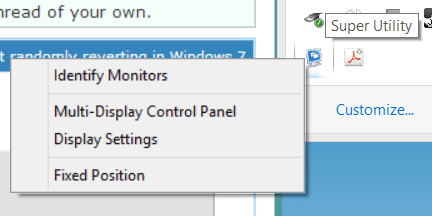
Anyway, I was having the same problem, and like Cswyke, this was the most promising Google result. So what did I find? It seems that I have something installed that I can only identify as "Super Utility." Its a system tray app that has a microsoft-like monitor logo and appears to have control over multi-monitor setups. TBH I can't remember where it came from, and I also can't seem to get rid of it! I have found, however, that if I uncheck "Fixed Position" as shown below, it stops messing with my monitor configuration. Hooray!

http://matt-schoen.com/theculprit.png
 

Attachments

  • theculprit.png
    theculprit.png
    8.8 KB · Views: 11
Last edited:

My Computer My Computer

At a glance

Windows 8.1 64bit
Computer type
PC/Desktop
OS
Windows 8.1 64bit
Back
Top