HDD showing incorrect free space, wasn't last night!

dextrose

New member
Local time
2:42 AM
Messages
9
Hi,

I just signed up and this is my first post, I have checked into this already but I'd figure I'd send my issue out here and maybe someone has an answer.

My system specs:

i7 920
Asus P6T SE
6GB ram
Hitachi 4TB 7K4000 (Storage/back up drive)
WD 2TB Caviar Black (OS drive)
WD 2TB Caviar Green (back up)
ATi Radeon HD 3870

Don't think they are quite necessary but there they are, now my issue basically started last night/early this morning. My 4TB drive (3 weeks old) had about 1.38TB left of free space, I was using about 2.3TB on it of different things, now it is showing up as only 448KB of free space! I checked different forums online and it could really seem like a number of things, which I have tried but no luck yet, last resort is moving things off and format the drive.

I actually noticed that some of my video files last night would not play at all in any video player, but they were working fine literally several days before, btw last night the drive was showing correct space too. Now the only difference is that I re-installed Windows a few days ago and something happened to my 4TB drive since certain files were not playing, mainly all newer files and conversions were the ones corrupted.

So, I ran the error checking in Windows last night and let that run overnight, when I awoke I noticed that it had finished (did not take a snapshot - wish I had) and there was no issue with the drive according to the report, it showed correct space free. I also noticed during the recent installation of Windows, while booting and installing, a couple times I saw the "error checking" go through before booting up Windows, I had not seen this previous times installing Windows, but it always finished and showed the correct space and always for the same Hitachi drive, never for my Caviar Green or Black.

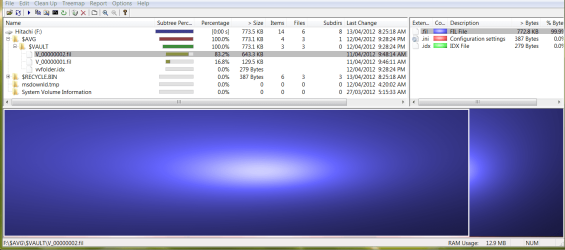
After running the error checking last night, my Hitachi drive basically lost all it's space. Now here's where it gets weird or tricky in defining the issue. I grabbed WinDirStat and ran that, it shows the same info as Windows, 448KB free of 3.6TB, when I click on my 4TB in WinDirStat to go to the second window, it shows nearly 100% usage, but says 2.3TB in space!

So this is where I'm scratching my head, Windows and the first screen of WinDirStat show the same info, 448KB free of 3.6TB, then when I go into my 4TB drive through WinDirStat, it shows nearly 100% usage of 2.3TB??? This is half correct, it should show 2.3TB being used but not that it's 100% full, I'm just confused here, why in one screen does it say 100% full of 3.6TB then in the next screen it says 2.3TB 100% full.

I also enabled hidden files, deleted the trash bin of that volume, but nothing. I literally cannot see what is taking up 1.3TB of space that I had available last night. I think manually running that error checking screwed it up somehow and why certain files have just stopped playing, I have no idea.

So any help would be great, the drive is new so I'm hoping that it's not failing already, but could be, since that was the only drive to automatically go through error checking during win7 installation. If anyone has any idea, how I can locate these hidden or corrupted files and what I can do or what I can delete, that would be greatly appreciated.

Oh last question, if I do end up formatting this drive, should I do a quick format or full?
 

My Computer My Computer

At a glance

Windows 7 Ultimate x64
OS
Windows 7 Ultimate x64
Hi dextrose, welcome to Seven Forums.
Have a look in

RR.PNG
 

My Computer My Computer

At a glance

Win7 H.Prem. 32bit+SP1
Computer Manufacturer/Model Number
Look in my Signature.
OS
Win7 H.Prem. 32bit+SP1
I'm sorry I don't have a clear answer for you outside of the format, as something goofy is going on and while I know at least 3 ways to possibly clear up the misreporting for you.
You really need to find out if the drive is reliable.
To that end I do suggest the format, following this method (after backing up data of course)
http://www.sevenforums.com/tutorials/91339-ssd-hdd-optimize-windows-reinstallation.html

After that I would run to Hitachi and get their drive diagnostic tool and check the drive with that before reinstalling windows.
Downloads

While as suggested above, this may be fixable through standard disk management it doesn't deal at all with how it happened int he first place. As drives aren't generally keen on paritioning themselves randomly and losing data integrity in video files.
 

My Computer My Computer

At a glance

Windows 7 x64Intel i7 2600kG.skill Ripjaw 16gigs @ 1866Nvidia gtx580 (evga)
Computer Manufacturer/Model Number
Insane hobo technologies. ;-)
OS
Windows 7 x64
CPU
Intel i7 2600k
Motherboard
Asrock z68 extreme 4 gen 3
Memory
G.skill Ripjaw 16gigs @ 1866
Graphics Card(s)
Nvidia gtx580 (evga)
Sound Card
Integrated HD audio + hdmi
Monitor(s) Displays
24" ASUS widescreen + 42" insignia
Screen Resolution
1080p (1920x1080)
Hard Drives
128 Samsung 830
256 Samsung 840
3 x 1tb storage drive (various)
1 western digital 1tb (eSATA)
1 Seagate 1tb (eSATA)
PSU
1 kilowatt SLI/Crossfire rated Silverstone modular
Case
NZXT Phantom + additional 220 fan
Cooling
Zalmann
Keyboard
Microsoft wireless 3000 (v2)
Mouse
MS - wireless 5000 (bluetrack)
Internet Speed
depends on if you ask me or my provider.
Other Info
The above information is provided as is, and the author assumes no responsibility for issues it may cause with your sanity or fanboyism.
Hi,

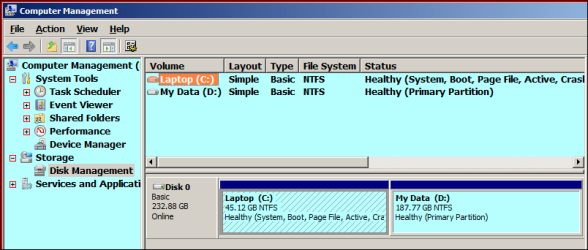
Thanks for the welcoming and thanks for the quick response. I guess I forgot to mention that, I did check on my drive to see if there were any hidden partitions, it just shows 3759.20 GB NTFS - Healthy Primary Partition.

I'm quite baffled at the moment, I can't seem to locate this 1.3TB of mysterious space.
 

My Computer My Computer

At a glance

Windows 7 Ultimate x64
OS
Windows 7 Ultimate x64
Are you saying I should re-install Windows on my Caviar Black? I am using that as my boot drive and the Hitachi just as storage/back up imaging, but are you suggesting to still redo that install?
 

My Computer My Computer

At a glance

Windows 7 Ultimate x64
OS
Windows 7 Ultimate x64
Thanks for the links btw, but is there any drive fitness tests for drives over 2-3TB? Hitachi makes a 4TB drive but doesn't have a fitness test for it, haha - or would it actually work still?

EDIT: Found one, here is a link for people who want to test larger drives:

http://www.seagate.com/www/en-us/support/downloads/seatools
 

My Computer My Computer

At a glance

Windows 7 Ultimate x64
OS
Windows 7 Ultimate x64
no the fitness one has to be for that specific series or the numbers will appear off even if it runs.
I misunderstood.
If it's not the boot drive
then no don't reinstall windows.
that wouldn't be required here.
I do suggest using a more aggressive than normal format method on it when you clean it up though.
Personally I would disable system restore for that drive.
It's pointless to try and use system restore for that much data anyhow. Only real option would be an identical mirror drive.

Finally a random thought inspired by coffee hit my head, have you simply tried doing a complete power cycle down, and swapping out the data cable for the new drive?

Did it come with it's own cable? because my new ssd did, and the cable was garbage, got all kinds of problems until I replaced the cable.
The power cycling could also clean up any bad buffer/cache data and other things that could potentially mess with this.
 

My Computer My Computer

At a glance

Windows 7 x64Intel i7 2600kG.skill Ripjaw 16gigs @ 1866Nvidia gtx580 (evga)
Computer Manufacturer/Model Number
Insane hobo technologies. ;-)
OS
Windows 7 x64
CPU
Intel i7 2600k
Motherboard
Asrock z68 extreme 4 gen 3
Memory
G.skill Ripjaw 16gigs @ 1866
Graphics Card(s)
Nvidia gtx580 (evga)
Sound Card
Integrated HD audio + hdmi
Monitor(s) Displays
24" ASUS widescreen + 42" insignia
Screen Resolution
1080p (1920x1080)
Hard Drives
128 Samsung 830
256 Samsung 840
3 x 1tb storage drive (various)
1 western digital 1tb (eSATA)
1 Seagate 1tb (eSATA)
PSU
1 kilowatt SLI/Crossfire rated Silverstone modular
Case
NZXT Phantom + additional 220 fan
Cooling
Zalmann
Keyboard
Microsoft wireless 3000 (v2)
Mouse
MS - wireless 5000 (bluetrack)
Internet Speed
depends on if you ask me or my provider.
Other Info
The above information is provided as is, and the author assumes no responsibility for issues it may cause with your sanity or fanboyism.
Okay, well basically that's what I had in mind if no other options, I will probably have to do a full format for this drive.

For the cables, I bought some sata cables from monoprice and they have been performing well, I could try swapping them though and see if that makes any difference. I'll give that a try and see if powering down helps.

I just doubled checked and I have system restore off my non OS drives. Will post any updates if I get this back in order, full format of 4TB is going to take a looooooong time haha.

Thanks again for the replies.
 

My Computer My Computer

At a glance

Windows 7 Ultimate x64
OS
Windows 7 Ultimate x64
dextrose, as its only 3 weeks old get a refund/replacement. My choice of HDD is WD.
 

My Computer My Computer

At a glance

Win7 H.Prem. 32bit+SP1
Computer Manufacturer/Model Number
Look in my Signature.
OS
Win7 H.Prem. 32bit+SP1

My Computer My Computer

At a glance

Windows 7 home premium x64AMD FX-4100 AM3+ 3.6GHz 12MB Black EditionCrsair vengeance 12Gb DDR3 1600MHz CL9Asus GTX 560 1GB
Computer Manufacturer/Model Number
DIY
OS
Windows 7 home premium x64
CPU
AMD FX-4100 AM3+ 3.6GHz 12MB Black Edition
Motherboard
Asus M5A97 Pro
Memory
Crsair vengeance 12Gb DDR3 1600MHz CL9
Graphics Card(s)
Asus GTX 560 1GB
Sound Card
Realtek onboard
Monitor(s) Displays
Hanns G 1680x1050 native
Hard Drives
OCZ 128Gb Petrol ssd
2x500 Gb Samsung
PSU
OCZ StealthXstream II 500W
Internet Speed
8Mb or better

My Computer My Computer

At a glance

Vista, Windows7, Mint Mate, Zorin, Windows 8from 1.6GHz Duo to i7
Computer Manufacturer/Model Number
HP, Dell, Gateway, Toshiba - 4 laptops and 2 desktops
OS
Vista, Windows7, Mint Mate, Zorin, Windows 8
CPU
from 1.6GHz Duo to i7
Monitor(s) Displays
2x HP w2207
Hard Drives
5x HDD, 7x SSD, 12x Externals
Keyboard
with trackball - no mices
Mouse
Trackball mice
Internet Speed
DSL 6000
Hey guys,

Kinda late I know, I actually just finished backing up my stuff from earlier! One thing that sucks about large HDDs, really long back ups. So after clearing the drive of all my files and running WinDirStat, the drive shows a huge chunk of space being used, even though nothing is on it, well almost nothing. If you look at the attachment, that shows the hidden files on there, but again in terms of space they aren't taking much, unless somehow those files are making the drive think there is more space being used than there actually is, Windows shows 2.27 TB free of 3.63 TB and WinDirStat shows 2.3 TB of 3.6 TB (guess they round those numbers).

I guess I can send this back and get it exchanged, but would that be necessary? Wouldn't a full format possibly correct the issues or does this sound like a typical HDD failure (or upcoming failure) to you guys? I haven't noticed any strange or loud noises coming from the drive and it passed any of the SeaTools tests I ran (didn't run any of the long tests however).

I don't mind if I have to send this back, but really? Has this drive gone bad already? Oh and I went with Hitachi since WD owns them and I figured, hey, maybe WD has helped them out on the manufacturing side of things, but maybe not, WD have been the best drives for me by far, wish they made Caviar Blacks larger than 2TB.

Thanks again for the input.
 

Attachments

  • hitachi drive.PNG
    hitachi drive.PNG
    88.1 KB · Views: 46

My Computer My Computer

At a glance

Windows 7 Ultimate x64
OS
Windows 7 Ultimate x64
Just a quick update, I deleted the volume and then went to quick format the Hitachi drive to see how much space there was, now Windows and WinDirStat both show a total space of 1.63 TB, 2 TB are now missing!

I saw this issue on another forum and looks like running "error checking" was the problem. I am going to do a full format and see what programs I can run to possibly recover the missing space. If that doesn't work, I will be sending this back for a replacement/refund.
 

My Computer My Computer

At a glance

Windows 7 Ultimate x64
OS
Windows 7 Ultimate x64
Have you tried creating multiple partitions < 2 GB each ?
Might be an issue with the 4 GB HD/partition size?
 

My Computer My Computer

At a glance

Multi-Boot W7_Pro_x64 W8.1_Pro_x64 W10_Pro_x6...AMD Athlon II x4 6206GB GSkill DDR2 800AMD 4670 GPU + AMD 4200 IGP
Computer type
PC/Desktop
Computer Manufacturer/Model Number
home built
OS
Multi-Boot W7_Pro_x64 W8.1_Pro_x64 W10_Pro_x64 +Linux_VMs +Chromium_VM
CPU
AMD Athlon II x4 620
Motherboard
Gigabyte GA-MA785G-UD3H
Memory
6GB GSkill DDR2 800
Graphics Card(s)
AMD 4670 GPU + AMD 4200 IGP
Sound Card
on board Realtek ALC889A
Monitor(s) Displays
RCA 40" LCD TV, Insignia 32" LCD TV, HP 15" LCD monitor
Screen Resolution
1680 x 1050
Hard Drives
OCZ Vertex 3 120GB,
Samsung F3 1TB (3),
Several others - WD, Seagate, Hitachi, ...
PSU
Corsair 500 W
Case
Rosewill mid tower
Cooling
CM 90mm rifle
Keyboard
Gyration wireless, Logitech wireless, Dell USB wired
Mouse
Gyration wireless, Logitech wireless, V7 USB wired
Internet Speed
Spectrum - 100Mbps D / 10Mbps U
Antivirus
Avast, MBAM3, EMET, WinPatrol
Browser
Pale Moon, Firefox, IE
Other Info
2 multi-boot PC's
Mainly HTPC/Office/Gen purpose (no gaming).
Trendnet USB KVM.
LG DVD burner/Blue Ray Player.
Tray system for removable SATA backup drives.

Not currently OCd, under-volted.
I use Hybrid sleep, rarely re-boot or shutdown.

Hauppauge HD-PVR, Avermedia PCIe TV Tuner, Hauppauge PCI TV Tuner.
Well when I initially installed the drive, I used the GPT setting since it's over 2 TB, and it read fine, it showed 3.63 TB of free space and I was able to use it without any problems up until recently. I just had one partition on this drive since it is my storage/back up drive.

The only thing that changed was that I re-installed Windows on my boot drive and during that time something happened to the Hitachi (storage) drive, I should have kept in unplugged while installing. After that install, certain files became corrupted on the Hitachi drive, which I noticed the other day, so that's why I ran "error checking" on it. After running that, it seems to have made things worse as it was showing a full drive when there should have been 1.3 TB free.

So now after deleting that volume, instead of 3.63 TB of total space it shows 1.63 TB total space, I'm running a full format now, so hopefully it sorts things out. If not, will have to see if there are any other programs that might recover this lost space or this drive goes back to Hitachi.
 

My Computer My Computer

At a glance

Windows 7 Ultimate x64
OS
Windows 7 Ultimate x64
A quick format would have probably done the same. A full format will take a long time on such a large disk. But I am curious what the format will yield.

I while ago I had seen a similar problem from another OP on another forum. But I do not recall what the solution was.
 

My Computer My Computer

At a glance

Vista, Windows7, Mint Mate, Zorin, Windows 8from 1.6GHz Duo to i7
Computer Manufacturer/Model Number
HP, Dell, Gateway, Toshiba - 4 laptops and 2 desktops
OS
Vista, Windows7, Mint Mate, Zorin, Windows 8
CPU
from 1.6GHz Duo to i7
Monitor(s) Displays
2x HP w2207
Hard Drives
5x HDD, 7x SSD, 12x Externals
Keyboard
with trackball - no mices
Mouse
Trackball mice
Internet Speed
DSL 6000
After quick formatting, full formatting, SeaTools tests, deleting volumes, error checking again, there has been no solution. I will note that my drive now shows 1.63 TB total space instead of 3.63 TB and that 142MB is automatically taken up on the drive (even though there are no files or data on the drive). I believe what caused this was running error checking in the first place, so be very careful before you do!

So I messaged Hitachi and they said most likely if the drive isn't fixed after formatting, then it most likely has bad sectors or has stopped performing properly. They also said that other than the tools on their support site, there is nothing else to use to check the drive, kinda funny like I mentioned before, they only have tests that support 2 TB or less so you technically can't even check with 3 TB or more. I should have just gone with another Caviar Black, WD and Hitachi are definitely not that same thing. I really hope this one was just a lemon, cause it looks like I'll be stuck with this guy for the next 3 years, time to RMA, this sucks! First drive failure in like 3-4 years, boo-urns Hitachi, boo-urns indeed!

Well thanks to everyone that replied, sorry I couldn't find a solution, but it's safe to say don't run error checking if your drive may be faulty, seems to only compound the problems. If by the strangest chance this drive becomes functional again I will be sure to post, going to try a couple other things first before RMAing.
 

My Computer My Computer

At a glance

Windows 7 Ultimate x64
OS
Windows 7 Ultimate x64
Try wiping with Diskpart Clean Command.

Then partition and format in Disk Mgmt to see if any changes.

At that point please post back a screenshot of your maximized Disk mgmt drive map and listings, using Snipping Tool in Start Menu.
 
Back
Top