Devices and Printers - Change Device Icons with Custom Icons

How to Change Icons in "Devices and Printers" with Custom Icons

   Information
This tutorial will cover how to change the icons in Devices and Printers with a custom icon of your choosing and be device specific, eliminating resource hacking and/or overwriting Windows 7 default icons.

   Note
You'll need to be familiar with making multi-resolution icons to complete this tutorial. Many tutorials already exist, and one can be found at SevenForums here. Please take the time to familiarize yourself with the procedure before moving onto this tutorial.

   Tip
The icons used in this method must contain the following sizes:

256x256 32bit + Alpha​

48x48: 32bit + Alpha
48x48: 8bit 256
48x48: 4bit 16​

32x32: 32bit + Alpha
32x32: 8bit 256
32x32: 4bit 16​

24x24: 32bit + Alpha
24x24: 8bit 256
24x24: 4bit 16​

16x16: 32bit + Alpha
16x16: 8bit 256
16x16: 4bit 16​

More information about icon design can be found on MSDN.


Final Example: Custom Computer Icon
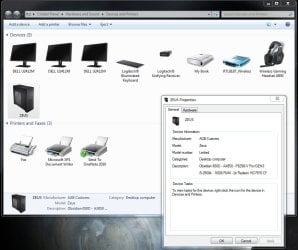
final.jpg


Step 1.
Create a multi-resolutioned icon, containing the appropriate sizes, using the tutorial mentioned in the Note pane above.
Step 2.
Download and install the Devices and Printers Metadata Authoring Wizard from MSDN.
Step 3.
Once installed, you'll have an added option called 'create metadata package' in your context menu for each device. Choose that option for the device icon you'd like to change.
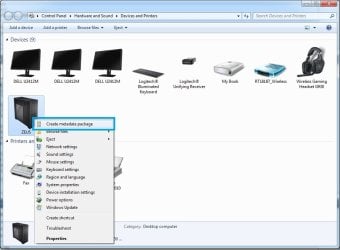
metascreen.jpg
Step 4.
Drag your created icon to the drop target area of the Icon Tab.
dndicon.jpg
Choose Next.
   Information
If your icon doesn't meet the required criteria, you'll be met with the following window. Adjust your icon as necessary.
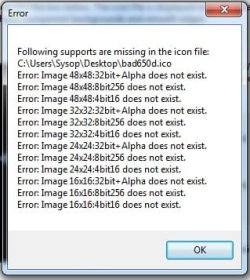
badicon.jpg
Step 5.
Fill out the fields in the Description Tab to your liking.
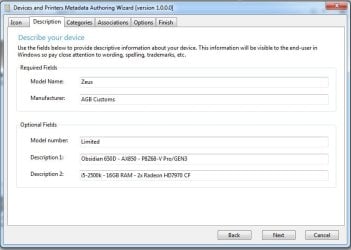
descrip.jpg
Choose Next.
Step 6.
Under the Categories Tab, select the category appropriate for your device. In this example, we're replacing the Desktop Computer icon.
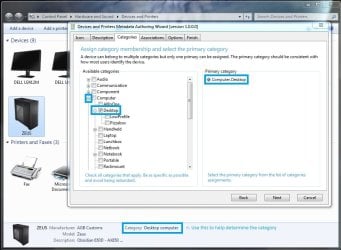
category.jpg
Choose Next.
Step 7. - See Other Devices section, below, for devices other than the Computer.
Under the Associations Tab, choose the proper association(s). For this example, the Computer icon, choose the 7 ComputerMetadata strings at the top of the Hardware ID list.
Assoc.jpg
Choose Next.
Other Devices
To determine the Hardware ID string for devices other than the Computer, use the following method to locate it.
A. From the Devices and Printers window, Right-Click your device and choose properties.
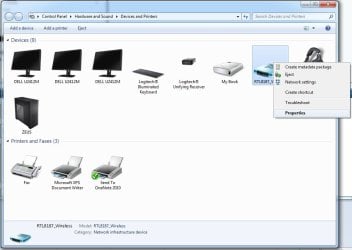
props1.jpg
B. From the Properties window, seclect the Hardware Tab at the top, and choose the Properties Button at the bottom.
props2.jpg
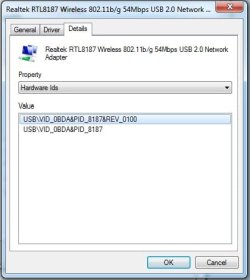
C. In the Properties Window, select the Details Tab at the top, and from the Property Pulldown menu, select Hardware Ids.
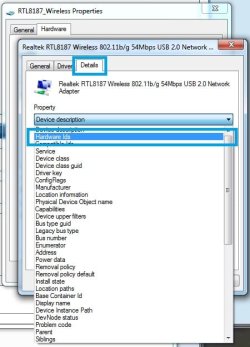
hids.jpg

hidstring.jpg
D. Using the Id from the previous step, you can verify the proper strings in the tool if multiple's are listed.
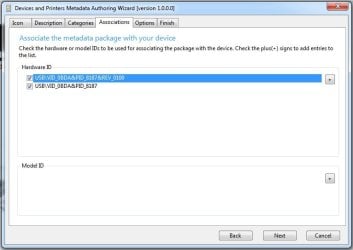
verified.jpg
Step 8.
You can select your locale from Options Tab. If you prefer USB, hot-swappable, etc. devices to be shown while disconnected, tick the Show device in disconnected state. For our example we'll leave it unchecked.
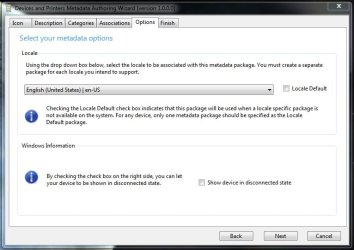
options.jpg
Choose Next.
Step 9.
From the Finish Tab, make sure to tick the Copy package to your system's local metadata store if you would like this to take immediate effect upon a refresh of your Devices and Printers window.
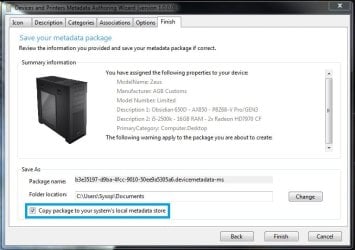
finish.jpg

   Tip
A backup of the package will be copied to your Documents folder for later use, i.e. after clean install. Copy the package to the following directory to install it if you didn't choose to tick Copy package to your system's local metadata store.
Code:
%PROGRAMDATA%\Microsoft\Windows\DeviceMetadataStore

That's it!
Ageeb


Last edited by a moderator:
nice tutorial, will give this a try later.
thanks
 

My Computer My Computer

Computer Manufacturer/Model Number
Hewlett packard/p6512uk
OS
Microsoft Windows 7 Home Premium 64-bit 7600
CPU
IIx4 amd athelon 635 processor
Motherboard
FOXCONN 2AA9
Memory
2x2gb
Graphics Card(s)
ati radeon HD 5450
Sound Card
(1) Realtek High Definition Audio (2) AMD High Definition
Monitor(s) Displays
samsung lcd tv 32"
Screen Resolution
1360x 768
Hard Drives
(1) WDC WD10 01FAES-60Z2A0 SATA Disk Device (2) Maxtor OneTouch USB Device (3) ST310003 33AS USB Device (4) WD My Book 1111 USB Device
PSU
?
Cooling
air!
Keyboard
wireless hp
Mouse
wireless Hp,optical
Internet Speed
1.10mb/s
Antivirus
MSE
Browser
Firefox
Very nice tutorial.
 

My Computer My Computer

Computer type
Laptop
Computer Manufacturer/Model Number
Sager NP9170
OS
Win 7 Pro x64 / Win 10 Pro
CPU
Intel(R) Core(TM) i7-3630QM CPU @ 2.40GHz
Motherboard
CLEVO P170EM
Memory
12 GB
Graphics Card(s)
(1) Intel(R) HD Graphics 4000 (2) NVIDIA GeForce GTX 675M
Sound Card
(1) Realtek High Definition Audio (2) Intel(R) Display Aud
Monitor(s) Displays
17.3
Screen Resolution
1920x1080
Hard Drives
(1) Samsung 860 EVO 500GB(OS) (1) Samsung 860 EVO 500GB(Data)
Keyboard
Backlite
Antivirus
MSE, Malwarebytes Pro
Browser
Firefox
Other Info
DESKTOP: Custom-built.
OS: Win 10 Pro x64.
CASE: Rosewill R5.
CPU: Intel I5 4670K CPU @ 3.40GHz.
CPU COOLER: Cool Master Hyper 212 EVO.
MOTHERBOARD: Asus Z87-A.
MEMORY: Kingston HyperX 2x4 GB.
GPU: Nvidia Geforce 650 TI.
PSU: Corsair TX750.
DRIVES: (1) Samsung 840 120 GB SSD (2) Western Digital blue 500 GB 7200 RPM.

My Computer My Computer

Computer Manufacturer/Model Number
Custom
OS
Windows 7 Ultimate x64
CPU
Intel i5-2500k
Motherboard
ASUS P8Z68-V Pro/GEN3
Memory
16GB
Graphics Card(s)
2x Radeon HD7970 Crossfire
Sound Card
On-Board / Logitech G930
Monitor(s) Displays
3x Dell u2412m
Screen Resolution
5760x1200
Hard Drives
Toshiba thns064gg2bbaa SSD
Seagate Barracuda 7200.12 ST31000528AS 1TB
Intel RST SSD caching enabled
PSU
Corsair AX850
Case
Corsair Obsidian 650D
Cooling
Corsair H100
Keyboard
Logitech Illuminated
Mouse
Logitech M510 Wireless
Internet Speed
1Mb/s
Thank you, and welcome to SevenForums kulbida!!
 

My Computer My Computer

Computer Manufacturer/Model Number
Custom
OS
Windows 7 Ultimate x64
CPU
Intel i5-2500k
Motherboard
ASUS P8Z68-V Pro/GEN3
Memory
16GB
Graphics Card(s)
2x Radeon HD7970 Crossfire
Sound Card
On-Board / Logitech G930
Monitor(s) Displays
3x Dell u2412m
Screen Resolution
5760x1200
Hard Drives
Toshiba thns064gg2bbaa SSD
Seagate Barracuda 7200.12 ST31000528AS 1TB
Intel RST SSD caching enabled
PSU
Corsair AX850
Case
Corsair Obsidian 650D
Cooling
Corsair H100
Keyboard
Logitech Illuminated
Mouse
Logitech M510 Wireless
Internet Speed
1Mb/s
Nice easy to follow tutorial. Only have one issue/question... the new/custom icon shows up in Devices and Printers just fine, but in My Computer, it's still the old/stock icon. Any way to change this?

Thanks for your help.
 

My Computer My Computer

OS
Windows 7 x64
Is there a way to go back to the default icons if you decide to go back?
 

My Computer My Computer

OS
Windows 7 Pro X64
I can not finish the process ... get a window saying:
"unhandled exception in the application ... Object reference not set to an instance of an object"
I have no idea ... looks like a bug of framework 2.0?
 

My Computer My Computer

Computer Manufacturer/Model Number
asus p9x79
OS
w7 ultimate 64 bits
CPU
i7 3930k
Motherboard
asus p9x79
Memory
g.skill 16 gb 2133
Graphics Card(s)
asus 1gb 7770
Sound Card
on board
Monitor(s) Displays
samsung syncmaster 245b
Hard Drives
ocz revodrive 3 120 gb
PSU
seasonic 860w platinum
Case
fractal design xl black pearl define
Cooling
noctua nhd14
HELP! problem with new Metadata Package

Hi, sorry for being a newbie here.
re. problem after creating a new Metadata Package

I followed the tutorial word for word but after finishing the package now the mouse icon has changed - the same as the new package.

Did I select too many File Associations?
I was confused - your advice didn't specify whether they all need to be selected, or just some. In the end I just selected ALL...and there were dozens and dozens of them, maybe a hundred or more...was that my error?

Will it affect the rest of my computer?
Do I need to undo this metadata package?
If so, how?
Any help would be appreciated. Thanks
 

My Computer My Computer

OS
Windows 7 Home Premium 32bit
Is this x64 compatible also. I 've tried this a few times now with no joy. The file is not created in My Documents or added to the store even though it says its completed:rolleyes:

Danny
 

My Computer My Computer

Computer Manufacturer/Model Number
acer aspire 5935g
OS
Windows 7 Home Premium x64 SP1
CPU
intel(R)core(TM)2 duo CPU T6600 @ 2.20GHz
Motherboard
intel gm45/gm47 revision 07
Memory
3 gb ddr3
Graphics Card(s)
ati radeon hd4570/512mb
Monitor(s) Displays
lop156wh2-tle1 15.3 flat
Screen Resolution
1366x768
Hard Drives
OCZ-Agility3 60gig ssd
320gig external hdd
500gig external hdd
Mouse
Optical
Internet Speed
30Mbps Down/30Mbps Up
Hi Ageeb hows things? Mate I did everything you have said in this tutorial and when I click finish in the metadata authoring wizard, nothing happens. I want to change the icons in devices and printers. Would you mind letting me know where I'm going wrong please as I've been at it for ages. Thanks
 

My Computer My Computer

OS
W7
I'll need some time to address these issues. My apologies for the late response, I didnt have notifications for this thread on.

xxxDannyxxx, the example was created on a 64 bit machine, with no available updates at windows update.
 

My Computer My Computer

Computer Manufacturer/Model Number
Custom
OS
Windows 7 Ultimate x64
CPU
Intel i5-2500k
Motherboard
ASUS P8Z68-V Pro/GEN3
Memory
16GB
Graphics Card(s)
2x Radeon HD7970 Crossfire
Sound Card
On-Board / Logitech G930
Monitor(s) Displays
3x Dell u2412m
Screen Resolution
5760x1200
Hard Drives
Toshiba thns064gg2bbaa SSD
Seagate Barracuda 7200.12 ST31000528AS 1TB
Intel RST SSD caching enabled
PSU
Corsair AX850
Case
Corsair Obsidian 650D
Cooling
Corsair H100
Keyboard
Logitech Illuminated
Mouse
Logitech M510 Wireless
Internet Speed
1Mb/s
I'll need some time to address these issues. My apologies for the late response, I didnt have notifications for this thread on.

xxxDannyxxx, the example was created on a 64 bit machine, with no available updates at windows update.

Yer thanks mate got it working fine eventually:D
 

My Computer My Computer

Computer Manufacturer/Model Number
acer aspire 5935g
OS
Windows 7 Home Premium x64 SP1
CPU
intel(R)core(TM)2 duo CPU T6600 @ 2.20GHz
Motherboard
intel gm45/gm47 revision 07
Memory
3 gb ddr3
Graphics Card(s)
ati radeon hd4570/512mb
Monitor(s) Displays
lop156wh2-tle1 15.3 flat
Screen Resolution
1366x768
Hard Drives
OCZ-Agility3 60gig ssd
320gig external hdd
500gig external hdd
Mouse
Optical
Internet Speed
30Mbps Down/30Mbps Up
I'll need some time to address these issues. My apologies for the late response, I didnt have notifications for this thread on.

xxxDannyxxx, the example was created on a 64 bit machine, with no available updates at windows update.

Yer thanks mate got it working fine eventually:D

Could you describe where adjustments should be made in the tutorial that would have helped you the first time through?
 

My Computer My Computer

Computer Manufacturer/Model Number
Custom
OS
Windows 7 Ultimate x64
CPU
Intel i5-2500k
Motherboard
ASUS P8Z68-V Pro/GEN3
Memory
16GB
Graphics Card(s)
2x Radeon HD7970 Crossfire
Sound Card
On-Board / Logitech G930
Monitor(s) Displays
3x Dell u2412m
Screen Resolution
5760x1200
Hard Drives
Toshiba thns064gg2bbaa SSD
Seagate Barracuda 7200.12 ST31000528AS 1TB
Intel RST SSD caching enabled
PSU
Corsair AX850
Case
Corsair Obsidian 650D
Cooling
Corsair H100
Keyboard
Logitech Illuminated
Mouse
Logitech M510 Wireless
Internet Speed
1Mb/s
if you screwed up how you fix it? for some reason now i got 6 devices with the same icon :S
 

My Computer My Computer

Computer type
PC/Desktop
OS
Windows 8.1 Pro 64bit
CPU
Intel i5-2500k @ 4.0ghz
Motherboard
Asus Sabertooth z77
Memory
G.skill RipjawsX 16GB (4GB x 4) DDR3-1866
Graphics Card(s)
Gigabyte gtx 780 Winforce gv-n780oc-3gd
Sound Card
onboard realtek ALC892
Monitor(s) Displays
Acer GD235hz
Screen Resolution
1920*1080
Hard Drives
2x Sandisk SSD 60gb raid 0 @ Intel® z77
8x Western Digital Green 1tb raid 5 @ RocketRAID 272x_1x
PSU
Rosewill RBR1000-M
Case
Antec darkfleet 85
Cooling
Zalman LQ310
Keyboard
logitech g19
Mouse
logitech g9x
Internet Speed
10mb download, about 400k upload T_T
Antivirus
my brain
Browser
firefox and chrome
You can just delete them from C:\ProgramData\Microsoft\Windows\DeviceMetadataStore\en-US if you can remember the numbers or have copies to check on the desktop.
Either that or delete them all and start again, it won't delete the default ones anyway

Danny
 
Last edited:

My Computer My Computer

Computer Manufacturer/Model Number
acer aspire 5935g
OS
Windows 7 Home Premium x64 SP1
CPU
intel(R)core(TM)2 duo CPU T6600 @ 2.20GHz
Motherboard
intel gm45/gm47 revision 07
Memory
3 gb ddr3
Graphics Card(s)
ati radeon hd4570/512mb
Monitor(s) Displays
lop156wh2-tle1 15.3 flat
Screen Resolution
1366x768
Hard Drives
OCZ-Agility3 60gig ssd
320gig external hdd
500gig external hdd
Mouse
Optical
Internet Speed
30Mbps Down/30Mbps Up
Is this x64 compatible also. I 've tried this a few times now with no joy. The file is not created in My Documents or added to the store even though it says its completed:rolleyes:

Danny
I have this exact problem, can you please post how you fixed it?
 

My Computer My Computer

OS
Windows 7 Ultiamte x64
Is this x64 compatible also. I 've tried this a few times now with no joy. The file is not created in My Documents or added to the store even though it says its completed:rolleyes:

Danny
I have this exact problem, can you please post how you fixed it?

If I remember right I was running it from a standard user account and not an admin account. If you still have issues delete all from C:\ProgramData\Microsoft\Windows\DeviceMetadataStore\en-US (It won't let you delete the default ones just skip those) Reboot and try again

Regards Danny
 

My Computer My Computer

Computer Manufacturer/Model Number
acer aspire 5935g
OS
Windows 7 Home Premium x64 SP1
CPU
intel(R)core(TM)2 duo CPU T6600 @ 2.20GHz
Motherboard
intel gm45/gm47 revision 07
Memory
3 gb ddr3
Graphics Card(s)
ati radeon hd4570/512mb
Monitor(s) Displays
lop156wh2-tle1 15.3 flat
Screen Resolution
1366x768
Hard Drives
OCZ-Agility3 60gig ssd
320gig external hdd
500gig external hdd
Mouse
Optical
Internet Speed
30Mbps Down/30Mbps Up
Well damn that isn't my issue. :/
 

My Computer My Computer

OS
Windows 7 Ultiamte x64
Back
Top