Hard Drive first not booting Windows, now not recognized in BIOS

SavageEagle

New member
Local time
5:31 PM
Messages
16
Hello! Having some serious issues, as it seems we all have. So, here's the situation. As a nerd truck driver I bought a laptop for skyping with the family and playing games. Laptop was working fine one night and the next morning I start it up and windows won't boot. Just gives me a blank screen with the infamous blinking cursor in the top left.

After searching the forums, it appears I need the Win7 install discs, which this computer did NOT come with. I may be able to get my hands on a reinstall disc, but I doubt it'll be a samsung laptop disc. I was, however, able to make a recovery disc from my wife's Dell laptop. I thought she had a reinstall disc, but we can't find it.

My current problem, and the most troubling, is that now BIOS doesn't even show the HDD. I checked the connections and they are fine, and I was able to put the SATA drive in my desktop and copied all my important data to my desktop. So I know the drive is good. Nothing is corrupted and all partitions, including the recovery partition is intact. I can't figure out why the laptop isn't showing the drive in BIOS now, though.

I've tried the recovery disc a second time, but it doesn't seem to want to boot correctly now. It worked fine when the HDD was recognized, but now it's getting to the blinking screen, then the cursor jumps to the bottom right and pixelates across the bottom of the screen like it's trying to load.

I can probably get my hands on a reinstall disc if I can download one or ask around tomorrow, but right now I need to figure out the HDD problem. Any ideas?

PS: I know this has been covered NUMEROUS times, but none of the other threads have been any help with these issues. Any help would be appreciated.
 

My Computer My Computer

At a glance

Windows 7 Home Premium 64 biti7-2630QM 2.0ghz6gbGeForce GT 525M
Computer Manufacturer/Model Number
Samsung RC512-S01US
OS
Windows 7 Home Premium 64 bit
CPU
i7-2630QM 2.0ghz
Memory
6gb
Graphics Card(s)
GeForce GT 525M
Hard Drives
Hitachi 750gb SATA
Case
Laptop
Ok, I got the recovery disc to boot again, but still don't have the HDD in BIOS yet. Only option that works in the recovery disc is the command prompt. searching for the HDD that way, but so far, I have only found D: which has the Dirs: Boot, and Sources, and a file called bootmgr. This is along with X: which is obviously the recovery disc. So far, I can't find anything else.
 

My Computer My Computer

At a glance

Windows 7 Home Premium 64 biti7-2630QM 2.0ghz6gbGeForce GT 525M
Computer Manufacturer/Model Number
Samsung RC512-S01US
OS
Windows 7 Home Premium 64 bit
CPU
i7-2630QM 2.0ghz
Memory
6gb
Graphics Card(s)
GeForce GT 525M
Hard Drives
Hitachi 750gb SATA
Case
Laptop
One more update before bed.

Couldn't find any drives through command prompt. Didn't figure I would since BIOS didn't load it.

So I grabbed the wife's Dell laptop and swapped HDDs. My HDD showed up in her computer (didn't boot it, just into BIOS), but her HDD didn't show up in my BIOS.

Checked the cables one last time, everything looks fine and nothing is disconnected, bent, burnt, etc. Swapped HDDs back to their respective laptops, hers boots fine, mine still won't recognize the HDD.

Could this be a bad motherboard? How can I test it? I don't know if Fry's Electronics sells these kinds of HDD cables, but I can check. Also, this was built Jan 2011 and is a factory Refub. What's the chances it has any kind of warranty left if it ever had one?
 

My Computer My Computer

At a glance

Windows 7 Home Premium 64 biti7-2630QM 2.0ghz6gbGeForce GT 525M
Computer Manufacturer/Model Number
Samsung RC512-S01US
OS
Windows 7 Home Premium 64 bit
CPU
i7-2630QM 2.0ghz
Memory
6gb
Graphics Card(s)
GeForce GT 525M
Hard Drives
Hitachi 750gb SATA
Case
Laptop
I suppose this issue is pretty played out. Maybe I should junk the whole laptop?
 

My Computer My Computer

At a glance

Windows 7 Home Premium 64 biti7-2630QM 2.0ghz6gbGeForce GT 525M
Computer Manufacturer/Model Number
Samsung RC512-S01US
OS
Windows 7 Home Premium 64 bit
CPU
i7-2630QM 2.0ghz
Memory
6gb
Graphics Card(s)
GeForce GT 525M
Hard Drives
Hitachi 750gb SATA
Case
Laptop
I do have a copy of Win7 64 bit now if that helps. I'm really hoping it's not the motherboard. I just dropped $750 on this refurbed laptop with no warranty.
 

My Computer My Computer

At a glance

Windows 7 Home Premium 64 biti7-2630QM 2.0ghz6gbGeForce GT 525M
Computer Manufacturer/Model Number
Samsung RC512-S01US
OS
Windows 7 Home Premium 64 bit
CPU
i7-2630QM 2.0ghz
Memory
6gb
Graphics Card(s)
GeForce GT 525M
Hard Drives
Hitachi 750gb SATA
Case
Laptop
Hi,
Welcome to seven forums and sorry you didn't get any response yet.
Coming to your problem, did you try resetting the bios to its default settings and updating it? Check the disk cables if they are properly seated when plugged to the hdd. Have you tried new cable?
I've asked some other members too to look into your problem.
 

My Computer My Computer

At a glance

Winbdows 7 ultimate x64 | Ubuntu 12.04 x64 LTSCore 2 Duo e7400 @ 2.90GHz3GB DDR2Asus Nvidia GTX 560Ti 1GB
Computer Manufacturer/Model Number
HCL
OS
Winbdows 7 ultimate x64 | Ubuntu 12.04 x64 LTS
CPU
Core 2 Duo e7400 @ 2.90GHz
Motherboard
Gigabyte G31M-ES2L
Memory
3GB DDR2
Graphics Card(s)
Asus Nvidia GTX 560Ti 1GB
Sound Card
On-board
Monitor(s) Displays
HCL eZeeBee 18.5" LCD
Screen Resolution
1366x768 @ 60Hz
Hard Drives
Western Digital 320GB
PSU
Corsair CX500 V2 500W
Cooling
Stock
Keyboard
Stock
Mouse
Stock
Internet Speed
15-25kBps D/L | 10kBps U/L | Hey Don't laugh

My Computer My Computer

At a glance

Win 7 Pro 64-bitIntel i5 2.4 Ghz8GB DDR3Intel HD 3000
Computer type
Laptop
Computer Manufacturer/Model Number
Sony Vaio VPCEB47GM Laptop
OS
Win 7 Pro 64-bit
CPU
Intel i5 2.4 Ghz
Memory
8GB DDR3
Graphics Card(s)
Intel HD 3000
Sound Card
IDT High Definition
Monitor(s) Displays
15.6 WGXA Anti-Glare LED
Screen Resolution
1280x800
Hard Drives
640Gb 7200rpm
Antivirus
MSE
Browser
Opera (primary) with IE9 backup
If you still can't get to the HDD, and it's not being recognized in BIOS, D/L Partition Wizard and make the Bootable CD or Bootable Flash Drive.
You can make this on your desktop or wife's laptop.

See if it will detect the drive's partition or just unallocated space.
Right click on it to Check File System which can correct errors to restore the HDD.
If necessary assign a drive letter if the partition doesn't have one, but do not create a new partition, you will lose all your data.

If it shows up as 'unallocated space' in PW then click on the HDD to highlight it and from the Wizards tab select Partition Recovery Wizard, have it scan the HDD to see if it can recover it's partition intact, then tick the box and Restore it.

If you have any questions, post a picture of what PW displays.

How to Post a Screenshot (or Picture) in Seven Forums

You can use Macruim Reflect to backup your laptop HDD, put it into your desktop and run the backup from there. Just backup your partition with the data, as the partition table is likely corrupt so won't do any good to backup the entire HDD now.
When your laptop is running again, make a full disk backup.
If you have another issue you can just restore the full backup and everything will be as it was on the day of the backup.
 

My Computer My Computer

At a glance

Windows 7 Ult x64 - SP1/ Windows 8 Pro x64Intel Core i5-3570K 4.6GHz8GB (2X4GB) DDR3 1600 Corsair Vengeance CL8 1.5vSapphire HD 7770 Vapor-X OC 1GB DDR5
Computer type
PC/Desktop
Computer Manufacturer/Model Number
76~2.0
OS
Windows 7 Ult x64 - SP1/ Windows 8 Pro x64
CPU
Intel Core i5-3570K 4.6GHz
Motherboard
Gigabyte GA-Z77X UD3H, f18
Memory
8GB (2X4GB) DDR3 1600 Corsair Vengeance CL8 1.5v
Graphics Card(s)
Sapphire HD 7770 Vapor-X OC 1GB DDR5
Sound Card
Onboard VIA VT2021
Monitor(s) Displays
22" LCD Dell
Screen Resolution
1680x1050
Hard Drives
Samsung 840Pro 128GB SSD,
Seagate Barracuda 500GB SATA2 7200rpm 32MB cache, Seagate Barracuda 1TB SATA2 7200rpm 32MB cache,
PSU
Corsair HX650W
Case
Cooler Master Storm Scout
Cooling
Corsair H80 2x12cm Noctua NF P12 , 2x14cm case fans
Keyboard
Logitech Wave
Mouse
CM Sentinel
Internet Speed
Dismal
Antivirus
Avast
Browser
Opera Next
Other Info
Haswell laptop: HP Envy 17t-j, i7-4700MQ, GeForce 740M 2GB DDR3, 17.3" Full HD 1920x1080, 16GB RAM, Samsung 840 Pro 128GB, 1TB Hitachi 7200 HDD,
Desktop: eSATA ports,
External eSATA Seagate 500GB SATA2 7200rpm,
External WD USB 500GB
I looked up Samsung's trouble shooter (was a bit awkward) and the only solution they come up with is that either the drive is busted, or not correctly connected.

I see you have tried the latter. Here's a Linky thing for you if you want to read more.
 

My Computer My Computer

At a glance

Windows 7 home premium x64AMD FX-4100 AM3+ 3.6GHz 12MB Black EditionCrsair vengeance 12Gb DDR3 1600MHz CL9Asus GTX 560 1GB
Computer Manufacturer/Model Number
DIY
OS
Windows 7 home premium x64
CPU
AMD FX-4100 AM3+ 3.6GHz 12MB Black Edition
Motherboard
Asus M5A97 Pro
Memory
Crsair vengeance 12Gb DDR3 1600MHz CL9
Graphics Card(s)
Asus GTX 560 1GB
Sound Card
Realtek onboard
Monitor(s) Displays
Hanns G 1680x1050 native
Hard Drives
OCZ 128Gb Petrol ssd
2x500 Gb Samsung
PSU
OCZ StealthXstream II 500W
Internet Speed
8Mb or better
Thanks for the reply, guys.

Hi,
Welcome to seven forums and sorry you didn't get any response yet.
Coming to your problem, did you try resetting the bios to its default settings and updating it? Check the disk cables if they are properly seated when plugged to the hdd. Have you tried new cable?
I've asked some other members too to look into your problem.

I did reset BIOS, but I can't seem to update it. The update file is an EXE file which looks like a downloader/installer. Using 7zip I could seem some files, but they didn't look like BIOS files to me. (I really miss the "chip" BIOS. So much easier to fix) I don't think I can update the BIOS on it without having windows loaded. When I use bothe the recovery disc and the reinstall disc in recovery mode, trying to run the file off my USB drive says that the computer has an invalid subset/subsystem/infrastructure to execute the file. Says the same thing when I try to run most EXE files.

Basically, updating BIOS is a no go. Which sucks, cause this laptop, Samsung RC512-S01US, has the most basic BIOS I've seen in a modern laptop.

Could you post a screen shot / snip of your disk managment? It's possible that something corrupted the C: drive and made it unallocated space. If so, it probably won't be recognized by BIOS. In any event, a snip would be most helpful to diagnose this.

Disk Management Windows 7 - How To Access Disk Management in Windows 7

I would, but I can't access disk management. Or anything else that would be in control panel. The disc just simply won't show up. In BIOS, or anything else.

If you still can't get to the HDD, and it's not being recognized in BIOS, D/L Partition Wizard and make the Bootable CD or Bootable Flash Drive.
You can make this on your desktop or wife's laptop.

See if it will detect the drive's partition or just unallocated space.
Right click on it to Check File System which can correct errors to restore the HDD.
If necessary assign a drive letter if the partition doesn't have one, but do not create a new partition, you will lose all your data.

If it shows up as 'unallocated space' in PW then click on the HDD to highlight it and from the Wizards tab select Partition Recovery Wizard, have it scan the HDD to see if it can recover it's partition intact, then tick the box and Restore it.

If you have any questions, post a picture of what PW displays.

How to Post a Screenshot (or Picture) in Seven Forums

You can use Macruim Reflect to backup your laptop HDD, put it into your desktop and run the backup from there. Just backup your partition with the data, as the partition table is likely corrupt so won't do any good to backup the entire HDD now.
When your laptop is running again, make a full disk backup.
If you have another issue you can just restore the full backup and everything will be as it was on the day of the backup.

Unfortunately, being a truck driver, I was only home for the weekend and yesterday. I've got to get back on my truck for a couple more weeks so I will try this when I get home and give an update. However, I don't see this working if BIOS won't recognize the HDD.

I have backed up all my files on the HDD, but as I stated before, I swapped the drive to my desktop and it ran fine, put it in my wife's laptop and it ran fine, and put my wife's laptop's hard drive in MY laptop and BIOS wouldn't recognize HER hard drive either.

This leads me to believe it's a faulty motherboard, but I'm hoping I'm wrong and there are other options.
 

My Computer My Computer

At a glance

Windows 7 Home Premium 64 biti7-2630QM 2.0ghz6gbGeForce GT 525M
Computer Manufacturer/Model Number
Samsung RC512-S01US
OS
Windows 7 Home Premium 64 bit
CPU
i7-2630QM 2.0ghz
Memory
6gb
Graphics Card(s)
GeForce GT 525M
Hard Drives
Hitachi 750gb SATA
Case
Laptop
I looked up Samsung's trouble shooter (was a bit awkward) and the only solution they come up with is that either the drive is busted, or not correctly connected.

I see you have tried the latter. Here's a Linky thing for you if you want to read more.

As I stated, I've tried the HDD in other computers with success. The cable was examined by me and a couple others (it's about 3" long) and appears to be in good shape. We even got some pictures from the internet to compare to make sure the pins weren't busted or smashed, and all the pins and wires are in place.
 

My Computer My Computer

At a glance

Windows 7 Home Premium 64 biti7-2630QM 2.0ghz6gbGeForce GT 525M
Computer Manufacturer/Model Number
Samsung RC512-S01US
OS
Windows 7 Home Premium 64 bit
CPU
i7-2630QM 2.0ghz
Memory
6gb
Graphics Card(s)
GeForce GT 525M
Hard Drives
Hitachi 750gb SATA
Case
Laptop
Obviously this is not looking good if the BIOS recognizes neither the original hard drive nor your wife's. It seems you're not going to get anywhere with it until you get that solved, and I don't think software will help (although firmware might). Could be wrong here of course.

Supposedly there are other SATA ports available on that motherboard. Being a laptop, I don't know how feasable this is, but with the cables that it comes with is it possible to connect the drive to any of the free ports? Or even swap it with the port the DVD is connected to, just to see if you can get the motherboard to recognize the drive?
 

My Computer My Computer

At a glance

Windows 7 Ultimate x64
OS
Windows 7 Ultimate x64
Software won't help if the BIOS doesn't detect the drive. It's almost certainly a hardware fault. The drive is detected in another PC so its either the cable or a motherboard fault. I'd re-seat the cable at both ends if you can. If it still won't work I'd swap the data cable out. That may not be easy if its a custom cable. Do you know if its IDE or SATA? IDE will be a wide ribbon cable and SATA a thin narrow cable. Does the optical drive work OK?
 

My Computer My Computer

At a glance

Windows 10 Education 64 bitAMD Phenom II X4 980 Black Edition Deneb 3.7GHz8GB 4GBx2 Kingston PC10600 DDR3 1333 MemoryZotac NVIDIA Geforce GT640 2 Gig DDR3 PCIe
Computer type
PC/Desktop
Computer Manufacturer/Model Number
Home Built
OS
Windows 10 Education 64 bit
CPU
AMD Phenom II X4 980 Black Edition Deneb 3.7GHz
Motherboard
Asus M4N68T-M V2 µATX Motherboard
Memory
8GB 4GBx2 Kingston PC10600 DDR3 1333 Memory
Graphics Card(s)
Zotac NVIDIA Geforce GT640 2 Gig DDR3 PCIe
Sound Card
VIA VT1708s High Definition Audio 8-channel Onboard
Monitor(s) Displays
22" LG E2242 1080p and 2 19" I-INC AG191D
Screen Resolution
1280x1024 - 1920x1080 - 1280x1024
Hard Drives
Crucial M100 256 GB SSD and 500 GB WD Blue SATA
PSU
Thermaltake TR 620
Case
Power Up Black ATX Mid-Tower Case
Cooling
Stock heatsink and fan
Keyboard
Logitech Wireless K350 Wave
Mouse
Logitech Wireless M570 Trackman Wheel
Internet Speed
80 Mbps Down 30 Mbps Up
Antivirus
Windows Defender
Browser
Internet Explorer 11
Other Info
HP DVD1040e Lightscribe - External USB2
SavageEagle,

Don't panic.

All is not lost.

Frequently, connections come loose in laptops. In reality, a laptop is a delicate device compared to a monkey wrench.

From your various posts, I'm trying to determine if your computer turns on? Can you get Windows to run?

Let's backtrack.

You can get into the bios? Correct?

Your laptop disk doesn't show in the bios? Correct?

On another computer, download MEMTEST 86+ and burn the download to CD.

Boot your computer from the CD.

Run Memtest. You won't need to run 6 levels, just 2 will suffice. We just want the big picture.

Answer all questions please and let us know the results of the ram test.

Memtest86+ - Advanced Memory Diagnostic Tool

http://www.sevenforums.com/tutorials/105647-ram-test-memtest86.html?ltr=R
 

My Computer My Computer

At a glance

MS Windows 7 Ultimate SP1 64-bitAMD A10-4600M6.00 GB Dual-Channel DDR3 @ 798MHz (11-11-12-28)AMD Radeon HD 7660G
Computer Manufacturer/Model Number
Toshiba Satellite S875D-S7239 laptop
OS
MS Windows 7 Ultimate SP1 64-bit
CPU
AMD A10-4600M
Motherboard
AMD Pumori (Socket FT1)
Memory
6.00 GB Dual-Channel DDR3 @ 798MHz (11-11-12-28)
Graphics Card(s)
AMD Radeon HD 7660G
Sound Card
High Definition Audio Device
Monitor(s) Displays
Generic PnP Monitor (1600x900@60Hz)
Screen Resolution
1600x900@60Hz
Hard Drives
SSD 119GB Corsair CSSD-V128GB2 ATA Device
Keyboard
Standard PS/2 Keyboard
Mouse
HP Wireless Optical Mobile Mouse Model FHA-3410
Internet Speed
What the local pub, local coffee shop offers.
Other Info
Optical Drive:MATSHITA BD-CMB UJ160B ATA Device


Also have an Asus ha1002xp netbook with Win 7 Ultimate installed.
SavageEagle,

Don't panic.

All is not lost.

Frequently, connections come loose in laptops. In reality, a laptop is a delicate device compared to a monkey wrench.

From your various posts, I'm trying to determine if your computer turns on? Can you get Windows to run?

Let's backtrack.

You can get into the bios? Correct?

Your laptop disk doesn't show in the bios? Correct?

On another computer, download MEMTEST 86+ and burn the download to CD.

Boot your computer from the CD.

Run Memtest. You won't need to run 6 levels, just 2 will suffice. We just want the big picture.

Answer all questions please and let us know the results of the ram test.

Memtest86+ - Advanced Memory Diagnostic Tool

http://www.sevenforums.com/tutorials/105647-ram-test-memtest86.html?ltr=R

Correct and correct.

And a small piece of good news, I got the HDD recognized once again in BIOS. I ejected the Blu-Ray drive from the system to see if I could see any other SATA ports. I could not, and attaching the HDD to the BD-ROM port was a no go as it's fixed and not a cable. Judging from the link in the post previous to yours, this may have done the trick.

However, I still cannot boot the HDD to Windows. It says there is a disk error, but the HDD runs fine on my desktop. Unfortunately, I am out on the road and do not have access to another computer except for my phone and I left my thumb drive at home as well.

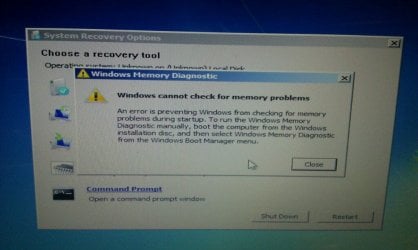
I will have to try the memtest program in a couple weeks when I get back. Is there a memtest on the Windows reinstall cd that I can run instead?
 

My Computer My Computer

At a glance

Windows 7 Home Premium 64 biti7-2630QM 2.0ghz6gbGeForce GT 525M
Computer Manufacturer/Model Number
Samsung RC512-S01US
OS
Windows 7 Home Premium 64 bit
CPU
i7-2630QM 2.0ghz
Memory
6gb
Graphics Card(s)
GeForce GT 525M
Hard Drives
Hitachi 750gb SATA
Case
Laptop
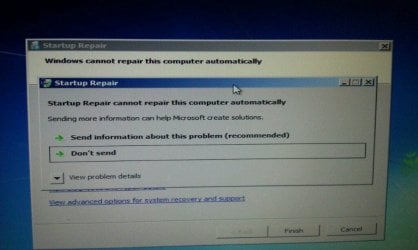
These are the results I get from the auto repair modules on the recovery cd.
 

Attachments

  • uploadfromtaptalk1335420855139.jpg
    uploadfromtaptalk1335420855139.jpg
    65.2 KB · Views: 18
  • uploadfromtaptalk1335420917742.jpg
    uploadfromtaptalk1335420917742.jpg
    56.9 KB · Views: 12

My Computer My Computer

At a glance

Windows 7 Home Premium 64 biti7-2630QM 2.0ghz6gbGeForce GT 525M
Computer Manufacturer/Model Number
Samsung RC512-S01US
OS
Windows 7 Home Premium 64 bit
CPU
i7-2630QM 2.0ghz
Memory
6gb
Graphics Card(s)
GeForce GT 525M
Hard Drives
Hitachi 750gb SATA
Case
Laptop
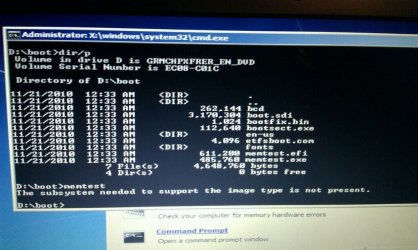
This part I do not understand.
 

Attachments

  • uploadfromtaptalk1335421479488.jpg
    uploadfromtaptalk1335421479488.jpg
    84.3 KB · Views: 22

My Computer My Computer

At a glance

Windows 7 Home Premium 64 biti7-2630QM 2.0ghz6gbGeForce GT 525M
Computer Manufacturer/Model Number
Samsung RC512-S01US
OS
Windows 7 Home Premium 64 bit
CPU
i7-2630QM 2.0ghz
Memory
6gb
Graphics Card(s)
GeForce GT 525M
Hard Drives
Hitachi 750gb SATA
Case
Laptop
Memtest86+ comes on UBCD that you can burn to disc and boot from it:

UBCD for Windows
 

My Computer My Computer

At a glance

Windows 7 Ultimate x64
OS
Windows 7 Ultimate x64
Memtest86+ comes on UBCD that you can burn to disc and boot from it:

UBCD for Windows

I am posting from a phone. I do not have access to a working computer as I am a truck driver and stuck on the road until early May.
 

My Computer My Computer

At a glance

Windows 7 Home Premium 64 biti7-2630QM 2.0ghz6gbGeForce GT 525M
Computer Manufacturer/Model Number
Samsung RC512-S01US
OS
Windows 7 Home Premium 64 bit
CPU
i7-2630QM 2.0ghz
Memory
6gb
Graphics Card(s)
GeForce GT 525M
Hard Drives
Hitachi 750gb SATA
Case
Laptop
Back
Top