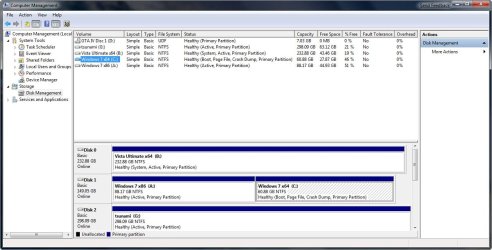
Virtual memory - Pagefile problem: no drives in list!

My Computer My Computer

OS
Windows 7 beta 1
CPU
E8400 (sometimes @4Ghz)
Motherboard
Asus Maxiumus Formula
Memory
CORSAIR DDR2 4GB (2x2GB) Kit DOMINATOR PC2-8500 1066MHz CL
Graphics Card(s)
Nvidia 8800 GTS 512
Try something else...

check "Show hidden files and folders" and uncheck "Hide protected operating system files" from folder options.

Then , search all your partitions for a file called pagefile.sys and if you find it in any partition, delete it.

Reboot, and check your paging options again.
 

My Computer My Computer

Computer Manufacturer/Model Number
ENIAC
OS
Windows 7 RC 7100 32bit/64bit
CPU
Intel Core2Duo E4500 2.20 GHz
Motherboard
ASUS P5LD2-X/1333
Memory
2x1GB Kinsgston DDR2 800MHz
Graphics Card(s)
Nvidia 8500GT
Sound Card
Onboard High Definition Audio Device
Monitor(s) Displays
Sony Bravia 42"
Case
LINKW 2222
Cooling
Standard Intel
Keyboard
Some cheap one
Mouse
Microsoft Intellimouse something
Internet Speed
24MBps ADSL
What do you think if he formatted all the unused partitions, do you think that would help?
 

My Computer My Computer

Computer Manufacturer/Model Number
Home Brew
OS
Windows 7 Ultimate Vista Ultimate x64
CPU
Core 2 Duo E8500 3.16Ghz @ 3.8Ghz
Motherboard
eVGA 750i FTW
Memory
2x2Gigs Patriot PC2-6400 LL
Graphics Card(s)
Inno3D GeForce GTX260 216 SP
Monitor(s) Displays
ASUS VW222U 22" 2ms Response time
Screen Resolution
1680x1050
Hard Drives
SATA 150GB
SATA II 250GB
USB IDE 750GB Ext.
PSU
HYTEC 600W & Thermaltake 650W Toughpower Power Exp
Case
Thermaltake Armor LCS (Liquid Cooling System)
Cooling
Liquid Cooling System
Keyboard
Logitech G15 Gaming Keyboard
Mouse
Logitech G9 Gaming Mouse
What do you think if he formatted all the unused partitions, do you think that would help?

Well, if he formats the 4GB partition he won't be able to boot, cause it's the active partition . Besides, windows won't let him do that.
 
Last edited:

My Computer My Computer

Computer Manufacturer/Model Number
ENIAC
OS
Windows 7 RC 7100 32bit/64bit
CPU
Intel Core2Duo E4500 2.20 GHz
Motherboard
ASUS P5LD2-X/1333
Memory
2x1GB Kinsgston DDR2 800MHz
Graphics Card(s)
Nvidia 8500GT
Sound Card
Onboard High Definition Audio Device
Monitor(s) Displays
Sony Bravia 42"
Case
LINKW 2222
Cooling
Standard Intel
Keyboard
Some cheap one
Mouse
Microsoft Intellimouse something
Internet Speed
24MBps ADSL
What do you think if he formatted all the unused partitions, do you think that would help?

I tried to format the 10 gb unused but the problem is still there.

There is not any pagefile.sys in other disk rather than C.
I realize now the 4gb partion i used for swap has been used by seven for winRE I suppose (like the (inf)famous 200 mb one). What do you think? Looking to the boot folder I have some suspect about an old ubuntu.. i don't know...


How the hell can I avoid this? I don't want this partion! I did this procedure but it seems i didn't work:

Take a look at this.
 

My Computer My Computer

OS
Windows 7 beta 1
CPU
E8400 (sometimes @4Ghz)
Motherboard
Asus Maxiumus Formula
Memory
CORSAIR DDR2 4GB (2x2GB) Kit DOMINATOR PC2-8500 1066MHz CL
Graphics Card(s)
Nvidia 8800 GTS 512
If you reinstall Windows don't you have options there to delete partitions?
 

My Computer My Computer

Computer Manufacturer/Model Number
Home Brew
OS
Windows 7 Ultimate Vista Ultimate x64
CPU
Core 2 Duo E8500 3.16Ghz @ 3.8Ghz
Motherboard
eVGA 750i FTW
Memory
2x2Gigs Patriot PC2-6400 LL
Graphics Card(s)
Inno3D GeForce GTX260 216 SP
Monitor(s) Displays
ASUS VW222U 22" 2ms Response time
Screen Resolution
1680x1050
Hard Drives
SATA 150GB
SATA II 250GB
USB IDE 750GB Ext.
PSU
HYTEC 600W & Thermaltake 650W Toughpower Power Exp
Case
Thermaltake Armor LCS (Liquid Cooling System)
Cooling
Liquid Cooling System
Keyboard
Logitech G15 Gaming Keyboard
Mouse
Logitech G9 Gaming Mouse
It's strange having that extra 200mb partition, I don't have one.

2009-01-14_011707.jpg
 

My Computer My Computer

Computer Manufacturer/Model Number
Home Brew
OS
Windows 7 Ultimate Vista Ultimate x64
CPU
Core 2 Duo E8500 3.16Ghz @ 3.8Ghz
Motherboard
eVGA 750i FTW
Memory
2x2Gigs Patriot PC2-6400 LL
Graphics Card(s)
Inno3D GeForce GTX260 216 SP
Monitor(s) Displays
ASUS VW222U 22" 2ms Response time
Screen Resolution
1680x1050
Hard Drives
SATA 150GB
SATA II 250GB
USB IDE 750GB Ext.
PSU
HYTEC 600W & Thermaltake 650W Toughpower Power Exp
Case
Thermaltake Armor LCS (Liquid Cooling System)
Cooling
Liquid Cooling System
Keyboard
Logitech G15 Gaming Keyboard
Mouse
Logitech G9 Gaming Mouse
Infact, it is possible to avoid this, as they say on that article.
I could try to reinstall and delete those partion. How can i do to have the boot partion on the right disk while I reinstall?
 

My Computer My Computer

OS
Windows 7 beta 1
CPU
E8400 (sometimes @4Ghz)
Motherboard
Asus Maxiumus Formula
Memory
CORSAIR DDR2 4GB (2x2GB) Kit DOMINATOR PC2-8500 1066MHz CL
Graphics Card(s)
Nvidia 8800 GTS 512
Have you deleted the pagefile.sys on C: and rebooted?

Yes, it was clear from the beginning that this is your boot partition, the 4GB because it is stated in DiskManagement as (System, Active). This is where the BCD store is located, your boot loader.

What strikes me though is that it has been created in another disk rather than your first disk where C: resides (your windows partition).

To fix that, do this:

1. Resize (shrink) partitions on your 250GB disk so that you have 200MB free space left , and create a ntfs partition on your 250GB drive of about 200MB.
2. copy all contents of your J: partition (make sure you copy hidden files too) to the newly created partition on your 250GB drive.
3. Mark the new 200mb partition as active.
4. Reboot computer, enter BIOS and make sure that your 250GB hard disk is first in the boot order, not the 500GB disk. You could also physically disconnect the 500GB disk.
5. Try booting, if windows doesn't load, insert WINDOWS 7 cd and do a "startup repair"
6. Reboot and come back in to let us know.
 

My Computer My Computer

Computer Manufacturer/Model Number
ENIAC
OS
Windows 7 RC 7100 32bit/64bit
CPU
Intel Core2Duo E4500 2.20 GHz
Motherboard
ASUS P5LD2-X/1333
Memory
2x1GB Kinsgston DDR2 800MHz
Graphics Card(s)
Nvidia 8500GT
Sound Card
Onboard High Definition Audio Device
Monitor(s) Displays
Sony Bravia 42"
Case
LINKW 2222
Cooling
Standard Intel
Keyboard
Some cheap one
Mouse
Microsoft Intellimouse something
Internet Speed
24MBps ADSL
Well when I installed mine I already had Vista on one of the HHD's and I just formatted the second HHD during setup and installed it, then once I had it installed I created the second partition and then I just done the same thing, during setup I formatted the partition and installed, no problems.
 

My Computer My Computer

Computer Manufacturer/Model Number
Home Brew
OS
Windows 7 Ultimate Vista Ultimate x64
CPU
Core 2 Duo E8500 3.16Ghz @ 3.8Ghz
Motherboard
eVGA 750i FTW
Memory
2x2Gigs Patriot PC2-6400 LL
Graphics Card(s)
Inno3D GeForce GTX260 216 SP
Monitor(s) Displays
ASUS VW222U 22" 2ms Response time
Screen Resolution
1680x1050
Hard Drives
SATA 150GB
SATA II 250GB
USB IDE 750GB Ext.
PSU
HYTEC 600W & Thermaltake 650W Toughpower Power Exp
Case
Thermaltake Armor LCS (Liquid Cooling System)
Cooling
Liquid Cooling System
Keyboard
Logitech G15 Gaming Keyboard
Mouse
Logitech G9 Gaming Mouse
Well when I installed mine I already had Vista on one of the HHD's and I just formatted the second HHD during setup and installed it, then once I had it installed I created the second partition and then I just done the same thing, during setup I formatted the partition and installed, no problems.

You had Vista installed, so there already existed a BCD store on your Vista partition, which was found during setup, used and updated from 6.0 to 6.1 (to support VHD) without adding the extra 200MB boot partition. I guess it happens only in clean installs, where all free unpartitioned space is used.
 

My Computer My Computer

Computer Manufacturer/Model Number
ENIAC
OS
Windows 7 RC 7100 32bit/64bit
CPU
Intel Core2Duo E4500 2.20 GHz
Motherboard
ASUS P5LD2-X/1333
Memory
2x1GB Kinsgston DDR2 800MHz
Graphics Card(s)
Nvidia 8500GT
Sound Card
Onboard High Definition Audio Device
Monitor(s) Displays
Sony Bravia 42"
Case
LINKW 2222
Cooling
Standard Intel
Keyboard
Some cheap one
Mouse
Microsoft Intellimouse something
Internet Speed
24MBps ADSL
I like it though, that microsoft uses an extra small partition for boot partition, leaving the windows partition untouched. It can help in cases of messing up with startup files on the windows partition. It can also help for managing several boot loaders without touching the windows partition. (You can add a bootsector file on the hidden partition once you unhide it first, of course, without putting bootsector files on the windows partition where they might be mistakenly deleted).

I think it also has to do with EFI support...we'll hear more about it , for sure.
 

My Computer My Computer

Computer Manufacturer/Model Number
ENIAC
OS
Windows 7 RC 7100 32bit/64bit
CPU
Intel Core2Duo E4500 2.20 GHz
Motherboard
ASUS P5LD2-X/1333
Memory
2x1GB Kinsgston DDR2 800MHz
Graphics Card(s)
Nvidia 8500GT
Sound Card
Onboard High Definition Audio Device
Monitor(s) Displays
Sony Bravia 42"
Case
LINKW 2222
Cooling
Standard Intel
Keyboard
Some cheap one
Mouse
Microsoft Intellimouse something
Internet Speed
24MBps ADSL
I tried to do what you told me, i created the new partion but i can't copy CD file because it is in use:


I guess it happens only in clean installs, where all free unpartitioned space is used.
Yes it heppens when u have some free unpartioned space as I understood.

Whati do you thik i I do a fresh install after i phisically disconnect the 500 gb drive?
 

My Computer My Computer

OS
Windows 7 beta 1
CPU
E8400 (sometimes @4Ghz)
Motherboard
Asus Maxiumus Formula
Memory
CORSAIR DDR2 4GB (2x2GB) Kit DOMINATOR PC2-8500 1066MHz CL
Graphics Card(s)
Nvidia 8800 GTS 512
Sounds like a good plan to me.
 

My Computer My Computer

Computer Manufacturer/Model Number
Home Brew
OS
Windows 7 Ultimate Vista Ultimate x64
CPU
Core 2 Duo E8500 3.16Ghz @ 3.8Ghz
Motherboard
eVGA 750i FTW
Memory
2x2Gigs Patriot PC2-6400 LL
Graphics Card(s)
Inno3D GeForce GTX260 216 SP
Monitor(s) Displays
ASUS VW222U 22" 2ms Response time
Screen Resolution
1680x1050
Hard Drives
SATA 150GB
SATA II 250GB
USB IDE 750GB Ext.
PSU
HYTEC 600W & Thermaltake 650W Toughpower Power Exp
Case
Thermaltake Armor LCS (Liquid Cooling System)
Cooling
Liquid Cooling System
Keyboard
Logitech G15 Gaming Keyboard
Mouse
Logitech G9 Gaming Mouse
I tried to do what you told me, i created the new partion but i can't copy CD file because it is in use:


Yes it heppens when u have some free unpartioned space as I understood.

Whati do you thik i I do a fresh install after i phisically disconnect the 500 gb drive?

Ok there's another way to copy that file.

open CMD with admin rights, and type :

BCDEDIT /export c:\BCD

this will save the bcd file to c:\

now copy it from c to your new partition under \boot so that the file path is \boot\bcd (in your new partition always)

Provided that the rest of the files are copied too, now proceed as instructed above.

Fresh install without the 500GB will work, but do this before, it's faster.
 

My Computer My Computer

Computer Manufacturer/Model Number
ENIAC
OS
Windows 7 RC 7100 32bit/64bit
CPU
Intel Core2Duo E4500 2.20 GHz
Motherboard
ASUS P5LD2-X/1333
Memory
2x1GB Kinsgston DDR2 800MHz
Graphics Card(s)
Nvidia 8500GT
Sound Card
Onboard High Definition Audio Device
Monitor(s) Displays
Sony Bravia 42"
Case
LINKW 2222
Cooling
Standard Intel
Keyboard
Some cheap one
Mouse
Microsoft Intellimouse something
Internet Speed
24MBps ADSL
I didn't see you post in time so i tried a fresh install but there is a problem. I'm writing from my notebook now.
I disconnected the 500gb secondary hd and now i have only my 250, that si partioned in this way:

DISK 0 partion 1 PRIMARY (free)
DISK 0 partion 2 PRIMARY (free)
DISK 0 partion 3 SYSTEM (not free, almost full of data)
DISK 0 partion 4 PRIMARY (not free, almost full of data)

I try to install in partion 1 but i can't, it says:

"Setup was unable to create a new system partion or locate anb existing system partion. Se setup log..."

and i can't install. I tried also to delete and recreate the partion but the result is the same
 

My Computer My Computer

OS
Windows 7 beta 1
CPU
E8400 (sometimes @4Ghz)
Motherboard
Asus Maxiumus Formula
Memory
CORSAIR DDR2 4GB (2x2GB) Kit DOMINATOR PC2-8500 1066MHz CL
Graphics Card(s)
Nvidia 8800 GTS 512
Cancel the clean install and log in to windows and do what I wrote above....
 

My Computer My Computer

Computer Manufacturer/Model Number
ENIAC
OS
Windows 7 RC 7100 32bit/64bit
CPU
Intel Core2Duo E4500 2.20 GHz
Motherboard
ASUS P5LD2-X/1333
Memory
2x1GB Kinsgston DDR2 800MHz
Graphics Card(s)
Nvidia 8500GT
Sound Card
Onboard High Definition Audio Device
Monitor(s) Displays
Sony Bravia 42"
Case
LINKW 2222
Cooling
Standard Intel
Keyboard
Some cheap one
Mouse
Microsoft Intellimouse something
Internet Speed
24MBps ADSL
Cancel the clean install and log in to windows and do what I wrote above....

It would be too easy.. i formatted the windows partion... Now i'm going to try with gparted live if I can fix this and set the system partion.

EDIT: i solved this issue with gPArted live, now I'm installing (again...) windows seven. When it finish i'll post the situation updated, before reconnecting the other disk.
 

My Computer My Computer

OS
Windows 7 beta 1
CPU
E8400 (sometimes @4Ghz)
Motherboard
Asus Maxiumus Formula
Memory
CORSAIR DDR2 4GB (2x2GB) Kit DOMINATOR PC2-8500 1066MHz CL
Graphics Card(s)
Nvidia 8800 GTS 512
No way... fresh install with only one hard disk, hard disk list in virtual memory windows is still empty...
I think this was not a problem with partions... :(
Here's some screenshoot from the new install:


Last edited:

My Computer My Computer

OS
Windows 7 beta 1
CPU
E8400 (sometimes @4Ghz)
Motherboard
Asus Maxiumus Formula
Memory
CORSAIR DDR2 4GB (2x2GB) Kit DOMINATOR PC2-8500 1066MHz CL
Graphics Card(s)
Nvidia 8800 GTS 512
Have you installed the drivers yet to see if it changes anything
 

My Computer My Computer

Computer Manufacturer/Model Number
Home Brew
OS
Windows 7 Ultimate Vista Ultimate x64
CPU
Core 2 Duo E8500 3.16Ghz @ 3.8Ghz
Motherboard
eVGA 750i FTW
Memory
2x2Gigs Patriot PC2-6400 LL
Graphics Card(s)
Inno3D GeForce GTX260 216 SP
Monitor(s) Displays
ASUS VW222U 22" 2ms Response time
Screen Resolution
1680x1050
Hard Drives
SATA 150GB
SATA II 250GB
USB IDE 750GB Ext.
PSU
HYTEC 600W & Thermaltake 650W Toughpower Power Exp
Case
Thermaltake Armor LCS (Liquid Cooling System)
Cooling
Liquid Cooling System
Keyboard
Logitech G15 Gaming Keyboard
Mouse
Logitech G9 Gaming Mouse
Back
Top