Show us your SSD performance 2

Uh oh, he is hooked!...
That's how it starts. First you're running an old IDE drive with the boys out behind the barn. Then you move on to an SSD with a rolled up towel under the door. Next thing you know you're mainlining a RAID setup while pumping out the Floyd at top volume... :confused:
 

Attachments

  • SSDaddict.jpg
    SSDaddict.jpg
    14.7 KB · Views: 159

My Computer My Computer

Computer Manufacturer/Model Number
Self
OS
Main - Windows 7 Pro SP1 64-Bit; 2nd - Windows Server 2008 R2
CPU
Main - Core i7 2600K; 2nd - Core i7 920
Motherboard
Main - Asus P8Z68-V Pro/Gen3; 2nd - Gigabyte GA-EX58-UDR3
Memory
Main - 16GB Corsair Vengeance; 2nd - 12GB Corsair Vengeance
Graphics Card(s)
Main - XFX Radeon 6870 1GB; 2nd - XFX Radeon 4870 1GB
Sound Card
Both: Onboard Realtek Azalia
Monitor(s) Displays
Main - Hann 25" + I-INC 25" + Acer 23"; 2nd - Upgrading Soon
Screen Resolution
Main - 1920x1080 (All Three Monitors); 2nd - Upgrading Soon
Hard Drives
Main - (1) Crucial M4 128GB (Boot)
Main - (1) Seagate 2TB 64MB Cache (Data)
Main - (1) Seagate 2TB 64MB Cache (Data Backup)
2nd - (1) Intel X25-M SSD 80GB (Boot)
2nd - (3) Seagate 1TB 32MB Cache (Data Backup)
2nd - (1) Seagate 320GB (Because)
PSU
Main - OCZ 600W Modular; 2nd - OCZ 600W
Case
Main - Thermaltake Element G; 2nd - NZXT something or other
Cooling
Main - Corsair H80; 2nd - Prolimatech Megahalems
Keyboard
Main - Razer Reclusa; 2nd - Old MS Keyboard
Mouse
Main - Logitech MX Revolution; 2nd - Old MS Mouse
Internet Speed
20Mbps Time-Warner Cable
Your SSD is out of alignment and you are apparently using the Nvidia driver. Yoou may do better with Microsoft's MSAHCI driver. Here is a Tutorial to fix misalignment. The easiest way is to use Paragon migrate Os to SSD ($19.95) or Paragon alignment tool ($29.95)

Which of those programs will fix the alignment, without having me to restore a backup image ? I never knew SSD has to be aligned. The tutorial to fix misalignment, comes across as I need to restore a image once again.
 

My Computer My Computer

Computer type
PC/Desktop
Computer Manufacturer/Model Number
Custom Built
OS
Windows 10 Pro
CPU
Core2Quad (2.6 Ghz)
Motherboard
nVidia 775
Memory
8 Gigs DDR2
Graphics Card(s)
Geforce Titan Black
Sound Card
Motherboard Audio
Monitor(s) Displays
25" Asus LCD
Screen Resolution
1680x1050
Hard Drives
120 Gig SSD
60 Gig SSD
750 Gig HDD
PSU
850 Watts
Case
Mid-Size
Keyboard
Logitech
Mouse
Logitech - I love logitech mouses
Internet Speed
DSL 25Mbps - Although extremely expensive
Antivirus
Microsoft Anti-Virus
Browser
FireFox 36.x
The Paragon alignment tool for $29.95 will do it automatically.
 

My Computer My Computer

Computer Manufacturer/Model Number
HP, Dell, Gateway, Toshiba - 4 laptops and 2 desktops
OS
Vista, Windows7, Mint Mate, Zorin, Windows 8
CPU
from 1.6GHz Duo to i7
Monitor(s) Displays
2x HP w2207
Hard Drives
5x HDD, 7x SSD, 12x Externals
Keyboard
with trackball - no mices
Mouse
Trackball mice
Internet Speed
DSL 6000
Thanx.
 

My Computer My Computer

Computer type
PC/Desktop
Computer Manufacturer/Model Number
Custom Built
OS
Windows 10 Pro
CPU
Core2Quad (2.6 Ghz)
Motherboard
nVidia 775
Memory
8 Gigs DDR2
Graphics Card(s)
Geforce Titan Black
Sound Card
Motherboard Audio
Monitor(s) Displays
25" Asus LCD
Screen Resolution
1680x1050
Hard Drives
120 Gig SSD
60 Gig SSD
750 Gig HDD
PSU
850 Watts
Case
Mid-Size
Keyboard
Logitech
Mouse
Logitech - I love logitech mouses
Internet Speed
DSL 25Mbps - Although extremely expensive
Antivirus
Microsoft Anti-Virus
Browser
FireFox 36.x
Supposedly there is a free edition of Paragon Alignment Tool that was shipped with some HDD. I can't find a down loadable copy ?
 

My Computer My Computer

Computer type
PC/Desktop
Computer Manufacturer/Model Number
Custom Built
OS
Windows 10 Pro
CPU
Core2Quad (2.6 Ghz)
Motherboard
nVidia 775
Memory
8 Gigs DDR2
Graphics Card(s)
Geforce Titan Black
Sound Card
Motherboard Audio
Monitor(s) Displays
25" Asus LCD
Screen Resolution
1680x1050
Hard Drives
120 Gig SSD
60 Gig SSD
750 Gig HDD
PSU
850 Watts
Case
Mid-Size
Keyboard
Logitech
Mouse
Logitech - I love logitech mouses
Internet Speed
DSL 25Mbps - Although extremely expensive
Antivirus
Microsoft Anti-Virus
Browser
FireFox 36.x
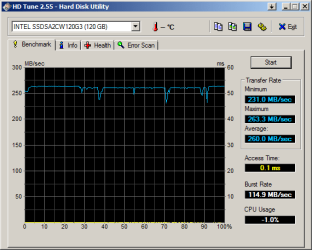
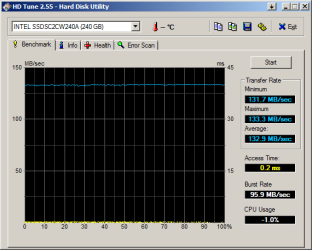
Here's my Intel 320, 120 GB on the left. Quite ok I think.

But then I cloned this onto an Intel 520, to the right, and I did not at all get what I expected. I expected in the region of 260 MB/s as promised by Intel. Something must be wrong, but it is not the alignment, I've checked that. Any ideas, anyone?
 

Attachments

  • HDTune_Benchmark_INTEL_SSDSA2CW120G3.png
    HDTune_Benchmark_INTEL_SSDSA2CW120G3.png
    9.9 KB · Views: 13
  • HDTune_INTEL_SSDSC2CW240A.png
    HDTune_INTEL_SSDSC2CW240A.png
    9.5 KB · Views: 13

My Computer My Computer

OS
Win 7
Supposedly there is a free edition of Paragon Alignment Tool that was shipped with some HDD. I can't find a down loadable copy ?
Yes, at times they offer promotions. But there does not seem to be one right now.
 

My Computer My Computer

Computer Manufacturer/Model Number
HP, Dell, Gateway, Toshiba - 4 laptops and 2 desktops
OS
Vista, Windows7, Mint Mate, Zorin, Windows 8
CPU
from 1.6GHz Duo to i7
Monitor(s) Displays
2x HP w2207
Hard Drives
5x HDD, 7x SSD, 12x Externals
Keyboard
with trackball - no mices
Mouse
Trackball mice
Internet Speed
DSL 6000
Here's my Intel 320, 120 GB on the left. Quite ok I think.

But then I cloned this onto an Intel 520, to the right, and I did not at all get what I expected. I expected in the region of 260 MB/s as promised by Intel. Something must be wrong, but it is not the alignment, I've checked that. Any ideas, anyone?
HD Tune is for bench marking HDD's/spinner hard drives not SSD's.
 

My Computer My Computer

Computer Manufacturer/Model Number
Hopalong/ Godzilla
OS
Windows7 Pro 64bit SP-1; Windows XP Pro 32bit
CPU
Intel Core i7-870 Lynnfield 2.93GHz LGA 1156 95W Quad-Core
Motherboard
ASUS P7P55D-E PRO
Memory
8GB@1400MHz Crucial Ballistix DDR3-1600 4x2GB
Graphics Card(s)
ASUS ENGTX460 DirectCU/2DI/1GD5 1GB 256-bit GDDR5
Sound Card
VIA Onboard
Monitor(s) Displays
Asus VS248H-P 24"; Samsung SyncMaster 941BW 19"ws
Screen Resolution
1920x1080; 1440x900
Hard Drives
Samsung 830 120GB SSD
Intel 320 120GB SSD
Western Digital Caviar Black WD7501AALS 750GB 7200 RPM SATA 3.0Gb/s
Western Digital Caviar Black WD6401AALS 640GB 7200 RPM SATA 3.0Gb/s
PSU
COOLER MASTER Silent Pro RS850-AMBAJ3-US 850W Modular
Case
COOLER MASTER HAF 932 RC-932-KKN5-GP Black
Cooling
Scythe "Mugen-2 Rev.B" (2 ScytheKaze-Jyuni PWM fans)
Keyboard
Logitech K-320
Mouse
Kensington
Antivirus
Avast Inernet Suite
Browser
IE 9 ; Chrome
Here's my Intel 320, 120 GB on the left. Quite ok I think.

But then I cloned this onto an Intel 520, to the right, and I did not at all get what I expected. I expected in the region of 260 MB/s as promised by Intel. Something must be wrong, but it is not the alignment, I've checked that. Any ideas, anyone?
Even though I also don't think HD Tune is the best bechmark, it looks that something is wrong.
Is Trim on?
What "cloning" app did you use?

You could try:
1) Securely erase the Intel 520
How to securely erase an SSD drive | How To - CNET
(courtesy whs for the link)
2) Simple image your Intel 320 with Windows inbuilt imaging and reimage to your Intel 520. NB: Only have the 520 connected when you reimage.
3) Recover any unallocated space with Disk Manager or a tool like Partition Wizard.
 

My Computer My Computer

Computer type
PC/Desktop
Computer Manufacturer/Model Number
Own build
OS
Windows 7x64 Home Premium SP1
CPU
Intel i7 2600k
Motherboard
ASUS P8Z68 Deluxe
Memory
G.Skill Ripjaws (DDR3-1600) 2x4GB
Graphics Card(s)
Nvidia GeForce GTS 450; Intel HD Graphics 3000(GT2+)
Monitor(s) Displays
Dell Ultrasharp IPS panel U2311H, Samsung SyncMaster P2350
Screen Resolution
1920x1080
Hard Drives
Samsung 850 Pro SSD 256GB, Samsung SSD 840 120GB, Seagates 1TB Barracuda ST31000528AS x2
PSU
Seasonic M12II 520W
Case
Lian Li Lancool PC-K60
Cooling
Case: 1x120mm, 3x140mm CPU: Hyper 212+
Keyboard
Logitech MK520 (wireless)
Mouse
Logitech MK520
Internet Speed
6-7 Mbps
Antivirus
Norton Security Premium, Malwarebytes on 2 (MSE on 3rd PC)
Browser
FireFox
Other Info
Audio: Logitech Z523 2.1
What "cloning" app did you use?

I did this:

2) Simple image your Intel 320 with Windows inbuilt imaging and reimage to your Intel 520. NB: Only have the 520 connected when you reimage.

The 520 entirely replaced the 320, connected even to the same physical SATA-port.

I'll try the other suggestions. Thanks.
 

My Computer My Computer

OS
Win 7
I did this:

2) Simple image your Intel 320 with Windows inbuilt imaging and reimage to your Intel 520. NB: Only have the 520 connected when you reimage.

The 520 entirely replaced the 320, connected even to the same physical SATA-port.
Interesting. I have tried a secure erase and reimaged my Crucial SSD a number of times this way in an attempt to solve another issue. It always reimages to produce repeatable results.

I wonder if you formatted your 520 as a data disk and ran the test. If the performance was still poor maybe it would indicate your 520 was faulty??
 

My Computer My Computer

Computer type
PC/Desktop
Computer Manufacturer/Model Number
Own build
OS
Windows 7x64 Home Premium SP1
CPU
Intel i7 2600k
Motherboard
ASUS P8Z68 Deluxe
Memory
G.Skill Ripjaws (DDR3-1600) 2x4GB
Graphics Card(s)
Nvidia GeForce GTS 450; Intel HD Graphics 3000(GT2+)
Monitor(s) Displays
Dell Ultrasharp IPS panel U2311H, Samsung SyncMaster P2350
Screen Resolution
1920x1080
Hard Drives
Samsung 850 Pro SSD 256GB, Samsung SSD 840 120GB, Seagates 1TB Barracuda ST31000528AS x2
PSU
Seasonic M12II 520W
Case
Lian Li Lancool PC-K60
Cooling
Case: 1x120mm, 3x140mm CPU: Hyper 212+
Keyboard
Logitech MK520 (wireless)
Mouse
Logitech MK520
Internet Speed
6-7 Mbps
Antivirus
Norton Security Premium, Malwarebytes on 2 (MSE on 3rd PC)
Browser
FireFox
Other Info
Audio: Logitech Z523 2.1
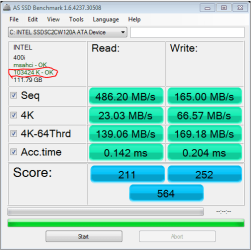
Check if the alignment is off.
Easy way is to D/L AS SSD
You don't have to run the benchmark, it will show SSD information in the upper left side.

The circled item is the alignment, should be in green font and have 'OK' at the end.

AS SSD Intel 520 on AMD system.PNG
 

My Computer My Computer

Computer type
PC/Desktop
Computer Manufacturer/Model Number
76~2.0
OS
Windows 7 Ult x64 - SP1/ Windows 8 Pro x64
CPU
Intel Core i5-3570K 4.6GHz
Motherboard
Gigabyte GA-Z77X UD3H, f18
Memory
8GB (2X4GB) DDR3 1600 Corsair Vengeance CL8 1.5v
Graphics Card(s)
Sapphire HD 7770 Vapor-X OC 1GB DDR5
Sound Card
Onboard VIA VT2021
Monitor(s) Displays
22" LCD Dell
Screen Resolution
1680x1050
Hard Drives
Samsung 840Pro 128GB SSD,
Seagate Barracuda 500GB SATA2 7200rpm 32MB cache, Seagate Barracuda 1TB SATA2 7200rpm 32MB cache,
PSU
Corsair HX650W
Case
Cooler Master Storm Scout
Cooling
Corsair H80 2x12cm Noctua NF P12 , 2x14cm case fans
Keyboard
Logitech Wave
Mouse
CM Sentinel
Internet Speed
Dismal
Antivirus
Avast
Browser
Opera Next
Other Info
Haswell laptop: HP Envy 17t-j, i7-4700MQ, GeForce 740M 2GB DDR3, 17.3" Full HD 1920x1080, 16GB RAM, Samsung 840 Pro 128GB, 1TB Hitachi 7200 HDD,
Desktop: eSATA ports,
External eSATA Seagate 500GB SATA2 7200rpm,
External WD USB 500GB
I wonder if you formatted your 520 as a data disk and ran the test. If the performance was still poor maybe it would indicate your 520 was faulty??

No. I boot from the 520, just as I did from the 320. So I re-imaged the 520 from a saved 320 image. But...

Strangest thing... today I turn the system on, nothing changed since yesterday, and now I get acceptable numbers! I don't get it, yesterday it showed half the performance...

epEzc.jpg


AS SSD gives me a "Error: Could not open device \\.\PHYSICALDRIVE2" when trying to measure the Acc Time. And I tried it twice. Somewhere on the web it was suggested this could this be due to a RAM drive. Anyone knows?

EDIT: Yes, one thing did change since yesterday. I removed an external USB2 disk...

EDIT: This is crazy! I removed the 320 ssd and put in the 520 meant to eb permanent, and now I am getting that low performance again. Read in the 130 MB/s... Not to derail this thread, I'm opening a new thread about this, see if anyone can shed some light.
 
Last edited:

My Computer My Computer

OS
Win 7

Attachments

  • RAM Disk 2012 4-23_.png
    RAM Disk 2012 4-23_.png
    32.6 KB · Views: 8
  • RAM Disk 2012 4-23__.png
    RAM Disk 2012 4-23__.png
    20.5 KB · Views: 8

My Computer My Computer

Computer Manufacturer/Model Number
HP HPE 270f
OS
Windows 7 x64 Home Premium
CPU
Intel Core i7 930 @ 2.8 Ghz Socket 1366 LGA
Motherboard
Pegatron Truckee v1.04E41
Memory
8 GB 1366 Mhz DDR3 (PC3-10700) RAM
Graphics Card(s)
ATI Radeon 5770 1 GB DDR5 RAM
Sound Card
Realtech High Definition
Monitor(s) Displays
32" Sony Bravia
Screen Resolution
1366 X 768
Hard Drives
Intel 25nm 120 GB Series 320 SSD HD Tune- 265 MBps Read/ 130 MBps Write

LaCie 1TB + 1TB RAID 0 eSATA Drive HD Tune- 160 MBps Read/ 90 MBps Write
Keyboard
Logitech Illuminated
Mouse
Logitech MX Revolution
Internet Speed
36.4 Mbps Maximum on a 37 Mbps Motorola SB501 Modem

My Computer My Computer

Computer Manufacturer/Model Number
Hopalong/ Godzilla
OS
Windows7 Pro 64bit SP-1; Windows XP Pro 32bit
CPU
Intel Core i7-870 Lynnfield 2.93GHz LGA 1156 95W Quad-Core
Motherboard
ASUS P7P55D-E PRO
Memory
8GB@1400MHz Crucial Ballistix DDR3-1600 4x2GB
Graphics Card(s)
ASUS ENGTX460 DirectCU/2DI/1GD5 1GB 256-bit GDDR5
Sound Card
VIA Onboard
Monitor(s) Displays
Asus VS248H-P 24"; Samsung SyncMaster 941BW 19"ws
Screen Resolution
1920x1080; 1440x900
Hard Drives
Samsung 830 120GB SSD
Intel 320 120GB SSD
Western Digital Caviar Black WD7501AALS 750GB 7200 RPM SATA 3.0Gb/s
Western Digital Caviar Black WD6401AALS 640GB 7200 RPM SATA 3.0Gb/s
PSU
COOLER MASTER Silent Pro RS850-AMBAJ3-US 850W Modular
Case
COOLER MASTER HAF 932 RC-932-KKN5-GP Black
Cooling
Scythe "Mugen-2 Rev.B" (2 ScytheKaze-Jyuni PWM fans)
Keyboard
Logitech K-320
Mouse
Kensington
Antivirus
Avast Inernet Suite
Browser
IE 9 ; Chrome

Attachments

  • ANVIL Bench.JPG
    ANVIL Bench.JPG
    87.2 KB · Views: 7
  • Crystal DiskMark.JPG
    Crystal DiskMark.JPG
    40 KB · Views: 4
  • ATTO.JPG
    ATTO.JPG
    65.1 KB · Views: 7

My Computer My Computer

Computer Manufacturer/Model Number
Home built
OS
Windows 7 x64
CPU
i7-870 and i7-2600K
Motherboard
ASRock P55-Pro and ASRock Z68 Extreme-7
Memory
16GB 2133MHz. in both Pc's
Graphics Card(s)
XFX R7770 and 2 GTX570's in SLI
Sound Card
on board
Monitor(s) Displays
24" Hanspree and 27" ASUS
Screen Resolution
1920x1200 and 1920x1080
Hard Drives
Kingston 120GB SSD and 1TB WD Black~~~
Mushkin Chronos 240GB SSD and 2TB Seagate
PSU
SeaSonic 650 and SeaSonic 750
Case
CoolerMaster 430 Elite and CoolerMaster Storm Sniper
Cooling
Corsair H60 and Corsaire H80
Other Info
Always adding or subtracting with these PC's, Never completely done with them.
From the HD Tune website versions list...

'12 February 2008: HD Tune Pro released!

HD Tune Pro is an extended version of HD Tune which includes many new features such as: write benchmark, secure erasing, AAM setting, folder usage view, disk monitor, command line parameters and file benchmark.

Version 2.55 includes several minor improvements.'

As I remember I used to have v2.55 before I upgraded to v3.5 about a year later.

MG9_.png
 

My Computer My Computer

Computer Manufacturer/Model Number
HP HPE 270f
OS
Windows 7 x64 Home Premium
CPU
Intel Core i7 930 @ 2.8 Ghz Socket 1366 LGA
Motherboard
Pegatron Truckee v1.04E41
Memory
8 GB 1366 Mhz DDR3 (PC3-10700) RAM
Graphics Card(s)
ATI Radeon 5770 1 GB DDR5 RAM
Sound Card
Realtech High Definition
Monitor(s) Displays
32" Sony Bravia
Screen Resolution
1366 X 768
Hard Drives
Intel 25nm 120 GB Series 320 SSD HD Tune- 265 MBps Read/ 130 MBps Write

LaCie 1TB + 1TB RAID 0 eSATA Drive HD Tune- 160 MBps Read/ 90 MBps Write
Keyboard
Logitech Illuminated
Mouse
Logitech MX Revolution
Internet Speed
36.4 Mbps Maximum on a 37 Mbps Motorola SB501 Modem
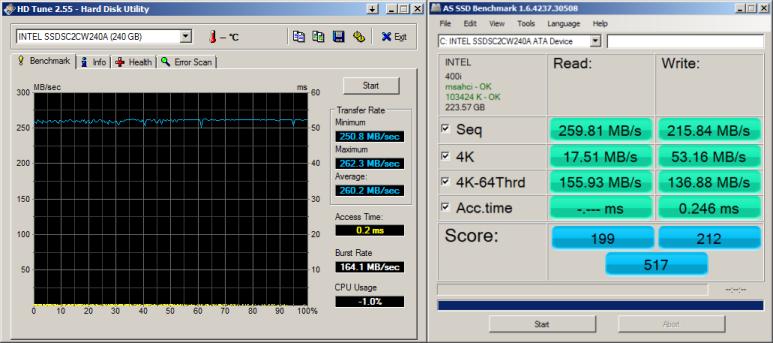
RAM Disk performance

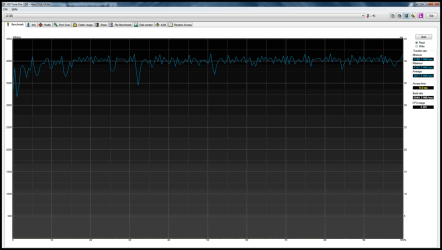
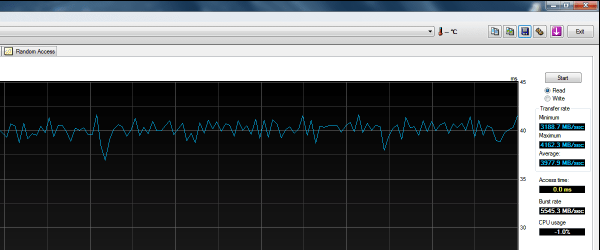
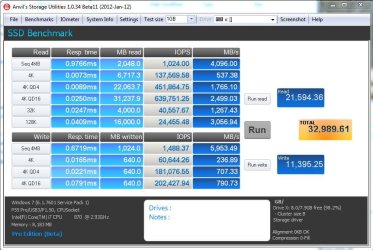
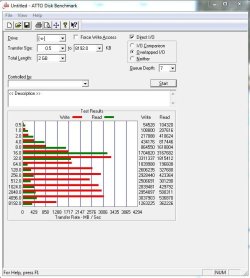
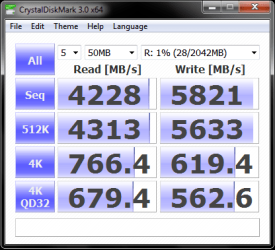
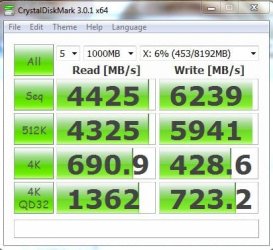
I've often noticed that the Crystal Disk measures significantly higher than HD Tune when benchmarking my 2GB RAM Disk.

MG9_.png
 

Attachments

  • RamDisk_.png
    RamDisk_.png
    16.1 KB · Views: 2

My Computer My Computer

Computer Manufacturer/Model Number
HP HPE 270f
OS
Windows 7 x64 Home Premium
CPU
Intel Core i7 930 @ 2.8 Ghz Socket 1366 LGA
Motherboard
Pegatron Truckee v1.04E41
Memory
8 GB 1366 Mhz DDR3 (PC3-10700) RAM
Graphics Card(s)
ATI Radeon 5770 1 GB DDR5 RAM
Sound Card
Realtech High Definition
Monitor(s) Displays
32" Sony Bravia
Screen Resolution
1366 X 768
Hard Drives
Intel 25nm 120 GB Series 320 SSD HD Tune- 265 MBps Read/ 130 MBps Write

LaCie 1TB + 1TB RAID 0 eSATA Drive HD Tune- 160 MBps Read/ 90 MBps Write
Keyboard
Logitech Illuminated
Mouse
Logitech MX Revolution
Internet Speed
36.4 Mbps Maximum on a 37 Mbps Motorola SB501 Modem
This was a 8GB RAM Disk tested last night. Would post some SSD scores but this PC only has SATA-II controllers for the HyperX SATA-III SSD. So it's nothing to write home about.
 

My Computer My Computer

Computer Manufacturer/Model Number
Home built
OS
Windows 7 x64
CPU
i7-870 and i7-2600K
Motherboard
ASRock P55-Pro and ASRock Z68 Extreme-7
Memory
16GB 2133MHz. in both Pc's
Graphics Card(s)
XFX R7770 and 2 GTX570's in SLI
Sound Card
on board
Monitor(s) Displays
24" Hanspree and 27" ASUS
Screen Resolution
1920x1200 and 1920x1080
Hard Drives
Kingston 120GB SSD and 1TB WD Black~~~
Mushkin Chronos 240GB SSD and 2TB Seagate
PSU
SeaSonic 650 and SeaSonic 750
Case
CoolerMaster 430 Elite and CoolerMaster Storm Sniper
Cooling
Corsair H60 and Corsaire H80
Other Info
Always adding or subtracting with these PC's, Never completely done with them.
Back
Top