
Solved I need help to extend my "WD2" partition

Satirelol

New member
Local time
11:02 AM
Messages
24
Hey guys, I need some help here. Here my disk management screenshot:

AFMau.jpg


Okay so basically I want to extend my "WD2" partition, which i tried doing there, but then I get that message so I just pressed No because I'm not sure what dynamic disks are.

I then tried doing it through command prompt, and when I do "extend", I get:
« Virtual Disk Service error:
The size of the extent is less than the minimum »

So yeah, not sure what to do right now and why it's acting like that in the first place.

So 2 questions:
What would be the best way of handling this?
Why is it doing this? Would it not do this if the unallocated space was on the far right?

-------

Edit:

Hmm, read up a bit on Partition Wizard but can't figure out how to get rid of these 2x 8mb unallocated volumes, so I haven't pressed Apply yet.
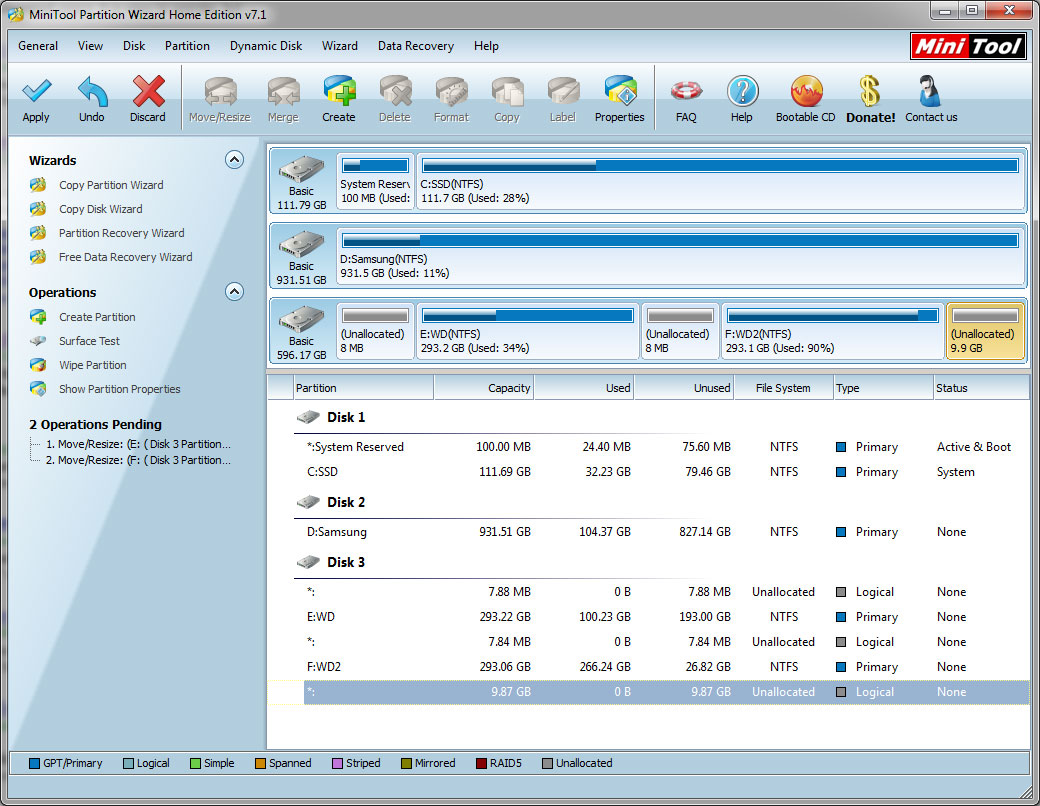
wIz2K.jpg
 
Last edited:

My Computer My Computer

At a glance

Windows Ultimate x64i5 7602x4gb gskillmsi gtx 460 hawk
OS
Windows Ultimate x64
CPU
i5 760
Motherboard
gigabyte p55a-ud3
Memory
2x4gb gskill
Graphics Card(s)
msi gtx 460 hawk
Monitor(s) Displays
LG 1920 x 1080
Hard Drives
120GB Vertex 2E
1TB Samsung
640GB WD
PSU
OCZ SX2 600W
Case
HAF 912
Cooling
Noctua NH-D14
Keyboard
Ducky Shine
Those 8MB spaces can't be moved or re-alocated. They just are.
As for the 9GB unalocated space you should be able to move that into the WD2 drive. But because the WD2 drive is 90% full it doesn't have enough room on the drive to move thing around to allow it. First move some of the stuff off that drive so you have something like 50% free. Then try incorporating that 9GBs into the WD2 drive.
 

My Computer My Computer

At a glance

7 x64
OS
7 x64
Ok so if I wanted to move the 9GB partition into "WD", how do I do that? I can't seem to just drag the unallocated space in Partition Wizard.
 

My Computer My Computer

At a glance

Windows Ultimate x64i5 7602x4gb gskillmsi gtx 460 hawk
OS
Windows Ultimate x64
CPU
i5 760
Motherboard
gigabyte p55a-ud3
Memory
2x4gb gskill
Graphics Card(s)
msi gtx 460 hawk
Monitor(s) Displays
LG 1920 x 1080
Hard Drives
120GB Vertex 2E
1TB Samsung
640GB WD
PSU
OCZ SX2 600W
Case
HAF 912
Cooling
Noctua NH-D14
Keyboard
Ducky Shine
Steps to Resize all of the available space into WD2:

Boot free Partition Wizard bootable CD., rightclick on E, choose Resize/Move, then left click on E and hold the left click button while you drag the entire E partition all the way to the left, click OK.

Next rightclick on F to Resize, drag only the left border all the way to the left to bump up against the E partition, click OK, apply both steps.

If you want another configuration you can resize either partition in either direction using the PW Resize function as shown in this video: Partition Wizard Move/Resize Partition Video Help.
 
Alright thank you, much better already without the need to format anything :)
F8D2f.jpg
 

My Computer My Computer

At a glance

Windows Ultimate x64i5 7602x4gb gskillmsi gtx 460 hawk
OS
Windows Ultimate x64
CPU
i5 760
Motherboard
gigabyte p55a-ud3
Memory
2x4gb gskill
Graphics Card(s)
msi gtx 460 hawk
Monitor(s) Displays
LG 1920 x 1080
Hard Drives
120GB Vertex 2E
1TB Samsung
640GB WD
PSU
OCZ SX2 600W
Case
HAF 912
Cooling
Noctua NH-D14
Keyboard
Ducky Shine
Ok so if I wanted to move the 9GB partition into "WD", how do I do that? I can't seem to just drag the unallocated space in Partition Wizard.

You can move it into WD directly. You can combine it into WD2

I see Greg covered it and you got it.
 

My Computer My Computer

At a glance

7 x64
OS
7 x64
Couldn't move anything "onto" anything, just had to play around by moving the volumes to the right/left and shrinking/extending to get where I wanted to be
 

My Computer My Computer

At a glance

Windows Ultimate x64i5 7602x4gb gskillmsi gtx 460 hawk
OS
Windows Ultimate x64
CPU
i5 760
Motherboard
gigabyte p55a-ud3
Memory
2x4gb gskill
Graphics Card(s)
msi gtx 460 hawk
Monitor(s) Displays
LG 1920 x 1080
Hard Drives
120GB Vertex 2E
1TB Samsung
640GB WD
PSU
OCZ SX2 600W
Case
HAF 912
Cooling
Noctua NH-D14
Keyboard
Ducky Shine
Back
Top