Friend's computer cannot connect to my network

Vincenzo

New member
I've got a friend visiting and we are unable to get their computer online at my house. My 4 computers connect fine to my router and internet. When this computer connects wirelessly, the connection to the router is successful, but then Windows says Access: Local Only and there is no internet.

When I try plugging in an ethernet cable to the router, Network Connections sees the cable is connected, but does not get online.

ipconfig shows the computer connected to the gateway but if I try to ping the gateway ip address it times out.
I am able to ping 127.0.0.1 and localhost with no problem.

I don't know if this makes any difference at all, but my friend's internet at home is CenturyLink, while I have Cox cable.

The really odd part is that we can see a neighbor's wireless signal and are able to connect to that with no problem. (Not sure if that ISP is Cox or Centurylink, my neighbor is out of town, but in ipconfig I see a DNS suffix that says Cox.)


Any ideas what I might try?

Thanks
 

My Computer

OS
Windows 7 Professional x64
How about posting an ipconfig/all from one of your working machines and one from your friend's.

On top of that, you might also want to compare the properties of the network adapters.
 

My Computer

OS
Windows 7 Ultimate x64
It is some setting in your router. More then likely a wireless setting of some type that is blocking his computer from going to the Net.
 

My Computer

OS
7 x64
Restart your wireless router. DONE.
 

My Computer

Computer Manufacturer/Model Number
Home Build.
OS
Windows 7 Home Pre
CPU
Q8200 Intell 2.333
Motherboard
Asus P5Q3 Delux
Memory
DDR3 1333 4gig
Graphics Card(s)
Ati HD4870
Sound Card
Onboard Soundmax. 7.1
Monitor(s) Displays
1, 20" Samsung
Screen Resolution
1600/900
PSU
Good enough
Case
Le Shark
Cooling
FAN FAN FAN FAN, Thermaltake Minitype 90 with speed fan 4.
Keyboard
Standard, Gaming Wolfking
Mouse
Cm-storm-inferno-wired-gaming-mouse
Internet Speed
Sky Crappy upto 20meg I get a whapping 5.8mbs.
DHCP is not enabled on wireless!!

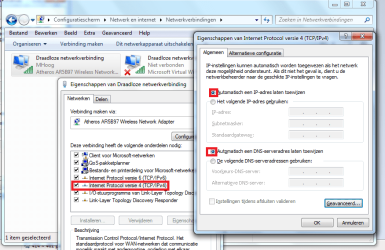
Set wired and wireless adapter properties to automatic!! network centre->change adapter settings. then right-click on adapter->properties->double click on tcp/ipv4

Do it for both wired and wireless. Off course you have to click OK multiple times to save it. Reboot afterwards
 

My Computer

Computer type
Laptop
Computer Manufacturer/Model Number
ACER ASPIRE 5742G
OS
Microsoft Windows 7 Home Premium 64-bits 7601 Multiprocessor Free Service Pack 1
CPU
Intel(R) Core(TM) i3 CPU M 370 @ 2.40GHz
Motherboard
Acer Aspire 5742G
Memory
4,00 GB
Graphics Card(s)
ATI Mobility Radeon HD 5400 Series
Sound Card
(1) AMD High Definition Audio Device (2) Realtek High Defi
Screen Resolution
1366 x 768 x 32 bits (4294967296 colors) @ 60 Hz
Hard Drives
WDC WD5000BEVT-22ZAT0
Most important is to set tcp/ip to "automatic get tcp/ip" address or something like that. A fixed ip-address is meant for servers. And wireless should never have a fixed ip address!!

And DON'T fill in DNS-servers. They are set automatically using dhcp (Dynamic Host Configuration Protocol)
 

My Computer

Computer type
Laptop
Computer Manufacturer/Model Number
ACER ASPIRE 5742G
OS
Microsoft Windows 7 Home Premium 64-bits 7601 Multiprocessor Free Service Pack 1
CPU
Intel(R) Core(TM) i3 CPU M 370 @ 2.40GHz
Motherboard
Acer Aspire 5742G
Memory
4,00 GB
Graphics Card(s)
ATI Mobility Radeon HD 5400 Series
Sound Card
(1) AMD High Definition Audio Device (2) Realtek High Defi
Screen Resolution
1366 x 768 x 32 bits (4294967296 colors) @ 60 Hz
Hard Drives
WDC WD5000BEVT-22ZAT0
See attachment (in Dutch)
 

Attachments

  • Naamloos.png
    Naamloos.png
    140.1 KB · Views: 131

My Computer

Computer type
Laptop
Computer Manufacturer/Model Number
ACER ASPIRE 5742G
OS
Microsoft Windows 7 Home Premium 64-bits 7601 Multiprocessor Free Service Pack 1
CPU
Intel(R) Core(TM) i3 CPU M 370 @ 2.40GHz
Motherboard
Acer Aspire 5742G
Memory
4,00 GB
Graphics Card(s)
ATI Mobility Radeon HD 5400 Series
Sound Card
(1) AMD High Definition Audio Device (2) Realtek High Defi
Screen Resolution
1366 x 768 x 32 bits (4294967296 colors) @ 60 Hz
Hard Drives
WDC WD5000BEVT-22ZAT0
Yes, do as Kaktussoft recommends. The only way static ip would work is if it didn't conflict with another device already using that ip address on the network your friend is trying to connect to.

On top of that, it'll never connect to a network that doesn't start with 192.168.0.xxx.
 
Last edited:

My Computer

OS
Windows 7 Ultimate x64
Yeah your friends computers DHCP is not enabled. Not sure why he does that but that is the problem.
 

My Computer

OS
7 x64
Yeah your friends computers DHCP is not enabled. Not sure why he does that but that is the problem.
It works when connecting to neighbour because:
your house, your friend's house and your neighbour all have 192.168.0.x and router 192.168.0.1 (just a coincidence).

So it works at neighbour and your house as well!! You can ping an internet site using ip-address I assume.

The DNS server isn't working because you have another provider. Neighbour has same provider as your friend at home?
---------------
Once again set TCP/IP address to automatically obtain and DNS automatically as well
 

My Computer

Computer type
Laptop
Computer Manufacturer/Model Number
ACER ASPIRE 5742G
OS
Microsoft Windows 7 Home Premium 64-bits 7601 Multiprocessor Free Service Pack 1
CPU
Intel(R) Core(TM) i3 CPU M 370 @ 2.40GHz
Motherboard
Acer Aspire 5742G
Memory
4,00 GB
Graphics Card(s)
ATI Mobility Radeon HD 5400 Series
Sound Card
(1) AMD High Definition Audio Device (2) Realtek High Defi
Screen Resolution
1366 x 768 x 32 bits (4294967296 colors) @ 60 Hz
Hard Drives
WDC WD5000BEVT-22ZAT0
OK thank you so very much guys.

By the way, what was it in ipconfig that gave you the clue. Was it the lack of a DHCP server entry and the IPv4 Address being 192.168.0.2?

Thanks
 

My Computer

OS
Windows 7 Professional x64
It was mostly the DHCP setting not in auto. That meant he could only connect to a network that was using an ip of 192.168.0.x, but even then, that also means that there could not be another device on that network that was using his specific ip of 192.168.0.2.
 

My Computer

OS
Windows 7 Ultimate x64
It was mostly the DHCP setting not in auto. That meant he could only connect to a network that was using an ip of 192.168.0.x, but even then, that also means that there could not be another device on that network that was using his specific ip of 192.168.0.2.
ip=192.168.0.1
gateway=192.168.0.1

all fixed addresses!!
but should work because you have the same by conincidence.

But dns were fixed and pointing to wrong provider!
 

My Computer

Computer type
Laptop
Computer Manufacturer/Model Number
ACER ASPIRE 5742G
OS
Microsoft Windows 7 Home Premium 64-bits 7601 Multiprocessor Free Service Pack 1
CPU
Intel(R) Core(TM) i3 CPU M 370 @ 2.40GHz
Motherboard
Acer Aspire 5742G
Memory
4,00 GB
Graphics Card(s)
ATI Mobility Radeon HD 5400 Series
Sound Card
(1) AMD High Definition Audio Device (2) Realtek High Defi
Screen Resolution
1366 x 768 x 32 bits (4294967296 colors) @ 60 Hz
Hard Drives
WDC WD5000BEVT-22ZAT0
...By the way, what was it in ipconfig that gave you the clue. Was it the lack of a DHCP server entry and the IPv4 Address being 192.168.0.2?...
You've been given several good answers to this - I would like to add a bit.

This is from your computer:
good.JPG
Notice that the last three digits of the IPv4 address end in 102. That probably means that the router in your home is set to hand out IP addresses from 198.162.0.100 thru 198.162.0.150. Some routers will not talk to computers that are using an IP address outside of the range that they are setup to hand out. I visit a friend's home that has a router like that (I won't go into why I use a static IP address on a laptop.) Your neighbor's router may also be setup to hand out IPs from 198.162.0.100 thru 198.162.0.150, but it might accept any other 198.162.0.xxx IP.

This is from your friend's computer:
bad.JPG
Do you see what others in the this thread saw as the problem?
"DHCP Enabled" was No on that computer.

As others have mentioned, there is also the possibility that another device was already using 198.162.0.2 in your house. Did you see any warnings about a conflict?
(edit: you might want to watch it in the full screen mode)

I do not have a W7 system that connects via WiFi with me right now, so I cannot be sure that you would even see the stuff that I did when I intentionally set the computer in the video to a static IP that conflicted with one already on my network.

hope this helps
 

My Computer

Computer type
Laptop
Computer Manufacturer/Model Number
Employer provided Dell Latitude
OS
W7 Pro SP1 64bit
CPU
i7
Memory
8GB
Graphics Card(s)
Intel HD Graphics
Hard Drives
crappy SSD
Antivirus
Employer mandated Symantec Endpoint Protection
Browser
Pale Moon 64bit, IE11 64bit & Chrome 64bit
OK thanks to all for all the information.

One more thing.
What is it that generally causes "DHCP enabled" to go to "No". Is it the changing of the settings mentioned above (taking Obtain IP and/or DNS off automatic) or is there another setting that causes that?

Thanks
 

My Computer

OS
Windows 7 Professional x64
It doesn't just go Disabled, "DHCP Enabled = NO". It is a setting that changed when the user made the decided to use a Static IP address. Once you assign a static IP the system does not ASK the DHCP server for an IP address.
 

My Computer

OS
7 x64
OK thanks to all for all the information.

One more thing.
What is it that generally causes "DHCP enabled" to go to "No". Is it the changing of the settings mentioned above (taking Obtain IP and/or DNS off automatic) or is there another setting that causes that?

Thanks
Changing "DHCP enabled" to "No" is done by setting a static IP address.
Changing "DHCP enabled" to "Yes" is done by setting the IP to be dynamic.

Static = things do not change.
Dynamic = things change.
See this write up.

"DHCP enabled" can change from "No" to "Yes" or from "Yes" to "No" because of software or because the user manually changed these settings shown in the link above. In my case, I use software to change things around several times a day.

Some part of your network will probably have a device (like a router or wireless access point) that is waiting to "give" an IP address to any device that connects. But, the device must ask for an IP address. If you setup a device (like a laptop) with a static IP address - it simply will not ask for another IP address from the router or wireless access point when it connects.

Make sense?
 

My Computer

Computer type
Laptop
Computer Manufacturer/Model Number
Employer provided Dell Latitude
OS
W7 Pro SP1 64bit
CPU
i7
Memory
8GB
Graphics Card(s)
Intel HD Graphics
Hard Drives
crappy SSD
Antivirus
Employer mandated Symantec Endpoint Protection
Browser
Pale Moon 64bit, IE11 64bit & Chrome 64bit
Back
Top