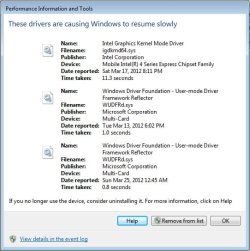
G georgebruv772 New member Local time 10:12 PM Messages 7 Apr 30, 2012 #1 Apparenty these drivers are causing Windows to resume slowly, could i please have some help? I have attached a print screen of the issue. Attachments Performance Information and Tools.jpg 42.6 KB · Views: 28 My Computer My Computer At a glance Windows 7 Home Premium 64bitComputer Manufacturer/Model NumberDell InspironOSWindows 7 Home Premium 64bit
Apparenty these drivers are causing Windows to resume slowly, could i please have some help? I have attached a print screen of the issue.
pebbly Golden Dudette Guru Gold Member VIP Local time 10:12 PM Messages 5,933 Location nottingham Apr 30, 2012 #2 Hi georgebruv772, try updating the graphics driver , the other drivers are possibly for the card reader but they are taking less than 2 seconds to load so I peresonnally would'nt worry too much about them My Computer My Computer At a glance win 7 ultimate32bit, Win8.1pro wmc 32bitamd phenom x4 9600corsair twinxs 2x2gb2x nvidia 1gb 8500gtComputer typePC/DesktopComputer Manufacturer/Model Numberself buildOSwin 7 ultimate32bit, Win8.1pro wmc 32bitCPUamd phenom x4 9600Motherboardasus m2n32-sli deluxeMemorycorsair twinxs 2x2gbGraphics Card(s)2x nvidia 1gb 8500gtSound CardonboardMonitor(s) Displays23" PB Viseo 233dScreen Resolution1920x1080Hard Drivesmaxtor sata 500gb maxtor sata 320gb fujitsu sata200gbPSUoryxx tornado 750wCasethermaltake xaser lllCoolingartic freezer64 pro + 7 case fans
Hi georgebruv772, try updating the graphics driver , the other drivers are possibly for the card reader but they are taking less than 2 seconds to load so I peresonnally would'nt worry too much about them
G georgebruv772 New member Thread Starter Local time 10:12 PM Messages 7 Apr 30, 2012 #3 Thanks, I've updated the Intel driver. Would it matter if I disabled the other two? My Computer My Computer At a glance Windows 7 Home Premium 64bitComputer Manufacturer/Model NumberDell InspironOSWindows 7 Home Premium 64bit
pebbly Golden Dudette Guru Gold Member VIP Local time 10:12 PM Messages 5,933 Location nottingham May 1, 2012 #4 georgebruv772 said: Thanks, I've updated the Intel driver. Would it matter if I disabled the other two? Click to expand... That all depends on wether you use a card reader or not ! My Computer My Computer At a glance win 7 ultimate32bit, Win8.1pro wmc 32bitamd phenom x4 9600corsair twinxs 2x2gb2x nvidia 1gb 8500gtComputer typePC/DesktopComputer Manufacturer/Model Numberself buildOSwin 7 ultimate32bit, Win8.1pro wmc 32bitCPUamd phenom x4 9600Motherboardasus m2n32-sli deluxeMemorycorsair twinxs 2x2gbGraphics Card(s)2x nvidia 1gb 8500gtSound CardonboardMonitor(s) Displays23" PB Viseo 233dScreen Resolution1920x1080Hard Drivesmaxtor sata 500gb maxtor sata 320gb fujitsu sata200gbPSUoryxx tornado 750wCasethermaltake xaser lllCoolingartic freezer64 pro + 7 case fans
georgebruv772 said: Thanks, I've updated the Intel driver. Would it matter if I disabled the other two? Click to expand... That all depends on wether you use a card reader or not !
G georgebruv772 New member Thread Starter Local time 10:12 PM Messages 7 May 1, 2012 #5 As I don't know what that is, I assume I don't use one. How would I go about disabling them? (I know it's not important, but it gives me peace of mind) My Computer My Computer At a glance Windows 7 Home Premium 64bitComputer Manufacturer/Model NumberDell InspironOSWindows 7 Home Premium 64bit
As I don't know what that is, I assume I don't use one. How would I go about disabling them? (I know it's not important, but it gives me peace of mind)
A alishathomaz Banned Local time 4:12 PM Messages 130 May 2, 2012 #6 If you want to stop other then perform the following task:: Services optimizer: Click Start, type services.msc in the Search box. Press ENTER. Right click and stop each service which is not necessary for you. My Computer My Computer At a glance Windows 7 Ultimate x64OSWindows 7 Ultimate x64
If you want to stop other then perform the following task:: Services optimizer: Click Start, type services.msc in the Search box. Press ENTER. Right click and stop each service which is not necessary for you.