AMD Phenom II X4 955 Drivers

Norwood

Lowly IT Drone
Member
VIP
Local time
9:40 AM
Messages
105
Location
A bit south o' Boston
I work with Dell machines at work. The one thing I like about Dell is that they release driver packs, .CAB files that contain drivers for all the components for a given system.

As I build out each specific laptop or desktop I simply download the driver pack and run through device manager and ensure all devices have up to date drivers. I find that CPU drivers, under the "System Devices" category particularly the "PCI to PCI bridge" and standard "PCI bridges" if mapped correctly provide great performance with quad core processors.

However, the processor I have at home is an AMD Phenom II X4 955 (Deneb). Searching AMD's website (they seem to be obsessed with their graphics side of things lately) I don't find any drivers for my device.

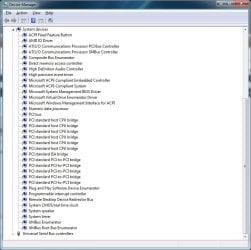
As seen in then window grab below, my PCI bridges are all just sitting there, unmapped and inefficiently bumbling along.

DVM.jpg


Does anyone know where I might find the drivers for this. I've googled...I just don't see anything.
P.S. What's the difference between the HDZ955FBGMBOX and the HDZ955FBGIBOX?
 
Last edited:

My Computer

Computer type
PC/Desktop
OS
Windows 7 64bit
CPU
AMD Phenom II X4 955 Black Edition Deneb 3.2GHz Quad-Core
Motherboard
ASUS M4A77TD AM3 AMD 770 ATX
Memory
G.SKILL Ripjaws DDR3 SDRAM DDR3 1600 (PC3 12800)
Graphics Card(s)
SAPPHIRE 100284L Radeon HD 5750 1GB 128-bit GDDR5 PCI-E
Sound Card
Audigy
Monitor(s) Displays
2 x 22" Widescreens
Hard Drives
System Drive: OCZ Vertex 3.20 120GB SSD
Internal: 2x 1TB Seagates
External: 1 TB Seagate
Case
Cooler Master Elite 310 ATX
Cooling
Arctic Cooling Freezer 7 Pro Rev.2 92mm Liquid Cooling
Keyboard
Microsoft Comfort Curve Keyboard 2000 v1.0
Mouse
Logitech G5 w/ full 36g weighted cartridge

My Computer

Computer Manufacturer/Model Number
homegrown
OS
Windows 7 Pro X64 SP1
CPU
Intel Core I7-3930k
Motherboard
Asus P9X79 Pro
Memory
16 GB Gskill DDR3-2133
Graphics Card(s)
eVGA GTX680
Sound Card
Creative X-Fi Titanium
Monitor(s) Displays
As PA246Q
Screen Resolution
1920 X 1200
Hard Drives
Corsair Force GT, 120 GB
WDC 1.5TB Caviar Black
PSU
PCP&C Silencer 750 Crossfire
Case
Silverstone FT02
Cooling
Noctua NH-D14
Keyboard
cheap Logitech USB
Mouse
Microsoft Intellimouse Explorer (old optical) USB
Internet Speed
6Mb cable
Other Info
Pioneer BDR-205
Samsung SH-203B
Monsoon 5.1 speakers
You need to download the drivers for your motherboard. The CPU does not have drivers, what you are looking for is the motherboard drivers.
 

My Computers

System One System Two

  • Computer type
    PC/Desktop
    Computer Manufacturer/Model Number
    ALWAYS UNDER CONSTRUCTION
    OS
    Windows 11 Pro
    CPU
    Ryzen 9 5900X
    Motherboard
    Asus X570 Crosshair Viii Hero
    Memory
    32GB G Skill DDR4-3600
    Graphics Card(s)
    EVGA RTX 3080 FTW 3 Ultra
    Sound Card
    On Board/Sennheiser PC37X Headset
    Monitor(s) Displays
    3 X Asus 27"
    Screen Resolution
    2560x1440
    Hard Drives
    2 X 1 TB NVME drives
    PSU
    EVGA 850
    Case
    Phanteks Eclipse P400A
    Cooling
    EVGA 280 AIO
    Keyboard
    Logitech G510s/ Logitech G13
    Mouse
    Logitech G502
    Internet Speed
    24/1
    Antivirus
    ESET/MBAM Pro/SAS Pro
    Browser
    Chrome/ Firefox/ Edge
  • Computer type
    Laptop
    System Manufacturer/Model Number
    Dell 16 Plus
    OS
    Windows 11 Pro
    CPU
    Intel Ultra 9 288V
    Memory
    32 GB LPDDR5X 8533
    Monitor(s) Displays
    16" Mini-LED HDR600 Touch 90 Hz
    Screen Resolution
    2560X1600
    Hard Drives
    1 TB NVME
And won't change a thing as all those PCI devices use a native Windows driver. It shows the the exact same thing and I have the latest chipset driver installed.

As for the difference between the two CPU's, it is the revision/stepping of them,

Compare AMD Processors for Desktops: AMD Phenom

The first (HDZ955FBGIBOX)is an early stepping) and the second (HDZ955FBGMBOX) is newer, with a few refinements to it over the previous.
 

My Computer

Computer type
PC/Desktop
Computer Manufacturer/Model Number
Me
OS
Win 7 Ultimate x64
CPU
FX-8350 @ 4.6 GHz so far
Motherboard
Asus M5A97 EVO
Memory
ADATA XPG V1 Series Black 8GB DDR3 1600
Graphics Card(s)
Sapphire R9 270x Dual-X
Sound Card
Xonar DGX w/ Corsair Vengence 1300
Monitor(s) Displays
Acer S232HL Abid
Screen Resolution
1920x1080
Hard Drives
120 GB OCZ Vertex 3
500 GB Seagate 7200.12
PSU
Antec Earthwatts 650W Green
Case
Antec Three Hundred
Cooling
Cooler Master 212 EVO
Keyboard
Logitech G510
Mouse
Logitech G500s
Internet Speed
35000/3000

My Computer

Computer type
PC/Desktop
OS
Windows 7 64bit
CPU
AMD Phenom II X4 955 Black Edition Deneb 3.2GHz Quad-Core
Motherboard
ASUS M4A77TD AM3 AMD 770 ATX
Memory
G.SKILL Ripjaws DDR3 SDRAM DDR3 1600 (PC3 12800)
Graphics Card(s)
SAPPHIRE 100284L Radeon HD 5750 1GB 128-bit GDDR5 PCI-E
Sound Card
Audigy
Monitor(s) Displays
2 x 22" Widescreens
Hard Drives
System Drive: OCZ Vertex 3.20 120GB SSD
Internal: 2x 1TB Seagates
External: 1 TB Seagate
Case
Cooler Master Elite 310 ATX
Cooling
Arctic Cooling Freezer 7 Pro Rev.2 92mm Liquid Cooling
Keyboard
Microsoft Comfort Curve Keyboard 2000 v1.0
Mouse
Logitech G5 w/ full 36g weighted cartridge
And won't change a thing as all those PCI devices use a native Windows driver. It shows the the exact same thing and I have the latest chipset driver installed.

As for the difference between the two CPU's, it is the revision/stepping of them,

Compare AMD Processors for Desktops: AMD Phenom

The first (HDZ955FBGIBOX)is an early stepping) and the second (HDZ955FBGMBOX) is newer, with a few refinements to it over the previous.

It will "change a thing".

Here's the device manager of a Dell computer at work with the proper chipset drivers installed:

dellPCI.png


A processor performs much better when those PCI bridges are mapped to their respective devices.
 

My Computer

Computer type
PC/Desktop
OS
Windows 7 64bit
CPU
AMD Phenom II X4 955 Black Edition Deneb 3.2GHz Quad-Core
Motherboard
ASUS M4A77TD AM3 AMD 770 ATX
Memory
G.SKILL Ripjaws DDR3 SDRAM DDR3 1600 (PC3 12800)
Graphics Card(s)
SAPPHIRE 100284L Radeon HD 5750 1GB 128-bit GDDR5 PCI-E
Sound Card
Audigy
Monitor(s) Displays
2 x 22" Widescreens
Hard Drives
System Drive: OCZ Vertex 3.20 120GB SSD
Internal: 2x 1TB Seagates
External: 1 TB Seagate
Case
Cooler Master Elite 310 ATX
Cooling
Arctic Cooling Freezer 7 Pro Rev.2 92mm Liquid Cooling
Keyboard
Microsoft Comfort Curve Keyboard 2000 v1.0
Mouse
Logitech G5 w/ full 36g weighted cartridge
Big difference, that Dell is Intel based. Still won't change anything even after installing the latest chipset driver from AMD.

Here is mine with the latest AMD chipset driver installed,

pcihost.jpg

The two that are missing from mine (3GIO and ATK0110) are because my board is newer. The first as I understand is if two or more video cards are present (can be onboard and card), which my motherboard doesn't have; my previous board does and that driver is installed, even though the onboard is disabled in the bios. The second is to help with how the OS "talks" to the bios, and is responsible for how the various senors (temperature, voltage, etc) are read. On my previous board the temps and voltages wouldn't be reported correctly by any monitoring app without it.
 

My Computer

Computer type
PC/Desktop
Computer Manufacturer/Model Number
Me
OS
Win 7 Ultimate x64
CPU
FX-8350 @ 4.6 GHz so far
Motherboard
Asus M5A97 EVO
Memory
ADATA XPG V1 Series Black 8GB DDR3 1600
Graphics Card(s)
Sapphire R9 270x Dual-X
Sound Card
Xonar DGX w/ Corsair Vengence 1300
Monitor(s) Displays
Acer S232HL Abid
Screen Resolution
1920x1080
Hard Drives
120 GB OCZ Vertex 3
500 GB Seagate 7200.12
PSU
Antec Earthwatts 650W Green
Case
Antec Three Hundred
Cooling
Cooler Master 212 EVO
Keyboard
Logitech G510
Mouse
Logitech G500s
Internet Speed
35000/3000
Back
Top