USB Ethernet adaptor set as unidentified network, no internet access

wittykitty

New member
Member
Local time
6:46 PM
Messages
58
Hi guys

I have tried fixes from all over the Internet and nothing seems to have worked. It seems there is an error in the gateway settings, but I cannot figure out where I'm going wrong. Any help or suggestions would be much appreciated.

I ran out of Ethernet connections on my wireless router, so bought a USB-Ethernet adaptor. I've plugged in my network printer, but seem to have stalled at getting the adaptor to actually have internet access and get on my network.

I have about 4 PCs connected to the network, hence why I've run out of ports directly on the router. All internet and networked devices connected to the router work fine. When I plug the printer into the back of the router it works - the problem is definitely the adaptor.

I've updated the driver, and tried loads of suggestions, but am still stuck.

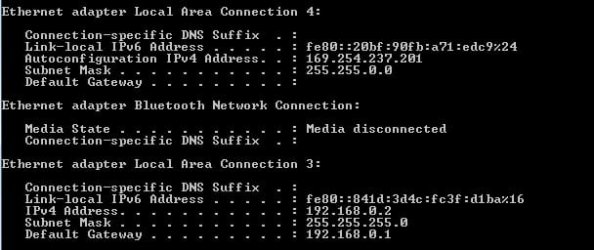
My Ethernet adaptor comes up as "Unidentified Network - Work network", and no Internet access. This is not a link so I cannot change the network location. My CMD IPCONFIG is as attached.

I really hope someone can help - I've never used this kind of adaptor before, and it's frustrating that the computer sees it and recognises it - it's all set up correctly and displays in Device Manager - but won't get onto the Internet and my network!

Hope someone can help :-)
 

Attachments

  • LAN-4.jpg
    LAN-4.jpg
    24.2 KB · Views: 73

My Computer My Computer

At a glance

Windows 7 Ultimate 32 bitIntel Pentium E5800 @ 3.20GHzRAM 4.00 GB Single-Channel DDR3 @ 400MHz (6-6...HP vs19x on Intel G41 Express Chipset
Computer Manufacturer/Model Number
Zoostorm desktop
OS
Windows 7 Ultimate 32 bit
CPU
Intel Pentium E5800 @ 3.20GHz
Motherboard
MSI G41M-P28 (MS-7592) (CPU 1)
Memory
RAM 4.00 GB Single-Channel DDR3 @ 400MHz (6-6-6-15)
Graphics Card(s)
HP vs19x on Intel G41 Express Chipset
Sound Card
SB X-Fi Xtreme Audio
Hard Drives
SAMSUNG HD103UJ ATA Device
Keyboard
Logitech diNovo wireless
Mouse
Logitech Click! Optical wireless
Internet Speed
5 MB
Hello,

The problem is that nothing is giving your USB Network Adapter an IP Address so its defaulting to 169.254.......

You need to go into network connections and give it a static IP address. You will also need to give your printer a static IP address.

A better way of solving this would be to buy a 2nd user 5-Port Network Switch from Ebay... You're creating yourself more hassle by doing the above.


Dave
 

My Computer My Computer

At a glance

Windows 7 Ultimate x64Intel Core i7 2600K (O/C 4.7GHz)8GB Corsair Vengeance LP, DDR3, 1600MhzNvidia GTX 460 Graphics Card
Computer type
PC/Desktop
Computer Manufacturer/Model Number
Custom
OS
Windows 7 Ultimate x64
CPU
Intel Core i7 2600K (O/C 4.7GHz)
Motherboard
Asus ROG Maximus IV Extreme-Z - Intel Z68 Chipset
Memory
8GB Corsair Vengeance LP, DDR3, 1600Mhz
Graphics Card(s)
Nvidia GTX 460 Graphics Card
Sound Card
Onboard
Monitor(s) Displays
Dell E228WFP
Hard Drives
2 x 500GB Samsung SpinPoint Drives (1 for OS, 1 for Data and Apps)
PSU
CoolerMaster 1000W
Case
CoolerMaster HAF
Cooling
Air
Internet Speed
Fibre - 60MB Down, 30MB Up
Antivirus
ESET NOD32 Antivirus
Hi

What's a "2nd user 5-Port Network Switch" please?
 

My Computer My Computer

At a glance

Windows 7 Ultimate 32 bitIntel Pentium E5800 @ 3.20GHzRAM 4.00 GB Single-Channel DDR3 @ 400MHz (6-6...HP vs19x on Intel G41 Express Chipset
Computer Manufacturer/Model Number
Zoostorm desktop
OS
Windows 7 Ultimate 32 bit
CPU
Intel Pentium E5800 @ 3.20GHz
Motherboard
MSI G41M-P28 (MS-7592) (CPU 1)
Memory
RAM 4.00 GB Single-Channel DDR3 @ 400MHz (6-6-6-15)
Graphics Card(s)
HP vs19x on Intel G41 Express Chipset
Sound Card
SB X-Fi Xtreme Audio
Hard Drives
SAMSUNG HD103UJ ATA Device
Keyboard
Logitech diNovo wireless
Mouse
Logitech Click! Optical wireless
Internet Speed
5 MB
Its a used network switch. I only said 2nd user because it will be cheaper then getting a new one.


Dave
 

My Computer My Computer

At a glance

Windows 7 Ultimate x64Intel Core i7 2600K (O/C 4.7GHz)8GB Corsair Vengeance LP, DDR3, 1600MhzNvidia GTX 460 Graphics Card
Computer type
PC/Desktop
Computer Manufacturer/Model Number
Custom
OS
Windows 7 Ultimate x64
CPU
Intel Core i7 2600K (O/C 4.7GHz)
Motherboard
Asus ROG Maximus IV Extreme-Z - Intel Z68 Chipset
Memory
8GB Corsair Vengeance LP, DDR3, 1600Mhz
Graphics Card(s)
Nvidia GTX 460 Graphics Card
Sound Card
Onboard
Monitor(s) Displays
Dell E228WFP
Hard Drives
2 x 500GB Samsung SpinPoint Drives (1 for OS, 1 for Data and Apps)
PSU
CoolerMaster 1000W
Case
CoolerMaster HAF
Cooling
Air
Internet Speed
Fibre - 60MB Down, 30MB Up
Antivirus
ESET NOD32 Antivirus
...I ran out of Ethernet connections on my wireless router, so bought a USB-Ethernet adaptor......
Could you please post the brand, model number and maybe the hardware version of the wireless router?

e.g Linksys WTR54GS version 2

David is right - buy a switch... but I'm curious about something and I wanted to look at the manual for the wireless router.

Thx
 

My Computer My Computer

At a glance

W7 Pro SP1 64biti78GBIntel HD Graphics
Computer type
Laptop
Computer Manufacturer/Model Number
Employer provided Dell Latitude
OS
W7 Pro SP1 64bit
CPU
i7
Memory
8GB
Graphics Card(s)
Intel HD Graphics
Hard Drives
crappy SSD
Antivirus
Employer mandated Symantec Endpoint Protection
Browser
Pale Moon 64bit, IE11 64bit & Chrome 64bit
Yes, it's a Netgear DGN1000, N150

I was hoping to avoid getting a new router, but if it would give me more advantages than not, I will.

Cheers!

Kit
 

My Computer My Computer

At a glance

Windows 7 Ultimate 32 bitIntel Pentium E5800 @ 3.20GHzRAM 4.00 GB Single-Channel DDR3 @ 400MHz (6-6...HP vs19x on Intel G41 Express Chipset
Computer Manufacturer/Model Number
Zoostorm desktop
OS
Windows 7 Ultimate 32 bit
CPU
Intel Pentium E5800 @ 3.20GHz
Motherboard
MSI G41M-P28 (MS-7592) (CPU 1)
Memory
RAM 4.00 GB Single-Channel DDR3 @ 400MHz (6-6-6-15)
Graphics Card(s)
HP vs19x on Intel G41 Express Chipset
Sound Card
SB X-Fi Xtreme Audio
Hard Drives
SAMSUNG HD103UJ ATA Device
Keyboard
Logitech diNovo wireless
Mouse
Logitech Click! Optical wireless
Internet Speed
5 MB
Thx for that info.

Keep in mind that I was attempting to envision what devices you have and how they are connected based on your first post. As soon as I read "I ran out of Ethernet connections on my wireless router,..." I assumed that you had purchased a USB device like this. Then you had unplugged the end of a LAN cable that was connected to a computer, plugged that end of the LAN cable into the printer and then attempted to get the USB WiFi adapter to connect the computer to your "wireless router".

But frankly, I had never heard a USB WiFi adapter (or USB wireless adapter) called a USB Ethernet adapter; so I Googled those terms:

search.JPG

...and I got images like this and this.

I read this again:
I ran out of Ethernet connections on my wireless router, so bought a USB Ethernet adapter.
And since some routers also have a USB connector, I wondered if you were attempting to plug the USB end of the USB Ethernet adapter in to the router's USB connector - hoping to have 5 Ethernet ports coming off of the router.

At that point - I should have just gone to sleep instead of attempting to envision more adapter/connection scenarios. But no, I read on - only to learn that you had the USB Ethernet adapter was connected to a computer (hence your ipconfig screenshot). Unfortunately, that did not clarify just what this USB adapter is - because the term "wireless" does not always make it in to the adapter's description for some USB WiFi adapters. They just show a description like your connection #4 shows in your ipconfig screenshot.

And my Google search mentioned above included a page that described people connecting a network printer like this. Where the yellow LAN cable goes to a modem/router and the blue USB cable is the "USB Ethernet adapter" leading to the printer via a LAN cable (not shown).

I attempted to write out some of my thoughts/confusion in my first post to your thread, but I could barely put two sentences together - so I opted for the short post that you were kind enough to reply to. Sadly, I failed to ask, "What type of USB Ethernet adapter is this?"

At least now I know that there is not a USB port on your router :-)
 

My Computer My Computer

At a glance

W7 Pro SP1 64biti78GBIntel HD Graphics
Computer type
Laptop
Computer Manufacturer/Model Number
Employer provided Dell Latitude
OS
W7 Pro SP1 64bit
CPU
i7
Memory
8GB
Graphics Card(s)
Intel HD Graphics
Hard Drives
crappy SSD
Antivirus
Employer mandated Symantec Endpoint Protection
Browser
Pale Moon 64bit, IE11 64bit & Chrome 64bit
Hi there,

Bless your heart! When you said "this and this", these are the adaptors that I meant! Mine is the attachment to this post.

However, I'm still stuck with this adaptor not working! This is running my second networked printer, or not as the case may be :-)

It's niggling me that I cannot get the damned thing to work - did you have any ideas on what the problem was?
 

Attachments

  • USB_2_0_Gigabit_Ethernet_Adapter.jpg
    USB_2_0_Gigabit_Ethernet_Adapter.jpg
    10.8 KB · Views: 24

My Computer My Computer

At a glance

Windows 7 Ultimate 32 bitIntel Pentium E5800 @ 3.20GHzRAM 4.00 GB Single-Channel DDR3 @ 400MHz (6-6...HP vs19x on Intel G41 Express Chipset
Computer Manufacturer/Model Number
Zoostorm desktop
OS
Windows 7 Ultimate 32 bit
CPU
Intel Pentium E5800 @ 3.20GHz
Motherboard
MSI G41M-P28 (MS-7592) (CPU 1)
Memory
RAM 4.00 GB Single-Channel DDR3 @ 400MHz (6-6-6-15)
Graphics Card(s)
HP vs19x on Intel G41 Express Chipset
Sound Card
SB X-Fi Xtreme Audio
Hard Drives
SAMSUNG HD103UJ ATA Device
Keyboard
Logitech diNovo wireless
Mouse
Logitech Click! Optical wireless
Internet Speed
5 MB
So, you are hooked up like this: Where the LAN cable goes to a modem/router and the USB cable is the "USB Ethernet adapter" leading to the printer via a LAN cable (not shown). Is that how the wires are connected? If so, then Dave stated the problem and two solutions in post #2:

Hello,

The problem is that nothing is giving your USB Network Adapter an IP Address so its defaulting to 169.254.......

You need to go into network connections and give it a static IP address. You will also need to give your printer a static IP address.

A better way of solving this would be to buy a 2nd user 5-Port Network Switch from Ebay... You're creating yourself more hassle by doing the above.


Dave
Do you need help assigning the static IP addresses that Dave suggested?

If one of the four computers that you have wired into your router does not move a lot of data over the network, then you could connect it to your router via WiFi. That would free up a LAN jack on the router for your network printer. If you do that, I would avoid using a USB WiFi adapter.
 

My Computer My Computer

At a glance

W7 Pro SP1 64biti78GBIntel HD Graphics
Computer type
Laptop
Computer Manufacturer/Model Number
Employer provided Dell Latitude
OS
W7 Pro SP1 64bit
CPU
i7
Memory
8GB
Graphics Card(s)
Intel HD Graphics
Hard Drives
crappy SSD
Antivirus
Employer mandated Symantec Endpoint Protection
Browser
Pale Moon 64bit, IE11 64bit & Chrome 64bit
Hi there,

Not quite.

The adaptor plugs into the USB port. The Ethernet cable plugs in the adaptor and the other end goes straight into the printer - it never touches the modem.

Items plugged into my modem are:
Wired internet connection for media centre computer
Printer number 1
Synology NAS drive
Wired internet connection for PC upstairs

Unfortunately neither of my network printers connects wirelessly.
The media centre requires a wired connection as it moves heavy data over the network
Same for upstairs PC
Obviously the NAS must be hardwired.

I was hoping there was like an expander plug that could go straight into the back of the modem to convert one socket into several sockets. Does such a thing exisit? I couldn't find anything.
 

My Computer My Computer

At a glance

Windows 7 Ultimate 32 bitIntel Pentium E5800 @ 3.20GHzRAM 4.00 GB Single-Channel DDR3 @ 400MHz (6-6...HP vs19x on Intel G41 Express Chipset
Computer Manufacturer/Model Number
Zoostorm desktop
OS
Windows 7 Ultimate 32 bit
CPU
Intel Pentium E5800 @ 3.20GHz
Motherboard
MSI G41M-P28 (MS-7592) (CPU 1)
Memory
RAM 4.00 GB Single-Channel DDR3 @ 400MHz (6-6-6-15)
Graphics Card(s)
HP vs19x on Intel G41 Express Chipset
Sound Card
SB X-Fi Xtreme Audio
Hard Drives
SAMSUNG HD103UJ ATA Device
Keyboard
Logitech diNovo wireless
Mouse
Logitech Click! Optical wireless
Internet Speed
5 MB
...I was hoping there was like an expander plug that could go straight into the back of the modem to convert one socket into several sockets. Does such a thing exisit? I couldn't find anything.
That is what a network switch does and why Dave suggested it :-).
 

My Computer My Computer

At a glance

W7 Pro SP1 64biti78GBIntel HD Graphics
Computer type
Laptop
Computer Manufacturer/Model Number
Employer provided Dell Latitude
OS
W7 Pro SP1 64bit
CPU
i7
Memory
8GB
Graphics Card(s)
Intel HD Graphics
Hard Drives
crappy SSD
Antivirus
Employer mandated Symantec Endpoint Protection
Browser
Pale Moon 64bit, IE11 64bit & Chrome 64bit
It looks like another router...
 

My Computer My Computer

At a glance

Windows 7 Ultimate 32 bitIntel Pentium E5800 @ 3.20GHzRAM 4.00 GB Single-Channel DDR3 @ 400MHz (6-6...HP vs19x on Intel G41 Express Chipset
Computer Manufacturer/Model Number
Zoostorm desktop
OS
Windows 7 Ultimate 32 bit
CPU
Intel Pentium E5800 @ 3.20GHz
Motherboard
MSI G41M-P28 (MS-7592) (CPU 1)
Memory
RAM 4.00 GB Single-Channel DDR3 @ 400MHz (6-6-6-15)
Graphics Card(s)
HP vs19x on Intel G41 Express Chipset
Sound Card
SB X-Fi Xtreme Audio
Hard Drives
SAMSUNG HD103UJ ATA Device
Keyboard
Logitech diNovo wireless
Mouse
Logitech Click! Optical wireless
Internet Speed
5 MB

My Computer My Computer

At a glance

W7 Pro SP1 64biti78GBIntel HD Graphics
Computer type
Laptop
Computer Manufacturer/Model Number
Employer provided Dell Latitude
OS
W7 Pro SP1 64bit
CPU
i7
Memory
8GB
Graphics Card(s)
Intel HD Graphics
Hard Drives
crappy SSD
Antivirus
Employer mandated Symantec Endpoint Protection
Browser
Pale Moon 64bit, IE11 64bit & Chrome 64bit
It looks perfect for what I want! The article explained what a switch is, but how does it connect? Does it use just one ethernet cable from the router, and expand the slot selection?

Also, a little off-topic, will it affect the speed of the network data? My Synology NAS drive has recently decided the connection is too slow, and media files transmitted downstairs are arriving too slow, resulting in jerky playback - will this improve that or is there another problem?

I really do appreciate all the help everyone's given - you've been really great thank you so much :-)
 

My Computer My Computer

At a glance

Windows 7 Ultimate 32 bitIntel Pentium E5800 @ 3.20GHzRAM 4.00 GB Single-Channel DDR3 @ 400MHz (6-6...HP vs19x on Intel G41 Express Chipset
Computer Manufacturer/Model Number
Zoostorm desktop
OS
Windows 7 Ultimate 32 bit
CPU
Intel Pentium E5800 @ 3.20GHz
Motherboard
MSI G41M-P28 (MS-7592) (CPU 1)
Memory
RAM 4.00 GB Single-Channel DDR3 @ 400MHz (6-6-6-15)
Graphics Card(s)
HP vs19x on Intel G41 Express Chipset
Sound Card
SB X-Fi Xtreme Audio
Hard Drives
SAMSUNG HD103UJ ATA Device
Keyboard
Logitech diNovo wireless
Mouse
Logitech Click! Optical wireless
Internet Speed
5 MB
...how does it connect? Does it use just one ethernet cable from the router, and expand the slot selection?...
Yes. See page 3 of this PDF manual.

...will this improve that or is there another problem?...
I'm not sure if it will help to plug certain devices into the switch versus the router, you can try it and see. I've never had to deal with video over a LAN. I mostly deal with small office stuff. Start a new topic on the speed issue and see if someone else knows. :-)
 

My Computer My Computer

At a glance

W7 Pro SP1 64biti78GBIntel HD Graphics
Computer type
Laptop
Computer Manufacturer/Model Number
Employer provided Dell Latitude
OS
W7 Pro SP1 64bit
CPU
i7
Memory
8GB
Graphics Card(s)
Intel HD Graphics
Hard Drives
crappy SSD
Antivirus
Employer mandated Symantec Endpoint Protection
Browser
Pale Moon 64bit, IE11 64bit & Chrome 64bit
You're all wonderful people! Is there a switch on eBay that I can buy here in the UK? Does it matter what make I use, or should I stick with a Netgear switch to match my Netgear router?

Kit
 

My Computer My Computer

At a glance

Windows 7 Ultimate 32 bitIntel Pentium E5800 @ 3.20GHzRAM 4.00 GB Single-Channel DDR3 @ 400MHz (6-6...HP vs19x on Intel G41 Express Chipset
Computer Manufacturer/Model Number
Zoostorm desktop
OS
Windows 7 Ultimate 32 bit
CPU
Intel Pentium E5800 @ 3.20GHz
Motherboard
MSI G41M-P28 (MS-7592) (CPU 1)
Memory
RAM 4.00 GB Single-Channel DDR3 @ 400MHz (6-6-6-15)
Graphics Card(s)
HP vs19x on Intel G41 Express Chipset
Sound Card
SB X-Fi Xtreme Audio
Hard Drives
SAMSUNG HD103UJ ATA Device
Keyboard
Logitech diNovo wireless
Mouse
Logitech Click! Optical wireless
Internet Speed
5 MB
You're all wonderful people! Is there a switch on eBay that I can buy here in the UK? Does it matter what make I use, or should I stick with a Netgear switch to match my Netgear router?

Kit
It does not matter what brand as long as it has a good reputation.

Be sure to check the manufacturer's website and/or download the manual to be sure that the device really is gigabit rated.

5 port GS605UK
 

My Computer My Computer

At a glance

W7 Pro SP1 64biti78GBIntel HD Graphics
Computer type
Laptop
Computer Manufacturer/Model Number
Employer provided Dell Latitude
OS
W7 Pro SP1 64bit
CPU
i7
Memory
8GB
Graphics Card(s)
Intel HD Graphics
Hard Drives
crappy SSD
Antivirus
Employer mandated Symantec Endpoint Protection
Browser
Pale Moon 64bit, IE11 64bit & Chrome 64bit
Hi there,

Thanks so much for the UK link, I will purchase this switch now. Am also going to open a seperate thread on the Synology slow transfer issue.

Love you alll!

Kit
 

My Computer My Computer

At a glance

Windows 7 Ultimate 32 bitIntel Pentium E5800 @ 3.20GHzRAM 4.00 GB Single-Channel DDR3 @ 400MHz (6-6...HP vs19x on Intel G41 Express Chipset
Computer Manufacturer/Model Number
Zoostorm desktop
OS
Windows 7 Ultimate 32 bit
CPU
Intel Pentium E5800 @ 3.20GHz
Motherboard
MSI G41M-P28 (MS-7592) (CPU 1)
Memory
RAM 4.00 GB Single-Channel DDR3 @ 400MHz (6-6-6-15)
Graphics Card(s)
HP vs19x on Intel G41 Express Chipset
Sound Card
SB X-Fi Xtreme Audio
Hard Drives
SAMSUNG HD103UJ ATA Device
Keyboard
Logitech diNovo wireless
Mouse
Logitech Click! Optical wireless
Internet Speed
5 MB
Hello, though it's many years later I happen to have encountered the same problem and successfully maneuvered the situation. First, the LAN cables (ethernet or internet cable) will be connected to one PC. That is a connection from the router and the other using the USB ethernet adapter. In the control panel, select network. You'll be able to see the multiple network connections. Select (mark the two) the active ethernet from the router and the inactive ethernet of the ethernet adapter. The right click to create a bridge connection. Windows will create a multiplexor connection, and assign the bridged network an IP address within your network. Give it a minute or so for the ethernet adapter network to be activated automatically and ALAS! Your connection will be assigned IP address if you using DHP or you can assign your ethernet adapter static IP. Hope this helps anyone out there. Cheers😊
 

My Computers My Computers

  • At a glance

    7*64 and 10*64
    Computer type
    Laptop
    OS
    7*64 and 10*64
  • Computer type
    PC/Desktop
Back
Top