System Image backup fails - not enough space for Volume Shadow Copy

highstream

New member
Member
Local time
1:20 AM
Messages
97
Had a 50gb Win 7 (x64) system image on a 66gb partition. It was a good image, because I had to use it to restore once. Decided to do a new one, so in setting up the new backup I deleted the old one first within the Win backup process. Then I ran the new one and it fails for lack of space to create the Volume Shadow Copy. The partition currently has 65gb free. Just to check, I tried on another partition with much more free space and got the same result. Where might the hang up be? Thanks,
 

My Computer My Computer

At a glance

Win 7 Home Premium and Win XP/SP3 Home 32 bit...AMD Phenom II X3 720 Black Edition (unlocked)6 GBXFX Radeon HD 5670
OS
Win 7 Home Premium and Win XP/SP3 Home 32 bit (desktop); Win 7 x64 Home Premium (laptop)
CPU
AMD Phenom II X3 720 Black Edition (unlocked)
Motherboard
Gigabyte GA-MA790X-UD4P (rev. 1.0) - version F9 BIOS
Memory
6 GB
Graphics Card(s)
XFX Radeon HD 5670
Monitor(s) Displays
Dell U2412M
Hard Drives
Corsair Force 3 SSD 60 GB
Seagate ST31000528AS - 1T
WD7500AAKS - 750GB
WD1600JBRTL - 160 GB
PSU
Corsair VX450
Case
Cooler Master
Cooling
front/back fans, CPU/PSU stock
Had a 50gb Win 7 (x64) system image on a 66gb partition. It was a good image, because I had to use it to restore once. Decided to do a new one, so in setting up the new backup I deleted the old one first within the Win backup process. Then I ran the new one and it fails for lack of space to create the Volume Shadow Copy. The partition currently has 65gb free. Just to check, I tried on another partition with much more free space and got the same result. Where might the hang up be? Thanks,
Goto system properties and then system security. Configure it. Is it enabled? How many percent and disk space?
 

My Computer My Computer

At a glance

Microsoft Windows 7 Home Premium 64-bits 7601...Intel(R) Core(TM) i3 CPU M 370 @ 2.40GHz4,00 GBATI Mobility Radeon HD 5400 Series
Computer type
Laptop
Computer Manufacturer/Model Number
ACER ASPIRE 5742G
OS
Microsoft Windows 7 Home Premium 64-bits 7601 Multiprocessor Free Service Pack 1
CPU
Intel(R) Core(TM) i3 CPU M 370 @ 2.40GHz
Motherboard
Acer Aspire 5742G
Memory
4,00 GB
Graphics Card(s)
ATI Mobility Radeon HD 5400 Series
Sound Card
(1) AMD High Definition Audio Device (2) Realtek High Defi
Screen Resolution
1366 x 768 x 32 bits (4294967296 colors) @ 60 Hz
Hard Drives
WDC WD5000BEVT-22ZAT0

My Computer My Computer

At a glance

Windows 7 Professional SP1 64-bitIntel Core 2 Duo Processor E8300 @ 2.83GHz4.00 GB Dual-Channel DDR2 @ 332MHz (5-5-5-15)Intel(R) G33/G31 Express Chipset Family
Computer type
PC/Desktop
Computer Manufacturer/Model Number
Dell Inspiron 530
OS
Windows 7 Professional SP1 64-bit
CPU
Intel Core 2 Duo Processor E8300 @ 2.83GHz
Motherboard
Dell Inc. 0RY007 (Socket 775)
Memory
4.00 GB Dual-Channel DDR2 @ 332MHz (5-5-5-15)
Graphics Card(s)
Intel(R) G33/G31 Express Chipset Family
Sound Card
Integrated 7.1 Channel Audio
Monitor(s) Displays
Acer G245HQL 23.6" LED(1920x1080@60Hz)
Screen Resolution
1920 x 1080
Hard Drives
Disk 0 HITACHI 1TB OS Installed - Disk 1 HITACHI 1TB For Backups
Keyboard
Dell USB Keyboard
Mouse
Dell Optical USB Mouse
Internet Speed
DSL 10 meg
Antivirus
Symantec(SEP)
Browser
Pale Moon
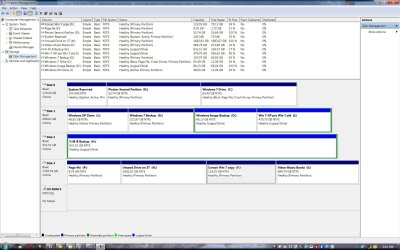
Disk Mgt screenshot attached. O is the designated image backup drive and C is the system drive (the XP clone drive is a leftover, not active). Note that since posting I enlarged C drive to 65gb, but that only 53gb is actually in use currently.
 

Attachments

  • Disk Mgt Window 5-1-12.jpg
    Disk Mgt Window 5-1-12.jpg
    230.7 KB · Views: 274

My Computer My Computer

At a glance

Win 7 Home Premium and Win XP/SP3 Home 32 bit...AMD Phenom II X3 720 Black Edition (unlocked)6 GBXFX Radeon HD 5670
OS
Win 7 Home Premium and Win XP/SP3 Home 32 bit (desktop); Win 7 x64 Home Premium (laptop)
CPU
AMD Phenom II X3 720 Black Edition (unlocked)
Motherboard
Gigabyte GA-MA790X-UD4P (rev. 1.0) - version F9 BIOS
Memory
6 GB
Graphics Card(s)
XFX Radeon HD 5670
Monitor(s) Displays
Dell U2412M
Hard Drives
Corsair Force 3 SSD 60 GB
Seagate ST31000528AS - 1T
WD7500AAKS - 750GB
WD1600JBRTL - 160 GB
PSU
Corsair VX450
Case
Cooler Master
Cooling
front/back fans, CPU/PSU stock
Follow up: I just ran it again and it worked. Since I had tried a larger drive earlier, it's hard to believe that resizing C was the difference. My guess is that it had to do with permissions, per Kaktussoft's hint. This is a single Admin/User system, but I noticed that the Users line didn't have full permissions, so I changed that. Could that have been the difference? I'm not sure why, because it wasn't any different last time I imaged. Otherwise, I don't know.

Btw, what does "Apply these permissions to objects and/or containers within this container only" mean? Thanks,
 

My Computer My Computer

At a glance

Win 7 Home Premium and Win XP/SP3 Home 32 bit...AMD Phenom II X3 720 Black Edition (unlocked)6 GBXFX Radeon HD 5670
OS
Win 7 Home Premium and Win XP/SP3 Home 32 bit (desktop); Win 7 x64 Home Premium (laptop)
CPU
AMD Phenom II X3 720 Black Edition (unlocked)
Motherboard
Gigabyte GA-MA790X-UD4P (rev. 1.0) - version F9 BIOS
Memory
6 GB
Graphics Card(s)
XFX Radeon HD 5670
Monitor(s) Displays
Dell U2412M
Hard Drives
Corsair Force 3 SSD 60 GB
Seagate ST31000528AS - 1T
WD7500AAKS - 750GB
WD1600JBRTL - 160 GB
PSU
Corsair VX450
Case
Cooler Master
Cooling
front/back fans, CPU/PSU stock
Follow up: I just ran it again and it worked. Since I had tried a larger drive earlier, it's hard to believe that resizing C was the difference. My guess is that it had to do with permissions, per Kaktussoft's hint. This is a single Admin/User system, but I noticed that the Users line didn't have full permissions, so I changed that. Could that have been the difference? I'm not sure why, because it wasn't any different last time I imaged. Otherwise, I don't know.

Btw, what does "Apply these permissions to objects and/or containers within this container only" mean? Thanks,
I didn't mean permissions at all! I meant space reserved for "system restore" and shadow sets. You have only one system image backup now?

Please post output from http://www.sevenforums.com/tutorials/783-elevated-command-prompt.html
Code:
vssadmin list shadowstorage /for=X:
Replace X with actual drive letter. Do it for all partitions you wanna backup. And for Output partition as well. Please post output
 

My Computer My Computer

At a glance

Microsoft Windows 7 Home Premium 64-bits 7601...Intel(R) Core(TM) i3 CPU M 370 @ 2.40GHz4,00 GBATI Mobility Radeon HD 5400 Series
Computer type
Laptop
Computer Manufacturer/Model Number
ACER ASPIRE 5742G
OS
Microsoft Windows 7 Home Premium 64-bits 7601 Multiprocessor Free Service Pack 1
CPU
Intel(R) Core(TM) i3 CPU M 370 @ 2.40GHz
Motherboard
Acer Aspire 5742G
Memory
4,00 GB
Graphics Card(s)
ATI Mobility Radeon HD 5400 Series
Sound Card
(1) AMD High Definition Audio Device (2) Realtek High Defi
Screen Resolution
1366 x 768 x 32 bits (4294967296 colors) @ 60 Hz
Hard Drives
WDC WD5000BEVT-22ZAT0
Btw, what does "Apply these permissions to objects and/or containers within this container only" mean? Thanks,

It means the permissions are only set for objects in that container (so in that folder). So only for files and folders within that folder. So NOT for files and folders in subfolders
 

My Computer My Computer

At a glance

Microsoft Windows 7 Home Premium 64-bits 7601...Intel(R) Core(TM) i3 CPU M 370 @ 2.40GHz4,00 GBATI Mobility Radeon HD 5400 Series
Computer type
Laptop
Computer Manufacturer/Model Number
ACER ASPIRE 5742G
OS
Microsoft Windows 7 Home Premium 64-bits 7601 Multiprocessor Free Service Pack 1
CPU
Intel(R) Core(TM) i3 CPU M 370 @ 2.40GHz
Motherboard
Acer Aspire 5742G
Memory
4,00 GB
Graphics Card(s)
ATI Mobility Radeon HD 5400 Series
Sound Card
(1) AMD High Definition Audio Device (2) Realtek High Defi
Screen Resolution
1366 x 768 x 32 bits (4294967296 colors) @ 60 Hz
Hard Drives
WDC WD5000BEVT-22ZAT0

My Computer My Computer

At a glance

Microsoft Windows 7 Home Premium 64-bits 7601...Intel(R) Core(TM) i3 CPU M 370 @ 2.40GHz4,00 GBATI Mobility Radeon HD 5400 Series
Computer type
Laptop
Computer Manufacturer/Model Number
ACER ASPIRE 5742G
OS
Microsoft Windows 7 Home Premium 64-bits 7601 Multiprocessor Free Service Pack 1
CPU
Intel(R) Core(TM) i3 CPU M 370 @ 2.40GHz
Motherboard
Acer Aspire 5742G
Memory
4,00 GB
Graphics Card(s)
ATI Mobility Radeon HD 5400 Series
Sound Card
(1) AMD High Definition Audio Device (2) Realtek High Defi
Screen Resolution
1366 x 768 x 32 bits (4294967296 colors) @ 60 Hz
Hard Drives
WDC WD5000BEVT-22ZAT0
^ I have experienced this issue before. For me, it was because my hidden "System Reserved" partition dropped to less than 50MB free. This volume seems to change automagically within Windows and when I tried to run the backup, and it was less than 50MB, I would get this error. Once it cleared space on it's own, the system backup would work again.
 

My Computer My Computer

At a glance

Windows 7 Ultimate x64Intel Q9550 2.83Ghz OC'd to 3.40Ghz8GB G.Skill PI DDR2-800, 4-4-4-12 timingsEVGA 1280MB Nvidia GeForce GTX570
Computer Manufacturer/Model Number
Self-Built in July 2009
OS
Windows 7 Ultimate x64
CPU
Intel Q9550 2.83Ghz OC'd to 3.40Ghz
Motherboard
Gigabyte GA-EP45-UD3R rev. 1.1, F12 BIOS
Memory
8GB G.Skill PI DDR2-800, 4-4-4-12 timings
Graphics Card(s)
EVGA 1280MB Nvidia GeForce GTX570
Sound Card
Realtek ALC899A 8 channel onboard audio
Monitor(s) Displays
23" Acer x233H
Screen Resolution
1920x1080
Hard Drives
Intel X25-M 80GB Gen 2 SSD
Western Digital 1TB Caviar Black, 32MB cache. WD1001FALS
PSU
Corsair 620HX modular
Case
Antec P182
Cooling
stock
Keyboard
ABS M1 Mechanical
Mouse
Logitech G9 Laser Mouse
Internet Speed
15/2 cable modem
Other Info
Windows and Linux enthusiast. Logitech G35 Headset.
Hmmm..interesting thought. Can't the System Reserved partition be set somewhere within Windows?

A different tho related problem for me in terms of system images has to do with freeing up space - deleting unneeded files - on a partition that I want to merge with another afterward, instead of just merging the two whole, which takes many hours longer. In a partition manager I've tried Wipe and Format, but both times Win 7 wouldn't start and I had to use the system image to get back on line. That suggests to me that I'm deleting something that's throwing off the system drive (mbr?). In the screenshot earlier, there's an inactive XP clone partition whose contents that I'd like to eliminate and then merge the partition with another on that HDD (or resize the other, which is even simpler). What's the most efficient way to do this w/o wrecking havoc again? Thanks,
 

My Computer My Computer

At a glance

Win 7 Home Premium and Win XP/SP3 Home 32 bit...AMD Phenom II X3 720 Black Edition (unlocked)6 GBXFX Radeon HD 5670
OS
Win 7 Home Premium and Win XP/SP3 Home 32 bit (desktop); Win 7 x64 Home Premium (laptop)
CPU
AMD Phenom II X3 720 Black Edition (unlocked)
Motherboard
Gigabyte GA-MA790X-UD4P (rev. 1.0) - version F9 BIOS
Memory
6 GB
Graphics Card(s)
XFX Radeon HD 5670
Monitor(s) Displays
Dell U2412M
Hard Drives
Corsair Force 3 SSD 60 GB
Seagate ST31000528AS - 1T
WD7500AAKS - 750GB
WD1600JBRTL - 160 GB
PSU
Corsair VX450
Case
Cooler Master
Cooling
front/back fans, CPU/PSU stock
Hmmm..interesting thought. Can't the System Reserved partition be set somewhere within Windows?

A different tho related problem for me in terms of system images has to do with freeing up space - deleting unneeded files - on a partition that I want to merge with another afterward, instead of just merging the two whole, which takes many hours longer. In a partition manager I've tried Wipe and Format, but both times Win 7 wouldn't start and I had to use the system image to get back on line. That suggests to me that I'm deleting something that's throwing off the system drive (mbr?). In the screenshot earlier, there's an inactive XP clone partition whose contents that I'd like to eliminate and then merge the partition with another on that HDD (or resize the other, which is even simpler). What's the most efficient way to do this w/o wrecking havoc again? Thanks,
You wanna remove "system reserved"? that's possible.
What partitions do you wanna merge?
 

My Computer My Computer

At a glance

Microsoft Windows 7 Home Premium 64-bits 7601...Intel(R) Core(TM) i3 CPU M 370 @ 2.40GHz4,00 GBATI Mobility Radeon HD 5400 Series
Computer type
Laptop
Computer Manufacturer/Model Number
ACER ASPIRE 5742G
OS
Microsoft Windows 7 Home Premium 64-bits 7601 Multiprocessor Free Service Pack 1
CPU
Intel(R) Core(TM) i3 CPU M 370 @ 2.40GHz
Motherboard
Acer Aspire 5742G
Memory
4,00 GB
Graphics Card(s)
ATI Mobility Radeon HD 5400 Series
Sound Card
(1) AMD High Definition Audio Device (2) Realtek High Defi
Screen Resolution
1366 x 768 x 32 bits (4294967296 colors) @ 60 Hz
Hard Drives
WDC WD5000BEVT-22ZAT0
I wasn't thinking of removing System Reserved, figuring that it is necessary. But I notice on C drive there is that with 100mb, plus two other unallocated partitions with 128kb and 1mb that I don't know what to make of. Can't recall seeing them on my previous Win 7 SSD.

Merge J & O into O, to make more room for backup images. Actually, I've got J down to a basic logical partition, but the partition manager has it grayed out for merging and there's another partition to the left between it and O that prevents expanding O directly. I guess the solution is to combine partitions to the left and then resize and combine to the right.
 
Last edited:

My Computer My Computer

At a glance

Win 7 Home Premium and Win XP/SP3 Home 32 bit...AMD Phenom II X3 720 Black Edition (unlocked)6 GBXFX Radeon HD 5670
OS
Win 7 Home Premium and Win XP/SP3 Home 32 bit (desktop); Win 7 x64 Home Premium (laptop)
CPU
AMD Phenom II X3 720 Black Edition (unlocked)
Motherboard
Gigabyte GA-MA790X-UD4P (rev. 1.0) - version F9 BIOS
Memory
6 GB
Graphics Card(s)
XFX Radeon HD 5670
Monitor(s) Displays
Dell U2412M
Hard Drives
Corsair Force 3 SSD 60 GB
Seagate ST31000528AS - 1T
WD7500AAKS - 750GB
WD1600JBRTL - 160 GB
PSU
Corsair VX450
Case
Cooler Master
Cooling
front/back fans, CPU/PSU stock
You can use Partition Wizard to try and cleanup bits of unallocated. Merging O and J will require a bit of fiddling. Again Partition Wizard is the tool I would use.
The free version doesn't support "merge". I would backup the 2nd partition, delete it and resize the 1st partition into it. Also, If you only plan 4 partitions on this drive then they can be made primary again with PW. More than 4 and your HDD will go dynamic - this is bad.

Re: your initial problem this may help
http://www.sevenforums.com/backup-r...not-enough-space-shadow-copy.html#post1643008
 

My Computer My Computer

At a glance

Windows 7x64 Home Premium SP1Intel i7 2600kG.Skill Ripjaws (DDR3-1600) 2x4GBNvidia GeForce GTS 450; Intel HD Graphics 300...
Computer type
PC/Desktop
Computer Manufacturer/Model Number
Own build
OS
Windows 7x64 Home Premium SP1
CPU
Intel i7 2600k
Motherboard
ASUS P8Z68 Deluxe
Memory
G.Skill Ripjaws (DDR3-1600) 2x4GB
Graphics Card(s)
Nvidia GeForce GTS 450; Intel HD Graphics 3000(GT2+)
Monitor(s) Displays
Dell Ultrasharp IPS panel U2311H, Samsung SyncMaster P2350
Screen Resolution
1920x1080
Hard Drives
Samsung 850 Pro SSD 256GB, Samsung SSD 840 120GB, Seagates 1TB Barracuda ST31000528AS x2
PSU
Seasonic M12II 520W
Case
Lian Li Lancool PC-K60
Cooling
Case: 1x120mm, 3x140mm CPU: Hyper 212+
Keyboard
Logitech MK520 (wireless)
Mouse
Logitech MK520
Internet Speed
6-7 Mbps
Antivirus
Norton Security Premium, Malwarebytes on 2 (MSE on 3rd PC)
Browser
FireFox
Other Info
Audio: Logitech Z523 2.1
J & O into O, to make more room for backup images
So you wanna delete J (can be done safely in win7)


Now using partition wizard How to Move/Resize Partition with partition manager? Partition Wizard Move/Resize Partition Video Help.
  • move G to the left
  • there's now unused space between G and O
  • extend O so let it use the "unused space"
Take the right partition!! Drive letters in win7 are diffirent as in partition wizard. Check drive letters after starting win7. Eventually correct them.
Partition Wizard Bootable CD allows user to manage partition directly with partition manager bootable CD.
Free download Magic Partition Manager Software, partition magic alternative, free partition magic, partition magic Windows 7 and server partition software - Partition Wizard Online take the last one so "bootable CD (ISO)". Burn that ISO on CD/DVD and boot from it.

Post results please.

Wanna delete "system reserved" as well? Only possible if you don't use and don't wanna use bitlocker. I post steps if you want
 

My Computer My Computer

At a glance

Microsoft Windows 7 Home Premium 64-bits 7601...Intel(R) Core(TM) i3 CPU M 370 @ 2.40GHz4,00 GBATI Mobility Radeon HD 5400 Series
Computer type
Laptop
Computer Manufacturer/Model Number
ACER ASPIRE 5742G
OS
Microsoft Windows 7 Home Premium 64-bits 7601 Multiprocessor Free Service Pack 1
CPU
Intel(R) Core(TM) i3 CPU M 370 @ 2.40GHz
Motherboard
Acer Aspire 5742G
Memory
4,00 GB
Graphics Card(s)
ATI Mobility Radeon HD 5400 Series
Sound Card
(1) AMD High Definition Audio Device (2) Realtek High Defi
Screen Resolution
1366 x 768 x 32 bits (4294967296 colors) @ 60 Hz
Hard Drives
WDC WD5000BEVT-22ZAT0

My Computer My Computer

At a glance

Microsoft Windows 7 Home Premium 64-bits 7601...Intel(R) Core(TM) i3 CPU M 370 @ 2.40GHz4,00 GBATI Mobility Radeon HD 5400 Series
Computer type
Laptop
Computer Manufacturer/Model Number
ACER ASPIRE 5742G
OS
Microsoft Windows 7 Home Premium 64-bits 7601 Multiprocessor Free Service Pack 1
CPU
Intel(R) Core(TM) i3 CPU M 370 @ 2.40GHz
Motherboard
Acer Aspire 5742G
Memory
4,00 GB
Graphics Card(s)
ATI Mobility Radeon HD 5400 Series
Sound Card
(1) AMD High Definition Audio Device (2) Realtek High Defi
Screen Resolution
1366 x 768 x 32 bits (4294967296 colors) @ 60 Hz
Hard Drives
WDC WD5000BEVT-22ZAT0
Oh, so that's what the Sys Reserved is. No, Unlocker comes in handy now and again.

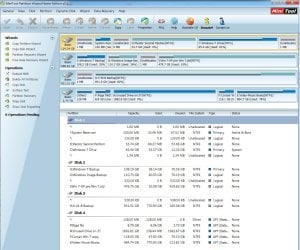
While you were posting, I finally remembered what to do with the partitions and had already downloaded Partition Wizard free (I have been using EASEUS, but decided to check out alternatives). So yes, it's pretty nifty although the free edition lacks Merge (the button is there but not the functionality). In any case, it all worked out (pending a reboot... - successful). See the screenshot - Disk 2. Any ideas about that unallocated 1mb (0.52mb)? It doesn't seem available for combining with its neighbors.

Also, how could I have gotten rid of the XP Clone partition (J) without wiping/reformatting it and then having to restore the C drive backup image? That was necessary to boot into Windows.
 

Attachments

  • Disk Mgt Window after changes.jpg
    Disk Mgt Window after changes.jpg
    183.1 KB · Views: 34

My Computer My Computer

At a glance

Win 7 Home Premium and Win XP/SP3 Home 32 bit...AMD Phenom II X3 720 Black Edition (unlocked)6 GBXFX Radeon HD 5670
OS
Win 7 Home Premium and Win XP/SP3 Home 32 bit (desktop); Win 7 x64 Home Premium (laptop)
CPU
AMD Phenom II X3 720 Black Edition (unlocked)
Motherboard
Gigabyte GA-MA790X-UD4P (rev. 1.0) - version F9 BIOS
Memory
6 GB
Graphics Card(s)
XFX Radeon HD 5670
Monitor(s) Displays
Dell U2412M
Hard Drives
Corsair Force 3 SSD 60 GB
Seagate ST31000528AS - 1T
WD7500AAKS - 750GB
WD1600JBRTL - 160 GB
PSU
Corsair VX450
Case
Cooler Master
Cooling
front/back fans, CPU/PSU stock
The way you go about "Merge J&O into O" to quote will depend what data you want to preserve. If you have data on G I suggest you back it up before you do anything.

If you use the EasyBCD tool you will lose your system reserved. If you don't want to lose it you can simply extend it with PW
How to Move/Resize Partition with partition manager? Partition Wizard Move/Resize Partition Video Help.
I suggest you make it 200MB

The other way to often fix your type of imaging problem is to delete USN journal files from the system reserved with the fsutil command. These are often cleared over time by the OS.
 
Last edited:

My Computer My Computer

At a glance

Windows 7x64 Home Premium SP1Intel i7 2600kG.Skill Ripjaws (DDR3-1600) 2x4GBNvidia GeForce GTS 450; Intel HD Graphics 300...
Computer type
PC/Desktop
Computer Manufacturer/Model Number
Own build
OS
Windows 7x64 Home Premium SP1
CPU
Intel i7 2600k
Motherboard
ASUS P8Z68 Deluxe
Memory
G.Skill Ripjaws (DDR3-1600) 2x4GB
Graphics Card(s)
Nvidia GeForce GTS 450; Intel HD Graphics 3000(GT2+)
Monitor(s) Displays
Dell Ultrasharp IPS panel U2311H, Samsung SyncMaster P2350
Screen Resolution
1920x1080
Hard Drives
Samsung 850 Pro SSD 256GB, Samsung SSD 840 120GB, Seagates 1TB Barracuda ST31000528AS x2
PSU
Seasonic M12II 520W
Case
Lian Li Lancool PC-K60
Cooling
Case: 1x120mm, 3x140mm CPU: Hyper 212+
Keyboard
Logitech MK520 (wireless)
Mouse
Logitech MK520
Internet Speed
6-7 Mbps
Antivirus
Norton Security Premium, Malwarebytes on 2 (MSE on 3rd PC)
Browser
FireFox
Other Info
Audio: Logitech Z523 2.1
Thanks, G drive is the SyncBack backup of C. Unlike the system image, that backup gives me direct access to files and folders and some synchronization regularly.

With the J&O merge, I didn't need my old XP system drive (clone - J) anymore, so it could be wiped clean. But the problem wiping and/or reformatting was that Win 7 (C) wouldn't boot, meaning to get it going I had to restore the backup image we discussed earlier. So I was thinking there has to be a better way to do this. Hence, my question. Suggestions for doing that next time? Many thanks!
 

My Computer My Computer

At a glance

Win 7 Home Premium and Win XP/SP3 Home 32 bit...AMD Phenom II X3 720 Black Edition (unlocked)6 GBXFX Radeon HD 5670
OS
Win 7 Home Premium and Win XP/SP3 Home 32 bit (desktop); Win 7 x64 Home Premium (laptop)
CPU
AMD Phenom II X3 720 Black Edition (unlocked)
Motherboard
Gigabyte GA-MA790X-UD4P (rev. 1.0) - version F9 BIOS
Memory
6 GB
Graphics Card(s)
XFX Radeon HD 5670
Monitor(s) Displays
Dell U2412M
Hard Drives
Corsair Force 3 SSD 60 GB
Seagate ST31000528AS - 1T
WD7500AAKS - 750GB
WD1600JBRTL - 160 GB
PSU
Corsair VX450
Case
Cooler Master
Cooling
front/back fans, CPU/PSU stock
Hello Highstream,

I had the same problem as you and mine was caused by the system reserved partition too.

Not sure why microsoft only made it 100mb as it's too small. It was 200mb in the windows 7 beta and in Windows 8 it's 350mb.

I used Easeus to extend mine to 350mb but I also keep a copy of the Windows Recovery Folder (WinRE) on mine too. I've never had any problems creating an image since.

I haven't used partition wizard boot cd but I hear it's very good. A lot of users on here recommend it.
 

My Computer My Computer

At a glance

Win 7 Ultimate, Win 8.1 Pro, Linux Mint 19 Ci...Intel i5 4690KCorsair Vengeance LP 32GB DDR3MSI GTX 1060 GAMING X 6GB
Computer type
PC/Desktop
Computer Manufacturer/Model Number
Custom Build
OS
Win 7 Ultimate, Win 8.1 Pro, Linux Mint 19 Cinnamon (All 64-Bit)
CPU
Intel i5 4690K
Motherboard
Gigabyte Z97X-UD3H
Memory
Corsair Vengeance LP 32GB DDR3
Graphics Card(s)
MSI GTX 1060 GAMING X 6GB
Sound Card
Onboard
Hard Drives
Samsung 850 EVO 250GB SSD (x2)
Samsung 860 EVO 1TB SSD (x2)
Crucial MX300 525GB SSD
WD Blue 2TB 5400rpm Intellipark Disabled (x2)
PSU
Corsair HX750i
Case
Phanteks Enthoo Pro
Cooling
CM Hyper 212 EVO on CPU, Noctua Redux NF-P14S 1500rpm (x6)
Keyboard
Corsair K70 RGB LUX
Mouse
Corsair Sabre RGB
Antivirus
Avast Free, MalwareBytes, SAS & CryptoPrevent
Browser
Chrome
Other Info
StarTech PEXESAT322I 2 Port PCI-E SATA Card
ASUS PCE-AC56 Dual-band AC1300 Wireless Card
Akasa FC.Six Manual Fan Controller
And a Partridge in a Pear Tree!
Thanks, G drive is the SyncBack backup of C. Unlike the system image, that backup gives me direct access to files and folders and some synchronization regularly.

With the J&O merge, I didn't need my old XP system drive (clone - J) anymore, so it could be wiped clean. But the problem wiping and/or reformatting was that Win 7 (C) wouldn't boot, meaning to get it going I had to restore the backup image we discussed earlier. So I was thinking there has to be a better way to do this. Hence, my question. Suggestions for doing that next time? Many thanks!
J was just a primary partition. Although it was active, you didn't boot from it. Could be deleted without issues (It wasn't used at all). Or didn't even contain pagefile, hibernation file etc I assume.

Did you try "startup repair" after removing J? This wil give you a clue what is wrong. I don't understand why it didn't boot. What was the error message when booting?
 

My Computer My Computer

At a glance

Microsoft Windows 7 Home Premium 64-bits 7601...Intel(R) Core(TM) i3 CPU M 370 @ 2.40GHz4,00 GBATI Mobility Radeon HD 5400 Series
Computer type
Laptop
Computer Manufacturer/Model Number
ACER ASPIRE 5742G
OS
Microsoft Windows 7 Home Premium 64-bits 7601 Multiprocessor Free Service Pack 1
CPU
Intel(R) Core(TM) i3 CPU M 370 @ 2.40GHz
Motherboard
Acer Aspire 5742G
Memory
4,00 GB
Graphics Card(s)
ATI Mobility Radeon HD 5400 Series
Sound Card
(1) AMD High Definition Audio Device (2) Realtek High Defi
Screen Resolution
1366 x 768 x 32 bits (4294967296 colors) @ 60 Hz
Hard Drives
WDC WD5000BEVT-22ZAT0
Back
Top