Not enough disk space to create the volume shadow copy ...

Re: VSS startup:
Have a link to that MS recommendation? It is certainly that way on a clean install. I have no dispute with that, however have not seen such a recommendation...........................................
Sure try this
Event ID 13 ? Volume Shadow Copy Service Operations
Under:Check that the VSS service is enabled

You then go on a bit including saying:
"I posted no such thing. I stated that increasing the size of the (system) reserved partition *allowed* you to make an image. reread the post. This issue is *NOT* the size of the partition, but the amount of remaining free space therein.
If Windows 7 needed a 200MB reserved partition, one presumes it would create one during install. It does not. Possibly there is there a KB article suggesting such an increase in size?"

A big presumption. System reserved needs 40-50MB shadow storage and a 100MB system reserved partition cuts it a bit fine for some users for some reason not fully known. That is why extending it to ~200MB is a solution.

You also say:
"there are also free space requirements for shadow storage on the partition where the image will be stored."

We know that. Browse this forum (which you appear to want to rename) and you'll find references to that and how to check.

It's a decision for you not to use third party imaging software. I've used Windows inbuilt imaging 100's of times on a number of PCs without problem yet I still use Macrium Reflect as a safeguard. Although Windows 7 is one of the best OSs, it is not bug free and we are not the MS software engineers that wrote it or MS employees.

You can also go over to the Microsoft Community forum - best of luck.
Windows - Microsoft Community
 
Last edited:

My Computer My Computer

At a glance

Windows 7x64 Home Premium SP1Intel i7 2600kG.Skill Ripjaws (DDR3-1600) 2x4GBNvidia GeForce GTS 450; Intel HD Graphics 300...
Computer type
PC/Desktop
Computer Manufacturer/Model Number
Own build
OS
Windows 7x64 Home Premium SP1
CPU
Intel i7 2600k
Motherboard
ASUS P8Z68 Deluxe
Memory
G.Skill Ripjaws (DDR3-1600) 2x4GB
Graphics Card(s)
Nvidia GeForce GTS 450; Intel HD Graphics 3000(GT2+)
Monitor(s) Displays
Dell Ultrasharp IPS panel U2311H, Samsung SyncMaster P2350
Screen Resolution
1920x1080
Hard Drives
Samsung 850 Pro SSD 256GB, Samsung SSD 840 120GB, Seagates 1TB Barracuda ST31000528AS x2
PSU
Seasonic M12II 520W
Case
Lian Li Lancool PC-K60
Cooling
Case: 1x120mm, 3x140mm CPU: Hyper 212+
Keyboard
Logitech MK520 (wireless)
Mouse
Logitech MK520
Internet Speed
6-7 Mbps
Antivirus
Norton Security Premium, Malwarebytes on 2 (MSE on 3rd PC)
Browser
FireFox
Other Info
Audio: Logitech Z523 2.1
Sure try this
Event ID 13 ? Volume Shadow Copy Service Operations
Under:Check that the VSS service is enabled

Event logs or logon show no Event ID 13 and/or any errors in VSS service.

Applies To: Windows Server 2008

Wrong OS.

A big presumption. System reserved needs 40-50MB shadow storage and a 100MB system reserved partition cuts it a bit fine for some users for some reason not fully known. That is why extending it to ~200MB is a solution.

You claim it as a "solution". My experience differs. MS has neither patched the OS to install a 200 MB reserved partition, nor have I seen a KB article suggesting such.

Nothing precludes anyone from partitioning to create a 200 MB [why stop there??] or a 30 GB reserved partition [just to cover the reason(s) not fully known....]

"there are also free space requirements for shadow storage on the partition where the image will be stored."

We know that.

...but failed to mention that in the post - so I did. Not everyone combs the forum for minutia. Lots of suggestions about what to do, but precious little information about the causes the basic problem. The gist of most of the "solutions" boil down to MS is just plain stupid. That may, in fact, be true, but I see no evidence presented to support such.

we are not the MS software engineers that wrote it or MS employees

There are, however, plenty of intelligent folks that are neither MS software engineers nor MS employees. I have no doubt that lots of them participate in this forum, otherwise I would not waste the time, TYVM
 

My Computer My Computer

At a glance

Win7 Pro x6417-477132 GbOnboard
Computer type
PC/Desktop
Computer Manufacturer/Model Number
Custom build Intel
OS
Win7 Pro x64
CPU
17-4771
Motherboard
DH87MC
Memory
32 Gb
Graphics Card(s)
Onboard
Hard Drives
Seagate ST2000DM001
I don't have an answer for you but you are right about intelligent people participating here, I'm sure others will post when they see this thread.

Going back to some of your other points, I checked my Volume shadow copy service and it was also stopped but is set to Automatic (Delayed Start).

I can also confirm that when starting backup it does start the service.

I don't have the problem of system reserved being too full, so I can't help there either.

You have definitely done your research so there isn't much I can add, I am curious to see how this turns out though.
 

My Computer My Computer

At a glance

Win 10 Pro x64Intel I5-2500K @3.3GHz16GB G.Skill Ripjaws X (4x4GB)EVGA GeForce 750 Ti SC 2GB
Computer type
PC/Desktop
Computer Manufacturer/Model Number
Self Built
OS
Win 10 Pro x64
CPU
Intel I5-2500K @3.3GHz
Motherboard
Asrock P67 Extreme4
Memory
16GB G.Skill Ripjaws X (4x4GB)
Graphics Card(s)
EVGA GeForce 750 Ti SC 2GB
Sound Card
ASUS Xonar DG 5.1 Channels 24-bit 96KHz PCI Interface Sound
Monitor(s) Displays
auria eq2367
Screen Resolution
1920 x 1080
Hard Drives
250GB Samsung 850 EVO SSD
1TB WD Blue
1TB Hitachi
PSU
SeaSonic X 650W 80 Plus Gold
Case
Corsair Obsidian 750D
Cooling
Corsair H60, Three 140mm case fans
Keyboard
Logitech Wireless Keyboard K520
Mouse
Logitech Wireless Mouse M310
Internet Speed
Wave Broadband ~ 100 dn 5 up
Antivirus
Windows Defender, Malwarebytes Premium
Browser
Edge, IE11, Chrome
Other Info
Laptop specs: HP g7-1365dx /
CPU: AMD A6-3420M APU with Radeon(tm) HD Graphics /
RAM: Crucial 8Gb (2x4Gb) /
SSD: Crucial M4-CT128M4SSD2 ATA Device/ FW 000F /
GFX: AMD Radeon HD 6520G /
OS: Windows 10 Pro x64
Hi derekimo,

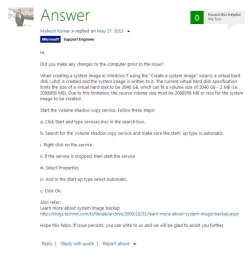
as to VSS, this is how MS support suggests Win7x64 be configured. I chose "Automatic", simply because I presumed it might clear space on the partition at startup by starting the service without have to do that manually. For two months, I did not have a problem with reserved being too full either...
 

Attachments

  • Startupautomatic.jpg
    Startupautomatic.jpg
    43.8 KB · Views: 0

My Computer My Computer

At a glance

Win7 Pro x6417-477132 GbOnboard
Computer type
PC/Desktop
Computer Manufacturer/Model Number
Custom build Intel
OS
Win7 Pro x64
CPU
17-4771
Motherboard
DH87MC
Memory
32 Gb
Graphics Card(s)
Onboard
Hard Drives
Seagate ST2000DM001
Yeah, I think either of those automatic settings would be fine. It still stays in the stopped state until backup is started or a restore point is being created.

I had a problem quite a while ago with windows backup not finding certain files but it was completing the task, just without those files, I never did find out what files it was looking for.

This is certainly a head scratcher...
 

My Computer My Computer

At a glance

Win 10 Pro x64Intel I5-2500K @3.3GHz16GB G.Skill Ripjaws X (4x4GB)EVGA GeForce 750 Ti SC 2GB
Computer type
PC/Desktop
Computer Manufacturer/Model Number
Self Built
OS
Win 10 Pro x64
CPU
Intel I5-2500K @3.3GHz
Motherboard
Asrock P67 Extreme4
Memory
16GB G.Skill Ripjaws X (4x4GB)
Graphics Card(s)
EVGA GeForce 750 Ti SC 2GB
Sound Card
ASUS Xonar DG 5.1 Channels 24-bit 96KHz PCI Interface Sound
Monitor(s) Displays
auria eq2367
Screen Resolution
1920 x 1080
Hard Drives
250GB Samsung 850 EVO SSD
1TB WD Blue
1TB Hitachi
PSU
SeaSonic X 650W 80 Plus Gold
Case
Corsair Obsidian 750D
Cooling
Corsair H60, Three 140mm case fans
Keyboard
Logitech Wireless Keyboard K520
Mouse
Logitech Wireless Mouse M310
Internet Speed
Wave Broadband ~ 100 dn 5 up
Antivirus
Windows Defender, Malwarebytes Premium
Browser
Edge, IE11, Chrome
Other Info
Laptop specs: HP g7-1365dx /
CPU: AMD A6-3420M APU with Radeon(tm) HD Graphics /
RAM: Crucial 8Gb (2x4Gb) /
SSD: Crucial M4-CT128M4SSD2 ATA Device/ FW 000F /
GFX: AMD Radeon HD 6520G /
OS: Windows 10 Pro x64
... and here is a link to "What you should know about Volume Shadow Copy..."

What you should know about Volume Shadow Copy/System Restore in Windows 7 & Vista (FAQ) | Trying To Be Helpful

and I am beginning to suspect that the extra space taken up in the reserved partition is hidden/read only shadow copy(ies) - and this may be why the reserved partition displayed files and the "used" MB on the partition do not match.

Starting VSS may initiate deletion of any temporary shadow copies created during previous system imaging. Hence the sudden cleanup of 40+ MB on the reserved partition. If VSS is set to Automatic - regular or delayed start - the result should be sufficient space on the reserved partition after a reboot.
 
Last edited:

My Computer My Computer

At a glance

Win7 Pro x6417-477132 GbOnboard
Computer type
PC/Desktop
Computer Manufacturer/Model Number
Custom build Intel
OS
Win7 Pro x64
CPU
17-4771
Motherboard
DH87MC
Memory
32 Gb
Graphics Card(s)
Onboard
Hard Drives
Seagate ST2000DM001
That's a good link there, some good info.

and I am beginning to suspect that the extra space taken up in the reserved partition is hidden/read only shadow copy(ies)

Good suspicion, how would one confirm that though? Why put them there is a good question as well.
 

My Computer My Computer

At a glance

Win 10 Pro x64Intel I5-2500K @3.3GHz16GB G.Skill Ripjaws X (4x4GB)EVGA GeForce 750 Ti SC 2GB
Computer type
PC/Desktop
Computer Manufacturer/Model Number
Self Built
OS
Win 10 Pro x64
CPU
Intel I5-2500K @3.3GHz
Motherboard
Asrock P67 Extreme4
Memory
16GB G.Skill Ripjaws X (4x4GB)
Graphics Card(s)
EVGA GeForce 750 Ti SC 2GB
Sound Card
ASUS Xonar DG 5.1 Channels 24-bit 96KHz PCI Interface Sound
Monitor(s) Displays
auria eq2367
Screen Resolution
1920 x 1080
Hard Drives
250GB Samsung 850 EVO SSD
1TB WD Blue
1TB Hitachi
PSU
SeaSonic X 650W 80 Plus Gold
Case
Corsair Obsidian 750D
Cooling
Corsair H60, Three 140mm case fans
Keyboard
Logitech Wireless Keyboard K520
Mouse
Logitech Wireless Mouse M310
Internet Speed
Wave Broadband ~ 100 dn 5 up
Antivirus
Windows Defender, Malwarebytes Premium
Browser
Edge, IE11, Chrome
Other Info
Laptop specs: HP g7-1365dx /
CPU: AMD A6-3420M APU with Radeon(tm) HD Graphics /
RAM: Crucial 8Gb (2x4Gb) /
SSD: Crucial M4-CT128M4SSD2 ATA Device/ FW 000F /
GFX: AMD Radeon HD 6520G /
OS: Windows 10 Pro x64
@ Tranas
I am beginning to think that your question is more academic than practical. An inability to accept at times that the 100MB system reserved partition is not of sufficient size to allow a system image. MS state that
"If the partition is less than 500 MB, it must have at least 50 MB of free space."
With a 100MB partition one reason can be USB journal files or maybe something else such as uncleared shadow storage (speculation) resulting in not providing 50MB of free space needed for shadow storage for creating a subsequent image. I would also speculate that the OS will eventually clear up system reserved but not in a timely fashion. This is probably a design flaw.

Regarding the use of a 200 MB system reserved rather than a 100 MB partition. You say:
"You claim it as a "solution". My experience differs. MS has neither patched the OS to install a 200 MB reserved partition, nor have I seen a KB article suggesting such."
What experience is that? With a 200MB system reserved can you demonstrate an inability to create a system image?
MS patching the OS would be problematic and just because MS may not have a KB article on the matter means nothing.
Many people with experience on this forum have recommended either increasing the size of system reserved or moving the boot functions into the OS partition with success.

The manual startup type for Volume Shadow Copy is the default for both Windows Server 2008 AND Windows 7. The event ID 13 reference in the link is neither here nor there. If you want another view on the same
» Volume Shadow Copy
Go looking yourself if you want more convincing. That's not to say automatic wouldn't work.

You also say:
"The gist of most of the "solutions" boil down to MS is just plain stupid".
How do you respond to a statement like that! Windows 7 was the first time MS introduced system imaging for the general user. Maybe they aren't as experienced as a third party software house with system imaging as their bread and butter. Many experienced users on this forum do not use Windows inbuilt imaging because they view it as problematic. These same people view Windows 7 as an excellent OS and I'm sure don't view MS as stupid!

Maybe some other members will come on board and help you. I'll watch with interest.
 
Last edited:

My Computer My Computer

At a glance

Windows 7x64 Home Premium SP1Intel i7 2600kG.Skill Ripjaws (DDR3-1600) 2x4GBNvidia GeForce GTS 450; Intel HD Graphics 300...
Computer type
PC/Desktop
Computer Manufacturer/Model Number
Own build
OS
Windows 7x64 Home Premium SP1
CPU
Intel i7 2600k
Motherboard
ASUS P8Z68 Deluxe
Memory
G.Skill Ripjaws (DDR3-1600) 2x4GB
Graphics Card(s)
Nvidia GeForce GTS 450; Intel HD Graphics 3000(GT2+)
Monitor(s) Displays
Dell Ultrasharp IPS panel U2311H, Samsung SyncMaster P2350
Screen Resolution
1920x1080
Hard Drives
Samsung 850 Pro SSD 256GB, Samsung SSD 840 120GB, Seagates 1TB Barracuda ST31000528AS x2
PSU
Seasonic M12II 520W
Case
Lian Li Lancool PC-K60
Cooling
Case: 1x120mm, 3x140mm CPU: Hyper 212+
Keyboard
Logitech MK520 (wireless)
Mouse
Logitech MK520
Internet Speed
6-7 Mbps
Antivirus
Norton Security Premium, Malwarebytes on 2 (MSE on 3rd PC)
Browser
FireFox
Other Info
Audio: Logitech Z523 2.1
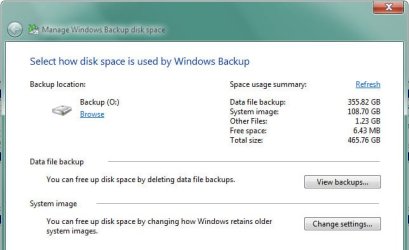
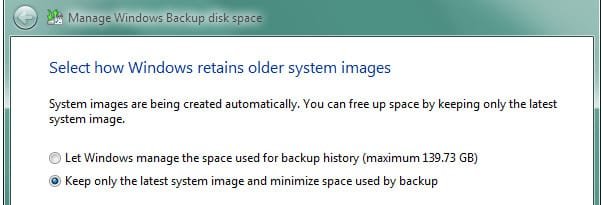
So far, this thread is way over my head so I'm going to plead for simple English. My 500 Gb backup drive fills up when there is no apparent reason for it to do so. I have made screen caps of the disk management table and the two dialogs related to back up settings. If someone could suggest a course of action, based on what they see, as to how I can deal with the fact that Windows is not obeying the setting that defines how much drive space it should use for backups, I would appreciate it. The P drive visible in the management table is an external drive used by Sync Toy to store game data and files that are changed several times a day.

manage.jpg

budisk.jpg

older images.jpg
 

My Computer My Computer

At a glance

Windows 7, 64 bit, SP-1
Computer type
PC/Desktop
Computer Manufacturer/Model Number
custom built
OS
Windows 7, 64 bit, SP-1
Antivirus
MS Essentials
Browser
Firefox 24.2 ESR
Proteus,
you may get more responses if you start a new thread.
For the time being:
You have ~96 GB on C: which suggest a reasonable amount of data (excluding the operating system and installed programs). I am guessing you have a scheduled backup that includes both file/folder (essentially personal data) and system image options.
What you could do in Backup settings is to select "Let me choose" and deselect the create an image option. Then use the "Create a system image" (left on backup and restore screen) button to manually create system images when you feel it is necessary.
I'm also guessing that a lot of the data on your C: partition is fairly static. It is best to keep this on a separate partition and back it up separately. You could create a data partition on C: but that depends on how comfortable you are in doing this.
 

My Computer My Computer

At a glance

Windows 7x64 Home Premium SP1Intel i7 2600kG.Skill Ripjaws (DDR3-1600) 2x4GBNvidia GeForce GTS 450; Intel HD Graphics 300...
Computer type
PC/Desktop
Computer Manufacturer/Model Number
Own build
OS
Windows 7x64 Home Premium SP1
CPU
Intel i7 2600k
Motherboard
ASUS P8Z68 Deluxe
Memory
G.Skill Ripjaws (DDR3-1600) 2x4GB
Graphics Card(s)
Nvidia GeForce GTS 450; Intel HD Graphics 3000(GT2+)
Monitor(s) Displays
Dell Ultrasharp IPS panel U2311H, Samsung SyncMaster P2350
Screen Resolution
1920x1080
Hard Drives
Samsung 850 Pro SSD 256GB, Samsung SSD 840 120GB, Seagates 1TB Barracuda ST31000528AS x2
PSU
Seasonic M12II 520W
Case
Lian Li Lancool PC-K60
Cooling
Case: 1x120mm, 3x140mm CPU: Hyper 212+
Keyboard
Logitech MK520 (wireless)
Mouse
Logitech MK520
Internet Speed
6-7 Mbps
Antivirus
Norton Security Premium, Malwarebytes on 2 (MSE on 3rd PC)
Browser
FireFox
Other Info
Audio: Logitech Z523 2.1
Proteus,
you may get more responses if you start a new thread.

I'll try to copy and move the original posting to a new thread tonight...

For the time being:
You have ~96 GB on C: which suggest a reasonable amount of data (excluding the operating system and installed programs). I am guessing you have a scheduled backup that includes both file/folder (essentially personal data) and system image options.
I do one scheduled backup a week.

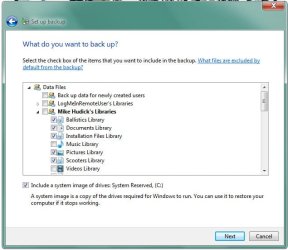
What you could do in Backup settings is to select "Let me choose"...
I am already using the "Let Me Choose" option. Essentially, all that is included in a backup (other than the system image) are a few file important files containing software licenses etc. and the 5 of my 7 Libraries that see regular activity. They total about 12 Gb worth of content at present. The other 2 libraries (Music and Videos) are assigned to the P: drive to be taken care of by Sync Toy.

...and deselect the create an image option. Then use the "Create a system image" (left on backup and restore screen) button to manually create system images when you feel it is necessary.
This is one of the things that puzzles me. It's true that my backs are configured to include a system image, but in one of the images in my previous post, you'll also note that one of the backup settings instructs that only the latest system image is to be retained. Shouldn't that mean that there would be only 1 system image among the data backups?

I'm also guessing that a lot of the data on your C: partition is fairly static. It is best to keep this on a separate partition and back it up separately. You could create a data partition on C: but that depends on how comfortable you are in doing this.
You're referring to a C: partition...the C: drive is a separate drive as are the O: and P: drives both separate individual drives, not partitions of another drive. About the only thing that IS backed up on the C: drive is data. I had the same problem with the backup drive filling up when I Windows was limited to 139 Gb for backup data storage. Windows apparently ignored that letting and simply filled the O: drive. That's why I change that setting to instruct Windows to keep only 1 the newest system image. What I need is a setting that limits the total amount of storage Windows is allowed to use in addition to that 1 system image, right?

Thanks for your input...I am appreciating the help!


Attachments

  • letmechoose.jpg
    letmechoose.jpg
    39.9 KB · Views: 34

My Computer My Computer

At a glance

Windows 7, 64 bit, SP-1
Computer type
PC/Desktop
Computer Manufacturer/Model Number
custom built
OS
Windows 7, 64 bit, SP-1
Antivirus
MS Essentials
Browser
Firefox 24.2 ESR
You seem to be doing your general backup in a sensible way except I would still make system images manually. I also recommend making only one image otherwise difference images will be stored in shadow storage. I think this gets hard to manage. When you do it manually you can delete an image, rename to something other than WindowsImageBackup and keep as many images your ext HDD can store. Whatever is renamed back to WindowsImageBackup is the image that will be restored. See the tutorial
http://www.sevenforums.com/tutorials/663-backup-complete-computer-create-image-backup.html

Given your backup settings, "Data file backup" is consuming most of the ext HDD. What do you see when you press "View Backups"?
 

My Computer My Computer

At a glance

Windows 7x64 Home Premium SP1Intel i7 2600kG.Skill Ripjaws (DDR3-1600) 2x4GBNvidia GeForce GTS 450; Intel HD Graphics 300...
Computer type
PC/Desktop
Computer Manufacturer/Model Number
Own build
OS
Windows 7x64 Home Premium SP1
CPU
Intel i7 2600k
Motherboard
ASUS P8Z68 Deluxe
Memory
G.Skill Ripjaws (DDR3-1600) 2x4GB
Graphics Card(s)
Nvidia GeForce GTS 450; Intel HD Graphics 3000(GT2+)
Monitor(s) Displays
Dell Ultrasharp IPS panel U2311H, Samsung SyncMaster P2350
Screen Resolution
1920x1080
Hard Drives
Samsung 850 Pro SSD 256GB, Samsung SSD 840 120GB, Seagates 1TB Barracuda ST31000528AS x2
PSU
Seasonic M12II 520W
Case
Lian Li Lancool PC-K60
Cooling
Case: 1x120mm, 3x140mm CPU: Hyper 212+
Keyboard
Logitech MK520 (wireless)
Mouse
Logitech MK520
Internet Speed
6-7 Mbps
Antivirus
Norton Security Premium, Malwarebytes on 2 (MSE on 3rd PC)
Browser
FireFox
Other Info
Audio: Logitech Z523 2.1
You seem to be doing your general backup in a sensible way except I would still make system images manually. I also recommend making only one image otherwise difference images will be stored in shadow storage.

So what you suggest is that I un-check the box in the image above that reads, "Include a system image..."

Is that what you are recommending?
 

My Computer My Computer

At a glance

Windows 7, 64 bit, SP-1
Computer type
PC/Desktop
Computer Manufacturer/Model Number
custom built
OS
Windows 7, 64 bit, SP-1
Antivirus
MS Essentials
Browser
Firefox 24.2 ESR
Given your backup settings, "Data file backup" is consuming most of the ext HDD. What do you see when you press "View Backups"?
I'm suggesting you provide this information
 

My Computer My Computer

At a glance

Windows 7x64 Home Premium SP1Intel i7 2600kG.Skill Ripjaws (DDR3-1600) 2x4GBNvidia GeForce GTS 450; Intel HD Graphics 300...
Computer type
PC/Desktop
Computer Manufacturer/Model Number
Own build
OS
Windows 7x64 Home Premium SP1
CPU
Intel i7 2600k
Motherboard
ASUS P8Z68 Deluxe
Memory
G.Skill Ripjaws (DDR3-1600) 2x4GB
Graphics Card(s)
Nvidia GeForce GTS 450; Intel HD Graphics 3000(GT2+)
Monitor(s) Displays
Dell Ultrasharp IPS panel U2311H, Samsung SyncMaster P2350
Screen Resolution
1920x1080
Hard Drives
Samsung 850 Pro SSD 256GB, Samsung SSD 840 120GB, Seagates 1TB Barracuda ST31000528AS x2
PSU
Seasonic M12II 520W
Case
Lian Li Lancool PC-K60
Cooling
Case: 1x120mm, 3x140mm CPU: Hyper 212+
Keyboard
Logitech MK520 (wireless)
Mouse
Logitech MK520
Internet Speed
6-7 Mbps
Antivirus
Norton Security Premium, Malwarebytes on 2 (MSE on 3rd PC)
Browser
FireFox
Other Info
Audio: Logitech Z523 2.1
Given your backup settings, "Data file backup" is consuming most of the ext HDD. What do you see when you press "View Backups"?
I'm suggesting you provide this information

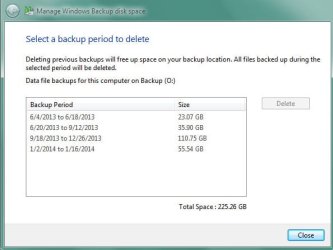
This is what I see NOW after deleting the backups from Jan 2013 thru May 2013 to gain 130 Gb of free space.

The comparatively large backup came as a result of my storing many Gb of movies from UTube.
 

Attachments

  • view.jpg
    view.jpg
    25.6 KB · Views: 30

My Computer My Computer

At a glance

Windows 7, 64 bit, SP-1
Computer type
PC/Desktop
Computer Manufacturer/Model Number
custom built
OS
Windows 7, 64 bit, SP-1
Antivirus
MS Essentials
Browser
Firefox 24.2 ESR
That explains it then. Your file/folder backup data sets are the major culprit in filling up your ext HDD. The data set 9/18/ to 12/26/13 is another big one. I'm sure you know what to do - keep them small and restrict their number.
I would still perform images manually and probably add an extra partition to disk 0 if it was me. At the very least don't put too much on disk 0 c: partition.
 

My Computer My Computer

At a glance

Windows 7x64 Home Premium SP1Intel i7 2600kG.Skill Ripjaws (DDR3-1600) 2x4GBNvidia GeForce GTS 450; Intel HD Graphics 300...
Computer type
PC/Desktop
Computer Manufacturer/Model Number
Own build
OS
Windows 7x64 Home Premium SP1
CPU
Intel i7 2600k
Motherboard
ASUS P8Z68 Deluxe
Memory
G.Skill Ripjaws (DDR3-1600) 2x4GB
Graphics Card(s)
Nvidia GeForce GTS 450; Intel HD Graphics 3000(GT2+)
Monitor(s) Displays
Dell Ultrasharp IPS panel U2311H, Samsung SyncMaster P2350
Screen Resolution
1920x1080
Hard Drives
Samsung 850 Pro SSD 256GB, Samsung SSD 840 120GB, Seagates 1TB Barracuda ST31000528AS x2
PSU
Seasonic M12II 520W
Case
Lian Li Lancool PC-K60
Cooling
Case: 1x120mm, 3x140mm CPU: Hyper 212+
Keyboard
Logitech MK520 (wireless)
Mouse
Logitech MK520
Internet Speed
6-7 Mbps
Antivirus
Norton Security Premium, Malwarebytes on 2 (MSE on 3rd PC)
Browser
FireFox
Other Info
Audio: Logitech Z523 2.1
That explains it then. Your file/folder backup data sets are the major culprit in filling up your ext HDD. The data set 9/18/ to 12/26/13 is another big one. I'm sure you know what to do - keep them small and restrict their number.
I would still perform images manually and probably add an extra partition to disk 0 if it was me. At the very least don't put too much on disk 0 c: partition.

One last thing...please explain "add an extra partition to disc O..." and "don't put too much on disk O c: partition".

Why do you suggest partitioning the O disk? What is the purpose of the partition? O: is a separate drive within my tower and it's only function is to hold the backups. All of its storage is devoted to backups.

I am still confused about why you refer to a "c partiton" on disk O? The C: drive and the O: drive are physically separate drives. There are no partitions on either one.
 

My Computer My Computer

At a glance

Windows 7, 64 bit, SP-1
Computer type
PC/Desktop
Computer Manufacturer/Model Number
custom built
OS
Windows 7, 64 bit, SP-1
Antivirus
MS Essentials
Browser
Firefox 24.2 ESR
He is referring to the number of the disk on the left, in this case 0 (Zero) which your C partition and system reserved partition are on.

Your lettered O drive is disk 1.
 

My Computer My Computer

At a glance

Win 10 Pro x64Intel I5-2500K @3.3GHz16GB G.Skill Ripjaws X (4x4GB)EVGA GeForce 750 Ti SC 2GB
Computer type
PC/Desktop
Computer Manufacturer/Model Number
Self Built
OS
Win 10 Pro x64
CPU
Intel I5-2500K @3.3GHz
Motherboard
Asrock P67 Extreme4
Memory
16GB G.Skill Ripjaws X (4x4GB)
Graphics Card(s)
EVGA GeForce 750 Ti SC 2GB
Sound Card
ASUS Xonar DG 5.1 Channels 24-bit 96KHz PCI Interface Sound
Monitor(s) Displays
auria eq2367
Screen Resolution
1920 x 1080
Hard Drives
250GB Samsung 850 EVO SSD
1TB WD Blue
1TB Hitachi
PSU
SeaSonic X 650W 80 Plus Gold
Case
Corsair Obsidian 750D
Cooling
Corsair H60, Three 140mm case fans
Keyboard
Logitech Wireless Keyboard K520
Mouse
Logitech Wireless Mouse M310
Internet Speed
Wave Broadband ~ 100 dn 5 up
Antivirus
Windows Defender, Malwarebytes Premium
Browser
Edge, IE11, Chrome
Other Info
Laptop specs: HP g7-1365dx /
CPU: AMD A6-3420M APU with Radeon(tm) HD Graphics /
RAM: Crucial 8Gb (2x4Gb) /
SSD: Crucial M4-CT128M4SSD2 ATA Device/ FW 000F /
GFX: AMD Radeon HD 6520G /
OS: Windows 10 Pro x64
As derekimo explained.
 

My Computer My Computer

At a glance

Windows 7x64 Home Premium SP1Intel i7 2600kG.Skill Ripjaws (DDR3-1600) 2x4GBNvidia GeForce GTS 450; Intel HD Graphics 300...
Computer type
PC/Desktop
Computer Manufacturer/Model Number
Own build
OS
Windows 7x64 Home Premium SP1
CPU
Intel i7 2600k
Motherboard
ASUS P8Z68 Deluxe
Memory
G.Skill Ripjaws (DDR3-1600) 2x4GB
Graphics Card(s)
Nvidia GeForce GTS 450; Intel HD Graphics 3000(GT2+)
Monitor(s) Displays
Dell Ultrasharp IPS panel U2311H, Samsung SyncMaster P2350
Screen Resolution
1920x1080
Hard Drives
Samsung 850 Pro SSD 256GB, Samsung SSD 840 120GB, Seagates 1TB Barracuda ST31000528AS x2
PSU
Seasonic M12II 520W
Case
Lian Li Lancool PC-K60
Cooling
Case: 1x120mm, 3x140mm CPU: Hyper 212+
Keyboard
Logitech MK520 (wireless)
Mouse
Logitech MK520
Internet Speed
6-7 Mbps
Antivirus
Norton Security Premium, Malwarebytes on 2 (MSE on 3rd PC)
Browser
FireFox
Other Info
Audio: Logitech Z523 2.1
Seems that there has been little posted in the last weeks that would shed additional light on the issue as originally described.

I just wanted to share some additional observations and add some final notes to the thread. They may or may not help others faced with the same issue.

Just to be clear - I use "create a system image" as the primary backup for Win7 machines. I do not backup on a schedule nor do I set up Windows Backup. I image based on significant changes or updates to the OS and installed programs. The issue as described effects the "reserved" partition free space. The issue breaks MS System Imaging. Although there are analogous free space requirements for other partitions used in the system image process, it appears that lack of space on the reserved partition is by far the most common cause of failure to create a system image. MS has not documented the process sufficiently for one to be able to say with certainty what the root cause of the basic issue is - so I draw conclusions based on what can be observed. The best info I found is at the link in post #26.

It should be pointed out, that Win7 installs a "System Reserved" partition of 100 MB and does not give it a drive letter. Seems safe to assume it has *THAT* specific name for a reason [duh]. Evidently, a primary cause of the described issue is other applications using that partition for their own incompatible proprietary purposes. That is *not* an MS or System Image issue. 100 MB is fully sufficient for System Reserved if used as designed and space/shadow copy information is not hijacked by incompatible applications. If anyone has information that proves otherwise - post it.

The best examples of rogue programs utilizing system reserved are BitDefender [USN journals], Acronis and Clonezilla [proprietary shadow copy issues]. There are undoubtedly others. The general conclusion for me was - use the native Windows backup restore system or use the others. The others apparently trash the system reserved partition. I personally think that the native Win7 backup/restore system is superior [pretty much the MS equivalent of Acronis TrueImage 8] and am staying with that. I use it regularly. ymmv

The observations in posts #9 and #10 of this thread seem to be accurate. I have not found anything from MS that would describe how to present a detailed list of what "uses" the space on System Reserved. I still believe the space is taken by shadow copy data that is not visible. For me, a "normal" system has about 30-37 MB of used space, which demonstrably does not match what is displayed [about 14 MB in all] - when the System Reserved is given a drive letter. It is also worth noting, that the Disk Cleanup/More Options/System Restore and Shadow Copies option becomes available when SYstem Reserved has a drive letter, however the effect of using that option is not clear - once again, a lack of documentation on the part of MS. This may be intentional by MS - makes other vendors figure it out on their own.

As to the Volume Shadow Copy Service - starting or stopping/starting the service can have an effect as noted in post #9, but not always. As noted by others, simply waiting [we wait 20 to 30 min] and rechecking the partition, showed that Win7 cleared the extra space needed on its own, without any intervention. This behavior is also not documented. There is obviously background activity on the part of Win7 taking place. Pretty much all MS recommendations as to the the Volume Shadow Copy Service specify setting start-up to Automatic or Automatic-Delayed, even though that is not the default for a standard installation.

As previously noted by others, what does seem to be an MS/System Imaqe issue is that you are sometimes unable to create a System Image "on demand", as there is no way to clear sufficient disk space on System Reserved "on demand" if there is insufficient space. Ultimately, you are forced to wait until the OS "creates" the space on it's own.

I have concluded, that a 100 MB System Reserved is fully sufficient for the intended use and setting up the Volume Shadow copy service to start automatically [either way] seems to prevent lack of free space. So the Issue is not resolved, but those choosing to use an MS imaging solution may now have a better idea of what worked [and continues to work] for us. From what I can see, MS does not have a standard response to the issue, which is a shame.

HTH

Windows 7 backup fails with error 0x81000019 - Microsoft Community
 

My Computer My Computer

At a glance

Win7 Pro x6417-477132 GbOnboard
Computer type
PC/Desktop
Computer Manufacturer/Model Number
Custom build Intel
OS
Win7 Pro x64
CPU
17-4771
Motherboard
DH87MC
Memory
32 Gb
Graphics Card(s)
Onboard
Hard Drives
Seagate ST2000DM001
Back
Top