System Image backup fails - not enough space for Volume Shadow Copy

Oh, so that's what the Sys Reserved is. No, Unlocker comes in handy now and again.
system reserved is used for bitlocker not unlocker!
 

My Computer My Computer

At a glance

Microsoft Windows 7 Home Premium 64-bits 7601...Intel(R) Core(TM) i3 CPU M 370 @ 2.40GHz4,00 GBATI Mobility Radeon HD 5400 Series
Computer type
Laptop
Computer Manufacturer/Model Number
ACER ASPIRE 5742G
OS
Microsoft Windows 7 Home Premium 64-bits 7601 Multiprocessor Free Service Pack 1
CPU
Intel(R) Core(TM) i3 CPU M 370 @ 2.40GHz
Motherboard
Acer Aspire 5742G
Memory
4,00 GB
Graphics Card(s)
ATI Mobility Radeon HD 5400 Series
Sound Card
(1) AMD High Definition Audio Device (2) Realtek High Defi
Screen Resolution
1366 x 768 x 32 bits (4294967296 colors) @ 60 Hz
Hard Drives
WDC WD5000BEVT-22ZAT0
I wasn't thinking of removing System Reserved, figuring that it is necessary. But I notice on C drive there is that with 100mb, plus two other unallocated partitions with 128kb and 1mb that I don't know what to make of. Can't recall seeing them on my previous Win 7 SSD.

Merge J & O into O, to make more room for backup images. Actually, I've got J down to a basic logical partition, but the partition manager has it grayed out for merging and there's another partition to the left between it and O that prevents expanding O directly. I guess the solution is to combine partitions to the left and then resize and combine to the right.
You can add the unused space to the partition before or after that unused space.

These disks are not SSD, is it? also not "Advanced Format" disks?
http://www.sevenforums.com/software...nce-format-drive-mis-aligned.html#post1777508
 

My Computer My Computer

At a glance

Microsoft Windows 7 Home Premium 64-bits 7601...Intel(R) Core(TM) i3 CPU M 370 @ 2.40GHz4,00 GBATI Mobility Radeon HD 5400 Series
Computer type
Laptop
Computer Manufacturer/Model Number
ACER ASPIRE 5742G
OS
Microsoft Windows 7 Home Premium 64-bits 7601 Multiprocessor Free Service Pack 1
CPU
Intel(R) Core(TM) i3 CPU M 370 @ 2.40GHz
Motherboard
Acer Aspire 5742G
Memory
4,00 GB
Graphics Card(s)
ATI Mobility Radeon HD 5400 Series
Sound Card
(1) AMD High Definition Audio Device (2) Realtek High Defi
Screen Resolution
1366 x 768 x 32 bits (4294967296 colors) @ 60 Hz
Hard Drives
WDC WD5000BEVT-22ZAT0
After the first time, I tried changing it to a logical partition, but no difference. Windows Startup repair didn't solve it. Had to use the backup image. One guess is that after making changes to the partition, I needed to reestablish or fix the boot record. Can't (or didn't see how to) do that with EaseUs, but that's where Partition Wizard would have come in handy. I'm not clear why changes to another HDD, even disconnected, would hangup the system drive, but it did. The two drives or partitions in question were the XP drive and the XP clone for previous builds of this computer, first when it was an XP system, then a dual boot (used easy BCD). I had just recently changed mobo/cpu from AMD to Intel and switched to Win 7 only.

The C (and D) partitions are SSD, the others HDDs. I was able to get rid of the small unallocated chunks on all the drives but the SSD - or maybe even there, not sure. I used EaseUs to bring a 0.2mb section at the far right into the adjoining partition and it no longer shows in that app, but with Partition Wizard it still shows as there. Doing the same operation with PW appears to work until the result, which still shows the 0.2mb unallocated partition.
 

My Computer My Computer

At a glance

Win 7 Home Premium and Win XP/SP3 Home 32 bit...AMD Phenom II X3 720 Black Edition (unlocked)6 GBXFX Radeon HD 5670
OS
Win 7 Home Premium and Win XP/SP3 Home 32 bit (desktop); Win 7 x64 Home Premium (laptop)
CPU
AMD Phenom II X3 720 Black Edition (unlocked)
Motherboard
Gigabyte GA-MA790X-UD4P (rev. 1.0) - version F9 BIOS
Memory
6 GB
Graphics Card(s)
XFX Radeon HD 5670
Monitor(s) Displays
Dell U2412M
Hard Drives
Corsair Force 3 SSD 60 GB
Seagate ST31000528AS - 1T
WD7500AAKS - 750GB
WD1600JBRTL - 160 GB
PSU
Corsair VX450
Case
Cooler Master
Cooling
front/back fans, CPU/PSU stock
Did you create C and "system reserved" by installing windows? Or by cloning? Did you create D within win7?
P is not for paging anymore.... see disk management.

Simply delete J was possible... at least I don't understand why not. Can you remember error message? Please tell me what error you got. "non system disk", "missing bootmgr" or.... ?
 

My Computer My Computer

At a glance

Microsoft Windows 7 Home Premium 64-bits 7601...Intel(R) Core(TM) i3 CPU M 370 @ 2.40GHz4,00 GBATI Mobility Radeon HD 5400 Series
Computer type
Laptop
Computer Manufacturer/Model Number
ACER ASPIRE 5742G
OS
Microsoft Windows 7 Home Premium 64-bits 7601 Multiprocessor Free Service Pack 1
CPU
Intel(R) Core(TM) i3 CPU M 370 @ 2.40GHz
Motherboard
Acer Aspire 5742G
Memory
4,00 GB
Graphics Card(s)
ATI Mobility Radeon HD 5400 Series
Sound Card
(1) AMD High Definition Audio Device (2) Realtek High Defi
Screen Resolution
1366 x 768 x 32 bits (4294967296 colors) @ 60 Hz
Hard Drives
WDC WD5000BEVT-22ZAT0
I don't believe that there was ever a specific error message. After "Loading Operating System," Windows would flash back to computer reboot, then the second time give the couldn't-start-needs-repair message, with System Repair or Start Windows as the choices. Sys Repair would run for awhile, be unable to fix the problem and so I chose Advanced Repair and then image restore.

P not paging (now L)? Not sure what you mean because it's right there in Disk Mgt.

In setting up after installing the new mobo/cpu, I tried transferring Win 7 - there's a tutorial how at this site - but finally had to bite the bullet and go clean, and just happened to have a new SSD to use for it. In the process, the XP drive got messed up, so I used the clone to restore it. That's why two drives were named the same. However, I clean installed Win 7 on the new SSD without the other drives attached for quite awhile, and when I hooked XP clone, it never came up as a dual boot choice.
 

My Computer My Computer

At a glance

Win 7 Home Premium and Win XP/SP3 Home 32 bit...AMD Phenom II X3 720 Black Edition (unlocked)6 GBXFX Radeon HD 5670
OS
Win 7 Home Premium and Win XP/SP3 Home 32 bit (desktop); Win 7 x64 Home Premium (laptop)
CPU
AMD Phenom II X3 720 Black Edition (unlocked)
Motherboard
Gigabyte GA-MA790X-UD4P (rev. 1.0) - version F9 BIOS
Memory
6 GB
Graphics Card(s)
XFX Radeon HD 5670
Monitor(s) Displays
Dell U2412M
Hard Drives
Corsair Force 3 SSD 60 GB
Seagate ST31000528AS - 1T
WD7500AAKS - 750GB
WD1600JBRTL - 160 GB
PSU
Corsair VX450
Case
Cooler Master
Cooling
front/back fans, CPU/PSU stock
Hi there
Not trying to hi-jack the thread but Windows 7 image backup really isn't that great -- the whole Volume shadowing idea when running a backup is just a load of Dog ....

For backup use a commercial backup program --they don't cost a fortune, are usually very flexible and the amount of time you save MORE than makes up for the relatively small cost of the program --usually around 40 USD.

You might even find some free versions but they tend to have limited capability.

BTW on restore whatever program you use ensure the BOOT partition is set to ACTIVE. This might be the small reserved system partition if this was created when you installed windows. If you have this partition then also ensure that the main Windows partition ("C") on restore is set to a PRIMARY partition.

If you are using GPT disks then other considerations apply -- haven't had any experience of these yet for using as a boot partition).


Cheers
jimbo
 

My Computer My Computer

At a glance

Linux CENTOS 7 / various Windows OS'es and se...Intel i7 Intel i58GB, 16GBOn Motherboard
Computer type
PC/Desktop
Computer Manufacturer/Model Number
Custom built, several laptops HP/ASUS
OS
Linux CENTOS 7 / various Windows OS'es and servers
CPU
Intel i7 Intel i5
Memory
8GB, 16GB
Graphics Card(s)
On Motherboard
Sound Card
Realtek HD audio
Monitor(s) Displays
Apple Cinema display, Samsung LCD
Screen Resolution
1920 X 1080
Hard Drives
4 X 1TB SATA
Mouse
Toshiba wireless laser
Internet Speed
> 20MB up
Windows recovery can restore one of its own image backups, but I found with EaseUS's free version that their image couldn't be restored if Windows wasn't booting, at least not without a recovery CD made with their program, I assume Windows' image has worked three times for me in the past few days, which is hard to argue with. Perhaps in other circumstances it wouldn't?
 

My Computer My Computer

At a glance

Win 7 Home Premium and Win XP/SP3 Home 32 bit...AMD Phenom II X3 720 Black Edition (unlocked)6 GBXFX Radeon HD 5670
OS
Win 7 Home Premium and Win XP/SP3 Home 32 bit (desktop); Win 7 x64 Home Premium (laptop)
CPU
AMD Phenom II X3 720 Black Edition (unlocked)
Motherboard
Gigabyte GA-MA790X-UD4P (rev. 1.0) - version F9 BIOS
Memory
6 GB
Graphics Card(s)
XFX Radeon HD 5670
Monitor(s) Displays
Dell U2412M
Hard Drives
Corsair Force 3 SSD 60 GB
Seagate ST31000528AS - 1T
WD7500AAKS - 750GB
WD1600JBRTL - 160 GB
PSU
Corsair VX450
Case
Cooler Master
Cooling
front/back fans, CPU/PSU stock
The thread is getting a bit confusing.
If Disk 0 was in the state shown in your first screenshot (ie system reserved active) then if you had boot problems you should have disconnected all drives except 0 and run startup repair on a system repair disk up to 3 times. Restart after each repair.
This should fix up your boot files.
If retaining system reserved then it is best to resize it to ~200MB.
 

My Computer My Computer

At a glance

Windows 7x64 Home Premium SP1Intel i7 2600kG.Skill Ripjaws (DDR3-1600) 2x4GBNvidia GeForce GTS 450; Intel HD Graphics 300...
Computer type
PC/Desktop
Computer Manufacturer/Model Number
Own build
OS
Windows 7x64 Home Premium SP1
CPU
Intel i7 2600k
Motherboard
ASUS P8Z68 Deluxe
Memory
G.Skill Ripjaws (DDR3-1600) 2x4GB
Graphics Card(s)
Nvidia GeForce GTS 450; Intel HD Graphics 3000(GT2+)
Monitor(s) Displays
Dell Ultrasharp IPS panel U2311H, Samsung SyncMaster P2350
Screen Resolution
1920x1080
Hard Drives
Samsung 850 Pro SSD 256GB, Samsung SSD 840 120GB, Seagates 1TB Barracuda ST31000528AS x2
PSU
Seasonic M12II 520W
Case
Lian Li Lancool PC-K60
Cooling
Case: 1x120mm, 3x140mm CPU: Hyper 212+
Keyboard
Logitech MK520 (wireless)
Mouse
Logitech MK520
Internet Speed
6-7 Mbps
Antivirus
Norton Security Premium, Malwarebytes on 2 (MSE on 3rd PC)
Browser
FireFox
Other Info
Audio: Logitech Z523 2.1
The original problem is solved and the discussion turned to what might have led to it. Looking at that first screenshot again, wouldn't have switching Active from the Reserved partition to C solved the problem? I resized the Reserved partition to 300mb and just set C as Active.
 

My Computer My Computer

At a glance

Win 7 Home Premium and Win XP/SP3 Home 32 bit...AMD Phenom II X3 720 Black Edition (unlocked)6 GBXFX Radeon HD 5670
OS
Win 7 Home Premium and Win XP/SP3 Home 32 bit (desktop); Win 7 x64 Home Premium (laptop)
CPU
AMD Phenom II X3 720 Black Edition (unlocked)
Motherboard
Gigabyte GA-MA790X-UD4P (rev. 1.0) - version F9 BIOS
Memory
6 GB
Graphics Card(s)
XFX Radeon HD 5670
Monitor(s) Displays
Dell U2412M
Hard Drives
Corsair Force 3 SSD 60 GB
Seagate ST31000528AS - 1T
WD7500AAKS - 750GB
WD1600JBRTL - 160 GB
PSU
Corsair VX450
Case
Cooler Master
Cooling
front/back fans, CPU/PSU stock
Looking at that first screenshot again, wouldn't have switching Active from the Reserved partition to C solved the problem? I resized the Reserved partition to 300mb and just set C as Active.
Yes if that was the way you wanted to go. You now say C is active. Therefore, System Reserved has no function any more. The BIOS goes to the active partition where the Boot Sector, Boot manager and BCD should reside.
 

My Computer My Computer

At a glance

Windows 7x64 Home Premium SP1Intel i7 2600kG.Skill Ripjaws (DDR3-1600) 2x4GBNvidia GeForce GTS 450; Intel HD Graphics 300...
Computer type
PC/Desktop
Computer Manufacturer/Model Number
Own build
OS
Windows 7x64 Home Premium SP1
CPU
Intel i7 2600k
Motherboard
ASUS P8Z68 Deluxe
Memory
G.Skill Ripjaws (DDR3-1600) 2x4GB
Graphics Card(s)
Nvidia GeForce GTS 450; Intel HD Graphics 3000(GT2+)
Monitor(s) Displays
Dell Ultrasharp IPS panel U2311H, Samsung SyncMaster P2350
Screen Resolution
1920x1080
Hard Drives
Samsung 850 Pro SSD 256GB, Samsung SSD 840 120GB, Seagates 1TB Barracuda ST31000528AS x2
PSU
Seasonic M12II 520W
Case
Lian Li Lancool PC-K60
Cooling
Case: 1x120mm, 3x140mm CPU: Hyper 212+
Keyboard
Logitech MK520 (wireless)
Mouse
Logitech MK520
Internet Speed
6-7 Mbps
Antivirus
Norton Security Premium, Malwarebytes on 2 (MSE on 3rd PC)
Browser
FireFox
Other Info
Audio: Logitech Z523 2.1
What are thinking with "the way you wanted to go?" After the post that raised the subject, I did a search and found some advice at THPC: How to mark, set, make a partition / drive Active in Windows 7, Vista, XP, Linux, NT, Me, 98SE, 98, 95. As I read it, specifically the paragrah beginning at "Just setting," with the system files on C, it should be the active partition. What are the implications of choosing either way?

Follow up: I just found out: can't find Master Boot Record. Glad I made a Partition Wizard boot disk.
 

My Computer My Computer

At a glance

Win 7 Home Premium and Win XP/SP3 Home 32 bit...AMD Phenom II X3 720 Black Edition (unlocked)6 GBXFX Radeon HD 5670
OS
Win 7 Home Premium and Win XP/SP3 Home 32 bit (desktop); Win 7 x64 Home Premium (laptop)
CPU
AMD Phenom II X3 720 Black Edition (unlocked)
Motherboard
Gigabyte GA-MA790X-UD4P (rev. 1.0) - version F9 BIOS
Memory
6 GB
Graphics Card(s)
XFX Radeon HD 5670
Monitor(s) Displays
Dell U2412M
Hard Drives
Corsair Force 3 SSD 60 GB
Seagate ST31000528AS - 1T
WD7500AAKS - 750GB
WD1600JBRTL - 160 GB
PSU
Corsair VX450
Case
Cooler Master
Cooling
front/back fans, CPU/PSU stock
This description of the boot process may be useful:
http://www.sevenforums.com/software/139658-reflect-updates-3.html#post1207608
Many people decide to do away with the system reserved which is what I was referring to by "the way you want to go". In my opinion a separate System Reserved facilitates:
1) Clean multibooting
2) BitLocker encryption
3) F8 - start windows in safe mode

and I keep it.
 

My Computer My Computer

At a glance

Windows 7x64 Home Premium SP1Intel i7 2600kG.Skill Ripjaws (DDR3-1600) 2x4GBNvidia GeForce GTS 450; Intel HD Graphics 300...
Computer type
PC/Desktop
Computer Manufacturer/Model Number
Own build
OS
Windows 7x64 Home Premium SP1
CPU
Intel i7 2600k
Motherboard
ASUS P8Z68 Deluxe
Memory
G.Skill Ripjaws (DDR3-1600) 2x4GB
Graphics Card(s)
Nvidia GeForce GTS 450; Intel HD Graphics 3000(GT2+)
Monitor(s) Displays
Dell Ultrasharp IPS panel U2311H, Samsung SyncMaster P2350
Screen Resolution
1920x1080
Hard Drives
Samsung 850 Pro SSD 256GB, Samsung SSD 840 120GB, Seagates 1TB Barracuda ST31000528AS x2
PSU
Seasonic M12II 520W
Case
Lian Li Lancool PC-K60
Cooling
Case: 1x120mm, 3x140mm CPU: Hyper 212+
Keyboard
Logitech MK520 (wireless)
Mouse
Logitech MK520
Internet Speed
6-7 Mbps
Antivirus
Norton Security Premium, Malwarebytes on 2 (MSE on 3rd PC)
Browser
FireFox
Other Info
Audio: Logitech Z523 2.1
Sounds like good reasons to me. Thanks!
 

My Computer My Computer

At a glance

Win 7 Home Premium and Win XP/SP3 Home 32 bit...AMD Phenom II X3 720 Black Edition (unlocked)6 GBXFX Radeon HD 5670
OS
Win 7 Home Premium and Win XP/SP3 Home 32 bit (desktop); Win 7 x64 Home Premium (laptop)
CPU
AMD Phenom II X3 720 Black Edition (unlocked)
Motherboard
Gigabyte GA-MA790X-UD4P (rev. 1.0) - version F9 BIOS
Memory
6 GB
Graphics Card(s)
XFX Radeon HD 5670
Monitor(s) Displays
Dell U2412M
Hard Drives
Corsair Force 3 SSD 60 GB
Seagate ST31000528AS - 1T
WD7500AAKS - 750GB
WD1600JBRTL - 160 GB
PSU
Corsair VX450
Case
Cooler Master
Cooling
front/back fans, CPU/PSU stock
I don't believe that there was ever a specific error message. After "Loading Operating System," Windows would flash back to computer reboot, then the second time give the couldn't-start-needs-repair message, with System Repair or Start Windows as the choices. Sys Repair would run for awhile, be unable to fix the problem and so I chose Advanced Repair and then image restore.

P not paging (now L)? Not sure what you mean because it's right there in Disk Mgt.

In setting up after installing the new mobo/cpu, I tried transferring Win 7 - there's a tutorial how at this site - but finally had to bite the bullet and go clean, and just happened to have a new SSD to use for it. In the process, the XP drive got messed up, so I used the clone to restore it. That's why two drives were named the same. However, I clean installed Win 7 on the new SSD without the other drives attached for quite awhile, and when I hooked XP clone, it never came up as a dual boot choice.
So "Loading Operating System" and then a BSOD (which you didn't see because automatic restart on crash is on). MBR and bootsector wasn't the problem. I don't know the BSOD message so I don't know.

P is labeld page file but doesn't have a page file, that's what i wanna say.

So you did a clean install on SSD... so partitions are aligned properly.

All is working fine now?
 

My Computer My Computer

At a glance

Microsoft Windows 7 Home Premium 64-bits 7601...Intel(R) Core(TM) i3 CPU M 370 @ 2.40GHz4,00 GBATI Mobility Radeon HD 5400 Series
Computer type
Laptop
Computer Manufacturer/Model Number
ACER ASPIRE 5742G
OS
Microsoft Windows 7 Home Premium 64-bits 7601 Multiprocessor Free Service Pack 1
CPU
Intel(R) Core(TM) i3 CPU M 370 @ 2.40GHz
Motherboard
Acer Aspire 5742G
Memory
4,00 GB
Graphics Card(s)
ATI Mobility Radeon HD 5400 Series
Sound Card
(1) AMD High Definition Audio Device (2) Realtek High Defi
Screen Resolution
1366 x 768 x 32 bits (4294967296 colors) @ 60 Hz
Hard Drives
WDC WD5000BEVT-22ZAT0
There is a pagefile.sys in L (formerly P) with 6gb. Is it not really one?

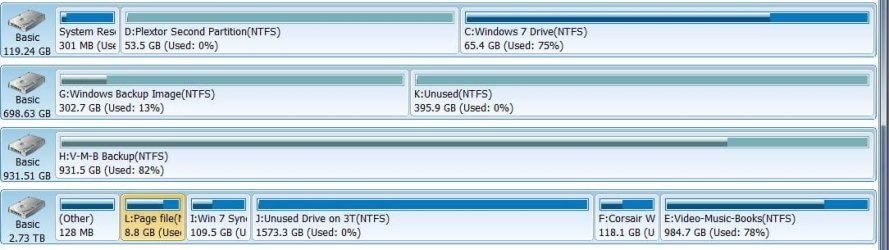
I did the clean install early last week. Here's how the partitions look now. Very grateful for your patient help.

Disk Partition Window 5-3-12.jpg
 

My Computer My Computer

At a glance

Win 7 Home Premium and Win XP/SP3 Home 32 bit...AMD Phenom II X3 720 Black Edition (unlocked)6 GBXFX Radeon HD 5670
OS
Win 7 Home Premium and Win XP/SP3 Home 32 bit (desktop); Win 7 x64 Home Premium (laptop)
CPU
AMD Phenom II X3 720 Black Edition (unlocked)
Motherboard
Gigabyte GA-MA790X-UD4P (rev. 1.0) - version F9 BIOS
Memory
6 GB
Graphics Card(s)
XFX Radeon HD 5670
Monitor(s) Displays
Dell U2412M
Hard Drives
Corsair Force 3 SSD 60 GB
Seagate ST31000528AS - 1T
WD7500AAKS - 750GB
WD1600JBRTL - 160 GB
PSU
Corsair VX450
Case
Cooler Master
Cooling
front/back fans, CPU/PSU stock
This description of the boot process may be useful:
http://www.sevenforums.com/software/139658-reflect-updates-3.html#post1207608
Many people decide to do away with the system reserved which is what I was referring to by "the way you want to go". In my opinion a separate System Reserved facilitates:
1) Clean multibooting
2) BitLocker encryption
3) F8 - start windows in safe mode

and I keep it.

3) F8 - start windows in safe mode => this has nothing to do with "system reserved" boot partition
1) Clean multibooting => boot partition must be an primary and active partition. OS partitions can be logical and inactive. So if you make your OS partition primary and active and put the bootmgr and bcd-menu (bootmenu) on it. It's working fine. But you can't simply delete that partition because it has the multiboot menu as well on it.

So seperating both tasks has some advantages.

2) BitLocker encryption => totally right.

Leave it the way it's now!
 

My Computer My Computer

At a glance

Microsoft Windows 7 Home Premium 64-bits 7601...Intel(R) Core(TM) i3 CPU M 370 @ 2.40GHz4,00 GBATI Mobility Radeon HD 5400 Series
Computer type
Laptop
Computer Manufacturer/Model Number
ACER ASPIRE 5742G
OS
Microsoft Windows 7 Home Premium 64-bits 7601 Multiprocessor Free Service Pack 1
CPU
Intel(R) Core(TM) i3 CPU M 370 @ 2.40GHz
Motherboard
Acer Aspire 5742G
Memory
4,00 GB
Graphics Card(s)
ATI Mobility Radeon HD 5400 Series
Sound Card
(1) AMD High Definition Audio Device (2) Realtek High Defi
Screen Resolution
1366 x 768 x 32 bits (4294967296 colors) @ 60 Hz
Hard Drives
WDC WD5000BEVT-22ZAT0
There is a pagefile.sys in L (formerly P) with 6gb. Is it not really one?

I did the clean install early last week. Here's how the partitions look now. Very grateful for your patient help.

View attachment 209953
You posted this before http://www.sevenforums.com/attachme...volume-shadow-copy-disk-mgt-window-5-1-12.jpg

No page file in that screenshot on P (it's on C)

Check this:
To change page file settings in Windows 7:
In the Start Menu search box, type "Advanced System Settings" and choose the Control Panel applet that should show up, "View advanced system settings"
Under "Advanced" tab, "Performance" section, click "Settings..."
Under "Advanced" tab, "Virtual Memory" section, click "Change..."
These are the actual settings. Uncheck "Automatically manage paging file size for all drives" and you can change these settings. Highlight the drive you want it on, and select either a fixed size or system managed size (I prefer system managed size), and then click "Set". YOU HAVE TO CLICK THE SET BUTTON. Do the same to remove it from the drive you don't want it on. ("No paging file".)
Click OK, OK, OK, and you should be prompted for a reboot.

Settings were right?
 

My Computer My Computer

At a glance

Microsoft Windows 7 Home Premium 64-bits 7601...Intel(R) Core(TM) i3 CPU M 370 @ 2.40GHz4,00 GBATI Mobility Radeon HD 5400 Series
Computer type
Laptop
Computer Manufacturer/Model Number
ACER ASPIRE 5742G
OS
Microsoft Windows 7 Home Premium 64-bits 7601 Multiprocessor Free Service Pack 1
CPU
Intel(R) Core(TM) i3 CPU M 370 @ 2.40GHz
Motherboard
Acer Aspire 5742G
Memory
4,00 GB
Graphics Card(s)
ATI Mobility Radeon HD 5400 Series
Sound Card
(1) AMD High Definition Audio Device (2) Realtek High Defi
Screen Resolution
1366 x 768 x 32 bits (4294967296 colors) @ 60 Hz
Hard Drives
WDC WD5000BEVT-22ZAT0
When I said pagefile on P (now L), I meant where the pagefile.sys was being placed. So yes, C is generating the page file. I unchecked auto, but I think P/L is where it automatically put it, unless I'm forgetting something. I did play around with pagefile settings at some point after installing Win 7 last week, as I recall. Any reason to change where the file is going? Here's what it looks like (C is system managed):

Disk Partition Pagefile 5-3-12.jpg
 

My Computer My Computer

At a glance

Win 7 Home Premium and Win XP/SP3 Home 32 bit...AMD Phenom II X3 720 Black Edition (unlocked)6 GBXFX Radeon HD 5670
OS
Win 7 Home Premium and Win XP/SP3 Home 32 bit (desktop); Win 7 x64 Home Premium (laptop)
CPU
AMD Phenom II X3 720 Black Edition (unlocked)
Motherboard
Gigabyte GA-MA790X-UD4P (rev. 1.0) - version F9 BIOS
Memory
6 GB
Graphics Card(s)
XFX Radeon HD 5670
Monitor(s) Displays
Dell U2412M
Hard Drives
Corsair Force 3 SSD 60 GB
Seagate ST31000528AS - 1T
WD7500AAKS - 750GB
WD1600JBRTL - 160 GB
PSU
Corsair VX450
Case
Cooler Master
Cooling
front/back fans, CPU/PSU stock
Delete L:\pagefile.sys . It isn't used now!
since you have 6GB of memory, the pagefile isn't used frequently. Most of it's use is for read operations anyway. SSD life span will shorten in case of writes. But not that terribly nowadays. Put it on SSD only for speed!
http://www.sevenforums.com/performa...-ssd-should-i-move-page-file.html#post1162139

Tip: Disable SSD partitions in your automatically defragmentation scheme. Defragmentatition is only usefull for HDD's! Defragmentation does a lot of write operations.
 

My Computer My Computer

At a glance

Microsoft Windows 7 Home Premium 64-bits 7601...Intel(R) Core(TM) i3 CPU M 370 @ 2.40GHz4,00 GBATI Mobility Radeon HD 5400 Series
Computer type
Laptop
Computer Manufacturer/Model Number
ACER ASPIRE 5742G
OS
Microsoft Windows 7 Home Premium 64-bits 7601 Multiprocessor Free Service Pack 1
CPU
Intel(R) Core(TM) i3 CPU M 370 @ 2.40GHz
Motherboard
Acer Aspire 5742G
Memory
4,00 GB
Graphics Card(s)
ATI Mobility Radeon HD 5400 Series
Sound Card
(1) AMD High Definition Audio Device (2) Realtek High Defi
Screen Resolution
1366 x 768 x 32 bits (4294967296 colors) @ 60 Hz
Hard Drives
WDC WD5000BEVT-22ZAT0
^ I have experienced this issue before. For me, it was because my hidden "System Reserved" partition dropped to less than 50MB free. This volume seems to change automagically within Windows and when I tried to run the backup, and it was less than 50MB, I would get this error. Once it cleared space on it's own, the system backup would work again.

I've had the imaging procedure fail for this reason. The partition needs to be about 70% free for imaging to work. If it isn't, the error message arises. The space not being enough usually happens after a major upgrade on the the security suite.

I've never found a definite cure for this but find that after a few reboots (sometimes more) and a bit of grumbling, the problem just goes away on its own.
 

My Computer My Computer

At a glance

Windows 7 Home Premium 64-bit SP1Intel Quad Core 2.5 Ghz4 GB DDR2ATI Radeon 3800 HD
OS
Windows 7 Home Premium 64-bit SP1
CPU
Intel Quad Core 2.5 Ghz
Motherboard
Asus P5Q-EM
Memory
4 GB DDR2
Graphics Card(s)
ATI Radeon 3800 HD
Monitor(s) Displays
BenQG2222HDL
Screen Resolution
1920x1080
Hard Drives
2 X 500GB Western Digital
Internet Speed
30 MB
Back
Top