Post Your Overclock!

Status
Not open for further replies.
Ive just took 8GB ram out of my pc cos its done nothing but cause me grief lol. I bought a second 8GB kit of the ram ive been using for ages but because the spd info on my original ram is wrong it wont run right. When i first installed it i would only get 12GB usable unless i upped the vcore. I did get it so i had all 16GB but sometimes i was having to go into the bios and reset the already set settings to get all the ram usable. Eventhough its the same ram technically its different enit. So i took it out as it was more than likely down to this that my oc was failing. I know having more ram makes it more difficult to oc and i only bought it to fill the empty slots lol as i have no need for 16GB really. it can go in the build i do for my daughter. id spent days tryin to get it right but it never was really so i'll restart my oc from scratch and see what difference it makes :D

EDIT: sorry i should have just edited my last post but didnt think... my heads up my arse at the min lol

Looks like your RAM is different build versions, meaning different chips used. This may or may not be coaxed into working together.
You're right, the best way is to buy a matched kit.

When you start loading up on RAM you usually will need to bump the IMC (Integrated Memory Controller) voltage and sometimes the DRAM voltage.
With more RAM cards, more memory chips, you need more voltage to get enough power to each memory chip on each RAM card.

You can bump voltage on AMD CPUs and boards a fair bit without causing too much heat.
If you want to post those voltage settings, I can give you some suggestions.
Or, if your happy with 8GB, then it's all good.

The SPD info on CPUZ is just the JEDEC standard testing information for the RAM cards, this is just for reference, it doesn't have anything to do with actual settings.
The Memory tab shows the actual timings.
All RAM voltages listed on CPUZ are recommended and not actual, these have to be taken from the BIOS. (CPU voltage is actual)

ello dave
cheers for the info :D im just gonna stick with the 8GB as i dont do any rendering or anythin like that. once in a blue moon maybe.
the new kit is a different version number too. i also think that the new kit i bought is dodgy too as when i took the other 8GB out i kept the new kit in but when i booted up this morning only 3.9GB was usable. i tried various settings to no avail so i put the old kit with the wrong spd bk in. redid the timings n so on and have 8GB. so i think i'll rma the new kit. i did have both kits working at 1600 but then id boot up in the morning and only have 7.9GB.
as for the voltages of the ram its rated @1.5v and 1.65v for xmp 1600 but this is rated for intel i5 i7. do u think i should be using a lower voltage as im on AMD or keep it as is? i have ran it @ 1600MHz @1.63v before and it seemed alright.
i was advised to follow this guide for settings for 4GB dimms
Crosshair V Formula Easy Memory Setup Guide which i did.
my board slightly overvolts the ram. only a tiny bit though. if i set 1.65v it actually sets 1.667.so i set it at 1.64v.
when im in the bios next i'll do so screenies and see what u all think i should change if anything.
thanks! :D
 

My Computer

Computer type
PC/Desktop
Computer Manufacturer/Model Number
Custom build
OS
Win7 Home Premium x64 SP1
CPU
i7 4770k
Motherboard
Asus maximus VI Hero
Memory
8Gb Kingston HyperX Beast 2400MHz @2133MHz 11-12-11-30
Graphics Card(s)
MSI GTX 780ti Gaming Oc x2
Sound Card
Onboard ROG SupremeFX
Monitor(s) Displays
Asus VG248QE
Screen Resolution
3840X1080 144Hz
Hard Drives
Samung Evo 256Gb, OCZ Agility4 128Gb
1x1TB hitachi storage
PSU
EVGA Supernova 1000w Platinum
Case
Corsair Air 540
Cooling
Corsair H100i
Keyboard
Coolermaster Quickfire Pro
Mouse
Corsair M65 RGB
Internet Speed
74mb dwn/16up
Antivirus
MSE,Malwarebytes
Browser
Chrome
Ganjiry type msconfig in search>enter>boot tab>Advanced Options button. In the BOOT Advanced Options window uncheck everything, OK, Apply, OK and reboot and see how much RAM is useable then.
 

My Computer

Computer type
PC/Desktop
Computer Manufacturer/Model Number
Home Built Desktop By DataTech
OS
Windows 7 Ultimate X64 SP1
CPU
Intel i5-2550K, Differing ~4.4-4.8GHz No built in GPU
Motherboard
ASUS P8Z68-V PRO/GEN3
Memory
16GB G.Skill Sniper 1866MHz @ 2133MHz 2x8GB
Graphics Card(s)
ASUS GTX650TIB-DC2OC-2GD5, (650TI Boost)
Sound Card
Onboard Realtek 5-1
Monitor(s) Displays
Samsung P2570HD
Screen Resolution
1920x1080
Hard Drives
Samsung 840 Pro 256GB SSD for OS, 500GB Seagate Constellation (Enterprise drive) for Data
PSU
Corsair HX650W
Case
Inwin Dragon Rider
Cooling
Hyper 212 EVO w/two Noctua fans, push-pull, @1300 RPM
Keyboard
E-Z Eyes, bright yellow keys with large characters
Mouse
steelseries SENSEI Laser Pro Gaming
Internet Speed
48-51Mbs Mbs down, 11 Mbs up Xfinity Cable
Antivirus
Norton Internet Security 2013
Browser
IE 10, Opera, Pale Moon if needed
Other Info
4 case fans, LG BluRay-RE, ASUS DVD-RW, Mr. Fusion power supply, 1.21 gigawatts.
everythin is unchecked already and hole memory mapping is enabled in the bios chap. i sorted the usable ram issue by installing my original kit.i have 8GB instaled and 8GB usable. im pretty sure the ram is sorted ive just gotta re-do my oc again.
i never had any probs when just running this kit
 

My Computer

Computer type
PC/Desktop
Computer Manufacturer/Model Number
Custom build
OS
Win7 Home Premium x64 SP1
CPU
i7 4770k
Motherboard
Asus maximus VI Hero
Memory
8Gb Kingston HyperX Beast 2400MHz @2133MHz 11-12-11-30
Graphics Card(s)
MSI GTX 780ti Gaming Oc x2
Sound Card
Onboard ROG SupremeFX
Monitor(s) Displays
Asus VG248QE
Screen Resolution
3840X1080 144Hz
Hard Drives
Samung Evo 256Gb, OCZ Agility4 128Gb
1x1TB hitachi storage
PSU
EVGA Supernova 1000w Platinum
Case
Corsair Air 540
Cooling
Corsair H100i
Keyboard
Coolermaster Quickfire Pro
Mouse
Corsair M65 RGB
Internet Speed
74mb dwn/16up
Antivirus
MSE,Malwarebytes
Browser
Chrome
Looks like your RAM is different build versions, meaning different chips used. This may or may not be coaxed into working together.
You're right, the best way is to buy a matched kit.

When you start loading up on RAM you usually will need to bump the IMC (Integrated Memory Controller) voltage and sometimes the DRAM voltage.
With more RAM cards, more memory chips, you need more voltage to get enough power to each memory chip on each RAM card.

You can bump voltage on AMD CPUs and boards a fair bit without causing too much heat.
If you want to post those voltage settings, I can give you some suggestions.
Or, if your happy with 8GB, then it's all good.

The SPD info on CPUZ is just the JEDEC standard testing information for the RAM cards, this is just for reference, it doesn't have anything to do with actual settings.
The Memory tab shows the actual timings.
All RAM voltages listed on CPUZ are recommended and not actual, these have to be taken from the BIOS. (CPU voltage is actual)

ello dave
cheers for the info :D im just gonna stick with the 8GB as i dont do any rendering or anythin like that. once in a blue moon maybe.
the new kit is a different version number too. i also think that the new kit i bought is dodgy too as when i took the other 8GB out i kept the new kit in but when i booted up this morning only 3.9GB was usable. i tried various settings to no avail so i put the old kit with the wrong spd bk in. redid the timings n so on and have 8GB. so i think i'll rma the new kit. i did have both kits working at 1600 but then id boot up in the morning and only have 7.9GB.
as for the voltages of the ram its rated @1.5v and 1.65v for xmp 1600 but this is rated for intel i5 i7. do u think i should be using a lower voltage as im on AMD or keep it as is? i have ran it @ 1600MHz @1.63v before and it seemed alright.
i was advised to follow this guide for settings for 4GB dimms
Crosshair V Formula Easy Memory Setup Guide which i did.
my board slightly overvolts the ram. only a tiny bit though. if i set 1.65v it actually sets 1.667.so i set it at 1.64v.
when im in the bios next i'll do so screenies and see what u all think i should change if anything.
thanks! :D

FYI, sometimes AMD boards have trouble with Intel RAM, which may be the issue with your new RAM.

The RAM timings and voltages depends on the RAM for the most part, also the combined interaction of the motherboard, CPU Integrated Memory Controller, and PSU.

The info from the link is a good basic setup for large amounts of RAM (4GB +).
CPU/NB voltage usually needs to be bumped, 1.20v is the standard starting place.
Did you manually set the first four timings?

Post you BIOS settings and you can get some recommendations.
 

My Computer

Computer type
PC/Desktop
Computer Manufacturer/Model Number
76~2.0
OS
Windows 7 Ult x64 - SP1/ Windows 8 Pro x64
CPU
Intel Core i5-3570K 4.6GHz
Motherboard
Gigabyte GA-Z77X UD3H, f18
Memory
8GB (2X4GB) DDR3 1600 Corsair Vengeance CL8 1.5v
Graphics Card(s)
Sapphire HD 7770 Vapor-X OC 1GB DDR5
Sound Card
Onboard VIA VT2021
Monitor(s) Displays
22" LCD Dell
Screen Resolution
1680x1050
Hard Drives
Samsung 840Pro 128GB SSD,
Seagate Barracuda 500GB SATA2 7200rpm 32MB cache, Seagate Barracuda 1TB SATA2 7200rpm 32MB cache,
PSU
Corsair HX650W
Case
Cooler Master Storm Scout
Cooling
Corsair H80 2x12cm Noctua NF P12 , 2x14cm case fans
Keyboard
Logitech Wave
Mouse
CM Sentinel
Internet Speed
Dismal
Antivirus
Avast
Browser
Opera Next
Other Info
Haswell laptop: HP Envy 17t-j, i7-4700MQ, GeForce 740M 2GB DDR3, 17.3" Full HD 1920x1080, 16GB RAM, Samsung 840 Pro 128GB, 1TB Hitachi 7200 HDD,
Desktop: eSATA ports,
External eSATA Seagate 500GB SATA2 7200rpm,
External WD USB 500GB
the only reason i have this ram is cos 17months ago i'd only had a laptop for 12months previous and didn't know squad about pc's. so i payed a shop £850 to build me a pc. i wasnt happy with it so started to learn what i needed by rebuilding a few times. ive learned a lot since then and the only original component from that pc is the ram lol.

yeah i always set all timings manually. i just check what the xmp settings r then input it all manually. i know its done right then :D ive never had any probs at all with the original kit which ive ran on 3 different amd boards over the last 17months. i see what ur saying though as the new kit has a different v number. not to worry now anyhooooo as im just running the original kit. if i want 16GB later on then i'll get a complete kit.
im a tad busy at the min but in an hour or so i'll do some bios screenies for ya. thanks! :D

i forgot to do the screenies yesterday, head was up my arse busy lol. will do em shortly
 

My Computer

Computer type
PC/Desktop
Computer Manufacturer/Model Number
Custom build
OS
Win7 Home Premium x64 SP1
CPU
i7 4770k
Motherboard
Asus maximus VI Hero
Memory
8Gb Kingston HyperX Beast 2400MHz @2133MHz 11-12-11-30
Graphics Card(s)
MSI GTX 780ti Gaming Oc x2
Sound Card
Onboard ROG SupremeFX
Monitor(s) Displays
Asus VG248QE
Screen Resolution
3840X1080 144Hz
Hard Drives
Samung Evo 256Gb, OCZ Agility4 128Gb
1x1TB hitachi storage
PSU
EVGA Supernova 1000w Platinum
Case
Corsair Air 540
Cooling
Corsair H100i
Keyboard
Coolermaster Quickfire Pro
Mouse
Corsair M65 RGB
Internet Speed
74mb dwn/16up
Antivirus
MSE,Malwarebytes
Browser
Chrome
Ok, no problem, when you get around to it.

I used to have a round tuit but, can't find it anymore ;)
 

My Computer

Computer type
PC/Desktop
Computer Manufacturer/Model Number
76~2.0
OS
Windows 7 Ult x64 - SP1/ Windows 8 Pro x64
CPU
Intel Core i5-3570K 4.6GHz
Motherboard
Gigabyte GA-Z77X UD3H, f18
Memory
8GB (2X4GB) DDR3 1600 Corsair Vengeance CL8 1.5v
Graphics Card(s)
Sapphire HD 7770 Vapor-X OC 1GB DDR5
Sound Card
Onboard VIA VT2021
Monitor(s) Displays
22" LCD Dell
Screen Resolution
1680x1050
Hard Drives
Samsung 840Pro 128GB SSD,
Seagate Barracuda 500GB SATA2 7200rpm 32MB cache, Seagate Barracuda 1TB SATA2 7200rpm 32MB cache,
PSU
Corsair HX650W
Case
Cooler Master Storm Scout
Cooling
Corsair H80 2x12cm Noctua NF P12 , 2x14cm case fans
Keyboard
Logitech Wave
Mouse
CM Sentinel
Internet Speed
Dismal
Antivirus
Avast
Browser
Opera Next
Other Info
Haswell laptop: HP Envy 17t-j, i7-4700MQ, GeForce 740M 2GB DDR3, 17.3" Full HD 1920x1080, 16GB RAM, Samsung 840 Pro 128GB, 1TB Hitachi 7200 HDD,
Desktop: eSATA ports,
External eSATA Seagate 500GB SATA2 7200rpm,
External WD USB 500GB
:D
ello folks i uploaded the screenies to photbucket as i kept getting an error when uploading to here.
thanks for havin a butchers for me :D

bios settings 4GHz Ram 1600 pictures by ganjiry1 - Photobucket
i think my vcore is still a tad low and ive gotta up the cpu/nb freq yet. i just wanted to make sure ram was ok first
 

My Computer

Computer type
PC/Desktop
Computer Manufacturer/Model Number
Custom build
OS
Win7 Home Premium x64 SP1
CPU
i7 4770k
Motherboard
Asus maximus VI Hero
Memory
8Gb Kingston HyperX Beast 2400MHz @2133MHz 11-12-11-30
Graphics Card(s)
MSI GTX 780ti Gaming Oc x2
Sound Card
Onboard ROG SupremeFX
Monitor(s) Displays
Asus VG248QE
Screen Resolution
3840X1080 144Hz
Hard Drives
Samung Evo 256Gb, OCZ Agility4 128Gb
1x1TB hitachi storage
PSU
EVGA Supernova 1000w Platinum
Case
Corsair Air 540
Cooling
Corsair H100i
Keyboard
Coolermaster Quickfire Pro
Mouse
Corsair M65 RGB
Internet Speed
74mb dwn/16up
Antivirus
MSE,Malwarebytes
Browser
Chrome
If you are Overclocking to let's say 4 ghz ,That chip all you really need to do is move the multipler

Stock voltage should get you over 4ghz max turbo core on that chip is 3.9 Ghz you can achieve that n stock voltage just a slight bump will have you running 4ghz easy

you should use the Multipler to get max core usage like if you had turbo permantly on then there is no need to tweek the ram

If you are playing it safe use the multiplyer and use a little v-core at a time to make it stable
 

My Computer

Computer type
PC/Desktop
Computer Manufacturer/Model Number
CoreI7-6700K MrFingerIII Special Builds
OS
Windows 10 Home Premium 64bit sp1
CPU
Intel I7-6700K @ 4.6 Ghz 1.344 volts everyday OC
Motherboard
Asrock Fatality K6 Z170 Socket 1151
Memory
32GB G-Skill TridentZ 3200mhz 16-18-18-38 DDR4
Graphics Card(s)
Sli Gigabyte Windforce GTX 980 G1
Sound Card
AC97 Creative Rage Tactic 3D Headphones Bluetooth
Monitor(s) Displays
27" Asus ROG Swift PG278Q G-Sync 48" Vizio Smart HD TV
Screen Resolution
2560x1440p 27"- 48" Currently Gaming at 2560x1440p Res 2K
Hard Drives
250GB Samsung Evo840SSD Seagate baracuda 500 GB WD Mybook 500Gb 1TB Seagate Barracuda
PSU
HX1050w Corsair Silver 80plus certified crosfire/sli
Case
Enthod Pro Full Tower
Cooling
Corsair H110i GT 280 mm High Performance WaterBlock
Keyboard
Logitech wireless keyboard
Mouse
Logitech wireless mouse
Internet Speed
Cox Cable 100+ mb
Antivirus
WebRoot Spysweeper with Antivirus
Browser
IE-10, Chrome, Opera
Other Info
My Other Rig is a AMD FX8320E @4.6Ghz 16GB Ballistic Sport Ram
Mobo Asrock Fatality 990FX 120GB OCZ SSD 1TB Seagate Barracuda Corsair H75 Cooling PSU Corsair CX750
GPU GTX Gigabyte 970G1
yup that was the plan for now, ram can be way tooo much of a pain in the arse lol. too many variables man. now i know my rams all stable and back to normal i know what what causing all my probs all's good :D it was a good learning curve though just experimenting and it was good seeing the gains from the oc but its not something id get into too much lol. too much thinking involved n i got enough to think about lol. i'll oc to 4.2/3 and leave it at that as there's no noticable difference with the ram oc'd anyhow is there. i have to give everythin a go just to see enit :D
 

My Computer

Computer type
PC/Desktop
Computer Manufacturer/Model Number
Custom build
OS
Win7 Home Premium x64 SP1
CPU
i7 4770k
Motherboard
Asus maximus VI Hero
Memory
8Gb Kingston HyperX Beast 2400MHz @2133MHz 11-12-11-30
Graphics Card(s)
MSI GTX 780ti Gaming Oc x2
Sound Card
Onboard ROG SupremeFX
Monitor(s) Displays
Asus VG248QE
Screen Resolution
3840X1080 144Hz
Hard Drives
Samung Evo 256Gb, OCZ Agility4 128Gb
1x1TB hitachi storage
PSU
EVGA Supernova 1000w Platinum
Case
Corsair Air 540
Cooling
Corsair H100i
Keyboard
Coolermaster Quickfire Pro
Mouse
Corsair M65 RGB
Internet Speed
74mb dwn/16up
Antivirus
MSE,Malwarebytes
Browser
Chrome
You're right, OC'ing RAM won't give you a noticeable performance increase.
But overclocking is fun and a great way to learn more about your system/BIOS functions.

Is your CPU/NB frequency still 2318MHz?
That should be good, if you're not having any crashes it's ok, maybe bump it up to 2500MHz.
The AMD guys can recommend the setting for that.
CPUZ and other similar apps don't always get the correct info on new released components.

Your BIOS settings look good.
 

My Computer

Computer type
PC/Desktop
Computer Manufacturer/Model Number
76~2.0
OS
Windows 7 Ult x64 - SP1/ Windows 8 Pro x64
CPU
Intel Core i5-3570K 4.6GHz
Motherboard
Gigabyte GA-Z77X UD3H, f18
Memory
8GB (2X4GB) DDR3 1600 Corsair Vengeance CL8 1.5v
Graphics Card(s)
Sapphire HD 7770 Vapor-X OC 1GB DDR5
Sound Card
Onboard VIA VT2021
Monitor(s) Displays
22" LCD Dell
Screen Resolution
1680x1050
Hard Drives
Samsung 840Pro 128GB SSD,
Seagate Barracuda 500GB SATA2 7200rpm 32MB cache, Seagate Barracuda 1TB SATA2 7200rpm 32MB cache,
PSU
Corsair HX650W
Case
Cooler Master Storm Scout
Cooling
Corsair H80 2x12cm Noctua NF P12 , 2x14cm case fans
Keyboard
Logitech Wave
Mouse
CM Sentinel
Internet Speed
Dismal
Antivirus
Avast
Browser
Opera Next
Other Info
Haswell laptop: HP Envy 17t-j, i7-4700MQ, GeForce 740M 2GB DDR3, 17.3" Full HD 1920x1080, 16GB RAM, Samsung 840 Pro 128GB, 1TB Hitachi 7200 HDD,
Desktop: eSATA ports,
External eSATA Seagate 500GB SATA2 7200rpm,
External WD USB 500GB
You're right, OC'ing RAM won't give you a noticeable performance increase.
But overclocking is fun and a great way to learn more about your system/BIOS functions.

Is your CPU/NB frequency still 2318MHz?
That should be good, if you're not having any crashes it's ok, maybe bump it up to 2500MHz.
The AMD guys can recommend the setting for that.
CPUZ and other similar apps don't always get the correct info on new released components.

Your BIOS settings look good.

ello
no cpu/nb freq is @2000 stock. it was 2318 when i oc'd the ram too but now im sure my rams stable again i'll raise it again. everythin is more stable when i leave the ram alone so i'll crack at it again today.
your right about it being enjoyable as i did enjoy my experimenting and i feel more cumfortable making changes in the bios. plus i learned a bit more about how my system runs. so all good. :D
ive had a few hours sleep now so destressed n ready for to start over lol
 

My Computer

Computer type
PC/Desktop
Computer Manufacturer/Model Number
Custom build
OS
Win7 Home Premium x64 SP1
CPU
i7 4770k
Motherboard
Asus maximus VI Hero
Memory
8Gb Kingston HyperX Beast 2400MHz @2133MHz 11-12-11-30
Graphics Card(s)
MSI GTX 780ti Gaming Oc x2
Sound Card
Onboard ROG SupremeFX
Monitor(s) Displays
Asus VG248QE
Screen Resolution
3840X1080 144Hz
Hard Drives
Samung Evo 256Gb, OCZ Agility4 128Gb
1x1TB hitachi storage
PSU
EVGA Supernova 1000w Platinum
Case
Corsair Air 540
Cooling
Corsair H100i
Keyboard
Coolermaster Quickfire Pro
Mouse
Corsair M65 RGB
Internet Speed
74mb dwn/16up
Antivirus
MSE,Malwarebytes
Browser
Chrome
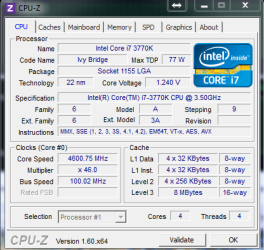
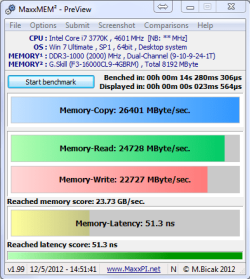
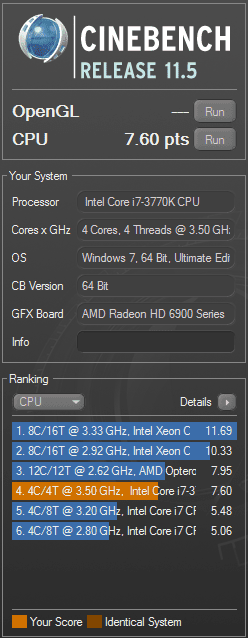
My first Intel rig ever...4.6GHz @ 1.24v Highest core temp 70c Ambient 22c

CPUZ_4600.PNG 4600_2000.PNG

Cinebench_4600.PNG

CPU-Z
 
Last edited:

My Computer

Computer Manufacturer/Model Number
tw33k
OS
Windows 7 Ultimate (x64) SP1
CPU
Intel 3770k 4.6GHz
Motherboard
ASUS Maximus V Formula
Memory
8GB (2x 4GB) Crucial Ballistix
Graphics Card(s)
Sapphire 7950 (1060/1600)
Sound Card
On Board Realtek HD Audio
Monitor(s) Displays
27" Acer B273HU (via HDMI)
Screen Resolution
2048 x 1152
Hard Drives
Crucial M4 128GB
2TB WD Black
1TB Samsung F3 SATA
1TB WD Elite External
2TB WD USB 3.0
PSU
Corsair AX750 Gold
Case
Corsair Obsidian 800DW
Cooling
Corsair H100 (2x AP-121/2x UK-3000 push/pull)
Keyboard
Microsoft Wireless 5000
Mouse
Microsoft Wireless 5000
Internet Speed
5mb/s
Other Info
Logitech z-2300 2.1 speakers
Lamptron FC-5 v2
Looking good tweek :p

Ram speeds are downright flying !
 

My Computer

Computer type
PC/Desktop
Computer Manufacturer/Model Number
CoreI7-6700K MrFingerIII Special Builds
OS
Windows 10 Home Premium 64bit sp1
CPU
Intel I7-6700K @ 4.6 Ghz 1.344 volts everyday OC
Motherboard
Asrock Fatality K6 Z170 Socket 1151
Memory
32GB G-Skill TridentZ 3200mhz 16-18-18-38 DDR4
Graphics Card(s)
Sli Gigabyte Windforce GTX 980 G1
Sound Card
AC97 Creative Rage Tactic 3D Headphones Bluetooth
Monitor(s) Displays
27" Asus ROG Swift PG278Q G-Sync 48" Vizio Smart HD TV
Screen Resolution
2560x1440p 27"- 48" Currently Gaming at 2560x1440p Res 2K
Hard Drives
250GB Samsung Evo840SSD Seagate baracuda 500 GB WD Mybook 500Gb 1TB Seagate Barracuda
PSU
HX1050w Corsair Silver 80plus certified crosfire/sli
Case
Enthod Pro Full Tower
Cooling
Corsair H110i GT 280 mm High Performance WaterBlock
Keyboard
Logitech wireless keyboard
Mouse
Logitech wireless mouse
Internet Speed
Cox Cable 100+ mb
Antivirus
WebRoot Spysweeper with Antivirus
Browser
IE-10, Chrome, Opera
Other Info
My Other Rig is a AMD FX8320E @4.6Ghz 16GB Ballistic Sport Ram
Mobo Asrock Fatality 990FX 120GB OCZ SSD 1TB Seagate Barracuda Corsair H75 Cooling PSU Corsair CX750
GPU GTX Gigabyte 970G1
Nice job, tw33k.Welcome to the dark side where anything is possioble.
 

My Computers

System One System Two

  • Computer type
    PC/Desktop
    Computer Manufacturer/Model Number
    ALWAYS UNDER CONSTRUCTION
    OS
    Windows 11 Pro
    CPU
    Ryzen 9 5900X
    Motherboard
    Asus X570 Crosshair Viii Hero
    Memory
    32GB G Skill DDR4-3600
    Graphics Card(s)
    EVGA RTX 3080 FTW 3 Ultra
    Sound Card
    On Board/Sennheiser PC37X Headset
    Monitor(s) Displays
    3 X Asus 27"
    Screen Resolution
    2560x1440
    Hard Drives
    2 X 1 TB NVME drives
    PSU
    EVGA 850
    Case
    Phanteks Eclipse P400A
    Cooling
    EVGA 280 AIO
    Keyboard
    Logitech G510s/ Logitech G13
    Mouse
    Logitech G502
    Internet Speed
    24/1
    Antivirus
    ESET/MBAM Pro/SAS Pro
    Browser
    Chrome/ Firefox/ Edge
  • Computer type
    Laptop
    System Manufacturer/Model Number
    Dell 16 Plus
    OS
    Windows 11 Pro
    CPU
    Intel Ultra 9 288V
    Memory
    32 GB LPDDR5X 8533
    Monitor(s) Displays
    16" Mini-LED HDR600 Touch 90 Hz
    Screen Resolution
    2560X1600
    Hard Drives
    1 TB NVME

My Computer

Computer type
PC/Desktop
Computer Manufacturer/Model Number
76~2.0
OS
Windows 7 Ult x64 - SP1/ Windows 8 Pro x64
CPU
Intel Core i5-3570K 4.6GHz
Motherboard
Gigabyte GA-Z77X UD3H, f18
Memory
8GB (2X4GB) DDR3 1600 Corsair Vengeance CL8 1.5v
Graphics Card(s)
Sapphire HD 7770 Vapor-X OC 1GB DDR5
Sound Card
Onboard VIA VT2021
Monitor(s) Displays
22" LCD Dell
Screen Resolution
1680x1050
Hard Drives
Samsung 840Pro 128GB SSD,
Seagate Barracuda 500GB SATA2 7200rpm 32MB cache, Seagate Barracuda 1TB SATA2 7200rpm 32MB cache,
PSU
Corsair HX650W
Case
Cooler Master Storm Scout
Cooling
Corsair H80 2x12cm Noctua NF P12 , 2x14cm case fans
Keyboard
Logitech Wave
Mouse
CM Sentinel
Internet Speed
Dismal
Antivirus
Avast
Browser
Opera Next
Other Info
Haswell laptop: HP Envy 17t-j, i7-4700MQ, GeForce 740M 2GB DDR3, 17.3" Full HD 1920x1080, 16GB RAM, Samsung 840 Pro 128GB, 1TB Hitachi 7200 HDD,
Desktop: eSATA ports,
External eSATA Seagate 500GB SATA2 7200rpm,
External WD USB 500GB
My first Intel rig ever...4.6GHz @ 1.24v Highest core temp 70c Ambient 22c

View attachment 211240 View attachment 211241

View attachment 211242

CPU-Z
Good news Mark! I really am impressed with my 2550K setup, which is still setting up on my desk. I suspect you can be stable with an even lower Vcore.
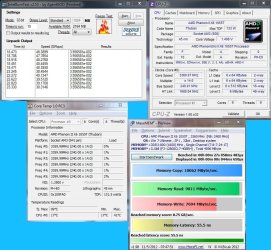
Here's my latest with the PhenomII X6 1055T @ 3360, stock 2500. This is on a W7 X86 but I will be reinstalling it as X64. Board is an ASUS M4A88T-M, a mATX which I'll put in an old Compaq case, Son of Frankenstein. :p
1055T.JPG
 

My Computer

Computer type
PC/Desktop
Computer Manufacturer/Model Number
Home Built Desktop By DataTech
OS
Windows 7 Ultimate X64 SP1
CPU
Intel i5-2550K, Differing ~4.4-4.8GHz No built in GPU
Motherboard
ASUS P8Z68-V PRO/GEN3
Memory
16GB G.Skill Sniper 1866MHz @ 2133MHz 2x8GB
Graphics Card(s)
ASUS GTX650TIB-DC2OC-2GD5, (650TI Boost)
Sound Card
Onboard Realtek 5-1
Monitor(s) Displays
Samsung P2570HD
Screen Resolution
1920x1080
Hard Drives
Samsung 840 Pro 256GB SSD for OS, 500GB Seagate Constellation (Enterprise drive) for Data
PSU
Corsair HX650W
Case
Inwin Dragon Rider
Cooling
Hyper 212 EVO w/two Noctua fans, push-pull, @1300 RPM
Keyboard
E-Z Eyes, bright yellow keys with large characters
Mouse
steelseries SENSEI Laser Pro Gaming
Internet Speed
48-51Mbs Mbs down, 11 Mbs up Xfinity Cable
Antivirus
Norton Internet Security 2013
Browser
IE 10, Opera, Pale Moon if needed
Other Info
4 case fans, LG BluRay-RE, ASUS DVD-RW, Mr. Fusion power supply, 1.21 gigawatts.
I have to say, I am blown away by how much better this setup is compared to my AMD rig. I was not expecting such a huge improvement to real world performance. Boot time and shut down time have decreased a lot. Everything feels way smoother. My SSD performs even quicker (which I never thought was possible) Even the audio quality and volume has improved. I'm very happy I finally decided to give Intel a try.

Welcome to the Darkside :cool:

Nice rig, congrats.

I think it was in this thread where they have a few tips on how to lower temps a bit by adjusting a few settings.
Ivy Bridge Temperatures – It’s Gettin’ Hot in Here

Thanks for the link Dave. I read about Intel using TIM instead of solder. Without an explanation from Intel we can only assume it was to cut down costs. Or maybe they did it to prevent how high we could overclock these chips.
 
Last edited:

My Computer

Computer Manufacturer/Model Number
tw33k
OS
Windows 7 Ultimate (x64) SP1
CPU
Intel 3770k 4.6GHz
Motherboard
ASUS Maximus V Formula
Memory
8GB (2x 4GB) Crucial Ballistix
Graphics Card(s)
Sapphire 7950 (1060/1600)
Sound Card
On Board Realtek HD Audio
Monitor(s) Displays
27" Acer B273HU (via HDMI)
Screen Resolution
2048 x 1152
Hard Drives
Crucial M4 128GB
2TB WD Black
1TB Samsung F3 SATA
1TB WD Elite External
2TB WD USB 3.0
PSU
Corsair AX750 Gold
Case
Corsair Obsidian 800DW
Cooling
Corsair H100 (2x AP-121/2x UK-3000 push/pull)
Keyboard
Microsoft Wireless 5000
Mouse
Microsoft Wireless 5000
Internet Speed
5mb/s
Other Info
Logitech z-2300 2.1 speakers
Lamptron FC-5 v2
I have to say, I am blown away by how much better this setup is compared to my AMD rig. I was not expecting such a huge improvement to real world performance. Boot time and shut down time have decreased a lot. Everything feels way smoother. My SSD performs even quicker (which I never thought was possible) Even the audio quality and volume has improved. I'm very happy I finally decided to give Intel a try.

Welcome to the Darkside :cool:

Nice rig, congrats.

I think it was in this thread where they have a few tips on how to lower temps a bit by adjusting a few settings.
Ivy Bridge Temperatures – It’s Gettin’ Hot in Here

Thanks for the link Dave.[/QUOTE

Nice set up Tweek How is the Darkside as they call it lol :cool:

See'ing new Gear always makes me want to jump on the boat too .......... I've used both brands so im not scared to turn Darkside aka Darth Vader either :p
 

My Computer

Computer type
PC/Desktop
Computer Manufacturer/Model Number
CoreI7-6700K MrFingerIII Special Builds
OS
Windows 10 Home Premium 64bit sp1
CPU
Intel I7-6700K @ 4.6 Ghz 1.344 volts everyday OC
Motherboard
Asrock Fatality K6 Z170 Socket 1151
Memory
32GB G-Skill TridentZ 3200mhz 16-18-18-38 DDR4
Graphics Card(s)
Sli Gigabyte Windforce GTX 980 G1
Sound Card
AC97 Creative Rage Tactic 3D Headphones Bluetooth
Monitor(s) Displays
27" Asus ROG Swift PG278Q G-Sync 48" Vizio Smart HD TV
Screen Resolution
2560x1440p 27"- 48" Currently Gaming at 2560x1440p Res 2K
Hard Drives
250GB Samsung Evo840SSD Seagate baracuda 500 GB WD Mybook 500Gb 1TB Seagate Barracuda
PSU
HX1050w Corsair Silver 80plus certified crosfire/sli
Case
Enthod Pro Full Tower
Cooling
Corsair H110i GT 280 mm High Performance WaterBlock
Keyboard
Logitech wireless keyboard
Mouse
Logitech wireless mouse
Internet Speed
Cox Cable 100+ mb
Antivirus
WebRoot Spysweeper with Antivirus
Browser
IE-10, Chrome, Opera
Other Info
My Other Rig is a AMD FX8320E @4.6Ghz 16GB Ballistic Sport Ram
Mobo Asrock Fatality 990FX 120GB OCZ SSD 1TB Seagate Barracuda Corsair H75 Cooling PSU Corsair CX750
GPU GTX Gigabyte 970G1
I've been loyal to AMD for as long as I can remember but after bulldozer didn't meet my expectations I had to rethink things. Intel has done a lot of dodgy things and that's the main reason I never bought their products but I pushed my 8150 as far as I could and really wanted something new. Ivy Bridge was the best choice. I still haven't worked out all the settings in the UEFI yet so have lots to learn and plenty to keep me busy. I reckon I can get this to or very close to 5GHz which would be awesome on air.
 

My Computer

Computer Manufacturer/Model Number
tw33k
OS
Windows 7 Ultimate (x64) SP1
CPU
Intel 3770k 4.6GHz
Motherboard
ASUS Maximus V Formula
Memory
8GB (2x 4GB) Crucial Ballistix
Graphics Card(s)
Sapphire 7950 (1060/1600)
Sound Card
On Board Realtek HD Audio
Monitor(s) Displays
27" Acer B273HU (via HDMI)
Screen Resolution
2048 x 1152
Hard Drives
Crucial M4 128GB
2TB WD Black
1TB Samsung F3 SATA
1TB WD Elite External
2TB WD USB 3.0
PSU
Corsair AX750 Gold
Case
Corsair Obsidian 800DW
Cooling
Corsair H100 (2x AP-121/2x UK-3000 push/pull)
Keyboard
Microsoft Wireless 5000
Mouse
Microsoft Wireless 5000
Internet Speed
5mb/s
Other Info
Logitech z-2300 2.1 speakers
Lamptron FC-5 v2
I read, somewhere, some UEFI settings to change that will reduce the CPU heat when OC'ing. When I find it again I will post.
 

My Computer

Computer type
PC/Desktop
Computer Manufacturer/Model Number
76~2.0
OS
Windows 7 Ult x64 - SP1/ Windows 8 Pro x64
CPU
Intel Core i5-3570K 4.6GHz
Motherboard
Gigabyte GA-Z77X UD3H, f18
Memory
8GB (2X4GB) DDR3 1600 Corsair Vengeance CL8 1.5v
Graphics Card(s)
Sapphire HD 7770 Vapor-X OC 1GB DDR5
Sound Card
Onboard VIA VT2021
Monitor(s) Displays
22" LCD Dell
Screen Resolution
1680x1050
Hard Drives
Samsung 840Pro 128GB SSD,
Seagate Barracuda 500GB SATA2 7200rpm 32MB cache, Seagate Barracuda 1TB SATA2 7200rpm 32MB cache,
PSU
Corsair HX650W
Case
Cooler Master Storm Scout
Cooling
Corsair H80 2x12cm Noctua NF P12 , 2x14cm case fans
Keyboard
Logitech Wave
Mouse
CM Sentinel
Internet Speed
Dismal
Antivirus
Avast
Browser
Opera Next
Other Info
Haswell laptop: HP Envy 17t-j, i7-4700MQ, GeForce 740M 2GB DDR3, 17.3" Full HD 1920x1080, 16GB RAM, Samsung 840 Pro 128GB, 1TB Hitachi 7200 HDD,
Desktop: eSATA ports,
External eSATA Seagate 500GB SATA2 7200rpm,
External WD USB 500GB
Status
Not open for further replies.
Back
Top