Ive just took 8GB ram out of my pc cos its done nothing but cause me grief lol. I bought a second 8GB kit of the ram ive been using for ages but because the spd info on my original ram is wrong it wont run right. When i first installed it i would only get 12GB usable unless i upped the vcore. I did get it so i had all 16GB but sometimes i was having to go into the bios and reset the already set settings to get all the ram usable. Eventhough its the same ram technically its different enit. So i took it out as it was more than likely down to this that my oc was failing. I know having more ram makes it more difficult to oc and i only bought it to fill the empty slots lol as i have no need for 16GB really. it can go in the build i do for my daughter. id spent days tryin to get it right but it never was really so i'll restart my oc from scratch and see what difference it makes
EDIT: sorry i should have just edited my last post but didnt think... my heads up my arse at the min lol
Looks like your RAM is different build versions, meaning different chips used. This may or may not be coaxed into working together.
You're right, the best way is to buy a matched kit.
When you start loading up on RAM you usually will need to bump the IMC (Integrated Memory Controller) voltage and sometimes the DRAM voltage.
With more RAM cards, more memory chips, you need more voltage to get enough power to each memory chip on each RAM card.
You can bump voltage on AMD CPUs and boards a fair bit without causing too much heat.
If you want to post those voltage settings, I can give you some suggestions.
Or, if your happy with 8GB, then it's all good.
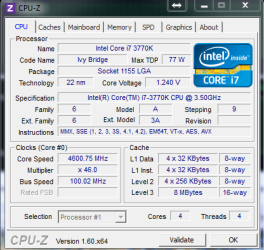
The SPD info on CPUZ is just the JEDEC standard testing information for the RAM cards, this is just for reference, it doesn't have anything to do with actual settings.
The Memory tab shows the actual timings.
All RAM voltages listed on CPUZ are recommended and not actual, these have to be taken from the BIOS. (CPU voltage is actual)
ello dave
cheers for the info
 im just gonna stick with the 8GB as i dont do any rendering or anythin like that. once in a blue moon maybe.
 the new kit is a different version number too. i also think that the new kit i bought is dodgy too as when i took the other 8GB out i kept the new kit in but when i booted up this morning only 3.9GB was usable. i tried various settings to no avail so i put the old kit with the wrong spd bk in. redid the timings n so on and have 8GB. so i think i'll rma the new kit. i did have both kits working at 1600 but then id boot up in the morning and only have 7.9GB.
as for the voltages of the ram its rated @1.5v and 1.65v for xmp 1600 but this is rated for intel i5 i7. do u think i should be using a lower voltage as im on AMD or keep it as is? i have ran it @ 1600MHz @1.63v before and it seemed alright.
i was advised to follow this guide for settings for 4GB dimms
Crosshair V Formula Easy Memory Setup Guide which i did.
my board slightly overvolts the ram. only a tiny bit though. if i set 1.65v it actually sets 1.667.so i set it at 1.64v.
when im in the bios next i'll do so screenies and see what u all think i should change if anything.
thanks!
My Computer
At a glance
Win7 Home Premium x64 SP1i7 4770k8Gb Kingston HyperX Beast 2400MHz @2133MHz 11...MSI GTX 780ti Gaming Oc x2
- Computer type
- PC/Desktop
- Computer Manufacturer/Model Number
- Custom build
- OS
- Win7 Home Premium x64 SP1
- CPU
- i7 4770k
- Motherboard
- Asus maximus VI Hero
- Memory
- 8Gb Kingston HyperX Beast 2400MHz @2133MHz 11-12-11-30
- Graphics Card(s)
- MSI GTX 780ti Gaming Oc x2
- Sound Card
- Onboard ROG SupremeFX
- Monitor(s) Displays
- Asus VG248QE
- Screen Resolution
- 3840X1080 144Hz
- Hard Drives
- Samung Evo 256Gb, OCZ Agility4 128Gb
1x1TB hitachi storage
- PSU
- EVGA Supernova 1000w Platinum
- Case
- Corsair Air 540
- Cooling
- Corsair H100i
- Keyboard
- Coolermaster Quickfire Pro
- Mouse
- Corsair M65 RGB
- Internet Speed
- 74mb dwn/16up
- Antivirus
- MSE,Malwarebytes
- Browser
- Chrome