Latest AMD Catalyst Video Driver for Windows 7

Status
Not open for further replies.
I don't get it.
I allways used to remove the old ccc suite/driver and install the new one.
This time,witk my ati hd radeon 5770 ,ccc version 12.1 i can't find a listing of the installed driver and can't remove it.

And yes indeed when i start the setup.exe out of the C:/.. folder it hangs...over and over again.
I can't: repair,remove,install the damn thing!!
Some help please??
 

My Computer My Computer

At a glance

Windows 7 Ultimate 64bitsCore i7 920 4 x 3,9 Mhz.6 gb ddr3 1333mhzXFX/ATI HD5770 1GB gddr5,overclocked
Computer Manufacturer/Model Number
Custom: Self-Build
OS
Windows 7 Ultimate 64bits
CPU
Core i7 920 4 x 3,9 Mhz.
Motherboard
MSI Pro-E socket 1366,2 x usb 3.0
Memory
6 gb ddr3 1333mhz
Graphics Card(s)
XFX/ATI HD5770 1GB gddr5,overclocked
Sound Card
Creative (under construction)
Monitor(s) Displays
Acer X243HQ 24 inch
Screen Resolution
1920x1080
Hard Drives
SAMSUNG HD103SJ ATA Device 1TB,
Hitachi 7220 2TB
PSU
500Watt,Coolermaster
Case
Cooler Master,work in progress.
Cooling
Scythe Mugen rev. 2b + 4 case-fans + Northbridge Fan 8000 re
Keyboard
Logitech K340
Mouse
Logitech M705 Marathon Mouse
Internet Speed
16 MB/s down 1 up
Other Info
e-Sata ports + external:
WDS 1 TB X 2 , Medion 1,5 TB,Medion 1 TB USB 3.0,500GB Medion 3.0 USB
I don't get it.
I allways used to remove the old ccc suite/driver and install the new one.
This time,witk my ati hd radeon 5770 ,ccc version 12.1 i can't find a listing of the installed driver and can't remove it.

And yes indeed when i start the setup.exe out of the C:/.. folder it hangs...over and over again.
I can't: repair,remove,install the damn thing!!
Some help please??
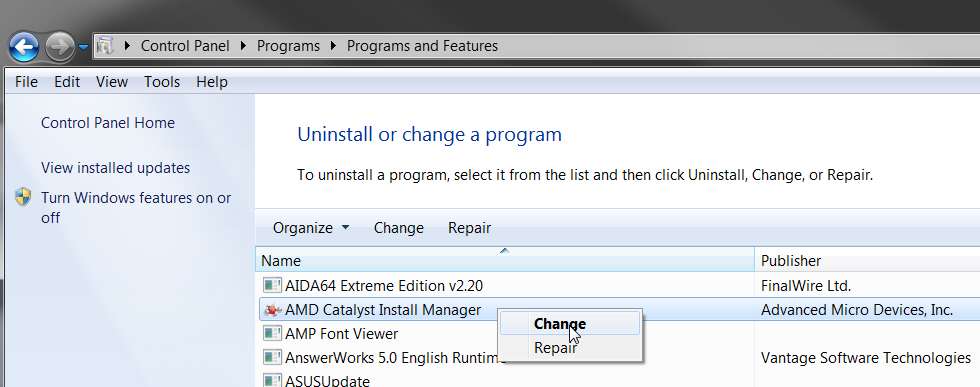
First, you would normally uninstall the driver software using the AMD Catalyst Install Manager.

Start -> Control Panel -> Uninstall a program

Wait for the installed program list to populate and then select the "AMD Catalyst Install Manager". Then right-click and select "change". Click NEXT, and go through the uninstall manager dialog wizard.

My own experience with this is that it's unreliable. Trying to install the next version of CCC/drivers doesn't necessarily work successfully, I don't really know what got uninstalled and what got installed, etc., etc.


I much prefer to remove EVERYTHING ATI-RELATED when I plan to move to a new CCC/driver installation package (e.g. 12.4). I have a simple setup, so this is not a problem. The Windows desktop shortcut arrangement is retained by Windows, for a given screen resolution/refresh combination so as soon as I finish installing the new CCC/driver package and re-set my 2-desktops and resolution/refresh, my old Windows desktop icon shortcut and taskbar arrangement will reappear. spontaneously.

So... I actually NEVER use this "install manager" approach to uninstall. It's not worked dependably and reliably for me ever since it was first brought out by ATI a while back, and I just don't want to fight with it.

Instead, I simply use "Driver Sweeper". All it takes is to check the "AMD Display" box, push the "ANALYZE" button, and then push the "CLEAN " button. Then re-boot, and EVERYTHING AMD IS GONE (at least relating to video drivers, CCC and Install Manager). If you also have AMD TV tuner cards those drivers are NOT removed, but remain installed (although you obviously should not be trying to use your TV tuner cards until you finish installing the new CCC/driver package).

After you reboot, you will be back to Windows video generic driver support for your VGA devices. Now you should be able to run the SETUP from the new ATI CCC/driver package and it will work perfectly.


That's just my suggestion.
 

My Computer My Computer

At a glance

Windows 7 Pro x64 (1), Win7 Pro X64 (2)i5-3350p 3.1Ghz/6MB-cache (1); E8400 3.0Ghz/6...8GB PC3-12800 DDR3 (1); 4GB PC3-10600 DDR3 (2)ATI HD7750 (1), (see TV cards); ATI R7 250 (2)
Computer type
PC/Desktop
Computer Manufacturer/Model Number
Home-built, two systems (1) and (2)
OS
Windows 7 Pro x64 (1), Win7 Pro X64 (2)
CPU
i5-3350p 3.1Ghz/6MB-cache (1); E8400 3.0Ghz/6MB-cache (2)
Motherboard
ASUS P8Z77-V Pro (1); ASUS P5Q3 (2)
Memory
8GB PC3-12800 DDR3 (1); 4GB PC3-10600 DDR3 (2)
Graphics Card(s)
ATI HD7750 (1), (see TV cards); ATI R7 250 (2)
Sound Card
Realtek ALC892 HD Audio (1); Realtek ALC1200 HD Audio (2)
Monitor(s) Displays
Eizo HD2441W LCD, Eizo S2433W (1); Eizo 24" S2433W (2)
Screen Resolution
1920x1200, 1920x1200 (1); 1920x1200 (2)
Hard Drives
(1) 1TB SATA-II (7200RPM), 2x2TB SATA-III (7200RPM), 250GB SATA-III (10000RPM) for OS; 2x2TB external USB 3.0

(2) 320GB SATA-II (7200RPM), 750GB SATA-II (7200RPM), 150GB SATA-II (10000RPM) for OS; 2TB external USB 3.0
PSU
Nesteq ECS-6001 600W (1); Nesteq ECS-5001 500W (2)
Case
Acousti-Case 360 (1) and (2)
Cooling
Noctua NH-U12P SE2 for CPU, 2x120mm case fans (1) and (2)
Keyboard
IBM PS/2 (1) and (2)
Mouse
Logitech MX Revolution wireless (1); Microsoft wired (2)
Internet Speed
100mbps down / 10mbps up
Antivirus
Microsoft Security Essentials; Malwarebyte Anti-Malware Pro
Browser
Firefox
Other Info
Ceton InfiniTV 4-tuner cablecard-enabled TV card as well as Hauppauge HVR-2250 OTA/ATSC 2-tuner TV card in (1), running under Win7 WMC
Thanks for your quick response dsperber,
but exactly what you describe i am trying to do.
The problem is,that the installation doesn't appear in any programm..certainly not in Start->Control Panel->Uninstall..

I suspect..,well i'm pretty sure,that it's connected with a faulty installation of network 4,which i fixed already.
Now when i try to uninstall by the contol manager it just crashes...

Well,i'll give driversweeper a chance.

Thanks.
 

My Computer My Computer

At a glance

Windows 7 Ultimate 64bitsCore i7 920 4 x 3,9 Mhz.6 gb ddr3 1333mhzXFX/ATI HD5770 1GB gddr5,overclocked
Computer Manufacturer/Model Number
Custom: Self-Build
OS
Windows 7 Ultimate 64bits
CPU
Core i7 920 4 x 3,9 Mhz.
Motherboard
MSI Pro-E socket 1366,2 x usb 3.0
Memory
6 gb ddr3 1333mhz
Graphics Card(s)
XFX/ATI HD5770 1GB gddr5,overclocked
Sound Card
Creative (under construction)
Monitor(s) Displays
Acer X243HQ 24 inch
Screen Resolution
1920x1080
Hard Drives
SAMSUNG HD103SJ ATA Device 1TB,
Hitachi 7220 2TB
PSU
500Watt,Coolermaster
Case
Cooler Master,work in progress.
Cooling
Scythe Mugen rev. 2b + 4 case-fans + Northbridge Fan 8000 re
Keyboard
Logitech K340
Mouse
Logitech M705 Marathon Mouse
Internet Speed
16 MB/s down 1 up
Other Info
e-Sata ports + external:
WDS 1 TB X 2 , Medion 1,5 TB,Medion 1 TB USB 3.0,500GB Medion 3.0 USB
Thanks for your quick response dsperber,
but exactly what you describe i am trying to do.
The problem is,that the installation doesn't appear in any programm..certainly not in Start->Control Panel->Uninstall..
Really? You don't see the AMD Catalyst Install Manager in the list of installed programs in Control Panel?

amdinstallmanager.jpg


That seems impossible if a proper ATI installer file for CCC/drivers was run to install your current drivers. The ATI Install Manager has been part of that package for probably a year or more. In fact it's "grayed out" as a feature you can opt out of in the custom install path. There's no way to not get it installed.


Well, i'll give driversweeper a chance.
This has been completely successful for me. Removes EVERYTHING ATI-related, everywhere. When you reboot you will be back to "virgin".

Then you should be able to run a brand new freshly downloaded 12.4 installer file for CCC/Drivers and it should work.

Fingers crossed.
 

My Computer My Computer

At a glance

Windows 7 Pro x64 (1), Win7 Pro X64 (2)i5-3350p 3.1Ghz/6MB-cache (1); E8400 3.0Ghz/6...8GB PC3-12800 DDR3 (1); 4GB PC3-10600 DDR3 (2)ATI HD7750 (1), (see TV cards); ATI R7 250 (2)
Computer type
PC/Desktop
Computer Manufacturer/Model Number
Home-built, two systems (1) and (2)
OS
Windows 7 Pro x64 (1), Win7 Pro X64 (2)
CPU
i5-3350p 3.1Ghz/6MB-cache (1); E8400 3.0Ghz/6MB-cache (2)
Motherboard
ASUS P8Z77-V Pro (1); ASUS P5Q3 (2)
Memory
8GB PC3-12800 DDR3 (1); 4GB PC3-10600 DDR3 (2)
Graphics Card(s)
ATI HD7750 (1), (see TV cards); ATI R7 250 (2)
Sound Card
Realtek ALC892 HD Audio (1); Realtek ALC1200 HD Audio (2)
Monitor(s) Displays
Eizo HD2441W LCD, Eizo S2433W (1); Eizo 24" S2433W (2)
Screen Resolution
1920x1200, 1920x1200 (1); 1920x1200 (2)
Hard Drives
(1) 1TB SATA-II (7200RPM), 2x2TB SATA-III (7200RPM), 250GB SATA-III (10000RPM) for OS; 2x2TB external USB 3.0

(2) 320GB SATA-II (7200RPM), 750GB SATA-II (7200RPM), 150GB SATA-II (10000RPM) for OS; 2TB external USB 3.0
PSU
Nesteq ECS-6001 600W (1); Nesteq ECS-5001 500W (2)
Case
Acousti-Case 360 (1) and (2)
Cooling
Noctua NH-U12P SE2 for CPU, 2x120mm case fans (1) and (2)
Keyboard
IBM PS/2 (1) and (2)
Mouse
Logitech MX Revolution wireless (1); Microsoft wired (2)
Internet Speed
100mbps down / 10mbps up
Antivirus
Microsoft Security Essentials; Malwarebyte Anti-Malware Pro
Browser
Firefox
Other Info
Ceton InfiniTV 4-tuner cablecard-enabled TV card as well as Hauppauge HVR-2250 OTA/ATSC 2-tuner TV card in (1), running under Win7 WMC
I had issues with 12.4 as well. Many others are also having problems with 12.4 Driver sweeper only complicated these issues because now I had to uninstall and reinstall net framework 4.0 (win 7-64)

After that the installation succeeded however CCC reports that I still only have 12.1 installed even though Device Manager reports that I have the correct driver for 12.4 (driver 8.961.0.0)
 

My Computer My Computer

At a glance

Windows 7 Ultimate x64Intel Core i7-980X24GB CORSAIR DOMINATOR DDR3 16002 X Radeon HD 6870 in CrossFire
OS
Windows 7 Ultimate x64
CPU
Intel Core i7-980X
Motherboard
Asus Rampage III Formula
Memory
24GB CORSAIR DOMINATOR DDR3 1600
Graphics Card(s)
2 X Radeon HD 6870 in CrossFire
Sound Card
HT | OMEGA eClaro Sound Card
Monitor(s) Displays
3 X Asus 24in LCD Monitors for Eyefinity
Hard Drives
2 X Corsair Force 120GB SSDs in raid 0 / 4 X 2TB SAMSUNG F4 Hard Drives 3-Raid 0
PSU
CORSAIR 1000W Modular PSU
Case
Corsair Obsidian 800D ATX Case
Cooling
CORSAIR Hydro H70 CPU Cooler
Odd I like never have problems with CCC amd driver updates and this update is running just fine on my rig
 

My Computer My Computer

At a glance

Windows 10 64bitAMD Phenom II X4 925 (Deneb)(2.8GHz) OC 3.4GHzCorsair Vengeance DDR3 4GBX2 (8192MB)XFX HD 6870 1GB (OC)- 940MHz core, mem 1150MHz
Computer type
PC/Desktop
Computer Manufacturer/Model Number
custom build
OS
Windows 10 64bit
CPU
AMD Phenom II X4 925 (Deneb)(2.8GHz) OC 3.4GHz
Motherboard
M5A78L-MLX Plus
Memory
Corsair Vengeance DDR3 4GBX2 (8192MB)
Graphics Card(s)
XFX HD 6870 1GB (OC)- 940MHz core, mem 1150MHz
Monitor(s) Displays
Vizio 26' 1920x1080 / Acer 1336x768
Screen Resolution
1920x1080 60Hz /1336x768
Hard Drives
Kingston Digital 60GB SSDNow V300/500gb HDD Western Digital 7200rpm (/WD 160GB HDD 7200rpm
PSU
CORSAIR CX600 600w
Case
AZZA Orion 202 EVO
Cooling
cooler master hyper TX3 cpu cooler
Keyboard
Razer DeathStalker
Mouse
Logitech Optical Gaming Mouse G400
Antivirus
Defualt on win 10
Browser
Firefox
Other Info
cpu is overclocked in bios
I just slapped a 2 year old 5770 back in my old rig it fired up and installed drivers flawlessly

Maybe your card is starting to show it's age j/k

You should have just installed over it if you didn't have issues before maybe a driver roll back then installing the last good driver could fix it and just wait for a newer 12.v driver
 

My Computer My Computer

At a glance

Windows 10 Home Premium 64bit sp1Intel I7-6700K @ 4.6 Ghz 1.344 volts everyday OC32GB G-Skill TridentZ 3200mhz 16-18-18-38 DDR4Sli Gigabyte Windforce GTX 980 G1
Computer type
PC/Desktop
Computer Manufacturer/Model Number
CoreI7-6700K MrFingerIII Special Builds
OS
Windows 10 Home Premium 64bit sp1
CPU
Intel I7-6700K @ 4.6 Ghz 1.344 volts everyday OC
Motherboard
Asrock Fatality K6 Z170 Socket 1151
Memory
32GB G-Skill TridentZ 3200mhz 16-18-18-38 DDR4
Graphics Card(s)
Sli Gigabyte Windforce GTX 980 G1
Sound Card
AC97 Creative Rage Tactic 3D Headphones Bluetooth
Monitor(s) Displays
27" Asus ROG Swift PG278Q G-Sync 48" Vizio Smart HD TV
Screen Resolution
2560x1440p 27"- 48" Currently Gaming at 2560x1440p Res 2K
Hard Drives
250GB Samsung Evo840SSD Seagate baracuda 500 GB WD Mybook 500Gb 1TB Seagate Barracuda
PSU
HX1050w Corsair Silver 80plus certified crosfire/sli
Case
Enthod Pro Full Tower
Cooling
Corsair H110i GT 280 mm High Performance WaterBlock
Keyboard
Logitech wireless keyboard
Mouse
Logitech wireless mouse
Internet Speed
Cox Cable 100+ mb
Antivirus
WebRoot Spysweeper with Antivirus
Browser
IE-10, Chrome, Opera
Other Info
My Other Rig is a AMD FX8320E @4.6Ghz 16GB Ballistic Sport Ram
Mobo Asrock Fatality 990FX 120GB OCZ SSD 1TB Seagate Barracuda Corsair H75 Cooling PSU Corsair CX750
GPU GTX Gigabyte 970G1
I am just going to dive in here and offer an alternative that worked for me.
(basically Driver Sweeper did not "help", so I tried a similar alternative program--which did the trick.)

History:
I was having all sorts of problems with the 12.3 drivers. I tried loading, reloading, even tried to go back to previous drivers. I still had various issues and problems with the drivers that I could not get rid of. I decided to go the nuclear route and I used Driver Sweeper to remove everything AMD, hoping to start over (my intention was to go back to the 12.1 drivers and just wait for the 12.4 version to be released). After using driver sweeper, I was able to load the drivers and they worked fine...but the CCC would not load, and kept crashing (without comment) every time I tried to start it. I just left things alone and decided to wait for the 12.4 drivers.

[addendum: Shamefully, I forgot about a previous post I had made that had a solution for the specific problem of the CCC not running properly. If any of you have that particular problem, this link http://www.sevenforums.com/graphic-...st-control-center-wont-open-6.html#post874072 will give you some backround and a way to solve your problem Long Live Sevenforums !!! :geek:]

I did some extensive searching and found many others having similar sorts of problems.
Here is the solution that worked:

(prior to proceeding, make sure you have the desired new AMD drivers downloaded (only) to your computer)

1. Download and install DriverCleaner pro (freebie--I Love Google !!) newest version you can find.
2. Disconnect from the "net" (I just pulled the LAN cable from my router..easy for me to unplug and replug)
This is a must do, otherwise when you reboot windows updates the drivers for you. (just do it !!)
3. Uninstall your AMD catalyst drivers (If you cannot uninstall, skip this and go to next step)
4. Reboot into safe mode
5. Run DriverCleaner pro and check the Remove AMD Options (I checked everything AMD)
6. note: you computer is still disconnected from the internet
7. Reboot normally into Windows (windows will load only the minimal drivers..which is what you want)
8. Now run the installer for the AMD drivers you want, the way you want.
9. Reconnect to the internet (plug it back in..or whatever), and REBOOT.

After I did the above steps (and installed the 12.4 drivers) all of my driver "issues" RESOLVED.
(It should have worked using Driver Sweeper--it also removes all the driver traces, but that particular program did not fix things for me)

I do not want to get into why one program worked, when another program (which should have the same effect did not). As pretty much everyone has slightly different hardware/software setups, I am only interested in offering alternatives that might solve problems. If Driver Sweeper worked for you GREAT, If Driver Cleaner Pro worked..GREAT...bottom line:
It is NICE to have OPTIONS. (that work :D)

Anyway, Hope this helps someone else out. I know how much of a pain it is trying to research these sorts of problems and randomly trying different solutions.
 
Last edited:

My Computer My Computer

At a glance

Windows 7 Ultimate x64AMD Phenome x4 965 Black Ed (Lovingly OverClo...6 Gb (3 x 2 Gb GSKILL 16000CL9 )ASUS EAH5850/2DIS/1GD5 Radeon HD 5850 1GB
Computer Manufacturer/Model Number
Custom Built and Maintained...by Me
OS
Windows 7 Ultimate x64
CPU
AMD Phenome x4 965 Black Ed (Lovingly OverClocked.a tad)
Motherboard
Gigabyte GA 890GPA-UD3H
Memory
6 Gb (3 x 2 Gb GSKILL 16000CL9 )
Graphics Card(s)
ASUS EAH5850/2DIS/1GD5 Radeon HD 5850 1GB
Sound Card
Creative SB X-Fi
Monitor(s) Displays
Dual 24" Samsung Wide-Sceens
Screen Resolution
Good Enough.
Hard Drives
5x SATA Seagates (in assorted sizes, shapes, and colors--Variety is the spice of Life)
PSU
790 Watt Enermax Modular
Case
Lian-Li Black Mesh (Love that Mesh !!)
Cooling
Pure Air Baby..Flowin Freely
Keyboard
Microsoft 4000 Natural Ergonomic
Mouse
Multiple Logitech Laser mice....each has its specific use
Internet Speed
Not Fast Enough, it's probably never going to be fast enough
Other Info
This Computer building crap started out years ago as a simple hobby..that has now gotten completely out of hand !!
(It does come in handy though, when everyone in the family wants their own computer)
I had issues with 12.4 as well. Many others are also having problems with 12.4 Driver sweeper only complicated these issues because now I had to uninstall and reinstall net framework 4.0 (win 7-64)

Lucky that is all it took. Have seen just far too many reports over the years from programs like Driver Sweeper where it took a complete re-install of Windows to repair the damage that it did. I cringe every time I see someone recommend a person use it without also pointing out the dangers of it, and telling them to make sure they have a solid backup image (or at least a restore point) just in case. One reason you will never see me recommend using it.

Odd I like never have problems with CCC amd driver updates and this update is running just fine on my rig

Then we are odd together. All I do is just install over the top and let the AMD installer deal with the uninstall and re-install of the new driver.
 

My Computer My Computer

At a glance

Win 7 Ultimate x64FX-8350 @ 4.6 GHz so farADATA XPG V1 Series Black 8GB DDR3 1600Sapphire R9 270x Dual-X
Computer type
PC/Desktop
Computer Manufacturer/Model Number
Me
OS
Win 7 Ultimate x64
CPU
FX-8350 @ 4.6 GHz so far
Motherboard
Asus M5A97 EVO
Memory
ADATA XPG V1 Series Black 8GB DDR3 1600
Graphics Card(s)
Sapphire R9 270x Dual-X
Sound Card
Xonar DGX w/ Corsair Vengence 1300
Monitor(s) Displays
Acer S232HL Abid
Screen Resolution
1920x1080
Hard Drives
120 GB OCZ Vertex 3
500 GB Seagate 7200.12
PSU
Antec Earthwatts 650W Green
Case
Antec Three Hundred
Cooling
Cooler Master 212 EVO
Keyboard
Logitech G510
Mouse
Logitech G500s
Internet Speed
35000/3000
Yeah I found driver sweeper to be good but If you can get along with out it probally better off

Driver sweeper actually should be a last resort if anything being installed failed
Just to use it to use it not worth doing

I find people doing more damage with there system useing catchy tools they don't really understand sometimes it helps to read the full story on the uses or you may end up Reformatting and that won't be by choice out of frustration
 

My Computer My Computer

At a glance

Windows 10 Home Premium 64bit sp1Intel I7-6700K @ 4.6 Ghz 1.344 volts everyday OC32GB G-Skill TridentZ 3200mhz 16-18-18-38 DDR4Sli Gigabyte Windforce GTX 980 G1
Computer type
PC/Desktop
Computer Manufacturer/Model Number
CoreI7-6700K MrFingerIII Special Builds
OS
Windows 10 Home Premium 64bit sp1
CPU
Intel I7-6700K @ 4.6 Ghz 1.344 volts everyday OC
Motherboard
Asrock Fatality K6 Z170 Socket 1151
Memory
32GB G-Skill TridentZ 3200mhz 16-18-18-38 DDR4
Graphics Card(s)
Sli Gigabyte Windforce GTX 980 G1
Sound Card
AC97 Creative Rage Tactic 3D Headphones Bluetooth
Monitor(s) Displays
27" Asus ROG Swift PG278Q G-Sync 48" Vizio Smart HD TV
Screen Resolution
2560x1440p 27"- 48" Currently Gaming at 2560x1440p Res 2K
Hard Drives
250GB Samsung Evo840SSD Seagate baracuda 500 GB WD Mybook 500Gb 1TB Seagate Barracuda
PSU
HX1050w Corsair Silver 80plus certified crosfire/sli
Case
Enthod Pro Full Tower
Cooling
Corsair H110i GT 280 mm High Performance WaterBlock
Keyboard
Logitech wireless keyboard
Mouse
Logitech wireless mouse
Internet Speed
Cox Cable 100+ mb
Antivirus
WebRoot Spysweeper with Antivirus
Browser
IE-10, Chrome, Opera
Other Info
My Other Rig is a AMD FX8320E @4.6Ghz 16GB Ballistic Sport Ram
Mobo Asrock Fatality 990FX 120GB OCZ SSD 1TB Seagate Barracuda Corsair H75 Cooling PSU Corsair CX750
GPU GTX Gigabyte 970G1
has anybody else tried the 12.4 (89.7) BETA, yet..?..

- it certainly runs well on my rig..!!
- Skyrim runs a treat..:cool:

- BF3 has never looked so good..

- now, if only there wasn't so much lag compensation in BF3..
- yesterday I got shot after I'd dodged behind a dockyard container..
- in another instance, I emptied my LMG magazine into an enemy at almost point-blank range..
- and he still got me with one shot from his handgun..

- very annoying game, if you can't find a decent server..:mad:
 

My Computer My Computer

At a glance

Windows10 Pro - 64Bit vs.10547i7-965 Extreme Edition (8 Cores) at 3.3GHz (n...12G Corsair Dominator DDR3 - tripled2xAMD SapphireNITRO R9 380(4G) crossfire
Computer type
PC/Desktop
Computer Manufacturer/Model Number
benchtec, built to personal specs
OS
Windows10 Pro - 64Bit vs.10547
CPU
i7-965 Extreme Edition (8 Cores) at 3.3GHz (no OC)
Motherboard
BloodRageX58 (Socket1366)
Memory
12G Corsair Dominator DDR3 - tripled
Graphics Card(s)
2xAMD SapphireNITRO R9 380(4G) crossfire
Sound Card
Sonar(SB)X-Fi onboard
Monitor(s) Displays
SyncMaster P2050 20"
Screen Resolution
1600x900 (widescreen)
Hard Drives
480G\OCZSolid3SSD, 64G\OCZVertex3SSD,60G\OCZVertex2SSD, 1TB\spinpointF1SATAHDD
PSU
1200w Power Station Gold
Case
ANTEC 900/2 all blue lights, etc..
Cooling
Noctua SE1366 NH-U12P - a tight fit, but a monster cooler!!
Keyboard
Logitech G19 (wired)
Mouse
Logitech G9 Laser (wired)
Internet Speed
150mb unlimited
Browser
IE11(RP)
Other Info
Xbox One, Nokia735 Windows10 mobile, LG HD/DVD/Blu-Ray r/w, CyberlinkPowerDVD15, LogitechZ5500-SS(5.1), LogitechG35Phones-SS(7.1),MSOffice 2007,CorelDrawX7,Painter2016, Wacom Intuos Pro-SE
Lucky that is all it took. Have seen just far too many reports over the years from programs like Driver Sweeper where it took a complete re-install of Windows to repair the damage that it did. I cringe every time I see someone recommend a person use it without also pointing out the dangers of it, and telling them to make sure they have a solid backup image (or at least a restore point) just in case. One reason you will never see me recommend using it.
To be fair and honest, it's obvious that everybody's system is different. There is (and must always be) some reason why one person's system has or doesn't have a problem or symptom that another person's system doesn't have or has. There has to be a reason why some "solution" works for some people but not for others.

Fact is, I had heard that starting with 10.9 or some older version of ATI's driver installer package that you were absolutely supposed to be able to just "run it" right over a currently installed set of CCC/drivers. But success using that approach was rare... at least for me. It inevitably failed to update the drivers, and I had to uninstall everything ATI (which often was difficult, before discovering Driver Sweeper and its ilk) and then start from scratch. This latter approach almost always worked, but sometimes even after that it was necessary to then take the right-click on hardware (in Device Manager) and "update drivers" and navigate to that expanded ATI directory where the original install had theoretically run from. Only then did the true current drivers get installed successfully.

Is this how it should work? No. Do you have that symptom? No. Do I always have that symptom? No. Why? Because there's something about the ATI installer software that is just "erratic". You need to be able to deal with any results you get, be they (a) 100% successful just by running the new version CCC/driver installer right over what you've currently got installed, or (b) partial or total failure, requiring some time of manual workaround or solution.


Odd I like never have problems with CCC amd driver updates and this update is running just fine on my rig

Then we are odd together. All I do is just install over the top and let the AMD installer deal with the uninstall and re-install of the new driver.
Well, just last week I let Windows Update apply the 12.4 driver update to my sister's machine (currently running 11.5 at the time) which has an onboard ATI HD2400 chip. Seemed to go fine (as my experience with letting Windows Update handle driver updates virtually always does). But CCC would no longer open. I took that to be caused by an 11.5 CCC now trying to run with a 12.4 driver.

So I then downloaded the true complete 12.4 CCC/driver installer and ran it... right over the existing 11.5 CCC and 12.4 driver. Magically, it worked perfectly! Result was 100% successful, with 12.4 CCC resulting (and it WOULD now open) as well as 12.4 drivers.

So... that "run right over existing" approach worked on my sister's machine, but it has rarely if ever worked for me over the past few years.


Obviously, you should always have taken at least a "system image" backup before you do anything significant (like updating video drivers, which from experience we all know may or may not go well even if the actual install is successful), to make recovery from unexpected surprises trivial and easy. And if the new driver proves problematic (e.g. BSOD), then "instant backoff" is possible with almost no effort if you've got a "system image" backup. This goes without saying.

But I think it's also wrong to talk down a fine product (in my opinion) like Driver Sweeper, just because something in your environment and in your experience has gone less than perfectly with its use. In my case, it's always worked fine (and seemingly is necessary, so it's just become part of my "normal recipe" for upgrading ATI video drivers), so I hold no animosity and only positive feelings toward it.
 

My Computer My Computer

At a glance

Windows 7 Pro x64 (1), Win7 Pro X64 (2)i5-3350p 3.1Ghz/6MB-cache (1); E8400 3.0Ghz/6...8GB PC3-12800 DDR3 (1); 4GB PC3-10600 DDR3 (2)ATI HD7750 (1), (see TV cards); ATI R7 250 (2)
Computer type
PC/Desktop
Computer Manufacturer/Model Number
Home-built, two systems (1) and (2)
OS
Windows 7 Pro x64 (1), Win7 Pro X64 (2)
CPU
i5-3350p 3.1Ghz/6MB-cache (1); E8400 3.0Ghz/6MB-cache (2)
Motherboard
ASUS P8Z77-V Pro (1); ASUS P5Q3 (2)
Memory
8GB PC3-12800 DDR3 (1); 4GB PC3-10600 DDR3 (2)
Graphics Card(s)
ATI HD7750 (1), (see TV cards); ATI R7 250 (2)
Sound Card
Realtek ALC892 HD Audio (1); Realtek ALC1200 HD Audio (2)
Monitor(s) Displays
Eizo HD2441W LCD, Eizo S2433W (1); Eizo 24" S2433W (2)
Screen Resolution
1920x1200, 1920x1200 (1); 1920x1200 (2)
Hard Drives
(1) 1TB SATA-II (7200RPM), 2x2TB SATA-III (7200RPM), 250GB SATA-III (10000RPM) for OS; 2x2TB external USB 3.0

(2) 320GB SATA-II (7200RPM), 750GB SATA-II (7200RPM), 150GB SATA-II (10000RPM) for OS; 2TB external USB 3.0
PSU
Nesteq ECS-6001 600W (1); Nesteq ECS-5001 500W (2)
Case
Acousti-Case 360 (1) and (2)
Cooling
Noctua NH-U12P SE2 for CPU, 2x120mm case fans (1) and (2)
Keyboard
IBM PS/2 (1) and (2)
Mouse
Logitech MX Revolution wireless (1); Microsoft wired (2)
Internet Speed
100mbps down / 10mbps up
Antivirus
Microsoft Security Essentials; Malwarebyte Anti-Malware Pro
Browser
Firefox
Other Info
Ceton InfiniTV 4-tuner cablecard-enabled TV card as well as Hauppauge HVR-2250 OTA/ATSC 2-tuner TV card in (1), running under Win7 WMC
I had issues with 12.4 as well. Many others are also having problems with 12.4 Driver sweeper only complicated these issues because now I had to uninstall and reinstall net framework 4.0 (win 7-64)

Lucky that is all it took. Have seen just far too many reports over the years from programs like Driver Sweeper where it took a complete re-install of Windows to repair the damage that it did. I cringe every time I see someone recommend a person use it without also pointing out the dangers of it, and telling them to make sure they have a solid backup image (or at least a restore point) just in case. One reason you will never see me recommend using it.

Odd I like never have problems with CCC amd driver updates and this update is running just fine on my rig

Then we are odd together. All I do is just install over the top and let the AMD installer deal with the uninstall and re-install of the new driver.

well advised stormy driver sweeper can do more damage than good :)
 

My Computer My Computer

At a glance

Operating System : Windows 7 Home Premium Edi...Processor : Intel Core 2 Quad Q8300 @ 2500 MHzPhysical Memory :8GB Corsair4x 2GB 800MHz C5 ...Video Card : XFX 6700 AMD
Computer Manufacturer/Model Number
packard bell IXTREME M5722
OS
Operating System : Windows 7 Home Premium Edition 6.01.7600 SP1 (x64)
CPU
Processor : Intel Core 2 Quad Q8300 @ 2500 MHz
Motherboard
Mainboard : Packard Bell (Acer EG43M )
Memory
Physical Memory :8GB Corsair4x 2GB 800MHz C5 DDR2
Graphics Card(s)
Video Card : XFX 6700 AMD
Monitor(s) Displays
Maestro 234DL - BenQ V2220 - BenQ VW2420H
Screen Resolution
Current Display :1920x1080p pixels at 60 Hz in HD LED
Hard Drives
Hard Disks : WDC (1000 GB)
Drive C: (Hard Disk) : 428 GB available on 491 GB
Drive D: (Hard Disk) : 426 GB available on 492 GB
SAMSUNG spinpoint HD103SJ 1000.2 GB
(X 2) KINGSTON SSD NOW V 30GB
PSU
XFX ProSeries 550W PSU
Case
PACKARD BELL IXTREME
Cooling
System Blower Current: 150mA Air Flow16CFM ;Akasa 90mm rear
Keyboard
Gigabyte Aivia K8100
Mouse
TRUST-Wireless Laser Mouse - Carbon edition MI-7770C
Internet Speed
TP-LINK > TL-WN951N / AV500 Gigabit Powerline Adapters
Browser
chrome dev
Other Info
EXTRA COOLING>(FAN CONTROLLER) PC Bay Cooler 3 x 40mm fans; Akasa AK-HD-BL Blue hard drive cooler 2 x 40 mm fan 4500 rpm 29.7 dBA
Bios> American Megatrends Inc.
Version : P01-A1
Date : 08/31/2009
Lucky that is all it took. Have seen just far too many reports over the years from programs like Driver Sweeper where it took a complete re-install of Windows to repair the damage that it did. I cringe every time I see someone recommend a person use it without also pointing out the dangers of it, and telling them to make sure they have a solid backup image (or at least a restore point) just in case. One reason you will never see me recommend using it.

Actually I've been using Driver Sweeper for years and I don't ever turn on system restore. I do however back up all my important files on an external drive. The really important files are backed up to 2 other PC's as well. I also clone my entire C drive about once a month and then set the copy aside for future catastrophes. I also find "Acronis-try and decide" to be a useful program if your involved in any behavior you consider to be risky.

Problems with apps like Driver Sweeper Usually arise from deleting some shared folder that is a resource for something else as well and often system restore won't help. If you can then find out what the missing resource is and then reinstall it your usually OK. But, I do a agree that it's not really a beginners tool.

Then we are odd together. All I do is just install over the top and let the AMD installer deal with the uninstall and re-install of the new driver.
I wish it were that simple for me. If it was this thread might not exist. Ever since I started running 2-cards in CrossFire installation of the latest driver has been a little flaky but, the last two times the install has been much more of a problem than usual for me and many others. All the above suggestions were tried before I posted here but, since the only thing that doesn't see that the updated driver has been installed is the catalyst control center and other than that everything seems to be working fine, I'll just leave well enough alone until the next update.

I do hope AMD gets their house in order. I don't think they want to end up with the rep for bad drivers that Creative had/has. That can be hard to shake.
 

My Computer My Computer

At a glance

Windows 7 Ultimate x64Intel Core i7-980X24GB CORSAIR DOMINATOR DDR3 16002 X Radeon HD 6870 in CrossFire
OS
Windows 7 Ultimate x64
CPU
Intel Core i7-980X
Motherboard
Asus Rampage III Formula
Memory
24GB CORSAIR DOMINATOR DDR3 1600
Graphics Card(s)
2 X Radeon HD 6870 in CrossFire
Sound Card
HT | OMEGA eClaro Sound Card
Monitor(s) Displays
3 X Asus 24in LCD Monitors for Eyefinity
Hard Drives
2 X Corsair Force 120GB SSDs in raid 0 / 4 X 2TB SAMSUNG F4 Hard Drives 3-Raid 0
PSU
CORSAIR 1000W Modular PSU
Case
Corsair Obsidian 800D ATX Case
Cooling
CORSAIR Hydro H70 CPU Cooler
when you update the ccc/driver the amd installer will uninstall previous ccc if you watch the process on the desktop when you start installing it tells you in the progress box
 

My Computer My Computer

At a glance

Operating System : Windows 7 Home Premium Edi...Processor : Intel Core 2 Quad Q8300 @ 2500 MHzPhysical Memory :8GB Corsair4x 2GB 800MHz C5 ...Video Card : XFX 6700 AMD
Computer Manufacturer/Model Number
packard bell IXTREME M5722
OS
Operating System : Windows 7 Home Premium Edition 6.01.7600 SP1 (x64)
CPU
Processor : Intel Core 2 Quad Q8300 @ 2500 MHz
Motherboard
Mainboard : Packard Bell (Acer EG43M )
Memory
Physical Memory :8GB Corsair4x 2GB 800MHz C5 DDR2
Graphics Card(s)
Video Card : XFX 6700 AMD
Monitor(s) Displays
Maestro 234DL - BenQ V2220 - BenQ VW2420H
Screen Resolution
Current Display :1920x1080p pixels at 60 Hz in HD LED
Hard Drives
Hard Disks : WDC (1000 GB)
Drive C: (Hard Disk) : 428 GB available on 491 GB
Drive D: (Hard Disk) : 426 GB available on 492 GB
SAMSUNG spinpoint HD103SJ 1000.2 GB
(X 2) KINGSTON SSD NOW V 30GB
PSU
XFX ProSeries 550W PSU
Case
PACKARD BELL IXTREME
Cooling
System Blower Current: 150mA Air Flow16CFM ;Akasa 90mm rear
Keyboard
Gigabyte Aivia K8100
Mouse
TRUST-Wireless Laser Mouse - Carbon edition MI-7770C
Internet Speed
TP-LINK > TL-WN951N / AV500 Gigabit Powerline Adapters
Browser
chrome dev
Other Info
EXTRA COOLING>(FAN CONTROLLER) PC Bay Cooler 3 x 40mm fans; Akasa AK-HD-BL Blue hard drive cooler 2 x 40 mm fan 4500 rpm 29.7 dBA
Bios> American Megatrends Inc.
Version : P01-A1
Date : 08/31/2009
has anybody else tried the 12.4 (89.7) BETA, yet..?..

- it certainly runs well on my rig..!!
- Skyrim runs a treat..:cool:

- BF3 has never looked so good..

- now, if only there wasn't so much lag compensation in BF3..
- yesterday I got shot after I'd dodged behind a dockyard container..
- in another instance, I emptied my LMG magazine into an enemy at almost point-blank range..
- and he still got me with one shot from his handgun..

- very annoying game, if you can't find a decent server..:mad:
That happens all the time to me in in bfbc2 ,i try to play in severs 120 ping and under or else i get a late response,usually am on severs with 40 ping
 

My Computer My Computer

At a glance

Windows 10 64bitAMD Phenom II X4 925 (Deneb)(2.8GHz) OC 3.4GHzCorsair Vengeance DDR3 4GBX2 (8192MB)XFX HD 6870 1GB (OC)- 940MHz core, mem 1150MHz
Computer type
PC/Desktop
Computer Manufacturer/Model Number
custom build
OS
Windows 10 64bit
CPU
AMD Phenom II X4 925 (Deneb)(2.8GHz) OC 3.4GHz
Motherboard
M5A78L-MLX Plus
Memory
Corsair Vengeance DDR3 4GBX2 (8192MB)
Graphics Card(s)
XFX HD 6870 1GB (OC)- 940MHz core, mem 1150MHz
Monitor(s) Displays
Vizio 26' 1920x1080 / Acer 1336x768
Screen Resolution
1920x1080 60Hz /1336x768
Hard Drives
Kingston Digital 60GB SSDNow V300/500gb HDD Western Digital 7200rpm (/WD 160GB HDD 7200rpm
PSU
CORSAIR CX600 600w
Case
AZZA Orion 202 EVO
Cooling
cooler master hyper TX3 cpu cooler
Keyboard
Razer DeathStalker
Mouse
Logitech Optical Gaming Mouse G400
Antivirus
Defualt on win 10
Browser
Firefox
Other Info
cpu is overclocked in bios
when you update the ccc/driver the amd installer will uninstall previous ccc if you watch the process on the desktop when you start installing it tells you in the progress box
OK, I'm kind of at a loss for words here. Was there a point you were trying to make?
 

My Computer My Computer

At a glance

Windows 7 Ultimate x64Intel Core i7-980X24GB CORSAIR DOMINATOR DDR3 16002 X Radeon HD 6870 in CrossFire
OS
Windows 7 Ultimate x64
CPU
Intel Core i7-980X
Motherboard
Asus Rampage III Formula
Memory
24GB CORSAIR DOMINATOR DDR3 1600
Graphics Card(s)
2 X Radeon HD 6870 in CrossFire
Sound Card
HT | OMEGA eClaro Sound Card
Monitor(s) Displays
3 X Asus 24in LCD Monitors for Eyefinity
Hard Drives
2 X Corsair Force 120GB SSDs in raid 0 / 4 X 2TB SAMSUNG F4 Hard Drives 3-Raid 0
PSU
CORSAIR 1000W Modular PSU
Case
Corsair Obsidian 800D ATX Case
Cooling
CORSAIR Hydro H70 CPU Cooler
I also have a dual card set-up - twin 6870's in crossfire..
before that, I ran twin 4870's in crossfire..
I've never used a (specific) driver sweeper, ever..
- never had problems with installation..

even earlier than this, I ran an HD3850(AGP) on an XP system
did have a few probs with hotfixes and what-not, but I expected those,
as my rig was at the final frontier, hardware-wise..
- though I was eventually running an early BETA Windows7, via that card..

The usual procedure is to install straight over the previous driver, but this can occasionally
produce glitches, and general advice is then to completely remove all traces of the previous driver..
this shouldn't normally be the case, but there may be differences in set-up, as has been mentioned..

The full uninstall process is pretty straightforward, in most cases it should be automatic..
there are a few additional ATI Files to remove, and a number of entries in the Windows System32 files..
whenever I completely scrub out old drivers, I run CCleaner between driver installations,
this is purely to prevent any unwanted Registry entries, stubs and pointers, etc from interfering with the new installtion..

I'm always testing BETA's, so I'm not that surprised when a test-version blows up..

as I said above, the 8.97 BETA works well with my twin 6870 cards:
AMD Catalyst 12.x (8.97 April 18) Unofficial BETA - Guru3D.com Forums
 

My Computer My Computer

At a glance

Windows10 Pro - 64Bit vs.10547i7-965 Extreme Edition (8 Cores) at 3.3GHz (n...12G Corsair Dominator DDR3 - tripled2xAMD SapphireNITRO R9 380(4G) crossfire
Computer type
PC/Desktop
Computer Manufacturer/Model Number
benchtec, built to personal specs
OS
Windows10 Pro - 64Bit vs.10547
CPU
i7-965 Extreme Edition (8 Cores) at 3.3GHz (no OC)
Motherboard
BloodRageX58 (Socket1366)
Memory
12G Corsair Dominator DDR3 - tripled
Graphics Card(s)
2xAMD SapphireNITRO R9 380(4G) crossfire
Sound Card
Sonar(SB)X-Fi onboard
Monitor(s) Displays
SyncMaster P2050 20"
Screen Resolution
1600x900 (widescreen)
Hard Drives
480G\OCZSolid3SSD, 64G\OCZVertex3SSD,60G\OCZVertex2SSD, 1TB\spinpointF1SATAHDD
PSU
1200w Power Station Gold
Case
ANTEC 900/2 all blue lights, etc..
Cooling
Noctua SE1366 NH-U12P - a tight fit, but a monster cooler!!
Keyboard
Logitech G19 (wired)
Mouse
Logitech G9 Laser (wired)
Internet Speed
150mb unlimited
Browser
IE11(RP)
Other Info
Xbox One, Nokia735 Windows10 mobile, LG HD/DVD/Blu-Ray r/w, CyberlinkPowerDVD15, LogitechZ5500-SS(5.1), LogitechG35Phones-SS(7.1),MSOffice 2007,CorelDrawX7,Painter2016, Wacom Intuos Pro-SE
I think I'll give that BETA version a try thanks BugMeister
 

My Computer My Computer

At a glance

Windows 7 Ultimate x64Intel Core i7-980X24GB CORSAIR DOMINATOR DDR3 16002 X Radeon HD 6870 in CrossFire
OS
Windows 7 Ultimate x64
CPU
Intel Core i7-980X
Motherboard
Asus Rampage III Formula
Memory
24GB CORSAIR DOMINATOR DDR3 1600
Graphics Card(s)
2 X Radeon HD 6870 in CrossFire
Sound Card
HT | OMEGA eClaro Sound Card
Monitor(s) Displays
3 X Asus 24in LCD Monitors for Eyefinity
Hard Drives
2 X Corsair Force 120GB SSDs in raid 0 / 4 X 2TB SAMSUNG F4 Hard Drives 3-Raid 0
PSU
CORSAIR 1000W Modular PSU
Case
Corsair Obsidian 800D ATX Case
Cooling
CORSAIR Hydro H70 CPU Cooler
I updated to the 12.4 catalyst driver from 12.3 but the catalyst control center says I have 12.1 now?? I already uninstalled from progs/features and removed and deleted driver from dev manger. Y U NO UPDATE CORRECTLY??
 

My Computer My Computer

At a glance

Windows 7 Pro 64 bit SP1Intel Core i7 950 Quad OC'ed to 3.2 GHZ12GB DDR 3Radeon HD 5870 1GB
Computer type
PC/Desktop
OS
Windows 7 Pro 64 bit SP1
CPU
Intel Core i7 950 Quad OC'ed to 3.2 GHZ
Motherboard
ASRock X58
Memory
12GB DDR 3
Graphics Card(s)
Radeon HD 5870 1GB
Sound Card
Onboard
Monitor(s) Displays
23" Acer HD
Screen Resolution
1920x1080
Hard Drives
128GB SSD
PSU
700W
Case
Coolermaster
Antivirus
Avast Free
Browser
Firefox
Status
Not open for further replies.
Back
Top