
System Restore Not Working - Windows 7 x64

fatherb

New member
Local time
7:49 PM
Messages
1
hi all,

My system protection system restore function is not working. The options in the system protection tab are greyed out.
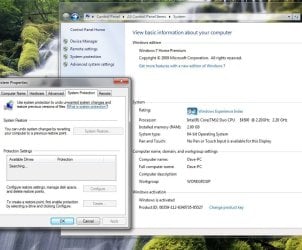
systemprotection.jpg

The service starts and then stops. This is affecting installing and uninstalling programs. Most programs attempt to do a system restore before installing or uninstalling and they will just hang until the system restore feature gives up.

The event viewer is giving these errors:
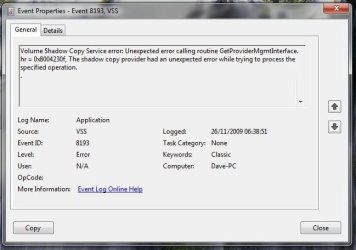
vsserror.jpg

I wonder if it has something to do with x64 ? Should the image path in regedit be set to the vss in syswow64 or system32?

Thanks for any help you can give.

fatherb
 

My Computer My Computer

At a glance

windows 7 64Intel Core 2 Duo2 GbATI 2400
Computer Manufacturer/Model Number
Asus
OS
windows 7 64
CPU
Intel Core 2 Duo
Memory
2 Gb
Graphics Card(s)
ATI 2400
Monitor(s) Displays
iiyama 17
Hard Drives
320gb
Go to Start > Run,. and type services.msc.

Scroll down until you see Volume Shadow copy and make sue it'd stated
 

My Computer My Computer

At a glance

Windows 7 Pro & Vista Home PremiumAthlon 64 3800+ (Orleans) 2.40GHz2GB DDR2 RAM DIMMNVIDIA GeForce 8500 GT 512 MB memory HDMI out
Computer Manufacturer/Model Number
Cheap $399.00 E-Machine
OS
Windows 7 Pro & Vista Home Premium
CPU
Athlon 64 3800+ (Orleans) 2.40GHz
Motherboard
Winfast
Memory
2GB DDR2 RAM DIMM
Graphics Card(s)
NVIDIA GeForce 8500 GT 512 MB memory HDMI out
Sound Card
creative X-Fi Exteme 7..1 channel
Monitor(s) Displays
Acer V223W 22" widescreen DVI
Screen Resolution
1680x1050
Hard Drives
WDC WD5 500GB
WDC WD25 250GB
PSU
OCZ 550 watt
Case
Gateway
Cooling
2 fans
Keyboard
Dell
Mouse
Sony Vaio
Internet Speed
18MB/s down - .72MB /s up
hi all,

My system protection system restore function is not working. The options in the system protection tab are greyed out.

View attachment 38715

The service starts and then stops. This is affecting installing and uninstalling programs. Most programs attempt to do a system restore before installing or uninstalling and they will just hang until the system restore feature gives up.

The event viewer is giving these errors:

View attachment 38714

I wonder if it has something to do with x64 ? Should the image path in regedit be set to the vss in syswow64 or system32?

Thanks for any help you can give.

fatherb

Make sure that you have enough space on your hard drive to make the copies. If you do, turn it off, then back on again. That will reset it and hopefully correct the problem.
 

My Computer My Computer

At a glance

Windows 10, Home Clean InstallIntel Core2 processsor Q8200(2.33Ghz 1333FSB)...6 gbATI Radeon 256MB HD3650
Computer type
PC/Desktop
Computer Manufacturer/Model Number
Dell XPS 420
OS
Windows 10, Home Clean Install
CPU
Intel Core2 processsor Q8200(2.33Ghz 1333FSB) Quad Core Tech
Motherboard
Dell
Memory
6 gb
Graphics Card(s)
ATI Radeon 256MB HD3650
Sound Card
Intergrated 7.1 Channel Audio
Monitor(s) Displays
Dell SP2009W 20"
Hard Drives
640 GB Serial ATA Hard drive
Cooling
Fan
Keyboard
Dell USB Keyboard
Mouse
Dell Premium Optical USB
Internet Speed
DSL 2.85
System Restore Error (0x810000203

Thanks For The Help ,

I have the same issue ,The system restore was and when it does it gives me this error .
I am running windows home premium 64 bit ,4 gigs of ram and 600 gigs hard drive ,I just bought it a week ago .thanks
 

My Computer My Computer

At a glance

64Intel Pentium i5Hewlett Packard 146Intel Graphics i5
Computer Manufacturer/Model Number
Hewlett Packard
OS
64
CPU
Intel Pentium i5
Memory
Hewlett Packard 146
Graphics Card(s)
Intel Graphics i5
I'm going to add my two cents worth here. I've tried to utilize System Restore on multiple client computers over the past year to try an back over acquired viruses and for other issues. On all of these Windows 7 computers, System Restore NEVER worked! Not once! And I've almost never had a failure of System Restore on an XP or Vista system!


In my opinion, Microsoft totally screwed the pooch with Windows 7 System Restore.
One other data point. When System Restore failed on my own Windows 7 computer, I uninstalled Avira Antivir (Version 12), and then after rebooting, lo and behold, System Restore worked! I strongly suspect that System Restore will fail on any Windows 7 computer that has avira antivir installed.


As as an aside, as far as I'm concerned antivir and the rest are worse than useless. They do not stop viruses from being installed, but they do produce large numbers of false alarms and interminably interfere with legitimate operations. I've dropped antivirus programs asstotally from my system and run my daily work from a Standard/Limited account that has been further locked down by locking .exe (and other) file association hooks, as well as locking several other commonly invaded hooks that have no business being in a Standard/Limited account in the first place.
 

My Computer My Computer

At a glance

Windows 7 ProfessionalIntel I5
Computer Manufacturer/Model Number
Panasonic CF-53
OS
Windows 7 Professional
CPU
Intel I5
SFC?

Have you tried running sfc.exe? 1.Open command prompt with Administrator privileges by right clicking on it. 2. type sfc /scannow and let it scan. It will take a while. Also do it a second and possibly third time because it doesn't fix everything in one single scan. Good luck.
 

My Computer My Computer

At a glance

Windows 7 Home Premium x64
OS
Windows 7 Home Premium x64
GrandServer, could you give more info on sfc.exe? What exactly does that do?
 

My Computer My Computer

At a glance

Windows 7 Professional x64
OS
Windows 7 Professional x64

My Computer My Computer

At a glance

Windows 10, Home Clean InstallIntel Core2 processsor Q8200(2.33Ghz 1333FSB)...6 gbATI Radeon 256MB HD3650
Computer type
PC/Desktop
Computer Manufacturer/Model Number
Dell XPS 420
OS
Windows 10, Home Clean Install
CPU
Intel Core2 processsor Q8200(2.33Ghz 1333FSB) Quad Core Tech
Motherboard
Dell
Memory
6 gb
Graphics Card(s)
ATI Radeon 256MB HD3650
Sound Card
Intergrated 7.1 Channel Audio
Monitor(s) Displays
Dell SP2009W 20"
Hard Drives
640 GB Serial ATA Hard drive
Cooling
Fan
Keyboard
Dell USB Keyboard
Mouse
Dell Premium Optical USB
Internet Speed
DSL 2.85
GrandServer, could you give more info on sfc.exe? What exactly does that do?
It is a piece of software built in in Windows that checks for the system itself for missing files and errors and repairs it. You can search sfc /scannow on this website. It is here:
http://www.sevenforums.com/tutorials/1538-sfc-scannow-command-system-file-checker.html
Also don't forget that after running it, it will say if any errors were encountered. If there was, you are going to restart the computer and do it as many times as it takes until it doesn't show any more errors encountered. Try that.
Also, if this doesn't solve it you could have a virus. I recommend a one-time full scan with Microsoft Security Essentials. Good luck.
I have to tell you. My system restore doesn't work either. When I put it to restore it stays forever on a looping windows screen saying it is doing the work. It stayed for 3 hours before I shut it down. Therefore, the only way I can get my Windows 7 restored is through a Windows 7 disk. Try that if you have the same problem as I do LATER ON. Good luck!
 

My Computer My Computer

At a glance

Windows 7 Home Premium x64
OS
Windows 7 Home Premium x64
Back
Top