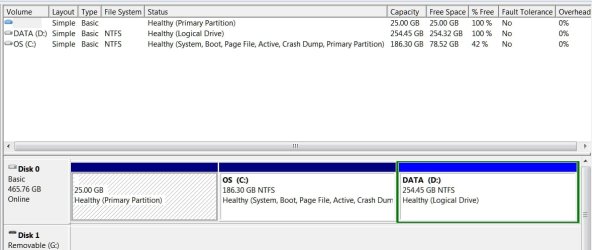
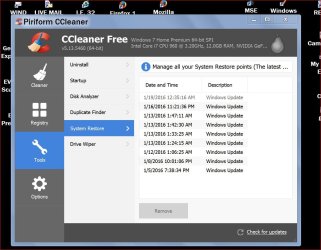
No I/we didn't create a restore point. The freezing is another issue we're concerned about.I would suggest not using Sleep or Hibernation until we get your Restore Point problem fixed.
Did you or did you not create your own new Restore point?
System Restore Point - Create
Completing this Tutorial by Golden would also give some useful information.
http://www.sevenforums.com/tutorials/274797-disk-management-post-screen-capture-image.html
***Have you been monitoring your laptop temperatures?
***How old is this laptop?
***When was the last time the inside of the laptop was cleaned?
No, we don't monitor the temperatures.
It's about 4 years old, give or take.
Inside hasn't been cleaned.
My cheap $300 ASUS laptop is 3 years old, and goes on Exede satellite installs with me, and doesn't have the issues she's having.
All computers are different, I understand, but I'm just saying.....
The laptop is off now, and she was using it a while ago, I'll do some of this in the morning, gotta go to bed,
Thank you for being helpful.

My Computer
At a glance
Microsoft Windows 7 Home Premium 64-bit 7601 ...Intel(R) Core(TM) i7-2670QM CPU @ 2.20GHz6.00 GB(1) Intel(R) HD Graphics 3000 (2) NVIDIA GeFo...
- Computer type
- Laptop
- Computer Manufacturer/Model Number
- ASUS
- OS
- Microsoft Windows 7 Home Premium 64-bit 7601 Multiprocessor Free Service Pack 1
- CPU
- Intel(R) Core(TM) i7-2670QM CPU @ 2.20GHz
- Motherboard
- ASUSTeK Computer Inc. N53SV
- Memory
- 6.00 GB
- Graphics Card(s)
- (1) Intel(R) HD Graphics 3000 (2) NVIDIA GeForce GT 540M
- Sound Card
- (1) Bluetooth Audio Device (2) Realtek High Definition Aud
- Screen Resolution
- 0 x 0 x 0 bits (0 colors) @ 0 Hz
- Hard Drives
- (1) ST9500423AS (2) HP Photosmart 8100 USB Device