Windows Mail

How to Reinstate Windows Mail in Windows 7

   Warning
Microsoft no longer supports Windows Mail, aka WinMail. It's recommended you use another well known supported email client. This Tutorial is for Advanced users who importantly have the Technical Ability to make the changes, have backups of everything including your OS, and to be your own tech support for WinMail going forward. If you decide to complete this tutorial you accept the fact that you are using WinMail as-is. It might be necessary to uninstall other email clients to resolve any WinMail conflicts in some environments. Understand it's likely that new OS updates from Microsoft will break WinMail's operation, and to fix make it necessary to rerun the tutorial again to reinstate it. With those things in mind, this tutorial was written so that you can rerun it without affecting WinMail user data.
Please see this Errata (Bug List) post before you install, to be aware of the current information about known issues using WinMail within Windows 7, these issues are programmatic and in most cases cannot be resolved by this tutorial, and will never be fixed.

Having said all of that disclaimer, if you have the technical ability, and can put up with the annoying minor byproduct bugs, then like so many of us still enjoy using WinMail on Windows 7 ...ymmv!


   Tip
As of January, 2025, the instructions given here supersede all other instructions given in forthcoming older posts. Realize some of the posts that follow are over 16 years old, and many of the link pointers within have become mislinked over time, many of the files or information within them is outdated, incomplete, or superseded with more accurate information - and so be careful. However you can always be sure that the latest info from all research is incorporated into this tutorial post, and its downloads are the latest available. This post is continuously kept up-to-date, and so..
...Always refer to this Tutorial post for the very latest updated information

This is the 4th iteration of the Windows 7, WinMail tutorial.

The process of this tutorial Will Not work to reinstate WinMail on Windows 8/10 !
Windows 8/10 users please go Here


Start here
  1. Download tutorial package TutReWinMail.zip

    Download

  2. Extract the TutReWinMail.zip into your user Downloads folder
    • Note: Be sure once extracted this is the address of the ''TutReWinMail'' folder:
    • C:\Users\username\Downloads\TutReWinMail... ... (if it's not there please put it there)
  3. Navigate to your user Downloads\TutReWinMail folder to be sure the above is correct.
    • (..if you need more verbose install instructions to follow, download this WinMail Local Tutorial.zip)
    • Advanced Users can proceed below:
      (..log in for Full Access, being able to get support, remove ads, like, and even to post, etc..)
Advanced Users: ..use this easy excellent overview of the steps in the local tutorial:
  • Open an Administrator Command Prompt. (screenshot showing in Administrator mode)
  • copy/paste this line into the command prompt: cd %USERPROFILE%\Downloads\TutReWinMail\
  • Your command prompt must now be showing you are at That Same Folder Address ..which contains the tutorial files that the batch file in the next step executes programs and copies files specifically from that folder address - if it's not there the batch file will fail since it cannot find what it needs!
  • Next type in either winmail32 or win64mail <matching OS bit, to interactively process These Next Steps
  • If you've finished to the bottom as shown in last screenshot, restart your machine (sets registry)
  • Create a shortcut from WinMail.exe to your Desktop
  • Open WinMail - it may prompt you one (or both) of These Two Notices ..click yes, and okay.
  • They now should be already set, but you can manually check/set at any time These Default Settings
  • That's pretty much all there is to it, and from here you setup the rest of the Windows Mail client (aka: WinMail) as normal within its various tab menus for Accounts, Options, Layout, etc, etc, to suit your individual needs.
  • Lastly, but should be the First thing you do, is to Create A WinMail Backup (new version) ..Go to this next link and when you get there scroll down to the heading: Backup/Restore Procedures for further instructions.
   Information
See How to open an elevated Administrator Command Prompt
Important: The exact text provided by the tutorial must be entered into the Administrator Command Prompt.
Hint: to avoid typos, copy/paste the entire line containing the command into the Command Prompt window.
Also see: How to Enable Copy to Clipboard from the Windows 7 Command Prompt

Every effort has been made to make this a step-by-step process, however, it is beyond the scope of a single tutorial to provide information on every command or concept. Search the Main Tutorial Section if you need greater detail on a concept or command presented in this tutorial.


Good luck, and long live WinMail :thumbsup:


   Note
Made possible by members:
Mark (aka Mr GRiM) - provided the original tutorial
Poppa Bear - continued Mark's work within the 2nd version
endeavor - provided continuous feedback, changes, invaluable testing instrumental to tutorial operations
EKManitis - propose the batch code that made operations easier
Slartybart - updated, tested, and consolidated all of the above into the 3rd version
endeavor - reviewed, updated, tested, and incorporated all of the above into this 4th version
...and also a special thanks to All the other members who presented discovery for this project


Attachments

  • TutReWinMail.zip
    TutReWinMail.zip
    1.8 MB · Views: 4,994
  • Win74umsZip.zip
    Win74umsZip.zip
    404 bytes · Views: 106
  • msoe_32.zip
    msoe_32.zip
    404 bytes · Views: 1,052
  • msoe_64.zip
    msoe_64.zip
    404 bytes · Views: 1,531
  • WinMailEdit.zip
    WinMailEdit.zip
    404 bytes · Views: 6
  • ACP.jpg
    ACP.jpg
    11.5 KB · Views: 1,083
  • DefaultClickYes-OkayAssociation.jpg
    DefaultClickYes-OkayAssociation.jpg
    31.1 KB · Views: 899
  • ProcessingBatch.jpg
    ProcessingBatch.jpg
    109 KB · Views: 1,147
  • PasteCDCommand.jpg
    PasteCDCommand.jpg
    18.5 KB · Views: 696
  • WinMail_Local_Tutorial.zip
    WinMail_Local_Tutorial.zip
    6.1 KB · Views: 1,202
  • FolderOptionsSet.jpg
    FolderOptionsSet.jpg
    37.9 KB · Views: 695
  • WinMailAdvanceOptionsBlank.jpg
    WinMailAdvanceOptionsBlank.jpg
    138.1 KB · Views: 93
  • Win7x64AdvancedTab+FileVersions.jpg
    Win7x64AdvancedTab+FileVersions.jpg
    184.7 KB · Views: 112
  • AdvancedTabBefore&After_fixed.jpg
    AdvancedTabBefore&After_fixed.jpg
    79.1 KB · Views: 50
  • CheckManually.jpg
    CheckManually.jpg
    131.8 KB · Views: 136
  • Win10_SetDefault.jpg
    Win10_SetDefault.jpg
    31.8 KB · Views: 33
Last edited by a moderator:
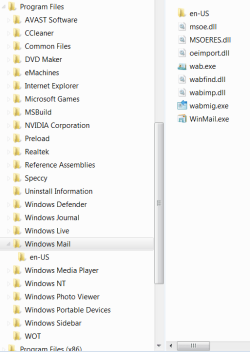
After I posted that last one & thought about it, I'm sure it's me. I'm either clicking too much, too little, or in the wrong spot, or should just click instead of right click???? I wonder myself "what my fingers are actually clicking, or what I'm really doing." :o I've never done anything with a batch file before, is there something special I need to do after it's downloaded. Just did #4, will show you what I have now in Windows Mail Folder & won't touch anything until you reply. I'm sorry to be such a PIA. Oh, I don't know what you mean by "prop. should be A instead of HSA".
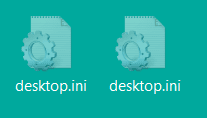
Also another shot . . . why 2 ini's on desktop.
 

Attachments

  • Windows Mail Folder.PNG
    Windows Mail Folder.PNG
    3.7 KB · Views: 1,685
  • why 2 of these on my desktop.PNG
    why 2 of these on my desktop.PNG
    1.7 KB · Views: 1,671

My Computer My Computer

Computer type
PC/Desktop
Computer Manufacturer/Model Number
emachines
OS
Microsoft Windows 7 Home Premium 64-bit 7601 Multiprocessor Free Service Pack 1
CPU
AMD Athlon(tm) II X2 220 Processor
Motherboard
eMachines EL1358G
Memory
3.00 GB
Graphics Card(s)
NVIDIA GeForce 6150SE nForce 430
Sound Card
Realtek High Definition Audio
Screen Resolution
1280 x 1024 x 32 bits (4294967296 colors) @ 60 Hz
Hard Drives
(1) WDC WD10 EADX-22TDHB0 SCSI Disk Device (2) Generic- Multi-Card USB Device
Keyboard
came with PC
Mouse
came with PC
Antivirus
Avast
Browser
IE 9
Other Info
don't know how to get info for the other 5 areas
I really don't know why this isn't working for me. From the beginning, last week or before, whenever this whole mess started : I did extract from the zip file, I did Run the 64bat, I did press a key. Here just a bit ago after reading & printing your last post, I started over from "Find your winmail64bat" & followed your instructions other than going back to reset defaults as per #4 because the shortcut did nothing, again, just like my other tries.

I'm hell on screen shots & feel I need to show you what I have ended up with so you'll see that I'm not pulling your leg & maybe you can spot something ??? that shows where I've gone wrong. This is why I "threw my hands up".

Unless I don't know what I'm looking at, I still don't see "any msoe.dll.old showing".
 

Attachments

  • Programs Folder.PNG
    Programs Folder.PNG
    14.5 KB · Views: 306
  • cmd window.PNG
    cmd window.PNG
    15.3 KB · Views: 266

My Computer My Computer

Computer type
PC/Desktop
Computer Manufacturer/Model Number
emachines
OS
Microsoft Windows 7 Home Premium 64-bit 7601 Multiprocessor Free Service Pack 1
CPU
AMD Athlon(tm) II X2 220 Processor
Motherboard
eMachines EL1358G
Memory
3.00 GB
Graphics Card(s)
NVIDIA GeForce 6150SE nForce 430
Sound Card
Realtek High Definition Audio
Screen Resolution
1280 x 1024 x 32 bits (4294967296 colors) @ 60 Hz
Hard Drives
(1) WDC WD10 EADX-22TDHB0 SCSI Disk Device (2) Generic- Multi-Card USB Device
Keyboard
came with PC
Mouse
came with PC
Antivirus
Avast
Browser
IE 9
Other Info
don't know how to get info for the other 5 areas
I'll give you that grits you are good with taking screenshots.

Yes there absolutely does show the few problems you're having as shown in your cmd windows screenshot, I'm glad you posted it.

The screenshot shows you are having permission issues for one thing..
(subinacl is not recognized as an internal external command operable program or batch file)
Perhaps Windows 7 Home Premium version does not have SubInACL installed or activated by default? I don't have a Home Premium version nearby to check that status. I know that Professional & Ultimate have its access automatically.
SubInACL is easy to install though, however! this could get complicated, and so perhaps you should just follow the tutorial and do the steps manually instead of proceeding this automated way.

Also looking at that cmd window screenshot, where did you unzip that EnableWindowsMail.zip file anyway since I don't see your ..dll files location in your cmd windows, but this could just still be a permissions issue? ...you know grits perhaps in your case and ability you should just do it manually by following the tutorial from step one and forget about doing it this automatic way unless someone else wants to take it from here. darn it, I really wanted this way to work for you though, sorry.
 
Last edited:

My Computer My Computer

Computer type
PC/Desktop
Computer Manufacturer/Model Number
..all towers built from scratch
OS
Vista/Win7/8/10/11 (x86/x64)
CPU
i7
I also wondered about 'Home' and the 'permissions issue' but somewhere in the earlier discussion pages were posts regarding those two. Don't know if they were resolved, will go look back later but wanted to answer your question.

When I downloaded the zip file it was in my 'Downloads Folder' so unzipped there, was that my first wrong move?

Why would doing the page 1 tutorial give me better results?

I just spent about an hour on 'Bing' searching SubInACL install & kept seeing many posts, results that it's not usable on Windows 7.

Thanks again for your time, I too wanted this way to work 'cuz I was afraid I'd screw up trying the tutorial.
 

My Computer My Computer

Computer type
PC/Desktop
Computer Manufacturer/Model Number
emachines
OS
Microsoft Windows 7 Home Premium 64-bit 7601 Multiprocessor Free Service Pack 1
CPU
AMD Athlon(tm) II X2 220 Processor
Motherboard
eMachines EL1358G
Memory
3.00 GB
Graphics Card(s)
NVIDIA GeForce 6150SE nForce 430
Sound Card
Realtek High Definition Audio
Screen Resolution
1280 x 1024 x 32 bits (4294967296 colors) @ 60 Hz
Hard Drives
(1) WDC WD10 EADX-22TDHB0 SCSI Disk Device (2) Generic- Multi-Card USB Device
Keyboard
came with PC
Mouse
came with PC
Antivirus
Avast
Browser
IE 9
Other Info
don't know how to get info for the other 5 areas
I also wondered about 'Home' and the 'permissions issue' but somewhere in the earlier discussion pages were posts regarding those two. Don't know if they were resolved, will go look back later but wanted to answer your question.

When I downloaded the zip file it was in my 'Downloads Folder' so unzipped there, was that my first wrong move?

That's good, that folder is just fine.

Why would doing the page 1 tutorial give me better results?.

Because it can bypass these simple issues that using the program SubInACL is currently causing you.

I just spent about an hour on 'Bing' searching SubInACL install & kept seeing many posts, results that it's not usable on Windows 7.

Well I think that's excellent that you are researching it like that, it shows tenacity, and in no time that process will help you get better at these things. "Just be sure to have a backup plan when you make any changes, please."

Be very discerning what you read on google, bing, or the web in general.

And by the way, yes SubInACL is absolutely usable on Windows 7, that post you read is inaccurate and is just somebody else's incorrect opinion at that particular moment in time. SubInACL does work on all versions of Windows 7, it comes installed on the Professional and Ultimate versions, and obviously many of us have used it with this batch file automation already and have never seen the issue you've had with it, well yet anyway.

Thanks again for your time, I too wanted this way to work 'cuz I was afraid I'd screw up trying the tutorial.

Well grits, thank you actually, because you have helped uncover an issue with using automation via the batch file, and in the end I know the relsove to it will be a simple adjustment, I hope.
 

My Computer My Computer

Computer type
PC/Desktop
Computer Manufacturer/Model Number
..all towers built from scratch
OS
Vista/Win7/8/10/11 (x86/x64)
CPU
i7
oh boy, now I'm confused & 'torn between the devil and the deep' . . . . which would be best for a dummy like me, should I try the SubInAcl & then the batch again or do the page 1 tutorial? And by the way, whichever way I go, should I undo, delete, or whatever, what I have already done to/in my machine before I start something else?
 

My Computer My Computer

Computer type
PC/Desktop
Computer Manufacturer/Model Number
emachines
OS
Microsoft Windows 7 Home Premium 64-bit 7601 Multiprocessor Free Service Pack 1
CPU
AMD Athlon(tm) II X2 220 Processor
Motherboard
eMachines EL1358G
Memory
3.00 GB
Graphics Card(s)
NVIDIA GeForce 6150SE nForce 430
Sound Card
Realtek High Definition Audio
Screen Resolution
1280 x 1024 x 32 bits (4294967296 colors) @ 60 Hz
Hard Drives
(1) WDC WD10 EADX-22TDHB0 SCSI Disk Device (2) Generic- Multi-Card USB Device
Keyboard
came with PC
Mouse
came with PC
Antivirus
Avast
Browser
IE 9
Other Info
don't know how to get info for the other 5 areas
oh boy, now I'm confused & 'torn between the devil and the deep' . . . . which would be best for me, should I try the SubInAcl & then the batch again or do the page 1 tutorial? And by the way, whichever way I go, should I undo, delete, or whatever, what I have already done to/in my machine before I start something else?


If I were you at your level I would use the Tutorial yes, it does the exact same thing anyway, it's also easy to do, and at this point in time it has been more used and therefore more proven, and I'm hoping others will be more willing to step in and help you with using it if you have more questions.

There is no reason to undo anything you have done, it's all the same, just accomplished in a different way.

There will be those that will want you to move on to a current email client too, and I must say those reasons have merit and are valid !!! ...even though I and many others have chosen a different path to use WM.
 

My Computer My Computer

Computer type
PC/Desktop
Computer Manufacturer/Model Number
..all towers built from scratch
OS
Vista/Win7/8/10/11 (x86/x64)
CPU
i7
Thanks again, it might take me all day tho' 'cuz I keep getting interrupted by phone calls, we're in the middle of planning my Grand Daughter's 30th birthday party.

Yes, I'm aware of being told to move on but at this point I've got my mind made up to keep trying a bit more. I'm kind of a stubborn ole granny sometimes. :)
 

My Computer My Computer

Computer type
PC/Desktop
Computer Manufacturer/Model Number
emachines
OS
Microsoft Windows 7 Home Premium 64-bit 7601 Multiprocessor Free Service Pack 1
CPU
AMD Athlon(tm) II X2 220 Processor
Motherboard
eMachines EL1358G
Memory
3.00 GB
Graphics Card(s)
NVIDIA GeForce 6150SE nForce 430
Sound Card
Realtek High Definition Audio
Screen Resolution
1280 x 1024 x 32 bits (4294967296 colors) @ 60 Hz
Hard Drives
(1) WDC WD10 EADX-22TDHB0 SCSI Disk Device (2) Generic- Multi-Card USB Device
Keyboard
came with PC
Mouse
came with PC
Antivirus
Avast
Browser
IE 9
Other Info
don't know how to get info for the other 5 areas
Wow, I think that was the scariest operation I've ever done on a PC & still not get the job done. That's exactly why I went with the batch method. I guess my level is even lower than I thought.

I may have goofed even more, after still not getting anything to happen when double clicking on desk top short cut, I did System Restore to several days back but still have some of what I got from the page 1 tutorial. "Don't ask me, I'm lost!!"
I think part of my confusion is that during the tutorial, it states 'save to desk top', which I always did with my XP but Windows 7 never gives me that option so the downloads went to My Docs & being the bonehead I am just made things confusing I guess. Like I said, I'm at such a low level that I shouldn't even be sitting here wasting anyone's time.
 

My Computer My Computer

Computer type
PC/Desktop
Computer Manufacturer/Model Number
emachines
OS
Microsoft Windows 7 Home Premium 64-bit 7601 Multiprocessor Free Service Pack 1
CPU
AMD Athlon(tm) II X2 220 Processor
Motherboard
eMachines EL1358G
Memory
3.00 GB
Graphics Card(s)
NVIDIA GeForce 6150SE nForce 430
Sound Card
Realtek High Definition Audio
Screen Resolution
1280 x 1024 x 32 bits (4294967296 colors) @ 60 Hz
Hard Drives
(1) WDC WD10 EADX-22TDHB0 SCSI Disk Device (2) Generic- Multi-Card USB Device
Keyboard
came with PC
Mouse
came with PC
Antivirus
Avast
Browser
IE 9
Other Info
don't know how to get info for the other 5 areas
scariest operation you ever done? ..for heavens sake that tutorial process is just copying a few files and a few minor adjustments.

There was no need to do a restore, for what reason? none! ..restore is for big mess ups like installing large programs that you change your mind on or for something that totally messes up your computer! The tasks on the first page tutorial is just copying a few files and a few minor adjustments.

There is no 'save to desktop' event on the the first page tutorial that I see not that it matters, nevertheless, when downloading/saving whatever file it does not matter if you save it to the downloads folder or the desktop, the desktop sometimes can be more convenient is all, and from there you copy the file to where ever you want. This next tidbit although irrelevant, is that on 7 like your XP you can download to your desktop if you want by when the little box appears at the bottom of the page to save a file, click the down arrow on it and click Save As, and here another box comes up and gives you a choice to browse the download location to your desktop, but again this tip is irrelevant to the tutorial task at hand.

All the answers are there to do it manually on the first page and beyond, but if you want to give up then so be it... I don't see how you are going to install the newer WLM and set it up if you can't even do this.
 

My Computer My Computer

Computer type
PC/Desktop
Computer Manufacturer/Model Number
..all towers built from scratch
OS
Vista/Win7/8/10/11 (x86/x64)
CPU
i7
This may have been noted elsewhere in the tutorial, but I didn't see it. Anyway - these are minor issues.

The WinEditMail.zip file contains a registry file that helps reinstate Windows Mail.
I perused it before running and found two things that I changed.

  • The recently used addresses
  • Rules - they are German in the file, I changed them to English
The reg file used to change these two is shown below.
Again - these are minor and might have been noted elsewhere.

Windows Registry Editor Version 5.00

; --------------------------------
; Remove MRU Addrs - WinMail
; --------------------------------
[HKEY_CURRENT_USER\Software\Microsoft\Windows Mail\Recently Used Addresses]
"MRUList"=""
"a"=-
"b"=-
"c"=-
"d"=-

; --------------------------------
; Change German to English
; --------------------------------
[HKEY_CURRENT_USER\Software\Microsoft\Windows Mail\Rules\Filter\FFA]
"Name"=-"Alle Nachrichten anzeigen"
"Name"="All news"

[HKEY_CURRENT_USER\Software\Microsoft\Windows Mail\Rules\Filter\FFB]
"Name"=-"Gelesene Nachrichten ausblenden"
"Name"="Hide read messages"

[HKEY_CURRENT_USER\Software\Microsoft\Windows Mail\Rules\Filter\FFC]
"Name"=-"Heruntergeladene Nachrichten anzeigen"
"Name"="Downloaded messages"

[HKEY_CURRENT_USER\Software\Microsoft\Windows Mail\Rules\Filter\FFF]
"Name"=-"Ignorierte/gelesene Nachrichten ausbl."
"Name"="Ignored / read messages"
 

My Computer My Computer

Computer type
Laptop
Computer Manufacturer/Model Number
HP Pavilion dv6-6c10us
OS
x64 (6.3.9600) Win8.1 Pro & soon dual boot x64 (6.1.7601) Win7_SP1 HomePrem
CPU
AMD A6-3420M APU with Radeon(tm) HD Graphics
Motherboard
Hewlett-Packard 1805
Memory
6.00 GB
Graphics Card(s)
AMD Radeon(TM) HD 6520G
Sound Card
(1) AMD High Definition Audio Device (2) IDT High Definiti
Monitor(s) Displays
HP W2072a 20" LCD (1600 x 900) @ 60 Hz
Screen Resolution
1366 x 768 x 32 bits (4294967296 colors) @ 60 Hz
Hard Drives
ST640LM0 00 HM641JI SATA Disk Device
Keyboard
Logitech k520 wireless KB
Mouse
Logitech m320 wireless mouse (bundled with KB)
Internet Speed
15/5 | 54 MB Wireless 'n'
Antivirus
Realtime: Defender or Avast | On-demand: Malwarebytes, ESET
Browser
IE 11 on Win8, IE 10 on win 7
Other Info
Media: [Gimp, Audacity, VLC] || Comm: [WEmail 2012, Skype] || Productivity: [OpenOffice,| Textpad] || Utils: [Sysinternals, cCleaner, Speccy, Defraggler]
@endeavor, I haven't given up, just had to give my mind & body abit of a break, have a couple health issues that I was over taxing. Also need to study up some & see if I can try to understand where I went wrong sooo many times in this process. I tried again & failed on Sun. 5/6.

Thanks again.
 

My Computer My Computer

Computer type
PC/Desktop
Computer Manufacturer/Model Number
emachines
OS
Microsoft Windows 7 Home Premium 64-bit 7601 Multiprocessor Free Service Pack 1
CPU
AMD Athlon(tm) II X2 220 Processor
Motherboard
eMachines EL1358G
Memory
3.00 GB
Graphics Card(s)
NVIDIA GeForce 6150SE nForce 430
Sound Card
Realtek High Definition Audio
Screen Resolution
1280 x 1024 x 32 bits (4294967296 colors) @ 60 Hz
Hard Drives
(1) WDC WD10 EADX-22TDHB0 SCSI Disk Device (2) Generic- Multi-Card USB Device
Keyboard
came with PC
Mouse
came with PC
Antivirus
Avast
Browser
IE 9
Other Info
don't know how to get info for the other 5 areas
This may have been noted elsewhere in the tutorial, but I didn't see it. Anyway - these are minor issues.

The WinEditMail.zip file contains a registry file that helps reinstate Windows Mail.
I perused it before running and found two things that I changed.

  • The recently used addresses
  • Rules - they are German in the file, I changed them to English
The reg file used to change these two is shown below.

Again - these are minor and might have been noted elsewhere.

Windows Registry Editor Version 5.00

; --------------------------------
; Remove MRU Addrs - WinMail
; --------------------------------
[HKEY_CURRENT_USER\Software\Microsoft\Windows Mail\Recently Used Addresses]
"MRUList"=""
"a"=-
"b"=-
"c"=-
"d"=-

; --------------------------------
; Change German to English
; --------------------------------
[HKEY_CURRENT_USER\Software\Microsoft\Windows Mail\Rules\Filter\FFA]
"Name"=-"Alle Nachrichten anzeigen"
"Name"="All news"

[HKEY_CURRENT_USER\Software\Microsoft\Windows Mail\Rules\Filter\FFB]
"Name"=-"Gelesene Nachrichten ausblenden"
"Name"="Hide read messages"

[HKEY_CURRENT_USER\Software\Microsoft\Windows Mail\Rules\Filter\FFC]
"Name"=-"Heruntergeladene Nachrichten anzeigen"
"Name"="Downloaded messages"

[HKEY_CURRENT_USER\Software\Microsoft\Windows Mail\Rules\Filter\FFF]
"Name"=-"Ignorierte/gelesene Nachrichten ausbl."
"Name"="Ignored / read messages"


Hi Slartybart,
Interesting and good catch in your perusing...
The issue though with you removing your a, b, c, d like that because if it's after the fact and you do it, it removes only the current placeholder of that key, iow, if in WM one had emailed with numerous people after the original reg merge and then you delete those 4 keys "a"=- thru "d"=- with your reg ...you're only removing the current placeholder since the others may have moved down the a-z list in their respective order. The correct way to remove them after the fact is to manually do it from your registry. Any new users that install WinMail from now on and use the new WinMailEdit.reg I've attached to this post will not have this problem. I've also removed the dozen redundant "Windows Registry Editor Version 5.00" entries that were scattered within since we only need one at the beginning!

Also Slartybart on your Change German to English ditty, nice peruse btw, but it is to know that even if you merged it originally with the German text like it was, Windows 7 'will' revert it to English after a WM restart anyway, confirmed, and so there is no need for you to change it like you have. Actually after testing it I've found out that even if you typed in complete gibberish in those \FFA \FFB \FFC \FFF registry keys and merged it, and it appears to take, however the next time you open WinMail it automatically reverts to what was hardcoded from MS. At first yes I did think it mattered, but after actually testing it showed me it does not matter what text is put in those particular keys, it will be reverted. I've edited my post.

Anyway fwiw besides the "Recently Used Addresses" entries noted but also the German text entries too, both of which seemed to have been introduced in 2009 on post 159 and then later mirrored in post 292, but it does not matter at all though who inadvertently included these minor issues since we're just appreciative for Everyone's hard work on this entire project over the years, thanks to everyone for that.

Attached is a revised/updated WinMailEdit.reg with these changes above fixed which includes having changed the German to English text entries (even if only for visual reg esthetic value), and also have removed many of someone's personal email addresses value data store from the auto-complete address store key "HKEY_CURRENT_USER\Software\Microsoft\Windows Mail\Recently Used Addresses" that was inadvertently introduced by the source in the beginning of this project that the links above point to; fyi, you don't see their addresses while editing the original WinMailEdit.reg file unless you convert the data, otherwise you can see it pop up as you type within the "To:" field of your email and you just happen to start with their name ..anyway those emails all have been removed now as it should be. Also has been added the registry change from post 1160 which found the problem since 2009 for some users that had Windows Mail missing from the default programs listing and they could not set Windows Mail as the Default Mail Program - the registry entry to fix that problem is now included in this revised WinMailEdit.reg...

This should now be used in place of the first page tutorial one, or in the EKMantis automated download, in both cases just replace those WinMailEdit.reg files with this one attached below.

WinMailEdit.reg
(Removed Attachment since it's now included in the new tutorial)
 
Last edited:

My Computer My Computer

Computer type
PC/Desktop
Computer Manufacturer/Model Number
..all towers built from scratch
OS
Vista/Win7/8/10/11 (x86/x64)
CPU
i7
Was hoping to post 'yippie,got it done' because last evening while just looking through different areas of my PC I came across Windows Mail listed in the Set Default Programs in Control Panel but was too tired at that point to concentrate so put off until this morning. So I figured (wrongly of course) the first thing to do before I even click on the Windows Mail short cut still on desktop from my last several tries, would be to go ahead & set it as default but then when I went back to desktop the short cut was gone!, as were a couple or so other areas that I'd seen it listed.
Again am too beat to concentrate on going any farther right now so will get back to it in morning.
 

My Computer My Computer

Computer type
PC/Desktop
Computer Manufacturer/Model Number
emachines
OS
Microsoft Windows 7 Home Premium 64-bit 7601 Multiprocessor Free Service Pack 1
CPU
AMD Athlon(tm) II X2 220 Processor
Motherboard
eMachines EL1358G
Memory
3.00 GB
Graphics Card(s)
NVIDIA GeForce 6150SE nForce 430
Sound Card
Realtek High Definition Audio
Screen Resolution
1280 x 1024 x 32 bits (4294967296 colors) @ 60 Hz
Hard Drives
(1) WDC WD10 EADX-22TDHB0 SCSI Disk Device (2) Generic- Multi-Card USB Device
Keyboard
came with PC
Mouse
came with PC
Antivirus
Avast
Browser
IE 9
Other Info
don't know how to get info for the other 5 areas
My windows mail works now, yippee. lol
Is the junk mail settings rendered impotent? Even though I select the mail is not junk mail, it still moves it to it. I know I can create a rule as a workaround.
 

My Computer My Computer

Computer type
PC/Desktop
Computer Manufacturer/Model Number
Asus P6X58D-E, Lenovo
OS
Windows 7, Windows 10 Pro
CPU
Intel Core i7 930
Motherboard
Asus X58 P6X58D-E
Memory
G.SKILL F3-12800CL9T-6GBNQ 6GB DDR3 3X2GB DDR3-1600 CL 9-9-9
Graphics Card(s)
ATI Radeon HD 5700
Hard Drives
Seagate Barracuda 1TB x2 SATA3 6GB/S 7200RPM 64MB
WD 1TB SATA3
PSU
Coolermaster Silent Pro 700W Modular Power Supply
I'm fairly certain that "not junk mail" is a per item function. You either need to add the sender to your contacts, safe sender's list, or, as you said, build a rule.

I know safe sender's list is present after you reinstate WinMail. You can see the list in Junk Mail options, l, but I'm not sure if it is functional.

Peace!

Is the junk mail settings rendered impotent? Even though I select the mail is not junk mail, it still moves it to it. I know I can create a rule as a workaround.
 

My Computer My Computer

Computer type
Laptop
Computer Manufacturer/Model Number
HP Pavilion dv6-6c10us
OS
x64 (6.3.9600) Win8.1 Pro & soon dual boot x64 (6.1.7601) Win7_SP1 HomePrem
CPU
AMD A6-3420M APU with Radeon(tm) HD Graphics
Motherboard
Hewlett-Packard 1805
Memory
6.00 GB
Graphics Card(s)
AMD Radeon(TM) HD 6520G
Sound Card
(1) AMD High Definition Audio Device (2) IDT High Definiti
Monitor(s) Displays
HP W2072a 20" LCD (1600 x 900) @ 60 Hz
Screen Resolution
1366 x 768 x 32 bits (4294967296 colors) @ 60 Hz
Hard Drives
ST640LM0 00 HM641JI SATA Disk Device
Keyboard
Logitech k520 wireless KB
Mouse
Logitech m320 wireless mouse (bundled with KB)
Internet Speed
15/5 | 54 MB Wireless 'n'
Antivirus
Realtime: Defender or Avast | On-demand: Malwarebytes, ESET
Browser
IE 11 on Win8, IE 10 on win 7
Other Info
Media: [Gimp, Audacity, VLC] || Comm: [WEmail 2012, Skype] || Productivity: [OpenOffice,| Textpad] || Utils: [Sysinternals, cCleaner, Speccy, Defraggler]
My windows mail works now, yippee. lol
Is the junk mail settings rendered impotent? Even though I select the mail is not junk mail, it still moves it to it. I know I can create a rule as a workaround.

On the main WM GUI (not an email GUI) you go to the top tab of Tools> Junk E-mail Options> and in here you have many settings you can make - and so check all the many different settings within all tabs in there to see if anything is your problem. I personally have mine checkmarked on the first first tab and first selection which is to Turn it Off, but your needs may vary.

One of a number of caveats using WM on 7 is that you are not 'automatically' able to update the junk filter definitions anyway and so they are old as it is, nevertheless the original ones will still follow the mindset of its time period if you have it turned on. I personally just leave it on Off.
 

My Computer My Computer

Computer type
PC/Desktop
Computer Manufacturer/Model Number
..all towers built from scratch
OS
Vista/Win7/8/10/11 (x86/x64)
CPU
i7
Hi Slartybart,

Hey thanks for the work and willing to be of help, thanks.

Just a couple of things as I look things over, if you're open to discussion?

~If you want to fix an 'inactive' typo - search for mso32 in your xtra3264wm.bat
~also in it, search .\subinacl ...what purpose is the .\ ?

~I see what you're thinking with your xtra3264wm.bat, I just don't think ? that 64 also uses the 32 version msoe.dll in it's own folder too?...but I understand your thought. Maybe ask someone who has Windows7 64 bit to delete the msoe.dll out of their 86 folder and see if it still starts...? (...you set it HSA so the norm won't see it, not many are norm here though and can get quite curious <g>)

~ just some coffeetable tidbit talk, I've not yet had to unblock a file on 7 Pro or Ultimate, but perhaps in the Home versions of 7 with their security settings the way they are, you need to? ..Pretty sure there is an automatic batch entry you can make to unblock for them "if appropriate" Unblock files (Batch Process) ...but in either case both issues make it more complex. I see Brink has a topic on unblocking too... I wish I had a Home version around so I could check some things like that, as well since grits has the Home version, specifically if the Home version has problems with permissions and perhaps needs to install SubInACL.exe to get on with it.

~ a tidbit on tut, when reading Tut Offline, concerning "cd %USERPROFILE%\Downloads\Tut_ReWinMail\" ...the way you have those lines highlighted prevents a 'copy' on it, the point is for a newbie to type in those commands by hand without making a mistake is a tall order, whereas using the online post itself you can copy/paste into the command box ...just talkin outloud tryin to be helpful is all since you included the Tut in the zip, someone will be more likely to use/read that, rather than your actual post which there you can copy... but speaking of all that though.. ..You know, thinking, as it was originally intended, it might be Easier to have them just double click the ..bat itself, that way there's no entering in all this info, just d-click the ..bat and go...?

~I see you redid all the bats to help while it runs to be more informative in what it's doing, you spent some time doing that. <smile>
 

My Computer My Computer

Computer type
PC/Desktop
Computer Manufacturer/Model Number
..all towers built from scratch
OS
Vista/Win7/8/10/11 (x86/x64)
CPU
i7
Thanks endeavor for still keeping me in mind :). Darn, I wish I understood the posts between you & Slartybart :huh:.

And I wish there was someone running Home Premium that had success using the batch by EKMantis that would come on board so I'd 'maybe' get a better idea as to whether it's maybe not just that I'm illiterate, maybe something with the way my machine is set? One reason I wonder is that while I was reading the above posts I left the machine for several minutes to take a phone call & when I came back, my screen was black like normal after setting idol for a bit, but this time it took me several tries of moving my mouse before it 'woke up' to the screen so I could post. Actually, I really do wonder if I have something set wrong in IE9 but that's for a different forum.
 

My Computer My Computer

Computer type
PC/Desktop
Computer Manufacturer/Model Number
emachines
OS
Microsoft Windows 7 Home Premium 64-bit 7601 Multiprocessor Free Service Pack 1
CPU
AMD Athlon(tm) II X2 220 Processor
Motherboard
eMachines EL1358G
Memory
3.00 GB
Graphics Card(s)
NVIDIA GeForce 6150SE nForce 430
Sound Card
Realtek High Definition Audio
Screen Resolution
1280 x 1024 x 32 bits (4294967296 colors) @ 60 Hz
Hard Drives
(1) WDC WD10 EADX-22TDHB0 SCSI Disk Device (2) Generic- Multi-Card USB Device
Keyboard
came with PC
Mouse
came with PC
Antivirus
Avast
Browser
IE 9
Other Info
don't know how to get info for the other 5 areas
When I decide to try Slarty's new batch, should I first delete all the folders & files I still have from EKMantis batch? For one thing I'm such an airhead that I'd be afraid of getting mixed up as to who's who. Also wondering if either of you read my post # 1221 & if you know why that happened?

Also, if I remember right, it seems like over the past several days that any folder/file where I click 'Properties', just under 'Open', it says 'Take Ownership'. Does that mean that I was further along in the Mantis batch than I realized?
S'cuse me, I'm probably not making any sense here & am going to have to skip things for today at least, I had to double up on one of my meds & am kinda (more than normal) foggy headed. Will check back tomorrow. Besides that it kinda looks like you 2 are still ironing out a couple things.
Thanks again to both endeavor & Slartybart.
 

My Computer My Computer

Computer type
PC/Desktop
Computer Manufacturer/Model Number
emachines
OS
Microsoft Windows 7 Home Premium 64-bit 7601 Multiprocessor Free Service Pack 1
CPU
AMD Athlon(tm) II X2 220 Processor
Motherboard
eMachines EL1358G
Memory
3.00 GB
Graphics Card(s)
NVIDIA GeForce 6150SE nForce 430
Sound Card
Realtek High Definition Audio
Screen Resolution
1280 x 1024 x 32 bits (4294967296 colors) @ 60 Hz
Hard Drives
(1) WDC WD10 EADX-22TDHB0 SCSI Disk Device (2) Generic- Multi-Card USB Device
Keyboard
came with PC
Mouse
came with PC
Antivirus
Avast
Browser
IE 9
Other Info
don't know how to get info for the other 5 areas
Back
Top