Solved Change Location of My Documents

  • Thread starter Thread starter Kill3dwardDead
  • Start date Start date
K

Kill3dwardDead

Guest
I'd like to change the location of My Documents, but they've removed the location tab that was present in Vista. What I'm looking to do is set the location of My Documents to E: (Western Digital 1TB My Book) as opposed to C: (Primary 150GB Hard-Drive) because of the much needed storage space.

http://www.sevenforums.com/tutorials/18629-user-folders-change-default-location.html

Note: I'm using the super-admin account instead of the limited one, so I should have full access to just about everything.

Any help is much appreciated.
 

Attachments

  • Windows Vista.png
    Windows Vista.png
    14.5 KB · Views: 1,265
  • Windows 7.png
    Windows 7.png
    11.8 KB · Views: 958
Last edited by a moderator:
I'd like to change the location of My Documents, but they've removed the location tab that was present in Vista. What I'm looking to do is set the location of My Documents to E: (Western Digital 1TB My Book) as opposed to C: (Primary 150GB Hard-Drive) because of the much needed storage space.

http://www.sevenforums.com/tutorials/18629-user-folders-change-default-location.html


Note: I'm using the super-admin account instead of the limited one, so I should have full access to just about everything.

Any help is much appreciated.


Hi Kill3dwardDead,

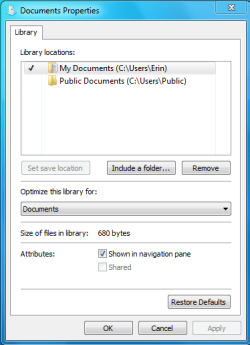
No Microsoft didn't remove the Location Tab, your just clicking properties for the wrong item ;)

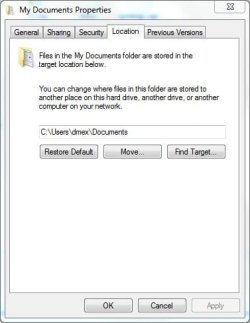
Your clicking properties on the Library folder called "Documents", instead expand the library folder and click properties on the "My Documents" folder, from there you can see the location tab and change its location ;)

mydoc.JPG

mydocloc.JPG

Hope it helps.

Steven
 
Last edited by a moderator:
I'd like to change the location of My Documents, but they've removed the location tab that was present in Vista. What I'm looking to do is set the location of My Documents to E: (Western Digital 1TB My Book) as opposed to C: (Primary 150GB Hard-Drive) because of the much needed storage space.

http://www.sevenforums.com/tutorials/18629-user-folders-change-default-location.html


Note: I'm using the super-admin account instead of the limited one, so I should have full access to just about everything.

Any help is much appreciated.
They haven't removed the Location thing...it is just moved

Go here
start->type in C:\Users\*Your User Name*->Right click on my documents and go to properties->click on location tab and make the appropriate change!
 
Last edited by a moderator:

My Computer

Computer Manufacturer/Model Number
Compal JFT02 (Custom Build Laptop)
OS
Windows 7 Home Premium x64 - Mac OS X 10.6.4 x64
CPU
Intel Core 2 Duo T9300 2.5 GHz
Motherboard
JFT02
Memory
4GB Kingston DDR2-800
Graphics Card(s)
NVIDIA Geforce 8600M GT (512MB Model)
Sound Card
Realtek HD Audio
Monitor(s) Displays
WUXGA Standard Laptop Display
Screen Resolution
1680*1050
Hard Drives
Toshiba 320GB 5400RPM Laptop HD
PSU
Standard Laptop Power Supply
Case
Standard Laptop Case
Cooling
Standard Laptop Cooling
Keyboard
Standard Laptop 105 Key-Keyboard
Mouse
Synaptics Touchpad
Internet Speed
Verizion Online DSL 3360/864 kbs (dl/up)
Can't believe I missed that, thank you.
 
I have a devil of a time quite often finding documents I just created and
saved. But I did not look which folder it saved it in, since from years of
working with computers it would always save it to Documents, where a normal
person would want it.

BUT I noticed (after hours of searching,) that it saved the document (a .pdf
file) in a Folder called XKVBTW02, but NOT also in Documents.
This drives me crazy. It's idiotic!!! Why does it do that and why could I
not find it when I searched for .pdf?

How do I fix this so every document is saved in the Documents folder?

BTW It also did not show up under Recent documents, that why it took me
hours to find it again. In above crazy folder.
 

My Computer

Computer Manufacturer/Model Number
HP Q8200
OS
windows 7
CPU
Intel Q8200
Motherboard
Plegarion
Memory
8GB
Graphics Card(s)
NVDA 9400GT
Sound Card
built in
Monitor(s) Displays
HP 17"
Screen Resolution
max
Hard Drives
3HD, i internal, 2 external
Keyboard
MS Wireless
Mouse
MS wireless
Internet Speed
22MB up, 4GB down Comcast
Back
Top