Computer wont shut down!

mayheamk

New member
So i posted this forum before on EVGA forume at:Computer turns on after shut down from windows and i didnt get any solution here, thought to ask it here as well, hopefully i may be able to find a solution.

So this has been happening for few days. after i shut down my computer, it restarts automatically after a few second (1-3). i have searched webs, i have tried some options on bios, i had previously problem with my power suppy, i changed it to a brand new one, but my problem still remains.
How can i fix it?
Regards

My specs

win7x64
i7 950
EVGA x58 FTW3
EVGA gefore 580
6GB DDR3
Power supply: crossair 1000W HX
 

My Computer

OS
windows 7
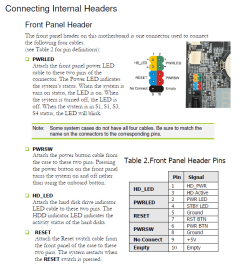
try checking CAREFULLY to see if you have any of these connectors reversed
 

Attachments

  • Capture.PNG
    Capture.PNG
    167.1 KB · Views: 104

My Computer

Computer type
PC/Desktop
OS
Windows 7 Pro 64 bit SP1
CPU
Intel Core i7 950 Quad OC'ed to 3.2 GHZ
Motherboard
ASRock X58
Memory
12GB DDR 3
Graphics Card(s)
Radeon HD 5870 1GB
Sound Card
Onboard
Monitor(s) Displays
23" Acer HD
Screen Resolution
1920x1080
Hard Drives
128GB SSD
PSU
700W
Case
Coolermaster
Antivirus
Avast Free
Browser
Firefox
How are you shutting down? Through Windows or pressing the power button? Your PC could be crashing during the shut down process and restarting automaticly.

If this is the case then this should be a fix, but further troubleshooting needs to nail down the cause.
* Right-click on Computer (on desktop or in start menu)
* Click on Advanced System Settings (upper left-hand side)
* Click on settings under Startup and Recovery
* Click (uncheck) the box next to Automatically Restart, then click OK
* Try to shut down and see if it will stay off

Good luck
 

My Computer

Computer Manufacturer/Model Number
ATX Custom Build 2012
OS
Windows 7 Enterprise x64 SP1
CPU
Intel Core i3-2100 @ 3.10GHz
Motherboard
Intel DH67CL desktop ATX
Memory
10 GB DDR3
Graphics Card(s)
Asus EAH5450 series (Radeon)
Monitor(s) Displays
Samsung SyncMaster 226BW, Samsung Syncmaster P2450H
Screen Resolution
226BW: 1680 x 1050 & P2450H: 1920 x 1080
Hard Drives
Western Digital 320 GB sata (boot), Samsung 640 GB sata, Seagate 2 TB sata (data)
PSU
Cooler Master Extreme Power Plus 500W
Case
Thermaltake V3 Black Edition
Cooling
stock cooling with added intake fan
Keyboard
HP Wireless Elite Keyboard Wireless Keyboard
Mouse
Microsoft Touch
Internet Speed
Comcast Cable business class <=18Mb {averages 12Mb}
Other Info
Optical drives: LG SuperMulti Blue, HP DVD 1260T
Other: Kensington Bluetooth Receiver
Network: Buffalo Wireless N USB, DLink N router/DLink Ethernet Switch/DLink Xtreme N wireless bridge
Printer: HP Photosmart Plus, HP Officejet Pro 8600 Plus
PCs: HP dv6-3040us (7 x64 SP1), HP DM4-2165dx (7 x64 SP1), HP Pavilion zv6130us (7 x86), Apple Macbook Air (Lion)
************
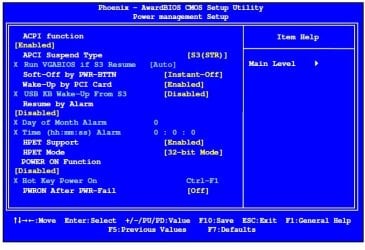
post ALL the settings in your power management BIOS page and what they are set to:
 

Attachments

  • Captures2.JPG
    Captures2.JPG
    91.6 KB · Views: 77

My Computer

Computer type
PC/Desktop
OS
Windows 7 Pro 64 bit SP1
CPU
Intel Core i7 950 Quad OC'ed to 3.2 GHZ
Motherboard
ASRock X58
Memory
12GB DDR 3
Graphics Card(s)
Radeon HD 5870 1GB
Sound Card
Onboard
Monitor(s) Displays
23" Acer HD
Screen Resolution
1920x1080
Hard Drives
128GB SSD
PSU
700W
Case
Coolermaster
Antivirus
Avast Free
Browser
Firefox
also try clearing CMOS parameters:
 

Attachments

  • Capture33.JPG
    Capture33.JPG
    31.3 KB · Views: 52

My Computer

Computer type
PC/Desktop
OS
Windows 7 Pro 64 bit SP1
CPU
Intel Core i7 950 Quad OC'ed to 3.2 GHZ
Motherboard
ASRock X58
Memory
12GB DDR 3
Graphics Card(s)
Radeon HD 5870 1GB
Sound Card
Onboard
Monitor(s) Displays
23" Acer HD
Screen Resolution
1920x1080
Hard Drives
128GB SSD
PSU
700W
Case
Coolermaster
Antivirus
Avast Free
Browser
Firefox
also try clearing CMOS parameters:

Thank you all for your responds. i think i may have to give a little background about myself. i am not new to computers and fixing it, ive been doing it for several years now, before i post here i have researched and i didnt get to any solutions.

My bios has been reset many ways, i even updated it, the problem is not freezing right before the shutting down, i have already checked all of those and if you check my evga forum, we already went through that.

My computer literally does shuts down, but the problem is it is turned on by itself, without anyone touching anything. this is what im trying to fix.

thanks
 

My Computer

OS
windows 7
Ok. Do one thing. Remove the mother board completely from the cabinet and take a brush/air gun and do the good clean-up and attach it again. Now your computer should not be restarting automatically.....It happened to me as well few years ago. Actually dust or little electronic material get glitch with board which is not visible but it does short the circuit. Please try and see if it works. Good luck!
 

My Computer

OS
windows 7 enterprises 64 bit
also try clearing CMOS parameters:

Thank you all for your responds. i think i may have to give a little background about myself. i am not new to computers and fixing it, ive been doing it for several years now, before i post here i have researched and i didnt get to any solutions.

My bios has been reset many ways, i even updated it, the problem is not freezing right before the shutting down, i have already checked all of those and if you check my evga forum, we already went through that.

My computer literally does shuts down, but the problem is it is turned on by itself, without anyone touching anything. this is what im trying to fix.

thanks

We cannot just assume you've done these things without you mentioning anything other than my computer shuts off and turns back on and 'here's my other thread.'

If you've done it all as you say, time to get a new motherboard.
 

My Computer

Computer type
PC/Desktop
OS
Windows 7 Pro 64 bit SP1
CPU
Intel Core i7 950 Quad OC'ed to 3.2 GHZ
Motherboard
ASRock X58
Memory
12GB DDR 3
Graphics Card(s)
Radeon HD 5870 1GB
Sound Card
Onboard
Monitor(s) Displays
23" Acer HD
Screen Resolution
1920x1080
Hard Drives
128GB SSD
PSU
700W
Case
Coolermaster
Antivirus
Avast Free
Browser
Firefox
Back
Top