"Limited Access" after 1 hour online

Schlomo

New member
Local time
8:26 AM
Messages
6
Hello,

I have searched and found that many people receive the same error as me, but my circumstance is unlike any I have found thus far.

I get a triangle and exclamation point on the wireless signal icon in my task bar after about an hour after being connected to the internet. When I hover over the icon it displays "Limited Access". Connection is lost at this point.

I then right click the icon and click "Troubleshoot Network Problems" and windows seems to restart the network card and I regain internet access for another hour or so. It says the error was "Wireless network connection doesn't have a valid IP configuration".

This is hard for me to troubleshoot because everyone else that has this error cannot connect to the internet in the first place. I am (strangely) connected just fine then all of a sudden I get "Limited Access" with full wireless bars caused by an "invalid IP configuration". None of the other computers in my home have this issue. Does anyone have any idea what could be wrong?

I have unchecked the power saving feature for the network card and tried disabling the firewall, but I'm not sure what else to do. Thanks for any help!
 

My Computer My Computer

At a glance

Windows 7 Professional x64
OS
Windows 7 Professional x64
Welcome to Seven Forums,

Wi-Fi adapter has the latest driver?

Also, please install and run Xirrus Wi-Fi Inspector from your computer. Double click the Xirrus Icon on his laptop's desktop, Tap the Printscreen key on your keyboard, open up Paint then choose Edit from the Menu and select Paste, then save it. Upload and attached the file here.
 

My Computer My Computer

At a glance

Win7 & Win8 64bitIntel i5
Computer Manufacturer/Model Number
Lenovo Desktop/Samsung Laptop
OS
Win7 & Win8 64bit
CPU
Intel i5
Internet Speed
Charter-20 Mbps
Antivirus
Avast
Browser
FF, IE9 and Chrome
Thanks for the welcome, this is a great community.

I have the latest drivers installed.

A few days ago, I tried to set a static IP address in hopes that it would fix my issue but, it didn't help.

Today, on a whim, I tried it again with a different IP address and my connection has held steady for 3 hours. I don't understand how a different IP could make the difference but, I'm happy it seems to have worked so far.

I am going to keep watching it and will report back with the Xirrus readout tomorrow just to be sure I'm not missing something.
 

My Computer My Computer

At a glance

Windows 7 Professional x64
OS
Windows 7 Professional x64
Ok that was short-lived.

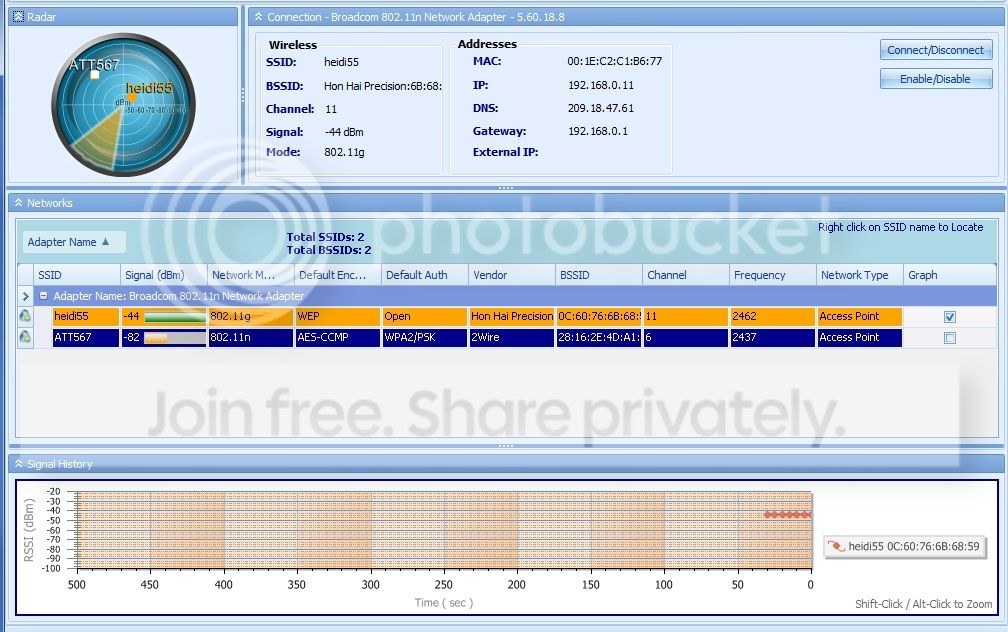
I had the same error again. This time I went into the event logs to find out what is happening. But first here is a screen shot of WiFi Inspector:

xirruscapture.jpg


Here are the events leading up to my "Limited Access" problem. When it occurred this time I had been playing an online game although this happens even if I'm browsing, or sitting idle.

1. Time: 11:40:21 PM
Source: BROWSER
Event ID: 8033
Description: "The browser has forced an election on network \Device\NetBT_Tcpip_(98CFC7FA-CA11-4201-91BA-1D0C7D3AB459) because a master browser was stopped."

2. Time: 11:40:24 PM
Source: Service Control Manager
Event ID: 7036
Description: "The WinHTTP Web Proxy Auto-Discovery Service entered the running state"

3. Time: 11:40:42 PM (Warning)
Source: DNS CLient Events
Event ID: 1014
Description: "Name Resolution for the name teredo.ipv6.microsoft.com timed out after none of the configured DNS servers responded."

4. The next series of event are '6100' network events that correspond to me using the network troubleshooter to restart the WiFi adaptor and regaining the internet connection.


Occasionally I see events with a 'warning' label that say "WLAN Extensibility Module has stopped" but these don't show up at the time of my disconnect.

I also see events with an 'error' label titled HAL that say "The platform firmware has corrupted memory across the previous system power transition. Update firmware"
 

My Computer My Computer

At a glance

Windows 7 Professional x64
OS
Windows 7 Professional x64
Ok that was short-lived.

I had the same error again. This time I went into the event logs to find out what is happening. But first here is a screen shot of WiFi Inspector:

xirruscapture.jpg


Here are the events leading up to my "Limited Access" problem. When it occurred this time I had been playing an online game although this happens even if I'm browsing, or sitting idle.

1. Time: 11:40:21 PM
Source: BROWSER
Event ID: 8033
Description: "The browser has forced an election on network \Device\NetBT_Tcpip_(98CFC7FA-CA11-4201-91BA-1D0C7D3AB459) because a master browser was stopped."

2. Time: 11:40:24 PM
Source: Service Control Manager
Event ID: 7036
Description: "The WinHTTP Web Proxy Auto-Discovery Service entered the running state"

3. Time: 11:40:42 PM (Warning)
Source: DNS CLient Events
Event ID: 1014
Description: "Name Resolution for the name teredo.ipv6.microsoft.com timed out after none of the configured DNS servers responded."

4. The next series of event are '6100' network events that correspond to me using the network troubleshooter to restart the WiFi adaptor and regaining the internet connection.


Occasionally I see events with a 'warning' label that say "WLAN Extensibility Module has stopped" but these don't show up at the time of my disconnect.

I also see events with an 'error' label titled HAL that say "The platform firmware has corrupted memory across the previous system power transition. Update firmware"

Rather that using WEP security trying changing to WPA-2 security with AES encryption, Windows 7 drivers tend to work much better this way. You will need to make these changes in both your routers settings for the WIFI connection and also make the changes to your Windows 7 wireless profile.

The signal strength and channel selection look fine.
 

My Computer My Computer

At a glance

Windows 7 Ult, Windows 8.1 Pro,Q9650-4.275GHz, E8600 4.5GHz, E6750-3.8GHzG.Skill PC2 9600 1200Mhz 5 5 5 15 2TGTX480
Computer type
PC/Desktop
Computer Manufacturer/Model Number
Home built
OS
Windows 7 Ult, Windows 8.1 Pro,
CPU
Q9650-4.275GHz, E8600 4.5GHz, E6750-3.8GHz
Motherboard
Evga 780i FTW
Memory
G.Skill PC2 9600 1200Mhz 5 5 5 15 2T
Graphics Card(s)
GTX480
Sound Card
Asus Xonar D2
Monitor(s) Displays
HannsG
Screen Resolution
1680X1050
Hard Drives
GSkill Phoenix Pro 120GB SSD
PSU
ThermalTake Toughpower 1000Watt modular
Case
ThermalTake XaserV
Cooling
Xigmatek S1283
Keyboard
Logitech G15
Mouse
Logitech G9
Internet Speed
T1
I agree, WEP = No Security at all. No issue at all looking at the Xirrus capture.

Please let us know.
 

My Computer My Computer

At a glance

Win7 & Win8 64bitIntel i5
Computer Manufacturer/Model Number
Lenovo Desktop/Samsung Laptop
OS
Win7 & Win8 64bit
CPU
Intel i5
Internet Speed
Charter-20 Mbps
Antivirus
Avast
Browser
FF, IE9 and Chrome
I agree, WEP = No Security at all. No issue at all looking at the Xirrus capture.

Please let us know.

Not to mention that with many Windows 7 drivers WEP flat out does not work correctly, TKIP encryption can also cause connection problems depending on the driver. WPA-2 with AES seems to be the only combo that gives consistent results, as in no mysterious drop outs. :sarc:
 

My Computer My Computer

At a glance

Windows 7 Ult, Windows 8.1 Pro,Q9650-4.275GHz, E8600 4.5GHz, E6750-3.8GHzG.Skill PC2 9600 1200Mhz 5 5 5 15 2TGTX480
Computer type
PC/Desktop
Computer Manufacturer/Model Number
Home built
OS
Windows 7 Ult, Windows 8.1 Pro,
CPU
Q9650-4.275GHz, E8600 4.5GHz, E6750-3.8GHz
Motherboard
Evga 780i FTW
Memory
G.Skill PC2 9600 1200Mhz 5 5 5 15 2T
Graphics Card(s)
GTX480
Sound Card
Asus Xonar D2
Monitor(s) Displays
HannsG
Screen Resolution
1680X1050
Hard Drives
GSkill Phoenix Pro 120GB SSD
PSU
ThermalTake Toughpower 1000Watt modular
Case
ThermalTake XaserV
Cooling
Xigmatek S1283
Keyboard
Logitech G15
Mouse
Logitech G9
Internet Speed
T1
Thanks for the responses. It has just disconnected me 2 more times. Each time I get the same 3 events in Event Viewer. I'm not sure what they mean exactly.

I'm now in the process of changing to WPA-2 security with AES encryption. Will update soon.
 

My Computer My Computer

At a glance

Windows 7 Professional x64
OS
Windows 7 Professional x64
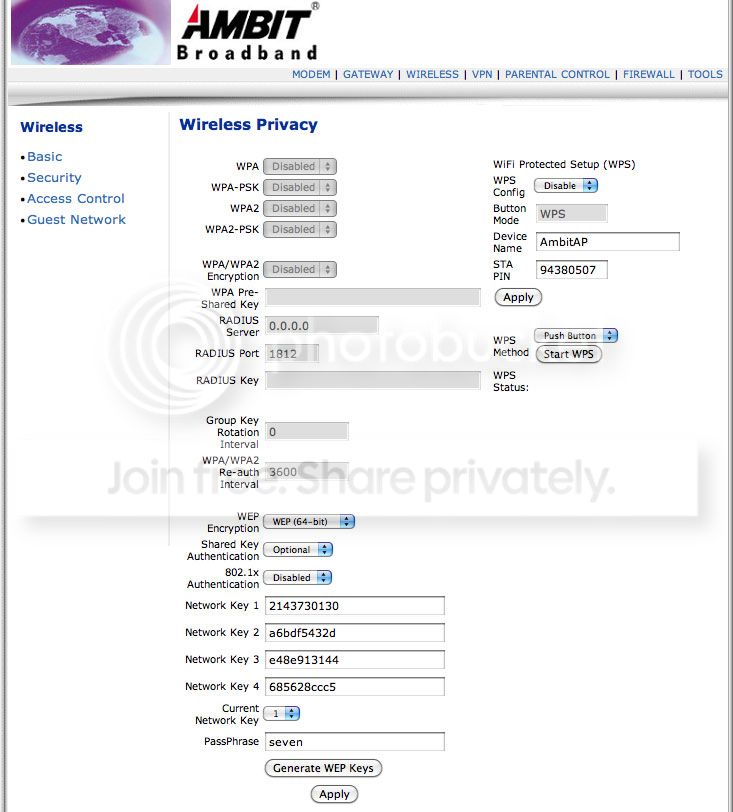
Maybe I'm missing something obvious here. When I login to my router (Ubee U10C022.010) the option for WPA-2 is grayed out.

router.jpg
 

My Computer My Computer

At a glance

Windows 7 Professional x64
OS
Windows 7 Professional x64
The router is from 2008. I suppose it doesn't support WPA.
 

My Computer My Computer

At a glance

Windows 7 Professional x64
OS
Windows 7 Professional x64
It says disabled at the top of the set up page there. You may need to disable WEP first.

I believe that you need to use a pass phrase with at least 8 letters or characters for WPA-2 to work. It's best to use a word that isn't in the dictionary.
 

My Computer My Computer

At a glance

Windows 7 Ult, Windows 8.1 Pro,Q9650-4.275GHz, E8600 4.5GHz, E6750-3.8GHzG.Skill PC2 9600 1200Mhz 5 5 5 15 2TGTX480
Computer type
PC/Desktop
Computer Manufacturer/Model Number
Home built
OS
Windows 7 Ult, Windows 8.1 Pro,
CPU
Q9650-4.275GHz, E8600 4.5GHz, E6750-3.8GHz
Motherboard
Evga 780i FTW
Memory
G.Skill PC2 9600 1200Mhz 5 5 5 15 2T
Graphics Card(s)
GTX480
Sound Card
Asus Xonar D2
Monitor(s) Displays
HannsG
Screen Resolution
1680X1050
Hard Drives
GSkill Phoenix Pro 120GB SSD
PSU
ThermalTake Toughpower 1000Watt modular
Case
ThermalTake XaserV
Cooling
Xigmatek S1283
Keyboard
Logitech G15
Mouse
Logitech G9
Internet Speed
T1
Back
Top