Solved How do I turn off that feature which auto moves windows on screen?

StupidUser

New member
Member
VIP
Local time
2:26 AM
Messages
109
You know how when you have a Windows' window that is partially off screen and you move the mouse over that window towards the edge of the screen where the window goes off screen how Windows automatically moves the window back fully onto the screen? What's that feature called?

And, more importantly, how do I turn it off?
 
Last edited:

My Computer My Computer

At a glance

Microsoft Windows 7 Professional 64-bit 7601 ...AMD A6-5350M APU with Radeon(tm) HD Graphics16.00 GBAMD Radeon HD 8450G
Computer type
PC/Desktop
Computer Manufacturer/Model Number
Lenovo/2757CTO Thinkpad W700
OS
Microsoft Windows 7 Professional 64-bit 7601 Multiprocessor Free Service Pack 1
CPU
AMD A6-5350M APU with Radeon(tm) HD Graphics
Motherboard
LENOVO 20B20011US
Memory
16.00 GB
Graphics Card(s)
AMD Radeon HD 8450G
Sound Card
(1) AMD High Definition Audio Device (2) Conexant 20671 Sm
Monitor(s) Displays
??
Screen Resolution
1366 x 768 x 32 bits (4294967296 colors) @ 60 Hz
Hard Drives
HGST HTS 545032A7E380 SATA Disk Device
Mouse
Microsoft Optical Wheel Mouse
Other Info
BIOS: Ver 1.00PARTTBLX

My Computer My Computer

At a glance

64-bit Windows 11 Pro for WorkstationsIntel i7-8700K OC'd to 5 GHz64 GB (4x16GB) G.SKILL TridentZ RGB DDR4 3600...ASUS ROG-STRIX-GTX1080TI-O11G-GAMING
Computer type
PC/Desktop
Computer Manufacturer/Model Number
Self built custom
OS
64-bit Windows 11 Pro for Workstations
CPU
Intel i7-8700K OC'd to 5 GHz
Motherboard
ASUS ROG Maximus XI Formula Z390
Memory
64 GB (4x16GB) G.SKILL TridentZ RGB DDR4 3600 MHz
Graphics Card(s)
ASUS ROG-STRIX-GTX1080TI-O11G-GAMING
Sound Card
Integrated
Monitor(s) Displays
2 x Samsung Odyssey G7 27"
Screen Resolution
2560x1440
Hard Drives
1TB Samsung 990 PRO M.2,
4TB Samsung 990 PRO PRO M.2,
TerraMaster F8 SSD Plus NAS
PSU
Seasonic Prime Titanium 850W
Case
Thermaltake Core P3
Cooling
Corsair Hydro H115i
Keyboard
Logitech wireless K800
Mouse
Logitech MX Master 4
Internet Speed
2 Gb/s Download and 100 Mb/s Upload
Antivirus
Malwarebyte Anti-Malware Premium
Browser
Google Chrome
Other Info
Logitech Z625 speaker system,
Logitech BRIO 4K Pro webcam,
HP Color LaserJet Pro MFP M477fdn,
APC SMART-UPS RT 1000 XL - SURT1000XLI,
Galaxy S23 Plus phone
Hello,

I'm not sure what you are wanting to turn off about that. As far as I know, it's not possible to disable the ability to Restore/Move an offscreen window back.

http://www.sevenforums.com/tutorials/75291-offscreen-window-move-back-desktop.html

If this is not what you meant, then could you give more details and a screenshot to help clarify more? :)

I'm talking about a window which is partially off-screen.

I have many windows open at a time. I want to see them all at the same time and I'm very picky about their positioning. Sometimes that means positioning a window partially off-screen. But then, when I click on that window, I have to be careful not to move the mouse pointer too close to the edge or the window will move towards the center of the screen.

Another time I want to position a window partially off-screen is when I'm reading a long document which has scrolling. It's easy to flick the mouse all the way to the right and click below the scroll bar to page down, without taking my eyes off the text. But Win7 has a border around the window, so if I flick the mouse to the right, I end up clicking the window's re-size border. Then, to scroll, I have to move my eyes to the scroll bar and it slows me down. I want to move the window a bit to the right so that I can click on the scroll bar without diverting my eyes from the text.

But with this feature turned on, when I flick the mouse to the right to scroll, the window moves to the left and I once again click the re-size border. That's the feature I want to turn off.
 

My Computer My Computer

At a glance

Microsoft Windows 7 Professional 64-bit 7601 ...AMD A6-5350M APU with Radeon(tm) HD Graphics16.00 GBAMD Radeon HD 8450G
Computer type
PC/Desktop
Computer Manufacturer/Model Number
Lenovo/2757CTO Thinkpad W700
OS
Microsoft Windows 7 Professional 64-bit 7601 Multiprocessor Free Service Pack 1
CPU
AMD A6-5350M APU with Radeon(tm) HD Graphics
Motherboard
LENOVO 20B20011US
Memory
16.00 GB
Graphics Card(s)
AMD Radeon HD 8450G
Sound Card
(1) AMD High Definition Audio Device (2) Conexant 20671 Sm
Monitor(s) Displays
??
Screen Resolution
1366 x 768 x 32 bits (4294967296 colors) @ 60 Hz
Hard Drives
HGST HTS 545032A7E380 SATA Disk Device
Mouse
Microsoft Optical Wheel Mouse
Other Info
BIOS: Ver 1.00PARTTBLX
Have you thought about using the Scroll Wheel on almost all Mice available today? No need to Click the scroll bar.
Even if you're on a notebook there is a Scroll feature built into the touch pad, finger on the left hand side and slide it down, or up as you please, page will scroll.

As to your original question about not moving Windows to the center. I don't have that problem. Windows stay where I put them. Do you know that the mouse is not the only way to switch between open windows. You can use Alt+Tab to switch active windows.
 

My Computer My Computer

At a glance

7 x64
OS
7 x64
Have you thought about using the Scroll Wheel on almost all Mice available today? No need to Click the scroll bar.
Even if you're on a notebook there is a Scroll feature built into the touch pad, finger on the left hand side and slide it down, or up as you please, page will scroll.

As to your original question about not moving Windows to the center. I don't have that problem. Windows stay where I put them. Do you know that the mouse is not the only way to switch between open windows. You can use Alt+Tab to switch active windows.

I use the scroll wheel often. But sometimes it scrolls too much or too little. Also, the settings for how far the wheel should go just aren't good enough (you used to be able to set it to go one page at a click - what ever happened to that setting, anyway? The one feature I liked!).

Edit: Whoops, I only answered part of your post.

I rarely use the touch pad. I don't like it. I prefer the little eraser head nub thing in the middle of the keyboard which I can use without removing my hands from the keyboard. I do know about the touch pad features, but don't really like them (they're too fine and weren't intuitive to me).
 

My Computer My Computer

At a glance

Microsoft Windows 7 Professional 64-bit 7601 ...AMD A6-5350M APU with Radeon(tm) HD Graphics16.00 GBAMD Radeon HD 8450G
Computer type
PC/Desktop
Computer Manufacturer/Model Number
Lenovo/2757CTO Thinkpad W700
OS
Microsoft Windows 7 Professional 64-bit 7601 Multiprocessor Free Service Pack 1
CPU
AMD A6-5350M APU with Radeon(tm) HD Graphics
Motherboard
LENOVO 20B20011US
Memory
16.00 GB
Graphics Card(s)
AMD Radeon HD 8450G
Sound Card
(1) AMD High Definition Audio Device (2) Conexant 20671 Sm
Monitor(s) Displays
??
Screen Resolution
1366 x 768 x 32 bits (4294967296 colors) @ 60 Hz
Hard Drives
HGST HTS 545032A7E380 SATA Disk Device
Mouse
Microsoft Optical Wheel Mouse
Other Info
BIOS: Ver 1.00PARTTBLX
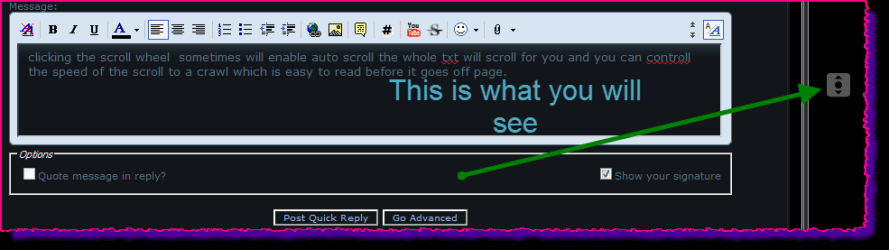
clicking the scroll wheel sometimes will enable auto scroll the whole text will scroll for you and you can control the speed of the scroll to a crawl which is easy to read before it goes off page.

xg.png
 

My Computer My Computer

At a glance

Microsoft Windows 7 Home Premium 64-bit 7600IIx4 amd athelon 635 processor2x2gbati radeon HD 5450
Computer Manufacturer/Model Number
Hewlett packard/p6512uk
OS
Microsoft Windows 7 Home Premium 64-bit 7600
CPU
IIx4 amd athelon 635 processor
Motherboard
FOXCONN 2AA9
Memory
2x2gb
Graphics Card(s)
ati radeon HD 5450
Sound Card
(1) Realtek High Definition Audio (2) AMD High Definition
Monitor(s) Displays
samsung lcd tv 32"
Screen Resolution
1360x 768
Hard Drives
(1) WDC WD10 01FAES-60Z2A0 SATA Disk Device (2) Maxtor OneTouch USB Device (3) ST310003 33AS USB Device (4) WD My Book 1111 USB Device
PSU
?
Cooling
air!
Keyboard
wireless hp
Mouse
wireless Hp,optical
Internet Speed
1.10mb/s
Antivirus
MSE
Browser
Firefox
clicking the scroll wheel sometimes will enable auto scroll the whole text will scroll for you and you can control the speed of the scroll to a crawl which is easy to read before it goes off page.

View attachment 212603
I reprogram my scroll wheel (the middle button, which is usually the wheel itself) to double-click, that way I don't have to double-click anymore.

All of your answers are good ideas, but I've tried them. I like to use Windows the way I like to use it (not the way Bill Gates says to use it. That's what I like about Windows over Mac, it's so customizeable (is that a word?). Now I want to customize this feature, too, to turn it off.

Thanks for all the suggestions (and the ones I'm sure are coming, too).
 

My Computer My Computer

At a glance

Microsoft Windows 7 Professional 64-bit 7601 ...AMD A6-5350M APU with Radeon(tm) HD Graphics16.00 GBAMD Radeon HD 8450G
Computer type
PC/Desktop
Computer Manufacturer/Model Number
Lenovo/2757CTO Thinkpad W700
OS
Microsoft Windows 7 Professional 64-bit 7601 Multiprocessor Free Service Pack 1
CPU
AMD A6-5350M APU with Radeon(tm) HD Graphics
Motherboard
LENOVO 20B20011US
Memory
16.00 GB
Graphics Card(s)
AMD Radeon HD 8450G
Sound Card
(1) AMD High Definition Audio Device (2) Conexant 20671 Sm
Monitor(s) Displays
??
Screen Resolution
1366 x 768 x 32 bits (4294967296 colors) @ 60 Hz
Hard Drives
HGST HTS 545032A7E380 SATA Disk Device
Mouse
Microsoft Optical Wheel Mouse
Other Info
BIOS: Ver 1.00PARTTBLX
Well that is just it. To my Knowledge this is NOT a feature that i have ever heard of. Like I said earlier If I place a window someplace on my 2 screens it stay there. Whether it is full on one screen or the other, whether it splits the 2 screens or if it is partially off one on the screens.

It could be some Add-On program you have installed that is causing this to happen.
 

My Computer My Computer

At a glance

7 x64
OS
7 x64
Well that is just it. To my Knowledge this is NOT a feature that i have ever heard of. Like I said earlier If I place a window someplace on my 2 screens it stay there. Whether it is full on one screen or the other, whether it splits the 2 screens or if it is partially off one on the screens.

It could be some Add-On program you have installed that is causing this to happen.
I don't think so. It was there when I first started Windows.

But, if it is some Lenovo add-on that I've been suffering with for three years then I'm going to be really, really angry! :D
 

My Computer My Computer

At a glance

Microsoft Windows 7 Professional 64-bit 7601 ...AMD A6-5350M APU with Radeon(tm) HD Graphics16.00 GBAMD Radeon HD 8450G
Computer type
PC/Desktop
Computer Manufacturer/Model Number
Lenovo/2757CTO Thinkpad W700
OS
Microsoft Windows 7 Professional 64-bit 7601 Multiprocessor Free Service Pack 1
CPU
AMD A6-5350M APU with Radeon(tm) HD Graphics
Motherboard
LENOVO 20B20011US
Memory
16.00 GB
Graphics Card(s)
AMD Radeon HD 8450G
Sound Card
(1) AMD High Definition Audio Device (2) Conexant 20671 Sm
Monitor(s) Displays
??
Screen Resolution
1366 x 768 x 32 bits (4294967296 colors) @ 60 Hz
Hard Drives
HGST HTS 545032A7E380 SATA Disk Device
Mouse
Microsoft Optical Wheel Mouse
Other Info
BIOS: Ver 1.00PARTTBLX
So this is on a Notebook PC. I suspect it is some Lenovo program feature because I have never heard of it before and It certainly doesn't happen on my desktop, home built, or on my Dell notebook.

Go to Control Panel and look for any Lenovo specific feature programs/add-on. you could also search the start menu for any Lenovo entry.
 

My Computer My Computer

At a glance

7 x64
OS
7 x64
Last edited by a moderator:

My Computer My Computer

At a glance

Microsoft Windows 10 Home Build 15036Intel(R) Core(TM) i7-860 @ 2.80GHz4.00 GBNVIDIA GeForce GTX 750
Computer type
PC/Desktop
Computer Manufacturer/Model Number
iBuyPower NZXT
OS
Microsoft Windows 10 Home Build 15036
CPU
Intel(R) Core(TM) i7-860 @ 2.80GHz
Motherboard
Gigabyte Technology Co., Ltd. P55-UD3L
Memory
4.00 GB
Graphics Card(s)
NVIDIA GeForce GTX 750
Sound Card
(1) Line 6 UX2 (2) Realtek High Definition Audio
Monitor(s) Displays
23" acer
Screen Resolution
1920 x 1080 x 32 bits (4294967296 colors) @ 60 Hz
Hard Drives
(1) WDC WD5000AAKS-00D2B0 ATA Device (2) Seagate FreeAgent Go 250G USB Device
Cooling
Corsair H75 liquid cooler (Very easy to install, actually)
Internet Speed
60M cable modem-->Linksys E1200-->1Gbps net card
Browser
Chrome
Other Info
This is probably the longest I've ever had a Windows machine run without having to restore it to scratch. I'm used to restoring to "factory" about every 2 yrs. I've run with Win7 since new in 2009 and only recently (Nov, '14) restored to clean up the machine from all my 'xperimenting. LOL!! I may never need another machine.

Upgraded to 10 when it was still free, then installed 2017 update.
That may be it. I don't use the Aero feature. I'm old school and use Classic Shell.
 

My Computer My Computer

At a glance

7 x64
OS
7 x64
Am I wrong, or are you referring to Snap?
Check this link and let me know...
http://www.sevenforums.com/tutorials/3069-aero-snap-turn-off.html
I like the feature which helps you arrange the windows by dragging them all the way to the side of the screen. That's not what I'm talking about.

Just to see if it was related to the feature I'm describing, I turned on the "Prevent windows from being automatically arranged when moved to the edge of the screen", but the feature I want to disable still worked. So it's not Snap.
 
Last edited by a moderator:

My Computer My Computer

At a glance

Microsoft Windows 7 Professional 64-bit 7601 ...AMD A6-5350M APU with Radeon(tm) HD Graphics16.00 GBAMD Radeon HD 8450G
Computer type
PC/Desktop
Computer Manufacturer/Model Number
Lenovo/2757CTO Thinkpad W700
OS
Microsoft Windows 7 Professional 64-bit 7601 Multiprocessor Free Service Pack 1
CPU
AMD A6-5350M APU with Radeon(tm) HD Graphics
Motherboard
LENOVO 20B20011US
Memory
16.00 GB
Graphics Card(s)
AMD Radeon HD 8450G
Sound Card
(1) AMD High Definition Audio Device (2) Conexant 20671 Sm
Monitor(s) Displays
??
Screen Resolution
1366 x 768 x 32 bits (4294967296 colors) @ 60 Hz
Hard Drives
HGST HTS 545032A7E380 SATA Disk Device
Mouse
Microsoft Optical Wheel Mouse
Other Info
BIOS: Ver 1.00PARTTBLX
So this is on a Notebook PC. I suspect it is some Lenovo program feature because I have never heard of it before and It certainly doesn't happen on my desktop, home built, or on my Dell notebook.

Go to Control Panel and look for any Lenovo specific feature programs/add-on. you could also search the start menu for any Lenovo entry.
The new control panel is a pain to navigate. I opened it and searched on Lenovo. There was nothing there which looked like a window arrangement feature. There was only Lenovo Power Controls, Airbag Protection (even though I have an SSD), Internet Connection, Fingerprint Reader, Health and Diagnostics and Update and Drivers.
 

My Computer My Computer

At a glance

Microsoft Windows 7 Professional 64-bit 7601 ...AMD A6-5350M APU with Radeon(tm) HD Graphics16.00 GBAMD Radeon HD 8450G
Computer type
PC/Desktop
Computer Manufacturer/Model Number
Lenovo/2757CTO Thinkpad W700
OS
Microsoft Windows 7 Professional 64-bit 7601 Multiprocessor Free Service Pack 1
CPU
AMD A6-5350M APU with Radeon(tm) HD Graphics
Motherboard
LENOVO 20B20011US
Memory
16.00 GB
Graphics Card(s)
AMD Radeon HD 8450G
Sound Card
(1) AMD High Definition Audio Device (2) Conexant 20671 Sm
Monitor(s) Displays
??
Screen Resolution
1366 x 768 x 32 bits (4294967296 colors) @ 60 Hz
Hard Drives
HGST HTS 545032A7E380 SATA Disk Device
Mouse
Microsoft Optical Wheel Mouse
Other Info
BIOS: Ver 1.00PARTTBLX
Control Window Auto Scroll

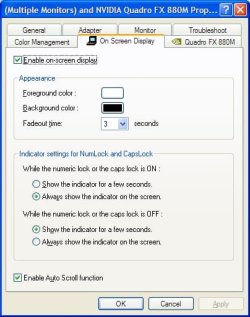
I think this is part of the Nvidia display driver, at least on my Lenovo laptop. It is also possible that this is a Lenovo add-on or customized display driver. The setting is somewhat obscurely located on the "On Screen Display" tab of the "Advanced" settings in the display properties. A check box labeled "Enable Auto Scroll function" controls whether the windows automatically move back onto the screen when you float the mouse over them. (See image below.)

It took me a while to find this. I've been searching the Internet off and on for months for this, but just happened to find it on my own one day.

I hope this helps.

Auto Scroll Setting.jpg
 

My Computer My Computer

At a glance

Windows 7 Professional 64bit
Computer Manufacturer/Model Number
Lenovo
OS
Windows 7 Professional 64bit
sponseld, thanks so much for registering and answering (because I really hate this "feature").

For (mine and others') future reference: In Control Panel, search for "Display" - click Adjust resolution -- Advanced Settings -- On Screen Display, then uncheck "Enable Auto Scroll function".
 
Last edited:

My Computer My Computer

At a glance

Microsoft Windows 7 Professional 64-bit 7601 ...AMD A6-5350M APU with Radeon(tm) HD Graphics16.00 GBAMD Radeon HD 8450G
Computer type
PC/Desktop
Computer Manufacturer/Model Number
Lenovo/2757CTO Thinkpad W700
OS
Microsoft Windows 7 Professional 64-bit 7601 Multiprocessor Free Service Pack 1
CPU
AMD A6-5350M APU with Radeon(tm) HD Graphics
Motherboard
LENOVO 20B20011US
Memory
16.00 GB
Graphics Card(s)
AMD Radeon HD 8450G
Sound Card
(1) AMD High Definition Audio Device (2) Conexant 20671 Sm
Monitor(s) Displays
??
Screen Resolution
1366 x 768 x 32 bits (4294967296 colors) @ 60 Hz
Hard Drives
HGST HTS 545032A7E380 SATA Disk Device
Mouse
Microsoft Optical Wheel Mouse
Other Info
BIOS: Ver 1.00PARTTBLX
good solve,
just to add you said in an earlier post stupiduser that you had changed the center scroll wheel button to operate as a single click to save you double clicking, im pretty sure that is an available option for the left mouse click already.
then you can have your middle wheel click for something else
 

My Computer My Computer

At a glance

Microsoft Windows 7 Home Premium 64-bit 7600IIx4 amd athelon 635 processor2x2gbati radeon HD 5450
Computer Manufacturer/Model Number
Hewlett packard/p6512uk
OS
Microsoft Windows 7 Home Premium 64-bit 7600
CPU
IIx4 amd athelon 635 processor
Motherboard
FOXCONN 2AA9
Memory
2x2gb
Graphics Card(s)
ati radeon HD 5450
Sound Card
(1) Realtek High Definition Audio (2) AMD High Definition
Monitor(s) Displays
samsung lcd tv 32"
Screen Resolution
1360x 768
Hard Drives
(1) WDC WD10 01FAES-60Z2A0 SATA Disk Device (2) Maxtor OneTouch USB Device (3) ST310003 33AS USB Device (4) WD My Book 1111 USB Device
PSU
?
Cooling
air!
Keyboard
wireless hp
Mouse
wireless Hp,optical
Internet Speed
1.10mb/s
Antivirus
MSE
Browser
Firefox
good solve,
just to add you said in an earlier post stupiduser that you had changed the center scroll wheel button to operate as a single click to save you double clicking, im pretty sure that is an available option for the left mouse click already.
then you can have your middle wheel click for something else
Thanks, booh. I currently use the left button for left click and right button for right click and the center button for double click. I could reassign the left button to be a double click, and the middle button to auto scroll, but then I'd have to use the left button for right click which, over time, is sure to confuse me and have me driving into a pond when the "GPS lady" tells me to "turn left in... 50... feet". :D
 

My Computer My Computer

At a glance

Microsoft Windows 7 Professional 64-bit 7601 ...AMD A6-5350M APU with Radeon(tm) HD Graphics16.00 GBAMD Radeon HD 8450G
Computer type
PC/Desktop
Computer Manufacturer/Model Number
Lenovo/2757CTO Thinkpad W700
OS
Microsoft Windows 7 Professional 64-bit 7601 Multiprocessor Free Service Pack 1
CPU
AMD A6-5350M APU with Radeon(tm) HD Graphics
Motherboard
LENOVO 20B20011US
Memory
16.00 GB
Graphics Card(s)
AMD Radeon HD 8450G
Sound Card
(1) AMD High Definition Audio Device (2) Conexant 20671 Sm
Monitor(s) Displays
??
Screen Resolution
1366 x 768 x 32 bits (4294967296 colors) @ 60 Hz
Hard Drives
HGST HTS 545032A7E380 SATA Disk Device
Mouse
Microsoft Optical Wheel Mouse
Other Info
BIOS: Ver 1.00PARTTBLX
An old thread (which I keep posting in!). But I notice that I still can't move Windows' windows off the top of the screen without Windows automatically moving the window down (got that?). Anyone know how to turn that off?
 

My Computer My Computer

At a glance

Microsoft Windows 7 Professional 64-bit 7601 ...AMD A6-5350M APU with Radeon(tm) HD Graphics16.00 GBAMD Radeon HD 8450G
Computer type
PC/Desktop
Computer Manufacturer/Model Number
Lenovo/2757CTO Thinkpad W700
OS
Microsoft Windows 7 Professional 64-bit 7601 Multiprocessor Free Service Pack 1
CPU
AMD A6-5350M APU with Radeon(tm) HD Graphics
Motherboard
LENOVO 20B20011US
Memory
16.00 GB
Graphics Card(s)
AMD Radeon HD 8450G
Sound Card
(1) AMD High Definition Audio Device (2) Conexant 20671 Sm
Monitor(s) Displays
??
Screen Resolution
1366 x 768 x 32 bits (4294967296 colors) @ 60 Hz
Hard Drives
HGST HTS 545032A7E380 SATA Disk Device
Mouse
Microsoft Optical Wheel Mouse
Other Info
BIOS: Ver 1.00PARTTBLX
Been trying to track down this feature forever

Thanks for finding the place to control this feature!

I'm desperate to get this functionality on my home desktop which obviously does not have the thinkpad "On screen display" control panel in video settings, which contains that checkbox.

I guess this probably means i am SOL there and have to look for some other third-party tool to do this. I hope if anybody finds such a program that you will kindly post a link to it here.


@StupidUser, As far as I can tell that is a thing that windows 7 forces, I would like to know if it's possible to shift a window upward so that we can squeeze out more real estate as well (not that I need it at home with my 27" screens, but still).
 

My Computer My Computer

At a glance

Windows 7
Computer type
PC/Desktop
OS
Windows 7
Back
Top