User Account Control: Most Annoying Feature Ever?

TomBrooklyn

New member
Member
Local time
10:53 AM
Messages
75
Is User Account Control the most annoying Windows feature ever? Or close to it?


When I click on an icon to open a program, it's because I want it to open. I don't want to be asked if I want to open it. If I didn't want to open it, I wouldn't have tried to open it.

I set User Account Control to the second to lowest setting, where it ominously warned that me and my computer were needlessly exposing ourselves to grave danger. Then it continued to queery me to confirm if I wanted to open programs that I wanted to open.

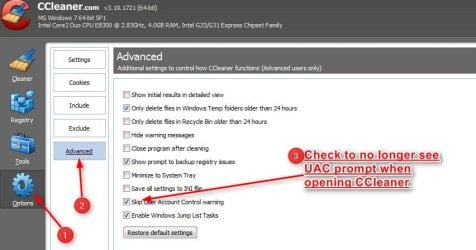
The latest interation of this confirmation was with CrapCleaner. I have now set User Account Control to the lowest possible setting.


Out of curiosity, I was wondering if this program has any redeeming virtues; or if I am not alone in assessing it to be just an annoyance best circumvented?
 

My Computer My Computer

Computer Manufacturer/Model Number
Home Built
OS
Win 7 Pro
CPU
Intel i7 2600K
Motherboard
Asus P8Z68-V LX
Memory
16 GB 1333 Crucial Hyper-X Blu I think
Graphics Card(s)
Integrated
Sound Card
Integrated
Monitor(s) Displays
Dual LCD IPS panels
Screen Resolution
1980x1200, 1980x1080
Hard Drives
3 SATA: 250, 160, 2000 GB, External USB 3TB
PSU
OCZ modular 500W
Case
Antec 300
Cooling
Case: 2 Stock fans, CPU: CoolerMaster Evo 212; PSU: fan
Keyboard
Dell Logitech wireless
Mouse
Logitech Wireless 510
Internet Speed
1.0 Mbps down, 448 Kbps up
Other Info
Case is too small.
IMHO, I am with you. Its the first thing I turn off on a new install. For the average user it may give a bit more security, but for me, Ugh!
 

My Computer My Computer

Computer Manufacturer/Model Number
HP Pavillion dv-7 1005 Tx
OS
Win 8 Release candidate 8400
CPU
[email protected]
Memory
4 gigs
Graphics Card(s)
Nvidia 9600M
Sound Card
HD built-in
Monitor(s) Displays
17" Wxga
Screen Resolution
1440x900
Cooling
none
Internet Speed
45Mb down 5Mb up
Hello Tom,

Yes, UAC can be a pain if you do a lot that requires elevatation to run.

The whole purpose of UAC is to alert you for permission before any program is allowed to run elevated (run as administrator). When a program runs elevated, it will have full control and access to everything on your computer. You can just imagine the damage that could be done to your system if say malware was to run elevated in the background and you never got a UAC prompt to have a chance to deny permission and stop it from running in the first place. If you turn off UAC, then you will never have a chance to allow or deny anything that wants to run elevated on your system. :shock:

I repeat, yeah UAC can be a pain, but how long does it really take and how many times do you really have to click on Yes/No in a UAC prompt compared to having that sort of last line of security??

It's something that you should weigh carefully before just disabling.

For more details and information about UAC:
Hope this helps,
Shawn
 

My Computer My Computer

Computer type
PC/Desktop
Computer Manufacturer/Model Number
Self built custom
OS
64-bit Windows 11 Pro for Workstations
CPU
Intel i7-8700K OC'd to 5 GHz
Motherboard
ASUS ROG Maximus XI Formula Z390
Memory
64 GB (4x16GB) G.SKILL TridentZ RGB DDR4 3600 MHz
Graphics Card(s)
ASUS ROG-STRIX-GTX1080TI-O11G-GAMING
Sound Card
Integrated
Monitor(s) Displays
2 x Samsung Odyssey G7 27"
Screen Resolution
2560x1440
Hard Drives
1TB Samsung 990 PRO M.2,
4TB Samsung 990 PRO PRO M.2,
TerraMaster F8 SSD Plus NAS
PSU
Seasonic Prime Titanium 850W
Case
Thermaltake Core P3
Cooling
Corsair Hydro H115i
Keyboard
Logitech wireless K800
Mouse
Logitech MX Master 4
Internet Speed
2 Gb/s Download and 100 Mb/s Upload
Antivirus
Malwarebyte Anti-Malware Premium
Browser
Google Chrome
Other Info
Logitech Z625 speaker system,
Logitech BRIO 4K Pro webcam,
HP Color LaserJet Pro MFP M477fdn,
APC SMART-UPS RT 1000 XL - SURT1000XLI,
Galaxy S23 Plus phone
I honestly don't run many applications at all which need to elevate. And then they do, it's 1 second and 1 click, no big deal. I leave UAC on. I've had a few instances where I am running something and then all of sudden, for no good reason, I get a prompt saying a program wants to elevate to admin. And that's where the annoyance becomes the feature, because I click no and try to figure out which program is trying to do something unwanted.

Edit: of course, I'm also a linux admin who is VERY used to running as a standard user and typing sudo command and providing a password for everything that needs administrative access. So, compared to this system, UAC isn't even a bother.
 

My Computer My Computer

Computer Manufacturer/Model Number
Self-Built in July 2009
OS
Windows 7 Ultimate x64
CPU
Intel Q9550 2.83Ghz OC'd to 3.40Ghz
Motherboard
Gigabyte GA-EP45-UD3R rev. 1.1, F12 BIOS
Memory
8GB G.Skill PI DDR2-800, 4-4-4-12 timings
Graphics Card(s)
EVGA 1280MB Nvidia GeForce GTX570
Sound Card
Realtek ALC899A 8 channel onboard audio
Monitor(s) Displays
23" Acer x233H
Screen Resolution
1920x1080
Hard Drives
Intel X25-M 80GB Gen 2 SSD
Western Digital 1TB Caviar Black, 32MB cache. WD1001FALS
PSU
Corsair 620HX modular
Case
Antec P182
Cooling
stock
Keyboard
ABS M1 Mechanical
Mouse
Logitech G9 Laser Mouse
Internet Speed
15/2 cable modem
Other Info
Windows and Linux enthusiast. Logitech G35 Headset.
I'm with pparks1 on this : I've just got so used to it, and I understand the benefits as outlined by Brink.

The analogy of a Linux user is perfect - you usually don't run as ROOT, so UAC on Windows is akin to running as a STANDARD user requiring SUDO and a password.
 

My Computer My Computer

Computer type
PC/Desktop
Computer Manufacturer/Model Number
Golden Mk. I.4
OS
Windows 10 Pro x64 ; Xubuntu x64
CPU
Intel i7 860 @ 2.80 GHz O/C'ed to 4.0GHz
Motherboard
Gigabyte P55A-UD3R Rev.1. Award BIOS F13
Memory
16GB Corsair Vengance DDR3 @ 661 MHz Dual Channel (9-9-9-24)
Graphics Card(s)
EVGA NVidia GTX 560 1024MB
Sound Card
Realtek Integrated
Monitor(s) Displays
Dual Samsung SyncMaster 2494HS
Screen Resolution
1920*1080 and 1920*1080
Hard Drives
1*Samsung 840 EVO 120GB SSD;
1*OCZ Vertex 2 60GB SSD;
2*Samsung F3 SpinPoint 1TB in RAID0;
1*Samsung F1 SpinPoint 1TB;
2*Western Digital 1TB External USB 3.0
1*Western Digital 500GB External USB 3.0
1*Seagate 500GB External USB 2.0
PSU
Thermaltake ToughPower QFan 750W
Case
Thermaltake Element S VK60001W2Z
Cooling
Corsair H60 Water Cooling, 2*230mm and 2*80mm case fans
Keyboard
Logitech G110
Mouse
Logitech MX518
I've learned to live with it. Yeah, it's annoying, and I really hated it at first, but a single click a couple times a day isn't all that big of a deal.
It's not as if it asks for every single program. CCleaner is the only one I notice on a regular basis.

I will say however, the idea of having a "whitelist" that can be modified would be nice. Only issue with that is something adding itself to the list without the user knowing.
 
Last edited:

My Computer My Computer

Computer Manufacturer/Model Number
Toshiba Satellite L455D
OS
Windows 7 Home Premium
CPU
Amd Semperon 2.10GHz
Memory
2 Gig
Graphics Card(s)
ATI Radeon 3100
Sound Card
Realtek
Monitor(s) Displays
15.6 inch
Screen Resolution
1366x768
Hard Drives
250gig
Mouse
Logitech Wireless
Internet Speed
16/2 cable
In my opinion, the annoyance is worth it. Stop to think about something: Are we a little bit spoiled (and, yes, I’m including myself) when it comes to how many times we have to click our mouse? Actually, how many seconds, or fraction of a second, does it take to do an extra click or two? ??
 

My Computer My Computer

Computer type
Laptop
Computer Manufacturer/Model Number
HP Pavilion g7-1260us Notebook
OS
Desk Top with Win 7 Home Premium 64 bit and Lap Top with Windows 8.1 Pro 64 bit
Memory
8Gig
Screen Resolution
1600x900
I think every layer of protection you can get is good, especially in nowadays web environment. Suppose something sneaks onto your PC and you're unaware of that, the UAC may just warn you about that.

As Frank1 said, 1 or 2 seconds isn't going to make a big dent in your day. When I fix someones PC, I usually put FF on it with NoScript. Even though I explain the benefits of having this plug in, people tend not to like it because "it's an extra click or 2" to get something to go.

Yepperz, I think we are a little spoiled :p
 

My Computer My Computer

Computer type
PC/Desktop
Computer Manufacturer/Model Number
Dell Hell oh Well
OS
Win 7 32 Home Premium, Win 7 64 Pro, Win 8.1, Win 10
CPU
Intel Core 2 Duo 2.93GHz
Memory
Not much with my ADHD
Graphics Card(s)
ATI Radeon HD 4350
Monitor(s) Displays
24" HDTV/Monitor
Screen Resolution
Blurry after a Scotch or 2
Hard Drives
1 HDD 250 GB, 1 HDD 1 TB, 3 - 1 TB Externals
Case
Don't get on my case...man :D
Cooling
I have an Air Conditioner & Diet Pepsi
Keyboard
Saitek Cyborg
Mouse
10 yr old MS optical mouse that still works
Internet Speed
Never fast enough
Antivirus
Various
Browser
Various
I leave it at its default settings and very rarely get prompted for anything.

In fact, I didn't know it was there until this thread reminded me! ;)
 

My Computer My Computer

Computer Manufacturer/Model Number
HP Pavilion Elite 495UK
OS
Windows 7 Ultimate SP1 64-Bit
CPU
Intel Core i7 870 @ 2.93GHz
Motherboard
MSI 2A9C (CPU1)
Memory
8Gb Dual-Channel DDR3 @ 664MHz
Graphics Card(s)
nVidia GeForce GTX 460 1024MB dedicated RAM
Sound Card
Realtek HD Audio
Monitor(s) Displays
HP2310i
Screen Resolution
1920 x 1080
Hard Drives
1x1954GB Hitachi HDS22020ALA 330 (RAID), 1x1954GB Hitachi External for backup and storage
PSU
460W
Case
HP Elite
Cooling
Air cooled
Keyboard
Logitech K750 solar-powered keyboard
Mouse
Logitech Wireless M180 mouse
Internet Speed
2Mb
Other Info
Pure Avanti Flow Internet Radio with iPod Dock, 64Gb iPod, HP USB Speakers, Sony MDR-V500 Headphones, Sony Vaio F-Series Laptop
I have UAC switched off as I found it a pain personally - I have never had any malware and I am not a saint when surfing but I don't do p2p or search for/use warez or ever open email attachments from an unknown source. I also run as admin for the same reason as not using UAC - I like to be in control of what I do and see on my computer. Have run as admin for many years without problems. I do image my system regularly but have never needed to restore due to malware but if you do lower your protection I think imaging is essential.

Just my experiences. :rolleyes: :huh: :rolleyes:
 

My Computer My Computer

Computer Manufacturer/Model Number
Compaq desktop
OS
Windows 7 x64 SP1
CPU
Athlon II x2 215
Memory
4.0 GB
Graphics Card(s)
Onboard
Sound Card
Creative SB X-Fi Titanium HD (nice)
Monitor(s) Displays
24" Dell LCD
Screen Resolution
1900 x 1200
Hard Drives
320 GB, 500 GB and 750 GB 7200 rpm
PSU
430w
Keyboard
USB
Mouse
USB
Internet Speed
approx 10 Mbps
I have UAC switched off as I found it a pain personally - I have never had any malware and I am not a saint when surfing but I don't do p2p or search for/use warez or ever open email attachments from an unknown source. I also run as admin for the same reason as not using UAC - I like to be in control of what I do and see on my computer. Have run as admin for many years without problems. I do image my system regularly but have never needed to restore due to malware but if you do lower your protection I think imaging is essential.

Just my experiences. :rolleyes: :huh: :rolleyes:
What is your security set-up?
 

My Computer My Computer

OS
win 7 64
I have UAC switched off as I found it a pain personally - I have never had any malware and I am not a saint when surfing but I don't do p2p or search for/use warez or ever open email attachments from an unknown source. I also run as admin for the same reason as not using UAC - I like to be in control of what I do and see on my computer. Have run as admin for many years without problems. I do image my system regularly but have never needed to restore due to malware but if you do lower your protection I think imaging is essential.

Just my experiences. :rolleyes: :huh: :rolleyes:

It's your choice of course, but just to note that having UAC turned on actually gives you more control of your system by giving you the ability to allow or deny permission of anything to run as administrator first.
 

My Computer My Computer

Computer type
PC/Desktop
Computer Manufacturer/Model Number
Self built custom
OS
64-bit Windows 11 Pro for Workstations
CPU
Intel i7-8700K OC'd to 5 GHz
Motherboard
ASUS ROG Maximus XI Formula Z390
Memory
64 GB (4x16GB) G.SKILL TridentZ RGB DDR4 3600 MHz
Graphics Card(s)
ASUS ROG-STRIX-GTX1080TI-O11G-GAMING
Sound Card
Integrated
Monitor(s) Displays
2 x Samsung Odyssey G7 27"
Screen Resolution
2560x1440
Hard Drives
1TB Samsung 990 PRO M.2,
4TB Samsung 990 PRO PRO M.2,
TerraMaster F8 SSD Plus NAS
PSU
Seasonic Prime Titanium 850W
Case
Thermaltake Core P3
Cooling
Corsair Hydro H115i
Keyboard
Logitech wireless K800
Mouse
Logitech MX Master 4
Internet Speed
2 Gb/s Download and 100 Mb/s Upload
Antivirus
Malwarebyte Anti-Malware Premium
Browser
Google Chrome
Other Info
Logitech Z625 speaker system,
Logitech BRIO 4K Pro webcam,
HP Color LaserJet Pro MFP M477fdn,
APC SMART-UPS RT 1000 XL - SURT1000XLI,
Galaxy S23 Plus phone
yeah UAC can be a pain, but how long does it really take and how many times do you really have to click on Yes/No in a UAC prompt compared to having that sort of last line of security??

It's something that you should weigh carefully before just disabling.
Ah, my problem is I am in the process of setting up a new computer for my own use with a new copy of Windows 7 and a fresh copy of many applications. So I've been seeing this UAC warning ad nauseum.

Once I get the bulk of loading apps complete, I'll turn the UAC back on. Probably, it will only have to pop up occasionally after that. I can live with that, and I like the added security if I'm not being prompted unnecessarily 20 times/day.
 

My Computer My Computer

Computer Manufacturer/Model Number
Home Built
OS
Win 7 Pro
CPU
Intel i7 2600K
Motherboard
Asus P8Z68-V LX
Memory
16 GB 1333 Crucial Hyper-X Blu I think
Graphics Card(s)
Integrated
Sound Card
Integrated
Monitor(s) Displays
Dual LCD IPS panels
Screen Resolution
1980x1200, 1980x1080
Hard Drives
3 SATA: 250, 160, 2000 GB, External USB 3TB
PSU
OCZ modular 500W
Case
Antec 300
Cooling
Case: 2 Stock fans, CPU: CoolerMaster Evo 212; PSU: fan
Keyboard
Dell Logitech wireless
Mouse
Logitech Wireless 510
Internet Speed
1.0 Mbps down, 448 Kbps up
Other Info
Case is too small.
With UAC set to the default level, you will almost never see it. When doing a new install, turning it off while installing programs you already know are safe isn't a problem, as long as you remember to turn it back on.

My parents both got new laptops a couple years ago. At first my dad was getting annoyed with the UAC prompts as well, until my mom suddenly started having it pop-up every five minutes one day. She kept clicking No and had me come look at it. Ran a scan with MSE and it found a trojan. After that my parents keep UAC set to the maximam setting on both computers. So, yes, it does have its redeming qualities.
 

My Computer My Computer

Computer type
Laptop
Computer Manufacturer/Model Number
Toshiba P775-S7100
OS
Windows 7 Professional SP1 64-bit
CPU
Intel Core i5-2450M @2.5 GHz
Memory
6 GB DDR3 1333MHz
Graphics Card(s)
Intel HD 3000
Monitor(s) Displays
Built-in 17.3" LED; 22" Insignia NS-L22Q-10A
Screen Resolution
1600x900; 1360x768
Hard Drives
750 GB Hitachi
1TB Seagate FreeAgent External
Internet Speed
Verizon DSL Speed(Down/Up): 3360 Kbps / 800 Kbps
Antivirus
MSE and MBAM Pro
Browser
IE10
Answer depends upon the user and the situation:

I tried living with it for along time.

After extensive reading, you might find the article by Mark in that list of links that Brink gives interesting, then:
I've shut it down. and am far happier.
 

My Computer My Computer

Computer Manufacturer/Model Number
Toshiba Satellite S875D-S7239 laptop
OS
MS Windows 7 Ultimate SP1 64-bit
CPU
AMD A10-4600M
Motherboard
AMD Pumori (Socket FT1)
Memory
6.00 GB Dual-Channel DDR3 @ 798MHz (11-11-12-28)
Graphics Card(s)
AMD Radeon HD 7660G
Sound Card
High Definition Audio Device
Monitor(s) Displays
Generic PnP Monitor (1600x900@60Hz)
Screen Resolution
1600x900@60Hz
Hard Drives
SSD 119GB Corsair CSSD-V128GB2 ATA Device
Keyboard
Standard PS/2 Keyboard
Mouse
HP Wireless Optical Mobile Mouse Model FHA-3410
Internet Speed
What the local pub, local coffee shop offers.
Other Info
Optical Drive:MATSHITA BD-CMB UJ160B ATA Device


Also have an Asus ha1002xp netbook with Win 7 Ultimate installed.
Tom, perceptions / tolerance levels vary with people & their personal situation.

Here UAC has been used on all computers since Vista days.
We do NOT find it intrusive or a waste of time.

IMHO the benefits outweigh the perceived negatives.
 

My Computer My Computer

Computer Manufacturer/Model Number
LAPTOP. HP Pavilion dv7-4010TX .
OS
Win 7 Ultimate 64-bit. SP1.
CPU
Intel i7 -720QM.[1.6GHz Turbo Boost 2.8GHz. 6MB Cache.]
Memory
8 DDR 3 RAM. 1066MHZ
Graphics Card(s)
ATI 1024 MB. DDR3. Radeon HD5650
Monitor(s) Displays
17.3" High Definition Brightview LCD. LED Backlit.
Screen Resolution
1600 x 900.
Hard Drives
640GB
Case
Laptop / notebook.
Mouse
Logitech Anywhere mouse. MX.
Internet Speed
ADSL [ but too slow ]

My Computer My Computer

Computer type
PC/Desktop
Computer Manufacturer/Model Number
Dell Inspiron 530
OS
Windows 7 Professional SP1 64-bit
CPU
Intel Core 2 Duo Processor E8300 @ 2.83GHz
Motherboard
Dell Inc. 0RY007 (Socket 775)
Memory
4.00 GB Dual-Channel DDR2 @ 332MHz (5-5-5-15)
Graphics Card(s)
Intel(R) G33/G31 Express Chipset Family
Sound Card
Integrated 7.1 Channel Audio
Monitor(s) Displays
Acer G245HQL 23.6" LED(1920x1080@60Hz)
Screen Resolution
1920 x 1080
Hard Drives
Disk 0 HITACHI 1TB OS Installed - Disk 1 HITACHI 1TB For Backups
Keyboard
Dell USB Keyboard
Mouse
Dell Optical USB Mouse
Internet Speed
DSL 10 meg
Antivirus
Symantec(SEP)
Browser
Pale Moon
I have UAC switched off as I found it a pain personally - I have never had any malware and I am not a saint when surfing but I don't do p2p or search for/use warez or ever open email attachments from an unknown source. I also run as admin for the same reason as not using UAC - I like to be in control of what I do and see on my computer. Have run as admin for many years without problems. I do image my system regularly but have never needed to restore due to malware but if you do lower your protection I think imaging is essential.

Just my experiences. :rolleyes: :huh: :rolleyes:
What is your security set-up?

Hi

I use NIS 2011 at the moment, and have used Norton NIS for quite a while on this and another XP system and also use SpywareBlaster and have Spybot S & D but it doesn't get much use. NIS seems to to work for me. I use CCleaner regularly and although HiJackThis is not apparently that safe to use with W7 I still use that but mainly to monitor those programs insisting on installing what I don't want e.g. updating automatically. I install all Windows critical and recommended updates as soon as they appear and let Norton update at least every day. I image my system regularly perhaps now every two weeks or so and none of my restores has failed - have done dozens - so in my mind the system is as reliable as I want it to be. This works for me but I wouldn't recommend it to others unless they were comfortable tinkering and as I said do have a reliable method of restoring. Perhaps I just use too many tools that require admin permissions and UAC is just another block in the way.

I don't use System restore or Hibernation and use Macrium Reflect free edition for imaging and SyncBack free edition for backing up data to a second internal HDD and to USB drives.

I use IE9 for general surfing since I quite like the way it works. I know it is not the best but generally I am happy with it. For any other surfing I use the latest version of Firefox in Private mode with cache in memory and use Noscript. I don't have Java installed and use Foxit for PDFs. Since Scroogle vanished (shame) I use Startpage for Homepage now - have got fed up with Google and trying to avoid triggering pop-ups! I use RoboForm for storing web passwords and Truecrypt for personal data storage.

My system works fine for me but what we do with our machines and what knowledge we have is probably the most relevant so as I said previously I wouldn't recommend it outright but lowering the system protection can work if you are careful.

;) or :cry: your choice :huh: :rolleyes:
 
Last edited:

My Computer My Computer

Computer Manufacturer/Model Number
Compaq desktop
OS
Windows 7 x64 SP1
CPU
Athlon II x2 215
Memory
4.0 GB
Graphics Card(s)
Onboard
Sound Card
Creative SB X-Fi Titanium HD (nice)
Monitor(s) Displays
24" Dell LCD
Screen Resolution
1900 x 1200
Hard Drives
320 GB, 500 GB and 750 GB 7200 rpm
PSU
430w
Keyboard
USB
Mouse
USB
Internet Speed
approx 10 Mbps
I have UAC switched off as I found it a pain personally - I have never had any malware and I am not a saint when surfing but I don't do p2p or search for/use warez or ever open email attachments from an unknown source. I also run as admin for the same reason as not using UAC - I like to be in control of what I do and see on my computer. Have run as admin for many years without problems. I do image my system regularly but have never needed to restore due to malware but if you do lower your protection I think imaging is essential.

Just my experiences. :rolleyes: :huh: :rolleyes:

It's your choice of course, but just to note that having UAC turned on actually gives you more control of your system by giving you the ability to allow or deny permission of anything to run as administrator first.

I am relatively intelligent and hopefully quite sensible too so logically everything tells me that lowering system protection is foolish, unwise and unnecessary but my experiences tell me otherwise so I'm afraid it is convenience over safety for me. When I fall flat on my face I assure you I will be the first to point the finger - directly at me!

:) ;)
 

My Computer My Computer

Computer Manufacturer/Model Number
Compaq desktop
OS
Windows 7 x64 SP1
CPU
Athlon II x2 215
Memory
4.0 GB
Graphics Card(s)
Onboard
Sound Card
Creative SB X-Fi Titanium HD (nice)
Monitor(s) Displays
24" Dell LCD
Screen Resolution
1900 x 1200
Hard Drives
320 GB, 500 GB and 750 GB 7200 rpm
PSU
430w
Keyboard
USB
Mouse
USB
Internet Speed
approx 10 Mbps
Back
Top