Wi-Fi is working but LAN is not connecting to the internet.

TarekElsakka

New member
Local time
4:23 PM
Messages
17
Hello there,

I have two operating systems installed on my Sony Vaio VPCF115FG, Windows 7 Home Premium and Windows 8 Consumer Preview.

Wi-Fi is working fine on both, however, LAN connections are only working on Windows 8 but not Windows 7. It reads the LAN connection in Windows 7 but it does not actually connect to the internet. I honestly tried everything, including uninstalling the LAN driver and reinstalling it, no use.

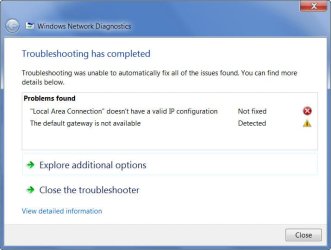
This is an error I received before:

527201295446pm.jpg


Is there any solution to this without having to reinstall Windows 7?

Thank you.
 

My Computer My Computer

At a glance

Windows 7 Home Premium
OS
Windows 7 Home Premium
Hello there,

I have two operating systems installed on my Sony Vaio VPCF115FG, Windows 7 Home Premium and Windows 8 Consumer Preview.

Wi-Fi is working fine on both, however, LAN connections are only working on Windows 8 but not Windows 7. It reads the LAN connection in Windows 7 but it does not actually connect to the internet. I honestly tried everything, including uninstalling the LAN driver and reinstalling it, no use.

This is an error I received before:

527201295446pm.jpg


Is there any solution to this without having to reinstall Windows 7?

Thank you.

If you can post a screen shot of your ipconfig/all from the Windows 7 machine I might be able to help. :)
 

My Computer My Computer

At a glance

Windows 7 Ult, Windows 8.1 Pro,Q9650-4.275GHz, E8600 4.5GHz, E6750-3.8GHzG.Skill PC2 9600 1200Mhz 5 5 5 15 2TGTX480
Computer type
PC/Desktop
Computer Manufacturer/Model Number
Home built
OS
Windows 7 Ult, Windows 8.1 Pro,
CPU
Q9650-4.275GHz, E8600 4.5GHz, E6750-3.8GHz
Motherboard
Evga 780i FTW
Memory
G.Skill PC2 9600 1200Mhz 5 5 5 15 2T
Graphics Card(s)
GTX480
Sound Card
Asus Xonar D2
Monitor(s) Displays
HannsG
Screen Resolution
1680X1050
Hard Drives
GSkill Phoenix Pro 120GB SSD
PSU
ThermalTake Toughpower 1000Watt modular
Case
ThermalTake XaserV
Cooling
Xigmatek S1283
Keyboard
Logitech G15
Mouse
Logitech G9
Internet Speed
T1
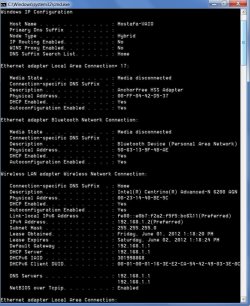
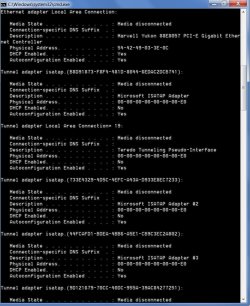
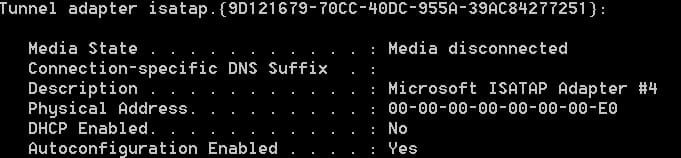
I do not know how to compile them into one screen shot, so I split them into three:


6-1-2012 6-32-18 PM.jpg

6-1-2012 6-32-38 PM.jpg

6-1-2012 6-32-50 PM.jpg
 

My Computer My Computer

At a glance

Windows 7 Home Premium
OS
Windows 7 Home Premium
The wireless looks to be working here though there are lots of extra tunnel adaptors there which may cause problems.

It may help if you disable the Bluetooth adaptor and I'd like to see the ipconfig/all with the Eithernet cable connected and the wireless disconnected.

For the extra tunnel adaptors save the file in the link below, unzip and run the file then reboot the machine. This file will automatically uninstall the extra tunnel adaptors.
 

Attachments

My Computer My Computer

At a glance

Windows 7 Ult, Windows 8.1 Pro,Q9650-4.275GHz, E8600 4.5GHz, E6750-3.8GHzG.Skill PC2 9600 1200Mhz 5 5 5 15 2TGTX480
Computer type
PC/Desktop
Computer Manufacturer/Model Number
Home built
OS
Windows 7 Ult, Windows 8.1 Pro,
CPU
Q9650-4.275GHz, E8600 4.5GHz, E6750-3.8GHz
Motherboard
Evga 780i FTW
Memory
G.Skill PC2 9600 1200Mhz 5 5 5 15 2T
Graphics Card(s)
GTX480
Sound Card
Asus Xonar D2
Monitor(s) Displays
HannsG
Screen Resolution
1680X1050
Hard Drives
GSkill Phoenix Pro 120GB SSD
PSU
ThermalTake Toughpower 1000Watt modular
Case
ThermalTake XaserV
Cooling
Xigmatek S1283
Keyboard
Logitech G15
Mouse
Logitech G9
Internet Speed
T1
Try this workaround as your problem may be related to your Windows 7 firewall settings.

Click Start and type cmd in the Search field.

Right-click cmd under Programs and choose Run as Administrator.

Click Yes if prompted.

At the command prompt type ipconfig /all then press Enter.

Note the physical address for the connection (s) that are not working.

Check your firewall settings for these addresses and unblock them.
 

My Computer My Computer

At a glance

Windows 7 Ultimate SP1 64-BitIntel Core i7 870 @ 2.93GHz8Gb Dual-Channel DDR3 @ 664MHznVidia GeForce GTX 460 1024MB dedicated RAM
Computer Manufacturer/Model Number
HP Pavilion Elite 495UK
OS
Windows 7 Ultimate SP1 64-Bit
CPU
Intel Core i7 870 @ 2.93GHz
Motherboard
MSI 2A9C (CPU1)
Memory
8Gb Dual-Channel DDR3 @ 664MHz
Graphics Card(s)
nVidia GeForce GTX 460 1024MB dedicated RAM
Sound Card
Realtek HD Audio
Monitor(s) Displays
HP2310i
Screen Resolution
1920 x 1080
Hard Drives
1x1954GB Hitachi HDS22020ALA 330 (RAID), 1x1954GB Hitachi External for backup and storage
PSU
460W
Case
HP Elite
Cooling
Air cooled
Keyboard
Logitech K750 solar-powered keyboard
Mouse
Logitech Wireless M180 mouse
Internet Speed
2Mb
Other Info
Pure Avanti Flow Internet Radio with iPod Dock, 64Gb iPod, HP USB Speakers, Sony MDR-V500 Headphones, Sony Vaio F-Series Laptop
The wireless looks to be working here though there are lots of extra tunnel adaptors there which may cause problems.

It may help if you disable the Bluetooth adaptor and I'd like to see the ipconfig/all with the Eithernet cable connected and the wireless disconnected.

For the extra tunnel adaptors save the file in the link below, unzip and run the file then reboot the machine. This file will automatically uninstall the extra tunnel adaptors.

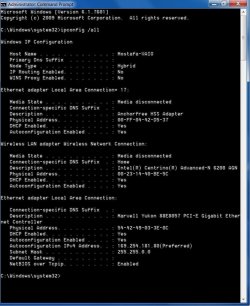
Thank you, sir. I downloaded the file and ran the 64-bit version and rebooted the computer. Here's a screenshot of ipconfig with only Ethernet connected and Wi-Fi disabled.

By the way, when I ran the "ia64", a message kept popping up and I'd click OK till the process was done. Is that normal? It wasn't an error message as far as I can tell.
 

Attachments

  • 6-1-2012 7-03-40 PM.jpg
    6-1-2012 7-03-40 PM.jpg
    98.2 KB · Views: 22

My Computer My Computer

At a glance

Windows 7 Home Premium
OS
Windows 7 Home Premium
Try this workaround as your problem may be related to your Windows 7 firewall settings.

Click Start and type cmd in the Search field.

Right-click cmd under Programs and choose Run as Administrator.

Click Yes if prompted.

At the command prompt type ipconfig /all then press Enter.

Note the physical address for the connection (s) that are not working.

Check your firewall settings for these addresses and unblock them.

Thank you, sir. I do not know how to do that, though. I tried using Windows Firewall with Advanced Settings but I couldn't.
 

My Computer My Computer

At a glance

Windows 7 Home Premium
OS
Windows 7 Home Premium
The wireless looks to be working here though there are lots of extra tunnel adaptors there which may cause problems.

It may help if you disable the Bluetooth adaptor and I'd like to see the ipconfig/all with the Eithernet cable connected and the wireless disconnected.

For the extra tunnel adaptors save the file in the link below, unzip and run the file then reboot the machine. This file will automatically uninstall the extra tunnel adaptors.

Thank you, sir. I downloaded the file and ran the 64-bit version and rebooted the computer. Here's a screenshot of ipconfig with only Ethernet connected and Wi-Fi disabled.

By the way, when I ran the "ia64", a message kept popping up and I'd click OK till the process was done. Is that normal? It wasn't an error message as far as I can tell.

Yes that's normal, the file was just asking for permission to delete the extra tunnel adaptors.

From what I'm seeing here you aren't getting anything from the router's Ethernet port. The extra tunnel adaptors are gone which is good and Bluetooth is disabled.

If you haven't reset the router you should try that first. After that save the file below then unzip and click on it, let it run till your machine reboots. This file will fix any problems with winsock, resets the network stack and flushes the DNS among other things.

Be sure and set the router back up for DHCP and make sure the wireless settings are correct. You should be using WPA2 with AES encryption.
 

Attachments

My Computer My Computer

At a glance

Windows 7 Ult, Windows 8.1 Pro,Q9650-4.275GHz, E8600 4.5GHz, E6750-3.8GHzG.Skill PC2 9600 1200Mhz 5 5 5 15 2TGTX480
Computer type
PC/Desktop
Computer Manufacturer/Model Number
Home built
OS
Windows 7 Ult, Windows 8.1 Pro,
CPU
Q9650-4.275GHz, E8600 4.5GHz, E6750-3.8GHz
Motherboard
Evga 780i FTW
Memory
G.Skill PC2 9600 1200Mhz 5 5 5 15 2T
Graphics Card(s)
GTX480
Sound Card
Asus Xonar D2
Monitor(s) Displays
HannsG
Screen Resolution
1680X1050
Hard Drives
GSkill Phoenix Pro 120GB SSD
PSU
ThermalTake Toughpower 1000Watt modular
Case
ThermalTake XaserV
Cooling
Xigmatek S1283
Keyboard
Logitech G15
Mouse
Logitech G9
Internet Speed
T1

My Computer My Computer

At a glance

Windows 7 Ultimate SP1 64-BitIntel Core i7 870 @ 2.93GHz8Gb Dual-Channel DDR3 @ 664MHznVidia GeForce GTX 460 1024MB dedicated RAM
Computer Manufacturer/Model Number
HP Pavilion Elite 495UK
OS
Windows 7 Ultimate SP1 64-Bit
CPU
Intel Core i7 870 @ 2.93GHz
Motherboard
MSI 2A9C (CPU1)
Memory
8Gb Dual-Channel DDR3 @ 664MHz
Graphics Card(s)
nVidia GeForce GTX 460 1024MB dedicated RAM
Sound Card
Realtek HD Audio
Monitor(s) Displays
HP2310i
Screen Resolution
1920 x 1080
Hard Drives
1x1954GB Hitachi HDS22020ALA 330 (RAID), 1x1954GB Hitachi External for backup and storage
PSU
460W
Case
HP Elite
Cooling
Air cooled
Keyboard
Logitech K750 solar-powered keyboard
Mouse
Logitech Wireless M180 mouse
Internet Speed
2Mb
Other Info
Pure Avanti Flow Internet Radio with iPod Dock, 64Gb iPod, HP USB Speakers, Sony MDR-V500 Headphones, Sony Vaio F-Series Laptop
Yes that's normal, the file was just asking for permission to delete the extra tunnel adaptors.

From what I'm seeing here you aren't getting anything from the router's Ethernet port. The extra tunnel adaptors are gone which is good and Bluetooth is disabled.

If you haven't reset the router you should try that first. After that save the file below then unzip and click on it, let it run till your machine reboots. This file will fix any problems with winsock, resets the network stack and flushes the DNS among other things.

Be sure and set the router back up for DHCP and make sure the wireless settings are correct. You should be using WPA2 with AES encryption.

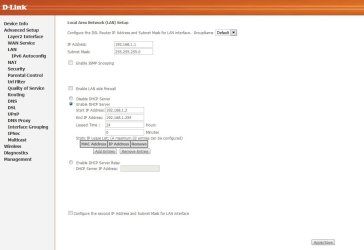
Alright, I'm going to download the file and let it do its thing. By the way, I manually configured the router when I got it (about a couple of months ago) because the Easy Setup CD that came with it did not really work and kept giving me errors. I may have mis-configured a couple of things because I'm not experienced with that; it did, however, eventually work. Here's a screenshot of the DHCP status. And I changed the Wireless Security Settings to WPA2-only with EAS.


Thank you, sir. I'm going to give this a shot after I reboot.
 

Attachments

  • 6-1-2012 7-19-11 PM.jpg
    6-1-2012 7-19-11 PM.jpg
    51.3 KB · Views: 37

My Computer My Computer

At a glance

Windows 7 Home Premium
OS
Windows 7 Home Premium
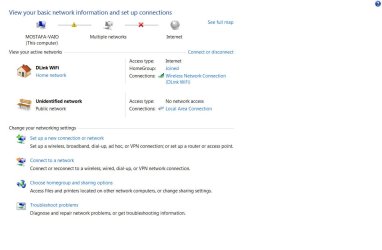
It did not work, unfortunately.

6-1-2012 7-32-48 PM.jpg

6-1-2012 7-33-19 PM.jpg

I am beginning to think it may be because the LAN network is set to Public rather than HOME or Private. But I don't know.
 

My Computer My Computer

At a glance

Windows 7 Home Premium
OS
Windows 7 Home Premium
It looks like you are now getting an IP from your router for the LAN connection where you weren't before so it seems to be a step in the right direction. So something we did worked but the Unidentified public network is now the problem.

On the network connection page it looks like you have your wireless enabled but it's not enabled in your ipconfig/all?

Do you have anything from Apple installed like iTunes or Adobe Photo shop? There is a service called Bonjour which is famous for creating the extra public connection which is showing up as Unidentified Public network.

Can you check the IPv4 properties page and make sure that nothing is entered there and that it's set to use DHCP. It looks like you have an extra default gateway entered there for the DNS server. If you can do that and disconnect the wireless also.
 

My Computer My Computer

At a glance

Windows 7 Ult, Windows 8.1 Pro,Q9650-4.275GHz, E8600 4.5GHz, E6750-3.8GHzG.Skill PC2 9600 1200Mhz 5 5 5 15 2TGTX480
Computer type
PC/Desktop
Computer Manufacturer/Model Number
Home built
OS
Windows 7 Ult, Windows 8.1 Pro,
CPU
Q9650-4.275GHz, E8600 4.5GHz, E6750-3.8GHz
Motherboard
Evga 780i FTW
Memory
G.Skill PC2 9600 1200Mhz 5 5 5 15 2T
Graphics Card(s)
GTX480
Sound Card
Asus Xonar D2
Monitor(s) Displays
HannsG
Screen Resolution
1680X1050
Hard Drives
GSkill Phoenix Pro 120GB SSD
PSU
ThermalTake Toughpower 1000Watt modular
Case
ThermalTake XaserV
Cooling
Xigmatek S1283
Keyboard
Logitech G15
Mouse
Logitech G9
Internet Speed
T1
It looks like you are now getting an IP from your router for the LAN connection where you weren't before. On the network connection page it looks like you have your wireless enabled.

Do you have anything from Apple installed like iTunes or Adobe Photo shop?

I have iTunes and Adobe (Photoshop, Elements, etc.) installed.
 

My Computer My Computer

At a glance

Windows 7 Home Premium
OS
Windows 7 Home Premium
It looks like you are now getting an IP from your router for the LAN connection where you weren't before so it seems to be a step in the right direction. So something we did worked but the Unidentified public network is now the problem.

On the network connection page it looks like you have your wireless enabled but it's not enabled in your ipconfig/all?

Do you have anything from Apple installed like iTunes or Adobe Photo shop? There is a service called Bonjour which is famous for creating the extra public connection which is showing up as Unidentified Public network.

Can you check the IPv4 properties page and make sure that nothing is entered there and that it's set to use DHCP. It looks like you have an extra default gateway entered there for the DNS server. If you can do that and disconnect the wireless also.

I checked. Nothing is entered in the IPv4 or the IPv6 properties pages and DHCP is enabled. There is also nothing under the gateway section.
 

My Computer My Computer

At a glance

Windows 7 Home Premium
OS
Windows 7 Home Premium
Thank you so much for your help guys but I give up. It just doesn't make any sense.

6-1-2012 7-58-29 PM.jpg

6-1-2012 7-58-50 PM.jpg
 

My Computer My Computer

At a glance

Windows 7 Home Premium
OS
Windows 7 Home Premium
It looks like you are now getting an IP from your router for the LAN connection where you weren't before. On the network connection page it looks like you have your wireless enabled.

Do you have anything from Apple installed like iTunes or Adobe Photo shop?

I have iTunes and Adobe (Photoshop, Elements, etc.) installed.

Ok then we have found the source of the problem. Please follow along and try not to get distracted. The firewall settings have absolutely nothing to do with this. :confused:

This is a very common problem which is caused by the now famous Apple Bonjour service, this is why I asked if you had iTunes or Photo shop installed.

To fix the Bonjour problem which installs with both iTunes and Photo shop do this...
To fix ...
Run MsConfig

Under the Services tab uncheck the service called "##Id_String1.6844[... and then a bunch of numbers]" by Apple

Reboot and problem solved.

To remove the Bonjour service completely.

1. Navigate to C:\Program Files\Bonjour
2. Rename the mdnsNSP.dll file in that folder to mdnsNSP.old
3. Restart your computer
4. Delete the Program Files\Bonjour folder
 

My Computer My Computer

At a glance

Windows 7 Ult, Windows 8.1 Pro,Q9650-4.275GHz, E8600 4.5GHz, E6750-3.8GHzG.Skill PC2 9600 1200Mhz 5 5 5 15 2TGTX480
Computer type
PC/Desktop
Computer Manufacturer/Model Number
Home built
OS
Windows 7 Ult, Windows 8.1 Pro,
CPU
Q9650-4.275GHz, E8600 4.5GHz, E6750-3.8GHz
Motherboard
Evga 780i FTW
Memory
G.Skill PC2 9600 1200Mhz 5 5 5 15 2T
Graphics Card(s)
GTX480
Sound Card
Asus Xonar D2
Monitor(s) Displays
HannsG
Screen Resolution
1680X1050
Hard Drives
GSkill Phoenix Pro 120GB SSD
PSU
ThermalTake Toughpower 1000Watt modular
Case
ThermalTake XaserV
Cooling
Xigmatek S1283
Keyboard
Logitech G15
Mouse
Logitech G9
Internet Speed
T1
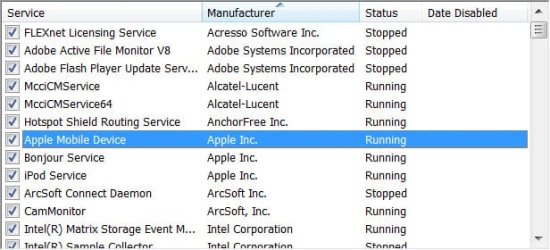
Those are the only ones I see by Apple.

6-1-2012 8-11-26 PM.jpg

I'm guessing I should disable the Bonjour one?
 

My Computer My Computer

At a glance

Windows 7 Home Premium
OS
Windows 7 Home Premium
Those are the only ones I see by Apple.

View attachment 214655

I'm guessing I should disable the Bonjour one?

Yes you should absolutely disable the Bonjour service then reboot the machine, and then uninstall the service then reboot the machine.

This should fix the problem straight away. :)
 

My Computer My Computer

At a glance

Windows 7 Ult, Windows 8.1 Pro,Q9650-4.275GHz, E8600 4.5GHz, E6750-3.8GHzG.Skill PC2 9600 1200Mhz 5 5 5 15 2TGTX480
Computer type
PC/Desktop
Computer Manufacturer/Model Number
Home built
OS
Windows 7 Ult, Windows 8.1 Pro,
CPU
Q9650-4.275GHz, E8600 4.5GHz, E6750-3.8GHz
Motherboard
Evga 780i FTW
Memory
G.Skill PC2 9600 1200Mhz 5 5 5 15 2T
Graphics Card(s)
GTX480
Sound Card
Asus Xonar D2
Monitor(s) Displays
HannsG
Screen Resolution
1680X1050
Hard Drives
GSkill Phoenix Pro 120GB SSD
PSU
ThermalTake Toughpower 1000Watt modular
Case
ThermalTake XaserV
Cooling
Xigmatek S1283
Keyboard
Logitech G15
Mouse
Logitech G9
Internet Speed
T1
I did that but unfortunately it did not. :(

It is still recognized as an Unidentified network (public network) with No Network Access.
 

My Computer My Computer

At a glance

Windows 7 Home Premium
OS
Windows 7 Home Premium
Back
Top