Solved Browsers not working but computer is connected to the internet

Gman1

New member
Local time
1:07 PM
Messages
10
Hello everyone. New to the forum. The title says it all regarding the issue I'm having. It started two days ago. I tried both IE & Firefox with no success. Our other laptop computer and all smartphones surf the net fine with no problem, it's just confined to one laptop. For security I use Eset NOD32 for AV, Comodo Firewall and Malwarebytes, all of which I've been using for 2-3 years without any issues.

Here's what I tried so far with no success:
1. Ran Malwarebytes scan normally and in safe mode with no infections
2. Ran AV scan with no infections
3. Turned off both firewall and AV, still would not connect to internet
4. Verified all browsers were not trying to connect via a proxy server
5. Performed a system restore
6. Cleared cache, cookies, history & temp files from IE & Firefox
7. Unplugged and reconnected cable modem and wireless router numerous times
8. Contacted ISP to confirm everything on their end was working. All is fine as evidenced by our other computer and smartphones being able to connect normally.
9. Ran the following through the command prompt: ipconfig /flushdns, ipconfig /release, ipconfig /renew, netsh winsock reset, netsh int ip reset.
10. Connected the laptop directly to the modem via ethernet cable

We do use Open DNS, so I did try changing to automatically select DNS server rather than their servers...still no success.

I did confirm the computer is connected to the internet as I'm able to ping various websites (google, yahoo, etc), update Malwarebytes and Windows...however NOD32 will not update.

Any recommendations would be greatly, greatly appreciated as I'm completely stumped at this point.
 
Last edited:

My Computer My Computer

At a glance

Windows 7 Home Premium 64 bitPentium Dual Core 2.30 GHz4 GB
Computer type
Laptop
Computer Manufacturer/Model Number
Toshiba Satellite C655
OS
Windows 7 Home Premium 64 bit
CPU
Pentium Dual Core 2.30 GHz
Memory
4 GB
Is anyone familiar with this issue and what else I can try?
 

My Computer My Computer

At a glance

Windows 7 Home Premium 64 bitPentium Dual Core 2.30 GHz4 GB
Computer type
Laptop
Computer Manufacturer/Model Number
Toshiba Satellite C655
OS
Windows 7 Home Premium 64 bit
CPU
Pentium Dual Core 2.30 GHz
Memory
4 GB
Hi and welcome to SevenForums,
Use Clean boot,
http://www.sevenforums.com/tutorials/179159-troubleshoot-application-conflicts-performing-clean-startup.html
Click Start and type in the search box,
msconfig
Click on the suggestion on top or hit the Enter key,
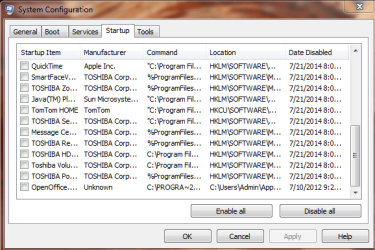
Go to the Startup section and take some screen shots for a complete list,
Go to the Services section and on the bottom left Check the box to Hide All Microsoft services,
Repeat the screen shots,
See the links above my signature on how to take and upload screen shots here,
Cheers.
 

My Computer My Computer

At a glance

Win-7-Pro64bit 7-H-Prem-64biti7-5930K 2nd i9-9940x both water blocked VRM'...Trident-z 3200C14 2nd Trident-z 3600C16EVGA 1080ti ftw3 2nd Titan Xp both water blocked
Computer type
PC/Desktop
Computer Manufacturer/Model Number
Custom assembled by me :}
OS
Win-7-Pro64bit 7-H-Prem-64bit
CPU
i7-5930K 2nd i9-9940x both water blocked VRM's too
Motherboard
ASUS SABERTOOTH X99 2nd ASUS x299 Apex
Memory
Trident-z 3200C14 2nd Trident-z 3600C16
Graphics Card(s)
EVGA 1080ti ftw3 2nd Titan Xp both water blocked
Sound Card
Built-in Realtek
Monitor(s) Displays
1-AOC G2460PG 24"G-Sync 144Hz/ 2nd 1-ASUS VG248QE 24" 144Hz
Screen Resolution
1920 x 1080 144Hz
Hard Drives
2-Samsung M.2 Evo & Evo Plus
2-Samsung 850 EVO 500GB SSD's/ 3-2.5 W.D. Black 1tb-&3-1tb/3-3.5 WD Black 1tb hdd's
PSU
EVGA SuperNOVA 1000-P2 2nd 1200-P2
Case
2-Corsair Obsidian Series 450D Black ATX Mid Tower
Cooling
Custom water loops
Keyboard
Logitech G710+/ 2nd Logitech G910
Mouse
2-RedDragon M901 Perdition 16400 dpi Gaming mouse = wired
Internet Speed
Comcast Ping 19ms 89.31mbps download speed 6.12mbps upload
Antivirus
Malwarebytes Pro/ Superantispyware Pro
Browser
FireFox & Pale moon
Other Info
2nd ASUS X299 Apex/Intel i9-9940x with Custom water loop/7H-Prem-x64/Corsair 450D case/Ram Trident-z 3600C16 4x8gb / Samsung970Evo plus 500gb SSD/Dual ssd EZ swap evo/PSU EVGA SuperNova 1200w-P2 80+Platinum/GPU Titan Xp /8-ML-140 on push-pull on 2-280GTX rads
Thanks Thrashzone. I followed the tutorial, but unfortunately still wasn't able to get the browsers to connect after performing the clean boot. What would be the next thing to check?
 

My Computer My Computer

At a glance

Windows 7 Home Premium 64 bitPentium Dual Core 2.30 GHz4 GB
Computer type
Laptop
Computer Manufacturer/Model Number
Toshiba Satellite C655
OS
Windows 7 Home Premium 64 bit
CPU
Pentium Dual Core 2.30 GHz
Memory
4 GB
Hi,
I don't see any screen shots submitted by you ?

See what safe mode with networking produces,
Shut down your machine,
Power up and Tap the F8 key continuously until you see a black page with white text,
Use the down arrow key to toggle to safe mode with networking/ hit the enter key.
Login as usual
http://www.sevenforums.com/tutorials/69585-safe-mode.html
 

My Computer My Computer

At a glance

Win-7-Pro64bit 7-H-Prem-64biti7-5930K 2nd i9-9940x both water blocked VRM'...Trident-z 3200C14 2nd Trident-z 3600C16EVGA 1080ti ftw3 2nd Titan Xp both water blocked
Computer type
PC/Desktop
Computer Manufacturer/Model Number
Custom assembled by me :}
OS
Win-7-Pro64bit 7-H-Prem-64bit
CPU
i7-5930K 2nd i9-9940x both water blocked VRM's too
Motherboard
ASUS SABERTOOTH X99 2nd ASUS x299 Apex
Memory
Trident-z 3200C14 2nd Trident-z 3600C16
Graphics Card(s)
EVGA 1080ti ftw3 2nd Titan Xp both water blocked
Sound Card
Built-in Realtek
Monitor(s) Displays
1-AOC G2460PG 24"G-Sync 144Hz/ 2nd 1-ASUS VG248QE 24" 144Hz
Screen Resolution
1920 x 1080 144Hz
Hard Drives
2-Samsung M.2 Evo & Evo Plus
2-Samsung 850 EVO 500GB SSD's/ 3-2.5 W.D. Black 1tb-&3-1tb/3-3.5 WD Black 1tb hdd's
PSU
EVGA SuperNOVA 1000-P2 2nd 1200-P2
Case
2-Corsair Obsidian Series 450D Black ATX Mid Tower
Cooling
Custom water loops
Keyboard
Logitech G710+/ 2nd Logitech G910
Mouse
2-RedDragon M901 Perdition 16400 dpi Gaming mouse = wired
Internet Speed
Comcast Ping 19ms 89.31mbps download speed 6.12mbps upload
Antivirus
Malwarebytes Pro/ Superantispyware Pro
Browser
FireFox & Pale moon
Other Info
2nd ASUS X299 Apex/Intel i9-9940x with Custom water loop/7H-Prem-x64/Corsair 450D case/Ram Trident-z 3600C16 4x8gb / Samsung970Evo plus 500gb SSD/Dual ssd EZ swap evo/PSU EVGA SuperNova 1200w-P2 80+Platinum/GPU Titan Xp /8-ML-140 on push-pull on 2-280GTX rads
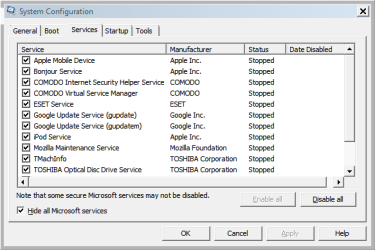
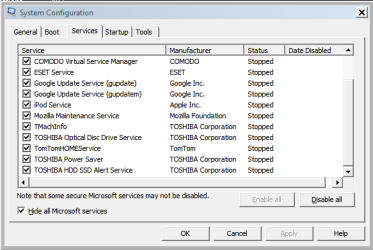
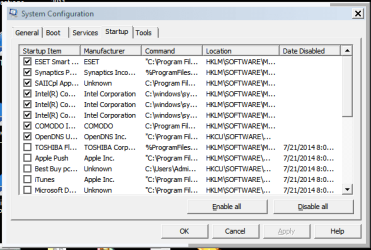
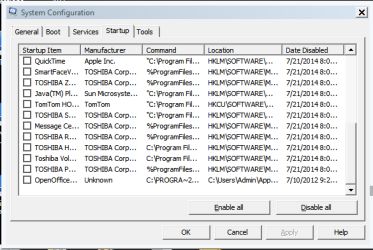
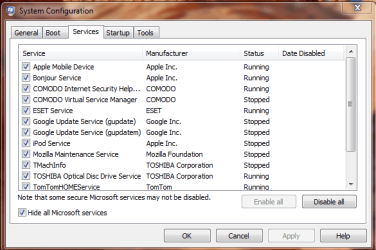
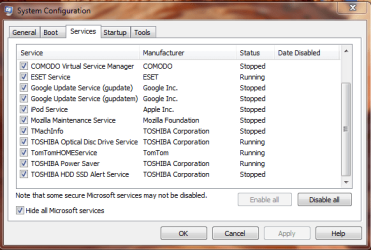
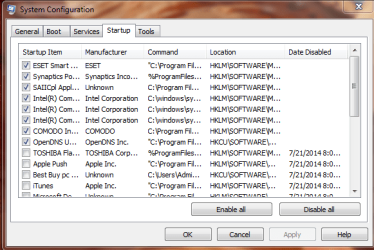
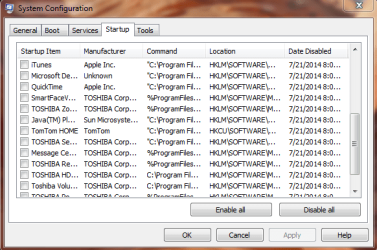
Sorry, here's those screen shots:
 

Attachments

  • Services 1.PNG
    Services 1.PNG
    9.3 KB · Views: 26
  • Services 2.PNG
    Services 2.PNG
    9.3 KB · Views: 27
  • Startup 1.PNG
    Startup 1.PNG
    10.7 KB · Views: 27
  • Startup 2.PNG
    Startup 2.PNG
    10 KB · Views: 26
Last edited:

My Computer My Computer

At a glance

Windows 7 Home Premium 64 bitPentium Dual Core 2.30 GHz4 GB
Computer type
Laptop
Computer Manufacturer/Model Number
Toshiba Satellite C655
OS
Windows 7 Home Premium 64 bit
CPU
Pentium Dual Core 2.30 GHz
Memory
4 GB
Great! When in safe mode, I can connect to the internet with both browsers. But still cannot connect in normal start up.
 

My Computer My Computer

At a glance

Windows 7 Home Premium 64 bitPentium Dual Core 2.30 GHz4 GB
Computer type
Laptop
Computer Manufacturer/Model Number
Toshiba Satellite C655
OS
Windows 7 Home Premium 64 bit
CPU
Pentium Dual Core 2.30 GHz
Memory
4 GB
The screen shots above were taken while in safe mode. Here they are in normal mode so you can see what's running and what's not:

Services 1.PNG

Services 2.PNG

Startup 1.PNG

Startup 2.PNG

Startup 3.PNG
 

My Computer My Computer

At a glance

Windows 7 Home Premium 64 bitPentium Dual Core 2.30 GHz4 GB
Computer type
Laptop
Computer Manufacturer/Model Number
Toshiba Satellite C655
OS
Windows 7 Home Premium 64 bit
CPU
Pentium Dual Core 2.30 GHz
Memory
4 GB
Thanks you have some weird entries TomTomHomeServices :confused:
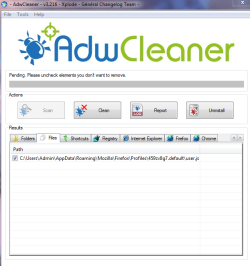
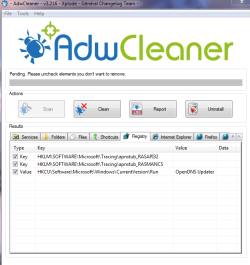
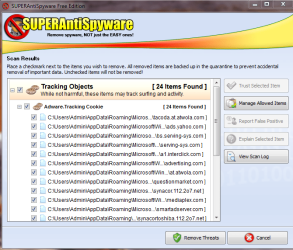
Review Jacee’s instructions to run Adwcleaner here post #7,
Ignore the title of the thread,
http://www.sevenforums.com/system-security/316404-instant-savings-app.html
Screen shot of the download button to use for Adwcleaner
You can use these free tools to see if they find anything,
Manually Update them before running full scans,
Try not to use your computer while the scans are running, (one at a time of course).
Uncheck the box to Activate the Free trial from the final install options,
Also use the Custom scan option not the Threat scan,
Select the drive to scan usually C,
If your really infected check the box to scan for Rootkits = this scan option will take several hours to complete,
Never use your machine while scans are running for best results,
http://www.malwarebytes.org/products/malwarebytes_free
http://www.superantispyware.com/?tag=SUPERANTISPYWARE
This one is the longest up to 4 hours, the others are only about 45 minutes,
http://www.microsoft.com/security/scanner/en-us/default.aspx

Post all scan reports for review.
 

My Computer My Computer

At a glance

Win-7-Pro64bit 7-H-Prem-64biti7-5930K 2nd i9-9940x both water blocked VRM'...Trident-z 3200C14 2nd Trident-z 3600C16EVGA 1080ti ftw3 2nd Titan Xp both water blocked
Computer type
PC/Desktop
Computer Manufacturer/Model Number
Custom assembled by me :}
OS
Win-7-Pro64bit 7-H-Prem-64bit
CPU
i7-5930K 2nd i9-9940x both water blocked VRM's too
Motherboard
ASUS SABERTOOTH X99 2nd ASUS x299 Apex
Memory
Trident-z 3200C14 2nd Trident-z 3600C16
Graphics Card(s)
EVGA 1080ti ftw3 2nd Titan Xp both water blocked
Sound Card
Built-in Realtek
Monitor(s) Displays
1-AOC G2460PG 24"G-Sync 144Hz/ 2nd 1-ASUS VG248QE 24" 144Hz
Screen Resolution
1920 x 1080 144Hz
Hard Drives
2-Samsung M.2 Evo & Evo Plus
2-Samsung 850 EVO 500GB SSD's/ 3-2.5 W.D. Black 1tb-&3-1tb/3-3.5 WD Black 1tb hdd's
PSU
EVGA SuperNOVA 1000-P2 2nd 1200-P2
Case
2-Corsair Obsidian Series 450D Black ATX Mid Tower
Cooling
Custom water loops
Keyboard
Logitech G710+/ 2nd Logitech G910
Mouse
2-RedDragon M901 Perdition 16400 dpi Gaming mouse = wired
Internet Speed
Comcast Ping 19ms 89.31mbps download speed 6.12mbps upload
Antivirus
Malwarebytes Pro/ Superantispyware Pro
Browser
FireFox & Pale moon
Other Info
2nd ASUS X299 Apex/Intel i9-9940x with Custom water loop/7H-Prem-x64/Corsair 450D case/Ram Trident-z 3600C16 4x8gb / Samsung970Evo plus 500gb SSD/Dual ssd EZ swap evo/PSU EVGA SuperNova 1200w-P2 80+Platinum/GPU Titan Xp /8-ML-140 on push-pull on 2-280GTX rads

My Computer My Computer

At a glance

Windows 7 Home Premium 64 bitPentium Dual Core 2.30 GHz4 GB
Computer type
Laptop
Computer Manufacturer/Model Number
Toshiba Satellite C655
OS
Windows 7 Home Premium 64 bit
CPU
Pentium Dual Core 2.30 GHz
Memory
4 GB
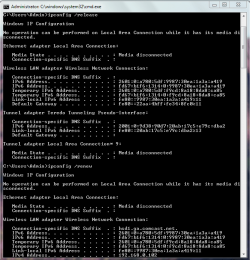
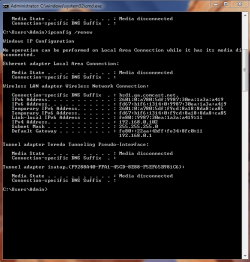
One other thing too, when I run the ipconfig /release & ipconfig /renew commands through the command prompt, I get the following which I assumed was jus symptomatic of the issue, but want to make sure it has nothing to do with the cause. It states the media as being disconnected:

ipconfig 1.PNG

ipconfig 2.PNG
 

My Computer My Computer

At a glance

Windows 7 Home Premium 64 bitPentium Dual Core 2.30 GHz4 GB
Computer type
Laptop
Computer Manufacturer/Model Number
Toshiba Satellite C655
OS
Windows 7 Home Premium 64 bit
CPU
Pentium Dual Core 2.30 GHz
Memory
4 GB
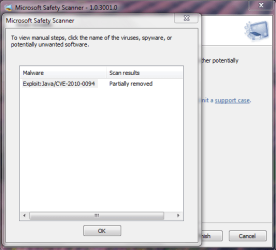
Hi Java exploit doesn't look good,
I asked for someone to take a peek,

In the mean time use this,
Temp files delete,
Run this as administrator and Start the scanner,
Shut your machine down after it finishes,
http://www.geekstogo.com/forum/files/file/187-tfc-temp-file-cleaner-by-oldtimer/
And if you haven't yet uninstall Java,
http://www.java.com/en/download/faq/remove_olderversions.xml
http://www.java.com/en/download/help/uninstall_java.xml
Interesting reads,
http://securitygarden.blogspot.com/2013/01/java-zero-day-again-time-to.html

I'm sure you'll need to reset all of your browsers,
https://support.mozilla.org/en-US/kb/reset-firefox-easily-fix-most-problems
See a tutorial here to Reset Internet explorer,
http://www.sevenforums.com/tutorials/1222-internet-explorer-reset.html
After Resetting ie9 or 10,
I would add this to the tutorials process
Reset process first opening Internet explorer
 

My Computer My Computer

At a glance

Win-7-Pro64bit 7-H-Prem-64biti7-5930K 2nd i9-9940x both water blocked VRM'...Trident-z 3200C14 2nd Trident-z 3600C16EVGA 1080ti ftw3 2nd Titan Xp both water blocked
Computer type
PC/Desktop
Computer Manufacturer/Model Number
Custom assembled by me :}
OS
Win-7-Pro64bit 7-H-Prem-64bit
CPU
i7-5930K 2nd i9-9940x both water blocked VRM's too
Motherboard
ASUS SABERTOOTH X99 2nd ASUS x299 Apex
Memory
Trident-z 3200C14 2nd Trident-z 3600C16
Graphics Card(s)
EVGA 1080ti ftw3 2nd Titan Xp both water blocked
Sound Card
Built-in Realtek
Monitor(s) Displays
1-AOC G2460PG 24"G-Sync 144Hz/ 2nd 1-ASUS VG248QE 24" 144Hz
Screen Resolution
1920 x 1080 144Hz
Hard Drives
2-Samsung M.2 Evo & Evo Plus
2-Samsung 850 EVO 500GB SSD's/ 3-2.5 W.D. Black 1tb-&3-1tb/3-3.5 WD Black 1tb hdd's
PSU
EVGA SuperNOVA 1000-P2 2nd 1200-P2
Case
2-Corsair Obsidian Series 450D Black ATX Mid Tower
Cooling
Custom water loops
Keyboard
Logitech G710+/ 2nd Logitech G910
Mouse
2-RedDragon M901 Perdition 16400 dpi Gaming mouse = wired
Internet Speed
Comcast Ping 19ms 89.31mbps download speed 6.12mbps upload
Antivirus
Malwarebytes Pro/ Superantispyware Pro
Browser
FireFox & Pale moon
Other Info
2nd ASUS X299 Apex/Intel i9-9940x with Custom water loop/7H-Prem-x64/Corsair 450D case/Ram Trident-z 3600C16 4x8gb / Samsung970Evo plus 500gb SSD/Dual ssd EZ swap evo/PSU EVGA SuperNova 1200w-P2 80+Platinum/GPU Titan Xp /8-ML-140 on push-pull on 2-280GTX rads
Please do the above suggested by thrashzone.

Turn off comodo and see if you can connect then.

_______________________________________________________________________________________

Then move on to this:

1.) Download herdprotect: (choose the portable version)

Download herdProtect - Free Anti-Malware Platform

2.) Run the scan.

3.) When the scan finishes, save the results per the screenshot below. Then upload the log here.

DO NOT REMOVE ANYTHING YET. I will advise if anything needs removed when I receive the log.

Attached Images
313957d1397626709-degrading-windows-performance-save-results.png
 
Last edited:

My Computer My Computer

At a glance

Windows 10 ProAMD Ryzen 5 2400G Processor with Radeon RX Ve...G.SKILL Ripjaws V Series 16GB (2 x 8GB) 288-P...2047MB NVIDIA GeForce GTX 1060 6GB (EVGA)
Computer type
PC/Desktop
Computer Manufacturer/Model Number
Custom Built
OS
Windows 10 Pro
CPU
AMD Ryzen 5 2400G Processor with Radeon RX Vega 11 Graphics
Motherboard
ASRock X470 Master SLI/AC AM4 AMD Promontory X470 SATA 6Gb/s
Memory
G.SKILL Ripjaws V Series 16GB (2 x 8GB) 288-Pin DDR4 SDRAM D
Graphics Card(s)
2047MB NVIDIA GeForce GTX 1060 6GB (EVGA)
Sound Card
Motherboard Built in
Monitor(s) Displays
Acer R240HY bidx 23.8-Inch IPS HDMI DVI VGA (1920 x 1080) Wi
Screen Resolution
1920 x 1080
Hard Drives
1TB Sandisk SSD PLUS (Main drive)
500 GB Seagate 7200 RPM (Games)
500 GB Western Digital 7200 RPM (Virtual Machines)
PSU
CORSAIR TX Series TX650M 650W 80+ Gold Modular Power Supply
Case
CORSAIR CARBIDE SPEC-02 Mid-Tower Gaming Case, Red LED Fan
Cooling
220mm, two 120mm, and four 60mm fans
Keyboard
Wired Dell keyboard
Mouse
Wireless Logitech mouse
Internet Speed
250mb down, 30mb up
Antivirus
Panda Cloud Antivirus
Browser
Chrome-ish x64
Other Info
Your awesome for reading this.
I do believe I see two anti virus installed.
Comondo and Eset.
 

My Computer My Computer

At a glance

Windows 10 Pro. 64/ version 1709 Windows 7 Pr...Intel i7-6800K @ 4.3Corsair Platinum 16 gig @2400EVGA GTX 1070 OC
Computer type
PC/Desktop
Computer Manufacturer/Model Number
Home made Desktop
OS
Windows 10 Pro. 64/ version 1709 Windows 7 Pro/64
CPU
Intel i7-6800K @ 4.3
Motherboard
ASUS X-99 Deluxe II
Memory
Corsair Platinum 16 gig @2400
Graphics Card(s)
EVGA GTX 1070 OC
Monitor(s) Displays
Asus 27" LED LCD/VE278Q
Screen Resolution
1920-1080 or 1280-720 HDMI
Hard Drives
INTEL SSD 730-240 Gb Sata 3.0/
PSU
EVGA Platium 1200W
Case
Phanteks Luxe Tempered Glass 8 fans/ one radiator
Cooling
XSPC/ Water Cooled CPU
Keyboard
Das 4 Professional
Mouse
Logitech M705/MX Anywhere 2-S
Internet Speed
100 mbits
Antivirus
Microsoft Security Essentials/ Malwarebytes Premium 3.0/ SAS
Browser
I.E. 11 default/Firefox/ ISP Time Warner Cable/Spectrum
Other Info
LG BluRay Burner/
Sound system-KLipsch-THX/
Icy Dock ssd Hot Swap bays.
Sorry for the delay in getting back here, had a very busy week. Thrashzone, I ran the temp file cleaner and uninstalled Java. I also reset both browsers per your instructions. Still not working. Andrew, I turned off Comodo and still not able to connect. I ran herd protect. Here's the file:

View attachment Scan_2014-8-1-19-22.txt
 

My Computer My Computer

At a glance

Windows 7 Home Premium 64 bitPentium Dual Core 2.30 GHz4 GB
Computer type
Laptop
Computer Manufacturer/Model Number
Toshiba Satellite C655
OS
Windows 7 Home Premium 64 bit
CPU
Pentium Dual Core 2.30 GHz
Memory
4 GB
Hmm herdprotect looks clean. I know you turned off comodo, but as a test Uninstall it. Sometimes turning it off is not enough. After you uninstall, restart and see if windows firewall is on. Then see if you can connect.

Also, try the following:

Use the Microsoft fix it to reset your hosts file back to the default:

How can I reset the Hosts file back to the default?

Have you also tried resetting internet explorer to default settings like thrash zone suggested?

(Start at step 3)

http://www.sevenforums.com/tutorials/1222-internet-explorer-reset.html

Make sure to check to delete personal settings as well and then test.
 

My Computer My Computer

At a glance

Windows 10 ProAMD Ryzen 5 2400G Processor with Radeon RX Ve...G.SKILL Ripjaws V Series 16GB (2 x 8GB) 288-P...2047MB NVIDIA GeForce GTX 1060 6GB (EVGA)
Computer type
PC/Desktop
Computer Manufacturer/Model Number
Custom Built
OS
Windows 10 Pro
CPU
AMD Ryzen 5 2400G Processor with Radeon RX Vega 11 Graphics
Motherboard
ASRock X470 Master SLI/AC AM4 AMD Promontory X470 SATA 6Gb/s
Memory
G.SKILL Ripjaws V Series 16GB (2 x 8GB) 288-Pin DDR4 SDRAM D
Graphics Card(s)
2047MB NVIDIA GeForce GTX 1060 6GB (EVGA)
Sound Card
Motherboard Built in
Monitor(s) Displays
Acer R240HY bidx 23.8-Inch IPS HDMI DVI VGA (1920 x 1080) Wi
Screen Resolution
1920 x 1080
Hard Drives
1TB Sandisk SSD PLUS (Main drive)
500 GB Seagate 7200 RPM (Games)
500 GB Western Digital 7200 RPM (Virtual Machines)
PSU
CORSAIR TX Series TX650M 650W 80+ Gold Modular Power Supply
Case
CORSAIR CARBIDE SPEC-02 Mid-Tower Gaming Case, Red LED Fan
Cooling
220mm, two 120mm, and four 60mm fans
Keyboard
Wired Dell keyboard
Mouse
Wireless Logitech mouse
Internet Speed
250mb down, 30mb up
Antivirus
Panda Cloud Antivirus
Browser
Chrome-ish x64
Other Info
Your awesome for reading this.
Andrew, uninstalling Comodo did it. That's strange because I've been using it for a couple of years now without any issues. What would cause that program to all of sudden start blocking the browsers?

Also, is Windows firewall adequate enough? Or do you recommend another firewall? I'm hesitant to use Comodo after this.

Thanks to everyone for their help on this. I really appreciate it.
 

My Computer My Computer

At a glance

Windows 7 Home Premium 64 bitPentium Dual Core 2.30 GHz4 GB
Computer type
Laptop
Computer Manufacturer/Model Number
Toshiba Satellite C655
OS
Windows 7 Home Premium 64 bit
CPU
Pentium Dual Core 2.30 GHz
Memory
4 GB
Andrew, uninstalling Comodo did it. That's strange because I've been using it for a couple of years now without any issues. What would cause that program to all of sudden start blocking the browsers?

I am not sure. You could always reinstall it and then leave it at default settings. Possible a setting was changed or something in the way comodo hips treated the browsers.

Also, is Windows firewall adequate enough? Or do you recommend another firewall? I'm hesitant to use Comodo after this.

The average user who has a router (which in it has a hardware based firewall which should be on) combined with windows firewall is more then enough protection. A software firewall will only cause issues and drain system resources. In my opinion, they are completely unnecessary. A common argument is that with comodo or zonealarm and other similar firewalls you can block programs from connecting to the internet. I say if you do not trust the program to connect to the internet, you should not have it in the first place installed on your pc which essentially defeats that argument.

However, it is up to you :)
 

My Computer My Computer

At a glance

Windows 10 ProAMD Ryzen 5 2400G Processor with Radeon RX Ve...G.SKILL Ripjaws V Series 16GB (2 x 8GB) 288-P...2047MB NVIDIA GeForce GTX 1060 6GB (EVGA)
Computer type
PC/Desktop
Computer Manufacturer/Model Number
Custom Built
OS
Windows 10 Pro
CPU
AMD Ryzen 5 2400G Processor with Radeon RX Vega 11 Graphics
Motherboard
ASRock X470 Master SLI/AC AM4 AMD Promontory X470 SATA 6Gb/s
Memory
G.SKILL Ripjaws V Series 16GB (2 x 8GB) 288-Pin DDR4 SDRAM D
Graphics Card(s)
2047MB NVIDIA GeForce GTX 1060 6GB (EVGA)
Sound Card
Motherboard Built in
Monitor(s) Displays
Acer R240HY bidx 23.8-Inch IPS HDMI DVI VGA (1920 x 1080) Wi
Screen Resolution
1920 x 1080
Hard Drives
1TB Sandisk SSD PLUS (Main drive)
500 GB Seagate 7200 RPM (Games)
500 GB Western Digital 7200 RPM (Virtual Machines)
PSU
CORSAIR TX Series TX650M 650W 80+ Gold Modular Power Supply
Case
CORSAIR CARBIDE SPEC-02 Mid-Tower Gaming Case, Red LED Fan
Cooling
220mm, two 120mm, and four 60mm fans
Keyboard
Wired Dell keyboard
Mouse
Wireless Logitech mouse
Internet Speed
250mb down, 30mb up
Antivirus
Panda Cloud Antivirus
Browser
Chrome-ish x64
Other Info
Your awesome for reading this.
Back
Top